 MetaTrader 5
 Experts
 Indicators
 Scripts
 Libraries
 Storage
Join our fan page

XlsxWriter: Excel .xlsx files from MQL5 without DLL - library for MetaTrader 5

What I do:
- Turn your strategy, TradingView script or written rules into a clean MT5 Expert Advisor
- Views:
- 59
- Published:
-
 You are missing trading opportunities:
- Free trading apps
- Over 8,000 signals for copying
- Economic news for exploring financial markets
Registration Log inYou agree to website policy and terms of use
If you do not have an account, please register -
 Need a robot or indicator based on this code? Order it on Freelance
Go to Freelance
Need a robot or indicator based on this code? Order it on Freelance
Go to Freelance


XlsxWriter.mqh writes real Excel workbooks (.xlsx) from MQL5. It needs no DLL and no Excel on the computer: the file is a zip of Office Open XML parts, stored without compression, with a CRC-32 for each part.
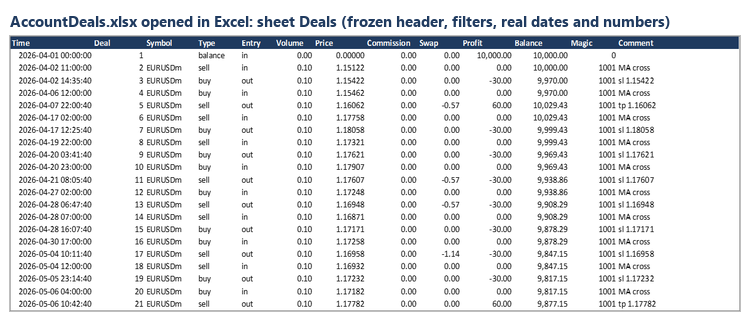
Features
- Several sheets in one workbook
- Text, numbers and dates; dates are real Excel dates, so they sort and filter correctly
- Bold header row, frozen, with filters on every sheet
- Column widths
- 8 number formats: date-time, date, month, money, integer, price (5 decimals), percent, 2 decimals
- Unicode text (UTF-8)
- Works in scripts, Expert Advisors and in the Strategy Tester (write to FILE_COMMON in OnTester)
Usage
#include <XlsxWriter.mqh>

CXlsxSheet sheets[1];
string headers[] = {"Time", "Symbol", "Profit"};
double widths[]  = {19, 12, 12};
sheets[0].Init("Trades", headers, widths);

sheets[0].BeginRow();
sheets[0].Time(TimeCurrent());
sheets[0].Text("EURUSD");
sheets[0].Number(12.5, XS_MONEY);
sheets[0].EndRow();

CXlsx book;
book.Save("trades.xlsx", 0, sheets);   // MQL5\Files\trades.xlsx
Example
The script ExportDealsToXlsx.mq5 writes the deals of the account history to the sheet Deals and the result of each trading day to the sheet Daily. Put XlsxWriter.mqh in MQL5\Include and the script in MQL5\Scripts.
The files were checked by opening them in Microsoft Excel.
 Failed Breakout Detector
Marks breakouts of the recent trading range and the breakouts that fail (price closes back inside within a few bars). Closed bars only, alerts, buffers for iCustom.
 Prop Firm Guard - daily loss and max drawdown protection
Closes all trades and blocks new ones when your prop firm daily loss or maximum drawdown limit is reached.
Order Blocks and Breaker Blocks (SMC) - no repaint, with mitigation and alerts
Marks the order block behind each break of market structure (the last opposite candle before the move), tracks when it is used and turns failed blocks into breaker blocks. No repaint. Alerts and buffers for EAs.
ICT Kill Zones - Asian, London, New York in New York time, with summer time
ICT kill zones (Asian, London, New York, London Close) at the right New York hours on any broker, with US and EU summer time. High / low boxes, levels until price takes them, midnight open. Alerts and buffers for EAs.