The builder uses a classic two-brick reversal. Oscillators update only on completed bricks, not on the candles of the chart timeframe. One mode is active at a time:
• RSI Re-entry: BUY when RSI returns above the lower threshold; SELL when it returns below the upper threshold. The upper threshold equals 100 minus the lower threshold.
• RSI Midline: BUY on an upward crossing of 50; SELL on a downward crossing.
• MACD Signal: BUY when MACD crosses above its signal line; SELL when it crosses below.
• MACD Zero: BUY on an upward crossing of zero; SELL on a downward crossing.
RSI uses Wilder smoothing. MACD is the difference between two EMAs; its signal line is an SMA of MACD values. Periods count completed bricks. The first valid indicator reading initializes crossing state without opening a trade.
When one tick completes several bricks, every brick updates the oscillator, but only the last brick's signal is eligible for entry. Orders use an available market quote, not a synthetic brick closing price. Signals blocked by an entry filter are not queued.
Position management
An existing position or active order on the symbol blocks a new entry. The EA manages its own position by symbol and Magic. Exits use virtual SL/TP or a holding-time limit; an opposite signal does not close a position. A cooldown in completed bricks follows an exit. The spread-to-brick filter applies to entries, not exits.
Demo means educational example, not simulated orders. With algorithmic trading enabled, the EA sends actual trade requests to the connected account. Use the Strategy Tester or a demo account when exploring the example.
Installation
1. Copy the source from Source to MQL5/Experts/GDS and compile it in MetaEditor.
2. Select the EA and symbol in the Strategy Tester. For the included example, use XAUUSD, M1 and Every tick based on real ticks.
3. Load the SET file from Presets on the Inputs tab. Disable optimization for a single test.
4. Select the dates, tick model, deposit, leverage and execution delay separately. These tester settings are not set by the SET file.
Brick size can be expressed in symbol points or absolute price units. In the supplied preset, 12 means a 12.00 XAUUSD price movement, not 12 points. The effective brick size is rounded to the symbol tick size. Requested volume is normalized to broker limits; the actual volume can be higher than requested when the symbol minimum is higher.
Included test example
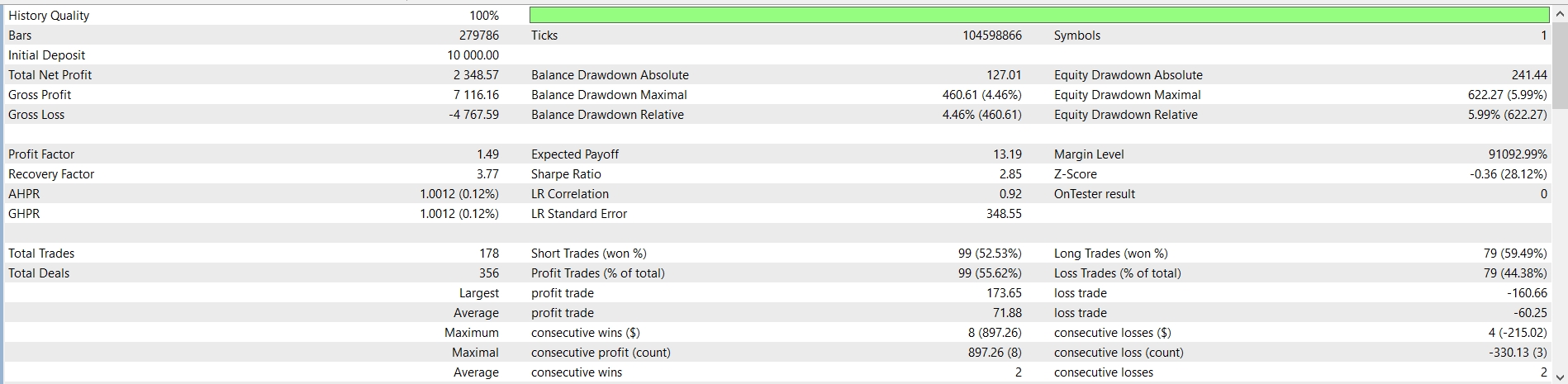
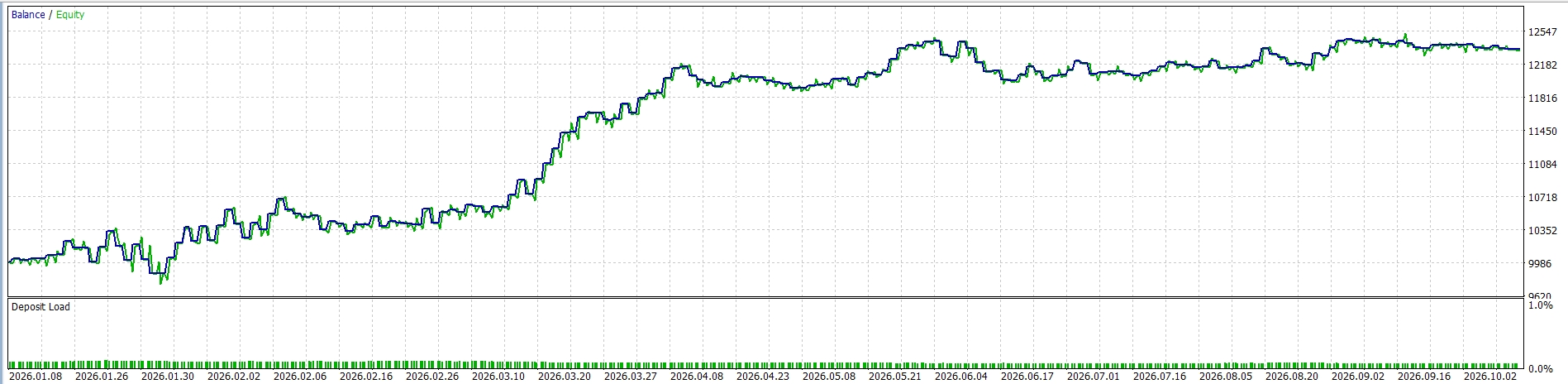
Test_Report/ReportTester-7800379.html contains a single v0.11 test on RoboForex-ECN: XAUUSD, M1, January 1–October 19, 2026, initial deposit USD 10,000 and leverage 1:500. The report states 100% real ticks and 104,598,866 ticks. It records 178 trades, net profit USD 2,348.57, Profit Factor 1.49 and maximum equity drawdown USD 622.27 (5.99%). Commission and swap are included.
The preset uses MACD Signal, brick size 12.00, MACD 5/30/5, TP 14 bricks, SL 13 bricks, maximum holding time 1380 minutes, cooldown 1 brick and lot size 0.01. Source defaults differ from the supplied XAUUSD preset.
Parameters were selected on this same period. This is an in-sample demonstration, not an independent profitability test. A substantial share of the profit occurred in March. Results can differ across periods, brokers and settings.
Limitations
SL and TP are virtual and are not placed on the broker server. They require the EA and terminal to remain running, a connection and executable trade requests. Gaps, closed sessions or execution delays can cause exits beyond the calculated levels. The holding-time limit can also be exceeded while execution is unavailable.
Renko and oscillator state start from the first available tick after initialization. Historical brick preloading and persistence across restarts are not implemented. The test start date affects brick anchoring and indicator warm-up. Do not mix manual trading or other EAs on the same symbol, particularly on netting accounts. Use a unique Magic for each instance.
The EA does not draw a separate Renko chart or dashboard. It is a source-code example for learning, testing and further development. It uses neither grid trading nor martingale.
 MetaTrader 5
 Experts
 Indicators
 Scripts
 Libraries
 Storage


 You are missing trading opportunities:
 Need a robot or indicator based on this code? Order it on Freelance
Go to Freelance
Need a robot or indicator based on this code? Order it on Freelance
Go to Freelance

 Spread Monitor
 Risk of Ruin: how often your account blows up at a chosen risk per trade