 MetaTrader 5
 Experts
 Indicators
 Scripts
 Libraries
 Storage
Join our fan page

Newtonian Mechanics - expert for MetaTrader 5

✅ "Summoning God from the Machine" "Deus ex Machina" (God from the Machine), simply refers to the intervention of Artificial Intelligence in CFD Forex Trading.
- Views:
- 44
- Rating:
- Published:
-
 You are missing trading opportunities:
- Free trading apps
- Over 8,000 signals for copying
- Economic news for exploring financial markets
Registration Log inYou agree to website policy and terms of use
If you do not have an account, please register -
 Need a robot or indicator based on this code? Order it on Freelance
Go to Freelance
Need a robot or indicator based on this code? Order it on Freelance
Go to Freelance
NEWTONIAN MECHANICS - bid/ask tick kinematics with honest error bars
Most tick tools ask "how far did price move in the last N seconds?". This one asks "how is each side of the quote moving right now, and how much should I trust that answer?"
It treats the bid stream and the ask stream as two separate trajectories, fits a local quadratic to each, and reports position, velocity and acceleration together with their standard errors. It then checks its own forecasts out of sample and shows you the score.
Two files are included. NewtonianMechanics.mq5 is the measurement tool on its own. Deployment.mq5 is a self-contained example showing how to use the same engine inside your own Expert Advisor, including a function that turns the readings into an entry price. Neither file places orders.
WHAT YOU GET
- Velocity (points/second) and acceleration (points/second^2) for bid and ask, at three window sizes: 16, 64 and 256 effective updates.
- A standard error and z-score beside every estimate, so a noisy number can be told apart from a real one.
- Turning time (-v/a), which is meaningful here because velocity and acceleration come from the same fit over the same data.
- A market phase label: EXPANSION, RETRACEMENT, STRESSED, CONSOLIDATION, UNDETERMINED or WARMING.
- A spread channel with its own velocity, error bar and efficiency.
- A forecast scoreboard: hit rate and R-squared of the estimator's own predictions, measured out of sample.
TWO DESIGN CHOICES
1. Windows are counted in events, not seconds.
The n-th most recent update of a side carries weight rho^n, so the effective sample size is (1 + rho) / (1 - rho) regardless of how fast ticks arrive. A window holds the same amount of evidence at 3 a.m. as at the London open. It stretches when the market is quiet and shrinks when it is busy.
2. Only the broker's clock, only bid and ask.
Time is MqlTick.time_msc. There is no mid price and no synthetic centre. Each side advances only on its own updates: a tick that repeats an unchanged bid is not a new observation of the bid.
ERROR BARS YOU CAN RELY ON
Ordinary least squares assumes independent residuals. Prices behave like a random walk, so the residuals are correlated and plain OLS error bars come out several times too narrow, increasingly so on longer windows. The code applies a random-walk error floor and reports the larger of the two figures.
Estimation error and forecast skill are different things. A velocity can be tightly estimated and still reverse a moment later. That is why the scoreboard exists: predictions are non-overlapping, scored out of sample, and split by |z| >= 2, so you can see whether high-confidence readings really are better.
MARKET PHASE
The phase is classified on the slowest window (256 updates), because that is where a drift can be told from noise reliably. A change must persist for several ticks before it is committed. There is deliberately no "reversal" state: from bid, ask and time alone, at tick scale, that cannot be detected reliably.
CLOCK HANDLING
The server timestamp is checked over the first 200 ticks. If it carries real millisecond information, it is the only clock used. If the broker sends whole seconds, the code falls back to an alternative clock and says so. The clock in use is shown on every repaint, so you always know which time base produced the numbers.
THREE DISPLAYS
- Chart comment (top left): a one-line bid/ask readout plus the full report.
- Label panel (right half of the chart, fixed-width font): aligned columns, with colour carrying meaning. Grey means below the confidence floor, and the phase line takes the colour of the phase. It follows chart resizing and removes all its objects when detached.
- Experts log: one line every 5 seconds, plus an immediate line on every phase change tagged TK-PHASE. Filter the log on that tag to get a journal of phase transitions.
FOR DEVELOPERS
Deployment.mq5 shows the integration in full. It contains the engine and a small Expert Advisor in one file, with no include files:
- OnInit calls NewtonianInit(), OnDeinit calls NewtonianDeinit(), and OnTick calls NewtonianTick(). After NewtonianTick() every reading is current.
- Tick.bidVelocity, Tick.askVelocity and the other paired fields give the fast-window readings. BidSide.kin[r] and AskSide.kin[r] give every window with its standard error and z-score. g_phase holds the market phase.
- ReadSignal() is an example rule: UP or DOWN when the phase is EXPANSION and both sides move the same way with |z| at or above InpMinZ.
- DetermineEntry() projects the traded side forward (ask for a buy, bid for a sell) and returns an entry price, the projected price, its error band and a plain-text reason. It refuses when the projection points the wrong way, when the fit expects a turn inside the look-ahead, or when the projected move does not cover the spread.
Inputs of Deployment.mq5:
- InpMinZ (2.0): |z| a velocity needs to count as real.
- InpLogSignals (true): print signals, phase changes and entry plans to the Experts log.
- InpEntryRung (1): window used for the entry, 0 fast, 1 middle, 2 slow.
- InpHorizonFrac (0.5): look-ahead as a fraction of that window's span.
- InpPullbackSE (0.0): 0 enters at the current quote; above 0 sets a limit that many standard errors behind it.
- InpMinEdge (1.0): projected move must exceed the spread by this factor.
Units are points, seconds, points/second and points/second^2. Every field is a bid/ask pair; there is no single "price velocity", because there is no single price.
HOW TO USE
1. Copy both files to MQL5\Experts and compile them.
2. To measure only, attach NewtonianMechanics.mq5 to a chart of any symbol. To see the engine used inside an EA, attach Deployment.mq5 instead. Use one or the other on a chart, not both. No trading permission is needed.
3. Wait for the windows to warm up; the slowest one needs a few hundred updates per side.
4. Read the clock line at the bottom of the panel first, then the phase line and the z-scores.
5. With Deployment.mq5, watch the Experts log for the signal and entry lines.
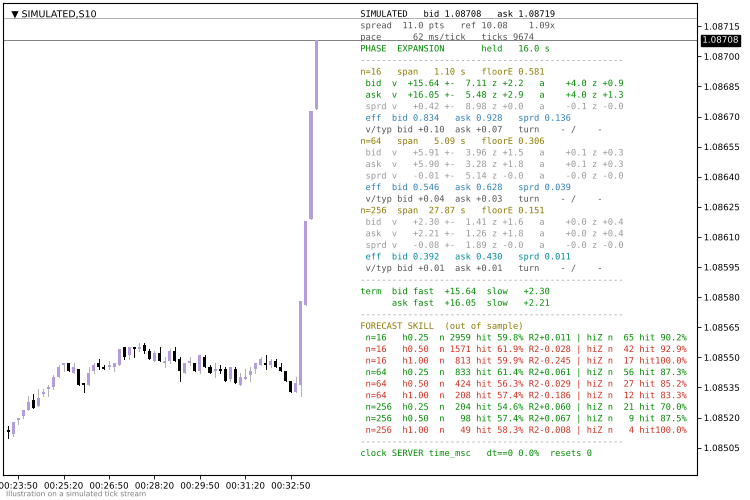
Panel layout, illustrated on a simulated tick stream.
NOTES
This is a measurement and research tool. Neither file places orders. The signal and entry price in Deployment.mq5 are a demonstration of how to read the engine, not a tested strategy, and nothing here is financial advice. Results depend on the quality of your broker's tick feed, in particular on whether timestamps have millisecond resolution.
 ICT Structure Visualizer – liquidity sweep, MSS and FVG with an honest statistics panel
Draws ICT structure on the chart (liquidity pools, sweeps, market structure shift, fair value gaps) from closed bars only, adds a trade plan for every confirmed setup and keeps an honest statistics panel of what those setups did on your symbol. Analysis only – it does not trade.
ATS Prop Rules Monitor - prop firm challenge scoreboard with the room left on every rule
One panel for the rules of a prop firm challenge: daily loss, maximum loss (static or trailing), profit target, minimum trading days and the best-day (consistency) rule. For each one it shows how much is used and how much room is left, in money. "One more trade" tells you the largest lot size that still keeps a stop-out inside the room left today and in the max-loss room. Read-only: it never opens, changes or closes a trade. The presets hold typical values; firms change their rules, so check yours and use the Custom preset. Built on the ATS Risk Library (ATS_RiskLib.mqh, included).
Accelerator Oscillator (AC)
The Acceleration/Deceleration Indicator (AC) measures acceleration and deceleration of the current driving force.
MACD Signals
Indicator edition for new platform.