 MetaTrader 5
 Experts
 Indicators
 Scripts
 Libraries
 Storage
Join our fan page

Advanced Prop-firm Trade Panel based on S-R - expert for MetaTrader 5

https://www.mql5.com/en/market/product/133653 (Best EA bundle deal)
- Views:
- 130
- Published:
-
 You are missing trading opportunities:
- Free trading apps
- Over 8,000 signals for copying
- Economic news for exploring financial markets
Registration Log inYou agree to website policy and terms of use
If you do not have an account, please register -
 Need a robot or indicator based on this code? Order it on Freelance
Go to Freelance
Need a robot or indicator based on this code? Order it on Freelance
Go to Freelance
Advanced Prop-firm Trade Panel based on S-R
A manual trading panel with a built-in prop-firm risk guard and a hidden Support/Resistance finder for MetaTrader 5.
If you find this EA useful, please leave a rating and add comments. I am keen to correct bugs or fix issues.
© 2026 https://www.mql5.com/en/users/classicaltrading/. All rights reserved. This project may not be sold and anyone who improves it should share if for free or keep it for themselves.
What it is
This is a trade-management panel, not a signal robot. On a live or demo account it never opens a trade by itself. You decide when to trade, and the panel does the work around the trade:
- It finds support and resistance levels and suggests stop losses and targets.
- It sizes the lot from your risk percentage.
- It checks every order against your daily and maximum drawdown limits and against leverage and margin rules.
- It draws everything as draggable lines on the chart.
It is built for traders on funded or challenge accounts, where one oversized trade can end the account. It also works on ordinary accounts.
This is custom-built according to my liking. I am of the opinion that it is just as good if not better than the expensive trade panels on the market!
The four tabs at a glance
| Tab | Purpose | Main tools |
|---|---|---|
| MAIN | Account protection and settings | Daily and max drawdown bars, buffer, profit target, max daily profit, basket close, S/R mode button, scale and font, theme |
| LIVE | Instant market orders | Buy / Sell, draggable SL and TP, S/R suggestions, risk %, auto lot, risk / reward / R:R, leverage and account-risk rows |
| GRID | Multi-order grids along S/R levels | Grid planner, first TP and grid TP, breakeven, TP on pending orders, Extend Grid, open-grid note, 2nd-grid toggle |
| PEND | Pending orders at S/R levels | Three entry suggestions, limit / stop / both selector, draggable entry, SL and TP |
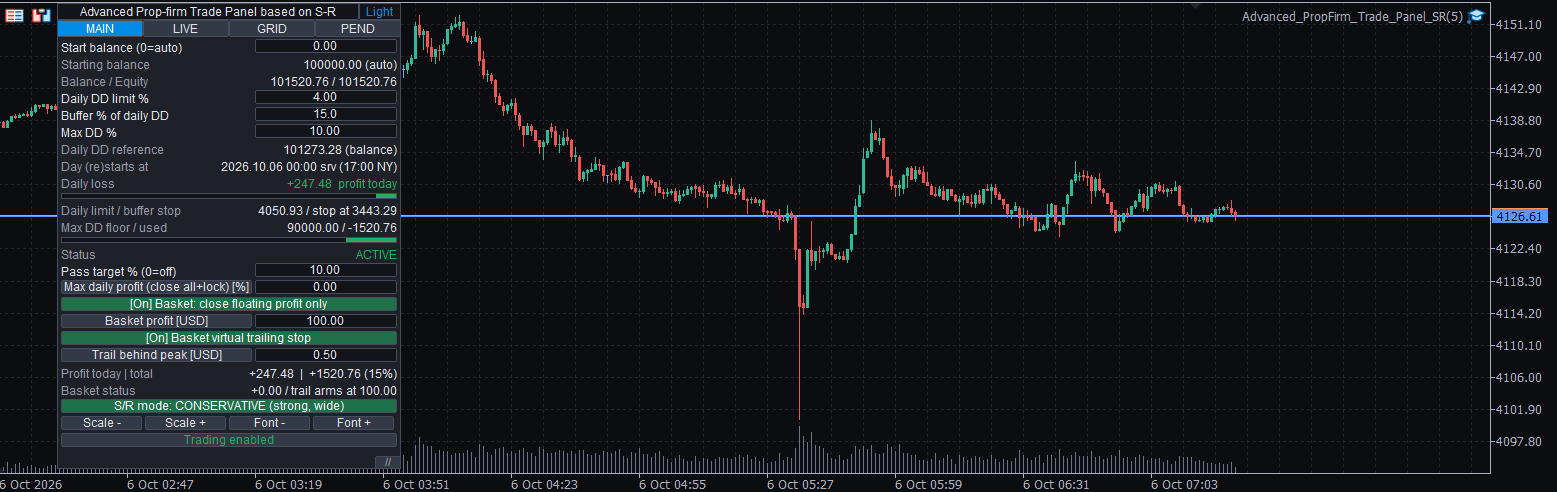

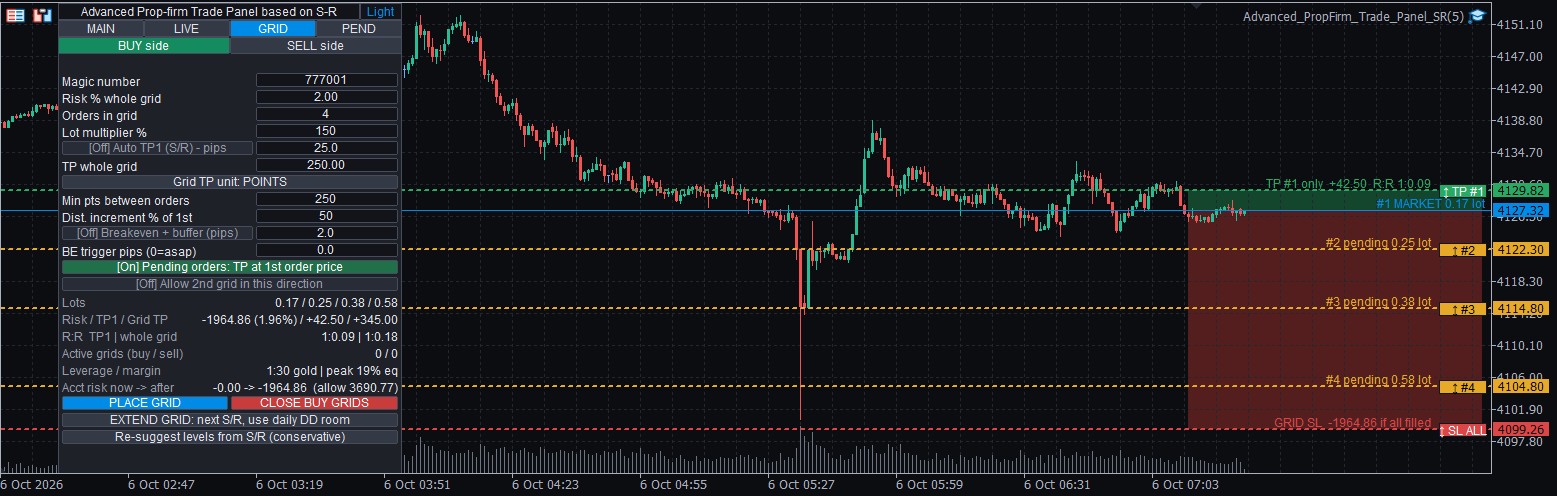


Key features
1. Prop-firm drawdown guard
- Daily drawdown and maximum drawdown limits in %, plus a safety buffer.
- The starting balance is detected automatically or can be entered by hand.
- The remaining allowance is shown live, with colour bars.
- When a limit is reached, the EA closes positions and pending orders and locks trading until the next day, or permanently for the maximum drawdown.
- The day boundary can follow 17:00 New York time, with daylight saving handled automatically, or the broker's server midnight.
- Optional profit target and optional maximum daily profit, each with its own lock.
2. Hidden Support/Resistance finder
- Levels are calculated from price pivots and are not drawn on the chart. They feed the suggestions and the grid planner only.
- One button switches between the two modes compared below.
| Aggressive | Conservative | |
|---|---|---|
| Levels used | Nearest levels | Only the strongest levels |
| Pivot strength and touches | Standard | Higher |
| Distance between levels | Standard | Wider |
| Stop buffer | Standard | Larger |
| Grid order spacing | Standard | Wider |
| Typical use | Tighter stops and targets | Wider stops with more room |
| Button colour | Light red | Light green |
3. Live trading tab
- Buy and Sell buttons, with SL and TP lines you drag by their handles (small coloured tabs at the right edge of each line).
- One-click suggestions for the three nearest targets and stops.
- Lot size from your risk % of the starting balance, or a fixed lot.
- The spread is added to the stop-loss distance, so a stop is never placed inside the spread.
- Live display of risk, reward, risk-to-reward and risk as a percentage.
4. Pending order tab
- Three S/R-based entry suggestions with SL and TP.
- Choose limit orders only, stop orders only, or both.
- Draggable entry, SL and TP lines.
- An identical pending order is never placed twice.
5. Grid tab
- Plans a grid of 2 to 8 orders along S/R levels, with a master stop beyond the outer zone.
- Optional lot increase per level, set in the settings.
- Automatic or manual first take profit, and a take profit for the whole grid in points or currency.
- Optional breakeven.
- Every pending grid order carries a take profit at the open price of the first order, so profit and stop are held by the broker server even if the EA or VPS goes offline. This can be switched off.
- The preview and levels refresh every minute, or when you press the Re-suggest button.
- When a grid is open in one direction, a note says so and the preview for another grid in that direction is hidden. The opposite direction stays available, and a toggle enables a second grid in the same direction.
- Extend Grid moves the stop to the next strong S/R zone and adds orders up to the remaining daily allowance, which includes the day's profit. It needs two clicks, so you see the plan on the chart before confirming.
6. Hedge-aware risk model
- Risk is judged on the whole account, not trade by trade.
- Open opposite positions offset each other. A new order that reduces the worst-case loss is never blocked.
- Pending orders count only their possible loss and never earn hedge credit, because they may never fill.
- Each order is checked against the remaining daily allowance, and the panel shows the account risk before and after the order.
7. Leverage and margin rules
- Leverage limits per asset class, all editable. The defaults below follow figures commonly used by prop firms. Always set them to your own firm's current rules.
| Asset class | Default leverage |
|---|---|
| Forex | 1:30 |
| Exotic forex (editable list of currency codes) | 1:6 |
| Gold | 1:30 |
| Silver | 1:10 |
| Oil / energy | 1:5 |
| Indices | 1:10 |
| Shares | 1:2 |
| Major crypto (BTC, ETH, SOL) | 1:5 |
| Other crypto | 1:2 |
| Other instruments | 1:10 |
- The stricter of the prop-firm margin and the broker's margin is used.
- Hedged positions can be netted, counted as the larger side or counted in full.
- Suggested lots are capped so the order is affordable. For a grid, every level is checked after the drawdown of the earlier orders, so the last order can still be placed.
8. Close options and basket
- Close all, close profitable and close losing positions.
- The scope is selectable: this EA's magic number, this symbol, or the whole account, including trades not created by the EA.
- The basket and the maximum daily profit are two separate functions:
| Basket close | Maximum daily profit | |
|---|---|---|
| Triggered by | Floating profit target | Day's profit (realized and floating) |
| Closes open positions | Yes, within the chosen scope | Yes, everything |
| Pending orders | Only those that belong to grids | All of them |
| Locks trading | No | Yes, until the next day |
- Optional trailing basket.
9. Interface
- Dark and light themes. The chart colours follow the theme: colour on near-black in dark mode, colour on white in light mode. Your trade-level and trade-history settings are left as they are.
- On/Off buttons are shown as [On] / [Off] and change colour.
- Long values are shortened with "..." and show the full text in a tooltip.
- Adjustable scale and font size, and a movable panel.
Strategy Tester
On a live or demo account the panel never trades automatically. In the Strategy Tester, automatic trading is on by default so the EA can be validated and back-tested. It opens a trade when a bar touches a strong S/R level and closes back on the right side of it. It uses the same risk, hedge and margin checks as a manual order. Turn InpTestAutoTrade off to use the panel by hand in visual mode. A non-visual test skips the panel for speed.
| Strategy Tester input | Default | Meaning |
|---|---|---|
| InpTestAutoTrade | On | Open trades automatically in the tester |
| InpTestRiskPct | 0.5 | Risk % of the starting balance per automatic trade |
| InpTestMaxTrades | 1 | Maximum open automatic positions |
| InpTestMinRR | 1.5 | Minimum reward : risk of an automatic trade |
Requirements and recommendations
- MetaTrader 5, with algorithmic trading allowed.
- A hedging account is recommended. The grid and hedge features are designed for it.
- No DLLs, no web requests and no external services.
- Attach it to one chart per symbol. The magic number separates different charts.
- Test on a demo account first.
Input groups
| Group | What it controls |
|---|---|
| Prop-firm rules | Daily and maximum drawdown, buffer, start balance, day transition mode, profit target and daily profit |
| Leverage / margin | Leverage per asset class, hedged-margin mode, maximum margin use |
| Order defaults | Magic number, risk %, auto lot, default SL and TP, pending type, minimum entry distance |
| Grid defaults | Number of orders, lot increase, spacing, first TP, breakeven, TP on pending orders, Extend Grid limits |
| Support/Resistance finder | Timeframe, lookback, pivot strength, touches, cluster size, SL buffer, aggressive and conservative settings |
| Close and basket | Scope, basket target, trailing basket |
| Strategy tester | Automatic trading on or off, risk %, maximum trades, minimum R:R |
| GUI | Theme, chart theme, scale, font, position, trade-level display |
How to use it
- Attach the EA to a chart and allow algorithmic trading. Adjust the settings as per your prop firm (Defaults are for FXIFY).
- On the MAIN tab, check your daily and maximum drawdown and the starting balance. Choose Aggressive or Conservative levels.
- On LIVE, GRID or PEND, pick Buy or Sell and drag the lines by their handles if you want to adjust them.
- Read the risk, margin and account-risk rows, then place the order.
Important notes
- S/R levels are statistical suggestions, not predictions.
- The hedge model assumes price moves in one direction between now and the stops. A whipsaw that hits stops on both sides can lose more than the model shows.
- Margin figures are estimates built from your settings and the broker's data. Prop firms and brokers have different rules and can change them, so set the values to your own firm's current terms.
- Grids, and especially grids with increasing lots, can produce large losses.
Disclaimer
Trading foreign exchange, metals, indices, crypto and other leveraged products carries a high level of risk and may not be suitable for everyone. You can lose some or all of your capital, and on funded or challenge accounts you can lose the account. This software is a trading tool. It does not provide investment advice or trading signals, and it does not guarantee profits or any particular result. Back-test results and past performance do not indicate future results. Settings such as risk, leverage and drawdown limits are your responsibility, and the software cannot protect against slippage, gaps, spreads, requotes, connection loss or broker and prop-firm rule changes. The software is provided "as is", without warranty. Always test on a demo account first and trade only with money you can afford to lose. You are solely responsible for your trading decisions and for complying with the rules of your broker and prop firm.
Newtonian Mechanics
A MetaTrader 5 utility that treats the bid and ask quote streams as two independent physical trajectories and fits a local quadratic to each, producing position, velocity, and acceleration with honest error bars and an out-of-sample forecast scoreboard.
 ICT Structure Visualizer – liquidity sweep, MSS and FVG with an honest statistics panel
Draws ICT structure on the chart (liquidity pools, sweeps, market structure shift, fair value gaps) from closed bars only, adds a trade plan for every confirmed setup and keeps an honest statistics panel of what those setups did on your symbol. Analysis only – it does not trade.
Session Reality Auditor
Checks the broker's session table against the M1 history. For every minute of the week it counts on how many of the last N days the symbol really has a bar, and sets that next to SymbolInfoSessionQuote and SymbolInfoSessionTrade: declared minutes that are usually empty (rollover holes), bars in minutes the table calls closed, trade and quote tables that disagree, and one-off outages such as an early holiday close. Prints the real sessions per weekday, writes every finding to CSV and prints its own arithmetic. Read only: no trade function, no DLL, no network.
 ATS Trade Management Library - break-even, trailing stop and partial closes for any EA
Look after open positions in an Expert Advisor: break-even, trailing stop, two partial closes, and a stop and target for positions that have none. It never opens a trade.