 MetaTrader 5
 Experts
 Indicators
 Scripts
 Libraries
 Storage
Join our fan page

- Views:
- 996
- Rating:
- Published:
- Updated:
-
 You are missing trading opportunities:
- Free trading apps
- Over 8,000 signals for copying
- Economic news for exploring financial markets
Registration Log inYou agree to website policy and terms of use
If you do not have an account, please register -
 Need a robot or indicator based on this code? Order it on Freelance
Go to Freelance
Need a robot or indicator based on this code? Order it on Freelance
Go to Freelance
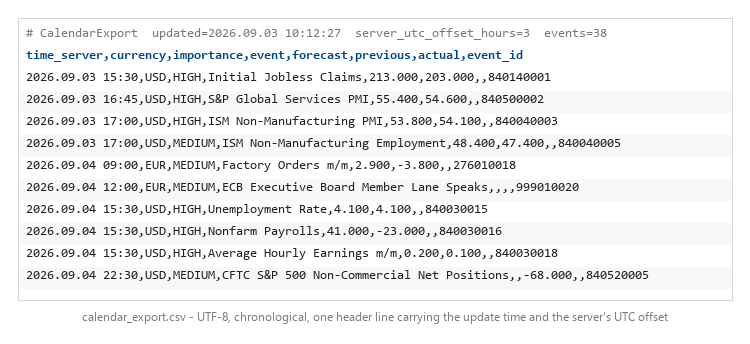
MetaTrader 5 ships a complete economic calendar, and MQL5 can read it through CalendarValueHistory(). Nothing outside the terminal can. The Python MetaTrader5 package exposes prices, symbols, orders, positions and history — but no calendar function at all.
So a research script, a dashboard, a bot or a spreadsheet has no way to ask the terminal when the next high-impact release lands. This Expert Advisor is that missing bridge: attach it to any chart and it periodically writes the calendar to a CSV file in MQL5\Files, where anything outside the terminal can read it.
It is strictly read-only. It never opens, closes or modifies a position.
Five details that matter
- UTF-8 output. Event names are localised by the terminal, so on a non-English MT5 they contain accented or non-Latin characters. Written in the local codepage they become bytes that are not valid UTF-8, and most consumers either throw or silently mangle the name.
- Sorted by time. The calendar is queried once per currency, so the natural output is grouped by currency and jumps back and forth in time. This one is chronological.
- Written in a single call. The file is built in memory and written at once. A reader that opens it mid-write would otherwise see a truncated list and have no way of knowing.
- HTML entities decoded. The terminal stores event names escaped: CFTC S&P 500 ... comes back as S&P. Written through unchanged it reaches every consumer wrong.
- A freshness header. The first line carries the update time, the event count and the server's UTC offset, so a consumer can tell a stale file from a current one — and notice that the EA was detached, instead of showing an old calendar as if it were live.
The update time is read from the trade server clock and not from the last tick. With the market closed the last tick stands still, so a file dated that way would look stale while being rewritten every few minutes, and the event window would slide backwards over the weekend.
Inputs
| Input | Meaning |
|---|---|
| InpCurrencies | Comma-separated list, e.g. USD,EUR. Leave empty for every currency. |
| InpHoursAhead | How far ahead to look. Default 48. |
| InpHoursBack | How far back, to catch data just released. Default 3. |
| InpMinImportance | 0 = none, 1 = low, 2 = medium, 3 = high. Default 2. |
| InpFile | Output file name inside MQL5\Files. |
| InpRefreshSec | Rewrite interval in seconds. Minimum 30. |
| InpUtf8 | UTF-8 output. Turn off only if your consumer needs the local codepage. |
A note on language. Event names are returned in the terminal's language and MQL5 offers no way to request another. If you need a key that is stable across languages and installations, use the event_id column — that is exactly why it is there.
If the file comes out empty: MT5 only populates the calendar when the terminal is connected, and some brokers restrict it. Check Tools → Options → Server that the calendar is enabled.
 TradeHistoryLogger
Exporting your deal history is easy and a dozen scripts already do it..
Position Peak Logger - how far your trades actually travelled, in R
Records the maximum favourable and adverse excursion of every position in R multiples and writes one CSV row per closed trade.
Trade Guardian - stop loss watchdog and drawdown limiter that re-arms
A safety EA that watches every open position on the chart symbol: it reports any position left without a stop loss, optionally attaches an ATR-based stop, and enforces a daily and a total drawdown limit that re-arms after a cooldown.
 Tick Audit - check real tick history and backtest quality month by month
Reports, month by month, whether your symbol really has ticks or only bars - so you know which part of your backtest ran on generated ticks before you trust the curve. The Strategy Tester gives you one History Quality figure after the test has finished, and it never says which months were the problem. This script asks first.