 MetaTrader 5
 Experts
 Indicators
 Scripts
 Libraries
 Storage
Watch how to download trading robots for free
Find us on Facebook!
Join our fan page
Join our fan page
You liked the script? Try it in the MetaTrader 5 terminal

Position Peak Logger - how far your trades actually travelled, in R - expert for MetaTrader 5
Petr Kostal

Petr Kostal — algorithmic trading developer, Czech Republic.
I trade on live accounts myself, so I build EAs the way I'd want to run them.
What I build:
• Expert Advisors and indicators for MetaTrader 4 and 5 (MQL4 / MQL5)
I trade on live accounts myself, so I build EAs the way I'd want to run them.
What I build:
• Expert Advisors and indicators for MetaTrader 4 and 5 (MQL4 / MQL5)
- Views:
- 771
- Rating:
- Published:
- Updated:
-
 You are missing trading opportunities:
- Free trading apps
- Over 8,000 signals for copying
- Economic news for exploring financial markets
Registration Log inYou agree to website policy and terms of use
If you do not have an account, please register -
 Need a robot or indicator based on this code? Order it on Freelance
Go to Freelance
Need a robot or indicator based on this code? Order it on Freelance
Go to Freelance

Most post-trade analysis tells you what a trade made. This tells you what it was offered and gave back.
For every position the EA captures the initial stop distance - that distance is what "1 R" means for that trade - and then tracks how far price travelled in each direction, in R. When the position closes it writes one row to a CSV file in MQL5\Files: ticket, symbol, side, open and close time, entry price, risk distance, peak R, worst R, realised result in R, and money profit. 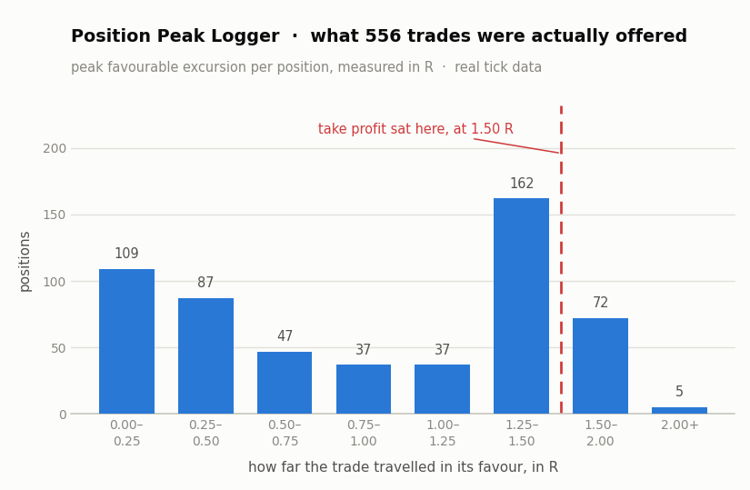
The reference is captured on the first sighting, before the stop is trailed, so trailing does not move the yardstick underneath the measurement.
Why it is useful: when an equity curve keeps spiking up and settling back, the question is whether the trades really reach far and give it back, or whether they simply never travel that far in the first place. Those two problems look identical on a chart and need opposite fixes. Averaging peak R against result R answers it in one number, and the on-chart panel shows the average given back per trade.
The EA never opens, modifies or closes anything. Attach it to a chart next to whatever is trading, set the magic number filter if you want to follow a single EA, and let it run. Positions without a stop loss are skipped and counted, because without a stop there is no R to measure against.
Inputs: current symbol only, magic filter, output file name, log printing, 0.5 R milestone printing, on-chart panel.
The attached chart comes from a verification run on real tick data: 556 trades were opened with a stop at 2 x ATR and a target at 3 x ATR, so by construction every winner has to measure exactly +1.50 R and every loser exactly -1.00 R. That is what the logger reported, with the remainder explained by slippage.
Session Range Desk MT5
Session-range breakout EA with ATR filtering, stop-distance sizing, optional break-even/partial close, and a shared chart desk. Hedging accounts; educational source with documented execution and coordination limits.
 Change in State of Delivery
Concept: Identifies market microstructure turning points based on ICT/SMC principles.
TradeHistoryLogger
Exporting your deal history is easy and a dozen scripts already do it..
CalendarExport
This Expert Advisor is that missing bridge. Attach it to any chart and it periodically writes the calendar to a CSV file in `MQL5\Files`, where anything outside the terminal can read it.