 MetaTrader 5
 Experts
 Indicators
 Scripts
 Libraries
 Storage
Join our fan page

- Views:
- 753
- Rating:
- Published:
- Updated:
-
 You are missing trading opportunities:
- Free trading apps
- Over 8,000 signals for copying
- Economic news for exploring financial markets
Registration Log inYou agree to website policy and terms of use
If you do not have an account, please register -
 Need a robot or indicator based on this code? Order it on Freelance
Go to Freelance
Need a robot or indicator based on this code? Order it on Freelance
Go to Freelance
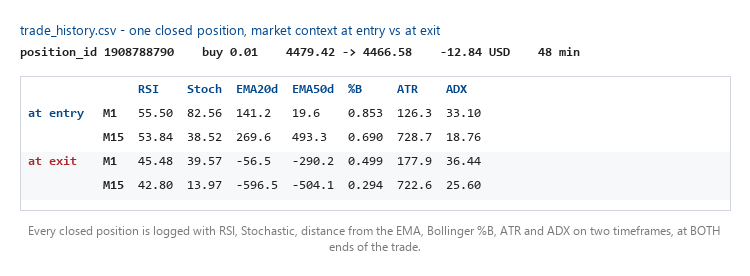
Exporting your deal history is easy and a dozen scripts already do it. What almost none of them do is record what the market looked like at the two moments that matter: when the position was opened, and when it was closed.
This Expert Advisor writes every closed position to a CSV file together with RSI, Stochastic, distance from the EMA20 and EMA50, Bollinger %B, ATR and ADX — on two timeframes, at entry and at exit. That is what lets you work out, from data alone, the rules of a strategy that does not state them: your own, or one you are evaluating.
It is strictly read-only. It never opens, closes or modifies a position.
Three traps this handles, and why they are in the code with their history
Deduplication went through three designs before it worked, and each failed version is documented in the source, because the failures are more useful to the reader than the final answer.
- A position_id watermark — "skip anything below the highest id seen" — is wrong, because position ids reflect the order positions were OPENED, not closed. A losing position held open for hours while newer ones opened and closed is skipped forever when it finally closes.
- A close_time watermark fixes that and breaks differently: MQL5 datetime has one-second resolution, so when several positions close inside the same second, the first one logged advances the watermark past the others and they are lost.
- A set of logged position ids makes no assumption about ordering, so neither failure applies. It is rebuilt from the CSV itself on restart.
And one that is easy to get wrong in a different way. HistorySelectByPosition() REPLACES the global history selection. Calling it inside the loop that is iterating over that same selection destroys the iteration: from the second match onward the loop indexes into one position's handful of deals instead of the full window. The symptom is exactly one position logged per timer tick. The scan therefore runs in two phases — collect the ids first, look them up afterwards.
Two more details that silently lose data if you miss them
- A position is closed by DEAL_ENTRY_OUT or DEAL_ENTRY_OUT_BY. "Close by" — closing a position against an opposite one on a hedging account — emits the second. Code that matches only the first never marks those positions closed.
- The magic number must be read from the position's opening deal, never from the deal in front of you. A position closed by hand, from the phone, or by a Close By carries magic 0 on the closing deal while the opening deal still carries the real one. Filtering by magic on the closing deal silently deletes exactly those closes.
Inputs
| Input | Meaning |
|---|---|
| InpSymbol | Symbol to track. Empty = the chart's own symbol. |
| InpCsvFileName | Output file, written to this terminal's MQL5\Files. |
| InpCheckIntervalSec | How often the history is scanned, in seconds. |
| InpMagicFilter | If non-zero, log ONLY this magic number. |
| InpExcludeMagics | Magic numbers to skip, comma separated. Empty = log everything. |
| InpBackfillHours | Backfill hours, NEW file only. 0 = start from now. |
On InpExcludeMagics, because exclusion is deliberate. If you are studying an EA whose magic numbers you do not know, listing the magics of your own advisors and logging everything else is more robust than guessing the other one's — an EA can use more than one magic, and you find out you missed one only after the analysis.
On InpBackfillHours. It only has an effect on a NEW file. If the CSV already exists the EA resumes from what is in it, whatever you set. To backfill: remove the EA from the chart first, then delete the file, then re-attach. Deleting it while the EA is still running recreates it without a header on the next write.
One honest note about one column. m1bar_spread_pts comes from the M1 bar's spread field, which is a per-bar summary and not the quote at the instant of execution. Measured on XAUUSD: the live spread was 20 points across 60 consecutive readings while the M1 bar field had a median of 6 — a factor of 3.3. For a position that is already closed the instantaneous spread is not recoverable from any source, so the column stays, but do not use it as an execution cost. The real cost is already inside profit, swap and commission.
 Position Peak Logger - how far your trades actually travelled, in R
Records the maximum favourable and adverse excursion of every position in R multiples and writes one CSV row per closed trade.
Session Range Desk MT5
Session-range breakout EA with ATR filtering, stop-distance sizing, optional break-even/partial close, and a shared chart desk. Hedging accounts; educational source with documented execution and coordination limits.
CalendarExport
This Expert Advisor is that missing bridge. Attach it to any chart and it periodically writes the calendar to a CSV file in `MQL5\Files`, where anything outside the terminal can read it.
Trade Guardian - stop loss watchdog and drawdown limiter that re-arms
A safety EA that watches every open position on the chart symbol: it reports any position left without a stop loss, optionally attaches an ATR-based stop, and enforces a daily and a total drawdown limit that re-arms after a cooldown.