 MetaTrader 5
 Experts
 Indicators
 Scripts
 Libraries
 Storage
Join our fan page

Currency Strength Meter - indicator for MetaTrader 5

Building, learning, and sharing one project at a time.
- Views:
- 1607
- Rating:
- Published:
- Updated:
-
 You are missing trading opportunities:
- Free trading apps
- Over 8,000 signals for copying
- Economic news for exploring financial markets
Registration Log inYou agree to website policy and terms of use
If you do not have an account, please register -
 Need a robot or indicator based on this code? Order it on Freelance
Go to Freelance
Need a robot or indicator based on this code? Order it on Freelance
Go to Freelance

Currency Strength Meter
The idea behind it
A single pair only tells you how two currencies are doing against each other, which can be misleading — EURUSD can be flat simply because both currencies are weak (or both strong) together. This indicator solves that by looking at every currency pair the broker offers among the 8 majors (USD, EUR, GBP, JPY, CHF, AUD, CAD, NZD), measuring each pair's percentage change over a lookback window, and averaging each currency's contribution across all the pairs it appears in. The result is a genuine relative-strength score per currency, not just a two-way comparison.
Because the base currency of a pair gains exactly what the quote currency loses, the math stays simple and self-consistent: every pair contributes +change to its base currency's score and -change to its quote currency's score, and each currency's final score is just the average of everything it took part in. Pairs the broker doesn't offer (some exotic crosses aren't available everywhere) are automatically skipped, so the ranking degrades gracefully instead of failing outright.
How to interpret it
- The ranked list — all 8 currencies, sorted strongest to weakest, refreshed every time the panel updates. The strongest currency is always row 1.
- The percentage value — each currency's average percentage change across all its available pairs over the chosen lookback window; positive means strengthening, negative means weakening.
- Bar length — scaled relative to whichever currency has the largest absolute score that refresh, so the strongest and weakest currencies are visually obvious even when the numeric differences are small.
- Bar/text color — InpStrongColor for a positive (strengthening) score, InpWeakColor for a negative (weakening) score.
- Refresh timing — with InpUpdateOnNewBarOnly enabled (default), the panel recalculates once per new bar of the chart it's attached to; disable it to recalculate on every tick instead.
External variables (inputs)
| Input | Default | Purpose |
|---|---|---|
| InpCalcTimeframe | H1 | Timeframe used to measure each pair's percentage change — independent of the chart's own timeframe. |
| InpLookbackBars | 24 | How many bars back (on InpCalcTimeframe) each pair's current price is compared against. |
| InpUpdateOnNewBarOnly | true | When true, recalculates once per new chart bar; when false, recalculates on every tick. |
| InpPanelCorner | Left Upper | Chart corner the panel is anchored to. |
| InpPanelXDistance / InpPanelYDistance | 12 / 18 | Panel offset from the chosen corner, in pixels. |
| InpBarMaxWidth | 100 | Pixel width of the bar for whichever currency currently has the largest absolute score. |
| InpBarHeight | 14 | Height of each currency's bar, in pixels. |
| InpFontSize | 8 | Font size used for the panel text. |
| InpStrongColor / InpWeakColor | Lime / Red | Bar and text color for positive vs. negative strength scores. |
| InpPanelTextColor / InpPanelBgColor | White / Dark Gray | Panel text and background colors. |
Recommended use
Can be attached to any single chart of any symbol and any timeframe — the ranking itself is independent of the chart it's running on, since it pulls its own data directly from each currency pair via iClose() . Only attach one instance per chart layout; there's no benefit to running it on multiple charts at once since the panel content would be identical.
Accuracy depends on how many of the 28 possible crosses your broker actually offers — most retail brokers cover all 8-currency crosses, but if some are missing, the affected currencies' scores are simply averaged over fewer pairs, which is noted in the code as an intentional graceful-degradation behavior rather than an error. This indicator only reads price data and never places, modifies, or closes any order, so it's safe to run on any account type.
All chart objects are created under a single internal name prefix and are fully removed via ObjectsDeleteAll() in OnDeinit() when the indicator is detached, so it leaves nothing behind on the chart.
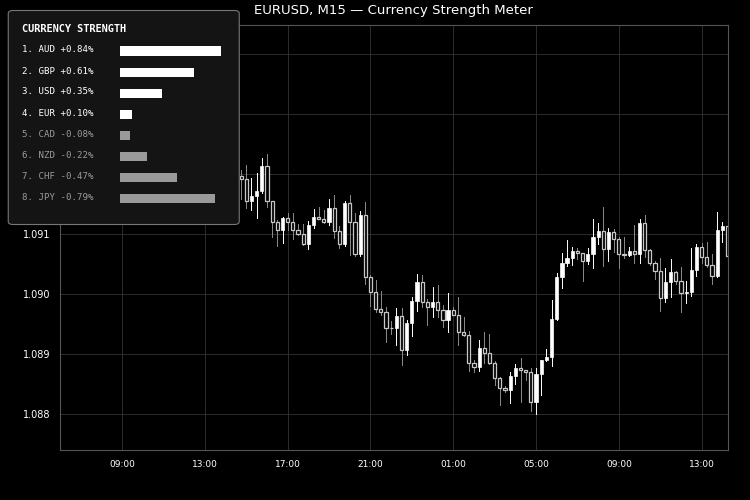
Fig. 1. The ranked currency strength panel on EURUSD M15, strongest to weakest with proportional bars. Rendered in black and white per the Code Base image guidelines (750×500 px).
Candle Body-to-Wick Pressure Oscillator
Converts the body-to-wick makeup of every candle into a bounded conviction reading, then smooths it into an oscillator that flags buyer/seller pressure and automatically marks divergence against price.
Multi-Symbol Correlation Divergence Meter
Tracks the rolling correlation between the current chart symbol and a chosen reference symbol, and flags the moment they decouple while their price spread is statistically stretched.
 Server Clock and Daily Reset Hour
A free, read-only MetaTrader 5 panel that converts your prop firm's daily reset rule (written in whatever time zone the firm uses) into your broker's actual server time, shows a live countdown to the next reset, and warns you before a daylight-saving shift moves the boundary by an hour. Sends no orders, reads no account data, display only.
Liquidity Void Decay Oscillator.
A subwindow oscillator that flags thin-participation displacement bars as "liquidity voids" and scores 0–100 how quickly price re-fills each one, distinguishing fast-absorbed noise from levels still acting as real support or resistance.