 MetaTrader 5
 Experts
 Indicators
 Scripts
 Libraries
 Storage
Join our fan page

Risk Based Position Size Calculator - indicator for MetaTrader 5

Building, learning, and sharing one project at a time.
- Views:
- 1213
- Rating:
- Published:
- Updated:
-
 You are missing trading opportunities:
- Free trading apps
- Over 8,000 signals for copying
- Economic news for exploring financial markets
Registration Log inYou agree to website policy and terms of use
If you do not have an account, please register -
 Need a robot or indicator based on this code? Order it on Freelance
Go to Freelance
Need a robot or indicator based on this code? Order it on Freelance
Go to Freelance

Risk-Based Position Size Calculator
The idea behind it
Position sizing is arithmetic, not judgment — but it is arithmetic traders routinely skip or rush under pressure, and the tick-value formula changes from symbol to symbol (a point on Gold is not worth the same as a point on a FX pair or an index). This indicator removes both problems. It places three draggable horizontal lines — Entry, Stop Loss and an optional Take Profit — directly on the chart. As you drag them to match your actual setup, an on-chart panel recalculates the stop distance, the direction, the exact lot size for your chosen risk, and the reward-to-risk ratio, all live.
The lot size is derived from the symbol's own tick value and tick size via SymbolInfoDouble() , so the same indicator gives a correct answer on Gold, FX majors, indices or crypto CFDs without any manual recalibration, and the result is automatically rounded to the symbol's allowed volume step, minimum and maximum.
How to interpret it
- Entry line — drag to your intended entry price. Its position relative to the Stop line determines whether the panel reads the setup as BUY or SELL.
- Stop Loss line — drag to your intended stop. The distance between this and the Entry line, converted through the symbol's tick value, is what the position size is solved for.
- Take Profit line (optional) — drag to your target. When shown, the panel also reports the reward in account currency and the resulting reward-to-risk ratio.
- The info panel — updates instantly while dragging (via OnChartEvent ) and on every new tick as a fallback, showing Direction, Entry, Stop (in price and points), Risk amount, calculated position Size, and — when Take Profit is enabled — TP, Reward and R:R.
- Risk basis — the risk amount behind the calculation can be set as a percentage of balance, a percentage of equity, or a fixed money amount, depending on how you manage risk.
External variables (inputs)
| Input | Default | Purpose |
|---|---|---|
| InpRiskMode | % of Balance | Chooses the risk basis: percent of account Balance, percent of account Equity, or a Fixed Money amount. |
| InpRiskPercent | 1.0 | Risk percentage used when the basis is Balance or Equity. |
| InpRiskMoney | 100.0 | Fixed risk amount (in account currency) used when the basis is Fixed Money. |
| InpDefaultStopPoints | 200 | Initial distance (in points) between the Entry and Stop lines the first time the indicator loads. |
| InpShowTakeProfitLine | true | Shows a third draggable line for the Take Profit and adds Reward/R:R to the panel. |
| InpDefaultRewardMultiple | 2.0 | Initial Take Profit distance, expressed as a multiple of the default stop distance, on first load. |
| InpEntryLineColor / InpStopLineColor / InpTPLineColor | DodgerBlue / Red / Lime | Independent colors for each of the three lines. |
| InpPanelCorner | Left Upper | Chart corner the info panel is anchored to. |
| InpPanelXDistance / InpPanelYDistance | 12 / 18 | Panel offset from the chosen corner, in pixels. |
| InpPanelFontSize | 9 | Font size used for the panel text. |
| InpPanelTextColor / InpPanelBgColor | White / Dark Gray | Panel text and background colors. |
Recommended use
Works on any symbol and any timeframe — the position-size math is fully symbol-aware via SYMBOL_TRADE_TICK_VALUE and SYMBOL_TRADE_TICK_SIZE , so it does not need separate handling for FX, metals, indices or crypto. The lines are draggable chart objects only: this indicator calculates a position size, it does not place, modify or manage any order, so it is safe to run on any account type (hedging or netting) alongside any EA.
On symbols with very small tick values relative to account currency, extremely tight stops may produce a lot size above the symbol's maximum allowed volume; the panel always shows the size after it has been clamped to SYMBOL_VOLUME_MIN / SYMBOL_VOLUME_MAX , so compare the displayed size against your intended risk if the stop is unusually tight.
All chart objects are created under a single internal name prefix and are fully removed via ObjectsDeleteAll() in OnDeinit() when the indicator is detached, so it leaves nothing behind on the chart.
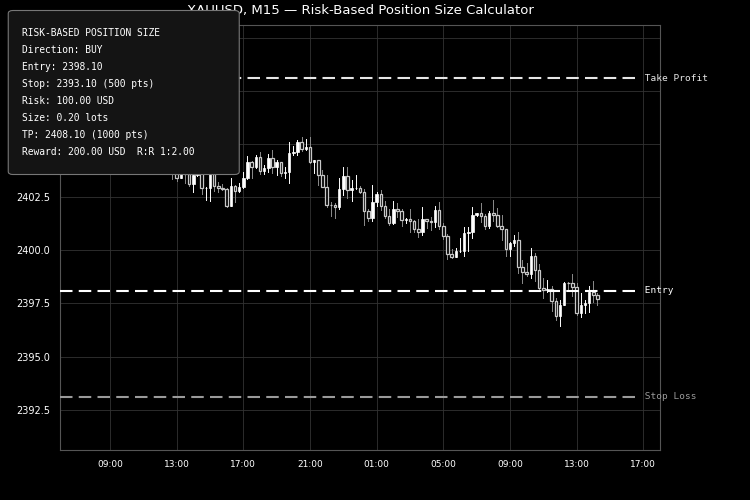
Fig. 1. Draggable Entry/Stop/Take-Profit lines with the live position-size panel on XAUUSD M15. Rendered in black and white per the Code Base image guidelines (750×500 px).
 Trend Execution Planner - Regime and Risk Panel
Free open-source MT5 read-only chart utility that scores current trend conditions and builds broker-normalized long and short risk plans. It uses moving-average direction and slope, ADX, Efficiency Ratio, ATR, spread, account currency and symbol specifications. It never opens, modifies or closes trades.
Risk Position Size Calculator
Set your risk %, drag the stop, and get the exact lot size priced in your account currency — margin and target included. Calculates only, never trades.
Swing High Low - Non-Repainting Pivots with Push/Email Alerts
Marks non-repainting swing highs and lows using configurable LeftBars / RightBars pivots. Sends push and email alerts on each new confirmed swing.
Smart Trade Manager for MT5
Automatic structure-based SL, breakeven, ATR trailing, and dollar-based profit protection for manual MT5 trades and pending orders on Gold and selected FX pairs.