 MetaTrader 5
 Experts
 Indicators
 Scripts
 Libraries
 Storage
Join our fan page

Swing High Low - Non-Repainting Pivots with Push/Email Alerts - indicator for MetaTrader 5

- Views:
- 1755
- Rating:
- Published:
- Updated:
-
 You are missing trading opportunities:
- Free trading apps
- Over 8,000 signals for copying
- Economic news for exploring financial markets
Registration Log inYou agree to website policy and terms of use
If you do not have an account, please register -
 Need a robot or indicator based on this code? Order it on Freelance
Go to Freelance
Need a robot or indicator based on this code? Order it on Freelance
Go to Freelance
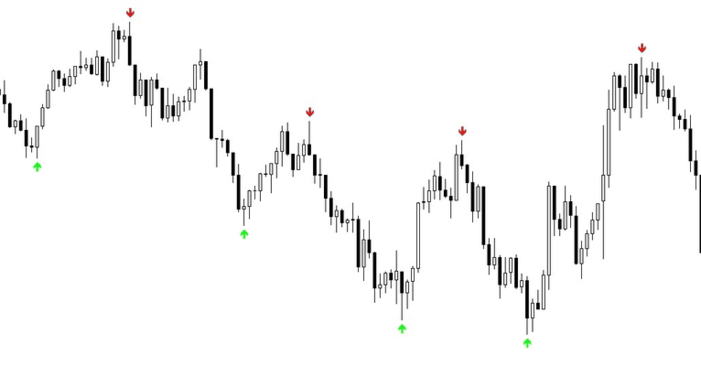
Swing High Low marks market-structure pivots directly on the chart. A red arrow is placed above each swing high and a green arrow below each swing low. Swing strength is set by the LeftBars and RightBars inputs — the same pivot logic as the TradingView pivothigh / pivotlow functions.
The indicator does not repaint. A swing is confirmed only after RightBars candles have closed to its right, so an arrow never moves or disappears once printed. Reliable for reading market structure and for drawing support / resistance trendlines by connecting the swing points.
On every newly confirmed swing the indicator can send a push notification to the MetaTrader mobile app and an email alert. Each swing is reported only once.
Inputs:
- LeftBars — bars required to the left of a pivot (higher = fewer, stronger swings)
- RightBars — bars required to the right; also the confirmation delay
- InpArrowHigh / InpArrowLow — Wingdings arrow codes
- InpPush — send push notification on a new swing (default: true)
- InpEmail — send email alert on a new swing (default: false)
How to enable Push notifications:
- Open the MetaTrader 5 mobile app → Settings → Messages → copy your MetaQuotes ID.
- On the PC terminal: Tools → Options → Notifications → tick Enable Push Notifications → paste the MetaQuotes ID → OK.
- Set the indicator input InpPush = true.
How to enable Email alerts:
- On the PC terminal: Tools → Options → Email → tick Enable → fill in your SMTP server, login and address → press Test.
- Set the indicator input InpEmail = true.
To turn alerts off, set InpPush = false and InpEmail = false. The arrows are still drawn on the chart.
Works on any symbol and timeframe.
Risk Based Position Size Calculator
Draggable Entry, Stop-Loss and Take-Profit lines with a live on-chart panel that calculates the exact lot size for a chosen account risk. No manual math, no guessing — drag the lines, read the size.
 Trend Execution Planner - Regime and Risk Panel
Free open-source MT5 read-only chart utility that scores current trend conditions and builds broker-normalized long and short risk plans. It uses moving-average direction and slope, ADX, Efficiency Ratio, ATR, spread, account currency and symbol specifications. It never opens, modifies or closes trades.
Smart Trade Manager for MT5
Automatic structure-based SL, breakeven, ATR trailing, and dollar-based profit protection for manual MT5 trades and pending orders on Gold and selected FX pairs.
 Scale Out Value Analyzer
A native MQL5 tool that reconstructs closed positions from deal-level history, flags the ones closed through more than one exit, and reprices each one at its own first, last, and best exit rates to measure whether scaling out actually added value. Reports a Value-Add Ratio, a Scale Out Win Rate, an Efficiency figure, and a single-trade dependence check, combined into an A+ to F score with recommendations. Runs out of the box against a built-in demonstration data set; a companion script exports the real input file from your own account history. Pure MQL5, no external libraries.