 MetaTrader 5
 Experts
 Indicators
 Scripts
 Libraries
 Storage
Join our fan page

Risk Position Size Calculator - expert for MetaTrader 5

- Views:
- 1567
- Rating:
- Published:
- Updated:
-
 You are missing trading opportunities:
- Free trading apps
- Over 8,000 signals for copying
- Economic news for exploring financial markets
Registration Log inYou agree to website policy and terms of use
If you do not have an account, please register -
 Need a robot or indicator based on this code? Order it on Freelance
Go to Freelance
Need a robot or indicator based on this code? Order it on Freelance
Go to Freelance
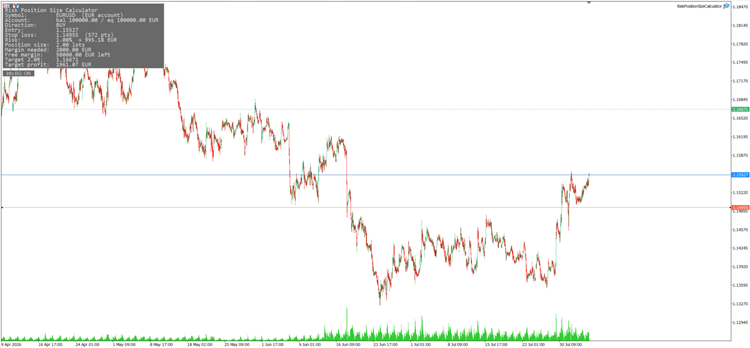
A chart tool that turns a fixed percentage risk and a stop-loss level into an exact lot size, priced in your account currency. Drag the Entry and Stop lines, and the panel recalculates the position size, the money at risk, the required margin and the target level in real time. It calculates and displays only — it never sends, modifies or closes an order.
Features
- Risk-based position sizing — set a risk percentage and the lot size is solved for you, not guessed.
- Draggable Entry and Stop lines — move either line and every number updates instantly, even on weekends when no ticks arrive.
- Correct on any instrument — the stop is priced with OrderCalcProfit() for one lot, so the result comes back in account currency with the broker's own conversion rate. The naive "points × tick value" shortcut silently drifts on cross pairs, metals and CFDs; this does not.
- Money at risk shown in account currency — the panel reports the exact amount you stand to lose, not just a percentage.
- Required margin, reported not estimated — margin comes straight from OrderCalcMargin() , plus the free margin left after the trade.
- Take-profit level for a chosen reward:risk — set an R:R ratio and the target line and its cash value are drawn for you (set 0 to hide it).
- Rounds volume DOWN to the broker's step — rounding up would exceed the risk you declared, so it never does. If the result falls below the broker minimum, the panel says so explicitly instead of showing 0.00 .
- Risk base selectable — balance, equity or free margin.
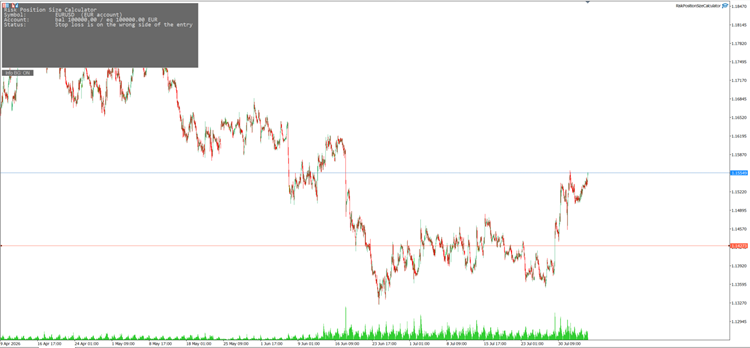
- Direction auto-detected — stop below entry means buy, above means sell; or force buy/sell manually.
- Configurable panel — corner, font size and colours.
- Single file, no dependencies, no external includes. Compiles with 0 errors and 0 warnings.
How to use
- Attach the EA to any chart. Two solid lines (Entry, Stop) and one dotted line (Target) appear, along with a panel in the corner.
- Set Risk per trade (%) and the risk base (balance / equity / free margin) in the inputs.
- Drag the Stop line to where your invalidation is. Leave Entry on the market price, or switch entry source to a line you place yourself.
- Optionally set the reward:risk ratio — the Target line marks the matching take-profit level.
- Read the panel: Position size is the lot to trade, alongside the money at risk, required margin and target profit.
Why use it
Fixed-lot trading means your loss in cash changes every time your stop distance changes — a tight stop risks too little, a wide stop risks too much, and the number is invisible until the trade is already open. Risk-based sizing inverts that: you decide the loss you accept in account currency, and the lot size follows the stop. Same risk on every trade, regardless of instrument or stop width.

Need a custom version or a full EA? Message me: click here.
 MT5 Order Preflight - Read-Only Validation
Checks a hypothetical MT5 market or pending order against current symbol, volume, tick-size, stop-distance and filling rules without sending a trade.
MT5 Broker Environment Report
Prints a privacy-conscious snapshot of the current MT5 broker, account, symbol and terminal environment to the Experts log for diagnostics and support.
Trend Execution Planner - Regime and Risk Panel
Free open-source MT5 read-only chart utility that scores current trend conditions and builds broker-normalized long and short risk plans. It uses moving-average direction and slope, ADX, Efficiency Ratio, ATR, spread, account currency and symbol specifications. It never opens, modifies or closes trades.
 Risk Based Position Size Calculator
Draggable Entry, Stop-Loss and Take-Profit lines with a live on-chart panel that calculates the exact lot size for a chosen account risk. No manual math, no guessing — drag the lines, read the size.