 MetaTrader 5
 Experts
 Indicators
 Scripts
 Libraries
 Storage
Join our fan page
- Published by:
-
Cristian David Castillo Arrieta
 Finance and International Business professional with a specialization in Financial Management. Self-taught MQL5 and Python developer focused on algorithmic trading, multi-asset portfolio construction, and quantitative risk management.
 - Views:
- 817
- Rating:
- Published:
- Updated:
-
 You are missing trading opportunities:
- Free trading apps
- Over 8,000 signals for copying
- Economic news for exploring financial markets
Registration Log inYou agree to website policy and terms of use
If you do not have an account, please register -
 Need a robot or indicator based on this code? Order it on Freelance
Go to Freelance
Need a robot or indicator based on this code? Order it on Freelance
Go to Freelance
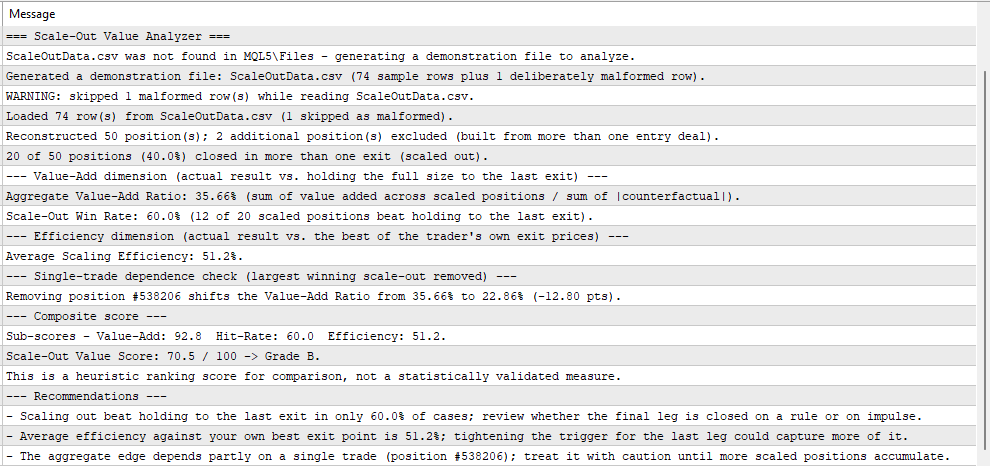
Scaling out of a position is usually assumed to help, but no standard MetaTrader report compares the blended result against what the same position would have returned if the trader's own exit prices had been used differently.
The script reads a CSV of closing deals and prints a full report to the Experts tab:
- Value-Add Ratio — the aggregate value scaling added, against holding the full position to the last exit.
- Scale-Out Win Rate — the share of scaled positions where scaling out beat holding to the last exit.
- Scaling Efficiency — the share of the best outcome available among the trader's own exit prices that was actually captured.
- A composite score (A+ to F) combining the three dimensions, with a single-trade dependence check and written recommendations.
Input. Place a CSV named in the InpFileName input (default ScaleOutData.csv) in the terminal MQL5\Files folder, with the header PositionID,Symbol,Direction,EntryTime,EntryPrice,EntryCount,TotalVolume,ExitTime,ExitPrice,ExitVolume,ExitProfit,ExitCommission,ExitSwap and one row per closing deal. On the first run, if no file is found, the script generates a built-in demonstration set and analyzes it, so the report is visible immediately. The companion script ScaleOutExport.mq5 writes that file directly from the terminal's own account history: run it once (optionally setting a from/to date range), then run ScaleOutValue.mq5 on the file it produces.
Parameters. InpFileName sets the input CSV; InpMinScaledPositions sets the minimum number of scaled positions required before a grade is produced; InpWeightValueAdd, InpWeightHitRate and InpWeightEfficiency set the three composite weights (normalized automatically); InpValueAddSensitivity sets how strongly the Value-Add Ratio moves its sub-score; InpGradeAPlus through InpGradeD set the letter-grade boundaries; InpHitRateAlertBelow, InpEfficiencyAlertBelow and InpStressDependenceAlert set the thresholds that trigger each written recommendation.
The tool is written in pure MQL5. It needs no external libraries, no Python and no DLLs. A full description of the method and the code is available in the article: [ARTICLE_URL].
 Smart Trade Manager for MT5
Automatic structure-based SL, breakeven, ATR trailing, and dollar-based profit protection for manual MT5 trades and pending orders on Gold and selected FX pairs.
 Swing High Low - Non-Repainting Pivots with Push/Email Alerts
Marks non-repainting swing highs and lows using configurable LeftBars / RightBars pivots. Sends push and email alerts on each new confirmed swing.
Structure Range
Sell Arrow SL Box: Extends UPWARDS from the Sell Arrow. Buy Arrow SL Box: Extends DOWNWARDS from the Buy Arrow.
 Magic Number Inventory, Trade Logging and Classifying by Magic Number
A read-only audit script for accounts running several EAs (or manual trades alongside them). It groups the closed-trade history by magic number and prints one line per magic: closed round turns, net P/L including swap and commission from BOTH sides of the trade, win rate, profit factor, average win/loss, currently open positions and pendings, activity dates and symbols - sorted by net result, with a CSV export for spreadsheets.