 MetaTrader 5
 Experts
 Indicators
 Scripts
 Libraries
 Storage
Join our fan page

Smart Session Breakout MT4 Asian Range with ATR Body-Quality Filter Dashboard and Non-Repainting Alerts - indicator for MetaTrader 4

PUBLISHED WORK
MQL5 Market — ArgosWatch Institutional Prop Suite:
- Prop Challenge Guardian MT5-Daily and maximum drawdown barrier with on-chart SOS danger line and instant lot matrix
- Views:
- 2365
- Rating:
- Published:
- Updated:
-
 You are missing trading opportunities:
- Free trading apps
- Over 8,000 signals for copying
- Economic news for exploring financial markets
Registration Log inYou agree to website policy and terms of use
If you do not have an account, please register -
 Need a robot or indicator based on this code? Order it on Freelance
Go to Freelance
Need a robot or indicator based on this code? Order it on Freelance
Go to Freelance
HOW IT WORKS
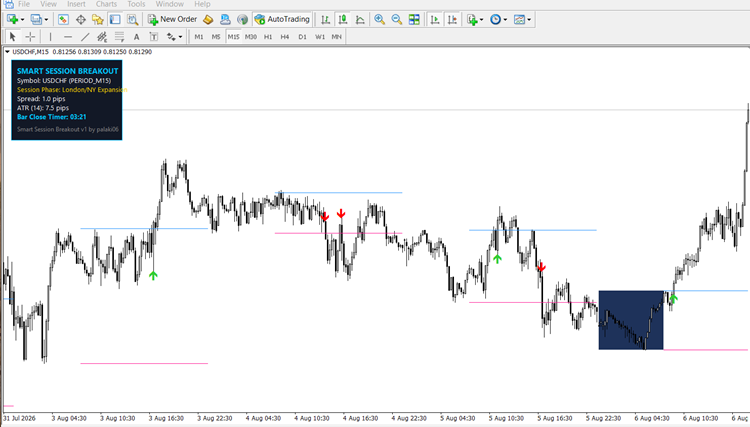
Feedback and suggestions are welcome in the comments.
Version 1.10 — correctness update
- Sessions that cross midnight now work. The session end was rebuilt from
each bar's own calendar date, so a window such as 22:00-08:00 never
registered as complete and the indicator drew nothing at all.
- The dashboard is drawn correctly in every corner. On a right-hand corner,
which is the default, both the panel text and its background box were
positioned from the chart edge outwards and ended up off screen.
- Alerts now fire with "Confirm Signal on Bar Close" switched off. The alert
was tied to a fixed bar index that mode never reaches, so arrows appeared
but nothing was ever announced. Alerts are now limited to one per bar.
- Session times are validated at startup. A malformed value now prints an
explanation instead of producing an empty chart.
- On a timeframe too high for the configured session the panel says so and
suggests a suitable range.
- The session range is calculated once per session rather than once per bar.
Inputs are unchanged, so existing templates keep working.
 Quantora Margin Calculator MT4 - Professional Margin Requirement Calculator
Professional open-source Margin Calculator for MetaTrader 4. Calculates required margin, Free Margin impact, estimated Margin Level, position value and margin safety.
Quantora Risk Calculator MT4 - Professional Trade Risk and Reward Calculator
Professional open-source Risk Calculator for MetaTrader 4. Calculates money risk, account risk percentage, potential profit, Reward-to-Risk ratio, margin requirement and risk level.
Smart S/R Zones MT4 Swing-Pivot Support and Resistance
Swing-pivot support and resistance zones clustered by touch count with adaptive zone thickness and higher-timeframe context.
Quantora Trade Manager MT4 - Professional Position Management Utility
Professional open-source trade management utility for MetaTrader 4. Automatically applies Stop Loss, Take Profit, Break Even and Trailing Stop while providing a modern dashboard for efficient position management.