 MetaTrader 5
 Experts
 Indicators
 Scripts
 Libraries
 Storage
Join our fan page

Swap Fee Monitor Panel - indicator for MetaTrader 5

- Views:
- 2896
- Rating:
- Published:
- Updated:
-
 You are missing trading opportunities:
- Free trading apps
- Over 8,000 signals for copying
- Economic news for exploring financial markets
Registration Log inYou agree to website policy and terms of use
If you do not have an account, please register -
 Need a robot or indicator based on this code? Order it on Freelance
Go to Freelance
Need a robot or indicator based on this code? Order it on Freelance
Go to Freelance


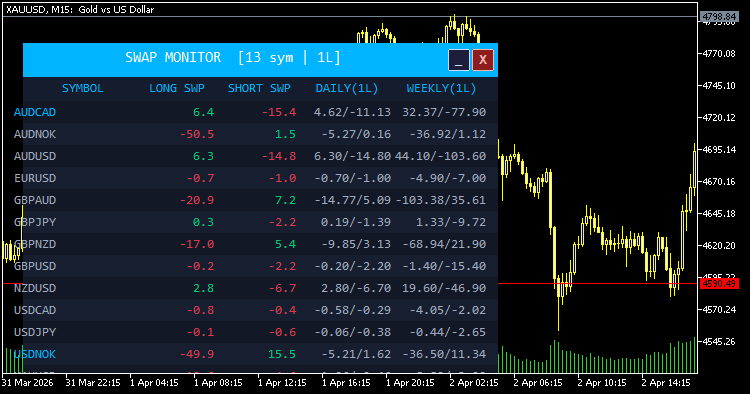
Swap Monitor Panel is a lightweight, fully customizable indicator that overlays a live swap rate dashboard directly on your MT5 chart. It scans every symbol in your MarketWatch window and presents long swap, short swap, estimated daily cost, and weekly cost side by side — all in one clean, readable panel.
Key Features
- Live MarketWatch scanning — automatically reads all symbols currently in your MarketWatch; no manual configuration needed.
- Multi-mode swap calculation — correctly handles all MT5 swap modes: points, currency (symbol/deposit/margin), and interest-based (current/open price), so monetary cost estimates are as accurate as possible.
- Daily & Weekly cost columns — shows the estimated real monetary cost or gain per your chosen lot size for both long and short positions, updated every 5 seconds.
- Best swap highlighting — optionally highlights the symbol with the most favorable long or short swap in accent color, helping you quickly spot carry trade opportunities.
- Flexible sorting — sort the table by symbol name (A–Z), best long swap, best short swap, or best daily cost with a single input change.
- Minimize / Close controls — title bar buttons let you collapse the panel to just its header bar or remove it from the chart entirely without detaching the indicator.
- Fully themeable — every color (background, rows, positive/negative values, accent, title) is exposed as an input parameter so the panel fits any chart theme.
- Font & layout control — choose your preferred font, font size, panel X/Y position, and toggle the daily/weekly cost columns on or off to keep the panel as compact or detailed as you need.
How It Works
On load, the panel reads swap rates and contract specifications for each MarketWatch symbol using native SymbolInfo functions. It then converts raw swap values into monetary terms based on the symbol's swap mode, tick value, and your reference lot size. The panel refreshes automatically every 5 seconds via a timer and can also be manually refreshed by clicking anywhere on the panel body.
Use Cases
- Identifying positive carry (swap-positive) opportunities across your watchlist
- Comparing rollover costs before holding positions overnight or over the weekend
- Monitoring weekly swap exposure for a given lot size across multiple instruments
Correlation Matrix Heatmap with Interactive Dashboard
Interactive Correlation Heatmap using high-performance MQL5 matrix functions. > Features a draggable, minimizable dashboard with instant multi-timeframe switching and a vivid 5-band color scale for real-time currency relationship analysis.
 Prime Quantum AI — TRADE WITH AI (Anthropic Claude, OpenAI GPT, Google Gemini, DeepSeek, xAI Grok).
Prime Quantum AI is an MT5 Expert Advisor combining a classical pre-filter (ADX + Alligator) with AI vision-based chart confirmation from major AI providers (Anthropic Claude, OpenAI GPT, Google Gemini, DeepSeek, xAI Grok). When the pre-filter detects a trend setup, the EA captures three adaptive- timeframe chart screenshots and sends them to the configured AI provider, which returns direction, confidence, stop-loss and take-profit. A trade is opened only when the AI confirms the pre-filter signal with sufficient confidence. Features: dual Standard Broker / Prop Firm risk modes, configurable lot sizing, optional martingale, multiple SL/TP modes, trailing stop, partial close, news/time/day/spread filters, draggable on-chart info panel, and fully exposed indicator parameters. Requires MetaTrader 5, WebRequest enabled for your provider's URL, and a valid API key. Provider auto-detected from key format.
Chart Water Mark
Chart Water Mark Transform your MetaTrader 5 charts to look as elegant and professional as TradingView.
Weekend Gap Statistics and Distribution Analyzer
The Weekend Gap Statistics & Distribution Analyzer is a purely analytical MQL5 indicator designed to evaluate the historical behavior of weekend price gaps. It scans chart data to calculate gap closure rates and measures the adverse excursion (drawdown) experienced before a gap successfully closes. By providing statistical distributions—including the 70th and 90th percentiles of adverse heat—this tool enables traders to make data-driven decisions. It moves beyond simple averages, allowing traders to properly assess risk, filter out low-probability instruments, and optimize stop-loss placement when fading weekend gaps.