 MetaTrader 5
 Experts
 Indicators
 Scripts
 Libraries
 Storage
Join our fan page

Expert Advisor required to fetch news data for the FFC Calendar indicator. - expert for MetaTrader 4

- Views:
- 5895
- Rating:
- Published:
- Updated:
-
 You are missing trading opportunities:
- Free trading apps
- Over 8,000 signals for copying
- Economic news for exploring financial markets
Registration Log inYou agree to website policy and terms of use
If you do not have an account, please register -
 Need a robot or indicator based on this code? Order it on Freelance
Go to Freelance
Need a robot or indicator based on this code? Order it on Freelance
Go to Freelance
The "Engine" behind the FFC Canvas Calendar.
🔌 What is this?
This is NOT a trading robot. It is a Utility Expert Advisor designed solely to download economic news data for the FFC Calendar Indicator.
Why is it needed?
In MQL4, indicators are not allowed to use the secure WebRequest function. To avoid forcing you to enable dangerous "DLL Imports", we created this helper EA. It runs silently in the background, fetches data securely from the official source, and saves it for the indicator to display.
🚀 Benefits
- ✅ 100% Native: Uses MQL4's built-in WebRequest .
- ✅ Safe: No DLL imports required.
- ✅ Efficient: You only need ONE instance running to serve all your charts.
📚 Setup Instructions (One-Time)
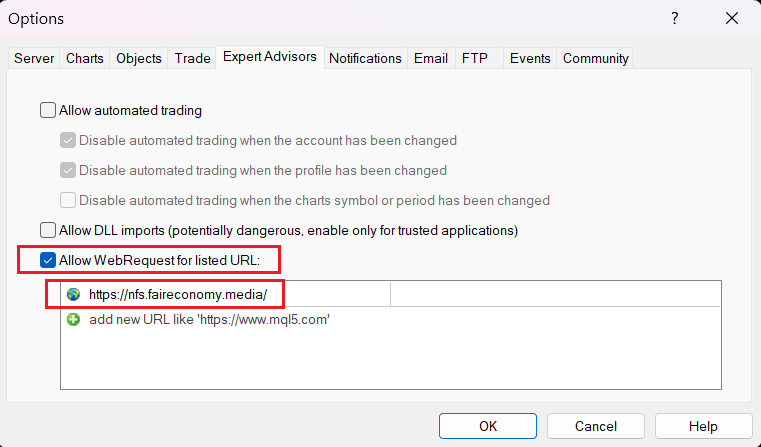
Step 1: Allow WebRequest
Go to Tools -> Options -> Expert Advisors:
- Check "Allow WebRequest for listed URL".
- Add this exact URL: https://nfs.faireconomy.media/
- (Note: "Allow DLL imports" can remain unchecked).
Step 2: Run the Feeder
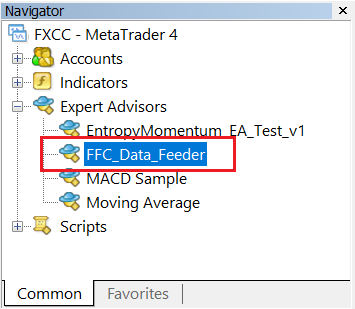
- Open ONE empty chart (e.g., EURUSD M1).
- Drag this FFC_Data_Feeder EA onto the chart.
- You will see a dashboard confirming the connection status.
Step 3: Get the Indicator
Once this Feeder is running, download and attach the visual indicator FFC 2.0 Calendar from the Indicators section to see the news panel on your trading charts.
Free Open Source Utility. Part of the MQL Trading Tools suite.
Popular (1M views) 4 Hour Range Strategy coded and tested
This EA is intended to test a popular trading strategy. My own backtest shows that this strategy does not work as it was intended
StrategyTester in pips
Tester statistics in pips with an early filter. This is how it should be done.
RiskSizer Panel Lite MT4 - Risk Percent Lot Calculator With One Click Buy Sell
RiskSizer Panel Lite is a simple MT4 trading panel that calculates an estimated lot size based on your risk percent. Drag two chart lines to set SL/TP, then use one-click BUY/SELL for fast manual execution.
MT4 Telegram Trade Notifier (Bot API) — Deal Alerts
Utility MT4 EA that sends BUY/SELL deal notifications to Telegram via Bot API (WebRequest)