 MetaTrader 5
 Experts
 Indicators
 Scripts
 Libraries
 Storage
Join our fan page

Session Daylight Gradient — Ambient Forex Session Overlay - indicator for MetaTrader 5

- Views:
- 3981
- Rating:
- Published:
- Updated:
-
 You are missing trading opportunities:
- Free trading apps
- Over 8,000 signals for copying
- Economic news for exploring financial markets
Registration Log inYou agree to website policy and terms of use
If you do not have an account, please register -
 Need a robot or indicator based on this code? Order it on Freelance
Go to Freelance
Need a robot or indicator based on this code? Order it on Freelance
Go to Freelance
Overview
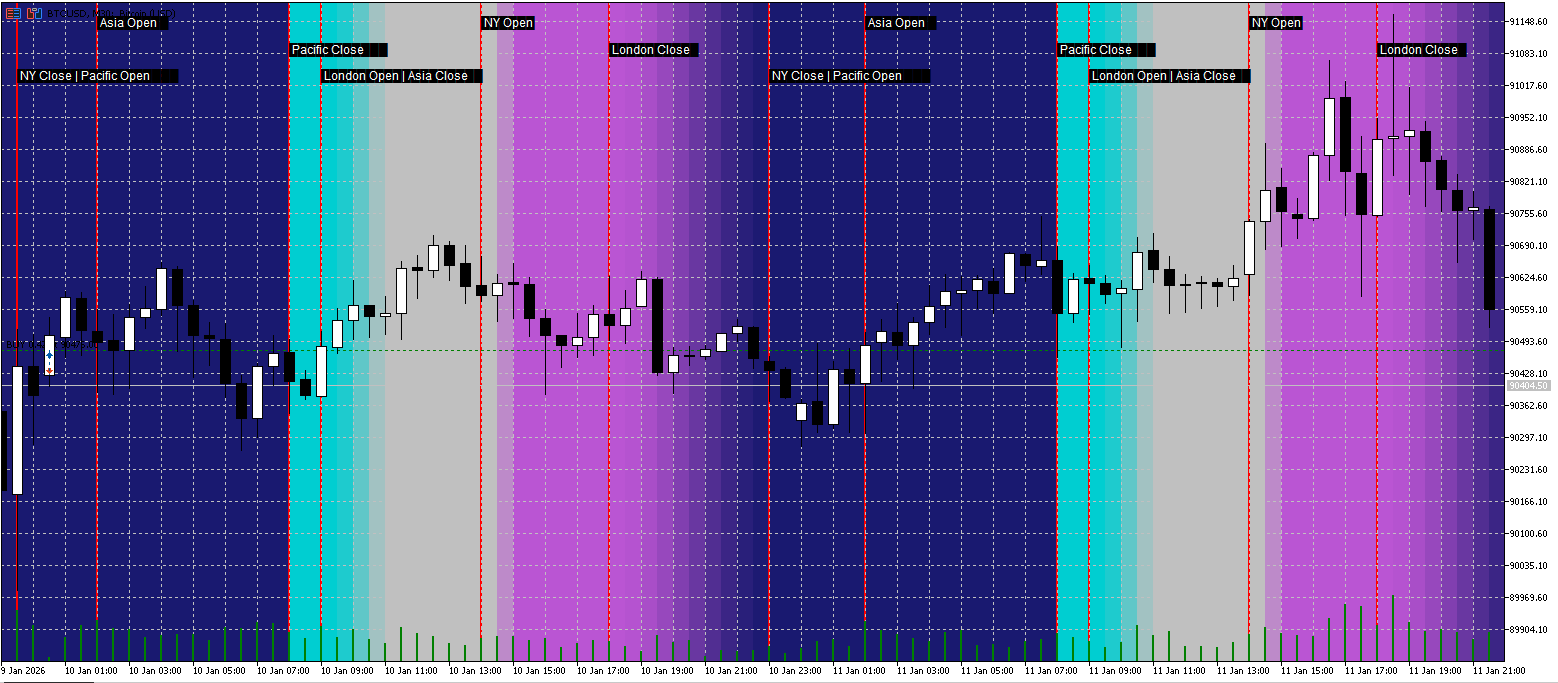
Session Daylight Gradient is an ambient session awareness indicator for MetaTrader 5.
Instead of drawing heavy session boxes, it uses a soft background gradient that visually communicates the current market regime—quiet hours, rising activity, peak volatility, and fade-out—at a glance.
This helps traders stay aligned with typical session behavior without cluttering the chart.
What You See on the Chart
-
Session Daylight Background:
A colored gradient that changes smoothly through the trading day:-
Pacific (quiet / reset)
-
Asia (range / consolidation)
-
London (activity increase)
-
London/NY overlap (peak volatility)
-
NY fade-out into Pacific
-
-
Session Event Markers (optional):
Vertical separator lines and compact labels for key events such as:-
Asia Open / Asia Close
-
London Open / London Session
-
NY Open (overlap start)
-
London Close
-
NY Close / Pacific Open
-
-
Sunrays (optional):
Add highlighted time windows for scheduled events (e.g., economic news).
You can enter multiple times in a simple list, and each is drawn as a “sunray” band around the timestamp.
Why It’s Useful
Most session indicators show boxes that dominate the chart. This indicator focuses on low-noise, high-information visuals:
-
You instantly sense whether you are in a calmer session or a high-volatility window.
-
The background is subtle (opacity adjustable), so price action remains the priority.
-
Event markers give structure without forcing you to read a timetable every day.
Timezone Handling (Important)
Markets trade globally, but brokers and PCs can use different time references.
This indicator provides three modes:
-
UTC — Recommended for consistent global session definitions.
-
Broker/Server Time — Uses your broker’s server time (chart time).
-
PC Local Time — Uses your computer’s local time.
Additionally, you can apply a Manual DST Shift (hours) to correct cases where daylight saving time causes session alignment to appear off by one hour.
Main Inputs
General Settings
-
EnableGradient — Enable/disable the background gradient.
-
EnableSunrays — Enable/disable news highlight bands.
-
SessionTimeMode — Choose UTC / Broker-Server / PC Local.
-
ManualDSTShiftHours — Manually shift session reference by hours (+1 / -1 / 0).
Session Times (HH:MM)
Customize session windows using simple strings:
-
AsiaStart / AsiaEnd
-
LondonOpenStart / LondonOpenEnd
-
OverlapStart / OverlapEnd
-
NYCloseStart / NYCloseEnd
-
PacificStart / PacificEnd (wraps midnight by design)
Colors & Intensity
-
PacificColor , AsiaColor , LondonColor , NYColor
-
MaxOpacity — Controls how subtle the background is (0–255).
-
SmoothingStrength — Smooth transition strength.
Visual Separators
-
ShowSessionLines
-
SessionLineColor , SessionLineStyle , SessionLineWidth
Sunrays
-
SunrayTimes — Example: 14:30; 16:00 or 2026-01-11 14:30; 16:00
-
SunrayWidthMinutes , SunrayOpacity , SunrayColor
Performance Notes
The indicator draws chart objects (rectangles/lines/text) only for the visible range plus a buffer.
If you use very low timeframes with a large visible history, consider reducing visible bars or disabling some visual features for maximum responsiveness.
Typical Workflow
-
Attach the indicator to any chart.
-
Set SessionTimeMode to UTC (recommended).
-
If sessions appear shifted, adjust ManualDSTShiftHours .
-
Enable ShowSessionLines for clearer structure.
-
Add SunrayTimes if you want news/event highlights.
 CPlotManager (Auto Buffer and Plot Manager)
Automates MQL5 buffer and plot index management. Eliminates manual counting, simplifies Z-order layering, and handles complex plot types (Candles, Color Lines) with a single line of code.
 The Playground Series v1 to V4 - A combination of trading concepts
The Playground EA series was created for experimentation with Fair Value Gaps (FVGs) and liquidity concepts
ASZ - Adaptive Structure ZigZag
A robust Market Structure analyzer that adapts to volatility. ASZ uses a Hybrid ATR engine to filter noise and detect reliable Swing points. Non-repainting on confirmed bars.
Adaptive VWAP Institutional
Adaptive VWAP Institutional: Multi-Asset Auto-Detection & DST-Accurate Session Resets (Forex 5PM NY Standard).