 MetaTrader 5
 Experts
 Indicators
 Scripts
 Libraries
 Storage
Watch how to download trading robots for free
Find us on Telegram!
Join our fan page
Join our fan page
You liked the script? Try it in the MetaTrader 5 terminal

Stop Loss and Take Profit Scripts - script for MetaTrader 4

- Views:
- 102387
- Rating:
- Published:
- Updated:
-
 You are missing trading opportunities:
- Free trading apps
- Over 8,000 signals for copying
- Economic news for exploring financial markets
Registration Log inYou agree to website policy and terms of use
If you do not have an account, please register -
 Need a robot or indicator based on this code? Order it on Freelance
Go to Freelance
A collection of predefined Scripts
A collection of predefined Scripts saves time by having available for immediate use the required setting without having to key it in.
Script List:
- SL (SL-20, ..SL-100, ..SL-500, ..SL-3000 etc)
- SL Modify
- SL Delete
- SL Break Even
- TP (TP-20, ..TP-100, ..TP- 500, ..TP-3000 etc)
- TP Modify
- TP Delete
- Market Buy
- Market Sell
- Buy Limit
- Buy Stop
- Sell Limit
- Sell Stop
- Close all open and pending orders
- Close all open orders
- Close all pending orders
- Close first this symbol
- Close open this symbol
- Unzip and place in experts/scripts folder. (Hampster FREE Zip Archiver - HERE - as of Jan-2014 no crapware in download).
- Note

- Test: Drag a SL Script onto the chart.
- Test: Dragging another SL Script onto the chart will cause the SL to adjust to the new value. Same applies for TP.
- Point and pip calculators can be added
Make your own Scripts from downloaded Scripts - This looks long-winded but once done its actually a quick 1,2,3. You will find it surprisingly quick and easy.
Why keep re-setting a Scrip, Indicator or EA default parameter from, say, 34 to 50 ? Permanently change the default setting to 50 or make a copy with default 50 !
Follow these steps
- The downloaded Scripts should be in the experts/scripts folder.
- Choose a SL Script and test that it works with your MT4. Prove that it works - you do not want to waste your time with something that does not work.
- Press Ctrl+N which will open the Navigator
Pane.
- If any other pane is also open, to avoid clutter, it can be closed. Click x at top-right of the relevant pane.
- Locate the tested SL Script under the Script folder.
- Right click on SL Script and select Modify - Enter. Image 1 shows 0-A-SL-0500 selected in the Scripts folder.
- Image 1

- Left click or press the Enter Key to open the source code in the MetaEditor.
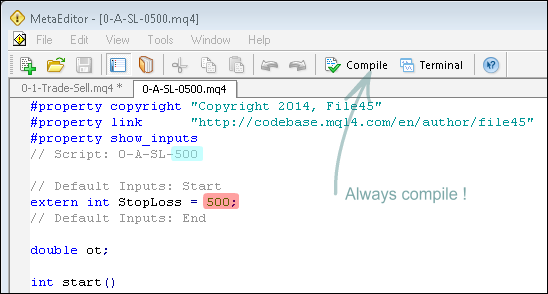
- The source code will open in the MetaEditor – see Image 2. Note the SL Script name on the code window tab and right of the yellow diamond icon at top.
- If more than one code window is loaded in the MetaEditor close each window
(right click in the area of the name tab of the code window → click close) and leave only the tested SL Script code open. For beginners less mistakes are made this way.
- The only code you will need to change are the numerical values highlighted in red and blue.
- Stop ! Before changing any code the next action is to save the Script to another name. This ensures that the original script code is not replaced with unintended edits.
Image 2
Continue....
- If more than one code window is loaded in the MetaEditor ensure that the correct code widow is selected.
- Click on File → Save As.
- Change the name from O-A SL 500.mq4 to
0-A SL 0800.mq4 or whatever SL value you have chosen. (0020, 0050, 0100, 0200, 1000 etc., naming is applied because it ensures consecutive numbering; if not 100 will appear before 1 to 99. As the maximum SL number is in thousands 4 digits are used to ensure consecutive numerical naming increment in the Navigator Pane. A and B are used to separate SL and TP groups respectively. 0 preceding A and B ensures that the entire collection is kept separate from other scripts.)
- Click the Save button.
- MedaEditor – [0-A SL-A SL 0800.mq4] will now be indicated right of the yellow icon and 0-A SL 0800.mq4 on the code window tab. Although 0-A-SL-0500.mq4 is no longer visible in the MetaEditor it remains - unchanged - in the experts/scripts folder.
The only code to edit are the two 500 numbers.
// Script: 0-A SL 500

extern int StopLoss = 500;
Relevant Information
The code behind the Inputs Tab of Scripts, Indicators and Expert Advisors can always be located by finding the code word 'extern' (without quotations) which will always be near the top of the program.
The code word 'int'
stands for integer (..-2, -1, 0, 1, 2, ..). Basically negative or
positive numbers that do not include decimals places. 'Int' defines
'Stoploss' as an integer value.
The code to change - as far basic edits go - will be the code after the = sign. Eg1: extern color
Line_Color = Red; - Change Red to Blue or Green etc. Eg2: extern int
Line_Width = 1; - Change 1 to 2, 3, 4 or 5. Eg3: extern string Font_Type = "Arial"; - Change Arial to "Arial Bold" or "Verdana". Note quotation marks (" bla") required for parameters of string variables (extern string ...... = "bla";).
Text after // is used as descriptive comment and excluded from code function. Sometimes code is commented out (// ..bla bla.. or /*..bla bla...*/ ) for reasons like fault finding by process of elimination.
Editing
- Change the two 500 numbers to your chosen numerical value and remember to include the semicolon (;) where applicable. The numerical value should form part of the script name (i.e. 0-A-SL-0800.mq4) for fast identification..
// Script: 0-A SL 800extern int StopLoss = 800;
- Click the Compile button. Always remember to compile. Edited code will not become effective until it is compiled.
- Check the left hand bottom of the MetaEditor for 0 errors and 0 warnings in the ToolBox (Ctrl+T).
- Image 3

- If an error is flagged the code will not compile and the code must compile for the program to work.
- If an error is flagged press Ctrl+Z in steps and follow the code in the MetaEditors as it is undone and returned to original copy. Try to determine where a mistake was made for future reference and learning.
- Click the Compile button to test that the code is free of errors and start again.
- If, after the edit of 500 to 800 no errors have been flagged in the Toolbox the New 0-A-SL-0800 Script will be found in the Scripts folder ready for use..
Testing
- Open a trade in the MT4 demo.
- Attach Script 0-A-SL-0500 to the the chart. A red SL Line at 500 points from entry will be drawn across the chart.
- Check SL difference against Entry price to ascertain accuracy.
- Attach Script 0-A-SL-0800 to the chart. The red SL Line will jump from 500 to 800 points from entry.
- Check SL difference against Entry price to ascertain accuracy.
- To delete the Stoploss attach Script 0-A-SL-Delete to the chart.
Conclusion
Apply the same procedure to other Scripts.
double: def - real number - includes fraction part.
int: def - (integer) whole number - no fraction part.
Before: 0-2 Buy Limit.mq4
// Default Inputs: Start
extern double Buy_Lots  = 0.01; // one micro-lot
extern double Buy_Limit_Price = 0.0;
extern int Slippage = 3;
extern int StopLoss = 0;
extern int TakeProfit = 0;
// Default Inputs: End
After: 0-2 Buy Limit 0200-0600.mq4
// Default Inputs: Start
extern double Buy_Lots  = 0.10; // one mini-lot
extern double Buy_Limit_Price = 0.0;
extern int Slippage = 4; // My name is Jack and I've coded slippagw at 4. I've added comments behind StopLoss at 200 and TakeProfit at 600
extern int StopLoss = 200; // 200 points (20 pips)
extern int TakeProfit = 600; // 600 points (60 pips)
// Default Inputs: End
After: 0-2 Buy Limit 0300-2000.mq4
// Default Inputs: Start
extern double Buy_Lots  = 10.00; // ten lots
extern double Buy_Limit_Price = 0.0;
extern int Slippage = 5; // My name is Jill and I've coded slippage at 5. I'm not going to add comments behind StopLoss and TakeProfit
extern int StopLoss = 300;
extern int TakeProfit = 2000;
// Default Inputs: End
 Fractal Support & Resistance Levels
The indicator draws support & resistance levels based on the last MN1, W1, D1, H4 and H1 fractals.
 a_informer
It Is placing stop loss and take profit at a given distance. Displays the current status of open orders. For closing of the order it is enough to select and move the label to the left.
Close Cross MA
The EA will close all open orders across all charts corresponding to the EA chart symbol when Bid or Ask is equal to or crosses the MA.
Close cross Kijun Sen
The EA will close all open orders across all charts corresponding to the EA chart symbol when Bid or Ask is equal to or crosses the Kijun Sen.