AetherRetrace (MT5): my setup guide and the retrospective record

I develop AetherRetrace at D7 Bots for traders who want selective EURUSD trading with short exposure rather than constant activity. It is designed for bearish market conditions and price corrections. It suits someone prepared for long periods without a trade and for evidence that is only retrospective. This guide explains the chart, history and server clock I check, how I read the startup messages, and what the published record can tell a prospective user.
What the EA does
AetherRetrace takes sell positions only. It holds at most one strategy position at a time, with risk-based position sizing and protective orders. It does not use a grid, martingale or a loss-recovery basket. I keep the strategy at its tested standard while checking that the broker environment is suitable.
The EA uses the symbol and timeframe of its host chart and checks whether that context is supported. Loading an EA, reaching its ready message and having an order accepted are separate events. I do not use a successful attachment as a substitute for checking the operating context.
Installation and the first run
For a first online run of a licensed copy, I use an existing demo environment. I work through the setup before leaving the terminal running.
- Locate the installed product. In Navigator, find AetherRetrace under Expert Advisors. Confirm the installed product and version instead of reusing another EA's saved configuration.
- Identify the exact broker symbol. In Market Watch, find the broker's EURUSD instrument and inspect its contract specification. Open that exact symbol's chart. A familiar-looking name is not enough to establish that the underlying contract is the intended currency pair.
- Use the reference chart and risk. Select H1 and attach the EA to that EURUSD chart. Risk per operation is adjustable; the published evidence uses 1.00%. Leave the remaining strategy settings at the tested standard.
- Check history and the server clock. Load synchronized history for the selected instrument and confirm that quotes update. Check the broker's server-clock convention, including seasonal changes, against the intended setup. The EA uses broker server time for its decisions; the computer's local clock is not a substitute.
- Check trading permissions. For the demo run, enable the platform's Algo Trading control and the EA's algorithmic-trading permission in its properties. Confirm that MT5 is connected and the host chart receives ticks.
- Read the startup entry. Open Experts in the Toolbox. The supported-context startup message begins AetherRetrace v2.08 exploratory candidate ready. I use that opening fragment to identify the startup stage, then check the actual chart symbol and period. It is not confirmation that a trade was accepted or that the full historical record is available.
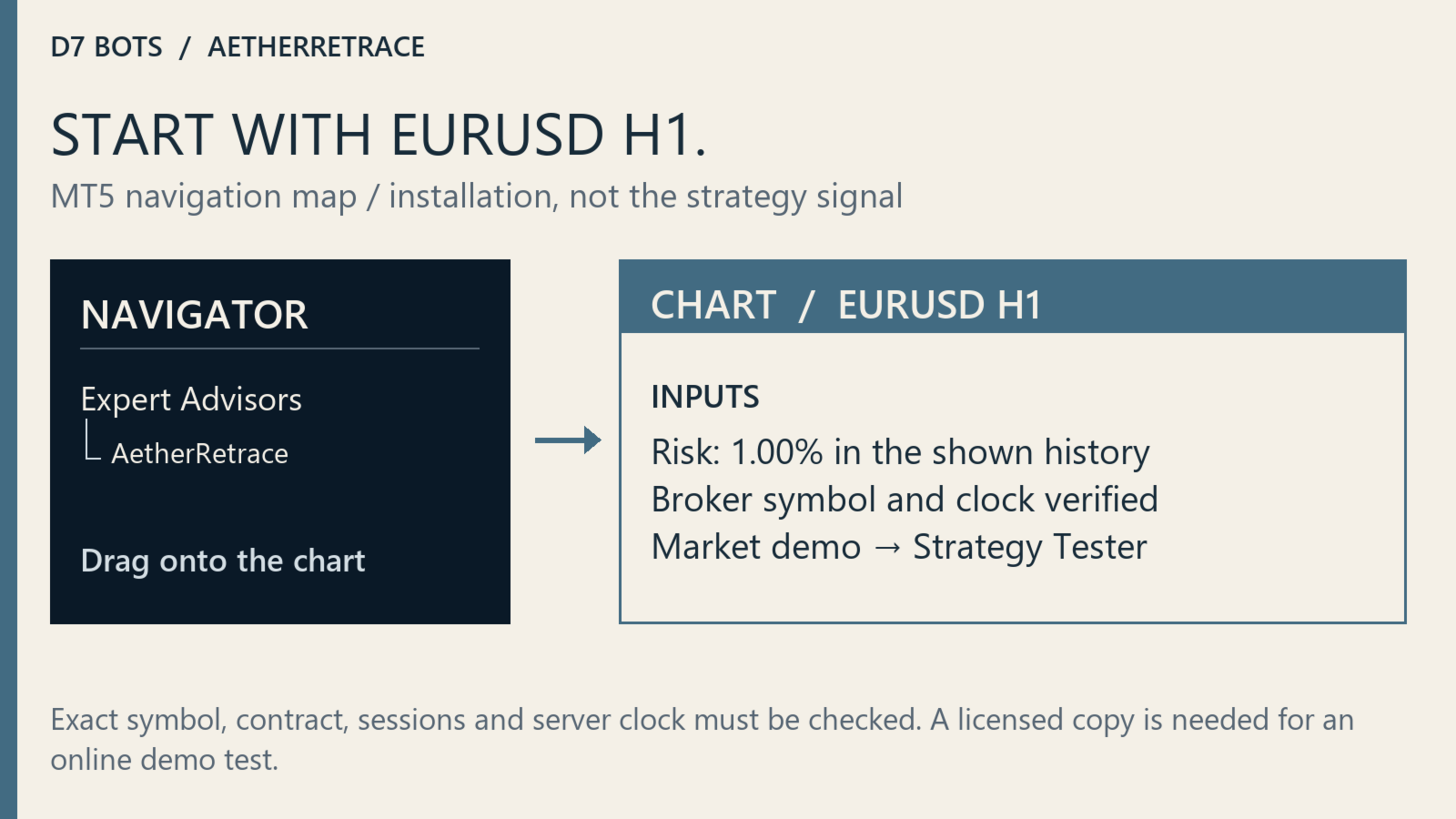
On an unsupported symbol or timeframe, the log begins AetherRetrace: unsupported Market validation context; EA remains inactive. With otherwise valid settings, the EA loads but remains inactive in that context. Check the symbol and return to the reference timeframe; waiting longer on the wrong chart does not fix it.
What I check in Experts when nothing happens
I read operational refusals before changing anything. AetherRetrace: rejected sell because SL/TP violates stops/freeze distance points to protection distances that do not meet the broker check. AetherRetrace: skipped sell because broker volume would exceed the configured risk budget identifies a sizing refusal. I check the contract and volume conditions rather than raise risk simply to make an order appear.
AetherRetrace: skipped sell because symbol, tick, trade mode or volume is not eligible calls for checking those execution conditions. AetherRetrace order not confirmed: is followed by execution return information. I retain the surrounding log, product version, broker, chart and test dates for support.
Some waiting paths return without a custom message, including when required data cannot be read. A quiet Experts tab therefore needs to be considered alongside the connection, quotes, loaded history and any existing strategy position. Neither silence nor the absence of an error establishes that a trade should already have occurred.
Reading the published retrospective record
I start with the reference environment stated on the page: Pepperstone, Every tick, EURUSD H1 and a virtual initial deposit of USD 10,000. The page presents a single retrospective/in-sample window, not separate testing segments.
- Retrospective / in sample: 1 January 2023 to 31 December 2025. Net profit USD +2,524.52; 50 trades; profit factor 2.29; maximum balance drawdown 3.28%.
The gallery shows the realized balance from closed trades over that window. I read the gains and declines together. This is a balance curve, not an equity curve capturing floating losses, so its drawdown should be read with that distinction in mind.
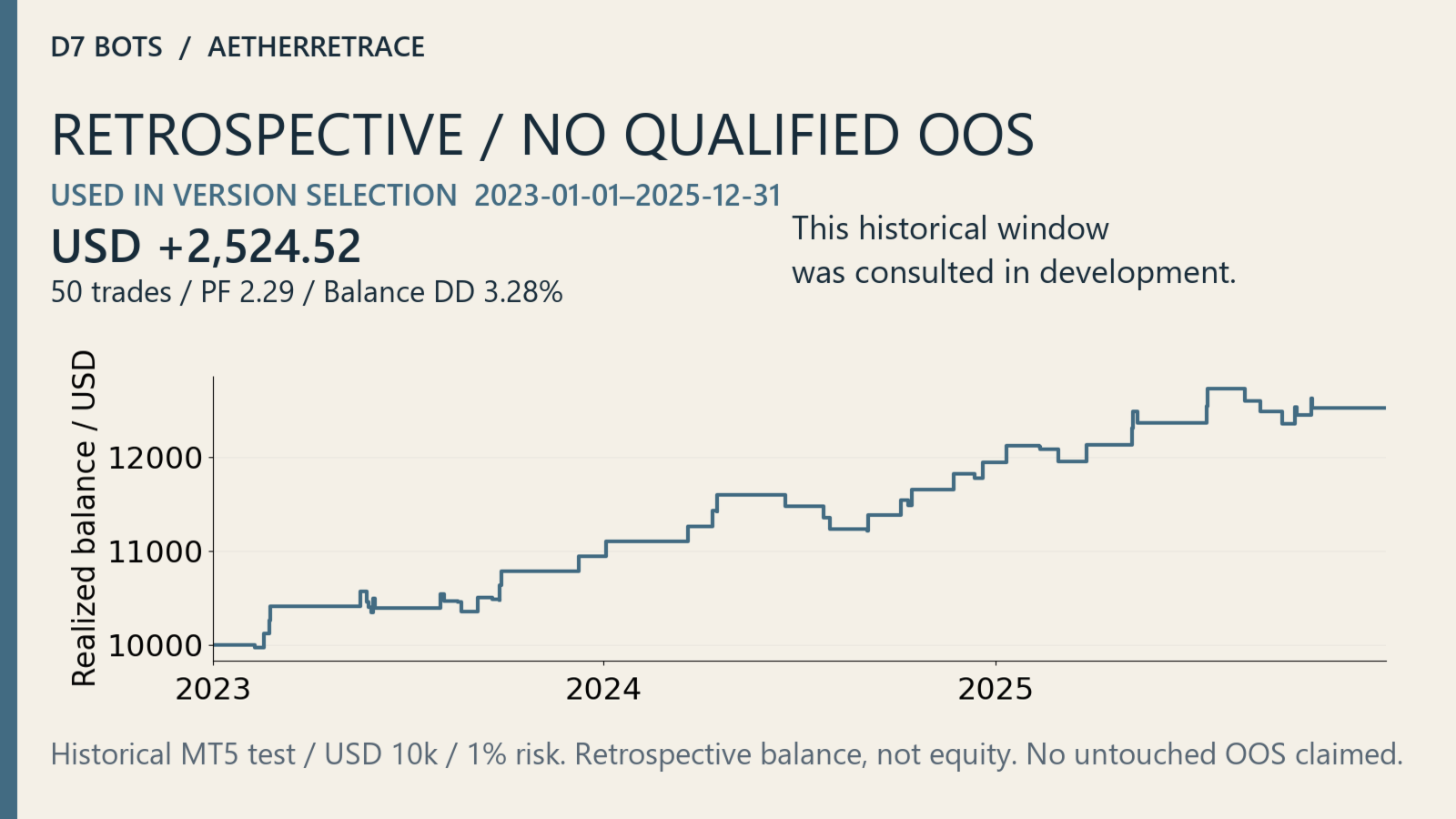
Is this an out-of-sample result? No. The window and its annual subperiods were consulted during version selection. They are not an untouched holdout. With 50 trades across three years, the sample is small for separating a durable edge from fitting to the observed history. Dividing those same years into smaller pieces would not turn them into independent evidence. I keep the selection context beside the headline result rather than treat a positive total as resolving that uncertainty.
Limits of this record
These are historical Strategy Tester simulations, not live-account results. Historical provenance remains incomplete for spread, commission, swap, slippage, tick coverage and gaps in the history. Every tick is declared in the historical context but was not reverified from the retained HTML. No future profitability or new OOS validation is claimed.
Risk settings above the historical reference were not validated by these figures and can materially increase loss and drawdown. Protective orders do not guarantee an execution price. Check contract size, tick value, volume step, margin, spread and trading sessions. Other host setups can change execution timing and results; unsupported contexts remain inactive as described above.
Reference ledger costs were commission USD -179.76 and swap USD +19.09. They are already included in the net result and are not a broker-independent cost model. A separate fee column is unavailable. I do not subtract those reference costs again when reading the displayed net figure.
Questions I address before first use
Does my broker's EURUSD suffix work, and can I use another chart? The name check is case-insensitive and accepts a symbol containing EURUSD, including prefixes or suffixes. It does not independently verify the underlying contract. Check that the instrument really is EURUSD and use H1. A different pair or timeframe is not a supported substitute.
Should I change settings when it stays inactive? I first distinguish the unsupported-context message from ordinary waiting, then check connection, history, clock and execution messages. Selectivity means long periods without trades can be normal. I leave the tested strategy settings alone rather than change them to manufacture activity.
Does it require netting or hedging? The inspected startup code does not reject an account merely for being netting or hedging. That is not universal broker certification. I check the intended setup in demo and avoid mixing trading activity on the same symbol, especially where positions are combined by the account's netting mode.
Is a VPS required? The EA has no dependency on a particular hosting provider. It needs a running, connected MT5 terminal receiving chart ticks for its ongoing logic. A VPS is another place to run that terminal. After moving it, I verify the chart, broker clock, settings and Experts entries again.
What can I check with the free demo? Run the free Market demo in the MT5 Strategy Tester using your own broker's history. Keep the symbol, period, configuration, dates and report together when comparing behavior. The Market demo does not run on an online chart; a subsequent demo-account chart test requires a licensed copy.
Can I run it beside other EAs? I begin with a single AetherRetrace instance and keep manual trades and other EAs off the same symbol. It identifies its own positions by symbol and trading identity; another identity's position does not trigger a separate foreign-position veto. Duplicate copies sharing its identity can manage the same position. Other symbols still share account resources.
AetherRetrace: product documentation and support on MQL5 Market.


