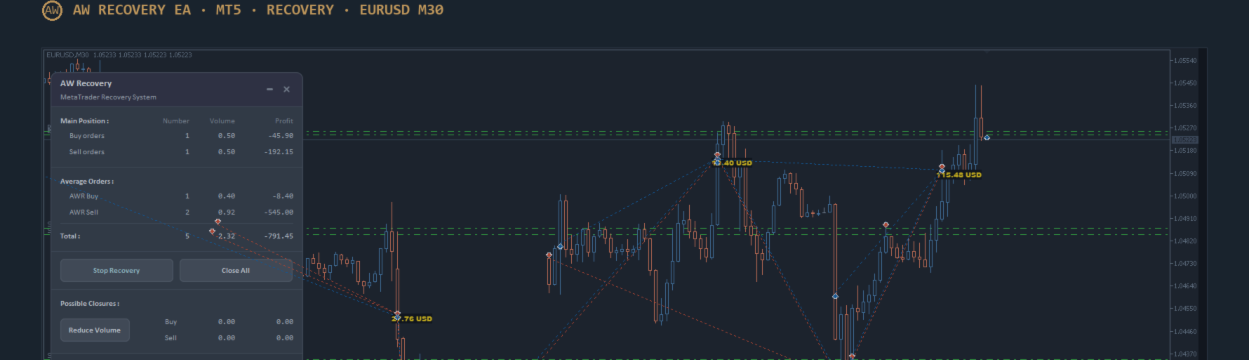

AW Recovery EA brings a losing position out of drawdown. The EA locks the position so that the loss stops growing, and then closes it part by part with the profit of small extra trades.
The EA works on the symbol where it is attached. If there is a drawdown on several pairs, the EA is attached to each pair separately.
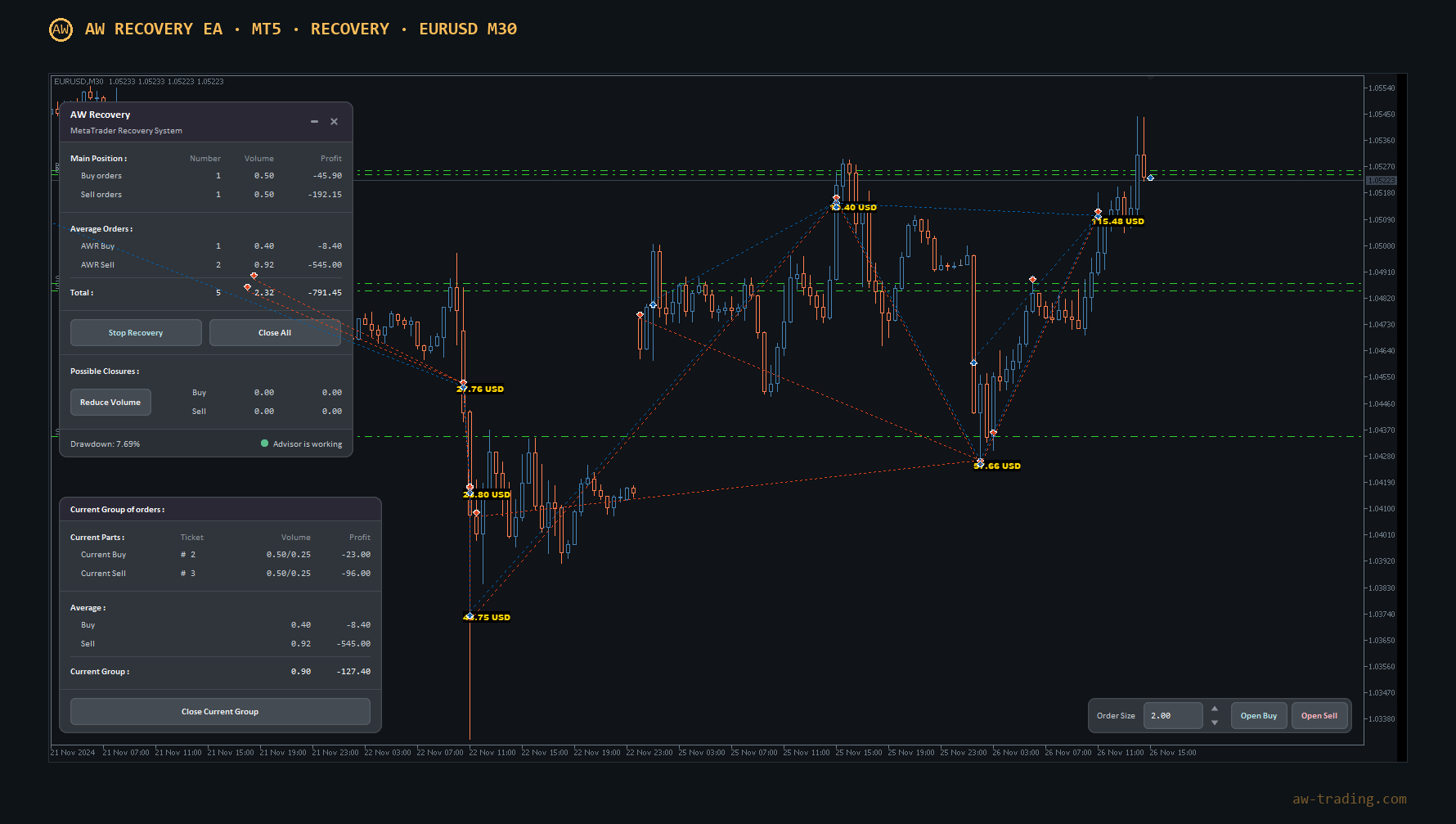
Note! Other articles about the EA:
All inputs with descriptions: HERE
The EA panel and its buttons: HERE
The article contains the following sections:
- Quick start
- Ready-made set files
- How the EA works
- EA volumes: the base and how to raise it
- Own calculation for another instrument
- Check in the Strategy Tester
- Frequently asked questions
Words used in the article
- Lot - the volume of a trade. 0.01 is the smallest volume.
- Drawdown - by how many percent the equity on the account is below the balance because of the open loss.
- Lock - an opposite trade of the same volume: Buy 0.50 and Sell 0.50. The loss stops growing.
- Averaging order - a small extra trade of the EA. Its profit goes to closing the loss.
- Part - a piece of the losing position that the EA closes at one time.
- Point - the smallest price change, the last digit of the quote. For gold at 2650.25, one point = 0.01.
- Set file - a file with ready-made EA settings (.set).
- Timeframe - the time of one candle: M30 - 30 minutes, D1 - one day.
1. Quick start
Action 1 - Check the account type: a Hedge account is needed (this word is shown in the title of the terminal window). On a Netting account the lock is not possible. Take the set file for the instrument from section 2: drawdown now from 10 to 15 % - the 10 % set, more than 15 % - the 20 % set.
Action 2 - Open Market Watch (Ctrl+M) and check how many decimal places the price has.
- EURUSD - 5 digits (1.08451), gold and bitcoin - 2 digits (2650.25): the set fits as it is.
- Gold with 3 digits (2650.255): in the set, multiply four numbers by 10 - "Step for average", "TakeProfit in points for partial close", "Maximum spread in points", "Maximum slippage in points". With 4 digits - by 100.
- Bitcoin: right-click BTCUSD - Specification - Contract size. It should be 1. If it is not 1, calculate the settings by section 5.
Action 3 - Open the chart of the symbol and click M30 at the top. In the Navigator window (Ctrl+N), in the Expert Advisors - Market folder, find AW Recovery EA and drag it onto the chart. On the Inputs tab click Load, select the set file, correct the numbers from action 2, click OK.
Action 4 - If the position was opened by another EA, close its chart so that it does not add trades. Turn on the Algo Trading button on the top toolbar of the terminal. Yellow panel - Recovery is waiting for the drawdown, green dot - it is already working.
The volumes in the set do not need to be changed. Each set has two volumes: "Volume of first average order" 0.06 and "Part to close from a loss-making position" 0.03. They are the same for any deposit and any position - they are not scaled to the account size. A large deposit by itself is not a reason to open larger trades: it gives a reserve of funds for the recovery, not a reason to spend it. How and when the volumes are raised - section 4.
Note! The EA recovers the position by averaging: while it works, the volume on the account grows, and the drawdown can become larger for a while than at launch. If the price moves against the position for a long time, the recovery needs more and more funds. The account must keep a reserve of free funds, so it is better to run the situation in the tester first (section 6).
2. Ready-made set files
Download the set files: See below the article.
The column "What was in the test" is not a requirement for the account but the situation in which the set was checked: what the position was and how much money was on the account. The EA volumes in the set do not depend on this situation (section 4).
The drawdown in the table means by how many percent of the deposit the equity went down on average over the completed recoveries. This is an average: some recoveries went deeper, so the account needs a larger reserve. Time is the average number of days from launch to the close of the last order.
The sets were tested in the MT5 tester on the full history for the given period, with leverage 1:500. If the account leverage is lower, for example 1:100, it is better to run the situation in the tester with this leverage.
Which set to take - 10 % or 20 %? The earlier the EA starts, the closer the price is to the position, the cheaper each part is to close, and the larger the reserve of funds for the recovery.
| Drawdown on the account | What to do |
|---|---|
| up to 5 % | usually too early: the position can return to profit by itself |
| from 10 to 15 % | the 10 % set, the EA starts at once |
| from 15 to 20 % | start as soon as possible - the 20 % set, its settings are more careful; if the drawdown is still below 20 %, enter the current drawdown in "Drawdown in percentage or in money to Launch" |
| more than 20 % | check in the tester first (section 6), add funds to the deposit if needed |
The EA can be attached in advance: it starts working by itself when the drawdown reaches the threshold. The threshold is set in "Drawdown in percentage or in money to Launch" (the sets already have 10 or 20), the current drawdown is shown at the bottom of the panel (Drawdown).
How the sets differ (nothing needs to be changed, everything is already in the file):
| Setting | EURUSD 10 % | EURUSD 20 % | XAUUSD 10 % | XAUUSD 20 % | BTCUSD 10 % | BTCUSD 20 % |
|---|---|---|---|---|---|---|
| "Part to close from a loss-making position" | 0.03 | 0.03 | 0.03 | 0.03 | 0.03 | 0.03 |
| "Volume of first average order" | 0.06 | 0.06 | 0.06 | 0.06 | 0.06 | 0.06 |
| "Step for average" | 400 | 400 | 1500 | 3000 | 75000 | 75000 |
| "Multiplier to step" | 1.3 | 1 | 1 | 1 | 1 | 1.3 |
| "Maximum number of average orders" | 6 | 6 | 6 | 6 | 6 | 3 |
| "TakeProfit in points for partial close" | 40 | 40 | 100 | 100 | 5000 | 5000 |
All sets have "Multiplier to volume" 1.3, the AW Trend Predictor trend filter with the H1 timeframe and trading in both directions. The 20 % sets have more careful settings: for gold the step is twice as large, for EURUSD the step does not grow, for bitcoin the step grows, but there are no more than 3 orders in one direction.

Is the position larger than it was in the test? The set works with it too: the EA volumes do not depend on the position. The only difference is that there are more parts, and the recovery takes longer. To speed it up, the volumes are raised by section 4, and only after checking the situation in the tester.
3. How the EA works
The "AW Recovery EA" advisor is used to recover losing positions on a trader's account.
The advisor locks* the losing position and then opens averaging* orders. The losing position is virtually divided into smaller parts, each of which is closed separately. Using partial closing* reduces the deposit burden and makes the recovery process safer.
- Локирование - это выравнивание ордеров типа Buy и Sell по объему. Локирование используется для фиксации убытка в текущем положении, если объемы одинаковы, то при изменении цены убыток останется в прежней величине. При наличии локированной позиции прирост убытка идет за счет начисления свопов со стороны брокера, это следует учитывать при расчетах рисков.
- Усредняющие ордера - это ордера, которые открывает советник для того, чтобы с помощью их прибыли восстанавливать убыточную позицию. Усредняющие ордера можно также открывать самому с помощью панели советника.
- Частичное закрытие - при закрытии советник не закрывает ордера целиком. То есть при наличии ордера с большим объемом советник виртуально разделит его на малые части и не будет закрывать весь объем сразу, а закроет ордер по частям. Например ордер в 1.00 лот может быть закрыт частями по 0.10 лотов или например по 0.05 лотов.
The Expert Advisor includes an intelligent system for closing averaging orders. This algorithm doesn't close the entire basket of averaging orders, as is usually the case. Only the first and last averaging orders are closed. This is done to reduce the load on the deposit, as each time averaging orders are closed, a portion of the losing order is also closed. This is used when there's no need to close the entire basket, so the Expert Advisor can close only the portion that will reduce the overall size of the basket of averaging orders and mitigate the portion of the losing position.
For example, if the number of averaging orders is more than three, the advisor will not close all three at once, but will only close the first and last one it opened. The remaining orders will be closed later, when the next averaging orders are opened. In addition to the averaging orders, the advisor will close a portion of the losing position.
4. EA volumes: the base and how to raise it
The EA has two volumes. "Part to close from a loss-making position" is the part it closes at one time. "Volume of first average order" is the first extra trade; each next one in the same direction is larger than the previous by "Multiplier to volume" times. To close a part, the profit of the extra trades must cover its loss, so these two numbers only work as a pair.
Action 1 - Start with the base.
"Volume of first average order" = 0.06, "Part to close from a loss-making position" = 0.03
for any deposit and any position
The base is already in the sets. The volumes are not calculated from the deposit: the account size says how large the reserve is, not how much to average. The first trade is only the start of a series. How much a series in one direction adds up to with "Multiplier to volume" 1.3 and "Maximum number of average orders" 6:
| "Volume of first average order" | Trades of the series | Whole series |
|---|---|---|
| 0.06 | 0.06, 0.08, 0.10, 0.13, 0.17, 0.22 | 0.76 lots |
| 0.12 | 0.12, 0.16, 0.20, 0.26, 0.34, 0.45 | 1.53 lots |
| 0.24 | 0.24, 0.31, 0.41, 0.53, 0.69, 0.89 | 3.07 lots |
A series of 0.76 lots on gold is already a noticeable load on a 10,000 USD account: every dollar of price movement changes the equity by 76 USD. That is why the base is small, and anything above it is a deliberate decision after a check.
Action 2 - Decide whether raising is needed. Raising makes sense if the position is large and the recovery with the base takes too long. The upper limit comes from the volume of the position, not from the deposit:
Part - not more than the volume of the largest losing order / 8
First order = part × 2 (1.5 to 2 is fine)
| Level | "Volume of first average order" | "Part to close from a loss-making position" | Largest order of the position at least |
|---|---|---|---|
| base | 0.06 | 0.03 | any |
| 2 | 0.12 | 0.06 | 0.48 lots |
| 3 | 0.24 | 0.12 | 0.96 lots |
| 4 | 0.50 | 0.25 | 2.00 lots |
Example: a Buy position of 1.00 lot in one order. 1.00 / 8 = 0.125, so level 3 (part 0.12, first order 0.24) is the limit. A position of 0.30 lots: 0.30 / 8 = 0.0375, there is nowhere to go above the base, the part stays 0.03.
Action 3 - Raise one level at a time and check.
- Change both numbers together, not more than twice at a time. Do not touch the other settings of the set: one change at a time.
- Before each level - the situation in the tester (section 6). Look at the maximum equity drawdown in the tester report and whether everything closed to the end. If the result is not acceptable, go back one level.
- The larger the volumes, the faster the parts close, but the more funds each series holds and the deeper the drawdown can go during the work.
When the volumes are not raised:
- the drawdown on the account is already above 20 %: the price is far from the position, each part is expensive, and the reserve of funds is smaller;
- the EA that opened the position is still working and adding orders;
- the only argument is the size of the deposit.
A position from a grid with growing orders. Many grid EAs open the first order small and each next one larger: for example, 0.01, 0.02, 0.04, 0.08, 0.16. For such a position the "order / 8" rule is calculated not from the farthest order but from the largest one - in such a grid it is the closest to the price. Far orders smaller than the part are closed whole, and that is normal: they are small, and the profit of one series is enough for them. In the example the largest order is 0.16, 0.16 / 8 = 0.02 - do not go above the base. If the grid has reached 0.50 or 1.00 lot, the limit is calculated from them. It is important to compare the total volume of all grid orders with the test, not the first order: an account with a 0.01 - 0.16 grid holds 0.31 lots. The sets have "What orders to start from" = "Start with easy to close orders": the EA starts with the orders closest to the price. In a growing grid these are the largest orders, so the volume on the account decreases fastest, and the small far orders are closed last.
Volumes in short. The base 0.06 / 0.03 for everyone. Raise as a pair, one level at a time, not above "largest order / 8", after a check in the tester. The deposit is a reserve for the recovery, not a reason to increase the trades.
5. Own calculation for another instrument
It is needed if the instrument is not among the ready-made sets. The volumes are the base ones (section 4), two numbers are calculated - the step and TakeProfit, the other settings are taken from the EURUSD 10 % set.
Action 1 - Step ("Step for average"). This is half of the usual daily price move. The ATR indicator shows it.
Step = ATR × multiplier / 2
Multiplier - a one followed by as many zeros as the price has decimal places: 2 digits - 100, 3 - 1,000, 4 - 10,000, 5 - 100,000
- Open the chart of the instrument and click D1 at the top.
- Insert - Indicators - Oscillators - Average True Range, period 14, OK.
- Zoom out with the "minus" key so that about one year is on the screen.
- The ATR value is shown in the top left corner of the indicator window, for example "ATR(14) 51.54" (1 in the picture). If the line is now much higher than usual for the year (a spike, 2 in the picture), hover the mouse over the line in a calm place (3) and take the number from the Data Window (Ctrl+D).
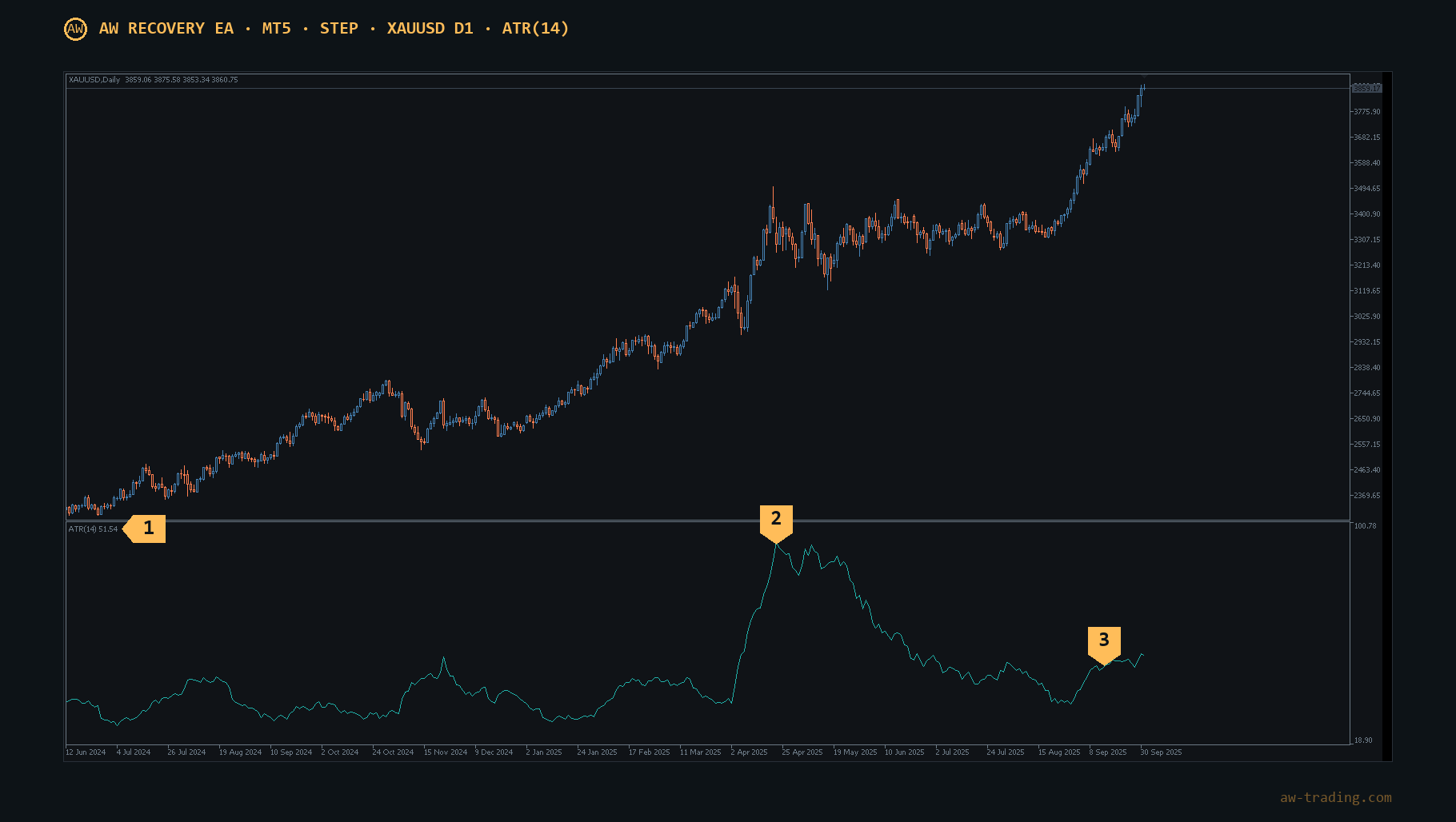
1 - the current ATR value, 2 - a spike, it is not used, 3 - the usual level of the line.
| Example | Price | Multiplier | ATR | Step |
|---|---|---|---|---|
| EURUSD | 1.08451 (5 digits) | 100,000 | 0.00822 | 0.00822 × 100,000 / 2 ≈ 400 |
| Gold | 3860.75 (2 digits) | 100 | 51.54 | 51.54 × 100 / 2 ≈ 2600 |
| Gold | 3860.755 (3 digits) | 1,000 | 51.540 | 51.540 × 1,000 / 2 ≈ 25,800 |
| Bitcoin | 96500.25 (2 digits) | 100 | 2606.14 | 2606.14 × 100 / 2 ≈ 130,000 |
Example: gold, as in the picture above. The price 3860.75 has two decimal places, the multiplier is 100. ATR 51.54. 51.54 × 100 = 5154. 5154 / 2 = 2577, round to 2600. Enter 2600 in "Step for average".
The same gold at a broker with three digits. Price 3860.755, multiplier 1,000. 51.540 × 1,000 = 51,540. 51,540 / 2 = 25,770, round to 25,800.
The numbers in the examples only show the calculation, on a real chart they will be different. The number of decimal places is visible in the price in Market Watch.
A common mistake - the wrong multiplier. For gold with three digits the step is 10 times larger than with two. With a step that is too small, the EA opens trades too often. Always calculate the step on the chart of the broker in use.
Own calculation or ready-made set? In an own calculation, step = ATR / 2. In the ready-made sets the step is already selected in the tester - take it as it is. For faster work, divide the step not by 2 but by 3 or 4: there will be more trades, but the load on the deposit grows too.
Action 2 - TakeProfit ("TakeProfit in points for partial close").
TakeProfit = spread × 3
Spread: Market Watch - right-click - Columns - check Spread. EURUSD with a spread of 13: 13 × 3 = 39, round to 40. A larger value is not needed: this is not a price target, but a small plus above the closed loss, and in tests a large TakeProfit only made the recovery longer.
6. Check in the Strategy Tester
Action 1 - View - Strategy Tester (Ctrl+R). Select AW Recovery EA, the symbol, M30, the deposit and leverage as on the account, turn on Visual mode. Choose a start date after which the price moved against the position for a long time.
Action 2 - On the Inputs tab right-click - Load, select the set file, set "Open Average orders via Panel" = Off. If a raised volume level is being checked, enter the volumes of that level (section 4).
Action 3 - Click Start. On the EA panel, enter the volume of the position in the Order Size field (1 in the picture) and click Open Buy (2) if the price fell after the start date, or Open Sell if it rose. For a position of several orders, click several times with the needed volumes.
Action 4 - Watch: the EA waits for the drawdown, sets the lock and starts the recovery. It is done when the bottom of the panel shows "No orders to recover". In the tester report look at the maximum equity drawdown: this is the reserve the account must have.
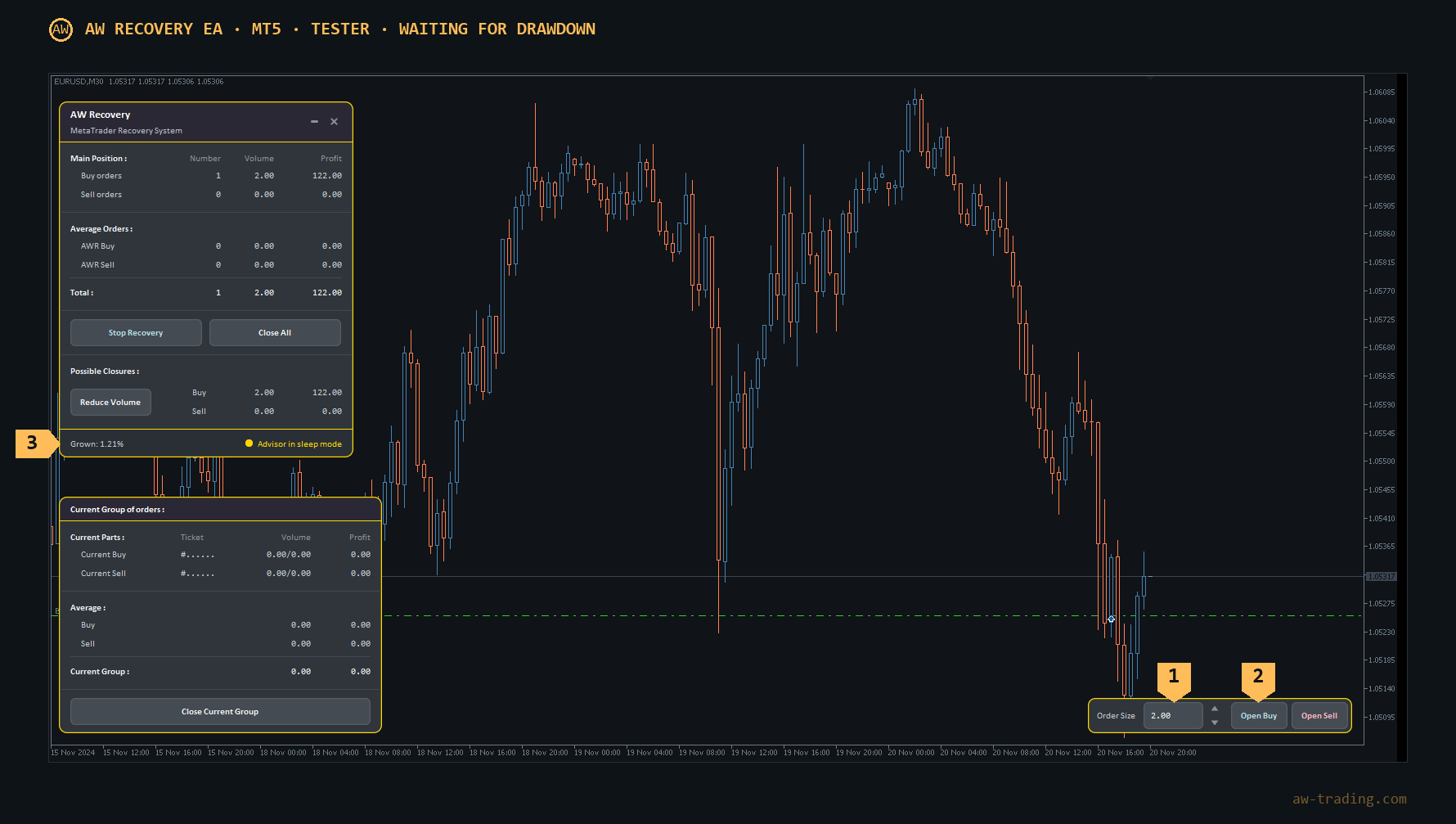
1 - the Order Size field, 2 - the Open Buy button, 3 - the status "Advisor in sleep mode": the EA is waiting for the drawdown.
7. Frequently asked questions
Which account is needed? One where Buy and Sell can be held at the same time on one symbol - brokers call it Hedge (hedging). On another account type the lock is not possible.
Should the other EA be turned off? Yes, the one that opened the losing position. Otherwise Recovery will lock each of its new trades.
How to recover the trades of only one EA? In "MagicNumbers group for recovery" select "Same MagicNumbers on same Symbol", in "MagicNumbers for recovery" enter its MagicNumber - the number from its settings (usually Magic or MagicNumber).
The deposit is large - raise the volumes? No. The volumes depend on the position, not on the deposit (section 4). A large deposit is a reserve of funds for the recovery.
The recovery is slow, how to speed it up? Raise the volumes one level by section 4 and check in the tester. The second way is a smaller step (section 5), it also increases the load on the account.
Does the broker charge a commission? Enter it per 1 lot in "Comission per 1 Lot(0-no comisions)". The EA takes swaps into account by itself.
Can trades be opened and closed manually during recovery? No: the EA levels the lock back at once.
The EA on a VPS and on a computer? It must work in one place only, the second copy is turned off.
The terminal restarted in the middle of recovery? In "Type of Launch" set "Instant start", otherwise the EA waits for the drawdown again.
Why did the EA close everything at once? The last part of the position was closed, the TakeProfit for all orders triggered ("TP for total basket in money", if enabled), or Close All was pressed.
Which timeframe? M30, as in the sets. M15-H1 also work. On M5 and lower there are too many trades, on H4 and higher the recovery takes a long time.
Drawdown below 5 %? Usually too early: the position can return to profit by itself.
Buy AW Recovery EA:
MT5 version
👉 https://www.mql5.com/en/market/product/49692
MT4 version
👉 https://www.mql5.com/en/market/product/49453

AW Trading Software