
0
80
How to Manage 100+ MT5 Positions Efficiently Without Losing Control
Managing one or two open positions in MetaTrader 5 is usually straightforward.
The situation changes when the number of open positions grows to 20, 50, 100 or more.
At that point, the challenge is no longer simply finding a Close All button.
The real challenge is maintaining clear control over:
WHY LARGE POSITION GROUPS ARE DIFFERENT
When many positions are open at the same time, repeating the same management operation manually can become inefficient and difficult to monitor.
For example, a trader may need to:
You also need to know whether the operation was completed across the intended position group.
SCOPE CONTROL
One of the most important concepts when managing multiple positions is scope.
Before executing an operation, the trader should clearly understand which positions will be affected.
EA_TOTAL_CLOSE provides two main Close Scope options:
This allows a trader to decide whether the operation should remain focused on one chart symbol or apply across eligible open positions.
BATCH POSITION MANAGEMENT
When a large position group is involved, completion visibility becomes especially important.
EA_TOTAL_CLOSE uses batch processing to manage eligible positions while displaying processing and completion information.
The batch system includes:
TESTING WITH 102 SELL POSITIONS
In one recent test, EA_TOTAL_CLOSE was used with 102 open SELL positions on MetaTrader 5.
The screenshot from this test shows the open positions in the MT5 Toolbox together with the EA_TOTAL_CLOSE dashboard and batch completion information.
The result shown in this specific test was:
The more important questions are:
Did the requested operation complete across the intended position group?
and
Can the trader clearly see that completion?
MANUAL TP/SL WITH MULTIPLE POSITIONS
TP and SL management becomes another important issue when many positions are open.
EA_TOTAL_CLOSE separates manual position management into four independent fields:
Changing TP does not remove or modify an existing SL.
Changing SL does not remove or modify an existing TP.
This becomes especially useful when positions already contain levels created manually, through Break Even, Trailing Stop, Auto TP/SL, another MetaTrader terminal, a mobile device, or the broker.
BROKER AUTO TP/SL
Broker Auto TP/SL works differently from a system that continuously replaces every existing TP or SL level.
It fills only missing levels.
Important behavior includes:
VIRTUAL TP/SL
Virtual TP/SL provides another management method.
Instead of placing visible TP/SL levels at the broker, EA_TOTAL_CLOSE monitors the configured virtual conditions internally and closes a position when the virtual condition is reached.
Because this monitoring happens locally, the following must remain active:
Break Even and Trailing Stop are also useful when managing groups of existing positions.
Break Even can be applied separately to BUY and SELL positions and follows the selected main Close Scope.
Trailing Stop can manage BUY and SELL positions according to its configured parameters and applicable scope.
Both functions remain subject to broker restrictions such as Stop Level, Freeze Level, current market price, symbol specifications and trading permissions.
THE MAIN GOAL IS CONTROL
Managing 100+ positions is not only about speed.
For the trader, the more important objective is maintaining clear control over:
ABOUT EA_TOTAL_CLOSE
EA_TOTAL_CLOSE is an MT5 Trade & Position Manager designed for managing positions that are already open.
It is not a signal EA and it does not automatically generate trade entries.
Main management functions include:
FULL VERSION ON MQL5 MARKET
EA_TOTAL_CLOSE is available on the MQL5 Market:
https://www.mql5.com/en/market/product/188753
VIDEO GUIDE
EA_TOTAL_CLOSE - Complete MT5 Trade Manager Guide & 100+ Position Batch Test:
https://youtu.be/TtOovOk-pig
IMPORTANT NOTE
The batch results mentioned in this article are examples from specific test environments and are not guaranteed execution speeds.
Actual results may vary depending on broker, server, network, market conditions, trading restrictions and the number of positions.
EA_TOTAL_CLOSE is a position-management utility. It does not provide trading signals, predict market direction or guarantee trading results.
Managing one or two open positions in MetaTrader 5 is usually straightforward.
The situation changes when the number of open positions grows to 20, 50, 100 or more.
At that point, the challenge is no longer simply finding a Close All button.
The real challenge is maintaining clear control over:
- Which positions are being managed
- Whether BUY or SELL positions are affected
- Whether the operation applies to the current symbol or multiple symbols
- Whether TP/SL changes were completed
- Whether every position in a batch was processed
- Whether any operation failed or requires another attempt
WHY LARGE POSITION GROUPS ARE DIFFERENT
When many positions are open at the same time, repeating the same management operation manually can become inefficient and difficult to monitor.
For example, a trader may need to:
- Apply TP to many positions
- Apply SL without changing an existing TP
- Move selected positions to Break Even
- Manage only BUY or SELL positions
- Close profitable positions
- Close losing positions
- Apply Trailing Stop
- Manage only the current chart symbol
- Manage all eligible open positions
You also need to know whether the operation was completed across the intended position group.
SCOPE CONTROL
One of the most important concepts when managing multiple positions is scope.
Before executing an operation, the trader should clearly understand which positions will be affected.
EA_TOTAL_CLOSE provides two main Close Scope options:
- Current Chart Only
- All Open Orders
- Total Floating
- Position count
- BUY volume and position count
- SELL volume and position count
- Last Close
This allows a trader to decide whether the operation should remain focused on one chart symbol or apply across eligible open positions.
BATCH POSITION MANAGEMENT
When a large position group is involved, completion visibility becomes especially important.
EA_TOTAL_CLOSE uses batch processing to manage eligible positions while displaying processing and completion information.
The batch system includes:
- Processing status
- Completed operation count
- Pending operation status
- Error reporting
- Retry and recovery handling
- Protection against overlapping batch operations
TESTING WITH 102 SELL POSITIONS
In one recent test, EA_TOTAL_CLOSE was used with 102 open SELL positions on MetaTrader 5.
The screenshot from this test shows the open positions in the MT5 Toolbox together with the EA_TOTAL_CLOSE dashboard and batch completion information.
The result shown in this specific test was:
- Open SELL positions: 102
- Batch completion: 102/102
- Completion time shown: 234 ms
- Scope: All Open Orders
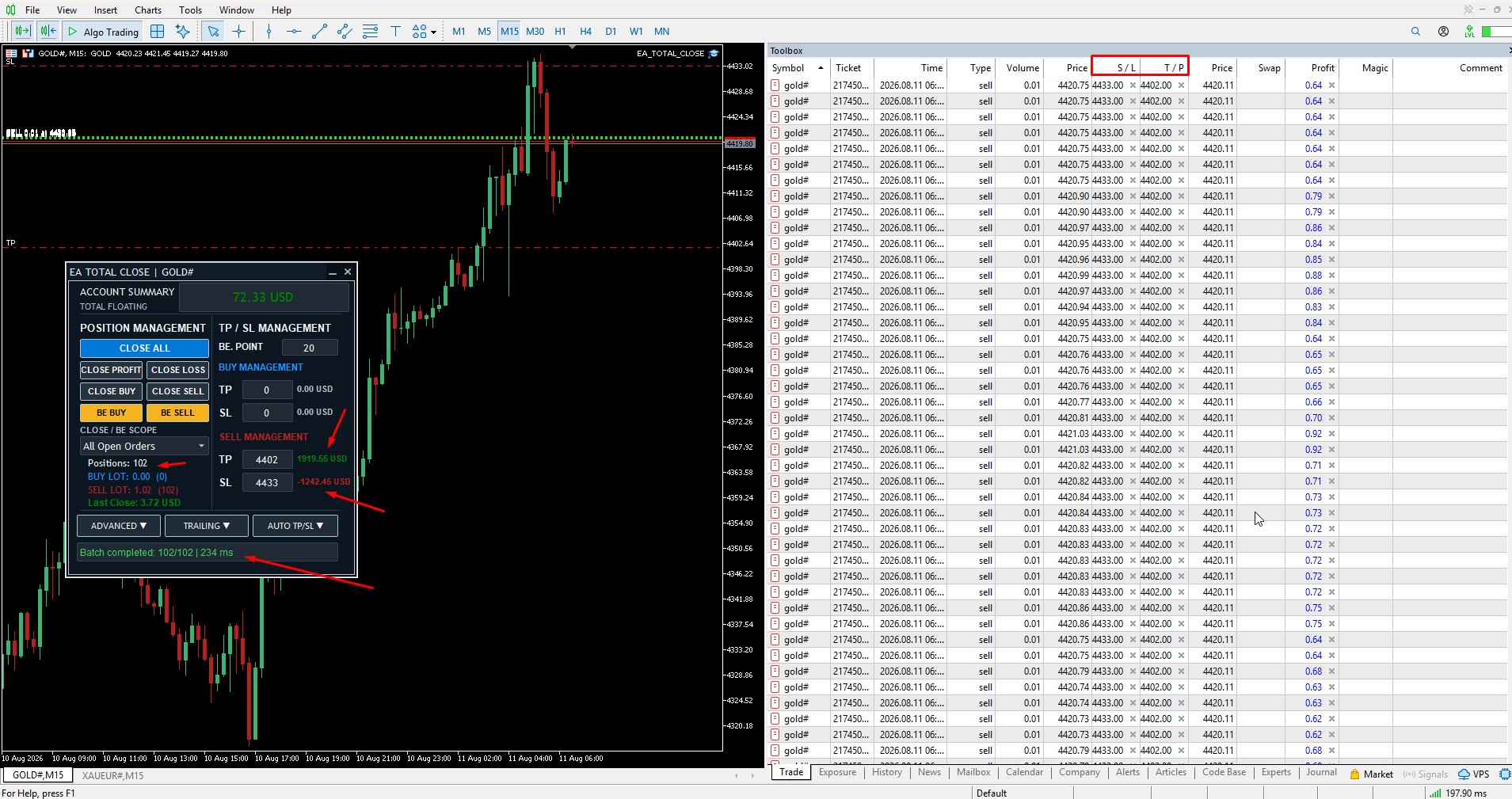
It is important to understand that the 234 ms figure is the result of this specific test environment.
It is not a guaranteed execution speed.
WHY EXECUTION TIME CAN CHANGE
Actual position-management time can vary depending on many factors, including:
- Internet connection
- Network latency
- Broker server response
- Broker or server load
- Market conditions
- Liquidity
- Number of open positions
- Symbol specifications
- Stop Level restrictions
- Freeze Level restrictions
- Trading permissions
- Price movement while operations are being processed
The more important questions are:
Did the requested operation complete across the intended position group?
and
Can the trader clearly see that completion?
MANUAL TP/SL WITH MULTIPLE POSITIONS
TP and SL management becomes another important issue when many positions are open.
EA_TOTAL_CLOSE separates manual position management into four independent fields:
- BUY TP
- BUY SL
- SELL TP
- SELL SL
Changing TP does not remove or modify an existing SL.
Changing SL does not remove or modify an existing TP.
This becomes especially useful when positions already contain levels created manually, through Break Even, Trailing Stop, Auto TP/SL, another MetaTrader terminal, a mobile device, or the broker.
BROKER AUTO TP/SL
Broker Auto TP/SL works differently from a system that continuously replaces every existing TP or SL level.
It fills only missing levels.
Important behavior includes:
- A missing TP or SL can be filled automatically
- Existing non-zero TP or SL levels are not moved when Auto point settings are changed later
- New positions use the latest saved Auto settings
- Existing manual non-zero levels remain in place
VIRTUAL TP/SL
Virtual TP/SL provides another management method.
Instead of placing visible TP/SL levels at the broker, EA_TOTAL_CLOSE monitors the configured virtual conditions internally and closes a position when the virtual condition is reached.
Because this monitoring happens locally, the following must remain active:
- MetaTrader 5
- EA_TOTAL_CLOSE
- Algo Trading
- Trading-account connection
- Internet connection
- Computer or VPS
Break Even and Trailing Stop are also useful when managing groups of existing positions.
Break Even can be applied separately to BUY and SELL positions and follows the selected main Close Scope.
Trailing Stop can manage BUY and SELL positions according to its configured parameters and applicable scope.
Both functions remain subject to broker restrictions such as Stop Level, Freeze Level, current market price, symbol specifications and trading permissions.
THE MAIN GOAL IS CONTROL
Managing 100+ positions is not only about speed.
For the trader, the more important objective is maintaining clear control over:
- What will be affected
- What has completed
- What is still pending
- Which management method is active
- Whether existing TP/SL levels remain intact
- What the latest closing result was
ABOUT EA_TOTAL_CLOSE
EA_TOTAL_CLOSE is an MT5 Trade & Position Manager designed for managing positions that are already open.
It is not a signal EA and it does not automatically generate trade entries.
Main management functions include:
- Close All
- Close BUY / SELL
- Close Profit / Loss
- Break Even
- Manual TP/SL
- Broker Auto TP/SL
- Virtual TP/SL
- Trailing Stop
- Current Chart / All Open Orders scope
- Batch Position Management
- Last Close
- Light / Dark interface
FULL VERSION ON MQL5 MARKET
EA_TOTAL_CLOSE is available on the MQL5 Market:
https://www.mql5.com/en/market/product/188753
VIDEO GUIDE
EA_TOTAL_CLOSE - Complete MT5 Trade Manager Guide & 100+ Position Batch Test:
https://youtu.be/TtOovOk-pig
IMPORTANT NOTE
The batch results mentioned in this article are examples from specific test environments and are not guaranteed execution speeds.
Actual results may vary depending on broker, server, network, market conditions, trading restrictions and the number of positions.
EA_TOTAL_CLOSE is a position-management utility. It does not provide trading signals, predict market direction or guarantee trading results.