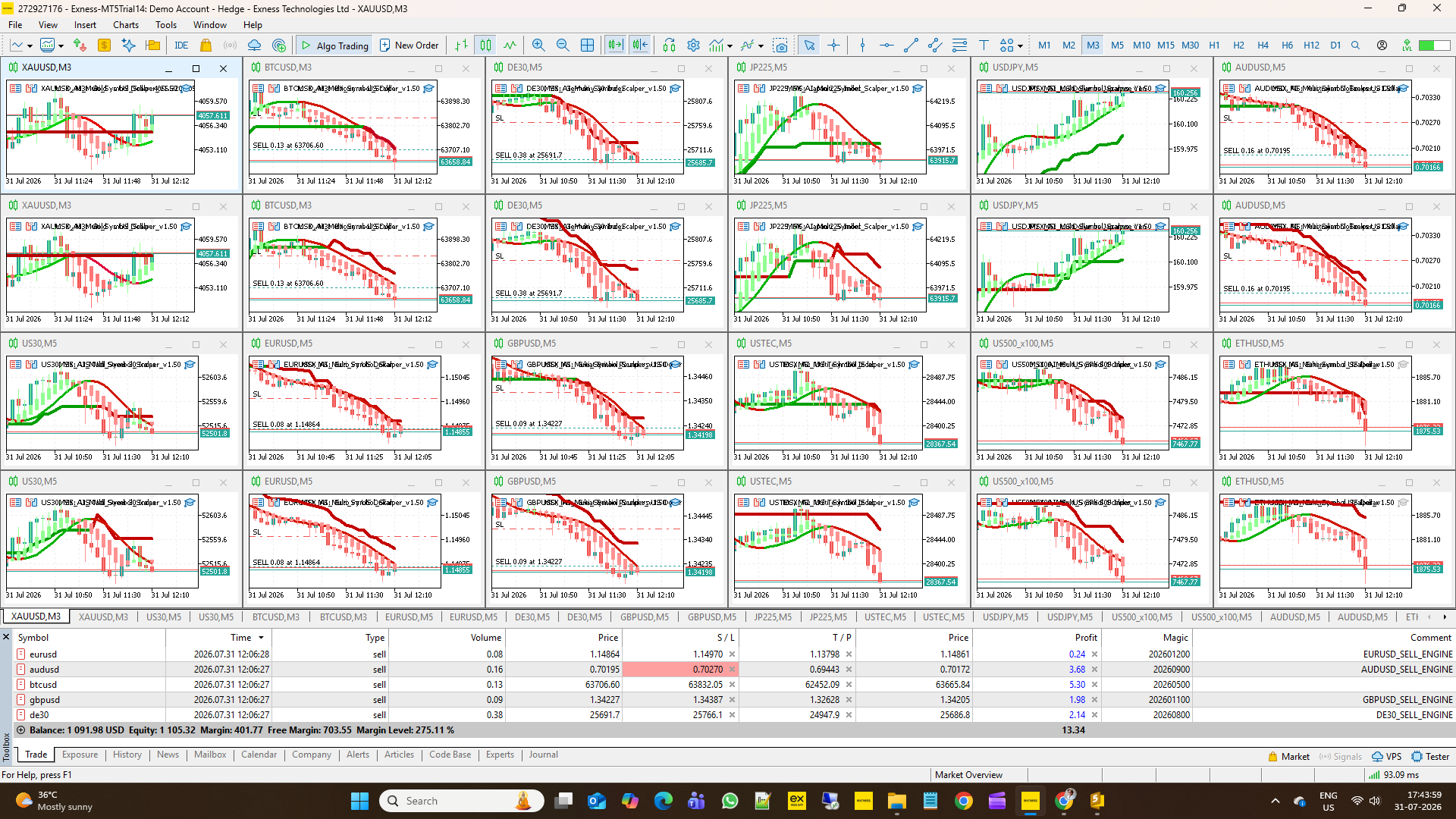
Building a Multi-Symbol Portfolio Trading Framework: Architecture of MSX AI Multi Symbol Scalper v1.80

Automated trading becomes considerably more complicated when an Expert Advisor moves beyond a single chart.
A strategy running on one symbol may only need to answer relatively simple questions: Is there a valid signal? What lot size should be opened? Where should the stop loss and take profit be placed?
A portfolio environment is different.
When several EA instances operate simultaneously, they share account equity, free margin and broker conditions. A position opened by one chart changes the resources available to every other chart. Trading sessions may start and finish at different times, protection limits may need to survive terminal restarts, and account-wide risk controls must coexist with the independent logic of individual EA instances.
Version 1.80 of MSX AI Multi Symbol Scalper was developed around these portfolio-management considerations.
This post provides an overview of the architecture and explains how its principal components interact.
1. Trading architecture
The EA uses several independent layers rather than allowing a trading signal alone to determine whether an order should be opened.
The general execution sequence can be viewed as:
Market Analysis → Trend Confirmation → Entry Validation → Trading Permission → Position Sizing → Margin Validation → Order Execution → Position Management → Capital Protection
A valid directional signal therefore does not necessarily mean that a trade will be opened.
For example, an entry can still be rejected because of spread conditions, session restrictions, available margin, portfolio capital allocation or another enabled protection rule.
This separation between signal generation and permission to trade is particularly important when several EA instances share one account.
2. Triple-layer trend framework
The analytical architecture combines three trend components:
- Master Smoothed HMA Trend Engine
- Hybrid Heiken Ashi Trend Engine
- MSX SuperTrend Advanced Engine
These components are used as a synchronized trend-confirmation framework.
Additional filters can evaluate characteristics such as trend strength, reversal strength and abnormal ATR-based volatility.
The purpose is not to predict every market movement. Instead, the framework attempts to define the market conditions under which the configured strategy is permitted to participate.
Each analytical component remains configurable, allowing the trader to optimize the parameters for the symbol, timeframe and intended trading style.
3. Trend Birth Protection
One issue in trend-following systems is distinguishing between an existing trend and the beginning of a newly confirmed trend.
Version 1.70 introduced Trend Birth Protection to address this.
When enabled, the EA tracks the confirmed SuperTrend direction and determines whether an entry opportunity belongs to the birth of a new trend.
An important part of this design is startup synchronization.
An MT5 restart, VPS restart, chart refresh or EA reload should not automatically transform an already established trend into a new trend merely because the program's runtime memory has been recreated.
The Trend Birth state is therefore synchronized with the current market trend during initialization.
This feature remains optional. Traders who prefer a different entry model can disable Trend Birth Protection.
4. One Trade Per Trend and pullback re-entry
Trend Birth Protection and One Trade Per Trend are related concepts, but they perform different jobs.
The One Trade Per Trend mechanism can place a hard lock on repeated trading during the same confirmed trend.
Pullback re-entry provides another configurable behavior. It can allow the EA to consider a later qualifying opportunity after an earlier position has been fully closed, provided that the applicable entry and protection requirements are again satisfied.
This separation allows different deployment styles.
A conservative configuration may permit only the initial trend opportunity, while another configuration may allow qualifying re-entry behavior during a continuing trend.
5. Position sizing starts with current account conditions
In percentage-risk mode, position sizing begins with current account equity.
Conceptually:
Risk Money = Current Equity × Risk Percentage
The resulting risk amount is combined with the current stop-loss distance and the symbol's trading specifications to calculate an initial lot size.
This means that risk sizing is adaptive.
If account equity changes, the risk-money calculation changes with it. The trader therefore does not need to manually recalculate a fixed lot merely because account equity has increased or decreased.
However, risk percentage alone is not sufficient for a multi-symbol portfolio.
A mathematically valid risk lot may still require too much margin when other positions are already using account resources.
For this reason, additional portfolio controls are applied.
6. Free Margin Reserve
The Free Margin Reserve protects a configurable portion of currently available free margin from being allocated to the next position.
Suppose:
Current Free Margin = $1,000
and:
Free Margin Reserve = 30%
The calculation becomes:
Reserved Margin = $300
Reserve-Adjusted Budget = $700
The next position is therefore evaluated against the remaining $700 rather than treating the entire $1,000 as available trading capacity.
Because the calculation uses current free margin, the budget changes dynamically as the account and existing portfolio positions change.
7. Per-EA capital allocation in Version 1.80
Version 1.80 extends this concept with an adaptive Per-EA Tradable Equity Limit.
Two allocation modes are available:
Fixed allocation uses a predefined money amount.
Percentage allocation calculates the EA's permitted budget as a percentage of the reserve-adjusted available margin budget.
Consider this example:
Free Margin = $1,000
Reserve = 30%
Reserve-Adjusted Budget = $700
Per-EA Limit = 20%
The resulting allocation for the next trade is:
$700 × 20% = $140
If the reserve-adjusted budget later becomes $1,400, the same 20% configuration produces a $280 allocation.
If it falls to $500, the allocation becomes $100.
This is the main difference between a fixed capital ceiling and an adaptive percentage allocation.
The allocation follows the current portfolio environment.
8. Relationship with the Emergency Max Lot Cap
Earlier configurations used a fixed Emergency Max Lot Cap as an absolute lot-size ceiling.
A fixed ceiling can still be useful when the advanced Per-EA capital-allocation system is disabled.
However, it creates a different behavior when percentage-based adaptive allocation is being used.
For example, an account may grow while an old fixed lot ceiling remains unchanged. The risk and capital calculations could permit a larger position, but the historical fixed cap would continue restricting it.
Version 1.80 therefore changes this relationship.
When the Per-EA Tradable Equity Limit is enabled, the old Emergency Max Lot Cap is bypassed.
The position remains constrained by the active money-management and margin architecture, including the applicable risk calculation, broker volume rules, Free Margin Budget, Per-EA allocation and margin checks.
When the Per-EA allocation system is disabled, the fixed Max Lot Cap can again act as the legacy lot ceiling.
9. Margin-aware lot reduction
A calculated lot is not automatically accepted.
The EA evaluates the broker-required margin for the proposed position using the current symbol, direction, execution price and volume.
The required margin is then compared with the currently permitted margin budget.
If the proposed lot requires more margin than the available budget, the lot can be reduced according to the broker's permitted volume step.
The calculation continues until either:
- a valid lot fits the available budget, or
- even the broker minimum lot cannot satisfy the requirements.
In the second case, the trade is rejected rather than forcing a minimum-volume position.
This behavior is important in a portfolio because account conditions can change between successive entry opportunities.
10. Margin Environment Protection
Available free margin is only one side of margin management.
Broker margin requirements themselves can also change.
For example, the required margin for the same symbol and volume may increase because of changes in broker trading conditions or temporary risk controls.
The Margin Environment Protection framework evaluates the current margin requirement before allowing a new entry.
When the detected margin environment falls outside the configured acceptable conditions, a new trade can be blocked.
This works as an additional layer rather than replacing the normal Free Margin Budget and capital-allocation systems.
11. Multi-stage partial position closing
The trade-management engine can progressively reduce an existing position when configured profit thresholds are reached.
The partial-close engine operates tick by tick and supports multiple stages.
Before submitting a partial-close request, it validates the broker's:
- Minimum volume
- Volume step
- Requested close volume
- Remaining position volume
A partial close is not attempted if it would leave an invalid remaining position.
For example, if the broker minimum volume is 0.01 lots and a position contains 0.02 lots, a 0.01 partial close can leave a valid 0.01 runner.
If the position cannot be legally divided according to the symbol's volume specifications, partial closing is skipped.
This makes the feature dependent on actual broker volume rules rather than assuming that every position can be divided.
12. Local and master capital protection
Portfolio trading creates two different protection requirements.
The first concerns an individual EA instance.
The second concerns the complete trading account.
The EA therefore separates local capital protection from master account protection.
Local protection can include per-trade loss, daily loss, daily profit and drawdown controls.
Master protection uses account-level equity and can supervise master daily loss, master daily profit and master drawdown conditions across the portfolio.
When a configured protection condition is reached, the corresponding trading state can enter sleep mode and prevent additional trading according to that protection's rules.
This allows a portfolio to maintain individual strategy protection while also having an account-level boundary.
13. Persistent protection state
Runtime variables disappear when an EA or terminal is restarted.
That creates an important protection problem.
Suppose a daily protection limit has already been triggered. If restarting MT5 simply cleared the lock, restarting the platform could unintentionally allow trading to resume.
For this reason, applicable protection states and equity baselines can be persisted through MetaTrader Global Variables.
They can then be restored following events such as:
- MT5 restart
- VPS restart
- EA reload
- Chart refresh
- EA reattachment
Persistence and reset are deliberately separate concepts.
Restarting the program is not automatically treated as a new trading day.
14. Centralized Full Fresh Start
Version 1.80 uses a centralized Full Fresh Start mechanism.
Instead of maintaining different reset packages for different events, the architecture provides one reset authority for the applicable fresh-start state.
A genuine new broker day can invoke this reset.
If the user enables Fresh Start Each Session, a new enabled trading session can invoke the same reset package.
The reset can refresh the relevant equity baselines and clear applicable local/master protection state, sleep state, hard locks, signal memory, Trend Birth runtime state and reversal state.
This architecture reduces the possibility that future modifications update one reset path but accidentally leave another reset path using older behavior.
15. Four-session trading architecture
The EA provides four configurable broker-server-time windows:
Tokyo
London
New York
Other / Custom
Each window has its own enable state, start time and end time.
This permits different schedules without hard-coding a single trading day structure.
Additional controls can prevent new entries shortly before a session finishes and can close an existing position when the applicable enabled trading window has ended.
Overlapping enabled sessions are also considered.
If one session ends while another enabled session is already active, the session-end logic can allow the position to continue rather than treating the first session's end as an unconditional exit.
16. Session fresh starts and equity baselines
The optional Fresh Start Each Session feature changes the interpretation of capital-protection periods.
When enabled, the transition into a new enabled session can establish a fresh equity baseline and reset the applicable protection state.
This makes each enabled session operate more like an independent capital-management period.
When disabled, the genuine broker-day transition remains the principal fresh-start event.
The choice depends on how the trader intends to structure the portfolio's risk periods.
17. Weekend protection
Weekend management is independent from normal session management.
The EA can use a configurable Friday protection time together with an entry-block buffer.
This allows new entries to be stopped before the configured weekend-protection boundary and existing positions to be handled according to the weekend rules.
A separate Sunday resume time can delay trading after the market reopens.
All of these schedules use broker server time, so users need to configure them according to their broker's trading server rather than their computer's local clock.
18. Multi-chart and multi-instance ownership
A portfolio EA must know which position belongs to which engine.
Position-management functions therefore use Symbol and Magic Number ownership checks.
The Instance Tag provides an additional organizational mechanism for deployments such as:
BUY_ENGINE and SELL_ENGINE
on separate EA instances.
This allows traders to construct portfolios where different symbols, directions or configurations operate independently while still sharing the same underlying trading account.
The important distinction is that strategy state may be isolated, but account resources are shared.
One EA consuming margin changes the environment available to every other EA.
19. Why portfolio risk is different from single-chart risk
Consider 20 EA instances running simultaneously.
Setting each one to a particular risk percentage does not mean that the entire account is exposed to only that percentage.
Several qualifying signals can occur at approximately the same time.
For this reason, portfolio architecture needs more than a per-trade risk setting.
In Version 1.80, several layers can participate in controlling this environment:
Equity-Based Risk Sizing → Free Margin Reserve → Per-EA Allocation → Margin-Aware Scaling → Margin-Level Verification → Master Account Protection
Each layer addresses a different part of the problem.
Risk percentage controls the intended risk of an individual position.
Free Margin Reserve protects part of current account resources.
Per-EA allocation restricts the resources available to an individual engine.
Margin validation checks whether the proposed position is feasible under current broker conditions.
Master protection supervises the account at portfolio level.
20. Configuration should be treated as a system
A common mistake when optimizing an EA is to treat every input as an independent parameter.
Many settings interact.
For example, increasing the Risk Percentage does not necessarily produce a proportionally larger final position if the Per-EA allocation or available margin becomes the tighter constraint.
Similarly, increasing the Take Profit multiplier changes the trade's reward target but does not remove the restrictions imposed by capital and execution controls.
Session configuration also affects how frequently fresh-start and protection periods occur.
For this reason, optimization should consider groups of related settings:
Signal parameters determine the type of market condition being sought.
Risk parameters determine the intended financial exposure.
Portfolio parameters determine how much account capacity an EA instance may consume.
Protection parameters determine when trading must stop.
Session parameters determine when trading is permitted and when state can be refreshed.
Understanding these relationships is more useful than searching for one universally optimal parameter set.
21. Strategy Tester and portfolio deployment
The MetaTrader 5 Strategy Tester is useful for studying strategy behavior and parameter configurations.
However, a single-symbol test should not automatically be interpreted as a complete simulation of a large live multi-chart portfolio.
In a live portfolio, several EA instances compete for the same changing equity and free-margin resources. Positions on one symbol can therefore influence the capital available to another.
Testing should consequently be combined with an understanding of the intended deployment architecture and the broker's actual symbol specifications.
22. Final perspective
The main architectural development through Versions 1.70 and 1.80 has been a shift from treating the Expert Advisor simply as a signal-and-order engine toward treating it as one component of a shared portfolio environment.
Version 1.70 strengthened areas such as Trend Birth synchronization, protection-state persistence and Margin Environment Protection.
Version 1.80 extends the architecture with adaptive percentage-based Per-EA capital allocation, centralized fresh-start handling, session-based equity refresh options and improved interaction between adaptive capital allocation and the legacy fixed lot ceiling.
The resulting design follows a simple principle:
A valid trading signal determines an opportunity. It does not by itself determine permission to trade.
Permission ultimately depends on the complete state of the strategy, session, account, portfolio, broker environment and enabled protection systems.
That distinction becomes increasingly important as an automated trading system expands from one chart to a multi-symbol portfolio.
Risk notice
Automated trading and leveraged financial instruments involve risk. Money-management, margin-control and capital-protection mechanisms can limit or control certain forms of exposure, but they cannot guarantee profits or prevent all losses.
Settings should be evaluated using appropriate testing and should reflect the account size, broker specifications, instruments traded and the combined exposure of the complete portfolio.