QuickStart — 7 steps
- Launch Backtester Telegram Signals.exe .
- Log in to Telegram: phone number → code → (if necessary) 2FA password.
- Open the Test Mode tab and test 1-2 signals (PreTest) to ensure recognition is correct.
- Open Backtest Mode , select a channel/chat, and set the period (Start/End Date).
- Start parsing and get the signals.csv file.
- Open Strategy Tester in MT4/MT5, select an Expert Advisor, and set the test dates (preferably the same period).
- Run the test and evaluate the results (report/statistics/chart/trades).
1) Launch Parser (.exe).
- Unzip the Parser archive (if it's in an archive).
- Run Backtester Telegram Signals.exe
- If Windows displays a security warning, allow it to run only if the file was purchased from an official source.
2) Log in to Telegram.
- Enter your phone number with the country code.
- Enter the code sent to Telegram.
- If two-factor authentication is enabled, enter your 2FA password.
Parser uses your Telegram account, so it can see the channels/chats you're a member of (including private ones).
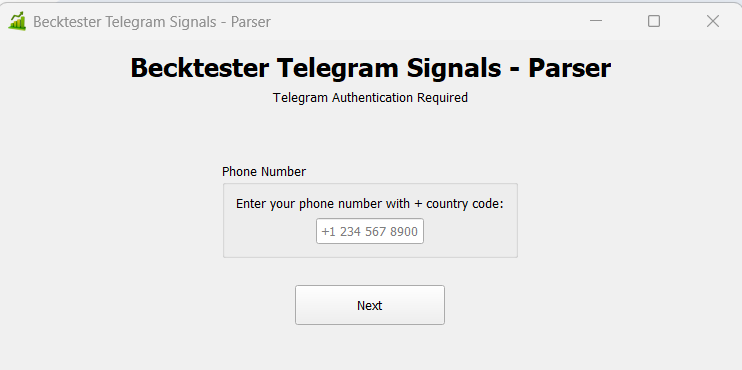
Number/code entry windows/2FA
3) Recognition Test (Test Mode) — Required Step:
Before downloading months of history, test recognition on 1–2 messages. This ensures that the final signals.csv file is correct.
- Open the Test Mode (Live Parsing) tab.
- Test the signal via By Link (if the channel is public) or By Text (insert the signal text).
- Click PreTest and ensure that the following parameters are correctly identified: Symbol , Order Type (BUY/SELL), Entry , SL , and TP .
Important: If recognition is incorrect, first ensure that the PreTest (format, words, and signal structure) is correct, and only then proceed to downloading the history.
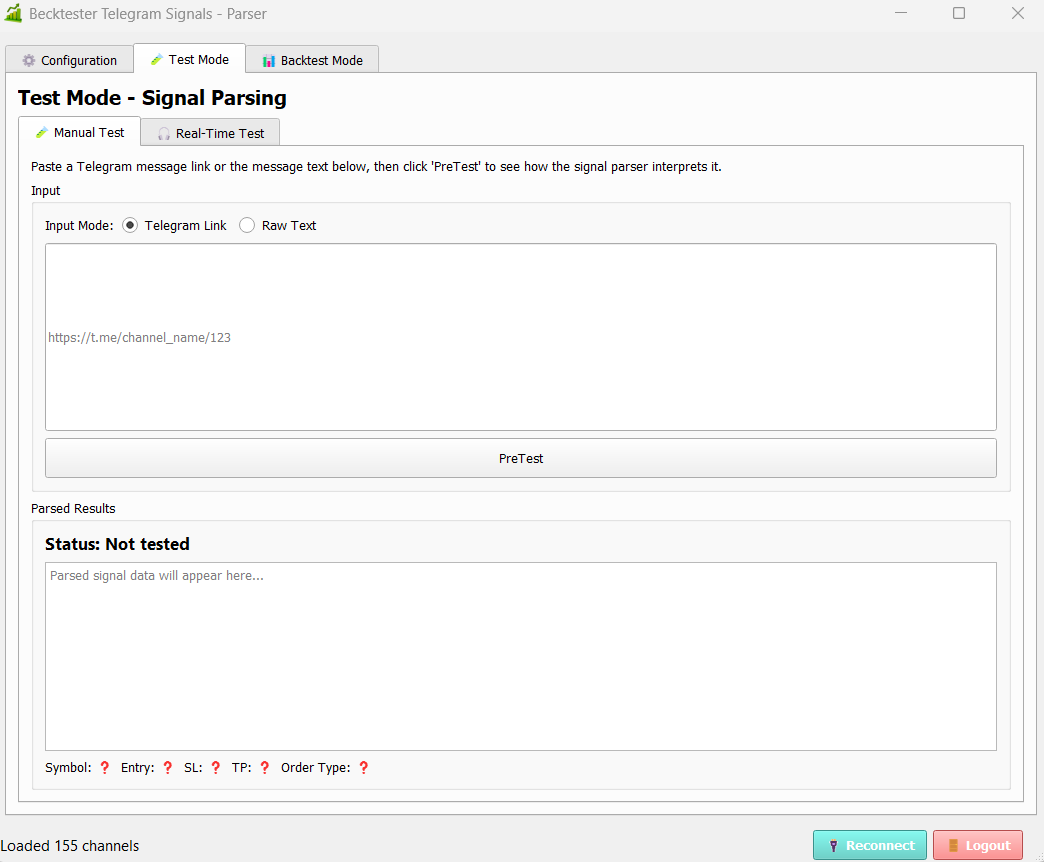
Test Mode: By Link / By Text

PreTest Result: Recognized Fields (Symbol/Entry/SL/TP)
4) Export signal history (Backtest Mode) → signals.csv.
- Open the Backtest Mode tab.
- Refresh the list of channels/chats (if there is a Refresh/Update button).
- Select a channel/chat from the list.
- Specify the history period: Start Date and End Date .
- Run parsing and wait for it to complete.
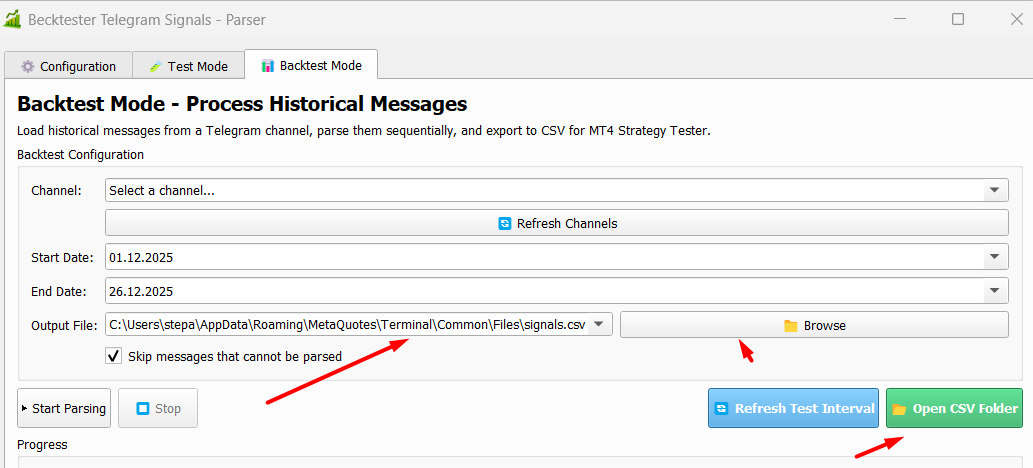
The output file will be signals.csv , which will then be used by the advisor in Strategy Tester.

Backtest Mode: Channel Selection + Dates

[SCREEN RU-07] Backtest Mode: log/progress + total (number of signals/errors)
5) Where should signals.csv be located?
Parser typically saves the file to a location where the EA can read it automatically (often this is the Terminal\Common\Files folder).
To check manually, in MetaTrader, open File → Open Data Folder , then go to the Common → Files folder and make sure signals.csv is there.
Common\\Files folder with the signals.csv file
6) Launch Strategy Tester (MT4/MT5)
- . Open Strategy Tester .
- Select the Becktester Telegram Signals advisor.
- Set the testing period ( Use Date ) – preferably the same range as for parsing.
- Select the instrument to test:
- If you're testing a single instrument , select it.
- If you're using MT5 and your signals.csv file contains multiple symbols , select any primary symbol (preferably one from the CSV file), and trades for the other symbols will be reproduced from the file (MT5's multi-symbol/multi-currency mode).
- Click Start and wait for the results.
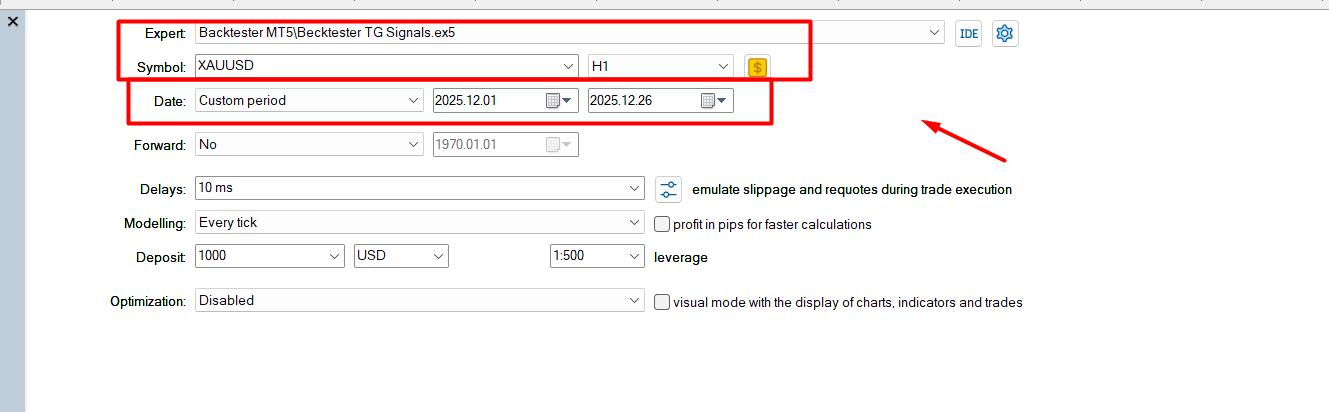
Strategy Tester: Selecting an Expert Advisor, Symbol, Dates, and Simulation Mode
7) Critical Inputs (recommended minimum)
- SignalFile = signals.csv (signal file name)
- BrokerUTCOffset — broker time offset (if trades are opened at the wrong time)
- RejectOrdersWithoutSL / RejectOrdersWithoutTP — recommended to enable to skip signals without SL/TP
- SLMode / TPMode — take from signal (Signal) or set manually (Custom)
- LotMode — fixed lot or risk (%), and volume/risk parameters
- SkipDuplicates , SkipWeekendSignals — useful “garbage” filters

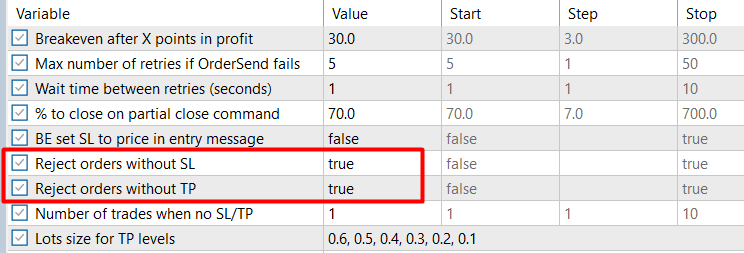

Inputs: SignalFile, BrokerUTCOffset, RejectOrdersWithoutSL/TP, SLMode/TPMode
8) Differences between MT4 and MT5 versions
- MT4: Testing is typically performed on one instrument at a time. If the CSV file contains several symbols, testing is often performed one at a time.
- MT5: More convenient for scenarios with multiple symbols in signals.csv (multi-symbol/multi-currency mode).
9) Common issues (briefly)
- : 0 trades in the report: check that signals.csv exists, is in the correct folder, and that the test dates overlap the CSV period.
- Incorrect recognition: first ensure the PreTest is running correctly in Test Mode, then re-download the history.
- Trades are opening at the wrong time: adjust BrokerUTCOffset.
Get the product
BackTester for MT4 you can get here: Becktester Telegram Signals (MT4)
BackTester for MT5 you can get here: Becktester Telegram Signals (MT5)