
FundedBridge EA — Strategies, Risk Profiles, and Backtesting Guide


FUNDEDBRIDGE EA FOR PROP FIRMS
Presentation and Guide
Welcome to FundedBridge, the Expert Advisor designed for prop firm challenges.
Learn how it works and how to configure it for consistent execution on MT5.
Where can I use it?
FundedBridge is built to pass prop firm challenges. Backtests were performed on FTMO data, but the same logic applies to other firms with similar rules. MT5 only.
Available Strategies
All strategies were backtested prior to release. More may arrive via updates.
- MACD
- Alligator
- MACD + RSI + Stochastic
- Parabolic SAR
- Ichimoku
- SuperTrend
Challenge Features
If the configured daily drawdown is reached, the EA closes current trades immediately.
For backtests: discard a set if total drawdown is reached.
When the monthly target is hit, close all and pause new entries for the rest of the month.
I purchased the EA — what now?
1) 24/7 VPSUse a reliable 24/7 VPS to avoid interruptions.
- Windows VPS 2GB+ RAM recommended
- Stable connection & MT5 always open
- Enable MT5 auto-start on reboot
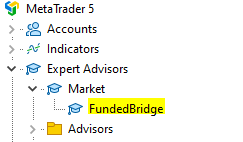
Find the EA in the Navigator and attach it to the recommended symbol/timeframe (see Backtesting).
Choose the most suitable (.set), import it, then adjust these fields:
| Parameter | Summary |
|---|---|
| Starting account capital | Initial balance (e.g., 20000). Drives lot size calculation. |
| Monthly profit target (%) | Close all at target (e.g., 8% Phase 1, 5% Phase 2, custom for funded). |
| Close trades on spread increase | If the spread (tick points) exceeds the set value, all open trades are closed. Set 0 to disable. |
| Max spread (tick points) | No entries when spread exceeds this threshold. |
| Monthly Restart | Backtesting only. Keep “false” in live trading. |
| Previous month loss recovery | Backtesting only. Use with Monthly Restart to simulate recovery. |
| Use Multi Instance | When enabled, you can run multiple EA instances with different set files working together independently. Assign unique Magic Numbers to each instance. |
| Daily drawdown limit (%) | Set slightly below firm rule (e.g., 4.9% if 5%). |
| Monthly drawdown limit (%) | Overall loss cap for the evaluation (typically 10–12%). |
| Magic Number | Unique ID for this EA’s trades. Use different numbers per chart/EA. |

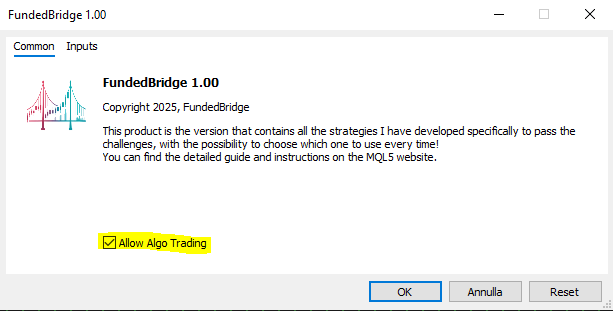
- Double-click the EA → Properties → “Common” tab
- Check “Allow Algo Trading”
- Click “Algo Trading” on the MT5 toolbar
- It should turn green when active

Other Input Parameters
| Parameter | Summary |
|---|---|
| Risk/Reward factor (Fixed RR) | e.g., 1.5 = risk 1 to target 1.5. |
| Risk per trade (%) of starting capital | Typical range: 0.5%–1%. |
| Take-profit model | Fixed RR target or opposite indicator signal. |
| Strategy selector (entry/exit) | Select the internal logic used to open/close trades. |
| Martingale | Increases lot after a loss; not recommended for prop accounts. |
| Close trades on spread increase (0=off) | Closes all if spread (ticks) exceeds the threshold. |
| Breakeven | Fixed RR: fraction to BE. Reverse: R level to BE. 0 = off. |
| Partial TP1 & TP2 | TP2 is active only if strictly greater than TP1. |
| Extra pips on stop loss | Small safety buffer (≤ 1 pip). |
| Max & Min SL size (pips) | Ignore trades outside these bounds. |
| MA distance (pips) | Minimum price↔MA distance required to allow entry. |
| Trading days | Weekday filter for entries. |
| Time | Intraday window during which new positions can be opened. |
| Indicators | Customize the indicator inputs for the selected strategy. |
Breakeven & Partial Take Profits
Enter a value between 0 and 1. Example: RR=5, BE=0.5 → move SL to BE at +2.5R. 0 or 1 = disabled.
Enter an R-multiple. Example: BE=1 → BE at +1R. 0 = off.
Use decimals strictly in (0,1). Examples:
- TP1=0, TP2=1 → both off
- TP1=0.5, TP2=0.7 → close 1/3 at 50% RR; 1/3 at 70% RR
- TP1=0.6, TP2=0.2 → TP1 on; TP2 off
- TP1=0.3, TP2=1 → TP1 on; TP2 off
Use R-multiples strictly > 0. Examples:
- TP1=0, TP2=0 → both off
- TP1=1, TP2=2 → close 1/3 at 1R; 1/3 at 2R
- TP1=1, TP2=0.2 → TP1 on; TP2 off
- TP2 is valid only if strictly greater than TP1.
- If both partials are on: TP1 closes one third, TP2 another third; last third runs to final TP.
- If only TP1 is on: it closes half.
Time Grid
Opens a base lot, then adds trades each bar up to a limit. Closes all when aggregated P/L reaches the set percentages. No SL/TP, no BE/partials.
- Initial lot size: First trade lot
- Next trades lot size: Lot for subsequent trades
- Max trades: Upper bound of positions
- Aggregate TP %: Combined profit to close all
- Aggregate SL %: Combined loss to close all
Scale lots with account size (e.g., double lots if you double balance).
Backtesting
Suggested workflow
- MT5 Strategy Tester (CTRL+R) → optimization
- Use 1m OHLC for speed → validate with every tick
- Optimization = custom max (rank by months at target & positive months)
- Monthly restart resets P/L unless DD; Previous Month Loss Recovery marks next month at target only if it recovers the loss
- When ON: reset month P/L only if no DD was touched
- When OFF: losses carry; DD detected even after multiple months
- Use with Restart OFF: next month must recover prior loss to count as “at target”
- Example: −5% in January, target 8% → February must do +13%
- OnTester encodes target months & positive months (e.g., 30005 = 30 target + 5 positive)
- Any DD → result = −1 (auto-discard)
- Fix challenge rules first (capital, target, daily/monthly DD)
- Optimize with 1m OHLC → validate winners with Every Tick
- Include spread & commissions (e.g., $3/lot)
- For funded accounts: moderate targets (≤3%), multi-year data, Restart OFF


Telegram Integration
Optional: notifications and basic commands.
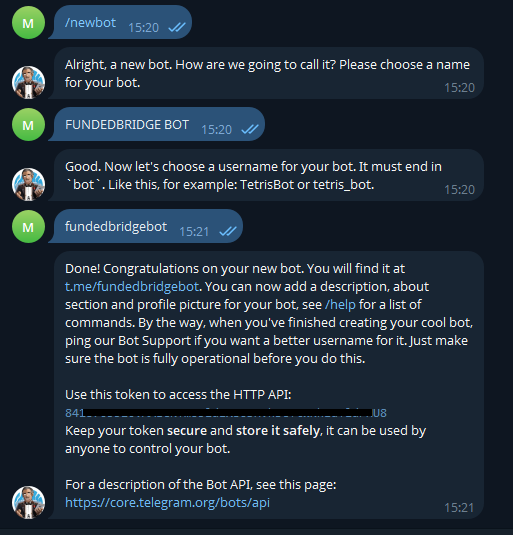
- Search @BotFather → /newbot → name + username ending with “bot”
- Copy Bot Token for EA inputs
- New Channel → Public → pick unique_name
- Add your bot as admin (can post)


You’ll reference this channel in the EA.
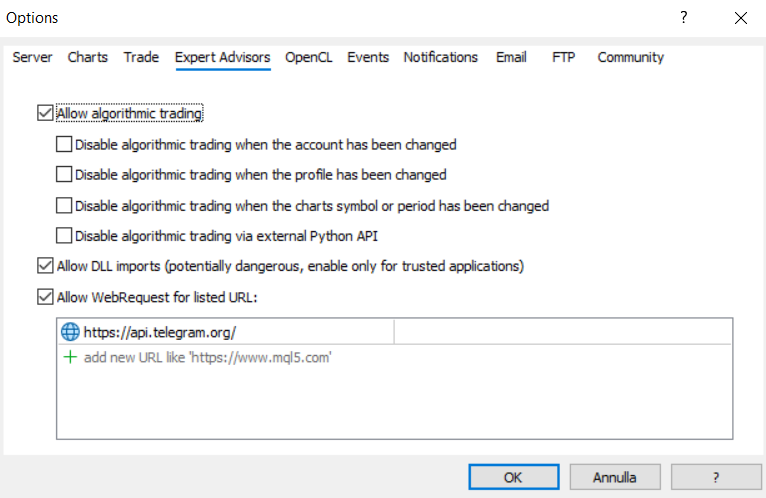
- Tools → Options → Expert Advisors
- Allow WebRequest for listed URL
- Add:
Required for Telegram messages.
- Enable Telegram = true
- Paste Bot Token + channel unique_name

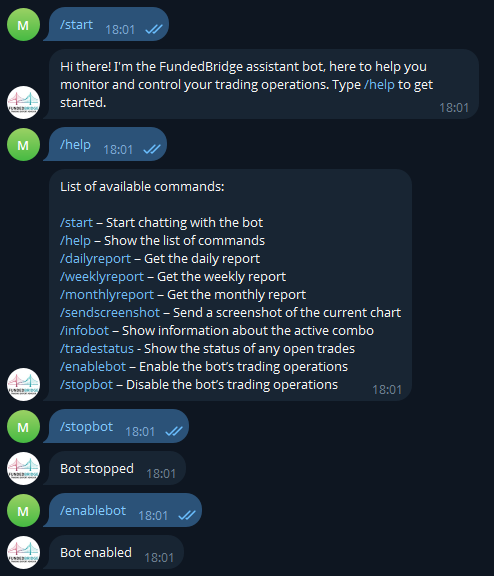
- /start → bot replies
- /help → command list
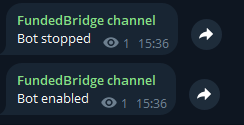
- /stopbot → channel posts disabled; /enablebot to re-enable
Optimized Presets
Pick the risk profile that suits your goals. Each preset was tested to maximize the odds of passing.
Conservative
Lower monthly targets; ideal for funded accounts or multi-month phases. Less pressure and lower drawdown exposure.
Balanced
Intermediate goals, e.g., pass phase 2 (5%) in one month or split phase 1 across two months.
Aggressive
Higher monthly targets (e.g., 8%) in a single month; faster but riskier with more false signals and drawdown.
Need optimized presets tuned to your account size, risk and target? Contact me via my MQL5 profile.
FAQ
It hasn’t opened any trades in two days. Normal?
Yes. The EA runs on M5/M6/M10 and opens one trade at a time. Few trades per week are normal. Patience is required.




