March Madness SALE! Golden Tiger EA now only $149 (U.P. $415)! Limited to the first 10 copies. Offer valid 15 Mar - 21 Mar!
📌 Introduction
This documentation provides a clear overview of how to use and setup Golden Tiger EA and understand its input parameters. This documentation is tailored for all, whether you have never used an EA before, or an experienced trader.
Golden Tiger is an Expert Advisor designed to trade XAUUSD (Gold) using a daily high/low breakout strategy. It automatically detects the previous day range and places breakout trades with risk management. This EA uses a built in trailing stop loss to follow behind price when in profit, this helps to secure profits.
This EA does NOT use Grid, Martingale, or any other high-risk recovery strategies. It trades one direction at a time with a strict Stop Loss and Take Profit, ensuring predictable risk on every trade.
You can find Golden Tiger EA in the MQL5 Market: https://www.mql5.com/en/market/product/147404📌 Features
- Daily Breakout Strategy - Automatically trades the proven XAUUSD daily high/low breakout strategy by placing pending buy stop and sell stop orders at the key levels.
- Smart Risk Management - Features % Risk-Based & Fixed lot sizing with built-in Stop Loss, Take Profit, and Trailing Stop Loss.
- Intelligent Gap Opening Detection - If XAUUSD opens with a significant gap beyond the previous day's range, the EA immediately recognizes this and executes a market order.
- Non Grid/Martingale - This EA does NOT use Grid, Martingale, or any other high-risk recovery strategies. It trades one direction at a time with a strict Stop Loss and Take Profit, ensuring predictable risk on every trade.
- Professional Control Panel - Includes a visual dashboard for real-time monitoring and manual control with one-click buttons.
- Dedicated support for all customers, with open feedback and discussion welcomed to make the EA even better.
📌 Setup
| Parameters | Values |
|---|---|
| Chart | XAUUSD |
| Timeframe | Any |
| Deposit | Min $200 USD |
| Leverage | Min 1:30 |
| Account Type | Hedging |
| Spread Type | RAW/ECN |
Step 1: Open Metatrader 5.
Step 2: Open a XAUUSD chart on any timeframe.
Step 3: After installing Golden Tiger EA, head to the "Market" Tab in Navigator. Drag and drop "Golden Tiger EA" onto the XAUUSD chart.
Step 4: Click on Inputs customize/load the set files. You may choose to download the set files I have created here, and load them by pressing on "Load". Once done, press on "Save".
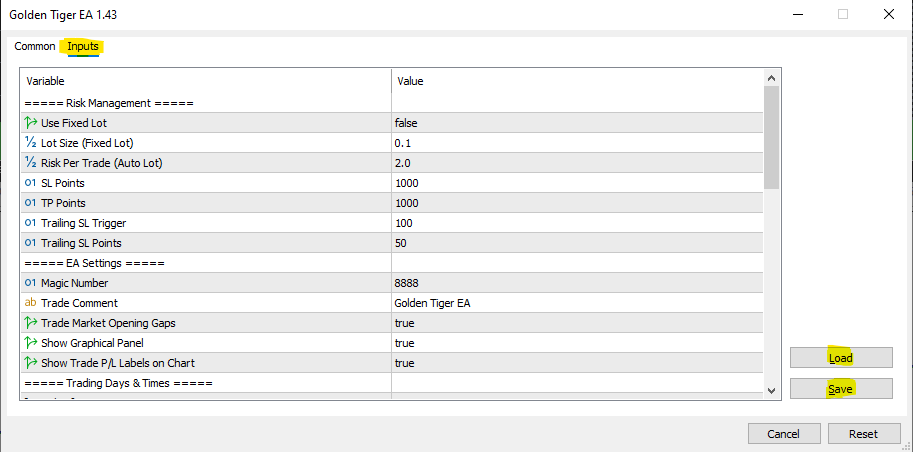
Step 5: Once Setup is completed, EA should initialize and you would be able to see the EA running on your chart.
📌 Input Parameters
Risk Management Settings
- Use Fixed Lots (True/False) - If set to False, the EA uses Auto Lot Size based on your account balance and risk percentage, making it adaptive and safer.
- Lot Size (Fixed Lots) - Only effective if Parameter "1" has been set to True. Allows user to set their preferred fixed lot size for all trades.
- Risk Per Trade (Auto Lot) - Only effective if Parameter "1" has been set to False. Automatically calculates lot size to risk only a set percentage every trade.
- SL Points - Fixed Stop Loss Value.
- TP Points - Fixed Take Profit Value.
- Trailing SL Trigger - Number of Points in Profit before Trailing Stop Loss is activated.
- Trailing SL Points - Number of Points Trailing Stop Loss will trail behind current price.
EA Settings
- Magic Number - A unique identifier for the EA's orders, preventing conflicts with other systems. (If you are running other EAs on the same account, please ensure to use different Magic Numbers for each EA).
- Trade Comment - Comment to label all trades placed by EA
- Trade Market Opening Gaps (True/False) - If set to True, the EA will instantly enter a trade if the market opens with a gap beyond the previous day's range. This should ONLY be enabled on RAW/ECN accounts on good brokers as spreads at market open may widen significantly.
- Show Graphical Panel (True/False) - If set to True, it will display the live control panel on the chart for real-time monitoring and manual control.
Trading Days & Time
- Define Trading Days (Monday - Sunday) - Allows you to select which days of the week you would like the EA to trade.
- Define Trading Start Hour & End Hour - Allows you to select the start and end hours for trading for each specific day.
📌 Set Files
Here are the set files I have created: Golden Tiger EA V1.46 Set Files
Set files for 3-Digit Decimal XAUUSD Brokers (e.g., RoboForex): Golden Tiger EA V1.46 3 Digit Decimal Set Files
Please select a set file based on your risk tolerance. I highly recommend testing it out on a Demo Account or in Strategy Tester first.
📌 Choosing of Stop Loss Points
After running year-to-date (YTD) tests, I found that using a 500-point stop loss (SL) can generate more profit compared to a 1000-point SL. That said, there are trade-offs. With a 500-point SL, the win rate decreases, which results in more losing trades, a lower profit factor, and a higher maximum drawdown.
If you have a higher risk appetite and are targeting greater profit potential, you may consider the 500-point SL option.
For your reference, I’ve attached two "Every Tick Based on Real Ticks" YTD backtesting results to help with your decision:
This test is being run on a $500USD ICMarkets RAW Account, risking 2% per trade.
500 Point SL:

1000 Point SL:

I recommend testing in the strategy tester or on a demo account first to better understand your risk appetite.
📌 Final Note to Clients
- The algorithm is very sensitive to spread and slippage. I recommend using a good RAW/Pro/ECN broker. (eg. IC Markets)
- The system uses a trailing stop loss which will constantly update. Using a VPS 24/7 is recommended.
- Try on a demo account for 1-2 weeks before moving to a live account
- Contact me for any recommendations/queries.
- If unsure on how to set up EA or run it on a VPS, please send me a private message.
If you are still facing any difficulties or have any queries, please feel free to send me a DM on MQL5, I will be happy to help you out!
Written by: Keyan Goh (Developer of Golden Tiger EA & Golden Oracle EA)