Jian Chen / Newsfeed
- Information
|
13+ Jahre
Erfahrung
|
0
Produkte
|
0
Demoversionen
|
|
0
Jobs
|
0
Signale
|
0
Abonnenten
|
Founder
in
TradingSword
It's all about probabilities.
So accept them and be ready for them.
Freunde
833
Anfragen
Ausgehend
Sergey Golubev
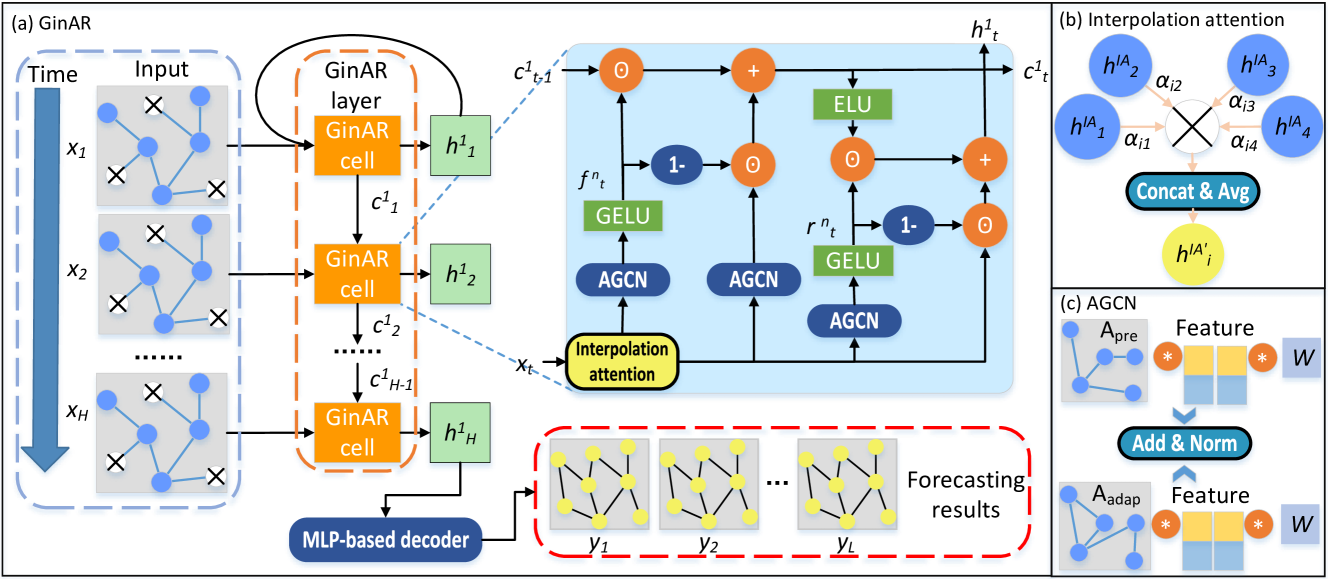
Neural Networks in Trading: An End-to-End Multivariate Time Series Forecasting Model (Key Components) - https://www.mql5.com/en/articles/18892
Eleni Anna Branou
Partial Closure EA MT4/5© allows you to partially close any trade on your account, manually by a chosen percentage of the lot size and/or by trade ticket, or automatically at specified percentages of the TP/SL level, closing a percentage of the initial lot size across up to 10 take profit and 10 stop loss levels.. It can manage all or selected trades in your account by specifying or excluding certain magic numbers, comments, or symbols.
✔️ Extremely easy and straightforward interface
✔️ Works smoothly on any chart, account type, or broker
✔️ Automatic partial closure of managed trades at specified TP/SL levels, closing independent percentages of the initial lot size across up to 10 TP and 10 SL levels
✔️ Manual partial closure of all managed trades or any individual trade by ticket number, based on a percentage of the lot size
✔️ Option to move the stop loss to break even for the remaining portion of trades automatically partially closed as above
✔️ Option to move the stop loss to break even once a specified profit level (in points) is reached
✔️ Ability to exclude certain magic numbers, comments, or symbol trades from management
✔️ Compatible with MQL5 VPS
⭐️⭐️⭐️⭐️⭐️ Partial Closure EA MT4©: https://www.mql5.com/en/market/product/82356
⭐️⭐️⭐️⭐️⭐️ Partial Closure EA MT5©: https://www.mql5.com/en/market/product/82357
📥 Download the Partial Closure EA MT4© demo version in your demo account now: https://c.mql5.com/6/975/Partial_Closure_EA_MT4_1.30_Demo.ex4
📥 Download the Partial Closure EA MT5© demo version in your demo account now: https://c.mql5.com/6/975/Partial_Closure_EA_MT5_1.30_Demo.ex5
✅ Partial Closure EA MT4/5© installation & user guide: https://www.mql5.com/en/blogs/post/749385
💎💎💎💎💎 Check out all my Expert Advisors, Indicators and Utilities: https://www.mql5.com/en/users/eleanna74/seller
30 September 2026
✔️ Extremely easy and straightforward interface
✔️ Works smoothly on any chart, account type, or broker
✔️ Automatic partial closure of managed trades at specified TP/SL levels, closing independent percentages of the initial lot size across up to 10 TP and 10 SL levels
✔️ Manual partial closure of all managed trades or any individual trade by ticket number, based on a percentage of the lot size
✔️ Option to move the stop loss to break even for the remaining portion of trades automatically partially closed as above
✔️ Option to move the stop loss to break even once a specified profit level (in points) is reached
✔️ Ability to exclude certain magic numbers, comments, or symbol trades from management
✔️ Compatible with MQL5 VPS
⭐️⭐️⭐️⭐️⭐️ Partial Closure EA MT4©: https://www.mql5.com/en/market/product/82356
⭐️⭐️⭐️⭐️⭐️ Partial Closure EA MT5©: https://www.mql5.com/en/market/product/82357
📥 Download the Partial Closure EA MT4© demo version in your demo account now: https://c.mql5.com/6/975/Partial_Closure_EA_MT4_1.30_Demo.ex4
📥 Download the Partial Closure EA MT5© demo version in your demo account now: https://c.mql5.com/6/975/Partial_Closure_EA_MT5_1.30_Demo.ex5
✅ Partial Closure EA MT4/5© installation & user guide: https://www.mql5.com/en/blogs/post/749385
💎💎💎💎💎 Check out all my Expert Advisors, Indicators and Utilities: https://www.mql5.com/en/users/eleanna74/seller
30 September 2026
Alexander Zelchert
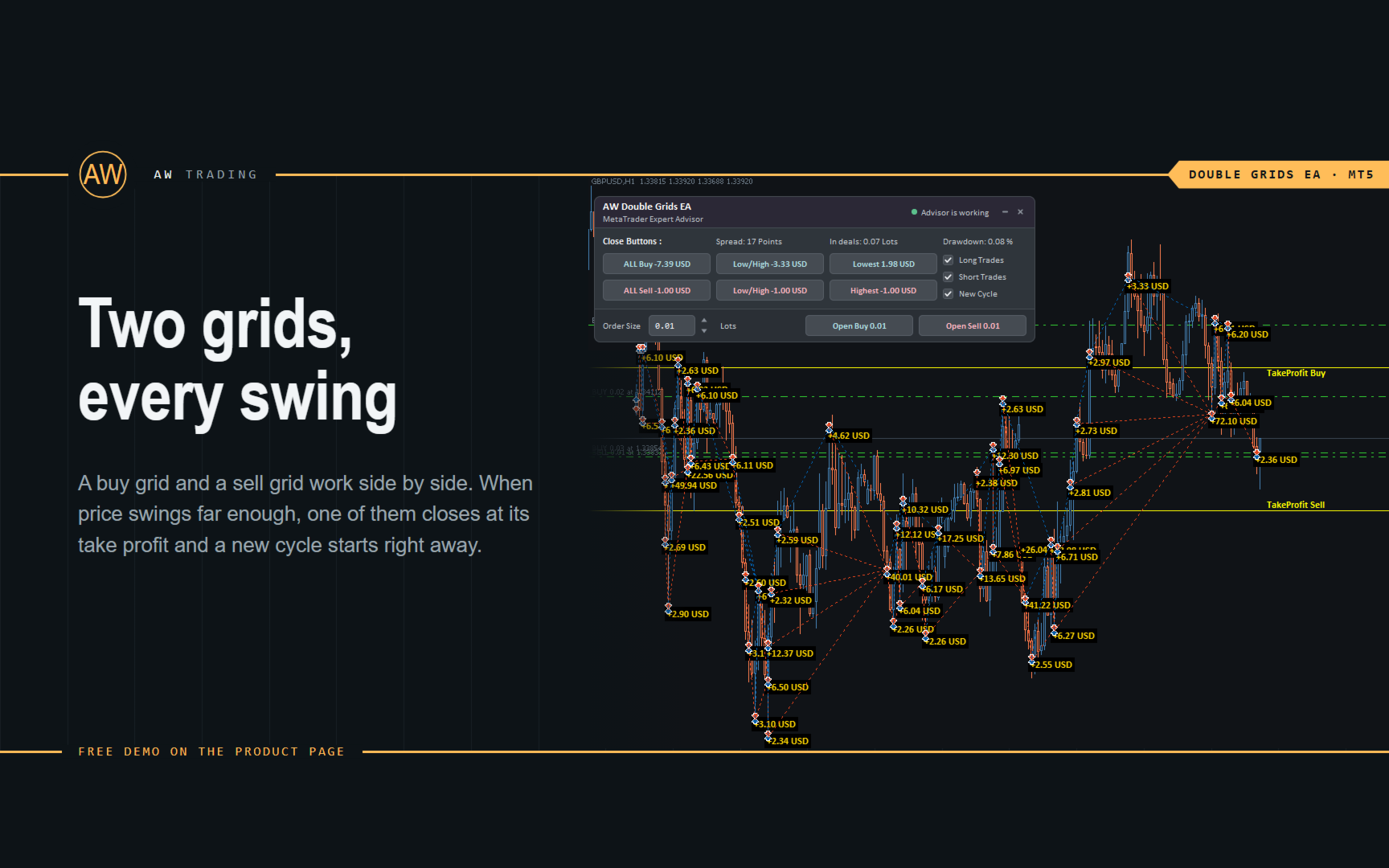
⭐⭐⭐⭐⭐ AW Double Grids EA ⭐⭐⭐⭐⭐
❗The AW Double Grids Expert Advisor is an aggressive, fully automated grid-based Expert Advisor with an informational trading panel and easy setup. The strategy consists in simultaneous two-sided work, multiplying the volume of one direction. Built-in automatic calculation of the lot, as well as a variation of the multiplication of orders.
❗How the advisor trades: The EA starts trading by opening two opposite orders. After closing a profitable order, the EA opens two orders again, multiplying the volume for the open direction. If there are open orders, the EA changes TakeProfit in points. TakeProfit is dynamic and is adjusted depending on the number of open orders in the opposite direction
Additional opening of grids of orders also has a dynamic step that changes depending on the number of open orders in the current direction
MT4 👉 https://www.mql5.com/en/market/product/48191
MT5 👉 https://www.mql5.com/en/market/product/48884
❗The AW Double Grids Expert Advisor is an aggressive, fully automated grid-based Expert Advisor with an informational trading panel and easy setup. The strategy consists in simultaneous two-sided work, multiplying the volume of one direction. Built-in automatic calculation of the lot, as well as a variation of the multiplication of orders.
❗How the advisor trades: The EA starts trading by opening two opposite orders. After closing a profitable order, the EA opens two orders again, multiplying the volume for the open direction. If there are open orders, the EA changes TakeProfit in points. TakeProfit is dynamic and is adjusted depending on the number of open orders in the opposite direction
Additional opening of grids of orders also has a dynamic step that changes depending on the number of open orders in the current direction
MT4 👉 https://www.mql5.com/en/market/product/48191
MT5 👉 https://www.mql5.com/en/market/product/48884
MetaQuotes
Hat das Thema Neue Version der Plattform MetaTrader 4 Build 1490 hinzugefügt
Am Freitag, den 2. Oktober 2026, wird ein Update für MetaTrader 4 veröffentlicht. Die neue Version enthält mehrere wichtige Sicherheitsverbesserungen, Fehlerbehebungen und Änderungen, die die allgemeine Stabilität der Plattform verbessern sollen
Eleni Anna Branou
Matrix Arrow Indicator MT4/5© is a unique 10 in 1 trend following 100% non-repainting multi-timeframe indicator that can be used on all symbols/instruments: forex, commodities, cryptocurrencies, indices, stocks. Matrix Arrow Indicator MT4/5© will determine the current trend at its early stages, gathering information and data from up to 10 standard indicators, which are: Average Directional Movement Index (ADX), Commodity Channel Index (CCI), Classic Heiken Ashi candles, Moving Average, Moving Average Convergence Divergence (MACD), Relative Vigor Index (RVI), Relative Strength Index (RSI), Parabolic SAR, Stochastic Oscillator, Williams' Percent Range.
When all indicators give a valid buy or sell signal, a corresponding arrow will be printed on the chart, at the opening of the next candle/bar indicating a strong uptrend/downtrend. The user can choose which indicators will use and can adjust the parameters of each indicator separately. Matrix Arrow Indicator MT4/5© gathers information only from the selected indicators and prints the arrow based only on their data. Matrix Arrow Indicator MT4/5© can also send terminal, push notification or email alerts for all new signals. Matrix Arrow Indicator MT4/5© is a super friendly & efficient solution whether you are a scalper, intraday or swing trader!
Matrix Arrow Indicator MT4/5© comes with a free add on, the Matrix Arrow Indicator Multi Timeframe Panel MT4/5© that offers the option to show the Matrix Arrow Indicator signals for 5 customizable timeframes of 16 modifiable symbols/instruments. It gives also the option to change the current chart it is attached onto, by clicking any one of the 16 modifiable symbol buttons. This will allow you to work much faster between different symbols and never miss a trading opportunity again.
✔️ 100% Non-Repainting indicator
✔️ 10 in 1 unique and extremely efficient Matrix and Arrow indicator
✔️ Works on all timeframes and all symbols/instruments
✔️ Super accurate entry Arrow signals that indicate a strong trend
✔️ Exit dot signals define neutral periods with no clear trend
✔️ Equally effective in trending and ranging markets
✔️ Each one indicator can be turned ON/OFF
✔️ Each and every parameter of all 10 indicators are fully adjustable
✔️ Matrix and Arrow colors are fully customizable
✔️ Free add on Panel with Matrix Arrow signals for 16 symbols and 5 timeframes
✔️ Terminal, Push Notification and Email Alerts available
✔️ Ideal for beginners but also a great asset for experienced traders
🔥🔥🔥🔥🔥 Matrix Arrow Indicator MT4/5© Demonstration Video: https://www.youtube.com/watch?v=-teba5v_90I
⭐️⭐️⭐️⭐️⭐️ Matrix Arrow Indicator MT4©: https://www.mql5.com/en/market/product/69726
⭐️⭐️⭐️⭐️⭐️ Matrix Arrow Indicator MT5©: https://www.mql5.com/en/market/product/69725
👉 Matrix Arrow Indicator MT4/5© Real Trading Examples: https://www.mql5.com/en/blogs/post/745715
✅ Matrix Arrow Indicator MT4/5© Installation Guide: https://www.mql5.com/en/blogs/post/745711
✅ Matrix Arrow Indicator MT4/5© Settings/Inputs: https://www.mql5.com/en/blogs/post/745707
💎💎💎💎💎 Check out all my Expert Advisors, Indicators and Utilities: https://www.mql5.com/en/users/eleanna74/seller
30 September 2026
When all indicators give a valid buy or sell signal, a corresponding arrow will be printed on the chart, at the opening of the next candle/bar indicating a strong uptrend/downtrend. The user can choose which indicators will use and can adjust the parameters of each indicator separately. Matrix Arrow Indicator MT4/5© gathers information only from the selected indicators and prints the arrow based only on their data. Matrix Arrow Indicator MT4/5© can also send terminal, push notification or email alerts for all new signals. Matrix Arrow Indicator MT4/5© is a super friendly & efficient solution whether you are a scalper, intraday or swing trader!
Matrix Arrow Indicator MT4/5© comes with a free add on, the Matrix Arrow Indicator Multi Timeframe Panel MT4/5© that offers the option to show the Matrix Arrow Indicator signals for 5 customizable timeframes of 16 modifiable symbols/instruments. It gives also the option to change the current chart it is attached onto, by clicking any one of the 16 modifiable symbol buttons. This will allow you to work much faster between different symbols and never miss a trading opportunity again.
✔️ 100% Non-Repainting indicator
✔️ 10 in 1 unique and extremely efficient Matrix and Arrow indicator
✔️ Works on all timeframes and all symbols/instruments
✔️ Super accurate entry Arrow signals that indicate a strong trend
✔️ Exit dot signals define neutral periods with no clear trend
✔️ Equally effective in trending and ranging markets
✔️ Each one indicator can be turned ON/OFF
✔️ Each and every parameter of all 10 indicators are fully adjustable
✔️ Matrix and Arrow colors are fully customizable
✔️ Free add on Panel with Matrix Arrow signals for 16 symbols and 5 timeframes
✔️ Terminal, Push Notification and Email Alerts available
✔️ Ideal for beginners but also a great asset for experienced traders
🔥🔥🔥🔥🔥 Matrix Arrow Indicator MT4/5© Demonstration Video: https://www.youtube.com/watch?v=-teba5v_90I
⭐️⭐️⭐️⭐️⭐️ Matrix Arrow Indicator MT4©: https://www.mql5.com/en/market/product/69726
⭐️⭐️⭐️⭐️⭐️ Matrix Arrow Indicator MT5©: https://www.mql5.com/en/market/product/69725
👉 Matrix Arrow Indicator MT4/5© Real Trading Examples: https://www.mql5.com/en/blogs/post/745715
✅ Matrix Arrow Indicator MT4/5© Installation Guide: https://www.mql5.com/en/blogs/post/745711
✅ Matrix Arrow Indicator MT4/5© Settings/Inputs: https://www.mql5.com/en/blogs/post/745707
💎💎💎💎💎 Check out all my Expert Advisors, Indicators and Utilities: https://www.mql5.com/en/users/eleanna74/seller
30 September 2026
Anastasia Danilova
🤖 Smart Grid Navigator: Expert Advisor for MT5
Multi-level grid strategy with an entry filter based on RSI and Bollinger Bands. Ready to run right after installation.
⚙️ Features:- Fully automated trading, 24/7 or during selected hours- Entry filtering: RSI + Bollinger Bands- Martingale can be fully disabled (LotMultiplier = 1.0)- Basket management: common Take Profit, configurable SL/TP- Pause between trade series to reduce risk
💰 Price: 99 USD or 39 USD/month rent🆓 Free demo available, test it before you buy
🛒 Product page on MQL5: https://www.mql5.com/en/market/product/157669
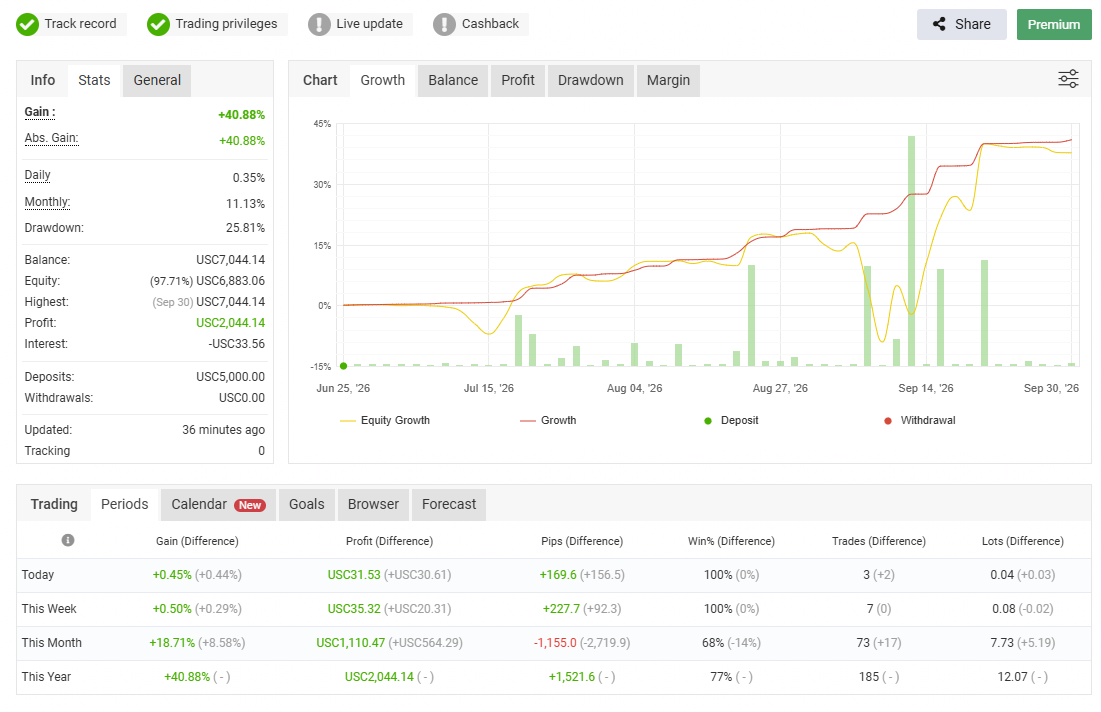
📊 Live monitoring (real account, Myfxbook)
🏦 The EA runs on this broker: https://puvip.co/la-partners/de/sA4RgjQY
⚠️ Trading financial markets involves a high risk of capital loss. Grid strategies and martingale can accumulate losses during strong moves against open positions. Recommended deposit when using martingale: 500–2000 USD with a 0.01 starting lot. Test on a demo account first. Past performance does not guarantee future results. This is not investment advice.
Multi-level grid strategy with an entry filter based on RSI and Bollinger Bands. Ready to run right after installation.
⚙️ Features:- Fully automated trading, 24/7 or during selected hours- Entry filtering: RSI + Bollinger Bands- Martingale can be fully disabled (LotMultiplier = 1.0)- Basket management: common Take Profit, configurable SL/TP- Pause between trade series to reduce risk
💰 Price: 99 USD or 39 USD/month rent🆓 Free demo available, test it before you buy
🛒 Product page on MQL5: https://www.mql5.com/en/market/product/157669
📊 Live monitoring (real account, Myfxbook)
🏦 The EA runs on this broker: https://puvip.co/la-partners/de/sA4RgjQY
⚠️ Trading financial markets involves a high risk of capital loss. Grid strategies and martingale can accumulate losses during strong moves against open positions. Recommended deposit when using martingale: 500–2000 USD with a 0.01 starting lot. Test on a demo account first. Past performance does not guarantee future results. This is not investment advice.
Eleni Anna Branou
Heiken Ashi EA MT4/5© is a fully automated trading system that takes Classic or Smoothed Heiken Ashi candles to the next level. It enters trades based on Heiken Ashi color changes, offering a highly customizable approach to fit different trading styles. The EA provides great flexibility, allowing you to select which Heiken Ashi candle (from the 2nd to the 10th) should trigger the first trade. Additionally, it includes a distance limitation feature to prevent excessive entries at similar price levels. A built-in Heiken Ashi trailing stop dynamically adjusts stop-loss levels based on past Heiken Ashi candles, helping to adapt to different market conditions. To improve trade quality, the EA includes Moving Average and MACD filters to reduce false signals. This EA comes with specialy optimized set files for many symbols/instruments.
✔️ The EA offers flexible trade execution, allowing either one trade per color change or multiple trades per trend.
✔️ Custom entry selection lets users open trades based on the 2nd to 10th Heiken Ashi candle.
✔️ Distance control helps prevent excessive trades at similar price levels.
✔️ A built-in Heiken Ashi trailing stop dynamically adjusts the stop-loss for better trend-following adaptability.
✔️ Advanced filters, including Moving Average and MACD, help reduce false signals.
✔️ ADR-based risk management calculates SL, TP, BE, and Trailing SL as a percentage of the Average Daily Range.
✔️ Basket TP and SL options enable efficient management of all open positions.
✔️ The EA avoids risky strategies such as Martingale and Grid, ensuring a safer trading approach for long-term success.
✔️ It is 100% compatible with MQL5 VPS, allowing smooth operation when running 24/7.
🔥🔥🔥🔥🔥 Heiken Ashi EA MT4/5© Backtests & New Optimized Set Files: https://www.mql5.com/en/blogs/post/745696
✅ How to Test the Heiken Ashi EA MT4/5©: https://www.mql5.com/en/blogs/post/750887
⭐️⭐️⭐️⭐️⭐️ Heiken Ashi EA MT4©: https://www.mql5.com/en/market/product/45283
⭐️⭐️⭐️⭐️⭐️ Heiken Ashi EA MT5©: https://www.mql5.com/en/market/product/64877
💎💎💎💎💎 Check out all my Expert Advisors, Indicators and Utilities: https://www.mql5.com/en/users/eleanna74/seller
30 September 2026
✔️ The EA offers flexible trade execution, allowing either one trade per color change or multiple trades per trend.
✔️ Custom entry selection lets users open trades based on the 2nd to 10th Heiken Ashi candle.
✔️ Distance control helps prevent excessive trades at similar price levels.
✔️ A built-in Heiken Ashi trailing stop dynamically adjusts the stop-loss for better trend-following adaptability.
✔️ Advanced filters, including Moving Average and MACD, help reduce false signals.
✔️ ADR-based risk management calculates SL, TP, BE, and Trailing SL as a percentage of the Average Daily Range.
✔️ Basket TP and SL options enable efficient management of all open positions.
✔️ The EA avoids risky strategies such as Martingale and Grid, ensuring a safer trading approach for long-term success.
✔️ It is 100% compatible with MQL5 VPS, allowing smooth operation when running 24/7.
🔥🔥🔥🔥🔥 Heiken Ashi EA MT4/5© Backtests & New Optimized Set Files: https://www.mql5.com/en/blogs/post/745696
✅ How to Test the Heiken Ashi EA MT4/5©: https://www.mql5.com/en/blogs/post/750887
⭐️⭐️⭐️⭐️⭐️ Heiken Ashi EA MT4©: https://www.mql5.com/en/market/product/45283
⭐️⭐️⭐️⭐️⭐️ Heiken Ashi EA MT5©: https://www.mql5.com/en/market/product/64877
💎💎💎💎💎 Check out all my Expert Advisors, Indicators and Utilities: https://www.mql5.com/en/users/eleanna74/seller
30 September 2026
Vladimir Pastushak
What is a ticker?
A ticker is a short alphabetic code of a financial instrument used to find it on the exchange. For example, the largest US companies have simple and memorable tickers: AAPL — Apple, TSLA — Tesla, MSFT — Microsoft. For currency pairs, their designation acts as a ticker — EURUSD, XAUUSD, GBPJPY. A ticker allows you to identify an instrument unambiguously: you use it to find a price in the terminal and add the instrument to your watchlist.
Why are tickers needed? Thousands of instruments are traded on the exchange at the same time, and many of them have similar names. A short code eliminates confusion: instead of the full name "Apple Inc.", three or four letters are enough, and the rules for assigning tickers are uniform on each venue. A ticker is both the "name" and "address" of an instrument: it tells which asset you mean and helps you quickly get its quote.
How to work with tickers in practice? In a trading terminal, the ticker is used when searching for an instrument, opening a chart and adding it to Market Watch. Sometimes the same ticker exists on different exchanges — for example, for companies listed both in the US and Europe. In this case, specify the exchange or venue, otherwise it is easy to make a mistake and choose the wrong asset. Attention to tickers is a small but important part of trading discipline.
In my profile you will find a lot of useful educational information (don't forget to add me as a friend) Profile: https://www.mql5.com/en/users/voldemar
What is a ticker?
A ticker is a short alphabetic code of a financial instrument used to find it on the exchange. For example, the largest US companies have simple and memorable tickers: AAPL — Apple, TSLA — Tesla, MSFT — Microsoft. For currency pairs, their designation acts as a ticker — EURUSD, XAUUSD, GBPJPY. A ticker allows you to identify an instrument unambiguously: you use it to find a price in the terminal and add the instrument to your watchlist.
Why are tickers needed? Thousands of instruments are traded on the exchange at the same time, and many of them have similar names. A short code eliminates confusion: instead of the full name "Apple Inc.", three or four letters are enough, and the rules for assigning tickers are uniform on each venue. A ticker is both the "name" and "address" of an instrument: it tells which asset you mean and helps you quickly get its quote.
How to work with tickers in practice? In a trading terminal, the ticker is used when searching for an instrument, opening a chart and adding it to Market Watch. Sometimes the same ticker exists on different exchanges — for example, for companies listed both in the US and Europe. In this case, specify the exchange or venue, otherwise it is easy to make a mistake and choose the wrong asset. Attention to tickers is a small but important part of trading discipline.
In my profile you will find a lot of useful educational information (don't forget to add me as a friend) Profile: https://www.mql5.com/en/users/voldemar
A ticker is a short alphabetic code of a financial instrument used to find it on the exchange. For example, the largest US companies have simple and memorable tickers: AAPL — Apple, TSLA — Tesla, MSFT — Microsoft. For currency pairs, their designation acts as a ticker — EURUSD, XAUUSD, GBPJPY. A ticker allows you to identify an instrument unambiguously: you use it to find a price in the terminal and add the instrument to your watchlist.
Why are tickers needed? Thousands of instruments are traded on the exchange at the same time, and many of them have similar names. A short code eliminates confusion: instead of the full name "Apple Inc.", three or four letters are enough, and the rules for assigning tickers are uniform on each venue. A ticker is both the "name" and "address" of an instrument: it tells which asset you mean and helps you quickly get its quote.
How to work with tickers in practice? In a trading terminal, the ticker is used when searching for an instrument, opening a chart and adding it to Market Watch. Sometimes the same ticker exists on different exchanges — for example, for companies listed both in the US and Europe. In this case, specify the exchange or venue, otherwise it is easy to make a mistake and choose the wrong asset. Attention to tickers is a small but important part of trading discipline.
In my profile you will find a lot of useful educational information (don't forget to add me as a friend) Profile: https://www.mql5.com/en/users/voldemar
What is a ticker?
A ticker is a short alphabetic code of a financial instrument used to find it on the exchange. For example, the largest US companies have simple and memorable tickers: AAPL — Apple, TSLA — Tesla, MSFT — Microsoft. For currency pairs, their designation acts as a ticker — EURUSD, XAUUSD, GBPJPY. A ticker allows you to identify an instrument unambiguously: you use it to find a price in the terminal and add the instrument to your watchlist.
Why are tickers needed? Thousands of instruments are traded on the exchange at the same time, and many of them have similar names. A short code eliminates confusion: instead of the full name "Apple Inc.", three or four letters are enough, and the rules for assigning tickers are uniform on each venue. A ticker is both the "name" and "address" of an instrument: it tells which asset you mean and helps you quickly get its quote.
How to work with tickers in practice? In a trading terminal, the ticker is used when searching for an instrument, opening a chart and adding it to Market Watch. Sometimes the same ticker exists on different exchanges — for example, for companies listed both in the US and Europe. In this case, specify the exchange or venue, otherwise it is easy to make a mistake and choose the wrong asset. Attention to tickers is a small but important part of trading discipline.
In my profile you will find a lot of useful educational information (don't forget to add me as a friend) Profile: https://www.mql5.com/en/users/voldemar
Eleni Anna Branou
Basket EA MT4/5© is a powerful profit-harvesting tool and a comprehensive account protection system, all combined into a simple and easy-to-use solution. Its core purpose is to give you complete control over your trading account’s overall profit and loss by managing all open positions at the basket level, rather than individually. The EA offers a full range of basket-level features, including take profit, stop loss, break even, and trailing stop loss. These can be configured as a percentage of your account balance, a fixed amount in your account’s currency, or a target in average points across all managed trades. This flexibility allows traders to tailor risk and profit strategies to their unique needs. Basket EA MT4/5© also supports intelligent trade filtering, allowing you to include or exclude specific trades from management based on their magic number, symbol, or comment. This ensures that only the trades you want managed by the EA are affected, while others are left untouched.
For added protection, the EA includes advanced account safeguarding mechanisms. When a specified equity take profit or stop loss level or a maximum drawdown from the account's balance high is reached, the EA can automatically close all open trades, delete any pending orders, and shut down all charts, removing any Expert Advisors running on them. This feature helps protect your capital during unexpected market movements or when reaching your predefined account targets.
✔️ Does not use Martingale, Grid, Averaging, or other high-risk techniques
✔️ Allows exclusion of specific Magic Numbers, trade comments, or symbol trades from management
✔️ Basket Take Profit in % for all managed trades combined
✔️ Basket Stop Loss in % for all managed trades combined
✔️ Basket Break Even in % for all managed trades combined
✔️ Basket Trailing Stop Loss in % for all managed trades combined
✔️ Basket Take Profit in money for all managed trades combined
✔️ Basket Stop Loss in money for all managed trades combined
✔️ Basket Break Even in money for all managed trades combined
✔️ Basket Trailing Stop Loss in money for all managed trades combined
✔️ Basket Take Profit in average points for all managed trades combined
✔️ Basket Stop Loss in average points for all managed trades combined
✔️ Basket Break Even in average points for all managed trades combined
✔️ Basket Trailing Stop Loss in average points for all managed trades combined
✔️ Option to reset all Basket settings after each account balance update or after a Basket target is hit
✔️ Option to close all managed trades at break even after recovering from a drawdown
✔️ Option to close all managed trades at a specific time on a chosen day or daily
✔️ Account protection feature that closes all trades and charts when equity-based TP or SL is reached
✔️ Maximum drawdown % from balance high that closes all trades and charts/EAs if triggered
✔️ Optional on-chart panel to monitor profit/loss and close trades by type or all at once
✔️ Terminal, push notification, and email alerts when any Basket or protection condition is triggered
✔️ 100% automated Expert Advisor
✔️ Fully compatible with MQL5 VPS
⭐️⭐️⭐️⭐️⭐️ Basket EA EA MT4©: https://www.mql5.com/en/market/product/45192
⭐️⭐️⭐️⭐️⭐️ Basket EA EA MT5©: https://www.mql5.com/en/market/product/72782
📥 Download the Basket EA MT4© demo version in your demo account now: https://c.mql5.com/6/988/Basket_EA_MT4_2_20_Demo.ex4
📥 Download the Basket EA MT5© demo version in your demo account now: https://c.mql5.com/6/988/Basket_EA_MT5_2_00_Demo.ex5
✅ Basket EA MT4/5© detailed Settings/Inputs guide: https://www.mql5.com/en/blogs/post/746117
💎💎💎💎💎 Check out all my Expert Advisors and Utilities: https://www.mql5.com/en/users/eleanna74/seller
30 September 2026
For added protection, the EA includes advanced account safeguarding mechanisms. When a specified equity take profit or stop loss level or a maximum drawdown from the account's balance high is reached, the EA can automatically close all open trades, delete any pending orders, and shut down all charts, removing any Expert Advisors running on them. This feature helps protect your capital during unexpected market movements or when reaching your predefined account targets.
✔️ Does not use Martingale, Grid, Averaging, or other high-risk techniques
✔️ Allows exclusion of specific Magic Numbers, trade comments, or symbol trades from management
✔️ Basket Take Profit in % for all managed trades combined
✔️ Basket Stop Loss in % for all managed trades combined
✔️ Basket Break Even in % for all managed trades combined
✔️ Basket Trailing Stop Loss in % for all managed trades combined
✔️ Basket Take Profit in money for all managed trades combined
✔️ Basket Stop Loss in money for all managed trades combined
✔️ Basket Break Even in money for all managed trades combined
✔️ Basket Trailing Stop Loss in money for all managed trades combined
✔️ Basket Take Profit in average points for all managed trades combined
✔️ Basket Stop Loss in average points for all managed trades combined
✔️ Basket Break Even in average points for all managed trades combined
✔️ Basket Trailing Stop Loss in average points for all managed trades combined
✔️ Option to reset all Basket settings after each account balance update or after a Basket target is hit
✔️ Option to close all managed trades at break even after recovering from a drawdown
✔️ Option to close all managed trades at a specific time on a chosen day or daily
✔️ Account protection feature that closes all trades and charts when equity-based TP or SL is reached
✔️ Maximum drawdown % from balance high that closes all trades and charts/EAs if triggered
✔️ Optional on-chart panel to monitor profit/loss and close trades by type or all at once
✔️ Terminal, push notification, and email alerts when any Basket or protection condition is triggered
✔️ 100% automated Expert Advisor
✔️ Fully compatible with MQL5 VPS
⭐️⭐️⭐️⭐️⭐️ Basket EA EA MT4©: https://www.mql5.com/en/market/product/45192
⭐️⭐️⭐️⭐️⭐️ Basket EA EA MT5©: https://www.mql5.com/en/market/product/72782
📥 Download the Basket EA MT4© demo version in your demo account now: https://c.mql5.com/6/988/Basket_EA_MT4_2_20_Demo.ex4
📥 Download the Basket EA MT5© demo version in your demo account now: https://c.mql5.com/6/988/Basket_EA_MT5_2_00_Demo.ex5
✅ Basket EA MT4/5© detailed Settings/Inputs guide: https://www.mql5.com/en/blogs/post/746117
💎💎💎💎💎 Check out all my Expert Advisors and Utilities: https://www.mql5.com/en/users/eleanna74/seller
30 September 2026
Sergey Golubev
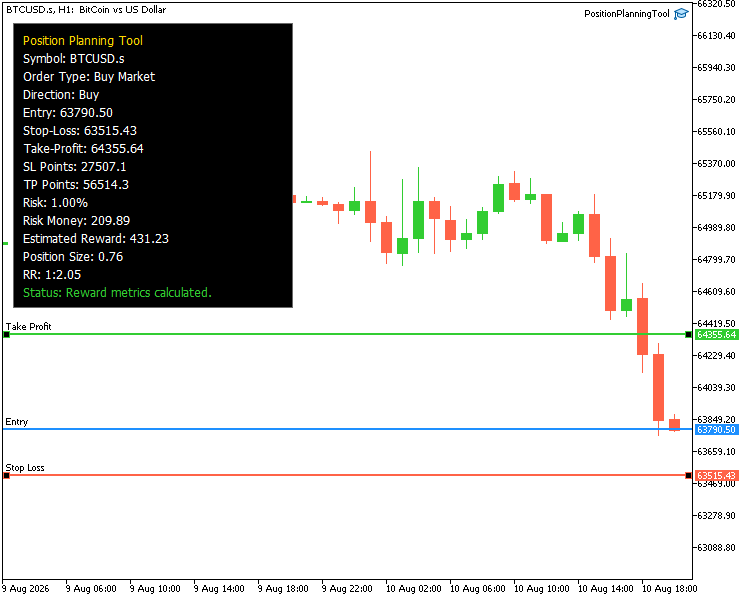
Building a Visual Position Planning Tool for MetaTrader 5 - https://www.mql5.com/en/articles/23970
Alexander Zelchert
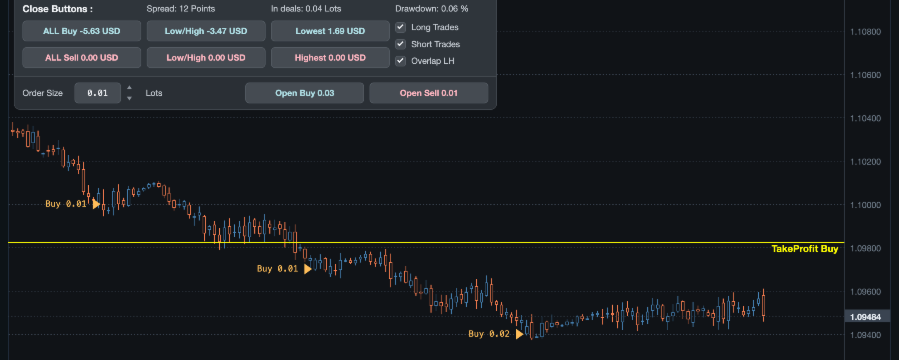
AW Shepherd Safety EA accompagne les positions ouvertes : il ajoute des ordres de récupération filtrés par la tendance, clôture un côté au TakeProfit, par trailing ou au stop, trace les niveaux de clôture sur le graphique et fournit des boutons de gestion manuelle du panier...
Sergey Golubev
Building a Position Lifecycle Manager in MQL5 (Part 1): The Foundation of Reusable Position Management - https://www.mql5.com/en/articles/23752
Alexander Zelchert
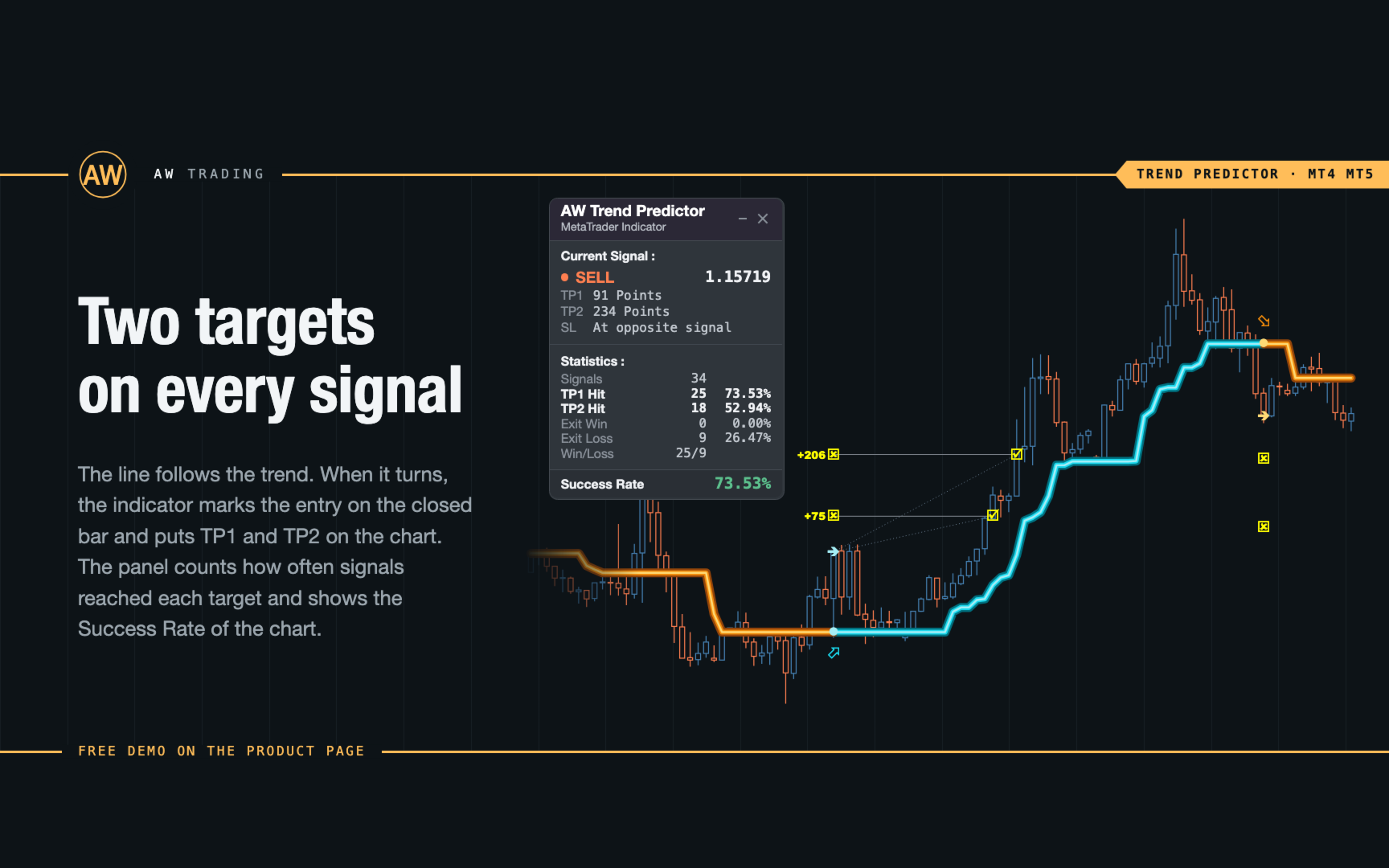
⭐⭐⭐⭐⭐ AW Trend Predictor indicator ⭐⭐⭐⭐⭐
Link to the product:
Get MT4 Version
👉 https://www.mql5.com/en/market/product/43299
Get MT5 Version
👉 https://www.mql5.com/en/market/product/28260
Manual: https://www.mql5.com/en/blogs/post/731214
Link to the product:
Get MT4 Version
👉 https://www.mql5.com/en/market/product/43299
Get MT5 Version
👉 https://www.mql5.com/en/market/product/28260
Manual: https://www.mql5.com/en/blogs/post/731214
Sergey Golubev
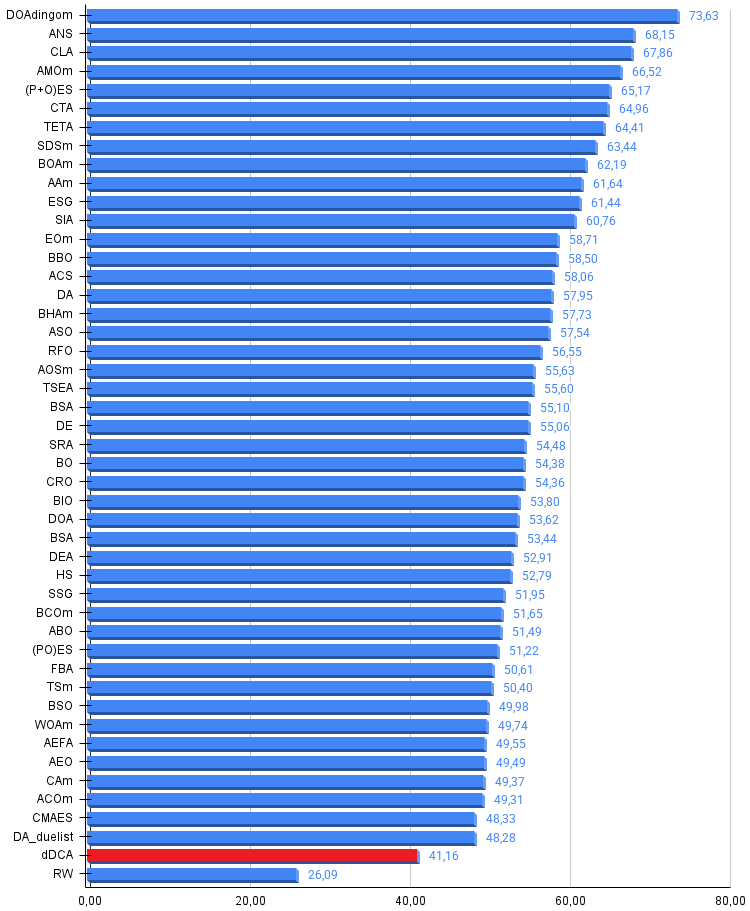
Deterministic Dendritic Cell Algorithm (dDCA) - https://www.mql5.com/en/articles/20430
: