CloseIfProfitorLoss mit Trailing: Positionen nach Gesamtgewinn/-verlust schließen, mit Trailing Stop.

| 💰 CloseIfProfitorLoss mit Trailing für MetaTrader 4 und MetaTrader 5 Professionelles Panel zum Schließen von Positionen nach Gesamtgewinn oder Gesamtverlust in Kontowährung, Punkten, Prozent des Kontostands und mit Profit Trailing. CloseIfProfitorLoss hilft Tradern, offene Positionen zu kontrollieren, Kontoergebnisse zu schützen, Trade-Körbe zu schließen, schwimmende Gewinne nachzuziehen und virtuelle Gewinn-/Verlustgrenzen für manuelles Trading oder Portfolios mit Expert Advisors zu nutzen. |
[Русский] - [English] - [Español] - [Português] - [Deutsch] - [Français] - [한국어] - [日本語] - [中文] - [Türkçe] - [Italiano]
| 💎 CloseIfProfitorLoss MT4 | 💎 CloseIfProfitorLoss MT5 |
| ⬇ CLP DEMO + PDF herunterladen | 📘 Vollständige Anleitung |
| ▶ Video ansehen | 🎛 Teil des VirtualTradePad-Systems |
| 🏠 Hauptseite | 🎓 Dokumentation | ⚙ Einstellungen |
| ❓ FAQ | ⭐ Bewertungen | 💬 Kommentare |
🎬 Sehen Sie, wie CloseIfProfitorLoss funktioniertDas Video zeigt, wie das Panel Positionen nach Gesamtgewinn oder Gesamtverlust schließen und Profit Trailing nutzen kann, um schwimmende Gewinne zu schützen, statt zu früh zu schließen. |
💰 CloseIfProfitorLoss für MT4 und MT5 Ein praktisches Panel für MetaTrader 4 und MetaTrader 5: Schließen nach Gesamtgewinn, Gesamtverlust, Punkten, Prozent, Kontowährung oder Nachziehen des schwimmenden Gewinns. |

🚀 Was ist CloseIfProfitorLoss?
CloseIfProfitorLoss, auch bekannt als Profit or Loss Pad oder CLP, ist ein Expert-Advisor-Panel für MetaTrader 4 und MetaTrader 5, das Positionen schließt, wenn der Gesamtgewinn oder Gesamtverlust den vom Trader gewählten Wert erreicht.
Das Panel kann das aktuelle Symbol oder alle Symbole überwachen, Gewinn und Verlust in Kontowährung, Punkten und Prozent des Kontostands berechnen und Positionen automatisch schließen, sobald die gewählte Bedingung erreicht ist.
Dieses Produkt ist besonders nützlich für Trader, die mehrere Positionen verwalten, Grids, Körbe, manuelles Trading, andere Expert Advisors, Recovery-Systeme, Averaging, Hedge-Positionen nutzen oder einen globalen virtuellen Take Profit / Stop Loss für eine Gruppe von Trades benötigen.
CloseIfProfitorLoss ist kein Signalroboter. Er entscheidet nicht, wo gekauft oder verkauft wird. Seine Aufgabe ist eine andere: das Ergebnis bereits geöffneter Trades zu kontrollieren und sie nach Ihren Risiko- und Gewinnregeln zu schließen.
💵 Schließen nach GewinnSchließen Sie Positionen, wenn der Gesamtgewinn einen gewählten Wert in Geld, Punkten oder Prozent erreicht. | 🛑 Schließen nach VerlustSchließen Sie Positionen, wenn der Gesamtverlust Ihre Schutzgrenze erreicht. |
📈 Profit TrailingLassen Sie den Gewinn wachsen und schließen Sie erst nach einem Rücklauf vom besten erreichten Gewinnniveau. | 🎛 Flexible ModiArbeiten Sie mit allen Symbolen, dem aktuellen Symbol, getrennten BUY/SELL-Richtungen oder jeder Order separat. |
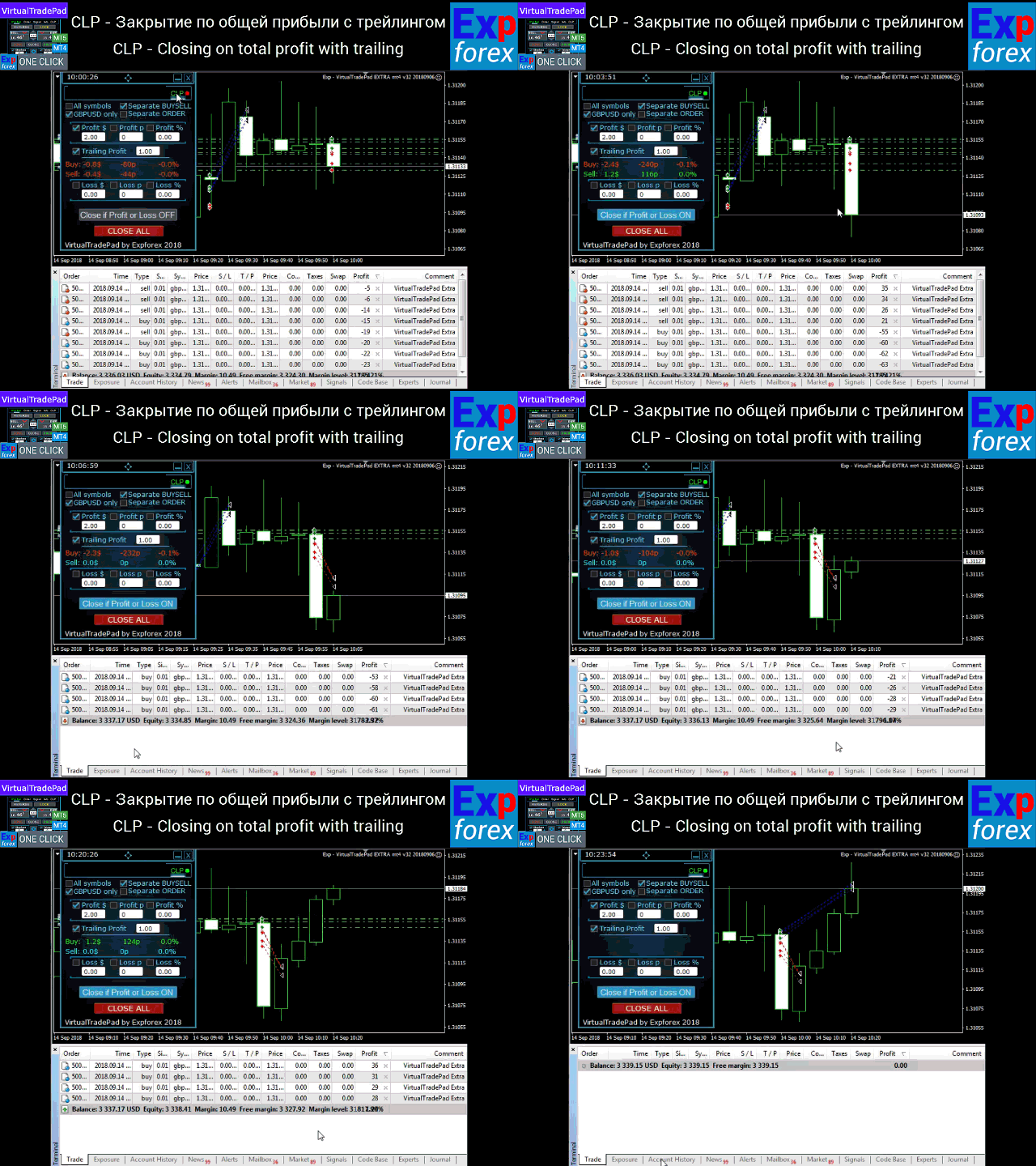
🖥 Funktionsbeispiel von Profit or Loss Pad Das Panel überwacht die ausgewählten Positionen und kann sie automatisch schließen, sobald Gewinn- oder Verlustbedingungen erreicht werden. |
⭐ Warum Trader CLP nutzen
- Gesamtgewinn automatisch schließen, wenn Konto, Symbol, Richtung oder Order das gewählte Ziel erreicht
- Gesamtverlust automatisch schließen, um Drawdown zu begrenzen oder eine unerwünschte Situation zu stoppen
- Profit Trailing verwenden, statt einen festen Gewinn zu früh zu schließen
- Nach Kontowährung schließen, zum Beispiel +10 USD oder -100 USD
- Nach Punkten schließen für punktbasierte Handelssysteme
- Nach Prozent des Kontostands schließen für Risiko- und Gewinnkontrolle auf Kontoebene
- Alle Symbole oder nur das aktuelle Symbol überwachen
- BUY- und SELL-Richtungen getrennt schließen
- Den Modus Separate Order nutzen als virtuellen Stop Loss / Take Profit für jede Position
- Pending Orders nach dem Schließen löschen, wenn die Einstellung aktiviert ist
- Den Notfallbutton Close ALL verwenden für schnelles manuelles Schließen
- Zukünftige Schließlinien anzeigen für Gesamtgewinn-/Gesamtverlustniveaus im Chart
| ⚠ Wichtig: CloseIfProfitorLoss schließt Trades nach den von Ihnen gewählten Ergebnisniveaus. Das Tool reduziert das Marktrisiko nicht von selbst. Falsche Einstellungen für Gewinn, Verlust, Prozent, Punkte, Magic Number oder Symbol können Trades früher oder später schließen als erwartet. |
🧠 Grundidee: den Korb kontrollieren, nicht nur einen Trade
Viele Trader eröffnen mehr als eine Position: manuelle Trades, Expert-Advisor-Trades, Grids, Recovery-Serien, Hedge-Positionen oder mehrere Symbole gleichzeitig.
In dieser Situation reicht ein normaler Stop Loss oder Take Profit für eine einzelne Position nicht immer aus. Der Trader muss möglicherweise das Gesamtergebnis schließen:
- alles schließen, wenn der Korb +50 USD erreicht;
- alle Trades des aktuellen Symbols bei -100 USD Verlust schließen;
- die BUY-Richtung separat schließen, wenn der BUY-Gewinn +20 USD erreicht;
- jede Order separat nach ihrem eigenen Gewinn-/Verlustniveau schließen;
- den Gesamtgewinn nachziehen, nachdem das gewählte Ziel erreicht wurde;
- alle Trades schließen, wenn der Verlust einen Prozentsatz des Kontostands erreicht.
CloseIfProfitorLoss wurde genau für diese Art praktischer Kontrolle entwickelt.
| ✅ Hauptnutzen: CLP gibt dem Trader ein klares Panel, um Positionen nach Regeln für Gesamtgewinn oder Gesamtverlust zu schließen, statt den ganzen Tag schwimmende Ergebnisse manuell zu überwachen. |
🎛 Hauptmodi des Panels
Das Panel lässt Sie festlegen, was genau überwacht und geschlossen werden soll. Das ist eine der stärksten Funktionen von CLP, weil verschiedene Trader unterschiedliche Schließlogiken benötigen.
| Modus | Funktionsweise |
| All Symbols | Berechnet und schließt Positionen über alle Symbole hinweg nach den gewählten Gewinn-/Verlustregeln. |
| Current Symbol Only | Berechnet und schließt nur Positionen des Chartsymbols, auf dem der Expert Advisor installiert ist. |
| Separate BUY / SELL | BUY- und SELL-Richtungen werden getrennt berechnet und können unabhängig voneinander geschlossen werden. |
| Separate Order | Jede Position wird separat berechnet. Dieser Modus kann wie ein virtueller Stop Loss / Take Profit pro Position arbeiten. |
| Close ALL | Notfallbutton zum sofortigen Schließen von Positionen nach der gewählten Symbol-/Moduslogik. |
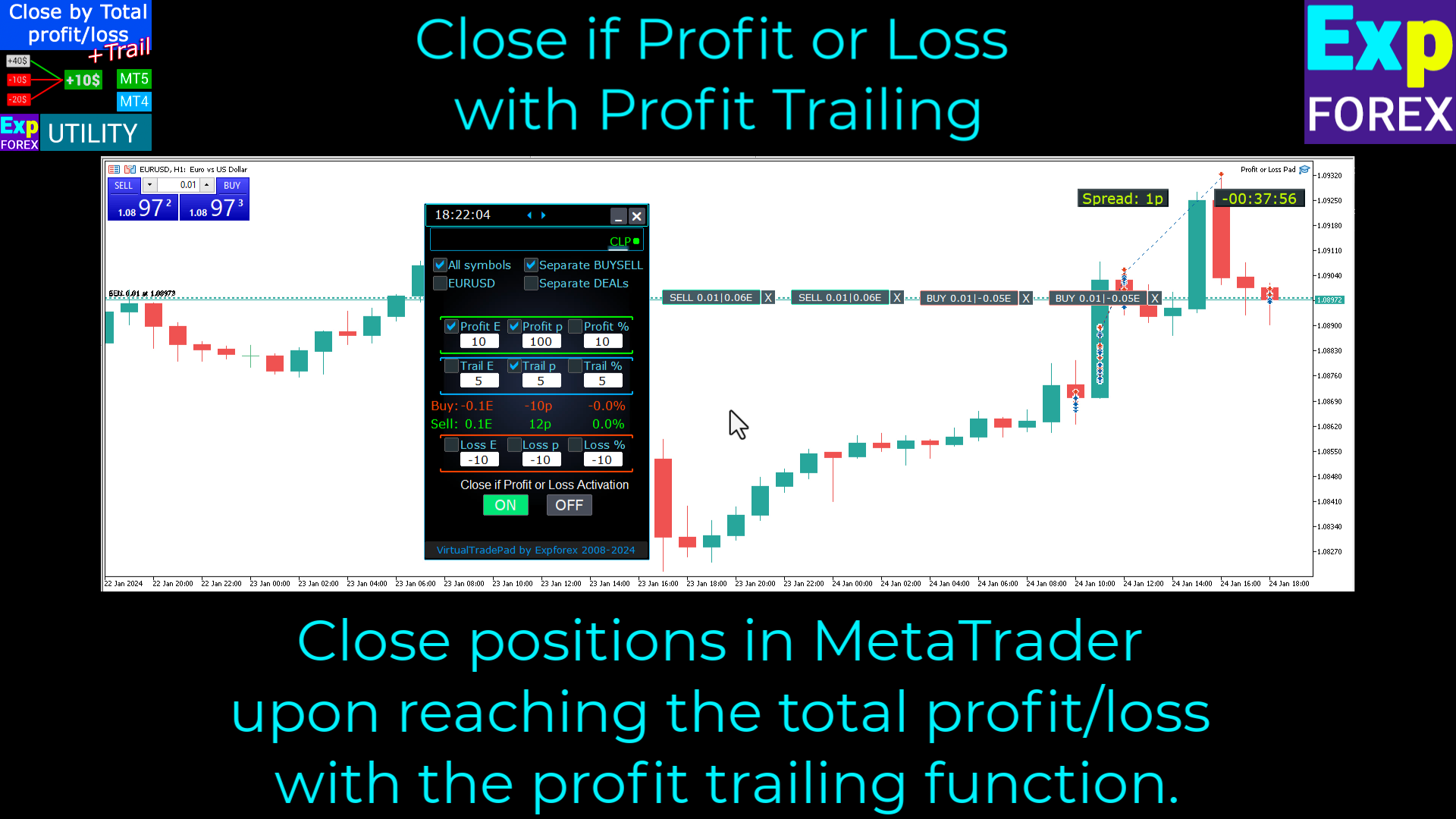
🎛 Beispiel für die CLP-Panelsteuerung Das Panel bietet direkten Zugriff auf Gewinn, Verlust, Trailing und Schließmodi direkt aus dem Chart. |
💵 Schließen nach Gewinn
Sie können ein Gewinnniveau definieren und die Art der Gewinnberechnung aktivieren, die Sie benötigen.
Zum Beispiel können Sie Positionen schließen, wenn:
- der Gesamtgewinn +10 USD erreicht;
- der Gesamtgewinn +100 Punkte erreicht;
- der Gesamtgewinn +2% des aktuellen Kontostands erreicht.
Der Gewinnwert muss größer als null sein. Wenn null eingegeben wird, arbeitet das Feld nicht. Wenn in ein Gewinnfeld ein negativer Wert eingegeben wird, kann der EA ihn automatisch in einen positiven Wert umwandeln, wenn die Autokorrektur aktiviert ist.
| Gewinnmodus | Bedeutung |
| Profit $ | Schließt, wenn der Gesamtgewinn den gewählten Wert in Kontowährung erreicht. |
| Profit p | Schließt, wenn der Gesamtgewinn den gewählten Punktwert erreicht. |
| Profit % | Schließt, wenn der Gesamtgewinn den gewählten Prozentsatz des Kontostands erreicht. |
🛑 Schließen nach Verlust
Sie können auch ein Verlustniveau definieren und CLP Positionen schließen lassen, wenn der Verlust das gewählte Limit erreicht.
Dies kann als globale Schutzregel für einen Korb, eine Richtung, das aktuelle Symbol, alle Symbole oder den Modus für getrennte Positionen verwendet werden.
Der Verlustwert muss kleiner als null sein. Wenn in ein Verlustfeld ein positiver Wert eingegeben wird, kann der EA ihn automatisch in einen negativen Wert umwandeln, wenn die Autokorrektur aktiviert ist.
| Verlustmodus | Bedeutung |
| Loss $ | Schließt, wenn der Gesamtverlust den gewählten negativen Wert in Kontowährung erreicht. |
| Loss p | Schließt, wenn der Gesamtverlust den gewählten negativen Punktwert erreicht. |
| Loss % | Schließt, wenn der Gesamtverlust den gewählten Prozentsatz des Kontostands erreicht. |
| ⚠ Richtige Werte: Gewinnwerte sollten positiv sein, Verlustwerte sollten negativ sein. Das verhindert Verwechslungen zwischen der Logik „im Gewinn schließen“ und „im Verlust schließen“. |
📈 Profit Trailing: Gewinn wachsen lassen, bevor geschlossen wird
Der stärkste Teil von CloseIfProfitorLoss ist Trailing Profit.
Ohne Trailing schließt der EA Positionen sofort, wenn der Gesamtgewinn den Wert 10 USD erreicht, falls Profit $ = 10 eingestellt ist. Das ist einfach, aber manchmal bewegt sich der Markt weiter zu Ihren Gunsten und der Trader verliert zusätzlichen potenziellen Gewinn.
Profit Trailing löst dieses Problem, indem es erst aktiv wird, nachdem das gewählte Gewinnniveau erreicht wurde. Der EA merkt sich das beste schwimmende Gewinnniveau und zieht die Schließlinie dem Gewinn nach. Wenn der Gewinn anschließend unter das nachgezogene Niveau fällt, schließt der EA die Positionen.
| Schritt | Beispiel mit Profit $ = 10 und TrailingProfit = 5 |
| 1 | Das Gewinnziel beträgt 10 USD. |
| 2 | Die Trailing-Linie startet bei 5 USD. |
| 3 | Wenn der Gesamtgewinn über 10 USD steigt, wird das Trailing aktiv. |
| 4 | Wenn der schwimmende Gewinn auf 20 USD steigt, folgt die Trailing-Linie mit Abstand. |
| 5 | Wenn der Gewinn unter das zuletzt nachgezogene Niveau zurückfällt, schließt der EA die Positionen. |
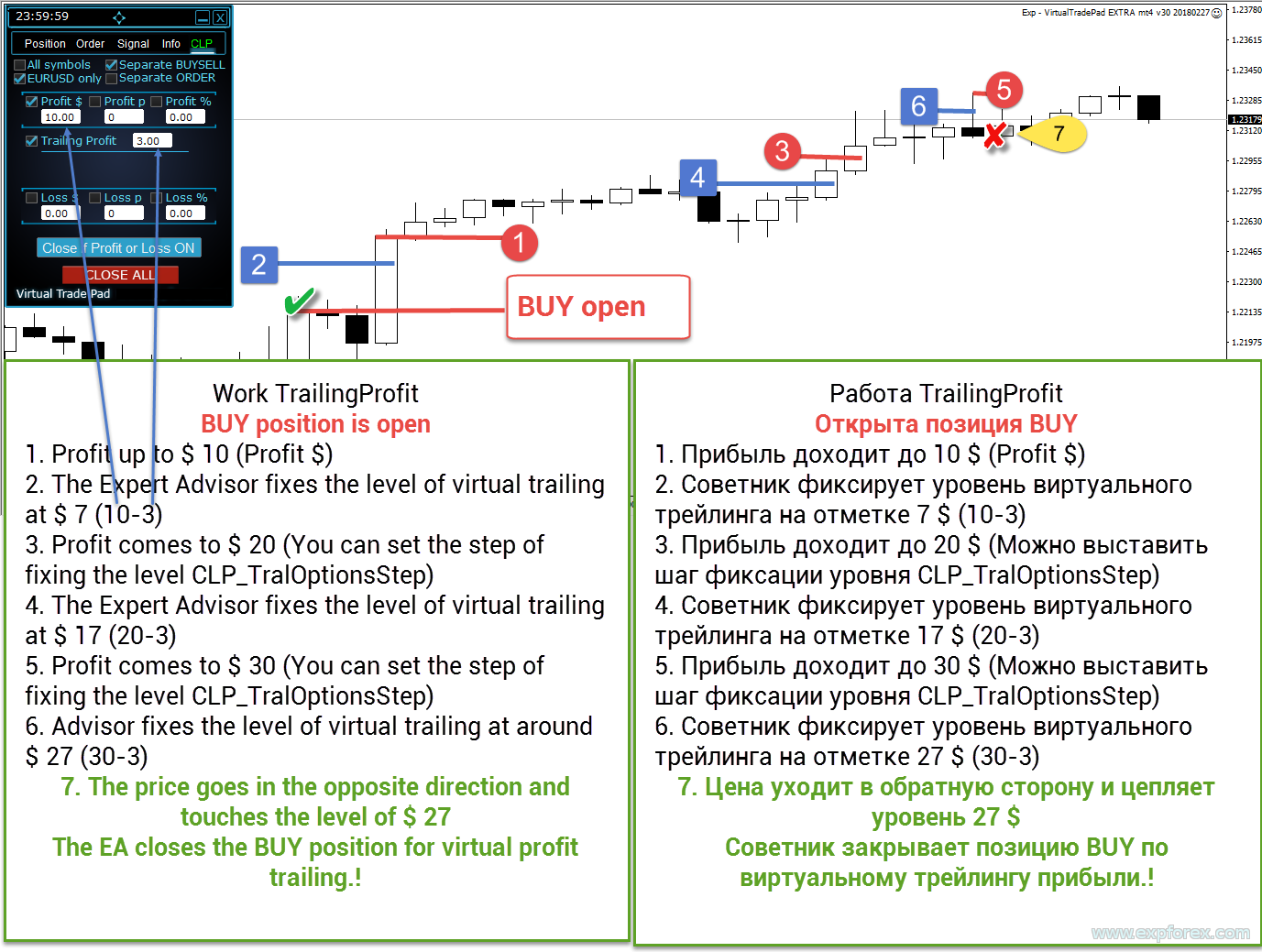
📈 Logik von Trailing Profit Trailing Profit ermöglicht es dem EA, den besten erreichten schwimmenden Gewinn zu schützen, statt sofort beim ersten Ziel zu schließen. |
📊 Profit Trailing in Prozent
Profit Trailing kann nicht nur in Kontowährung, sondern auch in Prozent arbeiten.
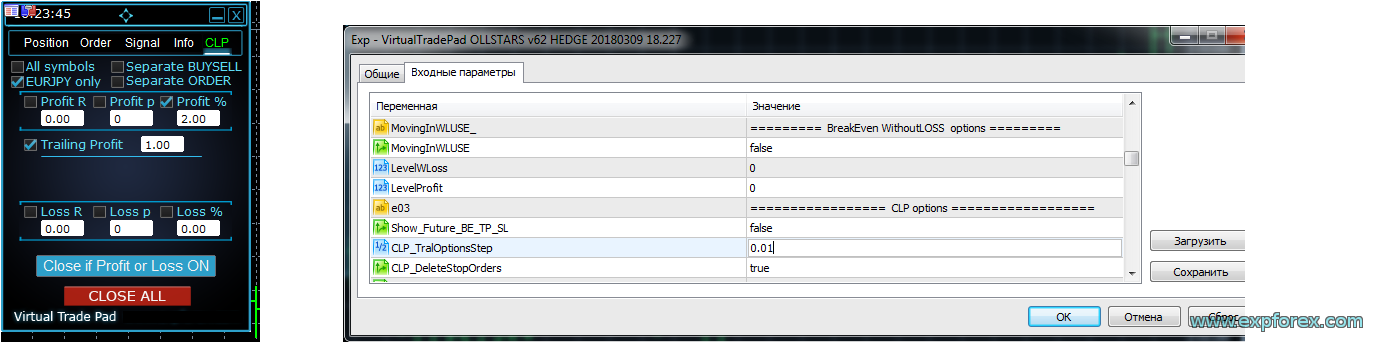
Wenn zum Beispiel Profit % auf 2 und TrailingProfit auf 1 gesetzt ist, beginnt der EA mit dem Trailing, nachdem der Gewinn 2% des Kontostands erreicht hat. Das Trailing-Niveau wird bei 1% platziert. Wenn der Gewinn auf 2,01% steigt, kann sich das Trailing-Niveau auf 1,01% bewegen und so weiter.
Fällt der Gewinn später unter das nachgezogene Niveau, werden die Positionen geschlossen.
| Parameter | Beispiel |
| Profit % | 2% |
| TrailingProfit | 1% |
| CLP_TralOptionsStep | Trailing-Schritt von 0,01%, wenn Sie feinere Aktualisierungen wünschen |
📊 Beispiel für Trailing Profit in Prozent Dieser Modus ist nützlich, wenn der Trader den Gewinn nach dem Prozentsatz des Kontostands statt nach festen Geldwerten kontrollieren möchte. |
💵 Profit Trailing in Kontowährung und getrennt für BUY / SELL
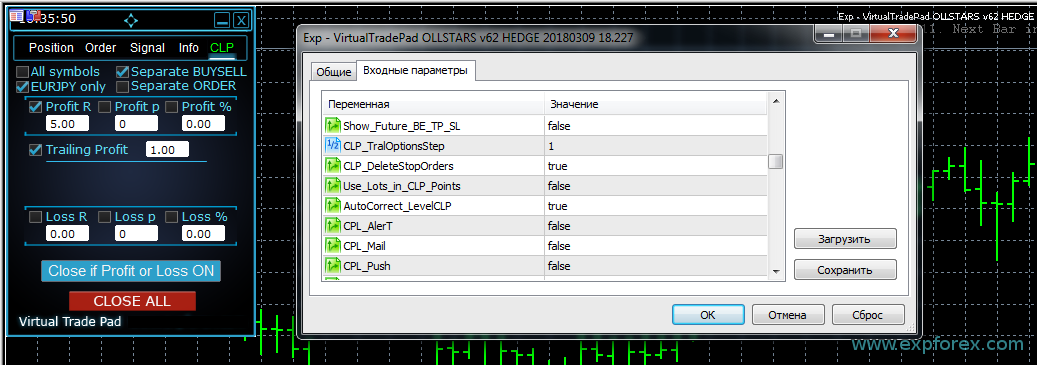
Profit Trailing kann auch in Kontowährung und getrennt für BUY- und SELL-Richtungen arbeiten.
Das ist nützlich, wenn eine Richtung profitabel ist und die andere noch im Minus liegt. Bei aktiviertem Separate BUY / SELL kann der BUY-Gewinn unabhängig von SELL-Positionen geschlossen oder nachgezogen werden.
Wenn zum Beispiel der BUY-Gewinn +5 USD erreicht und TrailingProfit 1 USD beträgt, kann die Trailing-Linie bei +4 USD starten. Wenn der BUY-Gewinn auf +6 USD steigt, bewegt sich das Trailing-Niveau auf +5 USD. Fällt der BUY-Gewinn unter das nachgezogene Niveau, können BUY-Positionen geschlossen werden, während SELL-Positionen separat berechnet werden.
💵 Trailing Profit in Kontowährung mit getrennten Richtungen Die getrennte Überwachung von BUY / SELL ist nützlich, wenn Richtungen unabhängig voneinander kontrolliert werden müssen. |
🧩 Separate Order Modus: virtueller Stop Loss und Take Profit
Der Modus Separate Order berechnet jede Position separat. Er kann wie ein virtueller Stop Loss oder virtueller Take Profit für jeden einzelnen Trade arbeiten.
Statt einen ganzen Korb zu schließen, prüft der EA jede Position unabhängig und schließt sie, wenn die gewählte Gewinn- oder Verlustregel erreicht ist.
Dieser Modus kann für manuelles Trading nützlich sein, wenn der Trader ein flexibles ergebnisbasiertes Schließen möchte, ohne sichtbare Stop Loss- oder Take Profit-Level beim Broker zu platzieren.
| Modus | Anwendungsfall |
| Separate Order OFF | Der EA berechnet das Ergebnis des Korbs oder der Richtung nach dem gewählten Modus. |
| Separate Order ON | Jede Position wird separat berechnet und geschlossen, wie bei virtuellem SL/TP. |
🌐 Aktuelles Symbol oder alle Symbole
CloseIfProfitorLoss kann nur das aktuelle Chartsymbol oder alle Symbole des Kontos überwachen.
Der Modus Current Symbol ist nützlich, wenn Sie eine unabhängige Kontrolle für jedes Handelspaar wünschen. Der Modus All Symbols ist nützlich, wenn Sie Korbkontrolle auf Kontoebene benötigen, zum Beispiel alles schließen, wenn der Gesamtgewinn des Kontos einen gewählten Betrag erreicht.
| Berechnungsmodus | Bedeutung |
| Current Symbol | Nur Positionen des Chartsymbols werden berechnet und geschlossen. |
| All Symbols | Positionen aller Symbole werden in die Gesamtberechnung von Gewinn und Verlust einbezogen. |
📍 Zukünftige BE / TP / SL Linien
Die Option Show_Future_BE_TP_SL kann zukünftige Schließniveaus im Chart anzeigen. Diese Linien helfen einzuschätzen, welchen Preis der Markt erreichen muss, damit die gewählte Gewinn- oder Verlustregel ausgelöst wird.
Die Linien können je nach Modus getrennt für BUY- und SELL-Positionen oder als gemeinsames Niveau angezeigt werden.
Diese Funktion arbeitet auf dem aktuellen Symbol und wenn der Modus Separate Order deaktiviert ist. Wenn die Linien nicht angezeigt werden, können Positionen einen Lock bilden, der sich nicht mit einer einfachen Gesamtgewinn- oder Gesamtverlustlinie darstellen lässt.
📍 Zukünftige Schließlinien Zukünftige Linien helfen, mögliche Schließpreise des Korbs für Gewinn- oder Verlustregeln zu visualisieren. |
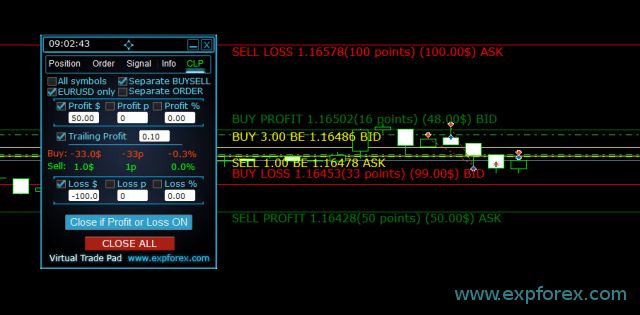
| ⚠ Hinweis zum Preis: Linien- und Preisdaten können bei variablem Spread ungefähr sein. Denken Sie daran: SELL-Positionen schließen zum ASK, BUY-Positionen schließen zum BID. |
🧮 Punkteberechnung und Lot-Gewichtung
CLP kann das Ergebnis in Punkten berechnen. Wenn mehrere Positionen unterschiedliche Lots haben, kann die reine Punktdistanz jedoch irreführend sein.
Zum Beispiel können eine Position mit 0,01 Lot und eine andere mit 0,02 Lot nicht als gleiches Geldrisiko betrachtet werden. Eine Bewegung von 10 Punkten bei 0,02 Lot hat die doppelte finanzielle Wirkung einer Bewegung von 10 Punkten bei 0,01 Lot.
Die Einstellung Use_Lots_in_CLP_Points erlaubt dem EA, Punkte mit Lot-Gewichtung zu berechnen. Das ist besonders nützlich auf Hedge-Konten, bei denen mehrere Positionen unterschiedliche Volumen haben können.
| Einstellung | Bedeutung |
| Use_Lots_in_CLP_Points = false | Der EA berechnet „saubere“ Punkte ohne Lot-Gewichtung. |
| Use_Lots_in_CLP_Points = true | Der EA berechnet Punkte mit Lot-Gewichtung auf Basis der Mindestlot-Logik. |
| Praxisbeispiel: Zwei Positionen können in „sauberen“ Punkten positiv aussehen, aber trotzdem einen Geldverlust erzeugen, wenn die verlierende Position ein größeres Lot hat. Deshalb kann die lotgewichtete Punkteberechnung wichtig sein. |
🪄 Autokorrektur von Gewinn- und Verlustwerten
Die Einstellung AutoCorrect_LevelCLP hilft, den Nutzer vor falsch eingegebenen Vorzeichen zu schützen.
In Gewinnfeldern muss der Wert positiv sein. In Verlustfeldern muss der Wert negativ sein. Wenn die Autokorrektur aktiviert ist, kann der EA falsche Vorzeichen automatisch in korrekte Vorzeichen umwandeln.
| Eingabe des Nutzers | Autokorrigierte Bedeutung |
| Profit = -100 | Wird für das Schließen nach Gewinn in +100 umgewandelt. |
| Loss = +100 | Wird für das Schließen nach Verlust in -100 umgewandelt. |
| TrailingProfit negativ | Wird je nach EA-Logik abgelehnt oder korrigiert, weil die Trailing-Distanz positiv sein muss. |
⚙ Wichtige Einstellungen, die Sie verstehen sollten
CloseIfProfitorLoss hat viele Einstellungen, weil es als Korb-Schließer, Verlustbegrenzer, virtueller TP/SL, Profit-Trailer und Konto-Kontrollpanel arbeiten kann. Die vollständige Liste ist in der Produktdokumentation verfügbar, aber diese Gruppen sind besonders wichtig.
| Einstellung | Warum sie wichtig ist |
| MagicNumber | Definiert, welche Magic Numbers überwacht werden und welche Magic Number beim Öffnen von Positionen aus dem Panel verwendet wird. |
| UseAllMagicFromAllAccount | Wenn true, können alle Positionen des aktuellen Symbols unabhängig von der Magic Number überwacht werden. |
| Show_Future_BE_TP_SL | Zeigt zukünftige Break-even-, Gewinn- und Verlustniveaus im Chart an. |
| CLP_TralOptionsStep | Schritt zum Ändern des Profit-Trailing-Niveaus in den gewählten Einheiten: Geld, Punkte oder Prozent. |
| CLP_DeleteStopOrders | Löscht Pending Orders beim Schließen nach Gesamtgewinn oder Gesamtverlust. |
| Use_Lots_in_CLP_Points | Bezieht die Lotgröße in die Punkteberechnung ein, damit die punktbasierte Gewinn-/Verlustlogik realistischer ist. |
| AutoCorrect_LevelCLP | Korrigiert automatisch die Vorzeichen von Gewinn-/Verlustwerten, um falsche Eingaben zu vermeiden. |
| CPL_AlerT | Zeigt eine Warnung an, wenn ein Schließen nach Gewinn oder Verlust erfolgt. |
| CPL_Mail | Sendet eine E-Mail-Benachrichtigung, wenn ein Schließen nach Gewinn oder Verlust erfolgt. |
| CPL_Push | Sendet eine Push-Benachrichtigung an das mobile Terminal, wenn der Schließvorgang erfolgt. |
| CPL_CloseTerminalAfterClose | Schließt das Terminal, nachdem alle Positionen geschlossen wurden. |
| CPL_AUTOOFF_AfterClose | Schaltet den Button Close if Profit or Loss automatisch aus, nachdem alle relevanten Positionen geschlossen wurden. |
| TypeFilling | Filling-Typ in MT5. Nützlich, wenn der Broker Fehler wegen ungültiger Filling-Modi zurückgibt. |
| 📘 Möchten Sie die vollständige Parameterliste? Öffnen Sie die vollständige Dokumentation der CloseIfProfitorLoss-Einstellungen, bevor Sie erweiterte Szenarien mit Magic, Trailing, zukünftigen Linien, Alerts oder Verlustlimits verwenden. |
🔔 Alerts, Push, Mail und Terminalaktionen
CLP kann den Trader benachrichtigen, wenn ein Schließen nach Gewinn oder Verlust erfolgt.
Das ist nützlich, wenn das Panel auf einem VPS läuft, mehrere Positionen verwaltet oder zusammen mit einem anderen Expert Advisor arbeitet. Benachrichtigungen helfen dem Trader zu erkennen, wann eine Regel zur Ergebniskontrolle ausgelöst wurde.
| Benachrichtigung | Zweck |
| CPL_AlerT | Zeigt eine Warnung im Terminal-Chart an. |
| CPL_Mail | Sendet eine E-Mail, wenn die MetaTrader-Mail korrekt eingerichtet ist. |
| CPL_Push | Sendet eine Push-Benachrichtigung an die mobile MetaTrader-App. |
| CPL_CloseTerminalAfterClose | Kann das Terminal schließen, nachdem alle Positionen geschlossen wurden. |
📉 Limit-Alerts für Tag, Woche, Monat oder Gesamtzeitraum
CloseIfProfitorLoss kann auch einen Block für Limit-Alerts enthalten. Dieser Block schließt Trades nicht selbst. Er gibt Alerts aus, wenn die gewählten Gewinn- oder Verlustlimits für einen ausgewählten Zeitraum erreicht werden.
Das ist nützlich, wenn der Trader benachrichtigt werden möchte, sobald das Gesamtergebnis des Tages, der Woche, des Monats oder des gesamten Zeitraums einen gewählten Wert erreicht.
| Limit-Einstellung | Bedeutung |
| LimitFor | Zeitraum für die Limitberechnung: Tag, Woche, Monat oder Gesamtzeitraum. |
| LimitForLosses | Verlustlimit in Kontowährung für Alerts. |
| LimitForProfits | Gewinnlimit in Kontowährung für Alerts. |
| NotificationMailSend | Aktiviert Meldungen, wenn die gewählten Limits erreicht werden. |
🧪 Beispiel für einen konsistenten Arbeitsablauf
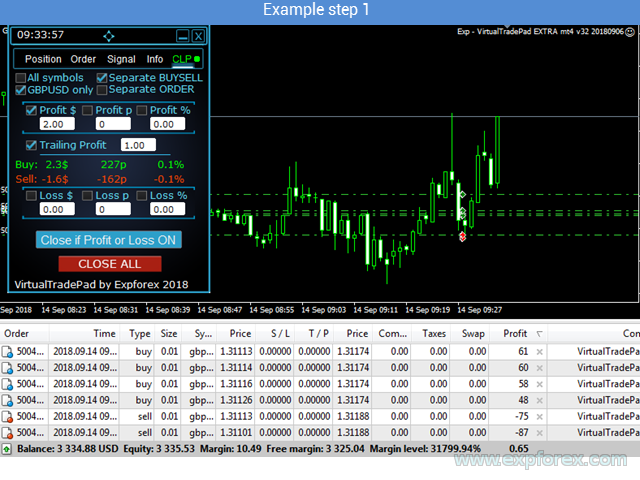
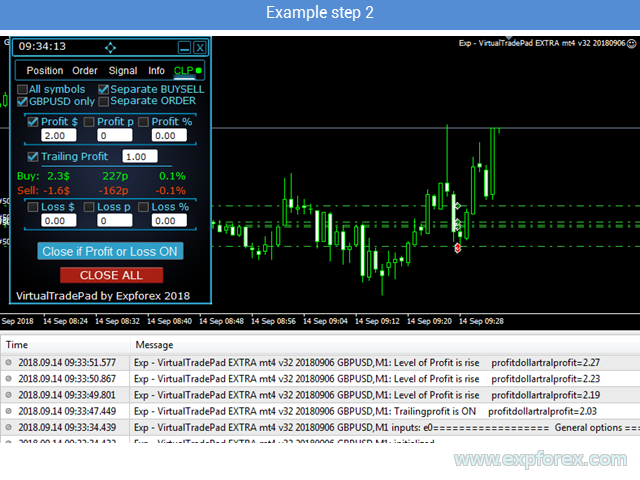
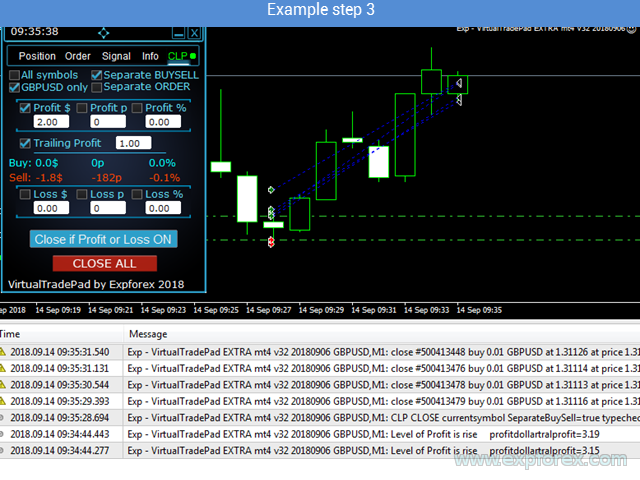
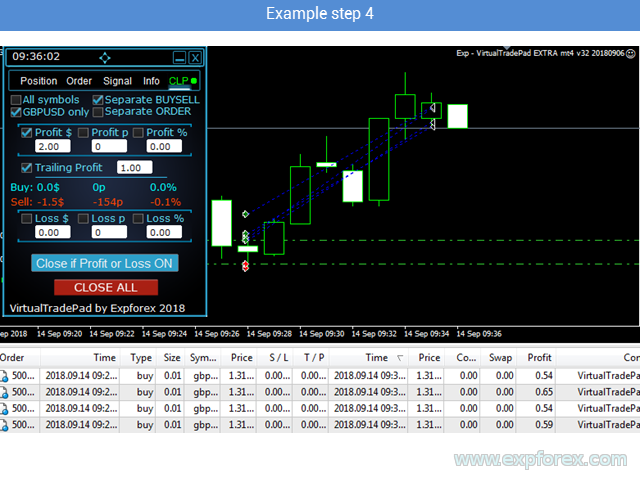
Das Panel kann Schritt für Schritt verwendet werden: Symbole auswählen, Einheiten für Gewinn/Verlust wählen, Schließmodi aktivieren, Gewinn- und Verlustwerte festlegen, Close if Profit or Loss aktivieren und warten, bis das gewählte Niveau erreicht ist.
Die folgenden Beispiele zeigen verschiedene Arbeitsschritte mit dem Panel und der Logik zur Ergebniskontrolle.
🧪 Beispiel Schritt 1 |
🧪 Beispiel Schritt 2 |
🧪 Beispiel Schritt 3 |
🧪 Beispiel Schritt 4 |
✅ Wann CloseIfProfitorLoss nützlich sein kann
- Sie handeln manuell und möchten automatisches Schließen nach Gesamtgewinn oder Gesamtverlust.
- Sie verwenden einen anderen Expert Advisor, benötigen aber externen Korbschutz.
- Sie verwalten mehrere Positionen auf einem Symbol und möchten eine gemeinsame Schließlogik.
- Sie benötigen Schließen auf Kontoebene über alle Symbole hinweg.
- Sie möchten BUY- und SELL-Richtungen getrennt schließen.
- Sie möchten jede Position separat nach virtuellen Gewinn-/Verlustniveaus schließen.
- Sie möchten schwimmenden Gewinn nachziehen, nachdem er eine gewählte Schwelle erreicht hat.
- Sie möchten zukünftige Schließniveaus im Chart sehen.
- Sie möchten Benachrichtigungen erhalten, wenn ein Schließen nach Gewinn oder Verlust erfolgt.
- Sie benötigen einen schnellen Close ALL Button für Notfallsituationen.
⚠ Wann Sie vorsichtig sein sollten
|
🌐 Empfehlungen zu Broker, VPS und Terminal
CloseIfProfitorLoss arbeitet mit Schließbefehlen, Korbüberwachung, Löschung von Pending Orders und Gewinn-/Verlustberechnungen. Stabile Ausführung und dauerhafte Terminalverfügbarkeit sind wichtig.
✅ Empfohlen
| ⚠ Sorgfältig prüfen
|
🛠 CLP installieren und starten
Die Installation ist standardmäßig wie bei Produkten aus dem MQL5 Market. Nach der Installation hängen Sie den EA an den Chart, konfigurieren die Schließregeln, wählen Symbole/Modus aus und aktivieren das Panel.
| Schritt | Aktion |
| 1 | Laden, kaufen oder mieten Sie CloseIfProfitorLoss für MT4 oder MT5. |
| 2 | Öffnen Sie MetaTrader und melden Sie sich bei dem MQL5-Konto an, das für das Produkt verwendet wird. |
| 3 | Installieren Sie das Produkt aus dem Market-Bereich des Terminals. |
| 4 | Hängen Sie den EA an den Chart des Symbols, das Sie überwachen möchten. |
| 5 | Aktivieren Sie Algo Trading / Auto Trading und erlauben Sie automatisierten Handel in den EA-Einstellungen. |
| 6 | Wählen Sie den Modus Current Symbol oder All Symbols. |
| 7 | Wählen Sie, ob BUY und SELL gemeinsam oder getrennt berechnet werden sollen. |
| 8 | Legen Sie Gewinn- und Verlustwerte in Geld, Punkten oder Prozent fest. |
| 9 | Aktivieren Sie Profit Trailing, wenn schwimmender Gewinn nachgezogen werden soll. |
| 10 | Aktivieren Sie Close if Profit or Loss und überwachen Sie das Panel zuerst auf einem Demokonto, bevor Sie es real einsetzen. |
🔗 Nützliche Links🔹 CloseIfProfitorLoss für MetaTrader 4 kaufen 🔹 CloseIfProfitorLoss für MetaTrader 5 kaufen 🔹 CLP DEMO + PDF herunterladen 🔹 Vollständige CloseIfProfitorLoss-Anleitung |
🆚 CLP gegenüber manuellem Schließen
Manuelles Schließen ist möglich, erfordert aber ständige Überwachung. Der Trader muss den schwimmenden Gewinn beobachten, das Gesamtergebnis berechnen, entscheiden, wann geschlossen werden soll, und schnell reagieren, wenn sich der Markt bewegt.
CloseIfProfitorLoss automatisiert diesen Prozess mit klaren Regeln.
| Manuelles Schließen | CloseIfProfitorLoss |
| Der Trader überwacht den schwimmenden Gewinn manuell | Der EA überwacht die gewählten Ergebnisniveaus automatisch |
| Viele Trades im richtigen Moment zu schließen ist schwierig | Der EA kann Korb, Richtung, Symbol oder alle Symbole nach Regel schließen |
| Gewinn wird oft zu früh geschlossen | Profit Trailing kann schwimmenden Gewinn weiter wachsen lassen |
| Ein Verlustlimit kann bei schnellen Bewegungen verpasst werden | Der EA kann schließen, sobald das gewählte Verlustniveau erreicht ist |
| Unterschiedliche Lots machen die Punkteberechnung unübersichtlich | Lotgewichtete Punkteberechnung kann aktiviert werden |
📌 Praktische Empfehlungen vor dem Start
- Beginnen Sie mit Tests auf einem Demokonto.
- Nutzen Sie zuerst den Modus Current Symbol, bevor Sie All Symbols verwenden.
- Prüfen Sie MagicNumber und UseAllMagicFromAllAccount sorgfältig.
- Verwenden Sie positive Werte für Gewinn und negative Werte für Verlust.
- Aktivieren Sie AutoCorrect_LevelCLP, um Eingabefehler zu reduzieren.
- Testen Sie Profit Trailing mit kleinen Werten, bevor Sie es auf echten Konten verwenden.
- Nutzen Sie Separate BUY / SELL nur, wenn Richtungen unabhängig geschlossen werden sollen.
- Nutzen Sie Separate Order nur, wenn Sie die individuelle virtuelle TP/SL-Logik verstehen.
- Aktivieren Sie CLP_DeleteStopOrders nur, wenn Pending Orders nach dem Schließen entfernt werden sollen.
- Verwenden Sie einen VPS, wenn das Panel Positionen dauerhaft überwachen soll.
⚠ Risikohinweis
| Der Handel mit Forex und CFDs ist mit Risiko verbunden. CloseIfProfitorLoss ist ein Tool zur Verwaltung und zum Schließen von Trades. Es kann Positionen nach gewählten Gewinn-/Verlustregeln schließen und schwimmenden Gewinn nachziehen, kann aber weder Gewinne garantieren noch alle Verluste verhindern. Marktlücken, Slippage, Broker-Verzögerungen, Spread-Ausweitungen, Verbindungsprobleme und falsche Einstellungen können das Endergebnis beeinflussen. |
🏁 Fazit
CloseIfProfitorLoss with Trailing wurde für Trader entwickelt, die strukturierte Kontrolle über offene Positionen und das Kontoergebnis benötigen.
Es ist besonders nützlich, wenn Sie mehrere Positionen handeln, Grids verwenden, Körbe verwalten, manuell handeln, einen anderen Expert Advisor nutzen oder ein globales Panel zur Gewinn-/Verlustkontrolle benötigen.
Die stärkste Funktion ist Profit Trailing: Statt sofort beim ersten Gewinnziel zu schließen, kann das Panel den schwimmenden Gewinn verfolgen und erst nach einem Rücklauf schließen. Das gibt Tradern eine flexiblere Möglichkeit, Gewinne zu schützen und dem Markt gleichzeitig Raum für weitere Bewegung zu lassen.
🚀 Nutzen Sie CloseIfProfitorLoss noch heuteLaden Sie die Demo herunter, sehen Sie sich das Video an, lesen Sie die vollständige Anleitung, konfigurieren Sie Ihre Gewinn-/Verlustregeln und testen Sie CLP auf einem Demokonto, bevor Sie es im echten Trading verwenden. |
| ▶ Video ansehen | 📘 Vollständige Anleitung |
| 💎 CLP MT5 kaufen | 💎 CLP MT4 kaufen |
| ⬇ DEMO + PDF herunterladen | 🛒 Alle Expforex-Produkte |
SEO-Tags
CloseIfProfitorLoss, Close if Profit or Loss, Profit or Loss Pad, CLP, Gewinn schließen, Verlust schließen, Gesamtgewinn, Gesamtverlust, Trailing Profit, Profit Trailing, Expert Advisor zum Schließen von Körben, Positionen nach Gewinn schließen, Positionen nach Verlust schließen, alle Positionen schließen, MetaTrader Gewinn-Schließer, MT4 Gewinn-Schließer, MT5 Gewinn-Schließer, Forex Korb-Schließer, virtueller Take Profit, virtueller Stop Loss, Schließen nach Prozent, Schließen nach Punkten, Schließen nach Kontowährung, Separate BUY SELL, Separate Order, All Symbols Schließen, Current Symbol Schließen, Close ALL Button, Forex Trade Management, Expforex CLP, MQL5 Market Expert Advisor