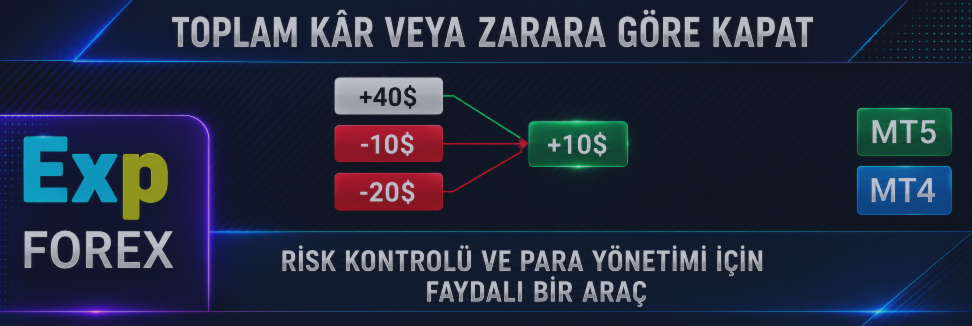
Trailing özellikli CloseIfProfitveyaLoss: Toplam kâr/zarara göre pozisyon kapatma ve Trailing Stop kullanımı.

| 💰 MetaTrader 4 ve MetaTrader 5 için Trailing özellikli CloseIfProfitorLoss Mevduat para birimi, puan, bakiye yüzdesi ve Profit Trailing ile toplam kâr veya zarara göre pozisyon kapatmak için profesyonel panel. CloseIfProfitorLoss, yatırımcıların açık pozisyonları kontrol etmesine, hesap sonucunu korumasına, işlem sepetlerini kapatmasına, dalgalı kârı takip etmesine ve manuel işlem veya Expert Advisor portföyleri için sanal kâr/zarar limitleri kullanmasına yardımcı olur. |
[Русский] - [English] - [Español] - [Português] - [Deutsch] - [Français] - [한국어] - [日本語] - [中文] - [Italiano]
| 💎 CloseIfProfitorLoss MT4 | 💎 CloseIfProfitorLoss MT5 |
| ⬇ CLP DEMO + PDF indir | 📘 Tam talimat |
| ▶ Videoyu izle | 🎛 VirtualTradePad sisteminin bir parçası |
| 🏠 Ana | 🎓 Dokümantasyon | ⚙ Ayarlar |
| ❓ SSS | ⭐ İncelemeler | 💬 Yorumlar |
🎬 CloseIfProfitorLoss nasıl çalışır?Video, panelin pozisyonları toplam kâr veya zarara göre nasıl kapatabildiğini ve çok erken kapatmak yerine dalgalı kârı korumak için Profit Trailing kullanabildiğini gösterir. |
💰 MT4 ve MT5 için CloseIfProfitorLoss MetaTrader 4 ve MetaTrader 5 için tek pratik panel: pozisyonları toplam kâr, toplam zarar, puan, yüzde, mevduat para birimi veya dalgalı kâr takibiyle kapatın. |

🚀 CloseIfProfitorLoss nedir?
CloseIfProfitorLoss, ayrıca Profit or Loss Pad veya CLP, trader tarafından seçilen toplam kâr veya zarar değerine ulaşıldığında pozisyonları kapatan MetaTrader 4 ve MetaTrader 5 için bir Expert Advisor panelidir.
Panel mevcut sembolü veya tüm sembolleri izleyebilir; kâr ve zararı mevduat para biriminde, puan olarak veya bakiye yüzdesiyle hesaplayabilir ve seçilen koşul gerçekleştiğinde pozisyonları otomatik olarak kapatabilir.
Bu ürün özellikle birden fazla pozisyon yöneten, grid veya sepet kullanan, manuel işlem yapan, başka bir Expert Advisor ile çalışan, recovery sistemleri, averaging, hedge pozisyonları kullanan ya da bir işlem grubu için global sanal Take Profit / Stop Loss ihtiyacı olan traderlar için faydalıdır.
CloseIfProfitorLoss bir sinyal robotu değildir. Nereden alım veya satım yapılacağına karar vermez. Görevi farklıdır: zaten açılmış işlemlerin sonucunu kontrol etmek ve onları sizin risk ve kâr kurallarınıza göre kapatmaktır.
💵 Kâra göre kapatToplam kâr para, puan veya yüzde olarak seçilen değere ulaştığında pozisyonları kapatır. | 🛑 Zarara göre kapatToplam zarar koruma limitinize ulaştığında pozisyonları kapatır. |
📈 Profit TrailingKârın büyümesine izin verir ve yalnızca dalgalı kâr ulaştığı en iyi seviyeden geri döndüğünde kapatır. | 🎛 Esnek modlarTüm sembollerle, mevcut sembolle, BUY/SELL yönlerini ayrı ayrı veya her emri ayrı ayrı izleyerek çalışabilir. |
🖥 Profit or Loss Pad çalışma örneği Panel seçilen pozisyonları izler ve kâr veya zarar koşulları gerçekleştiğinde onları otomatik olarak kapatabilir. |
⭐ Traderlar neden CLP kullanır
- Toplam kârı otomatik kapat hesap, sembol, yön veya emir seçilen hedefe ulaştığında
- Toplam zararı otomatik kapat drawdown’u sınırlamak veya istenmeyen bir durumu durdurmak için
- Profit Trailing kullan sabit kârı çok erken kapatmak yerine
- Mevduat para birimine göre kapat, örneğin +10 USD veya -100 USD
- Puana göre kapat puan tabanlı işlem sistemleri için
- Bakiye yüzdesine göre kapat hesap düzeyinde risk ve kâr kontrolü için
- Tüm sembolleri veya yalnızca mevcut sembolü izle
- BUY ve SELL yönlerini ayrı kapat
- Ayrı Emir modunu kullan her pozisyon için sanal Stop Loss / Take Profit olarak
- Kapatma sonrası bekleyen emirleri sil ayar etkinse
- Acil durum Close ALL düğmesini kullan hızlı manuel kapatma için
- Gelecekteki kapatma çizgilerini göster grafikte toplam kâr/zarar seviyelerini göstermek için
| ⚠ Önemli: CloseIfProfitorLoss, işlemleri seçtiğiniz sonuç seviyelerine göre kapatır. Piyasa riskini tek başına azaltmaz. Yanlış kâr, zarar, yüzde, puan, Magic number veya sembol ayarları işlemlerin beklenenden erken ya da geç kapanmasına neden olabilir. |
🧠 Ana fikir: yalnızca tek işlemi değil, sepeti kontrol edin
Birçok trader aynı anda birden fazla pozisyon açar: manuel işlemler, Expert Advisor işlemleri, gridler, recovery serileri, hedge pozisyonları veya farklı semboller.
Bu durumda tek bir pozisyon için kullanılan standart Stop Loss veya Take Profit her zaman yeterli olmayabilir. Traderın kapatmak isteyebileceği şey toplam sonuç:
- sepet +50 USD seviyesine ulaştığında her şeyi kapatmak;
- mevcut semboldeki tüm işlemleri -100 USD zararda kapatmak;
- BUY yönü +20 USD kâra ulaştığında BUY işlemlerini ayrı kapatmak;
- her emri kendi kâr/zarar seviyesine göre ayrı kapatmak;
- toplam kâr seçilen hedefe ulaştıktan sonra onu trailing ile takip etmek;
- zarar hesap bakiyesinin belirli bir yüzdesine ulaştığında tüm işlemleri kapatmak.
CloseIfProfitorLoss tam olarak bu tür pratik kontrol için geliştirilmiştir.
| ✅ Ana değer: CLP, tradera gün boyunca dalgalı sonucu manuel izlemek yerine toplam kâr/zarar kurallarına göre pozisyonları kapatmak için net bir panel sunar. |
🎛 Ana panel modları
Panel, tam olarak neyin izleneceğini ve kapatılacağını belirlemenizi sağlar. Bu, CLP’nin en güçlü özelliklerinden biridir çünkü farklı traderlar farklı kapatma mantıklarına ihtiyaç duyar.
| Mod | Nasıl çalışır |
| Tüm semboller | Seçilen kâr/zarar kurallarına göre tüm sembollerdeki pozisyonları hesaplar ve kapatır. |
| Yalnızca mevcut sembol | Yalnızca EA’nın kurulu olduğu grafik sembolündeki pozisyonları hesaplar ve kapatır. |
| BUY / SELL ayrı | BUY ve SELL yönleri ayrı hesaplanır ve bağımsız olarak kapatılabilir. |
| Ayrı emir | Her pozisyon ayrı ayrı hesaplanır. Bu mod, pozisyon başına sanal Stop Loss / Take Profit gibi çalışabilir. |
| Close ALL | Seçilen sembol/mod mantığına göre pozisyonları hemen kapatmak için acil durum düğmesidir. |
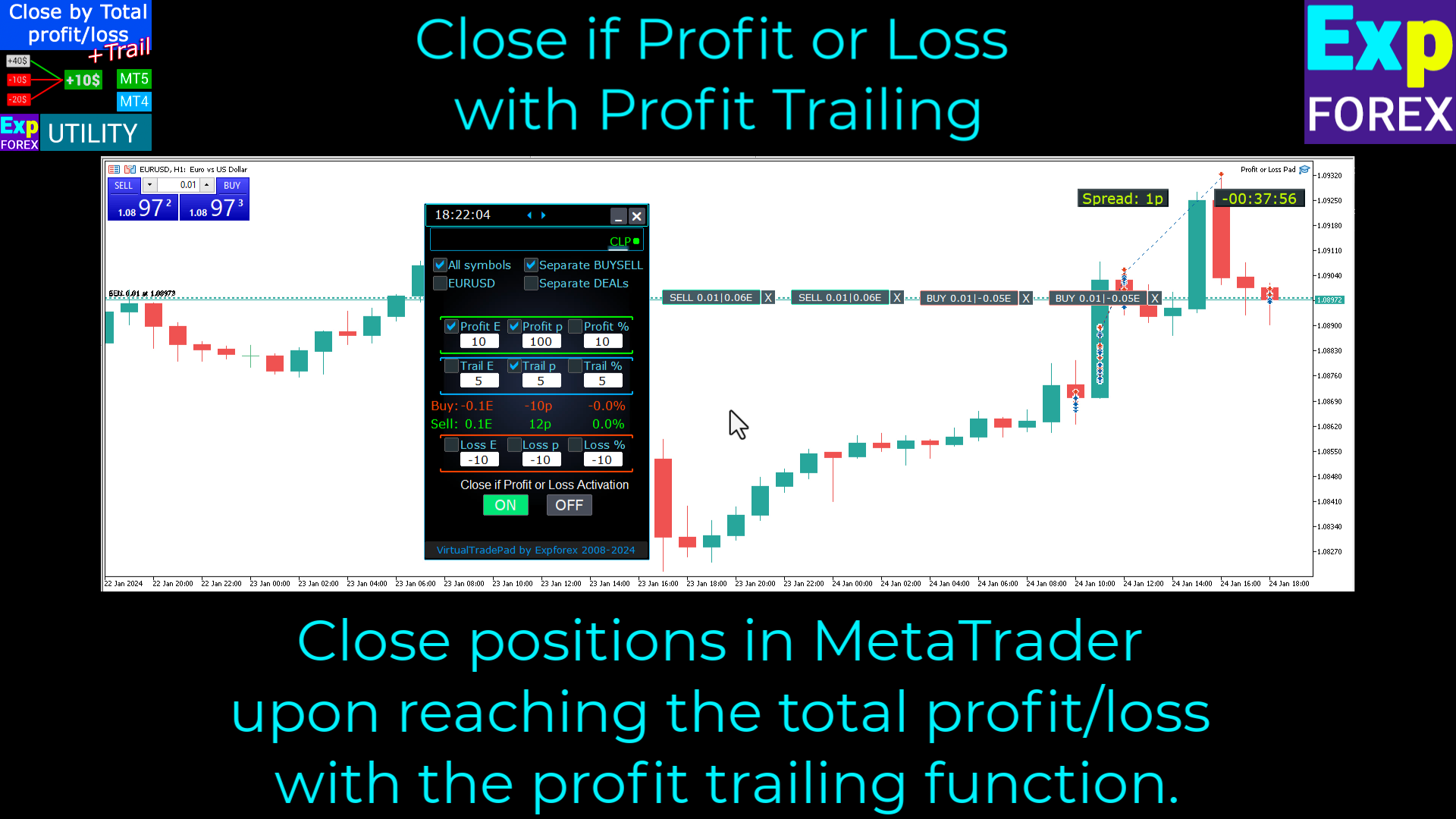
🎛 CLP panel kontrolü örneği Panel, kâr, zarar, trailing ve kapatma modlarına doğrudan grafik üzerinden hızlı erişim sağlar. |
💵 Kâra göre kapatma
Bir kâr seviyesi belirleyebilir ve ihtiyacınız olan kâr hesaplama türünü etkinleştirebilirsiniz.
Örneğin, pozisyonları şu durumlarda kapatabilirsiniz:
- toplam kâr +10 USD seviyesine ulaştığında;
- toplam kâr +100 puana ulaştığında;
- toplam kâr mevcut bakiyenin +%2’sine ulaştığında.
Kâr değeri sıfırdan büyük olmalıdır. Sıfır girilirse alan çalışmaz. Kâr alanına negatif değer girilirse, otomatik düzeltme etkin olduğunda EA bunu otomatik olarak pozitif değere çevirebilir.
| Profit Mod | Anlam |
| Profit $ | Toplam kâr mevduat para biriminde seçilen değere ulaştığında kapatır. |
| Profit p | Toplam kâr seçilen puan değerine ulaştığında kapatır. |
| Profit % | Toplam kâr bakiyenin seçilen yüzdesine ulaştığında kapatır. |
🛑 Zarara göre kapatma
Bir zarar seviyesi de belirleyebilir ve zarar seçtiğiniz limite ulaştığında CLP’nin pozisyonları kapatmasına izin verebilirsiniz.
Bu, sepet, yön, mevcut sembol, tüm semboller veya ayrı pozisyon modu için global koruma kuralı olarak kullanılabilir.
Zarar değeri sıfırdan küçük olmalıdır. Zarar alanına pozitif değer girilirse, otomatik düzeltme etkin olduğunda EA bunu otomatik olarak negatif değere çevirebilir.
| Loss Mod | Anlam |
| Loss $ | Toplam zarar mevduat para biriminde seçilen negatif değere ulaştığında kapatır. |
| Loss p | Toplam zarar seçilen negatif puan değerine ulaştığında kapatır. |
| Loss % | Toplam zarar bakiyenin seçilen yüzdesine ulaştığında kapatır. |
| ⚠ Doğru değerler: kâr değerleri pozitif, zarar değerleri negatif olmalıdır. Bu, “kârda kapatma” ve “zararda kapatma” mantığının karışmasını önler. |
📈 Profit Trailing: kapatmadan önce kârın büyümesine izin verin
CloseIfProfitorLoss’un en güçlü bölümü Trailing Profit.
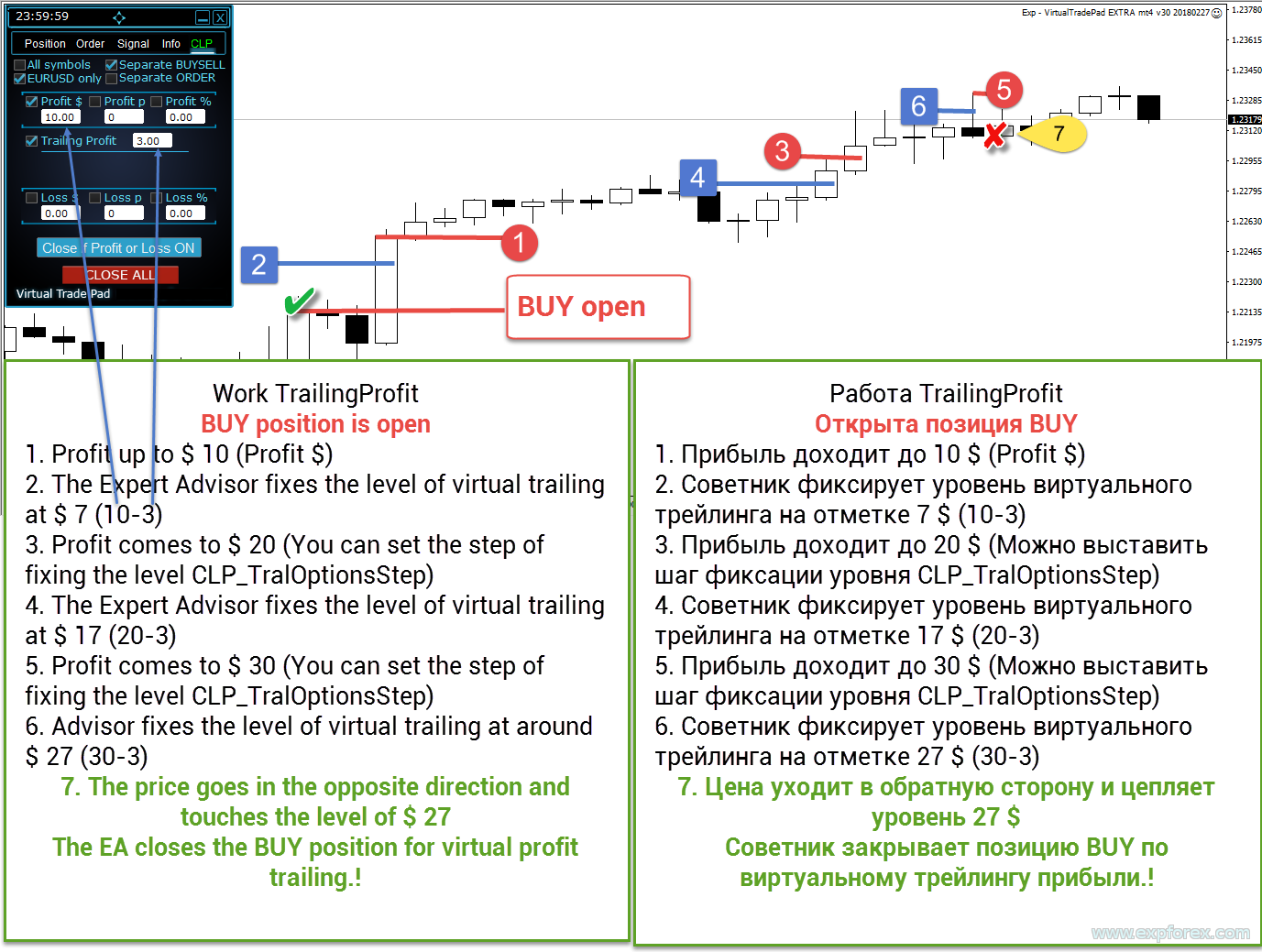
Trailing olmadan Profit $ = 10 ayarlarsanız, toplam kâr 10 dolara ulaştığında EA pozisyonları hemen kapatır. Bu basittir, ancak bazen piyasa lehinize hareket etmeye devam eder ve trader ek potansiyel kârı kaçırır.
Profit Trailing bunu yalnızca seçilen kâr seviyesine ulaşıldıktan sonra etkinleşerek çözer. EA en iyi dalgalı kâr seviyesini hatırlar ve kapatma çizgisini kârı takip edecek şekilde taşır. Kâr daha sonra takip edilen seviyenin altına düşerse EA pozisyonları kapatır.
| Adım | Profit $ = 10 ve TrailingProfit = 5 örneği |
| 1 | Kâr hedefi 10 USD’dir. |
| 2 | Trailing çizgisi 5 USD’den başlar. |
| 3 | Toplam kâr 10 USD’nin üzerine çıktığında trailing etkinleşir. |
| 4 | Dalgalı kâr 20 USD’ye yükselirse trailing çizgisi onu geriden takip eder. |
| 5 | Kâr son takip edilen seviyenin altına geri dönerse EA pozisyonları kapatır. |
📈 Trailing Profit mantığı Trailing Profit, EA’nın ilk hedefte hemen kapatmak yerine ulaşılan en iyi dalgalı kârı korumasını sağlar. |
📊 Yüzde ile Profit Trailing
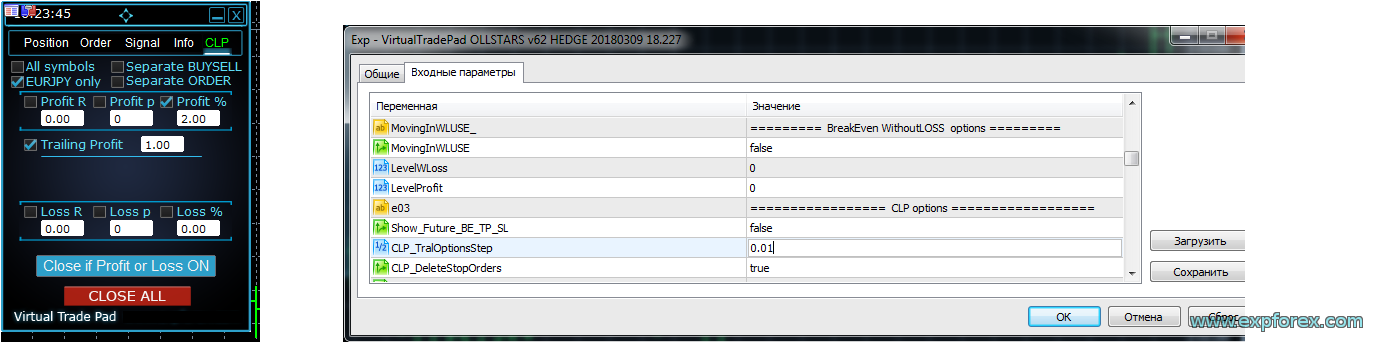
Profit Trailing yalnızca mevduat para biriminde değil, yüzde olarak da çalışabilir.
Örneğin Profit % değeri 2 ve TrailingProfit değeri 1 ise, EA kâr bakiyenin %2’sine ulaştıktan sonra trailing başlatır. Trailing seviyesi %1’e yerleştirilir. Kâr %2,01’e yükselirse trailing seviyesi %1,01’e taşınabilir ve bu şekilde devam eder.
Kâr daha sonra takip edilen seviyenin altına düşerse pozisyonlar kapatılır.
| Parametre | Örnek |
| Profit % | 2% |
| TrailingProfit | 1% |
| CLP_TralOptionsAdım | daha hassas güncellemeler için %0,01 trailing adımı |
📊 Yüzde ile Trailing Profit örneği Bu mod, trader sabit para değerleri yerine hesap bakiyesi yüzdesine göre kâr kontrolü yapmak istediğinde faydalıdır. |
💵 Mevduat para biriminde ve ayrı BUY / SELL için Profit Trailing
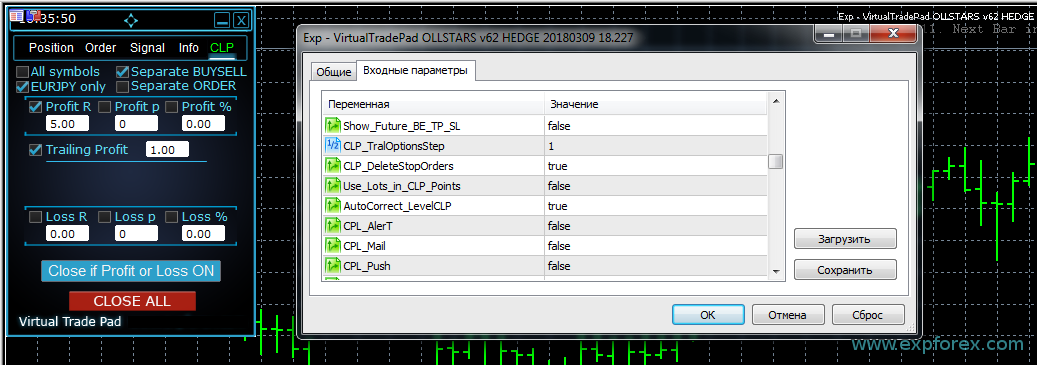
Profit Trailing mevduat para biriminde ve BUY / SELL yönleri için ayrı ayrı da çalışabilir.
Bu, bir yön kârlıyken diğer yön hâlâ negatif olduğunda faydalıdır. BUY / SELL ayrı modu etkinse, BUY kârı SELL pozisyonlarından bağımsız olarak kapatılabilir veya trailing ile takip edilebilir.
Örneğin BUY kârı +5 USD’ye ulaşır ve TrailingProfit 1 USD ise, trailing çizgisi +4 USD’den başlayabilir. BUY kârı +6 USD’ye yükselirse trailing seviyesi +5 USD’ye taşınır. BUY kârı takip edilen seviyenin altına düşerse BUY pozisyonları kapatılabilir, SELL pozisyonları ise ayrı hesaplanır.
💵 Ayrı yönlerle mevduat para biriminde Trailing Profit Yönlerin bağımsız kontrol edilmesi gerektiğinde ayrı BUY / SELL takibi faydalıdır. |
🧩 Ayrı emir modu: sanal Stop Loss ve Take Profit
Ayrı emir modu her pozisyonu ayrı hesaplar. Bu, her işlem için sanal Stop Loss veya sanal Take Profit gibi çalışabilir.
Tüm sepeti kapatmak yerine EA her pozisyonu bağımsız kontrol eder ve seçilen kâr veya zarar kuralına ulaşıldığında kapatır.
Bu mod, trader broker tarafında görünür Stop Loss veya Take Profit seviyeleri yerleştirmeden sonuç bazlı esnek kapatma istediğinde manuel işlem için faydalı olabilir.
| Mod | Kullanım senaryosu |
| Ayrı emir OFF | EA, seçilen moda göre sepet veya yön sonucunu hesaplar. |
| Ayrı emir ON | Her pozisyon sanal SL/TP gibi ayrı hesaplanır ve kapatılır. |
🌐 Mevcut sembol veya Tüm semboller
CloseIfProfitorLoss yalnızca mevcut grafik sembolünü veya hesaptaki tüm sembolleri izleyebilir.
Mevcut sembol modu, her işlem çifti için bağımsız kontrol istediğinizde faydalıdır. Tüm semboller modu ise hesap düzeyinde sepet kontrolü istediğinizde, örneğin toplam hesap kârı seçilen tutara ulaştığında her şeyi kapatmak için kullanışlıdır.
| Hesaplama modu | Anlam |
| Mevcut sembol | Yalnızca grafik sembolüne ait pozisyonlar hesaplanır ve kapatılır. |
| Tüm semboller | Tüm sembollerdeki pozisyonlar toplam kâr/zarar hesaplamasına dahil edilir. |
📍 Gelecekteki BE / TP / SL çizgileri
Show_Future_BE_TP_SL grafikte gelecekteki kapatma seviyelerini gösterebilir. Bu çizgiler, seçilen kâr veya zarar kuralının tetiklenmesi için fiyatın nereye gitmesi gerektiğini tahmin etmeye yardımcı olur.
Çizgiler, moda bağlı olarak BUY ve SELL pozisyonları için ayrı ayrı veya ortak bir seviye olarak gösterilebilir.
Bu özellik mevcut sembolde ve Ayrı emir modu kapalıyken çalışır. Çizgiler görünmüyorsa, pozisyonlar basit bir toplam kâr veya zarar çizgisiyle kapatılamayan bir lock oluşturmuş olabilir.
📍 Gelecekteki kapatma çizgileri Gelecek çizgileri, kâr veya zarar kuralları için olası sepet kapatma fiyatlarını görselleştirmeye yardımcı olur. |
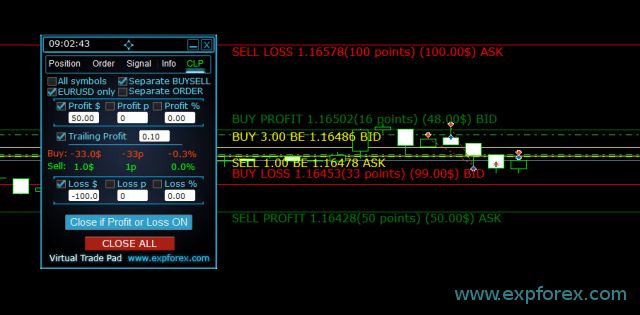
| ⚠ Fiyat notu: dalgalı spread olduğunda çizgi ve fiyat verileri yaklaşık olabilir. SELL pozisyonlarının ASK fiyatından, BUY pozisyonlarının ise BID fiyatından kapandığını unutmayın. |
🧮 Puan hesaplama ve lot ağırlığı
CLP sonucu puan olarak hesaplayabilir. Ancak farklı lotlara sahip birden fazla pozisyon olduğunda yalnızca puan mesafesi yanıltıcı olabilir.
Örneğin 0.01 lotluk bir pozisyon ile 0.02 lotluk başka bir pozisyon parasal risk açısından eşit değerlendirilemez. 0.02 lotta 10 puanlık hareket, 0.01 lotta 10 puanlık harekete göre iki kat finansal etkiye sahiptir.
Ayar Use_Lots_in_CLP_Points EA’nın puanları lot ağırlığıyla hesaplamasına izin verir. Bu, farklı hacimlere sahip birden fazla pozisyonun olabildiği hedge hesaplarda özellikle faydalıdır.
| Ayar | Anlam |
| Use_Lots_in_CLP_Points = false | EA lot ağırlığı olmadan “temiz” puanları hesaplar. |
| Use_Lots_in_CLP_Points = true | EA puanları minimum lot mantığına göre lot ağırlığıyla hesaplar. |
| Pratik örnek: iki pozisyon “temiz” puanlarda pozitif görünebilir, ancak kayıptaki pozisyonun lotu daha büyükse parasal olarak zarar oluşabilir. Bu nedenle lot ağırlıklı puan hesaplaması önemli olabilir. |
🪄 Kâr ve zarar değerlerinde otomatik düzeltme
Ayar AutoCorrect_LevelCLP kullanıcıyı yanlış işaret girişinden korumaya yardımcı olur.
Kâr alanlarında değer pozitif olmalıdır. Zarar alanlarında değer negatif olmalıdır. Otomatik düzeltme etkinse, EA yanlış işaretleri otomatik olarak doğru işaretlere çevirebilir.
| Kullanıcı girişi | Otomatik düzeltilmiş anlam |
| Profit = -100 | Kâra göre kapatma için +100 değerine dönüştürülür. |
| Loss = +100 | Zarara göre kapatma için -100 değerine dönüştürülür. |
| Negatif TrailingProfit | Trailing mesafesi pozitif olması gerektiği için EA mantığına göre reddedilir veya düzeltilir. |
⚙ Anlamanız gereken ana ayarlar
CloseIfProfitorLoss birçok ayara sahiptir çünkü sepet kapatıcı, zarar sınırlayıcı, sanal TP/SL, kâr takip aracı ve hesap kontrol paneli olarak çalışabilir. Tam liste ürün dokümantasyonunda bulunur, ancak aşağıdaki gruplar en önemlileridir.
| Ayar | Neden önemlidir |
| MagicNumber | Hangi Magic number değerlerinin izleneceğini ve panelden pozisyon açarken hangi Magic number kullanılacağını belirler. |
| UseAllMagicFromAllAccount | true ise mevcut semboldeki tüm pozisyonlar Magic number’dan bağımsız olarak izlenebilir. |
| Show_Future_BE_TP_SL | Grafikte gelecekteki break-even, kâr ve zarar seviyelerini gösterir. |
| CLP_TralOptionsAdım | Trailing kâr seviyesini seçilen birimlerde değiştirme adımıdır: para, puan veya yüzde. |
| CLP_DeleteStopOrders | Toplam kâr veya zarara göre kapatma sırasında bekleyen emirleri siler. |
| Use_Lots_in_CLP_Points | Daha gerçekçi puan tabanlı kâr/zarar mantığı için puan hesaplamasına lot büyüklüğünü dahil eder. |
| AutoCorrect_LevelCLP | Yanlış girişi önlemek için kâr/zarar değerlerinin işaretlerini otomatik olarak düzeltir. |
| CPL_AlerT | Kâr veya zarara göre kapatma gerçekleştiğinde uyarı gösterir. |
| CPL_Mail | Kâr veya zarara göre kapatma gerçekleştiğinde e-posta bildirimi gönderir. |
| CPL_Push | Kapatma gerçekleştiğinde mobil terminale push bildirimi gönderir. |
| CPL_CloseTerminalAfterClose | Tüm pozisyonlar kapatıldıktan sonra terminali kapatır. |
| CPL_AUTOOFF_AfterClose | İlgili tüm pozisyonlar kapatıldıktan sonra Close if Profit or Loss düğmesini otomatik olarak kapatır. |
| TypeFilling | MT5 filling türüdür. Broker geçersiz filling modu hatası döndürdüğünde faydalıdır. |
| 📘 Tam parametre listesini mi istiyorsunuz? Open the complete CloseIfProfitorLoss ayar dokümantasyonu gelişmiş Magic, trailing, gelecek çizgileri, uyarılar veya zarar limiti senaryolarını kullanmadan önce inceleyin. |
🔔 Uyarılar, Push, Mail ve terminal işlemleri
CLP, kâr veya zarara göre kapatma gerçekleştiğinde tradera bildirim gönderebilir.
Bu, panel VPS üzerinde çalıştığında, birden fazla pozisyon yönettiğinde veya başka bir Expert Advisor ile birlikte çalıştığında faydalıdır. Bildirimler, sonuç kontrol kuralının ne zaman tetiklendiğini traderın bilmesine yardımcı olur.
| Bildirim | Amaç |
| CPL_AlerT | Terminal grafiğinde uyarı gösterir. |
| CPL_Mail | MetaTrader mail ayarları yapılandırılmışsa e-posta gönderir. |
| CPL_Push | Mobil MetaTrader uygulamasına push bildirimi gönderir. |
| CPL_CloseTerminalAfterClose | Tüm pozisyonlar kapatıldıktan sonra terminali kapatabilir. |
📉 Gün, hafta, ay veya tüm zaman için limit uyarıları
CloseIfProfitorLoss ayrıca bir limit uyarı bloğu içerebilir. Bu blok işlemleri kendi başına kapatmaz. Seçilen dönem için kâr veya zarar limitlerine ulaşıldığında uyarı verir.
Bu, trader gün, hafta, ay veya tüm zaman toplam sonucu seçilen değere ulaştığında bildirim almak istediğinde faydalıdır.
| Limit ayarı | Anlam |
| LimitFor | Limit hesaplama dönemi: gün, hafta, ay veya tüm zaman. |
| LimitForLosses | Uyarı için mevduat para biriminde zarar limiti. |
| LimitForProfits | Uyarı için mevduat para biriminde kâr limiti. |
| BildirimMailSend | Seçilen limitlere ulaşıldığında mesajları etkinleştirir. |
🧪 Tutarlı çalışma örneği
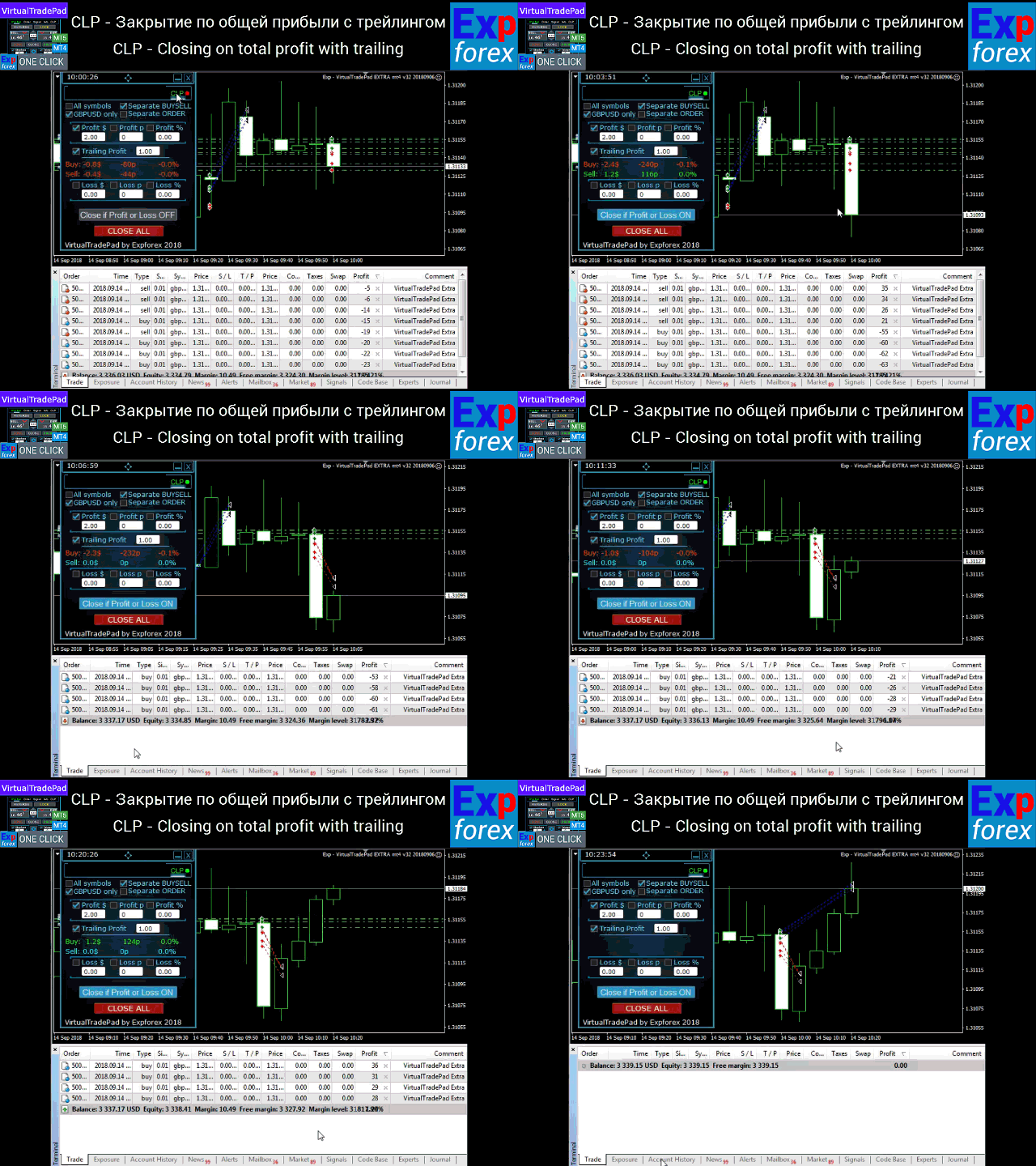
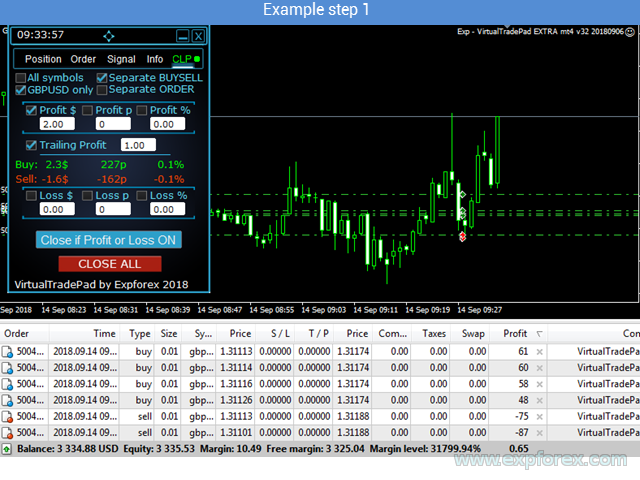
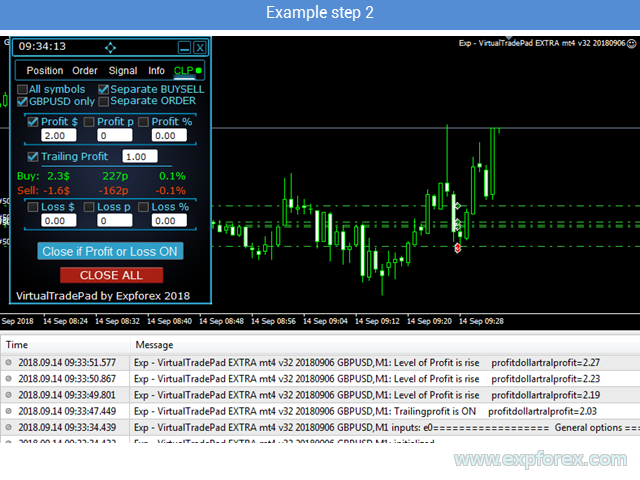
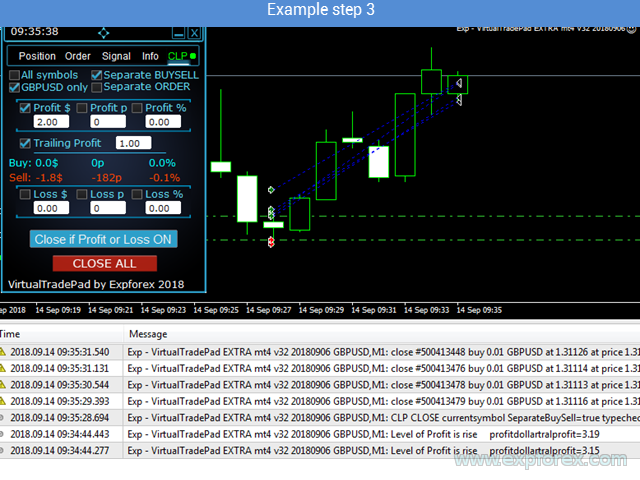
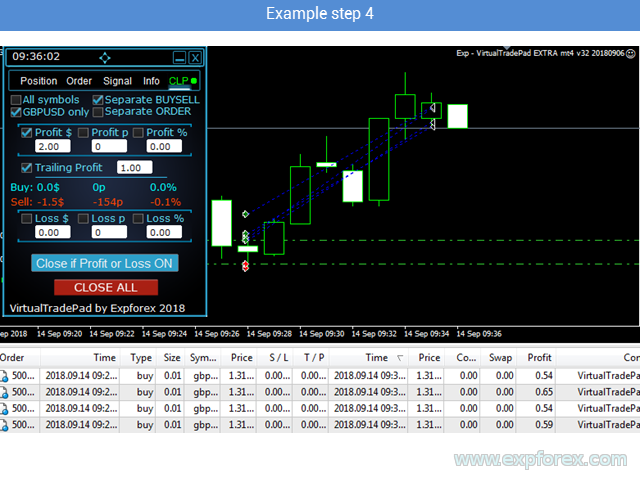
Panel adım adım kullanılabilir: sembolleri seçin, kâr/zarar birimlerini belirleyin, kapatma modlarını etkinleştirin, kâr ve zarar değerlerini ayarlayın, Close if Profit or Loss’u etkinleştirin ve seçilen seviyeye ulaşılmasını bekleyin.
Aşağıdaki örnekler panel ve sonuç kontrol mantığıyla çalışmanın farklı aşamalarını gösterir.
🧪 Örnek Adım 1 |
🧪 Örnek Adım 2 |
🧪 Örnek Adım 3 |
🧪 Örnek Adım 4 |
✅ CloseIfProfitorLoss ne zaman faydalıdır?
- Manuel işlem yapıyor ve toplam kâr veya zarara göre otomatik kapatma istiyorsanız.
- Başka bir Expert Advisor kullanıyor ancak harici sepet korumasına ihtiyaç duyuyorsanız.
- Tek sembolde birden fazla pozisyon yönetiyor ve ortak kapatma mantığı istiyorsanız.
- Tüm sembollerde hesap düzeyinde kapatma istiyorsanız.
- BUY ve SELL yönlerini ayrı kapatmak istiyorsanız.
- Her pozisyonun sanal kâr/zarar seviyelerine göre ayrı kapanmasını istiyorsanız.
- Dalgalı kâr seçilen eşiğe ulaştıktan sonra onu trailing ile takip etmek istiyorsanız.
- Grafikte görünür gelecek kapatma seviyeleri istiyorsanız.
- Kâr veya zarara göre kapatma gerçekleştiğinde bildirim almak istiyorsanız.
- Acil durumlar için hızlı Close ALL düğmesine ihtiyacınız varsa.
⚠ Ne zaman dikkatli olmalısınız?
|
🌐 Broker, VPS ve terminal önerileri
CloseIfProfitorLoss kapatma komutları, sepet izleme, bekleyen emir silme ve kâr/zarar hesaplamalarıyla çalışır. Kararlı yürütme ve terminalin sürekli aktif olması önemlidir.
✅ Önerilir
| ⚠ Dikkatle kontrol edin
|
🛠 CLP nasıl kurulur ve başlatılır
Kurulum MQL5 Market ürünleri için standarttır. Kurulumdan sonra EA’yı grafiğe ekleyin, kapatma kurallarını yapılandırın, sembolleri/modu seçin ve paneli etkinleştirin.
| Adım | İşlem |
| 1 | MT4 veya MT5 için CloseIfProfitorLoss’u indirin, satın alın veya kiralayın. |
| 2 | MetaTrader’ı açın ve ürün için kullanılan MQL5 hesabına giriş yapın. |
| 3 | Ürünü terminalin Market bölümünden kurun. |
| 4 | EA’yı izlemek istediğiniz sembolün grafiğine ekleyin. |
| 5 | Algo Trading / Auto Trading’i etkinleştirin ve EA ayarlarında otomatik işleme izin verin. |
| 6 | Mevcut sembol veya Tüm semboller modunu seçin. |
| 7 | BUY ve SELL’in birlikte mi ayrı mı hesaplanacağını seçin. |
| 8 | Kâr ve zarar değerlerini para, puan veya yüzde olarak ayarlayın. |
| 9 | Dalgalı kârın takip edilmesini istiyorsanız Trailing Profit’i etkinleştirin. |
| 10 | Close if Profit or Loss’u etkinleştirin ve gerçek kullanımdan önce paneli demoda izleyin. |
🔗 Faydalı bağlantılar🔹 MetaTrader 4 için CloseIfProfitorLoss satın al 🔹 MetaTrader 5 için CloseIfProfitorLoss satın al 🔹 Tam CloseIfProfitorLoss talimatı |
🆚 CLP ve manuel kapatma
Manuel kapatma mümkündür, ancak sürekli izleme gerektirir. Trader dalgalı kârı takip etmeli, toplam sonucu hesaplamalı, ne zaman kapatacağına karar vermeli ve piyasa hareket ettiğinde hızlı tepki vermelidir.
CloseIfProfitorLoss bu süreci net kurallarla otomatikleştirir.
| Manuel kapatma | CloseIfProfitorLoss |
| Trader dalgalı kârı manuel izler | EA seçilen sonuç seviyelerini otomatik izler |
| Birçok işlemi doğru anda kapatmak zordur | EA kurala göre sepeti, yönü, sembolü veya tüm sembolleri kapatabilir |
| Kâr çoğu zaman çok erken kapatılır | Profit Trailing dalgalı kârın büyümesine izin verebilir |
| Hızlı hareketlerde zarar limiti kaçırılabilir | EA seçilen zarar seviyesine ulaşıldığında kapatabilir |
| Farklı lotlar puan hesaplamasını karışık hale getirir | Lot ağırlıklı puan hesaplaması etkinleştirilebilir |
📌 Başlamadan önce pratik öneriler
- Demo testleriyle başlayın.
- Tüm semboller modundan önce Mevcut sembol modunu kullanın.
- MagicNumber ve UseAllMagicFromAllAccount ayarlarını dikkatle kontrol edin.
- Kâr için pozitif, zarar için negatif değerler kullanın.
- Enable AutoCorrect_LevelCLP to reduce input mistakes.
- Gerçek hesaplarda kullanmadan önce Profit Trailing’i küçük değerlerle test edin.
- BUY / SELL ayrı modunu yalnızca yönlerin bağımsız kapanmasını istediğinizde kullanın.
- Ayrı emir modunu yalnızca bireysel sanal TP/SL mantığını anladığınızda kullanın.
- CLP_DeleteStopOrders’ı yalnızca kapatma sonrası bekleyen emirlerin silinmesini istiyorsanız etkinleştirin.
- Panel pozisyonları sürekli izlemeliyse VPS kullanın.
⚠ Risk uyarısı
| Forex ve CFD işlemleri risk içerir. CloseIfProfitorLoss bir işlem yönetimi ve kapatma aracıdır. Seçilen kâr/zarar kurallarına göre pozisyonları kapatabilir ve dalgalı kârı takip edebilir, ancak kâr garantisi veremez veya tüm kayıpları önleyemez. Piyasa boşlukları, slippage, broker gecikmeleri, spread genişlemesi, bağlantı sorunları ve yanlış ayarlar nihai sonucu etkileyebilir. |
🏁 Son düşünceler
Trailing özellikli CloseIfProfitorLoss açık pozisyonlar ve hesap sonucu üzerinde yapılandırılmış kontrol isteyen traderlar için geliştirilmiştir.
Birden fazla pozisyonla işlem yaptığınızda, grid kullandığınızda, sepet yönettiğinizde, manuel işlemlerle çalıştığınızda, başka bir Expert Advisor kullandığınızda veya global bir kâr/zarar kontrol paneline ihtiyaç duyduğunuzda özellikle faydalıdır.
En güçlü özellik Profit Trailing’dir: panel, ilk kâr hedefinde hemen kapatmak yerine dalgalı kârı takip edebilir ve yalnızca geri çekilmeden sonra kapatabilir. Bu, piyasaya devam etme alanı bırakırken kârı korumak için daha esnek bir yol sunar.
🚀 CloseIfProfitorLoss’u bugün kullanmaya başlayınDemoyu indirin, videoyu izleyin, tam talimatı okuyun, kâr/zarar kurallarınızı yapılandırın ve gerçek işlemden önce CLP’yi demo hesapta test edin. |
| ▶ Videoyu izle | 📘 Tam talimat |
| 💎 CLP MT5 satın al | 💎 CLP MT4 satın al |
| ⬇ DEMO + PDF indir | 🛒 Tüm Expforex ürünleri |
SEO Etiketleri
CloseIfProfitorLoss, Close if Profit or Loss, Profit or Loss Pad, CLP, Close Profit, Close Loss, Total Profit, Total Loss, Trailing Profit, Profit Trailing, basket close Expert Advisor, close positions by profit, close positions by loss, close all positions, MetaTrader profit closer, MT4 profit closer, MT5 profit closer, Forex basket closer, virtual take profit, virtual stop loss, close by percent, close by points, close by deposit currency, Separate BUY SELL, Ayrı emir, Tüm semboller closing, Mevcut sembol closing, Close ALL button, Forex trade management, Expforex CLP, MQL5 Market Expert Advisor