HF PerformanceReport

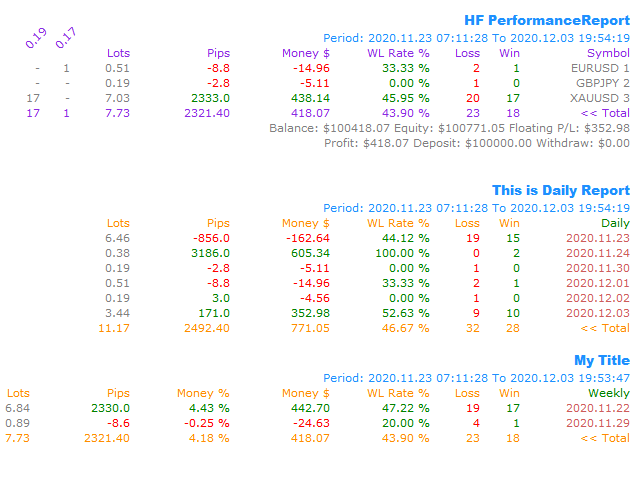
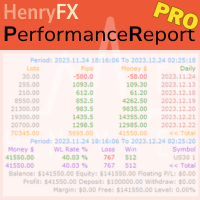
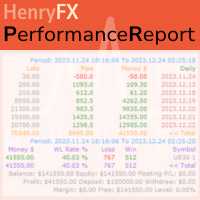
This Performance Report indicator is special design for some trader to analyst his/her performance.


FREE Version, included:

- "Display Language
"Report Grouping" 
"Count Live Order
"Label Row Dis"  
"Label Font Size"  

Performance Report Pro :: https://www.mql5.com/en/market/product/58287 


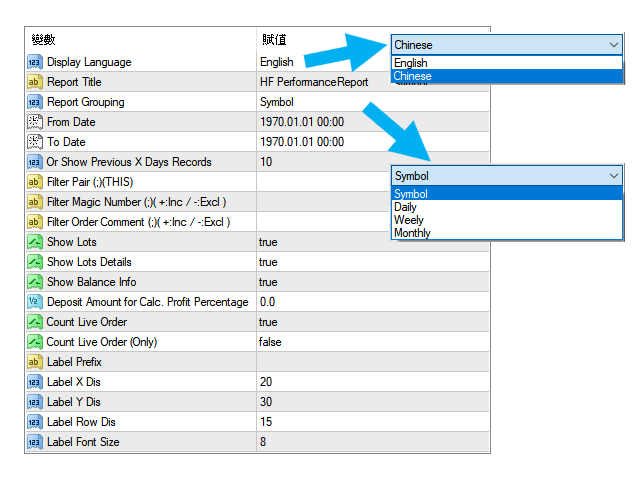
Input Parameter:

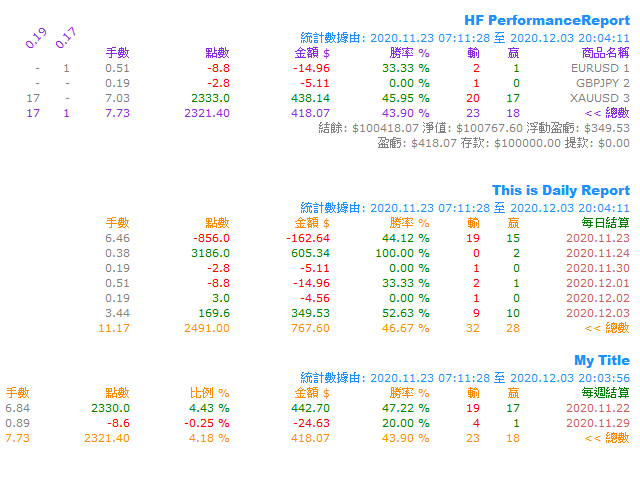
"Display Language" 
:: [ English / Chinese ] Display language;

"Report Title" 
:: Show the report title as you want;

"Report Grouping" 
:: [ Symbol / Daily / Weekly / Monthly ] Group the data as selected group;

"From Date" 
:: The start date of counting period, i.e. "2020.01.01"
;

"To Date" 
:: The end date of counting period
 , i.e. "2020.12.01";

"Or Show Previous X Days Records" 
:: Counting the previous x days records, for example, only show last "5" days records
;

"Filter Pair (;)(THIS)" 
:: Only counting some special symbol you want, for example "EURUSD;GBPUSD", or input "THIS" means current chart records only;

"Filter Magic Number (;)( +:Inc / -:Excl )" 
:: 
Only counting some special magic number's order(s), for example, "+2828;+1818" will only count the magic number 2828 and 1818 's order(s) profit and loss. If input "-2992" means excluded the magic number 2992 's order(s) records;

"Filter Order Comment (;)( +:Inc / -:Excl )"  
:: 
Only counting the order included or excluded some wording within order comment fields;

"Show Lots" 
:: Show the column of total "Lots" by records grouping
;

"Show Lots Details" 
:: Show the column of each lots information by records grouping
; 

"Show Balance Info" 
:: Show the account's balance, equity, profit, deposit and withdraw information
;

"Deposit Amount for Calc. Profit Percentage" 
:: Show the profit percentage column of inputted amount as calculated amount
;

"Count Live Order
:: If "true", then will included live order(s) to calculate as the record result
; 

"Count Live Order (Only)" 
:: 
If "true", then will included live order(s) ONLY to calculate as the record result; 

"Label Prefix" 
:: If added more than one performance report indicator into chart, you need to input the label prefix, otherwise, will replace exists label objects;
 

"Label X Dis" 
:: The X coordinate of report's label
;

"Label Y Dis"  
:: The Y coordinate of report's label
; 

"Label Row Dis"  
:: The distance between each data row
; 

"Label Font Size"  
:: The font size of each label
; 


推荐产品
HF PriceGrid
Wong Sze Wai
5 (1)
This indicator help you to easily calculate the price moving. You can change the gird size withing the input parameter for your trading style, such as hedge, swing trader, ect. It can let you easy to find your takeprofit and stoploss target price in chart. For more about my tools and EA, you can join my channel below, thank you. Telegram channel:   t.me/HenryEAChannel
FREE
Overview Happy Shiba Inu is a precision scheduling utility designed to restrict a MT4 account's trading activity to specific day or time windows. It manages both live execution logic and the automatic cleanup of pending orders during "Off-Hours." Operational Logic Pending Orders: The moment the timer hits a "Restricted" zone, the EA will scan all open orders. Any Limit or Stop orders will be deleted immediately to prevent accidental fills during high-volatility off-hours. Execution Block: Any c
VWAP Level
Francesco Lenza
4.75 (8)
The VWAP Level indicator is a technical analysis tool that calculates the weighted average price for the traded volumes of a specific asset. The VWAP provides traders and investors with the average price of an asset over a specific time frame. It is commonly used by investors to compare data on "passive" trading operations, such as pension funds and mutual funds, but also by traders who want to check if an asset has been bought or sold at a good market price. To calculate the VWAP level we us
FREE
Using multiple timeframes for analysis with Multi Timeframe Average True Range  can provide several significant benefits for traders: Comprehensive Market View: By applying Mtf ATR Standard across different timeframes, traders gain a broader perspective on market dynamics. This allows them to identify trends, patterns, and potential reversal points that might be more apparent or consistent across various scales. Enhanced Pattern Recognition: Multiple timeframes help in identifying repeating patt
FREE
Scalping Edge Pro
Saqr Mohammad Yousef Almasarweh
Scalping Edge Pro Indicator Unleash the Power of Precision Trading: Introducing Scalping Edge Pro Tired of market noise and conflicting signals that cloud your judgment? Are you searching for a tool that delivers the clarity and confidence needed to seize rapid opportunities in volatile markets? Scalping Edge Pro is the engineered solution designed for traders who demand precision and professionalism in every trade. It is meticulously calibrated for peak performance on the 15-minute (M15) timef
FREE
About: Get Free Scanner and example Strategies And understand detailed description here: https://www.mql5.com/en/blogs/post/759237 And also get example wrappers from above post. You can make your own wrappers if your indicators have complex conditions or for In-Built MT4 indicators. Features: - Specify your own Custom Indicator - Specify Buffer values and create Variables - Use those Variables to create your own Buy/Sell Conditions - Get Arrows Up/Down Signals - See Arrows Signals in Scanners
Delving deep into the sphere of finance and trading strategies, I decided to conduct a series of experiments, exploring approaches based on reinforcement learning as well as those operating without it. Applying these methods, I managed to formulate a nuanced conclusion, pivotal for understanding the significance of unique strategies in contemporary trading.  
FREE
Top Clock MT4
Blasius Kiss
5 (1)
Displays a digital clock in the chart in realtime. Benefits: Current time always in sight for market open/close, economic data, etc. Displays accurate time (server/broker time) Clearly visible (set color, size, font, position) Always runs/refreshes even without new price tick Hint: To display the most accurate time, use the server (broker) clock setting combined with the time (hour) offset for your time zone.
FREE
Pattern 3 Candles
Aleksandr Butkov
4.2 (5)
An Expert Advisor based on the 3 candlestick pattern. 1-SL, 2-TP, 3-OFF - 1 pulls up StopLoss. 2 pulls up TakeProfit. 3-disabled. auto SL / TP on hi-low count bars - number of bars for 1-SL, 2-TP expiration on profit - after passing N bars, TP changes expiration on loss - after N bars have passed SL to open an order + commission pips for loss expiration - the number of points for expiration on profit The rest of the settings are intuitive.
FREE
NeuroExtMT4
Dmytryi Voitukhov
https://t.me/mql5_neuroExt   actual version Signal  https://www.mql5.com/ru/signals/1516213 You can use any tool. The bases will be automatically created at the start of the Learn. If you need to start learning from 0 - just delete the base files. Initial deposit - from 200 ye. Options: DO NOT ATTEMPT TO TEST WITHOUT NEURAL NETWORK TRAINING! it is enough for the balance graph after training to be horizontal. generating a training base is extremely simple.  there is a ready-made training for
FREE
Color Macd Tf
Syarif Nur Arief
MACD is well known indicator that still can be use for prediction where price will go next few minutes, hours or even weekly  With colored bar of Macd, your eyes can easily catch when color is changed based what market price movement to find any early trend on market. here is the parameter of the indicator: TF_MACD , default is 1 Hour , this mean you can see clearly MACD of 1 Hour TimeFrame on Lower TimeFrame. InpPrice , default is Price Close , this is original MACD parameter from Metaquotes st
FREE
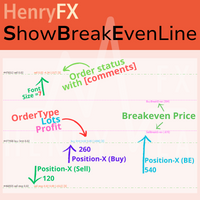
This indicator can help easy to management your order on screen. FREE   Version, included: - " Show Breakeven Price "  Show Breakeven Line Pro : :   https://www.mql5.com/en/market/product/58289   Input Parameter: " Label Prefix " :: [    ] Description; " Position-X-Dis " ::  [    ] Description; " Position-Y-Dis " ::  [    ] Description; " Show Market Price " :: [   ]    Description   ; " Price Up Color " ::  [    ] Description; " Price Down Color " :: [   ]    Description   ; " Position-Y-D
FREE
This is a basic tool that displays the Pip Value and Margin  required for each symbol. It displays the same information for both a standard lot and the amount based on lot amount entered in the input section. It allows you to use different colors for each line Font Size FontType (Based on what fonts are installed in the system folder on the pc. Set to Ariel by default if the font entered is not available.) Allows X &Y coordinates so you can decide where on the chart the info is displayed.
FREE
Close at time
Yaotang Liu
5 (2)
Close at time is a very useful EA to close specific positions at specific time. It also provides additional condition to setup. Close specific positions at time. Close specific positions which currently profits. Close specific long positions only. Close specific short positions only. Close specific pending orders. It is useful to support your trading strategies. Parameters description magic : Target magic number to close. close_time_hr: Hour to close. (MetaTrader 4 terminal time) close_time_min
FREE
Volatility Limit Trend
Safwan Rushdi Khalil Arekat
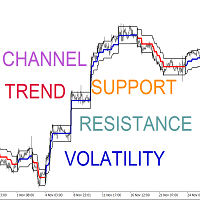
Volatility Limit Trend Indicator (VLT), an original indicator by this developer,  is a trend indicator based on setting a fixed volatility limit as a percentage of price. Volatile price is allowed to wander between two channel lines defining the fixed volatility about a central line. The price crossing one of the channel lines defines an exceeding of the allowed volatility, and ushering in one of two situation : either a continuation or a reversal of trend. The first buffer of the indicator (not
FREE
Night Hunter Pro
Valeriia Mishchenko
4.38 (53)
EA has a  live track record  with many months of stable trading with  low drawdown : Best Pairs   (default settings) High-risk   performance Night Hunter Pro is the advanced scalping system which utilizes smart entry/exit algorithms with sophisticated filtering methods to identify only the safest entry points during calm periods of the market. This system is focused on a long-term stable growth . It is a professional tool developed by me years ago that is constantly updated, incorporating all t
ZobGoldV7PRO
King Pang Yung
ZobGoldV7-PRO —— 黄金机构级 SMC 自动交易系统 【超越散户思维,跟随机构足迹】 为什么大多数黄金交易者会失败?因为他们被困在低周期的噪音中。 ZobGoldV7-PRO 专为黄金 H4 周期打造,深度融合 Smart Money Concepts (SMC) 核心逻辑,精准捕捉机构级订单块( Order Block )。 六年稳健: 经历 2020-2025 极端行情测试(包括疫情、战争与通胀),年均回报维持在 22% 左右。 三重博弈: 独特的 3 层分层建仓机制,通过内部算法优化进场成本,确保不遗漏任何暴利波段。 风控至上: 彻底杜绝马丁与网格。内置 ATR 动态追踪止损与保本机制,只在风险可控的前提下追求高盈亏比(最高 8.0 RR )。 极简运行: 告别繁琐设置。核心逻辑高度集成,适合追求长期资产增值的专业投资者。 加入少数派,像机构一样交易黄金
Cross MA Optimiser – Fine-Tune Your Moving Average Strategies in MT4! In the fast-moving world of trading, moving average crossovers are a proven method for identifying trends and trade entry points. However, using the wrong settings can lead to missed opportunities and inefficient strategies. Cross MA Optimiser takes the guesswork out of moving average optimization by automating and fine-tuning your crossover parameters for maximum trading accuracy. Whether you trade with Simple Moving Avera
FREE
# QuickTrade Panel 快捷交易面板 ## 产品概述 QuickTrade Panel 是一款专为MT5设计的专业快捷交易面板,集成市价交易、挂单交易、冰山订单、网格挂单、智能平仓、历史统计分析等功能于一体,帮助交易者快速执行各类交易操作并深入分析交易表现。 ## 核心功能 ### 1. 市价交易 - 一键买入卖出,实时显示Ask/Bid价格 - 支持快捷手数切换,预设6档常用手数 - 手数微调按钮,支持0.01手精细调整 - 可选止损止盈,支持点数设置 ### 2. 双开与对锁 - 双开:同时开立等量多空单,适合震荡行情 - 对锁:自动计算净仓位,一键锁定现有持仓 ### 3. 挂单交易 - 买限价:在指定价格下方挂买单 - 卖限价:在指定价格上方挂卖单 - 买止损:在指定价格上方挂突破买单 - 卖止损:在指定价格下方挂突破卖单 ### 4. 智能平仓 - 全部平仓:平掉当前品种所有持仓 - 平多单:只平多头仓位 - 平空单:只平空头仓位 - 平盈利单:只平浮盈仓位 - 平亏损单:只平浮亏仓位 - 删挂单:删除所有挂单 ### 5. 价格平仓 - 设置
FREE
This is a Sharkfin Arrows Indicator. Detailed explanation and TDI extras: https://www.mql5.com/en/blogs/post/759138 This indicator will show only Arrows. It does not have TDI symbols on chart. Please get the extras from links above for TDI indicators. Sharkfin Scanner (paid): https://www.mql5.com/en/market/product/123566 TDI Scanner Dash (paid): https://www.mql5.com/en/market/product/41826 About: This Indicator finds the Shark Fin Pattern. It will show an arrow in the current bar if RSI sha
FREE
Time Based Close - 自動化交易管理 EA 概述 Time Based Close 是一款功能強大且易於使用的 MetaTrader 4 (MT4) 專家顧問(EA)。它通過基於用戶設定的持倉時間自動關閉交易,並提供動態回撤控制功能來保護您的帳戶。無論您是新手還是資深交易者,這款 EA 都能簡化您的交易策略並有效管理風險。 核心功能 基於時間的關閉 :根據設定的持倉時間(預設:29 分鐘,可調整)自動關閉交易。 回撤保護 :監控並管理回撤,當回撤達到設定的百分比閾值(預設:30%)時關閉所有交易。 互動式面板 :直觀的圖表面板,可開關功能(持倉時間、回撤控制),調整設置,並實時監控餘額、淨值和回撤等數據。 贈金調整 :準確計算回撤,考慮經紀商贈金,確保精準的風險管理。 商品過濾 :支援特定商品或所有商品,兼容經紀商的後綴設置。 優勢 風險管理 :通過自動回撤控制保護您的帳戶免受過大損失。 節省時間 :基於時間自動關閉交易,無需手動監控。 易於使用 :簡單的面板設計,實時更新數據,適合各級交易者。 經紀商兼容性 :已在 IC Markets 和 Vantage Int
FREE
Multiple Charts Object Sync
Nguyen Thanh Sang
5 (3)
Synchronize objects from one chart to multiple charts. Synchronize objects from one chart to multiple charts. 1. Allows automatic synchronization of new and edited objects to other charts. 2. Allows synchronization of all objects on the chart to other charts at the current time. 3. Allows setting the charts to synchronize based on the position of the chart in the MT4 window. Version 1.2: Allow set list of object names that you don't want to sync (Separated by commas ",") Allow set 5 types of o
FREE
Vanexio
Sayan Vandenhout
VANEXIO USES THE TREND WAVE INDICATOR AND IT CAN IDENTIFY THE BEGINNING AND THE END OF A NEW WAVE TREND MOVEMENT. AS AN OSCILLATOR, THE INDICATOR IDENTIFIES THE OVERBOUGHT AND OVERSOLD ZONES. IT WORKS GREAT TO CATCH THE SHORT TERM PRICE REVERSALS AND USES A MARTINGALE STRATEGY TO CLOSE ALL TRADES IN PROFIT. USE DEFAULT SETTINGS ON H1 OR HIGHER TIME FRAME ON ANY PAIR FOR MORE ACCURATE TRADES WHY THIS EA : Smart entries calculated by 5 great strategies The EA can be run on even a $20000 acco
FREE
This indicator will display current logined mt4 account's orders information of current symbol chart. It also allow import some formated data: 1) MQL5 Signals History CSV file (*.csv) 2) MT4 Account History Statement file (*.htm -> *.txt) *[Next Version] Allow Import data form 'HF HistoryExporter (*.csv)' Sample Data of MQL5 Signals History File Time;Type;Volume;Symbol;Price;S/L;T/P;Time;Price;Commission;Swap;Profit;Comment 2023.12.20 23:00:02;Buy Limit;0.06;EURUSD;1.08994;1.06024;1.09464;202
Bingo – Smart Exit Automation for MT4 In the realm of trading, having a reliable exit strategy is just as crucial as finding the right entry. Bingo, an expert advisor for MT4, is designed to automate your trade exits with precision—ensuring you lock in profits and minimize losses without second-guessing your decisions. With advanced trailing take profit and stop loss, Bingo takes the complexity out of trade management, helping traders maintain discipline and execute their strategies flawlessly.
FREE
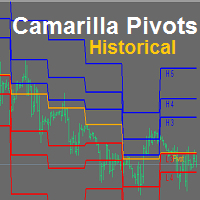
YOU CAN NOW DOWNLOAD FREE VERSIONS OF OUR PAID INDICATORS . IT'S OUR WAY OF GIVING BACK TO THE COMMUNITY ! >>>    GO HERE TO DOWNLOAD Camarilla Pivots Historical plots the historical data of the camarilla pivot point levels on the chart. The Camarilla Pivot levels was originated in 1989 by Nick Scott. The levels are used as primary support and resistance levels by Intraday traders. The levels are calculated with the following formula: R4 = C + RANGE * 1.1/2 R3 = C + RANGE * 1.1/4 R2 = C + RANG
FREE
Pivot Pro MT4
Samil Bozuyuk
5 (3)
Draws Daily, Weekly and Monthly pivots and the respective supports and resistances levels (S1, S2, S3, R1, R2, R3). Ideal for placing stop losses and/or using as a break-out strategy. Features Unlike other pivot indicators in market you get very clean charts. Pivot levels are plotted irrespective of timeframe, on which you trade, i.e. M1, M5, M15, M30, H1,H4 or Daily timeframes. Pivot levels do not change when you change timeframe. Fully customizable options.    If you are looking at Fibonacci
FREE
Price Rectifier Signals
Safwan Rushdi Khalil Arekat
This indicator provides trading signals based on the polarity of the dynamical parameters of two digital signals. The dynamical parameters (momentum-acceleration) are derived by applying a high quality momentum oscillator, MTEMA LPD ( see Top Gun Oscillators ) to two digital signals. The MTEMA momentum oscillator is first applied to the price itself. Then, a rectification procedure is applied to the price based on the signals from the momentum oscillator yielding a rectified price signal. This s
FREE
5/35 Oscillator to be used with our Elliott Wave Indicator as part of the overall strategy on trading the 5th wave. The Elliott Wave Indicator Suite is designed around a simple but effective Swing Trading Strategy. The Indicator Suite is great for Stocks, Futures and Forex trading on multiple timeframes You can find the main Elliott Wave Indicator here  https://www.mql5.com/en/market/product/44034
FREE
Trading panel for manual trading. Has a fairly wide functionality. Allows you to automatically calculate the order size, open both market and pending orders. It has a wide range of options for closing orders, it is possible to partially close orders, close orders after reaching a certain profit or loss, separately close profitable and unprofitable, buy and sell, as well as pending orders. The panel also contains a simple implementation of a grid of pending orders, reverse and lock functions, tr
FREE
该产品的买家也购买
Local Trade Copier EA MT4
Juvenille Emperor Limited
4.96 (109)
通过 Local Trade Copier EA MT4 获得非常快速的交易复制体验。它的简单1分钟设置,使您可以在同一台Windows计算机或Windows VPS上在多个MetaTrader终端之间复制交易,具有闪电般快速的复制速度,低于0.5秒。 无论您是初学者还是专业交易者, Local Trade Copier EA MT4 都提供了广泛的选项,可根据您的特定需求进行自定义。对于任何希望增加利润潜力的人来说,这都是终极解决方案。 今天就尝试一下,看看为什么它是市场上最快、最简单的贸易复印机! 提示: 您可以在您的模拟账户中下载并试用 Local Trade Copier EA MT4 模拟版: 这里 将下载的免费演示文件粘贴到您的 MT4 >> 文件 >> 打开数据文件夹 >> MQL4 >> 专家文件夹并重新启动您的终端。  免费演示版本每次可在 4 小时内发挥全部功能,仅限演示帐户。 要重置试用期,请转至 MT4 >> 工具 >> 全局变量 >> Control + A >> 删除。 请仅在非关键模拟账户上执行此操作,不要在挑战道具公司账户中执行此操作。 如果您无法在
Trade Assistant MT4
Evgeniy Kravchenko
4.42 (193)
它有助于计算每笔交易的风险,容易安装新的订单,具有部分关闭功能的订单管理, 7 种类型的追踪止损和其他有用的功能。 附加材料和说明 安装说明 - 应用程序说明 - 模拟账户应用程序的试用版 线条功能  - 在图表上显示开仓线、止损线、止盈线。 有了这个功能,就可以很容易地设置一个新的订单,并在开仓前看到它的附加特性。   风险管理  - 风险计算功能在考虑到设定的风险和止损单的大小的情况下,计算新订单的成交量。它允许你设置任何大小的止损,同时观察设定的风险。 批量计算按钮 - 启用 / 禁用风险计算。 在 " 风险 " 一栏中设置必要的风险值,从 0 到 100 的百分比或存款的货币。 在 " 设置 " 选项卡上选择风险计算的变量: $ 货币, % 余额, % 资产, % 自由保证金, % 自定义, %AB 前一天, %AB 前一周, %AB 前一个月。   R/TP 和 R/SL - 设置止盈和止损的关系。 这允许你设置相对于损失的利润大小。 例如, 1 : 1 - 这决定了 TP = SL 的大小。 2 : 1 - 这意味着 TP 是 SL 的两倍。 RR - 它禁用比率。  
欢迎来到 Trade Manager EA——这是一个终极风险管理工具,旨在使交易变得更直观、精准和高效。它不仅仅是一个下单工具,而是一个用于无缝交易计划、仓位管理和风险控制的全面解决方案。不论您是新手交易员、资深交易员,还是需要快速执行的剥头皮交易员,Trade Manager EA 都可以满足您的需求,适用于外汇、指数、大宗商品、加密货币等各种市场。 借助 Trade Manager EA,复杂的计算已成过去。只需分析市场,在图表上用水平线标记入场、止损和止盈,设置您的风险水平,Trade Manager 就会立即计算出理想的头寸规模,并实时显示以点、账户货币计价的止损和止盈。每笔交易都得以轻松管理。 主要功能: 头寸规模计算器 :根据定义的风险瞬间确定交易规模。 简单的交易计划 :在图表上用可拖动的水平线直接计划交易,设置入场、止损和止盈。 实时显示 SL 和 TP :以账户货币、点或分显示止损和止盈,便于分析。 高级保护工具 盈亏平衡选项 : 基本盈亏平衡 :当您的交易达到设定水平时自动保护利润。 多级盈亏平衡 :设置多达 4 个级别以逐步保护利润。 尾随止损选项 : 基本尾随
TradePanel MT4
Alfiya Fazylova
4.85 (93)
交易面板是一款多功能交易助手。该应用包含超过50种手动交易功能,并允许您自动执行大多数交易任务。 在购买之前,您可以在演示账户上测试演示版本。下载用于演示账户的试用版应用程序: https://www.mql5.com/zh/blogs/post/762579 。 完整说明 这里 。 贸易. 只需单击一下即可执行交易操作: 打開掛單和頭寸,並自動計算風險。 一鍵打開多個訂單和頭寸。 打開訂單網格。 按組別關閉掛單和頭寸。 反轉頭寸方向(關閉買入>打開賣出,關閉賣出>打開買入)。 鎖定頭寸(通過開啟缺少的頭寸,使買入和賣出頭寸的數量相等)。 一鍵部分關閉所有頭寸。 將所有頭寸的止盈和止損設置在同一價格水平。 將所有頭寸的止損設置在盈虧平衡水平。 開倉時,可使用以下功能: 在多個訂單或倉位之間分配計算出的數量(在單擊一次時開啟多個訂單和倉位)。 在開啟訂單前在圖表上可視化交易水平。 僅在當前點差不超過設定值時才開啟倉位。 止盈和止損之間的自動比例。 虛擬止損和止盈。 自動將止損和止盈的大小增加為當前點差的大小。 基於ATR指標讀數計算止盈和止損。 設置掛單的到期日期。 為掛單設置追蹤(掛單
Exp COPYLOT CLIENT for MT4
Vladislav Andruschenko
4.65 (66)
MetaTrader 4 的交易复制器。     它从任何账户复制外汇交易、头寸、订单。 它是最好的贸易复印机之一     MT4 - MT4,MT5 - MT4     为了   复制 MT4     版本(或     MT4 - MT5 MT5 - MT5     为了   复制MT5     版本)。 MT5版本 详细描述   +DEMO +PDF 如何购买 如何安装     如何获取日志文件     如何测试和优化     Expforex 的所有产品 复印机 版本       MetaTrader 5 终端 (   МТ5 - МТ5, МТ4 - МТ5   )-   Copylot 客户端 MT5 独特的复制算法将所有交易从主账户准确复制到您的客户账户。 该产品还以其高运行速度而著称,并且具有强大的错误处理能力。 一组强大的功能。 该程序可以在多个终端绑定上运行。 使用它作为您在一个账户上交易的多个账户的交易 的同步器 , - COPYLOT 会将您的交易复制到其他终端。 从已关闭的账户中复制 Invest 密码; 部分关闭仅从 mt4 到 mt4 从模拟账户复制到
ManHedger MT4
Peter Mueller
5 (1)
THIS EA IS A SEMI-AUTO EA, IT NEEDS USER INPUT. Manual & Test Version Please TEST this product before   BUYING  and watch my video about it. Contact me for user support or bug reports, or if you want the MT5 version! MT5 Version I do not guarantee any profits or financial success using this EA. With this Expert Advisor, you can: Implement your own   Zone Recovery   strategy to capitalize on trending markets. Create   Grid   trading strategies, to profit from ranging markets. Place orders easil
Copy Cat More Trade Copier MT4 (复制猫MT4) 不仅仅是一个简单的本地交易复制工具;它是一个为当今交易挑战而设计的完整风险管理与执行框架。从 prop firm 挑战到个人账户管理,它都能通过强大的执行力、资本保护、灵活配置以及先进的交易处理来适应各种情况。 该复制器同时支持 Master(发送端) 和 Slave(接收端) 模式,能够实时同步市价单与挂单、交易修改、部分平仓以及 Close By 操作。它兼容模拟账户与真实账户,支持交易或投资者密码,并通过持久交易记忆系统(Persistent Trade Memory)确保即使 EA、终端或 VPS 重启后也能恢复。可同时管理多个 Master 与 Slave,并通过前缀/后缀自动调整或自定义符号映射来处理跨平台或跨经纪商差异。 使用手册/设置: Copy Cat Trading Copier 使用手册 Copy Cat More MT5: https://www.mql5.com/en/market/product/139088 加入频道: https://www.mql5.com/en/cha
Trade copier MT4
Alfiya Fazylova
4.58 (33)
Trade Copier 是一种专业实用程序,旨在复制和同步交易账户之间的交易。 复制发生从供应商的帐户/终端到收件人的帐户/终端,安装在同一台计算机或 vps 上。 在购买之前,您可以在演示帐户上测试演示版本。 演示 这里 。 完整说明 这里 。 主要功能和优点: 支持复制MT4>MT4、MT4>MT5、MT5>MT4,包括МТ5 netting账户。 供应商和收件人模式在同一产品中实现。 简单直观的界面,允许您直接从图表中实时控制复制。 连接中断或终端重新启动时不会丢失设置和位置。 允许您选择要复制的符号,也可以替换接收者的符号,例如 EURUSD> USDJPY。 支持回拷贝。 能够仅复制某些订单。 允许您设置开仓交易价格的最大差异和最大时间延迟。 正确复制部分订单关闭的执行。 计算复制手数的几种方法。 同步止盈和止损。有几种方法可以计算它们的位置。 支持通过执行在“Market account”上工作,其中 SL / TP 仅在开仓后设置。 如何使用简单的设置复制交易 将供应商终端和接收终端安装在同一台计算机或 VPS 上。 在供应商终端上以“Master”模式安装复印机,然后
MT4 專業級跟單系統(MT4 版) 工業級、超高速的 LOCAL 本地跟單系統 ,適用於專業交易者、信號提供者與多帳戶管理。 工業級 LOCAL 架構 運行於同一 Windows 環境(同一電腦 / 同一 Windows VPS),低延遲、高穩定性,支援 24/7 無人值守運行。 Master / Slave / Self + Cross Copy(MT4 ↔ MT5) 支援 Master、Slave、Self-Copier 模式。 MT4→MT4、MT4→MT5、MT5→MT4、MT5→MT5。 重要:MT4↔MT5 跨平台跟單需同時安裝 MT4 與 MT5 版本。 核心功能 即時複製開倉、SL/TP 修改與平倉,並支援智慧化 Broker 品種名稱映射。 核心優勢 極速跟單、靈活手數管理、智能品種映射、可選風控模組與長期穩定性。
VirtualTradePad mt4 Extra
Vladislav Andruschenko
4.86 (59)
一键交易的交易面板。处理头寸和订单!通过图表或键盘进行交易 交易小组进行人工交易。您可以从图表(图表窗口)或键盘进行交易。打开和关闭,反向和锁定。处理职位和订单! МetaТrader4中主要订单的交易控制面板:买入,卖出,买入,买入,卖出,卖出限制,收盘,删除,修改,追踪止损,止损,止损。 MT5版本 详细描述   +DEMO +PDF 如何购买 如何安装     如何获取日志文件     如何测试和优化     Expforex 的所有产品 从符号窗口交易并从键盘交易! 您正在为MetaTrader 4终端提供一个独特的插件 - 虚拟控制面板VirtualTradePad。 Description on English 注意!如果您想学习如何交易 策略测试器  ,请查看我们的免费 TesterPad 实用程序 VirtualTradePad在“  MQL5语言最佳图形面板  ”竞赛中 获得二等奖 。 工作标签 职位标签   -使用职位: 开/关买入和卖出, 冲销所有头寸, 锁定一个共同的立场, 更改止损/获利, 设定一般的止损/获利的位置, 启用追踪止损, 实现盈亏平衡 只平
The product will copy all telegram signal to MT4   ( which you are member  ) , also it can work as remote copier.  Easy to set up, copy order instant, can work with almost signal formats, image signal, s upport to translate other language to English Work with all type of channel or group, even channel have "Restrict Saving Content", work with  multi channel, multi MT5 Work as remote copier: with signal have ticket number, it will copy exactly via ticket number. Support to backtest signal. How to
Trading History MT4
Siarhei Vashchylka
5 (9)
Trading History - A program for trading and money management on the history of quotes in stratagy tester. It can work with pending and immediate orders, and is equipped with trailing stop, breakeven and take profit functions. Very good for training and testing different strategies. Manual (Be sure to read before purchasing) Advantages 1. Allows you to test any trading strategy in the shortest possible time 2. An excellent simulator for trading training. You can gain months of trading experience
Riskless Pyramid
Snapdragon Systems Ltd
5 (1)
Introduction This powerful MT4 trade mangement EA offers a way potentially to aggressively multiply trade profits in a riskfree manner. Once a trade has been entered with a defined stoploss and take profit target then the EA will add three pyramid add-on trades in order to increase the overall level of profit. The user sets the total combined profit target to be gained if everything works out. This can be specified either as a multiple of the original trade profit or as a total dollar amount. Fo
EchoTrade Telegram to MT4 Copier
Perpetual Chinemerem Vincent
5 (2)
EchoTrade Telegram to MT5 Copier Seamless, Instant, and Reliable Signal Copying - Direct from Telegram to MetaTrader 4! The product does not run in the strategy tester but you can get free trial version   here  for testing before purchase. Tired of manually executing trades from Telegram signals? EchoTrade automates the process, instantly copying trades from any Telegram channel or group directly into your MT5 account—accurately, efficiently, and without delay. Key Features: Universal Compatib
Exp4 Duplicator
Vladislav Andruschenko
4.5 (22)
EA 在您的帐户 MetaTrader 4 上重复 交易和头寸或发出预设次数的信号。 它复制所有手动或由另一个“EA 交易”打开的交易。 复制仓位并根据仓位增加手数! 增加其他 EA 的数量。 支持以下功能:复制交易的自定义手数、复制止损、获利、使用追踪止损。 MT5版本 详细描述 +DEMO +PDF 如何购买 如何安装     如何获取日志文件     如何测试和优化     Expforex 的所有产品 链接 MetaTrader 的交易复印机可在此处获得:   COPYLOT 注意力 注意:这不是终端之间交易的复印机。 您可以在策略测试器中测试“EA 交易”,并在可视模式下使用我们的 EAPADPRO 工具栏进行交易! 在 1 个货币对上安装 EA 就足够了。默认情况下,它将监视所有打开的符号。 这个怎么运作? Duplicator/Dublicator 助手 EA 重复在终端中打开的头寸。 EA 能够复制头寸和挂单。 要复制的位置或顺序称为 源 。重复位置是一个 副本 。 The EA repeats the source the specified number o
MicroScalp Signal Finder 多品种、多时间框架 Smart Money 剥头皮信号扫描器 (MetaTrader 5) 剥头皮交易需要精确的时机把握和跨多个品种的多层次分析——这在实时操作中几乎不可能手动完成。同时追踪市场结构、订单块、公允价值缺口、流动性扫描和动量确认需要自动化工具的支持。 MicroScalp Signal Finder (MSF) 同时扫描多达20个品种,跨越五个时间框架(H4-H1-M15-M5-M1),应用严格的5层 Smart Money Concepts 分析。当趋势、结构、兴趣点、动量和入场形态全部对齐时,MSF 生成带有精确入场价、止损和三个止盈水平的评分信号。 专为外汇、加密货币和指数剥头皮交易者设计,提供机构级分析而无需手动操作。每个信号都附带汇合评分(0-18),让您专注于最高概率的交易机会。 了解更多:   详细指南和参数说明 (English) 限时优惠:   前50次下载免费!之后将转为付费产品。立即下载以获取免费副本。 核心功能 5层分析引擎:   自上而下分析:H4趋势、H1结构(BOS/CHoCH)、M15兴趣点
Trend Line Optimizer
Evgenii Aksenov
4.11 (19)
这是趋势线PRO指标的自动参数优化器 轻松快速地为您最喜爱的趋势线PRO指标选择最佳参数。  优化只需几秒钟。 优化器允许您找到每对和周期的最佳参数:振幅,TP1-TP3,止损,以及所选历史部分(天)上的时间过滤器和HTF过滤器的值  要优化不同的时间框架,您需要不同的历史范围: M5-M15设置计算范围参数(天)=60(三个月) M30-H1设置计算范围参数(天)=120(6个月) H4设置参数计算范围(天)=240(一年) D1-W1设置参数计算范围(天)=720(三年) MN1设置参数计算范围(天)=1200(五年) 优化后,参数自动保存到文件夹中的现成设置文件中:MQL4>Files>trendlineoptimizedsettings  如何使用优化器实用程序: 在需要优化的符号和时间的图形上运行优化器实用程序。 优化结束后单击保存按钮 将趋势线PRO指标添加到图表,然后将趋势线PRO扫描仪 Trend Line PRO指标面板上TP1、TP2、TP3、止损和利润指标的值将变得更好,Trend Line PRO 扫描仪中会出现一个按钮(红色或蓝色  Manual G
CloseIfProfitorLoss with Trailing
Vladislav Andruschenko
4.87 (31)
在 MetaTrader 4 中使用利润跟踪功能在达到总利润/亏损时平仓。 您可以启用 虚拟停止(单独订单)   , 分别计算和平仓 买入和卖出头寸 (Separate BUY SELL)   , 关闭和计算 所有交易品种或仅当前交易品种(所有交易品种)   , 启用追踪获利( 追踪 利润) 关闭存款货币、点数、余额百分比的总损益。 该应用程序旨在与任何其他 EA 一起用于任何账户或与手动交易结合使用。 MT5 版本 详细描述   +DEMO +PDF 如何购买 如何安装     如何获取日志文件     如何测试和优化     Expforex 的所有产品 一旦某些货币对或所有货币对的交易总余额大于或等于设置中指定的值,所有头寸将被关闭并删除订单。 此版本不仅能够在指定的利润水平平仓,而且还可以追踪利润以获得更好的结果。 我们实用程序的主要功能 按所有交易品种的总利润平仓; 按单独交易的总利润结算。 (虚拟模式); 按总利润结算并追踪利润; 按总利润以点数、百分比或货币结算; 所有交易或单独交易均以总亏损结束; 关闭交易后关闭图表和终端、风险管理器、包含关闭信息的邮件、推送通
Trade Dashboard MT4
Fatemeh Ameri
4.96 (52)
疲于复杂的订单下达和手动计算?Trade Dashboard 是您的解决方案。凭借其用户友好的界面,订单下达变得轻而易举,只需点击一下,您就可以开设交易、设置止损和止盈水平、管理交易手数,并计算风险回报比,让您只需专注于您的策略。告别手动计算,使用 Trade Dashboard 简化您的交易体验。 立即下载演示版本 。 您可以在这里找到仪表盘功能和特性的详细信息 。 加入 Telegram 频道 。 购买后请给我发消息以获取支持。如果您需要添加更多功能,可以在产品的评论区留下您的想法,我愿意听取任何建议,希望您能在使用我的产品时获得最佳体验 。 这是 MT5 版本。 风险管理:使用 Trade Dashboard,可以将您的风险设置为账户余额或权益的百分比,或将风险设置为总金额。在图表上直观地定义您的止损,让工具准确计算每个货币对的适当手数。该工具还可以根据您期望的风险回报比自动设置止盈水平。它甚至可以在手数计算中涵盖佣金和点差费用。此外,您的止损和止盈可以转变为虚拟水平,隐藏于经纪商。通过 Trade Dashboard 的高级风险管理功能,掌控风险,保护您的资本。 交易线
Crystal Trade Manager PRO – 高级 MT4 风险与交易控制系统 免费版: https://www.mql5.com/en/market/product/150632 概述 Crystal Trade Manager PRO(CTM)是一款为 MetaTrader 4 打造的完整专业级风险管理与交易控制工具。 它专为需要严格执行、稳定风险保护和智能自动化的交易者而设计。 系统可全面管理风险、保护账户权益、执行每日限制、自动设置 SL/TP,并提供专业级的一键式快速交易面板。 非常适合参与 prop firm 挑战、日内交易、剥头皮交易以及专业资金管理的交易者。 同时提供完整的 MT5 版本。 核心亮点功能 1. 高级风险与回撤保护 支持每日回撤限制 1%–70% 。 一旦达到回撤上限,系统将立即平掉 所有仓位 。 可选:突破后自动删除 所有挂单 。 每日锁仓模式:当天达到限制后阻止新下单,次日自动恢复。 完全符合各大 prop firm 的规则与要求。 2. 日内盈利与亏损目标自动化 可设置每日 盈利目标 与 亏损限制 (账户货币,例如 USD)。 达到任何目
Eezeorder 2
Tawanda Tinarwo
5 (2)
NEW VERSION!  NB: IF YOU ARE USING A VERY HIGH RESOLUTION MACHINE AND THE EA DISPLAY LOOKS TOO SMALL, CONTACT ME SO I CAN HELP YOU. Open Multiple Trades on MT4 in 1 click at one price. Enter the Lot size Specify the number of trades you want to open Choose whether you want TP SL or Trailing Stop Once you are done, click Buy or Sell Open Multiple Pending Orders on MT4 in 1 click at one price. Enter the Lot size Specify the gap from the current price, where you want to place the pending order Spe
Auto Trade Copier
Vu Trung Kien
4.76 (84)
自动交易复制器旨在以 100% 的准确度在多个 MT4/MT5 账户/终端之间复制交易。提供商和接收方账户必须位于同一台 PC/VPS 上。使用此工具,您可以将交易复制到同一台 PC/VPS 上的接收方账户。所有交易操作都将从提供商复制到接收方,不会有任何延迟。此版本仅适用于 MT4 账户。对于 MT5 账户,您必须使用 MT5 的自动交易复制器。参考: 参考: 对于 MT4 接收器,请下载“Trade Receiver Free” 这里 . 对于 MT5 接收器,请下载“Trade Receiver Free MT5”  这里 . 对于同一台 PC/VPS 上的 MT5 提供商,请检查“Auto Trade Copier MT5” 这里 . 如果您需要通过互联网在不同的 PC/VPS 上进行账户复制,请查看“Trade Copier Pro” 这里 . 如果您需要通过互联网在不同的 PC/VPS 账户之间进行复制,且接收方数量不限,请查看“无限交易复制器专业版” 这里 . 以下是重点功能 在 MT4 和 MT5 账户之间复制。 一个提供商可以将交易复制到多个接收者的账户。 一个提
MT4 至 Telegram 信号提供者 是一款易用、可完全自定义的工具,它使发送信号到 Telegram 成为可能,将您的账户变成信号提供者。 消息的格式 可以完全自定义! 但是,为了简便使用,您也可以选择一个预设模板,并能够启用或禁用消息的特定部分。 [ 演示 ]  [ 手册 ] [ MT5 版本 ] [ Discord 版本 ] [ Telegram 频道 ]  New: [ Telegram To MT5 ] 设置 可通过 用户指南 获取逐步说明。 无需了解 Telegram API;开发者提供所需的一切。 主要特性 自定义发送给订阅者的订单详情的能力 您可以创建分层订阅模型,例如铜牌、银牌、金牌。金牌订阅可获得所有信号等。 按订单号、符号或备注过滤订单 包括执行订单的图表的屏幕截图 在发送的屏幕截图上绘制已关闭的订单,以便额外验证 推迟发送新订单消息的可能性,以便在发送前对位置进行调整 订单详情的全透明度: 新的市场订单 *附带屏幕截图 订单修改(止损、获利点) 已关闭订单 *附带屏幕截图 部分关闭订单 ** 新的挂起订单 修改的挂起订单(进场价格) 挂起订单激活(
Equity Protect Pro:全方位账户保护专家,让您的交易更安心 如果您正在寻找账户保护、净值保护、投资组合保护、多策略保护、利润保护、利润收割、交易安全、风控程序、自动风控、自动清仓、条件清仓、定时清仓、动态清仓、跟踪止损、一键关闭、一键清仓、一键还原等功能,Equity Protect Pro 就是您要找的程序。 它配置简单,当到达预设条件时,可关闭所有图表,同时支持关闭信号订阅(这意味着所有交易程序也将停止运行)。此时,将不再有新订单产生,最后再关闭所有订单,有效防止意外损失,让您在交易过程中高枕无忧。 Equity Protect Pro Demo Version for yo u to test   Equity Protect Pro MT4 Demo.ex4 Equity Protect Pro MT5 Demo.ex5 Equity Protect Pro 拥有 14 个核心功能,它们都是独立运行的。您可以根据您的交易策略,选择合适的功能组合使用。这些功能默认为关闭状态,不使用时无需修改。需要使用时,只需将“enable (function)”设置为 tru
Basket EA MT4
Juvenille Emperor Limited
5 (5)
Basket EA MT4 是一款强大的盈利收割工具兼全方位账户保护系统,结合简洁易用的设计。其核心作用在于通过对所有持仓的“组合级”管理,而非单笔交易,全面掌控账户盈亏。该 EA 提供了组合级止盈、止损、保本和移动止损功能,支持设定为账户余额百分比、固定货币金额或所有管理交易的平均点数目标。这种灵活性让交易者能够依据自身需求制定风险和盈利策略。 Basket EA MT4 还支持智能交易过滤,可以根据 Magic Number、交易品种或备注选取要管理的交易,确保 EA 只影响您选择的持仓。 为进一步提升安全性,该 EA 内置先进的账户保护机制。当账户权益达到设定的止盈/止损水平,或从历史最高余额达到最大回撤时,EA 会自动平掉所有交易,删除所有挂单,并关闭所有图表,移除其上的所有 EA。这一功能有助于在市场波动或达到预设目标时保护账户资金。 提示 :您可以下载 篮子 EA MT4 演示版并在您的模拟账户上试用: 这里 将下载的免费演示文件粘贴到您的 MT4 >> 文件 >> 打开数据文件夹 >> MQL4 >> 专家文件夹并重新启动您的终端。  免费演示版本每次可在 4 小时内发
Automate your Trendsurfer trailing stop management - day and night With this Expert Advisor for Metatrader 4 you save time, avoid mistakes and trade more relaxed - specially developed for the Trendsurfer trading system. Always the right stop loss Fully automatic Simple to use Saves you time How it works 1. download the Expert Advisor and install it in Metatrader 4 (I will give you instructions on how to do this) 2. define your stop-loss rule 3. run your computer or VPS - the Expert Advisor
The product will copy all  Discord  signal   to MT4   ( which you are member  ) , also it can work as remote copier.  Easy to set up. Work with almost signal formats, support to translate other language to English Work with multi channel, multi MT4. Work with Image signal. Copy order instant, auto detect symbol. Work as remote copier: with signal have ticket number, it will copy exactly via ticket number. How to setup and guide: Let read all details about setup and download Discord To MetaTrader
Take a Break
Eric Emmrich
5 (31)
News filter, equity guard & session control for all your EAs — one tool, full protection Take a Break has evolved from a basic news filter into a comprehensive account protection solution . It pauses your other Expert Advisors during news events or based on custom filters. When trading resumes, it automatically restores your entire chart setup , including all EA settings. Why traders choose Take a Break One news filter for all your EAs — no more relying on individual built-in filters that may o
交易特惠 – 40% 折扣 高级交易管理器 – 终极一体化解决方案,助您更快、更智能、更安全地进行手动交易。 使用 NextGen Trade Manager AI 革新您的手动交易体验。这款专业的图表面板将即时执行、可视化交易计划和强大的风险管理功能整合到一个直观易用的工具中。无需离开图表,即可比以往更快地执行订单、管理风险并保护利润。完美满足所有希望提升交易精准度和效率的交易者的需求。 在 MT4 策略测试器中无风险测试 下载演示版本,解锁模拟交易功能。这是在安全模拟的环境中练习执行、测试风险管理规则和完善策略的理想方式,让您在实盘交易前做好充分准备。 如需完整的用户手册和分步指南,请访问: https://www.mql5.com/en/blogs/post/764217 主要优势: 快速交易:一键执行订单、设置止损和平仓。 更智能的风险管理:根据固定风险、账户余额或净值自动调整手数。轻松验证止损是否符合经纪商规则。 内置保护:自动设置盈亏平衡点、启用追踪止损,并使用部分平仓来锁定利润并最大限度地降低风险。 避免代价高昂的错误:市价单和平仓功能的安全确认确保
This EA is fully automated , it is built based on  the method of catching the pop-up Alert event and Open Market Orders (BUY/SELL) . Download trial version here:  https://www.mql5.com/en/blogs/post/751340 ***NOTE:   It is recommended to remove the available filter settings, only install the filter for your indicator. Parameters of the EA: -------- <EA Settings> -------- Magic Number:   The identifying (magic) number of the currently selected order. Allow Open trade:   Enable/ Disable Open Trade
作者的更多信息
HF Crosshair
Wong Sze Wai
4.6 (5)
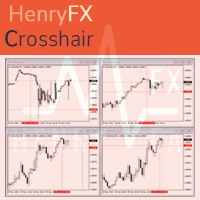
For some trader's charts analysis use, specially for  multi timeframe trading strategies . When you need to check something of the time within different timeframe at the same symbol chart, even different symbol charts, this indicator will show the crosshair at sync moving. You just need to load this indicator into some charts, then the crosshair will shown automatic. 
FREE
HF PriceGrid
Wong Sze Wai
5 (1)
This indicator help you to easily calculate the price moving. You can change the gird size withing the input parameter for your trading style, such as hedge, swing trader, ect. It can let you easy to find your takeprofit and stoploss target price in chart. For more about my tools and EA, you can join my channel below, thank you. Telegram channel:   t.me/HenryEAChannel
FREE
This indicator can help easy to management your order on screen. FREE   Version, included: - " Show Breakeven Price "  Show Breakeven Line Pro : :   https://www.mql5.com/en/market/product/58289   Input Parameter: " Label Prefix " :: [    ] Description; " Position-X-Dis " ::  [    ] Description; " Position-Y-Dis " ::  [    ] Description; " Show Market Price " :: [   ]    Description   ; " Price Up Color " ::  [    ] Description; " Price Down Color " :: [   ]    Description   ; " Position-Y-D
FREE
History Exporter can help to export your orders history from MT4 account. After that you can use another data analysis tools to get what you want.  File format is .csv file, the content such as below OrderID,Symbol,Type,Lots,OpenTime,OpenPrice,StopLoss,TakeProfit,CloseTime,ClosePrice,Commission,Swap,MagicNo,Comment,ProfitUSD,ProfitPips,NetProfit,Duration,(Days),(HH:MM:SS), 21520206,EURCHF,buy,0.05,2020.03.10 08:06:15,1.06304,0.00000,0.00000,2020.03.11 13:37:38,1.06015,-0.60,-0.05,28282888,RedRab
FREE
What is this?  This script not only can help you to place all type of orders, included market order " BUY " / " SELL " and pending order " BUYSTOP " / " BUYLIMIT " / " SELLSTOP " / " SELLLIMIT ", but also, it allow you to place order lots by money management concept. How to use this script? 1. Open the chart you want to trade; 2. Drag and drop the script to that chart; 3. Input the parameter what you want to do; 4. Double check the order information, then click "Yes" to confirm to place order;
HF SuperZig
Wong Sze Wai
5 (2)
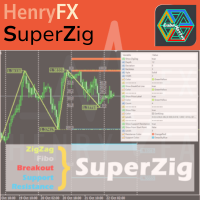
This SuperZig indicator is special design for some trader trade with  ZigZag  and  Fibonacci . ( !!! NEW !!! +++ Support and Resistance +++ ) It will draw least two Fibonacci automatically in your chart period. Alerts when Created/Touced the Support/Resistance Box, it will send phone push/email notification to you at the same time. ZigZag + Fibo + BreakOutLine + SupportResistance = SuperZig !!! Input Parameter: " Show ZigZag " ::  Show ZigZag indicator with your own style ; " Show BreakOut Lin
This Performance Report indicator is special design for some trader to analyst his/her performance. Key Features of the "Performance Report" Indicator Multi-language support: Choose between English and Chinese as the display language, catering to traders from different regions. Flexible report configuration: Customize the report title and group data based on trading symbols, time periods (daily , weekly , monthly ), meeting individual preferences. Date range selection: Specify the st
CubeMaster Lite
Wong Sze Wai
5 (2)
CubeMaster Lite - Your Ultimate Trading EA for Unleashing Profits!!! Our powerful EA that combines indicator signals and advanced money management functions. With this EA, you can implement various strategies such as grid , martingale , and arbitrage . Whether you're an experienced trader or a beginner , this versatile EA is suitable for you . It includes protection against high spreads and allows you to trade with a fixed or automatic lot size. Supercharge Your Trading : CubeMaster Lite maximi
Happy Dragon
Wong Sze Wai
5 (3)
Unleash the Power of " Happy Dragon " EA and Ignite Your Profits! - Buy NOW!! Get ready for an explosive trading experience with the game-changing " Happy Dragon " EA. This cutting-edge tool combines 4 highly profitable strategies that have been meticulously crafted to skyrocket your returns : Low Risk: NZDJPY M1 Medium Risk: GBPAUD M30 Medium Risk: GBPNZD M1 High Risk: EURAUD H1 Brace yourself for unprecedented profits and witness a smoother equity curve as the " Happy Dragon " EA unleashes i
This TraderMaster EA is super helpful for professional trader.  Input Parameter Section: 1) Allow trader to set different line style, such as color, width; 2) Apply our chart style, if set false, it will not change the chart style; 3) Select different panel mode 3.a) Simple Mode, for trader immediately place a market order, pending order, delete and close orders; 3.b) Draw Line Mode, for price action traders who want to trade for trend and reverse in his trading plan; 3.c) Advanced Mode, includ
Happy Tiger
Wong Sze Wai
This EA build -in  3  strategies has been developed, tested and traded live on below risk level, pairs and timeframe: Medium Risk - EURNZD M1 Medium Risk - CADCHF M1  Medium Risk - USDCAD M30 Medium Risk - GBPJPY H1 Multiple strategies traded together will lead to a bigger profits and high risk!!! ## ALL STRATEGIES TESTED WITH HIGH SPREAD ##  This EA with only FEW PARAMETERS.  Every trade has his own logic to open order and take profit. It also allow user input his OWN STOPLOSS amount of sa
This indicator will display current logined mt4 account's orders information of current symbol chart. It also allow import some formated data: 1) MQL5 Signals History CSV file (*.csv) 2) MT4 Account History Statement file (*.htm -> *.txt) *[Next Version] Allow Import data form 'HF HistoryExporter (*.csv)' Sample Data of MQL5 Signals History File Time;Type;Volume;Symbol;Price;S/L;T/P;Time;Price;Commission;Swap;Profit;Comment 2023.12.20 23:00:02;Buy Limit;0.06;EURUSD;1.08994;1.06024;1.09464;202
Your Key to PASS HFT Prop Firm Challenges   Are you ready to unlock the world of High-Frequency Trading ( HFT ) and take on the challenges set by proprietary trading firms? Look no further than   PropFirmFastPass , the ultimate Expert Advisor (EA) designed to help you pass unlimited HFT prop firm challenges effortlessly .  Unlimited Challenges, One-Time Fee Conquer evaluations from over 13 supported prop firms, including  Quantec Trading Capital , with just a single purchase. Say goodbye to e
Supercharge Your Trading with HF TradeCopier !   Are you tired of manual trade execution and missed opportunities? Take your trading efficiency to new heights with the   HF TradeCopier !  This cutting-edge solution empowers traders like you to effortlessly copy transactions between different MetaTrader 4 and MetaTrader 5 accounts, saving you time and maximizing your profit potential . With   lightning-fast copying speeds of under 0.5 seconds , you can seize market opportunities instantly and s
筛选:
无评论
回复评论