Trend Line Optimizer

4.11
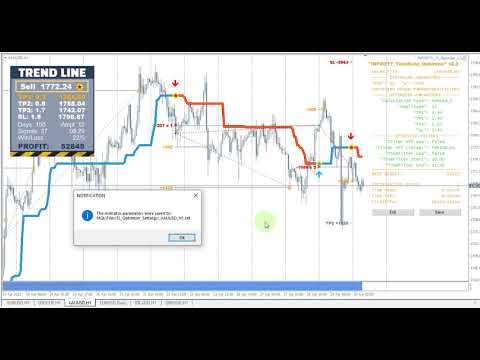
这是趋势线PRO指标的自动参数优化器
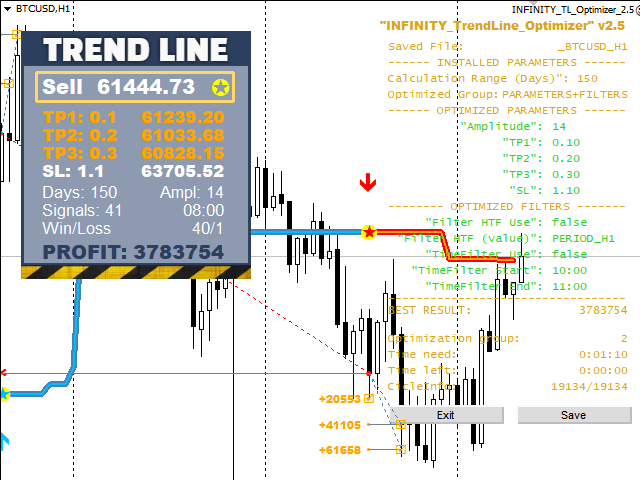
轻松快速地为您最喜爱的趋势线PRO指标选择最佳参数。  优化只需几秒钟。
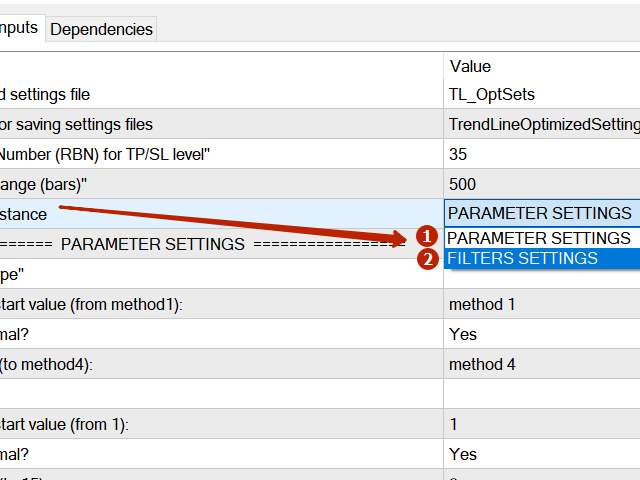
优化器允许您找到每对和周期的最佳参数:振幅,TP1-TP3,止损,以及所选历史部分(天)上的时间过滤器和HTF过滤器的值 

要优化不同的时间框架,您需要不同的历史范围:

M5-M15设置计算范围参数(天)=60(三个月)
M30-H1设置计算范围参数(天)=120(6个月)
H4设置参数计算范围(天)=240(一年)
D1-W1设置参数计算范围(天)=720(三年)
MN1设置参数计算范围(天)=1200(五年)
优化后,参数自动保存到文件夹中的现成设置文件中:MQL4>Files>trendlineoptimizedsettings 

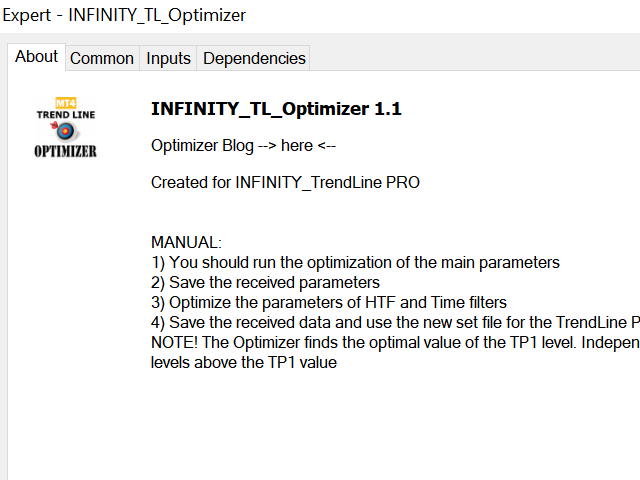
如何使用优化器实用程序:

在需要优化的符号和时间的图形上运行优化器实用程序。
优化结束后单击保存按钮
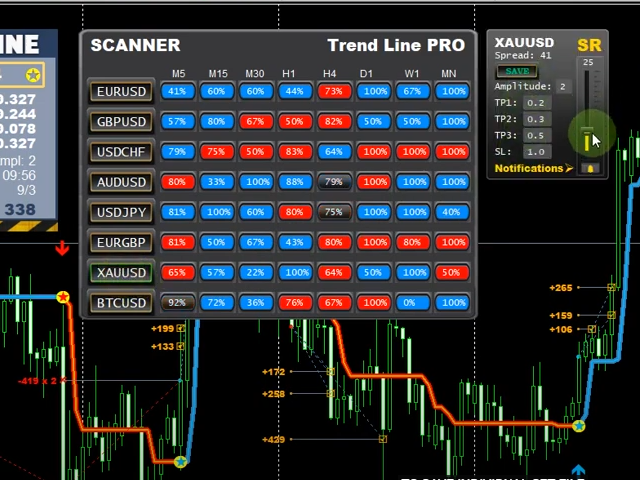
将趋势线PRO指标添加到图表,然后将趋势线PRO扫描仪
Trend Line PRO指标面板上TP1、TP2、TP3、止损和利润指标的值将变得更好,Trend Line PRO 扫描仪中会出现一个按钮(红色或蓝色 
Manual Guide: here

如果您有任何问题或希望收到私人聊天的个人邀请,请写信给我: admin@robomarket.org
(对不起,文本的自动翻译)

评分 35
2642422
60
2642422 2024.12.02 08:47 
 

It's a good program. It was useful to me. I advise you to use it.

ANTHONY RAPHAEL LEON
365
ANTHONY RAPHAEL LEON 2024.08.13 03:37 
 

I just purchased the Trend Line Optimizer MT4. I followed the detailed instructions, like making sure the history was sufficient in MT4 and running the specified range. I was impressed that it actually made the pair and time frame show way more pips than the original settings. This is definitely a "Must Have"! Thanks so much Evgenii! :)

Jasmin Sanders
305
Jasmin Sanders 2022.07.03 10:58 
 

Sehr gutes Tool, ich habe mir die Parameter für den Trend Line Indikator sonst mühsam per Hand eingestellt, was sehr viel Zeit und Nerven gekostet hat. Mit dem Tool habe ich die besten Settings innerhalb weniger Minuten gefunden. Funktioniert einwandfrei, sehr empfehlenswert !

推荐产品
Chart Patterns Detect 15 patterns (Ascending Triangle, Descending Triangle, Rising Wedge, Falling Wedge, Bullish Flag, Bearish Flag, Bullish Rectangle, Bearish Rectangle Symmetrical triangle, Head and Shoulders, Inverted Head and Shoulders, Triple top, Triple Bottom, Double Top, Double Bottom) Use historical data to calculate the probability of each pattern to succeed (possibility to filter notification according to the chance of success) gives graphic indication about the invalidation level and
Awesome Oscillator by Bill Williams with the ability to fine-tune and replace the averaging algorithms of the indicator, which significantly expands the possibilities of using this oscillator in algorithmic trading and brings it closer in its properties to such an indicator as the MACD. To reduce price noise, the final indicator is processed with an additional Smooth averaging. The indicator has the ability to give alerts, send mail messages and push signals when the direction of movement of th
NewsReady
Joel Protusada
NewsReady is a semi-automated Expert Advisor that uses a smart straddle methods It needs to be set in charts 2 to 10 minutes before Economic Data release with a red-flag impact on currencies related to the news. Then it run pending orders in specified number of minutes indicated in the time-period parameter. After the specified time, it will stop trading and will remove all pending orders. Important You can not backtest this tool because it is semi-automated and can only be set and run a few min
VR Cub
Vladimir Pastushak
VR Cub 这是获得高质量切入点的指标。该指标的开发是为了促进数学计算并简化对仓位入场点的搜索。多年来,该指标所针对的交易策略已被证明其有效性。交易策略的简单性是其巨大的优势,即使是新手交易者也能成功进行交易。 VR Cub 计算开仓点以及获利和止损目标水平,这显着提高了效率和易用性。查看使用以下策略进行交易的屏幕截图,了解简单的交易规则。 设置、设置文件、演示版本、说明、问题解决,可以从以下位置获取 [博客] 您可以在以下位置阅读或撰写评论 [关联] 版本为 [MetaTrader 5] 计算入场点的规则 开仓 要计算入场点,您需要将 VR Cub 工具从最后一个高点拉伸到最后一个低点。 如果第一个点在时间上早于第二个点,交易者等待柱线收于中线上方。 如果第一个点在时间上晚于第二个点,交易者等待柱线收于中线下方。 根据上述条件,严格在 柱线收盘 后建仓。 换句话说,如果我们在小时图上进行交易,那么从最高点到最低点的时间距离必须超过24小时,最高点和最低点之间的点数必须大于或等于平均价格变动每天。 维持和改变市场地位 可以有多个未平仓头寸;每个头寸都可以单独修改。 VR Cub
Trendiness Index
Libertas LLC
5 (3)
"The trend is your friend" is one of the best known sayings in investing, because capturing large trendy price movements can be extremely profitable. However, trading with the trend is often easier said than done, because many indicators are based on price reversals not trends. These aren't very effective at identifying trendy periods, or predicting whether trends will continue. We developed the Trendiness Index to help address this problem by indicating the strength and direction of price trend
YK Fibo Pivot Indicator
Peechanat Chatsermsak
YK-Fibo Pivot Indicator: Trade Smarter with Fibonacci Pivot Points The YK-Fibo Pivot Indicator is a powerful technical analysis tool that combines the precision of Fibonacci retracements with the insights of Pivot Points. Whether you're a novice or seasoned trader, this indicator empowers you to spot profitable opportunities in the market with ease. Why Choose YK-Fibo Pivot? Pinpoint Support & Resistance: By calculating Fibonacci levels based on the previous day's high, low, and close prices, y
Meta Treand
Tatiana Savkevych
Forex Meta Trend indicator - using the built-in algorithm allows you to determine the current trend. You can quickly understand what kind of trend is currently developing in the market. The indicator projects one of the main market wisdoms and says - "The trend is my friend". Using this indicator, you can develop a trading system in the financial markets. Since the indicator is designed specifically to create a system for searching for a market trend. This indicator does not lag and shows the tr
Details of each condition Type 1. Set no use Hedging Martingale, to open the order by yourself only through the push button. TP and SL follow setting. Set Setting_Hedging =false;     Use_HLine =false;      Set Setting_TrailingStop =false; if not use. Type 2. Semi Auto Recovery Zone You have to open the order by yourself only through the push button. If in the wrong direction and Set true on Hedging Martingale, EA will fix the order with the zone system by use Hedging Martingale Set Se
MajorAlert
Sergei Vassunov
MajorAlert - is a professional trading indicator for MetaTrader 4 that combines two distinct market analysis approaches into one powerful tool. By integrating a counter‑trend entry logic (upper block) with a trend‑following filter (lower block), the indicator generates high‑probability signals on the chart with clearly separated arrow colors. Key Features Fully self‑contained   – no external indicators required; all calculations are built‑in. Versatile inputs   – adjust all parameters to suit a
EARLY REMINDER: The Starting price is 65 price will rise soon up to 365$ and then 750$ after first 10 copies of sales. Grab this offer now! Introduction Hello, traders! Welcome to the demonstration of the Forex Beast Indicator , a comprehensive tool designed to assist aspiring traders in navigating the complexities of the forex market. This indicator incorporates seven essential components to provide a well-rounded trading experience: Moving Averages Colored Zones Support and Resistance Levels
这是一个预测蜡烛收盘价的指标。 该指标主要用于 D1 图表。 该指标适用于传统外汇交易和二元期权交易。 该指标可以用作独立的交易系统,也可以作为您现有交易系统的补充。 该指标分析当前蜡烛,计算蜡烛本身内部的某些强度因素,以及前一根蜡烛的参数。 因此,该指标预测市场走势的进一步方向和当前蜡烛的收盘价。 由于这种方法,该指标既适用于短期盘中交易,也适用于中长期交易。 该指标允许您设置指标在分析市场情况期间将产生的潜在信号的数量。 在指标设置中有一个特殊的参数。 此外,该指标可以通过图表上的消息、电子邮件以及推送通知的形式通知新信号。感谢您的关注!交易愉快! 购买后一定要写信给我! 我会给你我的交易指标的建议! 还可以获得奖金!
其中一个数字序列称为“森林火灾序列”。它被公认为最美丽的新序列之一。它的主要特点是该序列避免了线性趋势,即使是最短的趋势。正是这一属性构成了该指标的基础。 在分析金融时间序列时,该指标试图拒绝所有可能的趋势选项。只有当他失败时,他才会认识到趋势的存在并给出适当的信号。这种方法可以让人们正确地确定新趋势开始的时刻。然而,误报也是可能的。为了减少它们的数量,该指标添加了一个额外的过滤器。当新柱打开时会生成信号。在任何情况下都不会发生重绘。 指标参数: Applied Price - 应用价格常数; Period Main - 指标的主要周期,其有效值在 5 - 60 之间; Period Additional - 附加周期,此参数的有效值为 5 - 40; Signal Filter - 附加信号滤波器,有效值 0 - 99; Alerts - 启用后,指示器会在出现新信号时提醒您; Send Mail - 允许指标向电子邮件发送消息; Push - 允许您发送 Push 消息。
SMC Venom 模型 BPR 指標是針對在智慧貨幣 (SMC) 概念內工作的交易者的專業工具。它會自動辨識價格圖表上的兩種關鍵模式: FVG (公平價值缺口)是三根蠟燭的組合,其中第一根和第三根蠟燭之間存在缺口。它在水平之間形成一個沒有成交量支撐的區域,這通常會導致價格調整。 BPR (平衡價格區間)是兩種 FVG 模式的組合,形成一個「橋樑」 - 當價格以低成交量活動移動時,突破並返回到水平的區域,從而在蠟燭之間產生間隙。 這些模式可協助交易者透過分析圖表上的交易量和價格動態(大型市場參與者和普通參與者之間的互動)來識別關鍵的支撐/阻力位、突破區域和切入點。 此指標以矩形和箭頭的形式可視化模式,也支援靈活的警報設定。 主要特點: 模式顯示模式:選擇顯示 BPR 模式(看漲和看跌)或 FVG 模式(看漲和看跌)。 可以隱藏所有圖表分析模式。 以條數過濾:BPR 結構中 FVG 之間的最小/最大距離。 訊號的附加視覺化: 箭頭有 9 種類型可供選擇(標準、細、分形等)或手動輸入 Wingdings 代碼,其表格可以選擇性地顯示在圖表上。 使用 ATR 配置顏色、尺寸及其相對於價格
Crypto_Forex 指标“晨星模式”适用于 MT4。 - 指标“晨星模式”是价格行为交易的非常强大的指标:无需重绘,无延迟。 - 指标检测图表上的看涨晨星模式:图表上的蓝色箭头信号(见图片)。 - 带有 PC、手机和电子邮件警报。 - 还有它的兄弟 - 看跌“黄昏之星模式”指标可用(点击以下链接)。 - 指标“晨星模式”非常适合与支撑/阻力位结合使用。 ................................................................................................................. 点击这里查看高质量的交易机器人和指标! 这是仅在此 MQL5 网站上提供的原创产品。
GJ Options
Sayan Vandenhout
GJ OPTIONS USES THE TREND WAVE INDICATOR AND IT CAN IDENTIFY THE BEGINNING AND THE END OF A NEW WAVE TREND MOVEMENT. AS AN OSCILLATOR, THE INDICATOR IDENTIFIES THE OVERBOUGHT AND OVERSOLD ZONES. IT WORKS GREAT TO CATCH THE SHORT TERM PRICE REVERSALS AND USES A MARTINGALE STRATEGY TO CLOSE ALL TRADES IN PROFIT. USE DEFAULT SETTINGS ON H1 OR HIGHER TIME FRAME ON ANY PAIR FOR MORE ACCURATE TRADES WHY THIS EA : Smart entries calculated by 5 great strategies The EA can be run on even a $20000 account
Master prop firm challenges before risking real money!   Our advanced simulator recreates authentic prop firm trading environments, helping you practice, strategize, and pass challenges with confidence.   Using our Simulator, you can simulate any prop firm challenge using demo or live accounts, supports both manual trading strategies and automated trading via EAs ,  create personalized challenges for customized periods, and challenge yourself to develop the discipline needed for consistent profi
BONUS INDICATOR HERE :  https://linktr.ee/ARFXTools Trading Flow Using Fibo Eminence Signal 1️⃣ Wait for the Fibonacci to Auto-Draw The system automatically detects swings (from high to low or vice versa) Once the Fibonacci levels appear, the indicator sends an alert notification “Fibonacci detected! Zone is ready.” 2️⃣ Check the Entry Zone Look at the ENTRY LINE (blue zone) This is the recommended SELL entry area (if the Fibonacci is drawn from top to bottom) Wait for the price to enter
Fibonacci Auto Drawing
Makarii Gubaydullin
根据指定时间范围内的最高价和最低价自动绘制斐波那契水平 多个K线   可以合并:例如,您可以基于10天的最高价和最低价绘制斐波那契水平 我的   #1   工具 : 66+ 功能,包括此指标  |   联系我  如有任何问题  |    MT5版本 帮助识别潜在的反转水平; 在斐波那契水平形成的形态往往更强; 显著   减少   手动绘制   所花费的   时间 ; 设置: 计算基准最高价和最低价的时间范围 计算基准价格的周期数量  当前(浮动)K线可以包含/排除 每个级别可以自定义或禁用(设置为0以关闭) 您还可以禁用整个级别组:分别为主要级别、向上和向下扩展 线条颜色、样式和粗细  可以启用/禁用水位价格 //--------- 我的   #1   工具 : 66+ 功能,包括此指标  |   联系我  如有任何问题  |    MT4版本
Royal Dutch Skunk
Sayan Vandenhout
ROYAL DUTCH SKUNK USES THE TREND WAVE INDICATOR AND IT CAN IDENTIFY THE BEGINNING AND THE END OF A NEW WAVE TREND MOVEMENT. AS AN OSCILLATOR, THE INDICATOR IDENTIFIES THE OVERBOUGHT AND OVERSOLD ZONES. IT WORKS GREAT TO CATCH THE SHORT TERM PRICE REVERSALS AND USES A MARTINGALE STRATEGY TO CLOSE ALL TRADES IN PROFIT. USE DEFAULT SETTINGS ON H1 OR HIGHER TIME FRAME ON ANY PAIR FOR MORE ACCURATE TRADES WHY THIS EA : Smart entries calculated by 6 great strategies The EA can be run on even a $20000
Introduction to Order Risk Panel Pro EA Order Risk Panel Pro EA is the professional version of the simple Order Risk Management EA. Order Risk Panel Pro EA incorporate three powerful features in one. The three powerful features include the visual trading & Risk Management, the Harmonic Volatility Line indicator and Trade Statistics Panel. For all these three features, you get the price of one. Firstly, Order Risk Panel Pro provides the highly efficient visual trading feature. You do not have to
PipFinite Exit EDGE
Karlo Wilson Vendiola
4.83 (115)
Did You Have A Profitable Trade But Suddenly Reversed? In a solid strategy, exiting a trade is equally important as entering. Exit EDGE helps maximize your current trade profit and avoid turning winning trades to losers. Never Miss An Exit Signal Again Monitor all pairs and timeframes in just 1 chart www.mql5.com/en/blogs/post/726558 How To Trade You can close your open trades as soon as you receive a signal Close your Buy orders if you receive an Exit Buy Signal. Close your Sell orders if
CoPilot dashboard MT4
Frederic Jacques Collomb
CoPilot — 每日交易仪表板 掌握你的数据。清晰地交易。 MT5 版本 什么是 CoPilot? CoPilot 是一款 专业级 交易助手,可将您每日的交易绩效统计数据 实时 显示在图表上——配备 实时权益曲线 ,逐笔更新。专为需要在不离开图表的情况下即时了解交易状态的活跃交易者而设计,CoPilot 汇总 当日所有交易品种的每笔已平仓交易 ,并以简洁、色码化的交互面板呈现。 无需再切换到终端历史选项卡,无需手动计算。CoPilot 就像您的 副驾驶 ——时刻守候,持续计算,始终在您眼前。 实时统计面板 CoPilot 显示完整的每日绩效指标,分为三个部分: 活动 — 今日总交易数、已平仓交易、持仓数量、盈利/亏损笔数、 胜率 (%) 及保本交易。胜率颜色动态调整:高于 50% 显示绿色,低于 50% 显示红色。 盈亏 — 净盈亏 、 盈利因子 、每笔平均盈利和平均亏损、 平均风险回报比 、当日最佳交易和最差交易。每个数值根据其含义以绿色或红色显示。 时间与点数 — 平均持仓时间、最短和最长持仓时间、所有交易品种累计 总点数 ,以及 最大连续盈利/亏损次数 。 所有统计数据均基于
Binary panel for MT4. My development - a dashboard for binary options in MT4 (for example, the broker Grant Capital) has functions such as buy and sell (up and down), expiration time settings as on binary platforms (analogous) from 1 minute and up, increments of, for example, 5 minutes and up. It has lot settings from $1 and up. It has a balance level on the panel.
PZ ABCD Retracement
PZ TRADING SLU
4 (5)
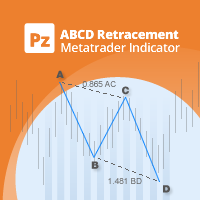
该指标找到AB = CD回撤形态。 AB = CD回调模式是一种4点价格结构,其中初始价格区间被部分回调,然后与回调完成后等距移动,这是所有谐波模式的基本基础。 [ 安装指南 | 更新指南 | 故障排除 | 常见问题 | 所有产品 ] 可定制的图案尺寸 可定制的AC和BD比率 可定制的突破时间 可定制的线条,颜色和大小 它根据CD纤维水平显示SL和TP水平 视觉/声音/推送/邮件警报,用于模式和突破 AB = CD Retracements可以扩展和重新绘制很多内容。为了使事情变得更容易,该指标实施了一个转折:它在向交易发出信号之前等待正确方向的Donchian突破。最终结果是带有非常可靠的交易信号的重新粉刷指示器。输入donchian突破时段作为输入。 看涨回撤是蓝色的 空头回撤是红色的 请注意,价格模式(例如AB = CD)可以扩展,指标必须重新绘制以跟随该模式的扩展。如果图案重涂超出了参数中输入的AC / BD / AB = CD比率,则该图案将消失,因为它将不再有效。要交易这些模式,请求助于donchian突破信号。 输入参数 幅度:AB = CD模式的大小 突围
LordEA English
Igor Pereira Calil
這是英文版本,要購買葡萄牙語版本,請訪問: https://www.mql5.com/pt/market/product/58513 免費安裝並在您的帳戶上執行 LordEA,請私訊詢問我。 LordEA 專家是 Meta Trader 的機器人,其目標是根據機器人自身的趨勢和策略進行工作。 我們默認使用距離和幾何手數類型的方法,機器人將通過趨勢檢測打開新訂單的確切時間,甚至在鞅下。 LordEA 是與鞅及其標準策略配合使用的最安全的機器人之一。 因此,您的設置中還包括如何在鞅和手數之間按點使用固定策略。 LordEA 有 3 種操作模式(標準、正常、Close_Profit、Close_Orders)。 LordEA 採用 3 種鞅模式(固定、幾何、指數)。 LordEA 有 4 種方式來關閉訂單並獲利(單單、籃子、混合和高級)。 LordEA 機器人有一個名為“Lord Call”的功能,不建議在任何時候關閉它,它是一種趨勢策略,如果您的貨幣對有快速且大幅的變動,則可以恢復損失。 我們還有回撤選項,您可以定義部分盈利、分割以及部分虧損平倉的訂單數量,默認值為 (3
Auto Fibo Pro m
DMITRII GRIDASOV
“Auto FIBO Pro” Crypto_Forex 指标 - 是交易中的绝佳辅助工具! - 指标自动计算并放置在图表斐波那契水平和局部趋势线(红色)上。 - 斐波那契水平指示价格可能反转的关键区域。 - 最重要的水平是 23.6%、38.2%、50% 和 61.8%。 - 您可以将其用于反转剥头皮或区域网格交易。 - 还有很多机会可以使用 Auto FIBO Pro 指标来改进您当前的系统。 - 它具有信息价差掉期显示 - 它显示所连接的外汇对的当前价差和掉期。 - 显示屏还显示账户余额、净值和保证金。 - 可以将信息价差掉期显示定位在图表的任何角落: 0 - 左上角,1 - 右上角,2 - 左下角,3 - 右下角。 点击这里查看高质量的交易机器人和指标! 这是仅在此 MQL5 网站上提供的原创产品。
Angry bull Option Binary
Fabio Oliveira Magalhaes
1 (1)
Angry Bull Option Binary   This is a Binary Options robot, which contains 7 strategies, you can backtest it to check what the best strategies are Settings Initial Batch Value Dynamic Investment = If activated it will use an automatic lot according to its capital Balance ($) w/ backtest = Starting balance to backtest PorcRiscoInvestment = It will be the value of % for the automatic lot if it is activated Expiration (in minutes) = It will be the expiration time of orders in Binary Options Magic
Mobile LotSize Trade on the go with confidence Have you ever spotted the perfect trade opportunity on your phone, only to enter with the wrong lot size and end up risking more than you intended? With Mobile LotSize , that’s no longer a problem. Leave this EA running on your trading platform, and it will automatically monitor your pending orders set at 0.01 lots. If you’ve placed a stop loss or take profit from your phone, Mobile LotSize will calculate and adjust the trade size to match your ris
Super Reversal Pattern
Parfait Mujinga Ndalika
Super Reversal Pattern Indicator Unlock the power of advanced pattern recognition with our Super Reversal Pattern Indicator. Designed for traders seeking precision and reliability, this indicator identifies one of the most effective reversal patterns in technical analysis, offering a significant edge in your trading strategy. Key Features: Non-Repainting Accuracy: Enjoy the confidence of non-repainting technology. Once a Super Reversal Pattern is detected, it remains static, providing consiste
Noize Absorption Index MT4
Ekaterina Saltykova
5 (1)
Noize Absorption Index - is the manual trading system that measures the difference of pressure between bears forces and bulls forces. Green line - is a noize free index that showing curent situation. Zero value of index shows totally choppy/flat market.Values above zero level shows how powerfull bullish wave is and values below zero measures bearish forces.Up arrow appears on bearish market when it's ready to reverse, dn arrow appears on weak bullish market, as a result of reverse expectation. S
该产品的买家也购买
欢迎来到 Trade Manager EA——这是一个终极风险管理工具,旨在使交易变得更直观、精准和高效。它不仅仅是一个下单工具,而是一个用于无缝交易计划、仓位管理和风险控制的全面解决方案。不论您是新手交易员、资深交易员,还是需要快速执行的剥头皮交易员,Trade Manager EA 都可以满足您的需求,适用于外汇、指数、大宗商品、加密货币等各种市场。 借助 Trade Manager EA,复杂的计算已成过去。只需分析市场,在图表上用水平线标记入场、止损和止盈,设置您的风险水平,Trade Manager 就会立即计算出理想的头寸规模,并实时显示以点、账户货币计价的止损和止盈。每笔交易都得以轻松管理。 主要功能: 头寸规模计算器 :根据定义的风险瞬间确定交易规模。 简单的交易计划 :在图表上用可拖动的水平线直接计划交易,设置入场、止损和止盈。 实时显示 SL 和 TP :以账户货币、点或分显示止损和止盈,便于分析。 高级保护工具 盈亏平衡选项 : 基本盈亏平衡 :当您的交易达到设定水平时自动保护利润。 多级盈亏平衡 :设置多达 4 个级别以逐步保护利润。 尾随止损选项 : 基本尾随
Local Trade Copier EA MT4
Juvenille Emperor Limited
4.96 (110)
通过 Local Trade Copier EA MT4 获得非常快速的交易复制体验。它的简单1分钟设置,使您可以在同一台Windows计算机或Windows VPS上在多个MetaTrader终端之间复制交易,具有闪电般快速的复制速度,低于0.5秒。 无论您是初学者还是专业交易者, Local Trade Copier EA MT4 都提供了广泛的选项,可根据您的特定需求进行自定义。对于任何希望增加利润潜力的人来说,这都是终极解决方案。 今天就尝试一下,看看为什么它是市场上最快、最简单的贸易复印机! 提示: 您可以在您的模拟账户中下载并试用 Local Trade Copier EA MT4 模拟版: 这里 将下载的免费演示文件粘贴到您的 MT4 >> 文件 >> 打开数据文件夹 >> MQL4 >> 专家文件夹并重新启动您的终端。  免费演示版本每次可在 4 小时内发挥全部功能,仅限演示帐户。 要重置试用期,请转至 MT4 >> 工具 >> 全局变量 >> Control + A >> 删除。 请仅在非关键模拟账户上执行此操作,不要在挑战道具公司账户中执行此操作。 如果您无法在
Trade Assistant MT4
Evgeniy Kravchenko
4.43 (195)
它有助于计算每笔交易的风险,容易安装新的订单,具有部分关闭功能的订单管理, 7 种类型的追踪止损和其他有用的功能。 附加材料和说明 安装说明 - 应用程序说明 - 模拟账户应用程序的试用版 线条功能  - 在图表上显示开仓线、止损线、止盈线。 有了这个功能,就可以很容易地设置一个新的订单,并在开仓前看到它的附加特性。   风险管理  - 风险计算功能在考虑到设定的风险和止损单的大小的情况下,计算新订单的成交量。它允许你设置任何大小的止损,同时观察设定的风险。 批量计算按钮 - 启用 / 禁用风险计算。 在 " 风险 " 一栏中设置必要的风险值,从 0 到 100 的百分比或存款的货币。 在 " 设置 " 选项卡上选择风险计算的变量: $ 货币, % 余额, % 资产, % 自由保证金, % 自定义, %AB 前一天, %AB 前一周, %AB 前一个月。   R/TP 和 R/SL - 设置止盈和止损的关系。 这允许你设置相对于损失的利润大小。 例如, 1 : 1 - 这决定了 TP = SL 的大小。 2 : 1 - 这意味着 TP 是 SL 的两倍。 RR - 它禁用比率。  
Exp COPYLOT CLIENT for MT4
Vladislav Andruschenko
4.69 (65)
MetaTrader 4 专业交易复制器 快速、专业、可靠的 MetaTrader 4 交易复制器。 COPYLOT 可在 MetaTrader 4 与 MetaTrader 5 终端之间复制外汇交易,并为不同账户类型和交易场景提供灵活的同步方案。 COPYLOT MT4 版本支持: MetaTrader 4 → MetaTrader 4 MetaTrader 5 Hedge → MetaTrader 4 MetaTrader 5 Netting → MetaTrader 4   MT5 版本 完整说明 + DEMO + PDF 如何购买 如何安装 如何获取日志文件 如何测试与优化 Expforex 的全部产品 您也可以使用 MetaTrader 5 版本,在 MetaTrader 5 → MetaTrader 5 和 MetaTrader 4 → MetaTrader 5 之间进行复制: COPYLOT CLIENT for MT5 COPYLOT 是一款专业级交易复制器,可稳定运行于 2、3 甚至 10 个终端之间。 支持从模拟账户和投资者密码账户进行复制 可同时运行在多个终端上
Copy Cat More Trade Copier MT4 (复制猫MT4) 不仅仅是一个简单的本地交易复制工具;它是一个为当今交易挑战而设计的完整风险管理与执行框架。从 prop firm 挑战到个人账户管理,它都能通过强大的执行力、资本保护、灵活配置以及先进的交易处理来适应各种情况。 该复制器同时支持 Master(发送端) 和 Slave(接收端) 模式,能够实时同步市价单与挂单、交易修改、部分平仓以及 Close By 操作。它兼容模拟账户与真实账户,支持交易或投资者密码,并通过持久交易记忆系统(Persistent Trade Memory)确保即使 EA、终端或 VPS 重启后也能恢复。可同时管理多个 Master 与 Slave,并通过前缀/后缀自动调整或自定义符号映射来处理跨平台或跨经纪商差异。 使用手册/设置: Copy Cat Trading Copier 使用手册 Copy Cat More MT5: https://www.mql5.com/en/market/product/139088 加入频道: https://www.mql5.com/en/cha
Telegram to MT4 Multi-Channel Copier   自动将您的Telegram频道中的交易信号直接复制到MetaTrader 4。无需机器人,无需浏览器扩展,无需手动复制。您在Telegram收到信号,EA在几秒钟内在您的终端上开仓。 该产品包含两个组件:一个监听您Telegram频道的Windows应用程序,以及在您的MT4终端上执行信号的Expert Advisor。 查看下载应用程序的指南: https://www.mql5.com/en/blogs/post/768988 工作原理 Windows应用程序使用您自己的API凭据连接到Telegram(不是机器人,这意味着它可以读取您订阅的任何频道,包括私人和VIP频道)。当检测到信号时,它会解析信号并将其发送给EA。EA读取信号,根据您的经纪商解析符号名称,根据您的风险设置计算手数,然后开仓。 整个过程是自动的。您无需坐在电脑前。 第1步:打开应用程序并登录Telegram(仅第一次)。 第2步:选择您想要监听的频道。 第3步:按下开始。EA负责其余的工作。 支持的信号格式 内置信号解析器可识别真实Te
Trade copier MT4
Alfiya Fazylova
4.58 (33)
Trade Copier 是一种专业实用程序,旨在复制和同步交易账户之间的交易。 复制发生从供应商的帐户/终端到收件人的帐户/终端,安装在同一台计算机或 vps 上。 促销活动 - 如果您已经购买了“Trade copier MT5”,您可以免费获取“Trade copier MT4”(用于 MT4 > MT5 和 MT4 < MT5 的复制)。欲了解更多详细条款,请通过私人消息与我们联系! 在购买之前,您可以在演示帐户上测试演示版本。 演示 这里 。 完整说明 这里 。 主要功能和优点: 支持复制MT4>MT4、MT4>MT5、MT5>MT4,包括МТ5 netting账户。 供应商和收件人模式在同一产品中实现。 简单直观的界面,允许您直接从图表中实时控制复制。 连接中断或终端重新启动时不会丢失设置和位置。 允许您选择要复制的符号,也可以替换接收者的符号,例如 EURUSD> USDJPY。 支持回拷贝。 能够仅复制某些订单。 允许您设置开仓交易价格的最大差异和最大时间延迟。 正确复制部分订单关闭的执行。 计算复制手数的几种方法。 同步止盈和止损。有几种方法可以计算它们的位置。 支持
Ultimate Trailing Stop EA
BLAKE STEVEN RODGER
4.33 (15)
This EA Utility allows you to manage (with advanced filtering) unlimited open orders (manual or EA) with 16 trailing stop methods: fixed, percent, ATR Exit, Chandelier Exit, Moving Average, Candle High Low Exit, Bollinger Bands, Parabolic, Envelope, Fractal, Ichimoku Kijun-Sen, Alligator, Exit After X Minutes or Bars, RSI and Stochastic. The trailing stop can be either real or virtual, and you can exit fully or with a partial close percent on touch or bar close.  Moreover, you can add (overrid
TradePanel MT4
Alfiya Fazylova
4.84 (95)
交易面板是一款多功能交易助手。该应用包含超过50种手动交易功能,并允许您自动执行大多数交易任务。 在购买之前,您可以在演示账户上测试演示版本。下载用于演示账户的试用版应用程序: https://www.mql5.com/zh/blogs/post/762579 。 完整说明 这里 。 贸易. 只需单击一下即可执行交易操作: 打開掛單和頭寸,並自動計算風險。 一鍵打開多個訂單和頭寸。 打開訂單網格。 按組別關閉掛單和頭寸。 反轉頭寸方向(關閉買入>打開賣出,關閉賣出>打開買入)。 鎖定頭寸(通過開啟缺少的頭寸,使買入和賣出頭寸的數量相等)。 一鍵部分關閉所有頭寸。 將所有頭寸的止盈和止損設置在同一價格水平。 將所有頭寸的止損設置在盈虧平衡水平。 開倉時,可使用以下功能: 在多個訂單或倉位之間分配計算出的數量(在單擊一次時開啟多個訂單和倉位)。 在開啟訂單前在圖表上可視化交易水平。 僅在當前點差不超過設定值時才開啟倉位。 止盈和止損之間的自動比例。 虛擬止損和止盈。 自動將止損和止盈的大小增加為當前點差的大小。 基於ATR指標讀數計算止盈和止損。 設置掛單的到期日期。 為掛單設置追蹤(掛單
The product will copy all telegram signal to MT4   ( which you are member  ) , also it can work as remote copier.  Easy to set up, copy order instant, can work with almost signal formats, image signal, s upport to translate other language to English Work with all type of channel or group, even channel have "Restrict Saving Content", work with  multi channel, multi MT5 Work as remote copier: with signal have ticket number, it will copy exactly via ticket number. Support to backtest signal. How to
Trade Dashboard MT4
Fatemeh Ameri
4.96 (53)
疲于复杂的订单下达和手动计算?Trade Dashboard 是您的解决方案。凭借其用户友好的界面,订单下达变得轻而易举,只需点击一下,您就可以开设交易、设置止损和止盈水平、管理交易手数,并计算风险回报比,让您只需专注于您的策略。告别手动计算,使用 Trade Dashboard 简化您的交易体验。 立即下载演示版本 。 您可以在这里找到仪表盘功能和特性的详细信息 。 加入 Telegram 频道 。 购买后请给我发消息以获取支持。如果您需要添加更多功能,可以在产品的评论区留下您的想法,我愿意听取任何建议,希望您能在使用我的产品时获得最佳体验 。 这是 MT5 版本。 风险管理:使用 Trade Dashboard,可以将您的风险设置为账户余额或权益的百分比,或将风险设置为总金额。在图表上直观地定义您的止损,让工具准确计算每个货币对的适当手数。该工具还可以根据您期望的风险回报比自动设置止盈水平。它甚至可以在手数计算中涵盖佣金和点差费用。此外,您的止损和止盈可以转变为虚拟水平,隐藏于经纪商。通过 Trade Dashboard 的高级风险管理功能,掌控风险,保护您的资本。 交易线
RiskManager
Roman Zhitnik
5 (4)
The Expert Advisor is a risk manager helping users to control their trading. In the settings, it is possible to specify the parameters at which the risk manager force closes the opened trades and closes the terminal as well, if it is needed to prevent opening trades on emotions, which do not correspond to the trading strategy. Risk Manager settings Check limit to close - check the equity limit Limit to close (account currency)   - equity limit that is checked when  Check limit to close is activ
Telegram to MT4 Coppy
Sergey Batudayev
3.89 (9)
Telegram 到 MT4: 终极信号复制解决方案 使用 Telegram 转 MT4 简化您的交易流程,这款先进的实用程序旨在将交易信号直接从 Telegram 频道和聊天复制到您的 MetaTrader 4 平台,无需 DLL 文件。这款强大的解决方案确保信号执行的无缝衔接,拥有无与伦比的精度和丰富的自定义选项,从而节省您的时间并提高您的效率。 [ Instructions and DEMO ] 主要特点 直接 Telegram API 集成 通过电话号码和安全码进行身份验证。 使用用户友好的 EXE 桥轻松获取和管理聊天 ID。 添加、删除和刷新多个频道/聊天以同时复制信号。 使用高级过滤器进行信号解析 跳过包含自定义例外词(例如“报告”、“摘要”)的不需要的信号。 支持灵活的 SL 和 TP 格式:价格、点数或点数。 当信号指定点而不是价格时自动计算入场点。 订单定制和灵活性 使用多种模式定制订单规模:固定手数、动态手数(% 风险)或特定符号手数。 使用信号数据或自定义参数调整 SL/TP。 配置滑点、挂单到期和重试设置以实现完美执行。 综合符号管理 排除特定符号或匹配自定义
Take a Break
Eric Emmrich
5 (31)
News filter, equity guard & session control for all your EAs — one tool, full protection Take a Break has evolved from a basic news filter into a comprehensive account protection solution . It pauses your other Expert Advisors during news events or based on custom filters. When trading resumes, it automatically restores your entire chart setup , including all EA settings. Why traders choose Take a Break One news filter for all your EAs — no more relying on individual built-in filters that may o
VirtualTradePad mt4 Extra
Vladislav Andruschenko
4.85 (61)
一键交易的交易面板。处理头寸和订单!通过图表或键盘进行交易 交易小组进行人工交易。您可以从图表(图表窗口)或键盘进行交易。打开和关闭,反向和锁定。处理职位和订单! МetaТrader4中主要订单的交易控制面板:买入,卖出,买入,买入,卖出,卖出限制,收盘,删除,修改,追踪止损,止损,止损。 MT5版本 详细描述   +DEMO +PDF 如何购买 如何安装     如何获取日志文件     如何测试和优化     Expforex 的所有产品 从符号窗口交易并从键盘交易! 您正在为MetaTrader 4终端提供一个独特的插件 - 虚拟控制面板VirtualTradePad。 Description on English 注意!如果您想学习如何交易 策略测试器  ,请查看我们的免费 TesterPad 实用程序 VirtualTradePad在“  MQL5语言最佳图形面板  ”竞赛中 获得二等奖 。 工作标签 职位标签   -使用职位: 开/关买入和卖出, 冲销所有头寸, 锁定一个共同的立场, 更改止损/获利, 设定一般的止损/获利的位置, 启用追踪止损, 实现盈亏平衡 只平
Managing trades MT4
David Julio Cuenca Oliver
Managing Trades 3.0 MT5 version:  https://www.mql5.com/en/market/product/172666?source=Site With Managing Trades 3.0, you can manage your trades quickly and efficiently. It features an intuitive visual interface with large buttons, allowing you to manage your trades as quickly as possible. With Managing Trades 3.0 you can: - Open a Buy and Sell order instantly with a single click, using any lot size you want. You can also optionally set Stop Loss and Take Profit. - Close all open trades in
The News Filter
Leolouiski Gan
5 (25)
这个产品在新闻时间过滤所有的专家顾问和手动图表,因此您不必担心突然的价格波动会破坏您的手动交易设置或其他专家顾问输入的交易。此产品还带有完整的订单管理系统,可在任何新闻发布前处理您的持仓和挂单。一旦您购买了 The News Filter ,您将不再需要依赖以后的专家顾问内置的新闻过滤器,因为这个产品可以从此过滤它们所有。 新闻选择 新闻来源于Forex Factory的经济日历。 选择可以基于任何一种货币,如USD,EUR,GBP,JPY,AUD,CAD,CHF,NZD和CNY等。 选择也可以基于关键识别,例如Non-Farm (NFP),FOMC,CPI等。 能够选择新闻影响级别的筛选,从低、中、到高影响。 自动模式只选择与图表相关的新闻。 新闻来源每小时自动刷新,以确保最新的新闻数据。 为每个新闻影响级别提供单独的输入,以确定您要过滤掉的新闻发布前后的分钟数。 订单管理选项 在新闻发布前关闭未平仓头寸的选项,并在新闻发布后恢复它们。 在新闻发布前删除挂单的选项,并在新闻发布后恢复它们。 在新闻发布前移除止损和止盈水平的选项,并在新闻发布后恢复它们。 在新闻发布前移动止损和止盈
Auto Trade Copier
Vu Trung Kien
4.76 (85)
自动交易复制器旨在以 100% 的准确度在多个 MT4/MT5 账户/终端之间复制交易。提供商和接收方账户必须位于同一台 PC/VPS 上。使用此工具,您可以将交易复制到同一台 PC/VPS 上的接收方账户。所有交易操作都将从提供商复制到接收方,不会有任何延迟。此版本仅适用于 MT4 账户。对于 MT5 账户,您必须使用 MT5 的自动交易复制器。参考: 参考: 对于 MT4 接收器,请下载“Trade Receiver Free” 这里 . 对于 MT5 接收器,请下载“Trade Receiver Free MT5”  这里 . 对于同一台 PC/VPS 上的 MT5 提供商,请检查“Auto Trade Copier MT5” 这里 . 如果您需要通过互联网在不同的 PC/VPS 上进行账户复制,请查看“Trade Copier Pro” 这里 . 如果您需要通过互联网在不同的 PC/VPS 账户之间进行复制,且接收方数量不限,请查看“无限交易复制器专业版” 这里 . 以下是重点功能 在 MT4 和 MT5 账户之间复制。 一个提供商可以将交易复制到多个接收者的账户。 一个提
EchoTrade Telegram to MT4 Copier
Perpetual Chinemerem Vincent
5 (2)
EchoTrade Telegram to MT5 Copier Seamless, Instant, and Reliable Signal Copying - Direct from Telegram to MetaTrader 4! The product does not run in the strategy tester but you can get free trial version   here  for testing before purchase. Tired of manually executing trades from Telegram signals? EchoTrade automates the process, instantly copying trades from any Telegram channel or group directly into your MT5 account—accurately, efficiently, and without delay. Key Features: Universal Compatib
Symbol Manager
Taras Slobodyanik
5 (4)
Symbol Manager or Grid Manager, designed to group orders into one position (by Symbol or by Magic Number). This utility will be useful to multi-currency traders (many EAs), who can have multiple orders on several pairs. You will be able to see the total number of lots, the total profit, and set virtual stop loss and virtual take profit. To set a real TP (or SL), you must first set the virtual value, and then enter the command in this cell: "set". If you want to set real TP/SL for all orders at
Trading History MT4
Siarhei Vashchylka
5 (9)
Trading History - A program for trading and money management on the history of quotes in stratagy tester. It can work with pending and immediate orders, and is equipped with trailing stop, breakeven and take profit functions. Very good for training and testing different strategies. Manual (Be sure to read before purchasing) Advantages 1. Allows you to test any trading strategy in the shortest possible time 2. An excellent simulator for trading training. You can gain months of trading experience
Grid Manual MT4
Alfiya Fazylova
4.71 (17)
Grid Manual是一个交易面板,用于处理订单网格。 该实用程序是通用的,具有灵活的设置和直观的界面。 它不仅可以在亏损方向上设置订单网格,还可以在盈利方向上设置订单网格。 交易者不需要创建和维护订单网格,实用程序会这样做。 打开一个订单就足够了,Grid manual会自动为它创建一个订单网格,并伴随它直到非常关闭。 完整说明和演示版 此處 。 该实用程序的主要特性和功能: 伴隨以任何方式打開的訂單,包括從移動終端打開的訂單。 適用於兩種類型的網格:“限制”和“停止”。 使用兩種方法計算網格間距:固定和動態(基於 ATR 指標)。 允許您更改未結訂單網格的設置。 顯示圖表上每個網格的盈虧平衡水平。 顯示每個網格的利潤率。 允許您一鍵關閉網格中的盈利訂單。 讓您一鍵關閉每個訂單網格。 允許您對訂單網格應用追踪止損功能。 允許您在訂單網格上應用將訂單網格的止損轉移到盈虧平衡水平的功能。 相對於訂單網格的盈虧平衡水平自動重新排列止盈(僅在限價網格模式下,距離取決於所選的計算類型:“保守”或“激進”)。 最多可管理 20 個訂單網格,每個網格最多可包含 100 個訂單。
TP Splitter Pro MT4 TP Splitter Pro MT4 is an advanced Expert Advisor (EA) designed to optimize your take-profit strategy by automatically placing copy trades with multiple TP levels. It ensures a structured exit plan while maximizing profits and managing risk efficiently. Unlike standard trade copiers, TP Splitter Pro MT4 only executes copy orders when the entry price is more favorable than the master order. It places sell orders at a higher price and buy orders at a lower price. With built-in
Riskless Pyramid
Snapdragon Systems Ltd
5 (1)
Introduction This powerful MT4 trade mangement EA offers a way potentially to aggressively multiply trade profits in a riskfree manner. Once a trade has been entered with a defined stoploss and take profit target then the EA will add three pyramid add-on trades in order to increase the overall level of profit. The user sets the total combined profit target to be gained if everything works out. This can be specified either as a multiple of the original trade profit or as a total dollar amount. Fo
If you need an advisor on any arrow indicator signals - this utility will definitely help you.  You will be able, with the help of this utility to form an unlimited number of EAs on YOUR signals , with your set of settings, with your copyright and complete source code . You will be able to use the resulting EAs unlimitedly , including adding them to the Market and other resources. Free simple version of the generation script to help you understand how it works - here What does the utility do? 
Local Trade Copier EA 是针对需要从外部来源执行交易信号或需要同时管理多个账户的个人交易者或账户经理的解决方案,无需 MAM 或 PAMM 账户。它可以从多达 8 个主帐户复制到无限的从帐户 [ 安装指南 | 更新指南 | 故障排除 | 常见问题 | 所有产品 ] 100% 自托管 容易安装和使用 不使用安装程序、配置文件、服务器、内存管道或 DLL 1000 次激活可永久使用 EA 本地执行,无网络延迟 它实现了您需要的所有功能: 最多8个主账户和无限从属账户 适用于所有经纪人和 DD/NDD/ECN/STP 执行 适用于具有不同帐户货币的帐户 在真实账户和模拟账户之间工作不明显 支持主从账户中的符号名称后缀 按幻数和订单评论过滤 不会干扰其他交易 可选择复制 SL 和 TP 水平 可选择复制挂单 支持符号翻译 支持部分关闭 反向模式 灵活的交易规模: - 固定地段 - 乘数 - 成比例的 - 与乘数成比例 EA 可以使用投资者或任何账户的主密码复制交易。 如何将交易从一个主账户复制到一个或多个从账户 在源终端中安装 EA 将 EA 加载到任何图表并选择“MA
Edge Zone EA
FXsolutions
5 (1)
With this Expert Advisor you will follow the sound trading principle Buy Low and Sell High by default ! And you can do that even with a normal day job . You will be even able to trade on lower timeframes which you could never do without such an Expert Advisor. And the best thing is that you are in control! You can tell the Edge Zone EA where it has to enter and where it has to exit. And you can do that even many hours before the trade will occur . This EA is therefore an excellent assistant for
MultiOrder Assistent V3.0   - Your professional trading assistant for MetaTrader 4 The  MultiOrder Manager  is a powerful trading tool designed to optimize your trading while managing risk efficiently. With intuitive features and a user-friendly interface, this Tool is ideal for traders who want to manage multiple orders simultaneously without losing track.   Symbols: FX pairs, gold and cryptocurrencies Here you get a detailed description of the parameters and functions Manual     Features and
News Filter EA: Advanced Algo Trading Assistant News Filter EA is an advanced algo trading assistant designed to enhance your trading experience. By using the   News Filter EA , you can integrate a Forex economic news filter into your existing expert advisor, even if you do not have access to its source code. In addition to the news filter, you can also specify   trading days   and   hours   for your expert. The News Filter EA also includes   risk management   and   equity protection   features
EasyTrade MT4
Alain Verleyen
5 (1)
Easy Trade – 智能、简洁且强大的交易管理工具 Easy Trade 是为 MetaTrader 用户打造的一体化交易管理解决方案,帮助您轻松掌控风险,实现流畅交易执行。 它是根据交易者的反馈从零开始开发的,简化了多品种交易的执行、监控和管理流程,无需繁琐的操作。 无论您是手动短线交易者,还是管理多个交易设置的小型投资组合,Easy Trade 都能让您专注于明智决策和稳定盈利。 ⸻ 为什么选择 Easy Trade? 精准风险管理:可选择固定手数或按百分比定义每笔交易的风险。实时显示风险与潜在收益。 篮子式跟踪止盈:追踪多笔交易的总利润,目标达成时自动锁定部分收益,适用于组合交易。 交易截图记录:每笔交易都可截图保存,方便日记记录、回顾与绩效分析。 定时自动平仓:可设定具体日期和时间自动关闭持仓,适合日终或周末前平仓。 界面可自定义:可调整按钮排序与大小、线条样式与颜色、缩放比例等,满足个人使用习惯。 ⸻ 主要功能(版本 1.0) 魔术号与策略标签: 使用注释标记轻松区分不同策略的交易,便于统计与复盘。 手数设置: 支持固定手数或基于止损与账户资金百分比的动态手
作者的更多信息
Wall Street Scalper MT5
Evgenii Aksenov
4.83 (12)
A scalping robot of a new generation should be developed using Artificial Intelligence. Suitable for scalping trading on one of the most popular US Wall Street 30  index (US30). The strategy has passed months of tests on real and demo accounts and is currently being used on several investment accounts with different Profit/Risk ratios. Big sale 50% OFF! Price $199. Regular price $399 All our signals are now available on myfxbook :   click here   Unique set files and all recommendations are pro
TrendLine GRID
Evgenii Aksenov
4.83 (18)
Big sale 50% OFF! Price $199. Regular price $399 Real Signal:   click here   Unique set files and all recommendations are provided free of charge. All future updates of the adviser are included in the price. After the purchase, contact me and I will help you install and configure the robot correctly. I will also share with you information on how to get a free VPS from a reliable broker. Trend Line REVOLUTION  EA trade the first order based on the indicator signal and builds a grid if the price
CopyMaster mt5
Evgenii Aksenov
5 (3)
此实用程序将允许您将任何交易从一个具有主设置的终端复制到具有从设置的其他终端 与此同时,您可以选择要复制的对,通过几个参数设置复制顺序的大小。 通过回撤或只复制有利可图的交易来设定限额损失 您可以将mt4或MT5的交易复制到MT4或MT5其他经纪商 现在,将在MT4中工作的任何Ea交易的信号复制到MT5终端或返回将不难 使用复制主复制任何交易从其他信号,EAs,手动交易.  使用设置,您可以更改批量大小,交易方向,只复制利润交易和setdbvalue来保存您的存款  复制大师可以在一个帐户上统一不同订阅信号的几种策略 要复制MT4的交易,你需要复制主MT4版本: https://www.mql5.com/en/market/product/62132 有关复制主设置的更多信息: https://www.mql5.com/en/blogs/post/749356
A unique robot that has been successfully trading on a real account since 2021. The Gold Dragon trading system is so stable that it has allowed it to survive all market fluctuations, while other systems have failed! Big sale 50% OFF! Price $450. Regular price $899 Real signal:   click here   Unique set files and all recommendations are provided free of charge. All future updates of the adviser are included in the price. After the purchase, contact me and I will help you install and configure
这是一个简单而非常有效的工具,只需点击一下即可关闭订单。 如果您的余额中有许多未结订单,并且手动关闭它们需要太长时间,这可能会导致帐户上的额外资金损失,则您将需要它。 该实用程序由一个外部面板组成,带有两个按钮"关闭过滤器"和"全部关闭",便于在图形中移动。 您可以设置关闭所有实用程序,以便在存款货币达到指定的损益值时立即关闭订单。 您还可以通过设置所需的利润大小或限制您的损失来设置计划关闭。 要做到这一点,只需激活关闭过滤器按钮。 该实用程序将节省您的存款,以防市场急剧变化。 只需将其添加到任何免费图表,并将其用于您的日常交易。 由于参数设置最少,您可以轻松地为MT4或MT5中的任何符号设置实用程序。 最新版本的Close All PRO 实用程序支持通过Telegram messenger进行交互式控制。 安装说明: 这里 Close All Button: Close (All pairs/Current)   -选择所有符号的订单或仅对当前图表的一对的设置 Close (ALL/LOSS) -选择是关闭所有订单还是仅关闭无利可图的订单 Close By Filt
TrendLine PRO MT5
Evgenii Aksenov
4.67 (33)
Trend Line PRO   指标是一个独立的交易策略。 它显示趋势变化,交易的入口点,以及自动计算三个级别的止盈和止损保护 Trend Line PRO  非常适合所有元交易者符号:货币,金属,加密货币,股票和指数 该指标用于真实账户交易,这证实了该策略的可靠性 您可以在这里找到使用   Trend Line PRO   和真实信号的机器人:   https://www.mql5.com/zh/users/neurofx/seller 目前,Trend Line PRO指标的售价为75美元。 促销后价格为 149 美元 。 趋势线专业的优点 永远不要重绘它的信号; 将其作为独立策略的可能性; 它有三个自动水平止盈和止损水平  该指标具有iCustom信号缓冲区,允许您基于它创建交易机器人 具有通知功能 该指标已证明其在真实账户交易中的有效性 如何设置和优化趋势线PRO指标: 通过更改幅度参数以及 TP 和 SL 水平,将重点放在指标面板上的利润上 您可以使用以下方式自动优化指标参数: Optimizer Utility 详细说明(ENG): 这里 趋势线PRO指标如何工作:
FIBO Trend EA mt5
Evgenii Aksenov
5 (6)
50% discount until the end of the month ($199). Regular price $399 Real Signal:   click here   Unique set files and all recommendations are provided free of charge. All future updates of the adviser are included in the price. After the purchase, contact me and I will help you install and configure the robot correctly. I will also share with you information on how to get a free VPS from a reliable broker. This is a trend strategy that uses the  FIBO Trend PRO  indicator. The FIBO Trend EA implem
Prometheus MT5
Evgenii Aksenov
3.44 (9)
Prometheus signal:   点击此处前往 独特的设置文件和所有建议均免费提供。 顾问的所有未来更新均包含在价格中。 购买后,请联系我,我会帮助您正确安装和配置机器人。 我还将与您分享如何从可靠的经纪人处获得免费 VPS 的信息。 黄金是市场上风险最高的交易工具之一。它需要精准的策略、深入的分析和有效的风险管理。Prometheus EA 将所有这些要素无缝集成到一个专为优化交易而设计的复杂系统中。 Prometheus EA 结合技术指标、美国指数相关性和情绪分析,持续适应不断变化的市场环境。这确保了对长期趋势和短期波动的实时响应。 Prometheus EA 执行的每笔交易都受到止损和止盈的保护。凭借 4:1 的风险回报率,该 EA 优先考虑可持续的风险管理和账户增长。 Prometheus EA 不使用马丁格尔、网格交易或平均线等危险的交易方法。相反,它依赖于平衡且注重风险的交易方式。 Prometheus EA 专为黄金交易而设计,利用黄金的高波动性来执行精准且有利可图的交易,同时降低不必要的风险。 Prometheus EA 拥有超过十年的算法交易经验,采用真实
Copy Master mt4
Evgenii Aksenov
5 (5)
此实用程序将允许您将具有主设置的一个终端的任何事务复制到具有从属设置的其他终端 与此同时,您可以选择要复制的对,根据几个参数设置复制顺序的大小。 设定亏损限额或只复制盈利交易 您可以将MT4或MT5的交易复制到其他经纪商的MT4或MT5 现在,将任何在MT4中工作的专家的信号复制到MT5终端或返回并不困难 使用复制大师复制任何交易从其他信号,专家顾问,手动交易.  使用设置,您可以更改批量大小,交易方向,只复制有利可图的交易,并设置价值以保存您的存款  复制大师可以在一个帐户上组合不同订阅信号的几种策略 要复制交易到MT4,你需要复制主MT5版本: https://www.mql5.com/zh/market/product/74371 有关复制向导设置的其他信息: https://www.mql5.com/en/blogs/post/749356 (抱歉文本的自动翻译)

Sakura EA mt5
Evgenii Aksenov
4.73 (11)
Combo Signal:   click here Unique set files and all recommendations are provided free of charge. All future updates of the adviser are included in the price. After the purchase, contact me and I will help you install and configure the robot correctly. I will also share with you information on how to get a free VPS from a reliable broker. SAKURA Expert Advisor is a classic trading system with breaking through certain trend levels (breakout strategy).  The built-in news filter function blocks
Trend Line PRO EA mt4
Evgenii Aksenov
4.57 (47)
趋势线 EA 顾问根据趋势线 PRO 指标的信号以自动模式进行交易。 一组额外的功能允许 Trend Line PRO 策略与 MT4 中的任何工具实现收支平衡:黄金、外汇、指数、股票、加密货币。 春季大促销 50%! 价格 199 美元。原价 398 美元 我们的所有信号现在都可以在 myfxbook 上获取: 点击此处前往 独特的设置文件和所有建议均免费提供。 顾问的所有未来更新均包含在价格中。 购买后,请联系我,我会帮助您正确安装和配置机器人。 我还将与您分享如何从可靠的经纪人处获得免费 VPS 的信息。 附加功能: Trailing Profit Breakeven (盈亏平衡) Recovery (亏损交易后的恢复) News Filter Hidden Stop Loss and Take Profit Notification to cellphone One deal mode 设置趋势线 EA 参数的说明: 此处 附加信息博客: 这里
TrendLine PRO MT4
Evgenii Aksenov
4.83 (167)
Trend Line PRO   指标是一个独立的交易策略。 它显示趋势变化,交易的入口点,以及自动计算三个级别的止盈和止损保护 Trend Line PRO  非常适合所有元交易者符号:货币,金属,加密货币,股票和指数 该指标用于真实账户交易,这证实了该策略的可靠性 您可以在这里找到使用   Trend Line PRO   和真实信号的机器人:   https://robomarket.org/product-category/signals/ 目前,Trend Line PRO指标的售价为75美元。 促销后价格为 149 美元 。 趋势线专业的优点 永远不要重绘它的信号; 将其作为独立策略的可能性; 它有三个自动水平止盈和止损水平  该指标具有iCustom信号缓冲区,允许您基于它创建交易机器人 具有通知功能 该指标已证明其在真实账户交易中的有效性 如何设置和优化趋势线PRO指标: 通过更改幅度参数以及 TP 和 SL 水平,将重点放在指标面板上的利润上 您可以使用以下方式自动优化指标参数: Optimizer Utility 详细说明(ENG): 这里 趋势线PRO指标如
Hephaestus EA
Evgenii Aksenov
3.8 (5)
Hephaestus is the god of artisans and blacksmiths from ancient Greek mythology. The advisor created for trading on the XAUEUR pair (gold/euro) corresponds to its image, it is hardworking and reliable as a god The strategy is based on patterns. This is a unique technology for entering a transaction when special conditions occur that are invisible to most ordinary traders and robots Hephaestus does not use dangerous trading systems (grid, martingale, doubling, etc.) The price of 450 USD is a promo
Neon EA MT5
Evgenii Aksenov
Neon EA is an Expert Advisor that uses overbought and oversold levels in combination with a unique order management system. Proven track record of stable trading on a real account for 3 years! Real signal available: here 75% discount is valid for a limited time. Price after the discount is $450. IMPORTANT! After purchase, send me a private message via mql5 chat to receive installation and configuration instructions. Best pairs: AUDCAD, NZDCAD, AUDNZD Timeframe: M15 Neon EA is compatible wit
Trend Line PRO EA mt5
Evgenii Aksenov
4.7 (27)
趋势线 EA 顾问根据趋势线 PRO 指标的信号以自动模式进行交易。 一组额外的功能允许 Trend Line PRO 策略与 MT5 中的任何工具实现收支平衡:黄金、外汇、指数、股票、加密货币。 春季大促销 50%! 价格 199 美元。原价 399 美元 我们的所有信号现在都可以在 myfxbook 上获取: 点击此处前往 独特的设置文件和所有建议均免费提供。 顾问的所有未来更新均包含在价格中。 购买后,请联系我,我会帮助您正确安装和配置机器人。 我还将与您分享如何从可靠的经纪人处获得免费 VPS 的信息。 附加功能: Trailing Profit Breakeven (盈亏平衡) Recovery (亏损交易后的恢复) News Filter Hidden Stop Loss and Take Profit Notification to cellphone One deal mode 设置趋势线 EA 参数的说明: 此处 附加信息博客: 这里
Gold Dragon AI MT5
Evgenii Aksenov
5 (1)
A unique robot that has been successfully trading on a real account since 2021. The Gold Dragon trading system is so stable that it has allowed it to survive all market fluctuations, while other systems have failed! Big sale 50% OFF! Price $450. Regular price $799 Real signal:   click here   Unique set files and all recommendations are provided free of charge. All future updates of the adviser are included in the price. After the purchase, contact me and I will help you install and configure t
Trend Line Optimizer MT5
Evgenii Aksenov
4.09 (11)
这是趋势线PRO指标的自动参数优化器 轻松快速地为您最喜爱的趋势线PRO指标选择最佳参数。  优化只需几秒钟。 优化器允许您找到每对和周期的最佳参数:振幅,TP1-TP3,止损,以及所选历史部分(天)上的时间过滤器和HTF过滤器的值  要优化不同的时间框架,您需要不同的历史范围: M5-M15设置计算范围参数(天)=60(三个月) M30-H1设置计算范围参数(天)=120(6个月) H4设置参数计算范围(天)=240(一年) D1-W1设置参数计算范围(天)=720(三年) MN1设置参数计算范围(天)=1200(五年) 优化后,参数自动保存到文件夹中的现成设置文件中:MQL4>Files>trendlineoptimizedsettings  如何使用优化器实用程序: 在需要优化的符号和时间的图形上运行优化器实用程序。 优化结束后单击保存按钮 将趋势线PRO指标添加到图表,然后将趋势线PRO扫描仪 Trend Line PRO指标面板上TP1、TP2、TP3、止损和利润指标的值将变得更好,Trend Line PRO 扫描仪中会出现一个按钮(红色或蓝色  Manual G
Scanner Trend Line PRO mt5
Evgenii Aksenov
4.67 (6)
使用趋势线PRO指标并设置由优化器实用程序创建的文件 您可以下载其他程序:这里 扫描仪设计用于接收从M5到MN1的所有对和时间帧上的趋势线PRO指标的新信号 为了使扫描仪工作,您必须有一个指示器。 扫描仪趋势线专业的主要优点是能够使用一个单独的设置文件为每对和时间帧。 您可以在附加扫描仪窗口中自动调整、更改和保存每对的设置。 您还可以使用由特殊趋势线优化器实用程序开发和优化的现成设置文件。 扫描仪允许您仅使用所需的设置,从而加快其工作速度。 扫描仪是手动交易和测试新策略所必需的。 只需在您的计算机或VPS上的任何图表上安装Trend Line PRO SCANNER,它就会通知您一个新的信号,并向您的手机上的移动版Meta Trader发出警告或短信,无论您身在何处。 如何使用扫描仪:  https://www.mql5.com/en/blogs/post/749265 1. 在使用之前,加载所需字符的历史记录(按 Ctrl+U) 2. 使用优化器实用程序为您要交易的每对和时间帧优化和保存参数  3. 首先,在图表上安装趋势线PRO指标 4. 之后,将扫描仪添加到相同的图形
FREE
FIBO Trend EA mt4
Evgenii Aksenov
5 (2)
50% discount until the end of the month ($199). Regular price $399 Real Signal on myfxbook:   click here   Unique set files and all recommendations are provided free of charge. All future updates of the adviser are included in the price. After the purchase, contact me and I will help you install and configure the robot correctly. I will also share with you information on how to get a free VPS from a reliable broker. This is a trend strategy that uses the  FIBO Trend PRO  indicator. The FIBO Tre
FIBO Trend PRO mt5
Evgenii Aksenov
4.56 (9)
FREE
Scanner Trend Line PRO mt4
Evgenii Aksenov
4.6 (5)
使用趋势线PRO指标并设置由优化器实用程序创建的文件 您可以下载其他程序:这里 扫描仪设计用于接收从M5到MN1的所有对和时间帧上的趋势线PRO指标的新信号 为了使扫描仪工作,您必须有一个指示器。 扫描仪趋势线专业的主要优点是能够使用一个单独的设置文件为每对和时间帧。 您可以在附加扫描仪窗口中自动调整、更改和保存每对的设置。 您还可以使用由特殊趋势线优化器实用程序开发和优化的现成设置文件。 扫描仪允许您仅使用所需的设置,从而加快其工作速度。 扫描仪是手动交易和测试新策略所必需的。 只需在您的计算机或VPS上的任何图表上安装Trend Line PRO SCANNER,它就会通知您一个新的信号,并向您的手机上的移动版Meta Trader发出警告或短信,无论您身在何处。 如何使用扫描仪:   https://www.mql5.com/en/blogs/post/749265 1. 在使用之前,加载所需字符的历史记录(按F2) 2. 使用优化器实用程序为您要交易的每对和时间帧优化和保存参数  3. 首先,在图表上安装趋势线PRO指标 4. 之后,将扫描仪添加到相同的图形 (指示
FREE
PZ Grid MT5
Evgenii Aksenov
4.63 (8)
You can use Stop Loss and Take Profit or activate the GRID function to open a series of orders in the direction of the Expert Advisor signal. We use advanced technologies DrawDown Reduce (reduce the deposit load) and Dynamic Zones (dynamic Buy and Sell zones) as well as News Filter and Time Filter to control price spikes during important news. Big sale 50% OFF! Price $99. Regular price $198 All our signals are now available on myfxbook:   click here   Unique set files and all recommendations are
这是一个简单而非常有效的工具,只需点击一下即可关闭订单。 如果您的余额中有许多未结订单,并且手动关闭它们需要太长时间,这可能会导致帐户上的额外资金损失,则您将需要它。 该实用程序由一个外部面板组成,带有两个按钮"关闭过滤器"和"全部关闭",便于在图形中移动。 您可以设置关闭所有实用程序,以便在存款货币达到指定的损益值时立即关闭订单。 您还可以通过设置所需的利润大小或限制您的损失来设置计划关闭。 要做到这一点,只需激活关闭过滤器按钮。 该实用程序将节省您的存款,以防市场急剧变化。 只需将其添加到任何免费图表,并将其用于您的日常交易。 由于参数设置最少,您可以轻松地为MT4或MT5中的任何符号设置实用程序。 最新版本的Close All PRO 实用程序支持通过Telegram messenger进行交互式控制。 安装说明: 这里 Close All Button: Close (All pairs/Current)     -选择所有符号的订单或仅对当前图表的一对的设置 Close (ALL/LOSS)   -选择是关闭所有订单还是仅关闭无利可图的订单 Close By
FIBO Trend PRO mt4
Evgenii Aksenov
4.67 (15)
FREE
Infinity ProfitZone
Evgenii Aksenov
4.85 (13)
该指标在图表上显示利润区域,显示局部趋势的开始和结束 利润区PRO是完美的所有元交易者符号:货币,金属,加密货币,股票和指数 利润区PRO指标的优点: 输入信号而不重绘 该指标的算法允许您找到进入交易(购买或出售资产)的理想时刻,这为100%的交易者增加了交易的成功。 该指标有两个利润水平,允许您以保证收入部分平仓。 该指标分析交易的比例  该指标显示您的盈利/亏损交易的统计数据,以便您更好地了解Profit Zone PRO的交易总数中有多少确定了正确的交易方向 利润区PRO指标有信号缓冲区,允许您基于它创建交易机器人 通知到手机。 您可以轻松地坚持将消息发送到您的手机,不要错过一个强劲趋势的开始 最低存款额。 Minimum100的最低存款金额足以与Profit Zone PRO指标一起工作(对于外汇对和初始手数0.01),它是 易于安装和使用。 元交易的基本知识足以开始使用该指标并获利 Profit Zone pro指标如何工作 ? 在指示信号以向上或向下箭头的形式出现后,等待信号形成的当前蜡烛的结束 同方向开仓  设置离进场价格最近的极端的止损水平 在价格向信号移动
Trend Line GRID mt4
Evgenii Aksenov
4.62 (42)
Trend Line REVOLUTION (GRID) EA trade the first order based on the indicator signal and builds a grid if the price deviates. After a certain number of orders, the DrawDown Reduction function is enabled, which reduces the most unprofitable orders by closing them with a counter profit. EA also accompanies trades opened in manual mode and resolves them into a profit.  The recommended Deposit amount is from $100 to a micro-account.  You need to have a VPS to automatically trading .  Trend Line REVOL
PZ Grid MT4
Evgenii Aksenov
5 (3)
You can use Stop Loss and Take Profit or activate the GRID function to open a series of orders in the direction of the Expert Advisor signal. We use advanced technologies DrawDown Reduce (reduce the deposit load) and Dynamic Zones (dynamic Buy and Sell zones) as well as News Filter and Time Filter to control price spikes during important news. Big sale 50% OFF! Price $99. Regular price $198 All our signals are now available on myfxbook:   click here   Unique set files and all recommendations are
ProfitZone PRO MT5
Evgenii Aksenov
4.5 (6)
该指标在图表上显示利润区域,显示局部趋势的开始和结束 利润区PRO是完美的所有元交易者符号:货币,金属,加密货币,股票和指数 利润区PRO指标的优点: 输入信号而不重绘 该指标的算法允许您找到进入交易(购买或出售资产)的理想时刻,这为100%的交易者增加了交易的成功。 该指标有两个利润水平,允许您以保证收入部分平仓。 该指标分析交易的比例  该指标显示您的盈利/亏损交易的统计数据,以便您更好地了解Profit Zone PRO的交易总数中有多少确定了正确的交易方向 利润区PRO指标有信号缓冲区,允许您基于它创建交易机器人 通知到手机。 您可以轻松地坚持将消息发送到您的手机,不要错过一个强劲趋势的开始 最低存款额。 Minimum100的最低存款金额足以与Profit Zone PRO指标一起工作(对于外汇对和初始手数0.01),它是 易于安装和使用。 元交易的基本知识足以开始使用该指标并获利 Profit Zone pro指标如何工作 ? 在指示信号以向上或向下箭头的形式出现后,等待信号形成的当前蜡烛的结束 同方向开仓  设置离进场价格最近的极端的止损水平 在价格向信号移动后
Champion MT5
Evgenii Aksenov
5 (12)
春季大促销 50%! 价格 199 美元。原价 399 美元 我们的所有信号现在都可以在 myfxbook 上获取: 点击此处前往 独特的设置文件和所有建议均免费提供。 顾问的所有未来更新均包含在价格中。 购买后,请联系我,我会帮助您正确安装和配置机器人。 我还将与您分享如何从可靠的经纪人处获得免费 VPS 的信息。 这是一个多货币专家顾问与智能订单打开功能,新闻过滤器和动态下降控制。  专家顾问分析每个蜡烛的价格和它的动态偏差在报价流,并作出决定,只有当蜡烛关闭。 一系列订单只有在取得积极结果时才会关闭。  算法系统与风险控制技术相结合,以减少账户缩编。 冠军EA适合初学者和经验丰富的交易者。  高级仪表板显示每对的交易进度和必要的帐户数据。 所有设置都经过优化。 不需要额外的set文件。    在一个图表中添加一个专家顾问就足够了,它将自动交易所有允许的对。  只需要建立所需的风险比率/收入。  主要货币对: AUDCAD,NZDCAD,AUDNZD 额外对:EURCAD,GBPCAD 使用的时间范围:H1 说明: 这里 冠军EA顾问的优势: 独特的交易算法 内置
Happy Pound MT5
Evgenii Aksenov
Combo Signal:   click here Unique set files and all recommendations are provided free of charge. All future updates of the adviser are included in the price. After the purchase, contact me and I will help you install and configure the robot correctly. I will also share with you information on how to get a free VPS from a reliable broker. This is a scalping EA with a classic system of opening orders when breaking through strong levels. Happy Pound EA is designed for trading GBPUSD M15. The EA is
筛选:
2642422
60
2642422 2024.12.02 08:47 
 

It's a good program. It was useful to me. I advise you to use it.

wlopez
74
wlopez 2024.09.11 23:07 
 

用户没有留下任何评级信息

ANTHONY RAPHAEL LEON
365
ANTHONY RAPHAEL LEON 2024.08.13 03:37 
 

I just purchased the Trend Line Optimizer MT4. I followed the detailed instructions, like making sure the history was sufficient in MT4 and running the specified range. I was impressed that it actually made the pair and time frame show way more pips than the original settings. This is definitely a "Must Have"! Thanks so much Evgenii! :)

cutter44
201
cutter44 2024.04.28 01:05 
 

i never really used it just halftrend set the optimizer to a max amount thats lower than what it is like max 10 otherwise the tp are all ridiculous like 1st 20 pips 2nd 400 pips etc

pornchai_p
1037
pornchai_p 2023.03.13 02:18 
 

用户没有留下任何评级信息

zp152093
686
zp152093 2022.11.10 04:41 
 

你好,优化生成文件是否可以考虑到起始资金这一项,谢谢。急需要您的回复。另外它生成的文件是在哪个ea上起作用?

Evgenii Aksenov
233146
来自开发人员的回复 Evgenii Aksenov 2022.11.10 05:30
Hello. Actually Indicator can't use lot size or amount Balance. You should calculate Risk according your Money Management
Juan De Dios Villoria Marcos
180
Juan De Dios Villoria Marcos 2022.07.09 12:15 
 

Hi. Several questions. I have bought this good utility. Congratulations The last versión you have eliminated time filter and HTF. Why? In what time frame and days back do you think offers the best results? Thanks.

Evgenii Aksenov
233146
来自开发人员的回复 Evgenii Aksenov 2022.07.16 08:38
Hello. Don't worry in the next updating versions we will use the HTF and Time filter again. Now you can optimize Amplitude, SL and TP1-TP3 levels
Ernesto MM
38
Ernesto MM 2022.07.06 21:09 
 

I bought Trend Line Scanner and Optimizer Utility. I have had some problems, I sent an email with my problems and this man's response was "Hello. You need to follow the manual guide recommendations. If you want to get notification and a new signal of different timeframes, you should Optimise and save set file for each one." Too bad, no help from this person If you decide to buy something from this seller, know that if you have a problem, you will have to solve it yourself because he does not care what problem you have. -------------------------------------------------------------- Compré Trend Line Scanner y Optimizer Utility. Tuve algunos problemas, envié un correo electrónico con mis problemas y la respuesta de este hombre fue "Hola. Debe seguir las recomendaciones de la guía manual. Si desea recibir una notificación y una nueva señal de diferentes períodos de tiempo, debe Optimizar y guardar conjunto archivo para cada uno". Lástima, no hay ayuda de esta persona Si decide comprar algo de este vendedor, sepa que si tiene un problema, tendrá que resolverlo usted mismo porque a él no le importa qué problema tiene.

Evgenii Aksenov
233146
来自开发人员的回复 Evgenii Aksenov 2022.07.16 08:39
Hello. Thanks for your feedback. I already contact you DM to solve your problems.
Join the support chat if you have any questions: https://t.me/INFINITY_MQL5_chat
Cheers
Jasmin Sanders
305
Jasmin Sanders 2022.07.03 10:58 
 

Sehr gutes Tool, ich habe mir die Parameter für den Trend Line Indikator sonst mühsam per Hand eingestellt, was sehr viel Zeit und Nerven gekostet hat. Mit dem Tool habe ich die besten Settings innerhalb weniger Minuten gefunden. Funktioniert einwandfrei, sehr empfehlenswert !

Evgenii Aksenov
233146
来自开发人员的回复 Evgenii Aksenov 2022.07.03 11:01
Thanks you! 💗🙏💗
Kevin Joseph Dempsey
456
Kevin Joseph Dempsey 2022.05.31 18:52 
 

Hopeless!!!

Evgenii Aksenov
233146
来自开发人员的回复 Evgenii Aksenov 2022.06.24 15:05
I think you need to understand how it works: https://www.mql5.com/en/blogs/post/738685
Delase
51
Delase 2022.03.25 13:39 
 

用户没有留下任何评级信息

Evgenii Aksenov
233146
来自开发人员的回复 Evgenii Aksenov 2022.06.24 15:07
Thank you. Join the tm community to stay in informed: https://t.me/INFINITY_MQL5
MaestroSensei
80
MaestroSensei 2022.03.10 22:32 
 

Very useful utility, works better with the latest update.

JUN T
116
JUN T 2022.02.14 11:42 
 

Confusing of setting the Time Filter cause there is 2 input for Filter start time and 2 End Time. There is no explanation in the video Try to set the Start time and End Time, but the optimizer still showing "TimeFilter use" : false In the Timer Filter's Parameter already set optime ? =Yes and use Time Filter = True So make me doubt the result of the Optimizer, SL can reach more than 100 pips

Alexandr Serbinov
125
Alexandr Serbinov 2022.02.01 10:39 
 

Весьма полезная утилита!! Пользуюсь уже пол месяца, очень доволен. Существенно повысила прибыльность торговли! Евгений Благодарю)

murshedbaig
99
murshedbaig 2022.01.31 22:56 
 

Very useful tool. Love it.

kdmstr
19
kdmstr 2022.01.21 17:27 
 

I've loved the Trendline Pro indicator, but this optimizer is not working. I've set everything, and Optimizer automatically change the rates to different things. For example I've set specifically not to use HTF, and change optimizers settings to false, but the optimizer keeps adjusting itself to HTF. Another thing is I see optimizer sets stop loss to 1.30, but trendline indicator sets itself to 2.0 . It's really useless right now. Worst 99 usd I've spent. Pls fix that thing or else I demand a refund. Because it doesn't works like it is marketed right here, it doesn't do its job.

EDIT: After the new update from 2.7 to 2.9 things work as expected. Didn't have any troubles. By the way where can I download the scanner, I still cannot find it in the store. Thanks

EDIT2: this thing is not working again. Whatever settings I use, trendline and the optimizer always shows different results. Also at last second optimizer reduces the total profit.

Evgenii Aksenov
233146
来自开发人员的回复 Evgenii Aksenov 2022.01.22 15:50
Hello. Thanks for your feedback. I answered you here: https://www.mql5.com/en/market/product/53011#!tab=comments&amp;page=2&amp;comment=27235352 Fill free to ask me any questions
lrathi
343
lrathi 2021.11.27 20:46 
 

Bought the optimise and found it easy to install and use. I saved the optimised results which showed on the trendpro indicator on the chart and scanner. Waiting to clarify with owner if some parameters are necessary to change from default settings. Due to the weekend, I will wait for Monday.

Regular MT5
51
Regular MT5 2021.11.06 10:07 
 

用户没有留下任何评级信息

Evgenii Aksenov
233146
来自开发人员的回复 Evgenii Aksenov 2021.11.06 10:26
Hello. Thank for your feedback but your review is not about the Optimizer
1. The Optimizer utility for search best parameters for Trend LIne PRO indicator and Scanner
2. Before use Scanner and indicator you need to save set files created by Optimizer for each timeframe and pair
Video here: https://youtu.be/joWsVLtJYJ4
Paolo Terenziani
601
Paolo Terenziani 2021.10.12 13:37 
 

probably the most useful tool I haver bought on MQL5, it helps so much to choose the best parameters for Trend Line PRO EA so to obtain the best results from it. 6 stars!

manasvi.sriram
1732
manasvi.sriram 2021.09.10 03:55 
 

用户没有留下任何评级信息

Evgenii Aksenov
233146
来自开发人员的回复 Evgenii Aksenov 2021.10.09 10:48
Thanks you! 💗🙏💗 Contact me to get personal invitation to the INFINITY support chat
12
回复评论