GUI Graphic Library MT5

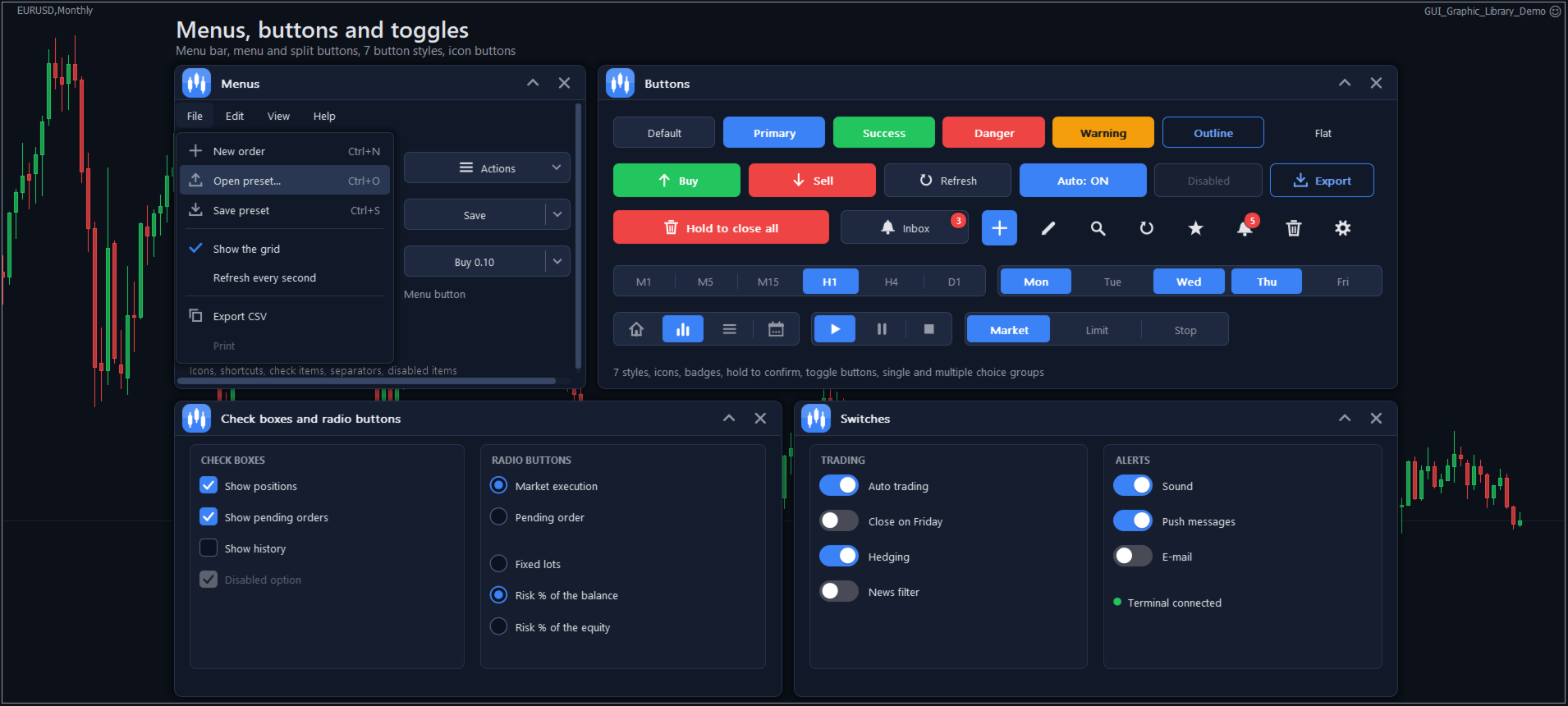
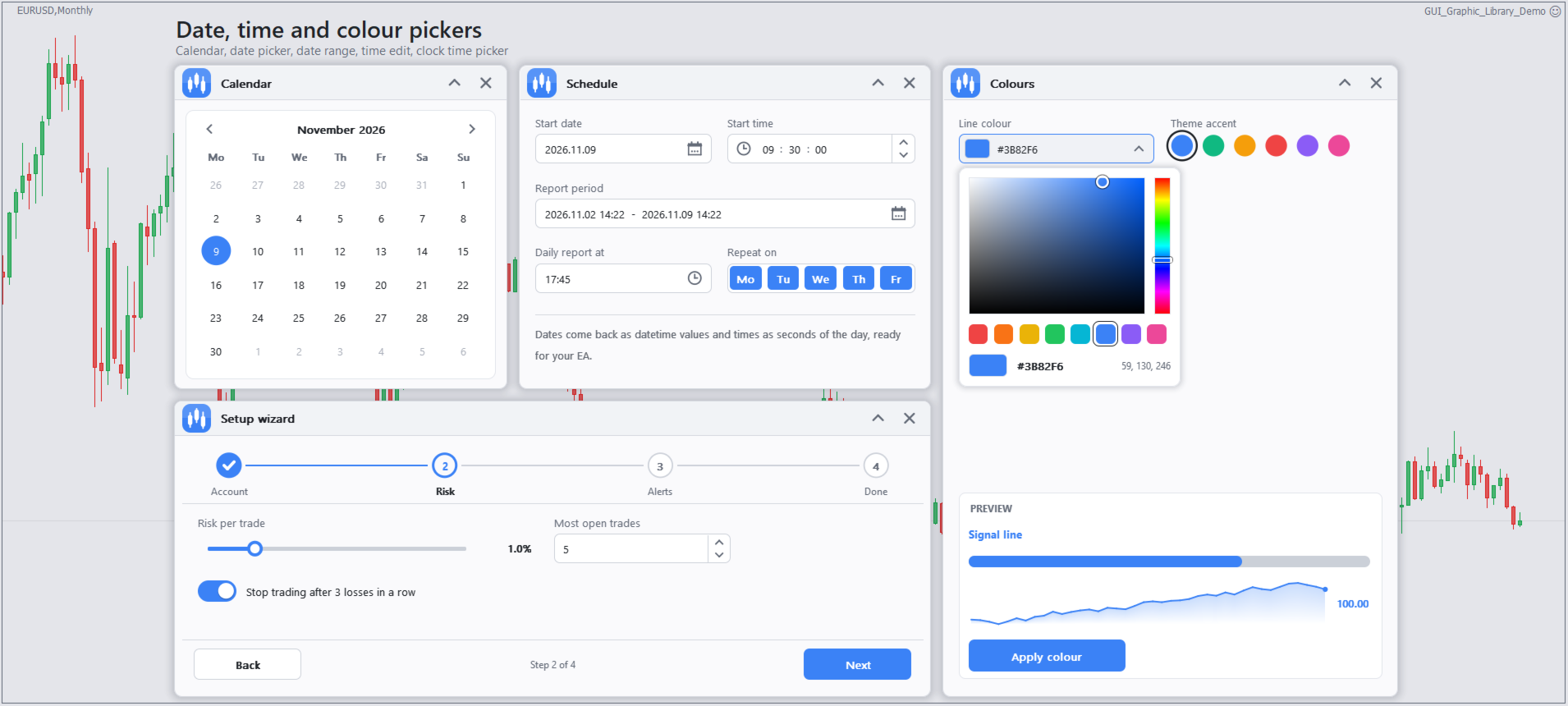
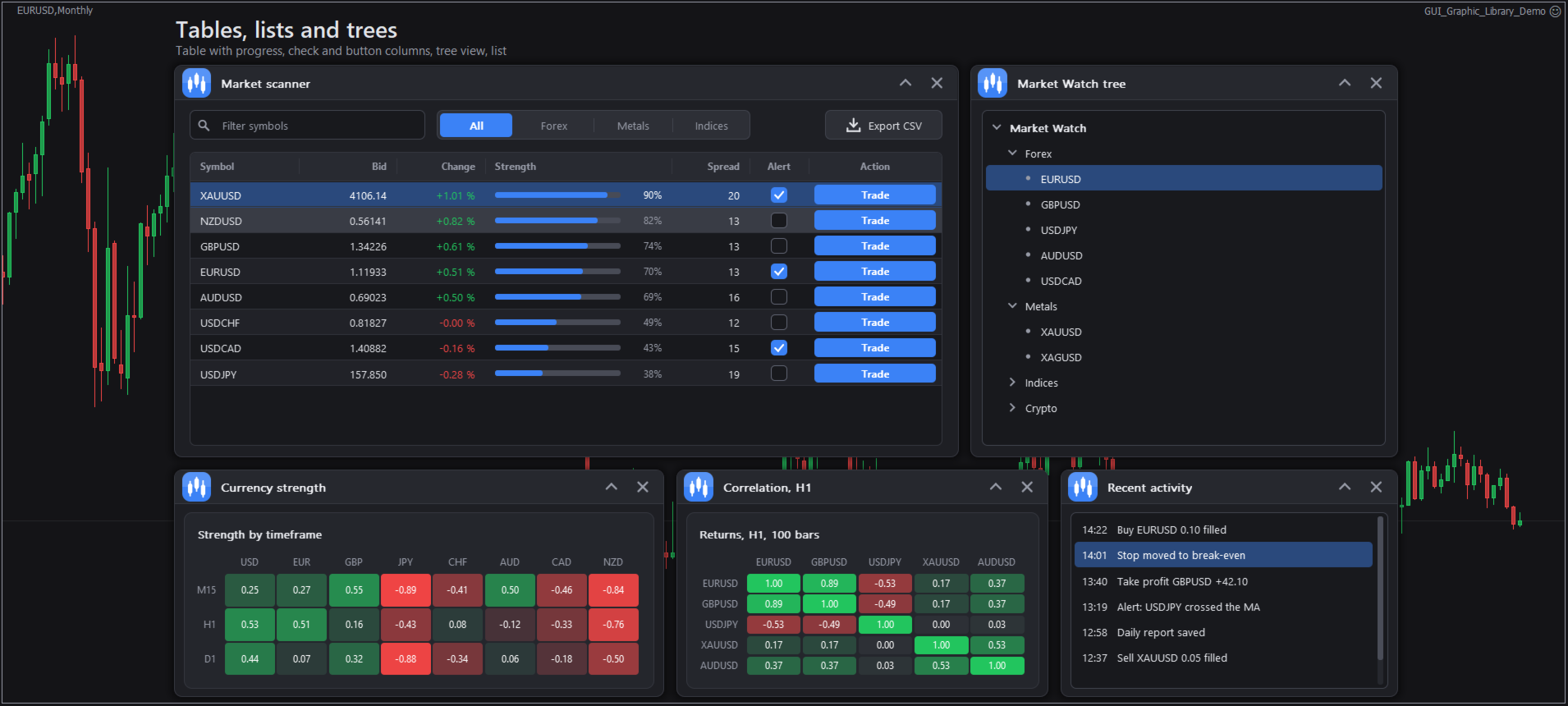
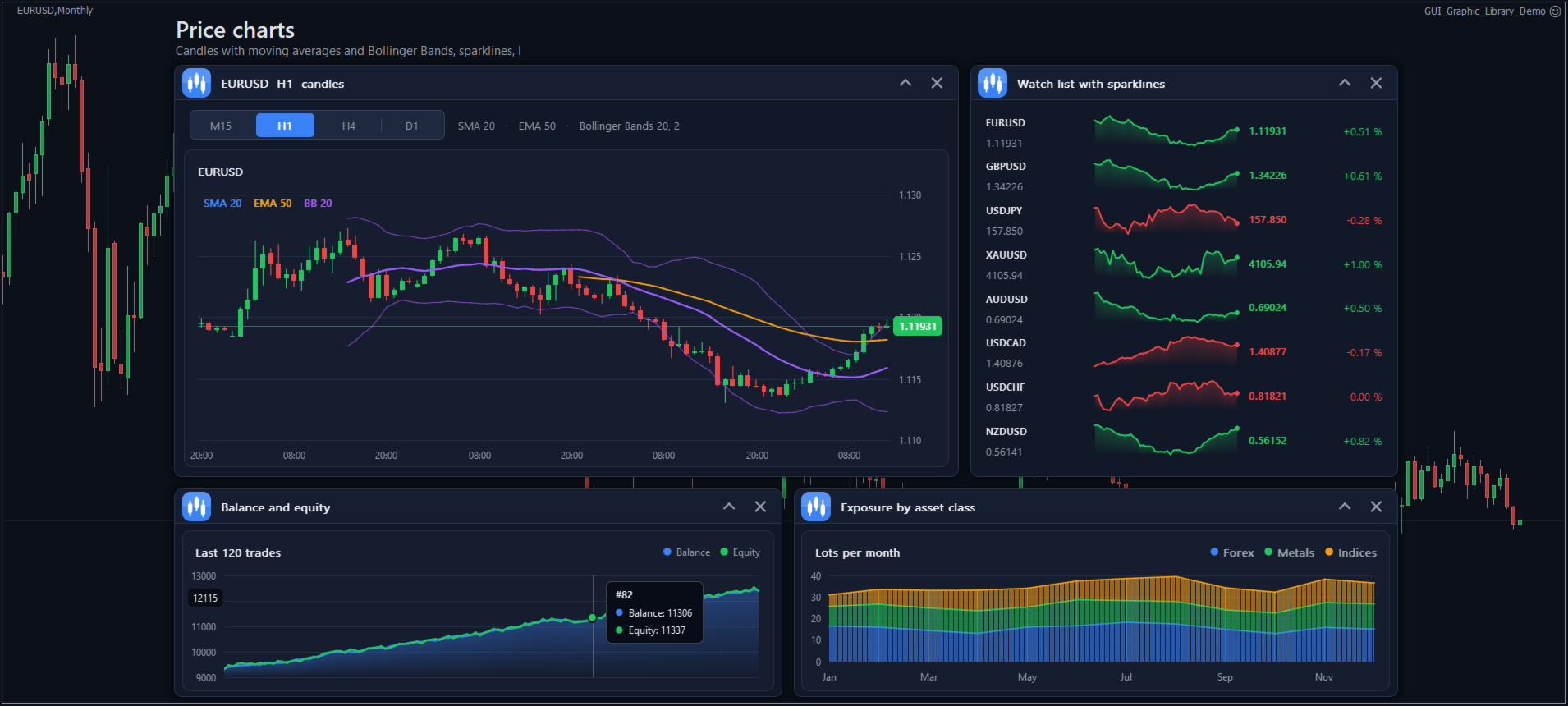
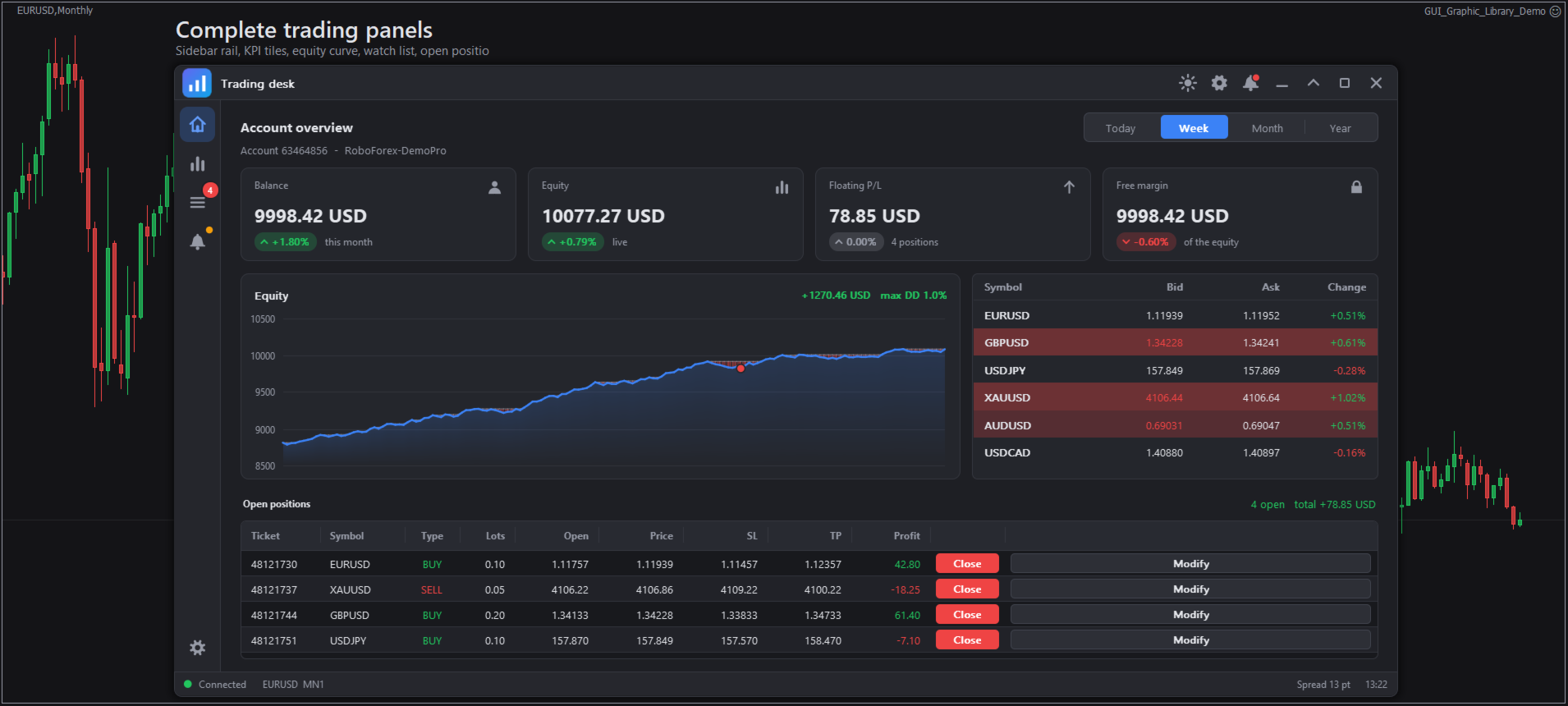
GUI Graphic Library 是一个面向 MQL5 开发者的已编译库,可为您的智能交易系统(EA)和指标创建窗口、面板、控件和图表。整个界面绘制在一个图表对象上,由 15 个函数驱动,因此只需几行代码即可为您的程序添加专业的面板。

这是一个面向程序员的库。它不是智能交易系统,也不会进行交易。Buy 或 Close 之类的按钮只会向您的程序发送一个事件,由您的程序决定接下来做什么。使用它需要编写或修改 MQL5 代码。

可以构建什么

该库包含 78 个现成元素,因此大多数面板根本不需要绘图代码:

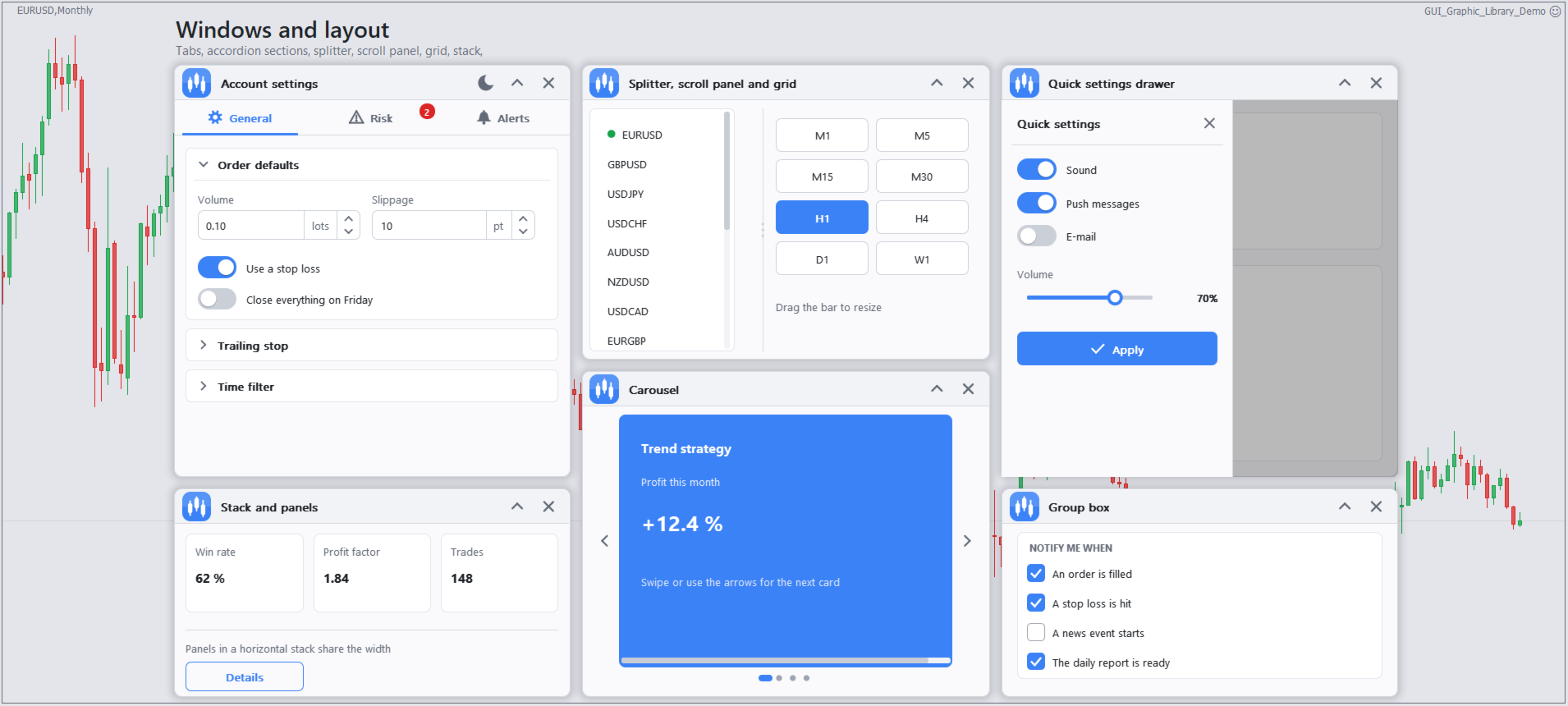
  • 窗口、面板、分组框、选项卡、侧边导航栏、轮播、菜单、抽屉、堆叠布局、网格和分隔条
  • 按钮、拆分按钮、开关、复选框、单选按钮、文本和价格输入框、滑块、列表、树、表格和搜索框
  • 日期、时间、颜色和范围选择器、日历、标签、PIN 输入框和分步向导
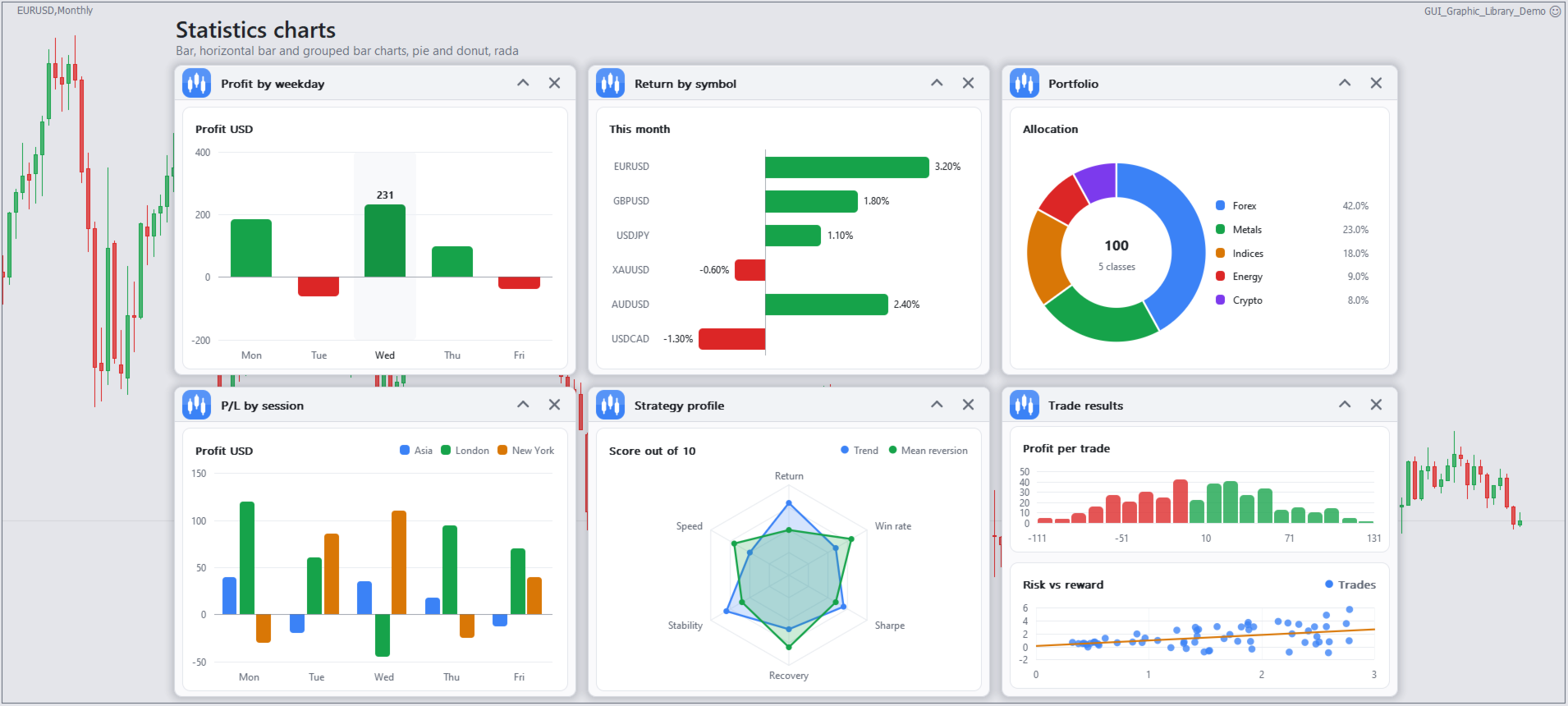
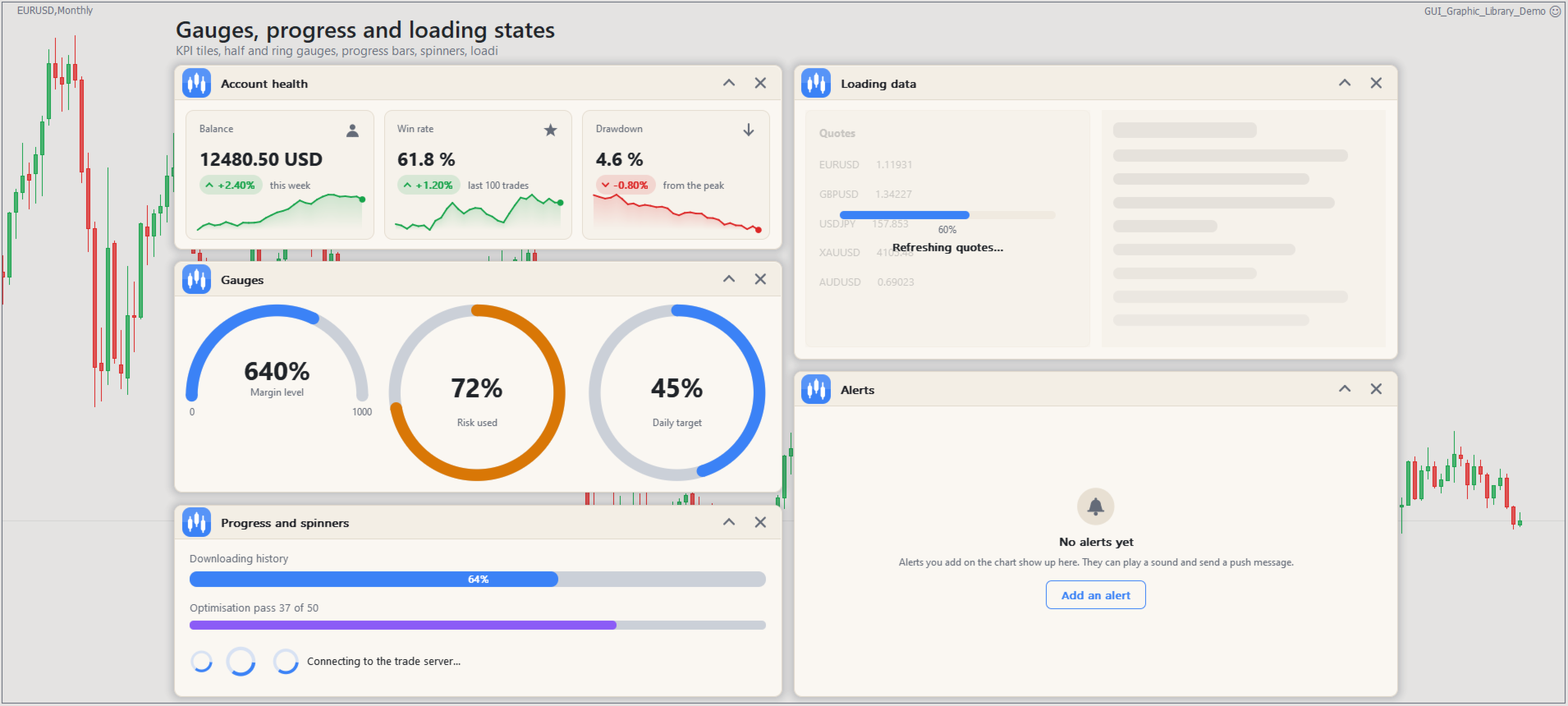
  • 折线图、柱状图、K 线图、饼图、雷达图、散点图和面积图,仪表盘、KPI 卡片、迷你走势图、热力图和相关性矩阵
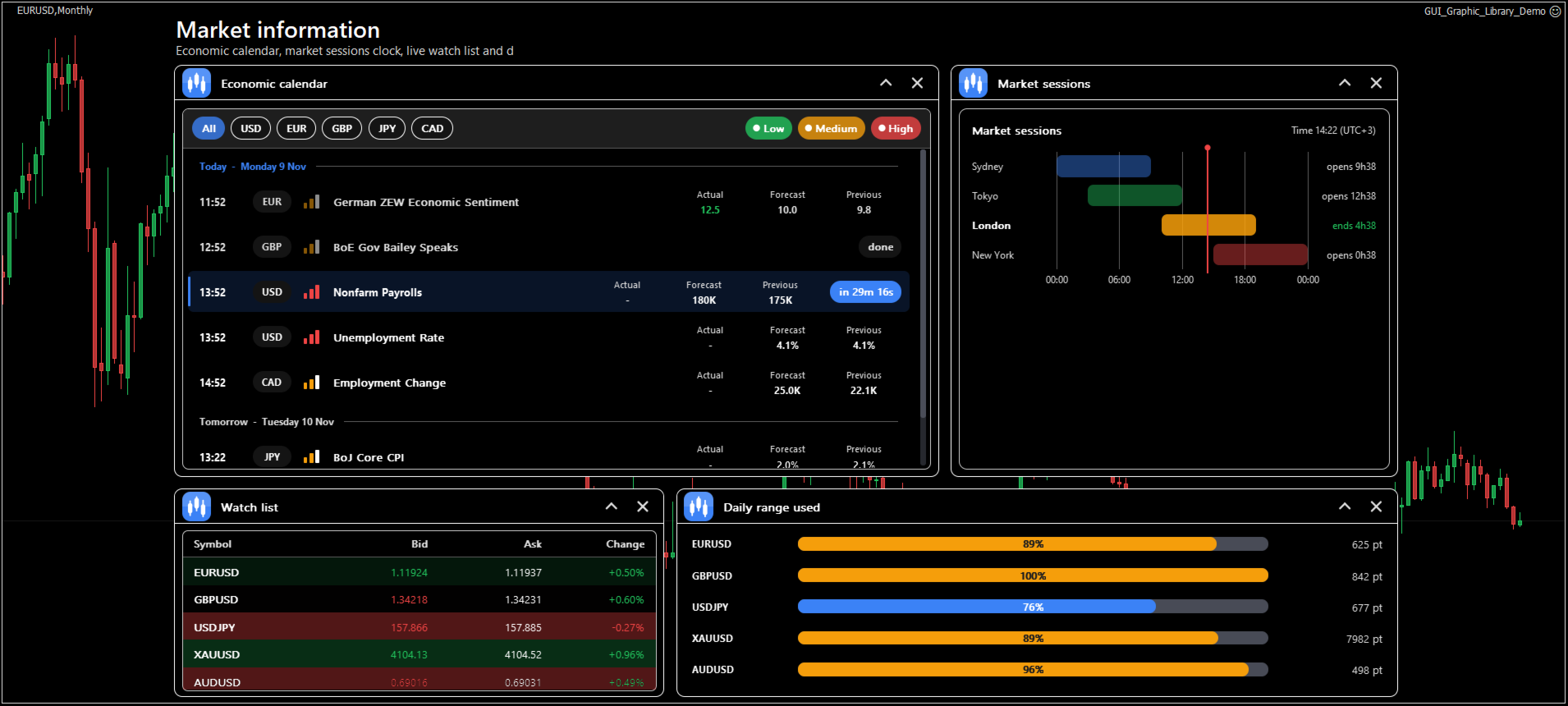
  • 交易组件:下单面板、持仓列表、报价列表、风险计算器、经济新闻列表、交易时段时钟、K 线倒计时、价格标签和市场深度阶梯
  • 对话框、带操作按钮的提示消息、工具提示、状态栏和空状态提示

工作原理

所有内容都绘制在一个位图对象上,因此图表保持整洁、快速,复杂的面板也不会在对象列表中增加数百个对象。用 Gui_Add 创建元素,用 Gui_Set 修改,用 Gui_Get 读取,并用 Gui_NextEvent 从事件队列中读取用户的点击和更改。每个元素都有一个简单的整数 ID,所有名称都是在包含文件中带有说明的枚举,因此 MetaEditor 会在您输入时给出提示。

外观只需为整个界面设置一次。共有五种主题(Dark、Light、Midnight、High contrast 和 Soft),可自定义强调色和悬停色、圆角半径、阴影和动画。屏幕缩放跟随 Windows 显示设置或您选择的数值,因此面板在高分辨率屏幕上依然清晰。

窗口可以移动、停靠到边缘、折叠、最小化和调整大小。每个窗口都可以有设置视图和通知视图。位置、大小和数值可以按图表保存,并在程序下次启动时恢复。其他功能包括热键、撤销和重做、带错误提示的输入检查、多语言翻译以及从右到左的布局。

要求

  • MetaTrader 5,任意交易品种和时间周期,可用于智能交易系统和指标
  • 不调用 DLL,不使用 WebRequest,无需外部下载
  • 包含文件 GUI_Graphic_Library.mqh,其中包含枚举和 15 个函数的导入

包含文件、完整的 API 参考、安装指南和示例程序都在产品博客页面。

欢迎提出您的意见。如有问题或改进建议,请在产品评论中留言,或在 MQL5.com 上给我发消息。

标签:#GUI #Panel #Dashboard #TradePanel #TradingPanel #ControlPanel #DrawingTools #Library #Canvas #UserInterface #Controls #Buttons #Charts #Widgets #ExpertAdvisor #Indicator #MQL5 #MT5 #MT4
推荐产品
OrderBook History Library
Stanislav Korotky
3 (2)
Order Book, known also as Market Book, market depth, Level 2, - is a dynamically updated table with current volumes of orders to buy and to sell specific financial instument at price levels near Bid and Ask. MetaTrader 5 provides the means for receiving market book from your broker, but in real time only, without access to its history. The library OrderBook History Library reads market book state in the past from archive files, created by OrderBook Recorder . The library can be embedded into you
```text IndexRaider Library 将 IndexRaider 核心引擎以可调用函数的形式提供:包括流动性扫单(SFP)检测、H4 趋势方向判断、Fair Value Gap 确认,以及整个 IndexRaider 产品系列所使用的基于风险的仓位计算功能。 您可以基于相同的规则构建自己的 Expert Advisor、指标或交易面板——Library 负责分析,您的程序负责做出交易决策。 它提供的函数 - IXR_Drive(symbol) — 基于 H1 数据推进每个交易品种的状态机;可在每个 tick 或定时器中调用。每根完整收盘的 H1 K 线只执行一次,并返回当前阶段:   0 = 空闲   1 = 已检测到流动性扫单 / 等待确认   2 = 交易 setup 已激活 - IXR_Setup(symbol, direction, entry, sl, tp) — 当阶段为 2 时返回已激活 setup 的价格水平:   入场位于 gap 边缘,   止损位于 sweep 影线之外,   目标位于被扫荡区间的另一端 - IXR_Bias(symb
This indicator presents an alternative approach to identify Market Structure. The logic used is derived from learning material created by   DaveTeaches (on X) Upgrade v1.10: + add option to put protected high/low value to buffer (figure 11, 12) + add  Retracements  value to buffer when Show Retracements When quantifying Market Structure, it is common to use fractal highs and lows to identify "significant" swing pivots. When price closes through these pivots, we may identify a Market Structure S
MT4/5通用交易库(  一份代码通用4和5 ) #ifdef __MQL5__      #define KOD_TICKET ulong      #define KOD_MAGIC   long #else        #define KOD_TICKET long      #define KOD_MAGIC   int #endif class ODLIST; #import "K Trade Lib Pro 5.ex5"       //祝有个美好开始,运行首行加入    void StartGood() ;    //简单开单    long OrderOpen( int type, double volume, int magic, string symbol= "" , string comment= "" , double opprice= 0 , double sl= 0 , double tp= 0 , int expiration= 0 , bool slsetmode= false , bool tpsetmode= false );    //复杂开单
CyberTradeTHxAI Gold Sniper MT5 Professional Gold Trading Signal Indicator for MetaTrader 5 CyberTradeTHxAI Gold Sniper MT5 is a professional-grade Gold (XAUUSD) trading indicator developed to identify high-probability Buy and Sell opportunities using trend analysis, pullback confirmation, and intelligent market structure detection. Designed for both beginner and advanced traders, the indicator automatically calculates optimal Entry Zones, Stop Loss, and multiple Take Profit levels while provid
RSI Currency Strength Meter is a powerful and elegant multi-currency indicator that measures the real-time relative strength of the 8 major currencies using RSI logic. By calculating the smoothed performance of each currency across its major pairs and applying the RSI formula, it delivers clean and responsive strength lines that make it easy to spot which currencies are truly strong or weak at any moment. This indicator is particularly useful for visualizing currency correlations and divergence
Scan a fixed list of assets (Ibovespa) in the chosen timeframe (TimeFrame). For each pair and for various periods. Calculate a regression model between the two assets (and, if desired, using the bova11 index as a normalizer). Generate the spread of this relationship, its mean, standard deviation, speculative deviation, and betas (B1 and B2). Apply an ADF test without exclusion (cointegration/stationarity). Calculate the Z-score of the current exclusion (how many standard deviations are away from
FREE
Native Websocket
Racheal Samson
5 (6)
An   easy to use, fast,  asynchronous   WebSocket library  for MQL5. It supports: ws://   and   wss://  (Secure "TLS" WebSocket) text   and   binary   data It handles: fragmented message  automatically (large data transfer) ping-pong   frames  automatically (keep-alive handshake) Benefits: No DLL required. No OpenSSL installation required. Up to 128 Web Socket Connections from a single program. Various Log Levels for error tracing Can be synchronized to MQL5 Virtual Hosting . Completely native t
Gold Obsidian Crown 是一款 MetaTrader 5 专家顾问,用于监控多个高时间周期的 XAUUSD 结构。它在确认的水平附近挂出止损订单(stop order),带有预设的出场条件,并在各个活跃结构之间分配风险。 逻辑 读取高时间周期上的结构,并在确认的水平附近挂出止损订单。未成交的订单会过期。 多个相互独立的结构并行运行,每个结构有各自的几何形态和各自的风险预算份额。 出场条件是预设的。 RiskBudgetPercent 输入项用于设定总风险预算。 不使用马丁格尔、网格或摊平亏损,也不会为了挽回亏损而加大手数。每一笔成交的持仓在券商端都有止损。 输入参数 风险预算(RiskBudgetPercent) 固定手数 最大手数 Magic number 订单注释 最大点差 每一行表格都有对应的 preset 文件。 历史回测 MetaTrader 5 Strategy Tester 在 XAUUSD 上的回测,使用真实 tick 数据,2019 年至 2026 年 5 月 1 日,杠杆 1:500,初始入金 5,000 美元。在 Standard 设置下,年化收益
Passband Filter Pro Passband Filter Pro is a trend and cycle oscillator for MetaTrader 5. It is built on the Ehlers Super Passband Filter, a band pass filter that removes long term trend drift and short term noise so that only the dominant market cycle remains. The result is a clean oscillator with a color cloud that shows overbought and oversold conditions, cycle turns, and momentum on forex, gold, indices, stocks and crypto. Most traders enter too early or too late. Simple moving averages la
Noize Absorption Index
Ekaterina Saltykova
Noize Absorption Index - is the manual trading system that measures the difference of pressure between bears forces and bulls forces. Green line - is a noize free index that showing curent situation. Zero value of index shows totally choppy/flat market.Values above zero level shows how powerfull bullish wave is and values below zero measures bearish forces.Up arrow appears on bearish market when it's ready to reverse, dn arrow appears on weak bullish market, as a result of reverse expectation.
重要通知 – 需要许可证和激活 ============================ 激活说明: 完成购买后,请立即联系我们以获取您的许可证密钥、密码或激活信息。没有这些信息,软件将无法运行。我们将确保为您提供顺畅的激活过程,并解答您的任何问题。 --- Volume Delta Profile V2 Enhanced ================================ 专业成交量与Delta分析工具 ------------------------- 概述 ---- **Volume Delta Profile** 是一款专业级分析工具,结合了传统的成交量分布分析与先进的Delta和失衡检测功能。这款综合性指标为交易者提供了市场动态的精细视图,通过实时图形化展示拍卖数据,捕捉价格随时间波动的连续起伏。 --- 核心功能 -------- 5种显示模式 -------------- - **VOL** — 总成交量直方图:显示整体成交量分布 - **BS** — 买卖拆分:可视化每个价格水平的买卖压力 - **ΔH** — Delt
Introducing "TG Trade Service Manager" — your all-in-one solution for seamless trade management in both MQL4 and MQL5 environments. With a focus on speed, reliability, and convenience, this powerful library simplifies the complexities of trade execution and management, empowering developers with a single interface for enhanced efficiency. Metatrader4 Version   |   All Products   |   Contact   Key Features: Unified Interface : TG Trade Service Manager" provides a unified interface for   MQL4   an
Before installing the HeatMap indicator make sure you are using a broker that gives you access to the Depth of market (DOM) !! This indicator creates a heatmap on your chart allowing you to see the buy or sell limit orders easily and in real time. You have the possibility to change the setting and the colors of the HeatMap in order to adapt to all markets and all charts. Here is an example of a setting you can use with the NASDAQ100 on the AMPGlobal broker :  https://www.youtube.com/watch?v=x0Y
RRtoolBox
David Ruiz Moreno
RRtoolbox - Professional Tools: Risk:Reward Trading Tool (SL/TP Horizontals + Pending orders + Diagonals), Alerts set on trend lines (for alerts on diagonal levels), SelfManagement (BE, partials...), close/cancelling by time, Statistics, Info and trading on chart. One-Click Trading with Visual Risk:Reward Management RRtoolbox is a comprehensive trading panel that combines one-click order execution,  statistics and  powerful visual Risk:Reward tools, alerts set with trendlines, on chart butt
近段时间买家运行良好,但同时也有朋友担心: 1、EA测试回测数据的真实性; 2、回测效果好不代表实测效果好,而免费演示版的可测试时间太短,无法判断EA的实用性。 针对以上问题,现推出一个完美的解决方案,直接给到限定时间的测试版本,需要的可以私信留言,或者聊天窗口找我,看到后会发送测试版本过来。 此外,为了方便部分已购买源代码的客户熟悉了解代码,进一步优化和提升空间,并且让更多的有意向的客户了解这个EA的编辑逻辑,特将代码拆解,不定期的讲解基本思路,跟着走即便是小白也可以快速上手,以便后续购买源代码后快速上手优化! 知乎专栏: Day01:初始MQL5量化系统 - quanter的文章 - 知乎 https://zhuanlan.zhihu.com/p/1969031679428530490 Wordpress个人网站: https://quanter001.wordpress.com/ 如有任何问题,欢迎邮件沟通:quanter001@163.com ****************************************************************
Trading Utility for Forex Currency Pairs Only not for Gold  Functions Auto Lot Calculation based on Risk Auto stoploss  Auto TakeProfit Breakeven Auto Close Half % Close in percentage with respect to the PIPs Pending Orders BuyLimit Sell Limit with distances BuyStop Sell Stop    with distances Trading Informations Risk in percentage For Multiple trades Combine Takeprofit and Combine Stoplosses
GoldOil
Babak Alamdar
LAUNCH PROMO: ONLY A FEW COPIES LEFT! OPEN BLACK BOX: ONE EA, MANY STRATEGIES — CREATE NEW SETS, CONTRIBUTE YOUR IDEAS, AND POTENTIALLY TURN THEM INTO COMMERCIAL EAs UNDER AGREEMENT. Gold Is The Target. Oil Is The Driver. GoldOil Watches What Drives Gold. VERY LIMITED COPIES AT CURRENT PRICE Final Price: $2499 Exclusive:   After purchase, send me a direct message to receive VIP set files, setup instructions, and access to the private GoldOil Telegram group. PROP FIRM READY! Buy not just a back
1. 这是什么 MT5系统自带的优化结果非常少,有时候我们需要研究更多的结果,这个库可以让你在回测优化时可以输出更多的结果。也支持在单次回测时打印更多的策略结果。 2. 产品特色 优化的输出的结果非常多。 可以自定义CustomMax。 输出结果在Common文件夹。 根据EA名称自动命名,且同一个EA多次回测会自动更新名称,不会覆盖上一次的结果。 函数非常简单,你一眼就可以看懂。 #import "More BackTest Results.ex5" // Libraries Folder, Download from the market. //---Set CustomMax void iSetCustomMax( string mode); //---Display multiple strategy results when backtesting alone (not opt). void iOnDeinit(); //--- void iOnTesterInit(); double iOnTester(); void iOnTesterPass( string lang
First and foremost, the Insight Flow Indicator stands out as a Non-Repainting, Non-Redrawing, and Non-Lagging tool. This makes it a prime choice for both manual and algorithmic trading, ensuring reliable and consistent signals. User Manual: Settings, Inputs, and Strategy The Insight Flow Indicator leverages price action, strength, and momentum to provide a clear edge in the market. Equipped with advanced filters, it eliminates noise and false signals, enhancing trading potential. By using multip
GoldPro Max
Taher Ahmed Mohamed Taha Elshafei
GOLDPRO MAX Advanced Multi-Timeframe and Smart Money Market Analysis for MetaTrader 5 GoldPro Max is a professional market analysis indicator for MetaTrader 5 designed to help traders study market direction, price structure, liquidity, market imbalance and potential trading areas from multiple perspectives. The indicator combines Multi-Timeframe Analysis, Smart Money Concepts, Market Structure, Liquidity Analysis, Order Blocks, Fair Value Gaps, Premium and Discount analysis, Smart Analytical Eng
Delta Profile Volume
Teresinha Moraes Correia
指标技术说明 – Delta Profile for MetaTrader 5 Delta Profile 是为 MetaTrader 5 开发的一款指标,用于在指定的 K 线区间内对成交量流进行详细分析。它能够在不同的价格水平上对正向成交量(与上涨相关)和负向成交量(与下跌相关)的不平衡进行结构化和可视化展示。最终,用户可以清晰地识别图表中成交最为集中的区域,以及真实的市场不平衡形成的位置。 以下是该指标的主要技术特征与参数说明。 核心概念 指标会识别 价格水平 ,并将其分类为正向成交量、负向成交量,以及净 Delta(正负成交量的差值)。 每个价格水平会在图表中以 水平条形 显示,帮助用户直观观察市场活跃区和不平衡区域。 用户可自由控制 分析的 K 线数量 、 价格精度(小数位数) 、 显示的最大水平数量 以及 可视化样式 。 主要功能 价格水平映射 :根据设定的精度对价格进行四舍五入,并累计对应 K 线的成交量。 净 Delta 计算 :显示正负成交量的差值,提供每个价格区间的客观数值。 最强 Delta 水平突出显示 :自动识别 Delta 绝对值最大的价格水平,并用特殊颜色标
Free Access for the First 10 Downloads! I'm giving away this panel completely free to the first 10 traders who download it. After that, a price will be added. If you're one of the lucky first 10, please leave an honest review and any questions you have – your feedback means the world to me. Thank you in advance! Overview Peril Trader is a trading panel designed to assist with the execution of a dual pending order breakout strategy. The panel places a Buy Stop order above the current market
FREE
Trade Copier Local MT5 is a fast local trade copier for copying trades between multiple MT4 and MT5 accounts. One EA works in both Master and Slave modes. Simply select the required Copier Mode and use the same product on your MetaTrader terminals. Copy trades between: • MT5 → MT5 • MT5 → MT4 • MT4 → MT5 • MT4 → MT4 Perfect for: • Trading multiple accounts at once • Linking multiple trading accounts • Personal account mirroring • Signal providers • Account managers • Prop trading setups #



Alligator modified
Hennadii Stanilevych
5 (6)
Alligator Modified is a modification of the classic Alligator indicator designed to help traders visually identify market direction and coordinated line expansion. In addition to displaying the Jaw, Teeth, and Lips, the indicator marks situations when the lines cross and become correctly aligned. This helps distinguish directional Alligator expansion from periods when the lines are intertwined and do not indicate a consistent market direction. A Buy signal appears when the Lips and Teeth cross t
Key level wedge MT5
Presley Annais Tatenda Meck
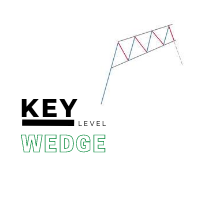
The   Key level wedge MT5   indicator automatically draws rising wedge pattern and falling wedge pattern for you on the chart. This pattern is really good when used as a confirmation entry at key support & resistance, supply & demand and reversal zones. Advantages  The   Key level wedge MT5   block DOES NOT RE-PAINT, giving you confidence when a signal appears and also helps when looking back.  The   Key level wedge MT5   includes an on/off button on the chart to easily keep the charts clean
WHAT IT DOES ICT-SMC Order Flow Risk & Order Management EA is a semi-automatic trade management panel for MetaTrader 5 that puts risk first. You decide how much money you are willing to risk per trade — the EA calculates the exact lot size from your stop-loss distance, places the order (market or pending), and then manages the position automatically: price-based or R-based partial closes, breakeven, R-based trailing stop, and an R-multiple take-profit. Built for ICT / SMC order-flow discretiona
Bastion is a monitor-and-close-only risk manager for prop-firm traders. It watches your account against your firm's daily-loss and maximum-drawdown limits in real time and force-closes your open positions BEFORE you cross a line. It never opens a trade of its own, so it stays fully within the tools allowed by FTMO, FundedNext, The5ers, FTUK and FXIFY. Why traders fail challenges A large share of failed evaluations end on a single daily-loss breach: a moment of inattention, a news spike, one tra
INTRODUCING MML Data Bridge The demand for bridging external data and machine learning with trading platforms is higher than ever. MetaTrader 5 is a powerful environment for trading and back testing, but without a data bridge, MT5 is largely isolated from using any external data. MML Bridge is a developer tool that allows users to bridge external data into MT5 for back testing, live trading, and optimization. It's built for ease of use, providing users with a simple function API that drip-feeds
FREE
Crash 1000 Scalping Indicator for the Crash 1000 Deriv Synthetic Index. Introduction The Crash 1000 Scalping Indicator is a specialized tool designed for the Crash 1000 index on the Deriv Synthetic market. This indicator is particularly useful for scalping on the M1 timeframe, helping traders to identify precise entry and exit points for buy positions. It is designed to be non-repainting, providing clear signals with audible alerts and push notifications, and is compatible with mobile devices th
该产品的买家也购买
The library is dedicated to help manage your trades, calculate lot, trailing, partial close and other functions. Lot Calculation Mode 0: Fixed Lot. Mode 1: Martingale Lot (1,3,5,8,13) you can use it in different way calculate when loss=1 ,when profit=0. Mode 2: Multiplier Lot (1,2,4,8,16) you can use it in different way calculate when loss=1 ,when profit=0. Mode 3: Plus Lot (1,2,3,4,5) you can use it in different way calculate when loss=1 ,when profit=0. Mode 4: SL/Risk Lot calculate based on s
BitMEX Trading API
Romeu Bertho
5 (1)
Cryptocurrency analysis has never been easier with Crypto Charts for MetaTrader 5. Now, trading on BitMEX has never been easier with BitMEX Trading API for MetaTrader 5. BitMEX Trading API library was built to be as easy to use as possible. Just include the library into your Expert Advisor or Script, call the corresponding methods and start trading! Features Trade on BitMEX and BitMEX Testnet. Build and automate your strategies. Concern more with the trading strategy logic and less with the co
Goliath Mt5
Nicolokondwani Biscaldi
Goliath MT5 - scalper fully automated Expert Advisor for medium-volatile forex markets P roperties: The Library trades 10 currency pairs (USDCHF, EURCHF, EURGBP, AUDUSD, USDCAD, GBPUSD, EURUSD, NZDUSD, CADCHF, EURAUD, EURCAD, AUDJPY) The Library does not use martingale The Library sets a fixed stop loss and take profit for all orders The Library only trades a user input volume The Library can be installed on any currency pair and any timeframe Recommendations: Before using on a real account, t
Binance Library
Hadil Mutaqin SE
5 (1)
The library is used to develop automatic trading on Binance Spot Market from MT5 platform. Support all order types: Limit, Market, StopLimit and StopMarket Support Testnet mode Automatically display the chart on the screen Usage: 1. Open MQL5 demo account 2. Download Header   file and EA sample   https://drive.google.com/uc?export=download&id=1kjUX7Hyy02EiwTLgVi8qdaCNvNzazjln Copy Binance.mqh to folder \MQL5\Include Copy  BinanceEA-Sample.mq5 to folder \MQL5\Experts 3. Allow WebRequest from MT5
The library is used to develop automatic trading on Binance Futures Market from MT5 platform. Support Binance Futures USD-M and COIN-M Support Testnet mode Support all order types: Limit, Market, StopLimit, StopMarket, StopLoss and TakeProfit Automatically display the chart on the screen Usage: 1. Open MQL5 demo account 2. Download Header file and EA sample https://drive.google.com/uc?export=download&id=17fWrZFeMZoSvH9-2iv4WDJhcyxG2eW17 Copy BinanceFutures.mqh to folder \MQL5\Include Copy  Bina
EA Toolkit
Esteban Thevenon
EA Toolkit   is a library that allows any developer to quickly and easily program Advisor experts. It includes many functions and enumerations such as trailing stop, lot, stop loss management, market trading authorisations, price table updates, trading conditions and many more. Installation + Documentation : You will find all the information to install this library and the documentation of its functions on this GitHub : https://github.com/Venon282/Expert-Advisor-Toolkit WARNING : The installat
Hello everyone! I am a professional MQL programmer , Making EAs, Indicators and Trading Tools for my clients all over the world. I build 3-7 programs every week but I seldomly sell any ready-made Robots. Because I am fastidious and good strategy is so few...  this EA is the only one so far I think its good enough to be published here.  As we all know, the Ichimoku indicator has become world popular for decades, but still, only few people knows the right way of using it, and if we check the clo
Applying these methods, I managed to arrive at a nuanced conclusion that is crucial to understanding the importance of unique strategies in contemporary trading. Although the neural network advisor showed impressive efficiency in the initial stages, it proved to be highly unstable in the long run. Various factors such as market fluctuations, trend changes, external events, etc. cause its operation to be chaotic and eventually lead to instability. With these experiences, I accepted the challenge
OpenAI Library MT5
VitalDefender Inc.
该库旨在提供一种尽可能简单的方法,直接在MetaTrader上使用OpenAI的API。 要深入了解库的潜力,请阅读以下文章: https://www.mql5.com/en/blogs/post/756098 The files needed to use the library can be found here: Manual 重要提示:要使用EA,需要添加以下URL以允许访问OpenAI API  如附图所示 要使用该库,需要包含以下Header,您可以在以下链接找到:  https://www.mql5.com/en/blogs/post/756108 #import "StormWaveOpenAI.ex5" COpenAI *iOpenAI(string); CMessages *iMessages(void); CTools *iTools(void); #import 这就是您需要的所有信息,以便轻松使用该库。 以下是如何轻松使用该库并与OpenAI的API交互的示例 #include <StormWaveOpenAI.mqh>       //--- 包含用于AP
Kaseki
Ben Mati Mulatya
The Hybrid Metaheuristic Algorithm (HMA) is a cutting-edge optimization approach that combines the strengths of genetic algorithms with the best features of population-based algorithms. Its high-speed computation ensures unparalleled accuracy and efficient search capabilities, significantly reducing the total time required for optimization while identifying optimal solutions in fewer iterations. HMA outperforms all known population optimization algorithms in both speed and accuracy. Use Cases AO
该产品已经开发了 3 年,它是 MQL5 编程语言中最先进的人工智能和机器学习代码库。它已被用于创建多个基于 AI 的交易机器人和指标,适用于 MetaTrader 5。 这是一个高级版,基于免费开源的 MQL5 机器学习项目,链接如下:  https://github.com/MegaJoctan/MALE5 。免费版本功能较少,文档较少,维护不足,仅适用于小型 AI 模型。 该高级版包含您编写 AI 交易机器人的所有必需工具。 为什么要购买此库? 非常易于使用,代码语法友好,类似于 Python 的流行 AI 库,如 Scikit-learn、TensorFlow 和 Keras。 文档齐全,提供丰富的视频、示例和文档,帮助您快速上手。 计算优化,性能优越,运行方式类似普通 EA。  无需额外依赖,无需 DLL 文件,所有内容可编译为单一 .EX5 文件,便于测试和分发。 全天候技术支持,我将提供帮助,确保您正确使用,并在问题出现时协助修复。  谁适合使用此库? 具有基本机器学习和 AI 知识的用户。 机器学习爱好者,特别是来自 Python ML 社区的开发者。 MQL5 中级
Shawrie
Kevin Kipkoech
This Pine Script implements a Gaussian Channel + Stochastic RSI Strategy for TradingView . It calculates a Gaussian Weighted Moving Average (GWMA) and its standard deviation to form an upper and lower channel. A Stochastic RSI is also computed to determine momentum. A long position is entered when the price closes above the upper Gaussian band and the Stoch RSI K-line crosses above D-line . The position is exited when the price falls back below the upper band. The script includes commission, cap
Bookeepr
Marvellous Peace Kiragu
Bookeepr is an advanced MQL5 trading bookkeeping software that automates trade logging, tracks real-time P&L, and integrates a ledger-style financial system for deposits, withdrawals, and expenses. It supports multi-currency assets , generates detailed performance reports , and provides risk management tools to help traders optimize their strategies. With secure cloud storage, exportable reports, and seamless MetaTrader 5 integration , Bookeepr ensures accurate, transparent, and hassle-free fina
Ai Prediction MT5
Mochamad Alwy Fauzi
A free indicator for those who purchase the full version This indicator is created by this Ai, with your desired settings Artificial Intelligence at your service Have a complete artificial intelligence and use it in your codes This artificial intelligence is trained to tell you on each candle whether the market is moving up or down. In general, artificial intelligence can be used in all markets, all timeframes and all symbols However, due to the increasing complexity and decreasing accuracy of
快速关仓,无需任何操作。 当前版本的一键关仓主要针对的是来不及手动关仓的情况,目前是不分交易标的类别,是对所有的持仓进行关仓。 未来可能升级的方向: 1、分类别、分标的关仓。 适用场景:开了多个标的的仓位,并且波动不一,快速频繁的波动影响了整体的判断。 2、增加只关闭盈利仓位、只关闭亏损仓位。 适用场景:持仓较多,趋势发生变化。 个人建议:一般建议选择一键全部关仓,因为如果行情与持仓方向一致,只关闭盈利仓位无形就是扩大了亏损。如果行情方向与持仓方向相反,只关闭亏损仓位,当前已盈利的后面又会变为亏损,盈利无法变现。 3、按照仓位顺序由大到小关仓、按照仓位顺序由小到大关仓。 适用 场景:行情发生波动,对于未来行情判断把握不确定的,可根据自己需求选择仓位关仓顺序,由大到小关仓的话,可以避免亏损的进一步扩大。 4、减小仓位量,保持绝对的安全距离。 适用 场景:对未来趋势相对确定,不想错过当前行情,但是认为当前持仓体量又有点大,想降低仓位。
【黄金智能交易EA|风控稳守,盈利突围】 专为黄金波动特性定制的智能交易EA,以硬核交易系统为核心,每笔下单均源自量化模型对行情趋势、支撑压力的精准研判,杜绝主观干扰,让交易决策更客观高效。 搭载多维风控体系,动态止损止盈+仓位智能调控双保险,严格锁定单笔风险阈值,即便面对黄金跳空、黑天鹅行情,也能有效规避大幅回撤,守护本金安全。 更具备浮盈加仓智能算法,趋势明朗时自动放大盈利头寸,让利润在顺势中滚动增长,既不浪费单边行情红利,又通过阶梯式加仓策略平衡风险与收益,实现“风控打底,盈利上不封顶”的交易闭环! 本款EA历经38次修改与测试,每一次升级都境加了EA的稳定盈利能力,才最终确定此为终极版本发布。 本款EA目前只针对现货黄金 交易的长期回测和实盘验证,按照下图设置实现长期的稳定 盈利。如果需要交易期它品种,请根据实际情况更改设置。 本EA为阶梯定价,每卖出10份价格增加10%
SniperkickEA
Mohamed Maguini
Questo Expert Advisor (EA) è stato progettato per offrire un'esperienza di trading automatizzata di alto livello, adatta sia ai trader principianti che a quelli esperti. Utilizzando algoritmi avanzati e tecniche di analisi del mercato, l'EA è in grado di identificare opportunità di trading redditizie con precisione e velocità. L'EA è configurabile per operare su vari strumenti finanziari, tra cui forex, indici e materie prime, garantendo una flessibilità senza pari. Le caratteristiche princip
LSTM Library
Thalles Nascimento De Carvalho
LSTM Library - MetaTrader 5的高级神经网络 专业算法交易神经网络库 LSTM Library为您的MQL5交易策略带来递归神经网络的强大功能。这个专业级实现包括LSTM、BiLSTM和GRU网络,具有通常只在专业机器学习框架中才能找到的高级功能。 "交易机器学习成功的秘诀在于正确的数据处理。 垃圾进,垃圾出 –您的预测质量永远不会超过您的训练数据质量。" — 马科斯·洛佩兹·德·普拉多博士, 金融机器学习进展 主要特点 完整实现LSTM、BiLSTM和GRU 递归Dropout实现更好的泛化 多种优化算法(Adam, AdamW, RAdam) 高级归一化技术 全面的指标评估系统 训练进度可视化 支持通过类权重处理不平衡数据 技术规格 纯MQL5实现 - 无外部依赖 为交易应用程序优化 全面的错误处理和验证 完全支持保存/加载训练模型 详尽的文档 集成说明 要将LSTM Library集成到您的Expert Advisor中,请按照以下步骤操作: 1. 完整库导入 #import "LSTM_Library.ex5"    // 库信息    void Get
本 EA 专为震荡 / 横盘行情设计。 在设定区间内自动补单交易 EA 仅在 预先设定的价格区间内运行 。 当订单平仓、成交、取消后(单数量少了),EA 会自动补充新的订单,以维持交易策略的持续运行。 您以通过 Max Orders 来控制最大订单数量。 示例: 最大订单数(Max Orders):8 当前持仓订单:2 单 挂单 Buy Limit:6 单 在这种情况下,EA 不会继续下新单。 只有当订单 平仓、成交 、 取消 后,EA 才会 自动补单 ,持续捕捉 震荡行情 中的利润。 注意: Buy Limit 订单 只会挂在当前市场价格的下方 。 产品参数说明 Trade Symbol : 交易品种  XAUUSD、USDJPY、BTCUSD 等等... 区间设置 Zone Low :区间下边界 Zone High :区间上边界 说明: 例如,您将黄金的交易区间设定为: Zone Low :4420 Zone High :4455 EA 只会在该价格区间内挂单并自动交易。 当价格突破区间范围时,EA 将停止交易。 当价格回到区间内,EA 会自动恢复交易。 订单设置
本 EA 专为震荡 / 横盘行情设计。 在设定区间内自动补单交易 EA 仅在 预先设定的价格区间内运行 。 当订单平仓、成交、取消后(单数量少了),EA 会自动补充新的订单,以维持交易策略的持续运行。 您可以通过 Max Orders 来控制最大订单数量。 示例: 最大订单数(Max Orders):8 当前持仓订单:2 单 挂单 Sell Limit:6 单 在这种情况下,EA 不会继续下新单。 只有当订单 平仓、成交 、 取消 后,EA 才会 自动补单 ,持续捕捉 震荡行情 中的利润。 注意: Sell Limit   订单 只会挂在当前市场价格的上方 。 产品参数说明 Trade Symbol : 交易品种  XAUUSD、USDJPY、BTCUSD 等等... 区间设置 Zone Low :区间下边界 Zone High :区间上边界 说明: 例如,您将BTCUSD的交易区间设定为: Zone Low : 92000 Zone High : 94500 EA 只会在该价格区间内挂单并自动交易。 当价格突破区间范围时,EA 将停止交易。 当价格回到区间内,EA 会自动恢复
A complete PostgreSQL client implemented in pure MQL5 over native MetaTrader 5 TCP sockets. The library implements the PostgreSQL client with MD5 and SCRAM-SHA-256 authentication, SSL/TLS, the Simple Query Protocol, and explicit transactions. No DLLs, no external dependencies, no third-party services. Features Direct TCP connection to any PostgreSQL-compatible database MD5 and SCRAM-SHA-256 authentication, auto-detected SSL/TLS via PostgreSQL's SSLRequest flow Full transaction support Typed res
Edkt
Pitiphum Noikhieo
ตัวชี้วัดการกลับตัวของราคาแบบมืออาชีพสำหรับ MetaTrader 5 PA Reversal Sniper เป็นตัวชี้วัดแบบกำหนดเองสำหรับ MT5 ที่ออกแบบมาโดยเฉพาะสำหรับ XAUUSD ในกรอบเวลา M5 โดยเน้นที่การเคลื่อนไหวของราคา โครงสร้างการกลับตัว การกวาดสภาพคล่อง การแตกหักของโครงสร้างตลาด สภาวะโมเมนตัม และการยืนยันความผันผวน ตัวชี้วัดนี้ให้สัญญาณซื้อและขายที่ชัดเจน พร้อมด้วยจุดเข้าซื้อ จุดหยุดขาดทุน และจุดทำกำไรหลายระดับ คุณสมบัติหลัก XAUUSD M5 ปรับแต่งแล้ว การตรวจจับการกลับตัวของราคา การตรวจจับแท่งเทียน Pin Bar ขาขึ้นและขาลง การตร
Auto trading so strong mt5 trading script so rich and running amazing auto trading trades with so high quality performance and results Look that is the best trading script that will help you to make good results like in screenshots i built that strategy depend on Envelopes indicator to make that script trading in that area excellent scalping trades and gain maximum good results per trade so i built that strategy manually then I make it auto trading  so to start use that script add to scripts aft
用于 MetaTrader 5 的 DhanHQ v2 API 桥接程序 将 MetaTrader 5 连接到您的 DhanHQ 交易账户,直接通过 MQL5 管理订单、 持仓、资金和投资组合。该库封装了官方 DhanHQ v2 REST API(支持 NSE、BSE、MCX), 让您能够在 Dhan 平台上构建自己的 EA(智能交易系统)、脚本和自动化策略。 功能特性 - 完整的订单生命周期管理:下单、修改、取消、拆单、查询订单簿、按 ID 查询订单、 按关联 ID 查询订单、查询成交记录及按订单查询成交明细。 - 订单辅助功能:市价单、限价单、止损单(Stop-Loss)和止损市价单(Stop-Loss-Market)。 - 超级订单(区间/Bracket 订单):下单、修改子单、取消子单、查询列表。 - 投资组合:持仓资产、持仓明细、转换持仓、平掉所有仓位。 - 资金管理:资金限额查询及保证金计算器。 - 交易控制:紧急停止(Kill Switch)功能。 - 身份验证:使用 access-token 标头(header)及 Dhan 客户 ID。 - 静态 IP 白名单(设
XAUUSD BREAKOUT EA — Stop Predicting the Market. Trade the Breakout. You do not need to sit in front of the chart all day waiting for gold to break support or resistance. This XAUUSD Breakout EA is designed to identify market consolidation, detect meaningful price expansion, and automatically execute trades when predefined breakout conditions are met. BACKTEST RESULTS — 99% QUALITY Initial Deposit: $1,000 Total Net Profit: +$21,115 Profit Factor: 2.37 Expected Payoff: $213 per trade Total Tr
Preppy
Ruben Ardenas Torres
MCR ADAUSD — Python local para MT5 mcr_adausd_python.py es un script independiente para Windows con el terminal MetaTrader 5 abierto y conectado . No usa credenciales ni conexiones MT5 en Replit. El modo predeterminado solo observa ; no llama a order_send . Reproduce la dirección R de 15 barras diarias cerradas y las presiones de volumen de ticks de M1/M5/M15/M30 del EA experimental de fases. No utiliza datos de volumen institucional. Advertencia: aún no hay backtest de ADAUSD ni ejecución demo
RiskGuard Toolkit Library
AL MOOSAWI ABDULLAH JAFFER BAQER
RiskGuard Toolkit Library for MQL5 developers - version 1.01 Questions before buying? Message me privately and I will show you how the functions fit into your own EA. Need an example for your use case? Ask by private message - integration help is included. Send a screenshot of your order and receive one of my free products as a thank-you. Stop rewriting the same risk code in every Expert Advisor Every serious EA needs the same boring but critical pieces: a lot size that matches the risk you inte
TradeShield Position Manager Library
AL MOOSAWI ABDULLAH JAFFER BAQER
Try it before you decide: attach the free demo EA in the Strategy Tester with visual mode on, open a few manual trades and watch the gold TradeShield panel read every basket figure the library returns, tick by tick. One compiled library that looks after the trades your Expert Advisor has already opened - so your own code can focus on when to enter, not on the dozens of small rules that decide whether a stop change or a close is accepted by the server. Why it is called TradeShield Opening a posit
ModernUI Library
Levi Dane Benjamin
适用于 MetaTrader 5 的 ModernUI 库 ModernUI 是一个用于 MetaTrader 5 的图表内用户界面库。它可以帮助 MQL5 开发者在 MT5 图表环境中构建更清晰的 EA 面板、仪表盘、设置窗口、表单、表格、对话框、抽屉式面板以及紧凑型交易风格界面。 它适合希望获得比零散图表对象更专业的界面层,同时仍然完全掌控自己 EA、指标或工具逻辑的开发者。 Modern UI - 用户指南   | EA 示例演示 你可以构建什么 ModernUI 并不局限于某一种面板类型。它为你提供了一个可复用的界面层,几乎可以用于任何你想在 MetaTrader 5 图表中构建的工具。 你可以用它创建简单的设置界面、紧凑型交易面板、完整仪表盘、数据视图、控制面板、账户工具、流程界面、监控界面、实用工具窗口、商业 EA 前端界面等等。 随附的演示展示了几个实用示例,但它们只是起点。如果你的 MQL5 项目需要按钮、输入框、表格、对话框、标签页、抽屉面板、图表、状态区域,或需要一种更清晰的方式在图表上展示信息,ModernUI 都可以为你提供构建模块。 主要功能 适用于 Me
This library will allow you to send your trades using your MT5 EA bot and its very easy to integrate on any EA which you can do yourself with the script code which is mentioned in documentation. This product allows trading operations via API For MEXC chart : Renting   Crypto Charting  for OHLC data or   Crypto Ticks with Order Book Depth  is optional - Supports MEXC API calls - Place Limit, SL Limit and Take Profit Limit Orders - Place Market, SL-Market, TP-Market orders - Modify Limit order - C
作者的更多信息
风险回报率管理器是一款可视化订单管理工具和头寸规模计算器,旨在支持严谨的交易和专业的风险管理。它允许交易者直接在图表上直观地设置入场、止损和止盈水平,并在下单前自动计算交易手数和风险回报率。该工具有助于标准化交易准备,并确保每个仓位都以预先设定且可控的风险水平开仓。 该工具适用于多种交易工具,包括货币对、指数、金属、大宗商品和加密货币。它既适合手动交易者,也适合注重策略、对每个仓位都应用风险管理规则的交易者。通过减少计算时间并避免手动错误,该工具可帮助交易者在执行过程中保持一致性和清晰度。 风险回报率经理   安装和输入指南 如果您想获取有关 EA 的通知,请添加 URL (       http://www.betasoft.dev   ) MT4/MT5 终端(见截图)。 MT4版本 https://www.mql5.com/en/market/product/110797 MT5版本 https://www.mql5.com/en/market/product/110798 主要特点 可视化交易规划:该工具在图表上显示入场点、止损点和止盈点。这种可视化方法可帮助交易者在执行前查看
Elliott Wave Counter 是一个面板,用于快速和用户友好地手动标记 Elliott 波浪。可以选择一种颜色和一个级别的标记。还有用于删除最后一个标记和工具制作的整个标记的功能。一键制作标记。点击五次 - 有五波!艾略特波浪计数器对于艾略特波浪的初学者和专业分析师来说都是一个很好的工具。 艾略特波浪计数器安装和输入指南 如果你想得到   关于 EA 添加 URL (   http://autofxhub.com   ) MT5 终端的 通知 (见截图)。 MT4版本 https://www.mql5.com/en/market/product/14016 MT5版本 https://www.mql5.com/en/market/product/15081 一般输入: 波形类型按钮: 此按钮允许用户选择他们想要在图表上突出显示的波形类型。可用的选项包括推动波、调整波和其他自定义波模式。 波级按钮: 这个按钮   允许用户选择他们想要在图表上突出显示的波形级别。可用的选项包括初级、中级和次级波级别。 波浪颜色: 这个   按钮   允许用户选择他们想要在图表上突出显示的波浪图
If you wish to draw Support and Resistance lines, view: daily market opening, classical pivot levels, Fibonacci pivot levels, trend lines, Fibonacci levels, the remaining time to candle closing, and current spread. If you seek to place your orders with the exact lot that meets your desired stop loss risk. If you wish to do all this and more with just one click, then this is the perfect tool to use. This tool will allow you to feel more relaxed when deciding to open orders, as well as predicting
一键式分析工具是   基于键盘快捷键的对象创建   和 MetaTrader 的复制工具。只需单击一下,即可轻松使用 MetaTrader 中的分析工具。使用我们的工具,您可以在图表上快速绘制支撑和阻力位、斐波那契位、形状、通道、趋势线和所有其他对象。只需单击按钮,移动鼠标,一键式分析工具将为您完成剩下的工作。这可以节省您的时间并使您的图表分析更有效率,让您可以专注于根据您的分析做出明智的交易决策。 除了对象创建之外,一键式分析工具还包括   对象复制器 (   c   hart sync)   ,允许您轻松地将对象从一个图表复制到另一个图表。如果您打开了多个图表并且需要在它们之间复制对象,这会特别有用。 一键式分析工具允许您   对所有符号使用一个图表   在元交易者中。这意味着您可以在同一窗口中查看不同的图表,而无需在多个图表之间切换。当您切换到不同的符号时,一键式分析工具会自动从其他符号中隐藏对象,并在您返回第一个符号时再次显示它们。这可以帮助您节省时间并提高交易效率,让您可以轻松地在同一窗口上比较和分析不同的图表。 一键分析   安装和输入指南 如果您想获得有关 EA 添加 U
Draw Agent 是一款适用于 MetaTrader 图表的绘图工具。它允许您像在黑板上一样在图表上手绘,并通过一个简单的面板管理所有绘图。它不进行交易,也不提供交易信号。 如果您喜欢手工绘制艾略特波浪图、在图表上画线或在图表上说明想法,那么这是一个很有用的工具;如果您正在为客户举办在线研讨会,或者向他人分发屏幕截图或图表文件,它也特别有用。 安装和输入指南 MT4 版本: https://www.mql5.com/en/market/product/14929 MT5 版本: https://www.mql5.com/en/market/product/14964 目的和用例 Draw Agent 是一款可视化分析和演示工具。您可以使用它来标记支撑位、阻力位和区域,手绘波浪计数和交易策略,在直播网络研讨会期间为学生或客户突出显示重点区域,并保存带注释的屏幕截图以便分享。您的绘图会与每个交易品种关联,因此您可以随时返回查看您的笔记。 主要特点 - 用钢笔或毛笔徒手绘画 - 直线(按住Shift键)、矩形、椭圆和箭头 调色板中的任何颜色 - 线宽可调,无固定限制 在蜡烛前面或后面作

部分平仓专家 是一款将多种功能整合到一个自动化系统中的工具。该 EA 提供多种风险管理选项,并最大化潜在收益,从而帮助交易者更有效地管理仓位。 使用部分平仓专家,交易者可以设置   部分关闭   锁定利润的水平,     追踪止损   保护利润和限制损失的水平,     收支平衡   水平,以确保即使价格朝着不利于交易的方向变动,交易也能实现盈亏平衡,以及其他一些功能。 使用这款一体化智能交易系统,交易者可以节省时间和精力,因为他们无需时刻监控交易。相反,EA 会根据市场情况执行预设指令,从而为交易者提供更大的灵活性和对交易的控制力。 附加部分关闭专家,     按下键盘上的“p”   ,更改设置,然后就可以开始了。 部分关闭专家   安装和输入指南 如果您想收到有关 EA 的通知,请添加 URL(   http://www.betasoft.dev   )MT4/MT5 终端(见截图)。 MT4版本 https://www.mql5.com/en/market/product/14965 MT5版本 https://www.mql5.com/en/market/product/15
Trade Copier Agent 旨在复制多个 MetaTrader(4/5) 账户/终端之间的交易。 使用此工具,您可以充当提供者(源)或接收者(目的地)。所有交易行为都将立即从提供者复制到接收者。 该工具允许您在同一台计算机上的多个 MetaTrader 终端之间复制交易,复制速度快如闪电,不到 0.5 秒。 贸易复印机代理安装和输入指南 请在开始复制之前或没有订单时在提供商帐户上应用设置! 有订单时的任何更改都会影响收款人帐户。 例如:如果提供者账户应用买单然后禁用接收者账户上的所有买单将被关闭。 如果您想获得有关 EA 添加 URL (   http://autofxhub.com   ) MT4 终端的通知(请参阅屏幕截图)。 MT5版本 https://www.mql5.com/en/market/product/77134 以下是亮点功能: 在 MT4 和 MT5 账户之间复制。 在一个工具内切换提供者或接收者。 每个账户既可以作为Provider又可以作为Receiver,因此账户之间可以通过2种传输方式相互复制。这就像一个贸易共享网络。 一个提供者可以将交易
The library is dedicated to help manage your trades, calculate lot, trailing, partial close and other functions Orders CloseallSell CloseallBuy CloseallOpen DeletePending DeleteAll: Close All Market Orders and delete all pending orders. CheckOpenBuyOrders: return the count of buy orders. CheckOpenSellOrders: return the count of sell orders. CheckOpenOrders: return the count of market orders. ModifyOrder DeleteOrder CloseOrder OpenOrder Lot Calculation Mode 0: Fixed Lot. Mode 1: Martingale Lot
Telegram Publisher Agent 是一个附加组件,允许交易者实时向他们的 Telegram 频道和群组发送信号。通过可定制的消息、图表截图和其他功能,该工具可以帮助交易者与他们的追随者分享他们的交易见解和策略。该工具还具有亮暗主题切换的精美设计,为用户提供美观和功能性的交易体验。 Telegram Publisher Agent 旨在将您的所有交易作为信号发布在您的频道和群组中。您所要做的就是提供交易,然后 Telegram 发布商代理将为您完成所有繁重的工作,只需单击一个按钮即可将交易信号发送到您的交易渠道或群组。 电报发布代理   安装和输入指南 如果您想获得有关 EA 添加 URL ( http://autofxhub.com ) MT4/MT5 终端的通知(见屏幕截图)。 MT4版本 https://www.mql5.com/en/market/product/18985 MT5版本 https://www.mql5.com/en/market/product/23946 主要特点: 信号发送 - 将信号发送到用户的 Telegram 频道和组,带有可自定义的
发现信号很好,但提供商的信号太小?您需要更大的持仓量,但终端设置太差?信号手数管理器将通过所需交易量的重复订单来增加提供商的头寸交易量。 只需设置手数大小和用于复制订单的信号名称即可。 Signal Lot Manager 是一个批量乘数实用程序,用于在您的终端上复制订单。来源可以选择任何顾问、手动交易、单独的交易信号。它具有广泛的功能、简单的设置以及高速度和可靠性。 Signal Lot Manager 安装和输入指南 如果您想获取有关 EA 的通知,请将我们的 URL 添加到 MT4/MT5 终端(参见屏幕截图)。 MT4版本     https://www.mql5.com/en/market/product/34864 MT5版本     https://www.mql5.com/en/market/product/41610 一般输入: 信号标题:信号的名称(您可以从信号顺序注释中复制它)。 最大限度。滑点:开仓交易可接受的最大滑点。因此,如果当前价格超过最高价格。与信号订单的入场价格相比的滑点距离,交易不会被复制。这对于防止复制交易出现不必要的滑点非常有用,特别是在高波动
二元交易面板是一款非常有用的工具,用于在 MT4/MT5 平台上进行二元期权交易。不再需要在 MT4/MT5 之外设置插件。这是 MT4/MT5 图表上简单方便的面板。 二元交易面板对于使用 MT4/MT5 平台交易二元期权的交易者来说是一个有用的工具。它是一个简单方便的面板,允许交易者直接从 MT4/MT5 图表进行二元期权交易,无需设置外部插件或浏览多个屏幕和菜单。 二元交易面板专为与提供 MT4/MT5 交易平台的二元期权经纪商合作而设计。 话虽这么说,如果您更喜欢二元期权交易的工作方式并希望继续与常规经纪商以这种方式进行交易,二元交易面板旨在为交易者提供与二元期权交易类似的体验,即使所使用的经纪商不是二元期权经纪人。 二元交易面板安装和输入指南 如果您想获取有关 EA 的通知,请将我们的 URL 添加到 MT4/MT5 终端(参见屏幕截图)。 MT4版本     https://www.mql5.com/en/market/product/48886 MT5版本     https://www.mql5.com/en/market/product/91749 主要特点: 面
News Panel MT4
Omar Alkassar
1 (1)
MetaTrader 新闻面板是一款在 MetaTrader 交易平台内显示经济日历数据的工具。该工具从外部来源(例如财经新闻网站或数据提供商)获取经济新闻和数据发布,并以易于阅读的格式显示它们。 该工具允许交易者按来源、时区、影响级别、货币和通知方式过滤新闻发布。它还包括一个刷新按钮,使用户能够手动更新数据并确保他们拥有最新的可用信息。 新闻面板安装和输入指南 您必须将数据源的 URL 添加到选项 -> Expert Advisors ->“允许对列出的 URL 进行 WebRequest”,以便让新闻面板从源加载新闻数据  (参见屏幕截图)。 MT4版本     https://www.mql5.com/en/market/product/77300 MT5版本     https://www.mql5.com/en/market/product/77301 主要特点: 新闻载有完整的详细信息(解释、效果、频率等)。 随时手动刷新数据。 过滤要显示的新闻类型(影响、货币等)。 在即将发布的新闻发布之前发出警报。 在即将发布的新闻发布之前向您的手机和/或电子邮件发送通知。 该工具的特
使用革命性的交易时间管理器轻松控制您的交易程序。这个强大的工具可以在指定时间自动执行订单,从而改变您的交易方式。 为不同的交易行为(从购买到设置订单)制定个性化任务列表,所有这些都无需人工干预。 交易时间管理器安装和输入指南 如果您想获取有关 EA 的通知,请将我们的 URL 添加到 MT4/MT5 终端(参见屏幕截图)。 MT4版本     https://www.mql5.com/en/market/product/103716 MT5版本     https://www.mql5.com/en/market/product/103715 告别人工监控,拥抱精简效率。直观的界面允许您设置精确的参数,包括交易品种、执行时间、价格、止损 (SL)、止盈 (TP) 点和手数大小。 该工具的灵活性通过与市场行为相匹配的适应性重复选项来凸显。通过视觉主题个性化您的体验,并减少长时间交易期间的眼睛疲劳。 摆脱手动交易程序,拥抱“交易时间管理器”的强大功能。提高交易的准确性、组织性和自由度。简化您的日常工作并重新体验交易。 主要特点: 自动订单执行:按指定时间间隔无缝自动执行订单,从而节省您的
一张图表,全面掌控。 无需再浪费时间分别管理每个图表上的对象、颜色和设置。有了   图表同步管理器 ,您可以   同步、复制和控制所有 MetaTrader 图表   立即使用一个面板和几个快捷方式。 一次绘制,随时随地更新。只需单击即可打开和关闭图表。使用   基于符号的对象管理 。并且不会错过重要细节   价差显示、倒计时器和蜡烛收盘警报。 节省时间,减少错误,更智能地交易。 图表同步管理器 安装和输入指南 如果您想收到有关 EA 的通知,请添加 URL(   http://www.betasoft.dev   )MT4/MT5 终端(见截图)。 MT4版本 https://www.mql5.com/en/market/product/148491 MT5版本 https://www.mql5.com/en/market/product/148492 主要特点: 克隆所有图表的图表属性(颜色、背景、网格、模板设置等)。 在图表之间立即同步所有绘图对象。 显示或隐藏对象信息(如价格水平或点)。 使用快捷方式删除、选择或复制图表对象。 轻松切换时间范围、打开/关闭图表和缩放图表
GUI Graphic Library 是一个面向 MQL5 开发者的已编译库,可为您的智能交易系统(EA)和指标创建窗口、面板、控件和图表。整个界面绘制在一个图表对象上,由 15 个函数驱动,因此只需几行代码即可为您的程序添加专业的面板。 这是一个面向程序员的库。它不是智能交易系统,也不会进行交易。Buy 或 Close 之类的按钮只会向您的程序发送一个事件,由您的程序决定接下来做什么。使用它需要编写或修改 MQL5 代码。 安装与输入参数指南 MT4 版本: https://www.mql5.com/en/market/product/206760 MT5 版本: https://www.mql5.com/en/market/product/206761 可以构建什么 该库包含 78 个现成元素,因此大多数面板根本不需要绘图代码: 窗口、面板、分组框、选项卡、侧边导航栏、轮播、菜单、抽屉、堆叠布局、网格和分隔条 按钮、拆分按钮、开关、复选框、单选按钮、文本和价格输入框、滑块、列表、树、表格和搜索框 日期、时间、颜色和范围选择器、日历、标签、PIN 输入框和分步向导 折线图、柱状图、
Draw Agent MT5
Omar Alkassar
5 (1)
Draw Agent 是一款适用于 MetaTrader 图表的绘图工具。它允许您像在黑板上一样在图表上手绘,并通过一个简单的面板管理所有绘图。它不进行交易,也不提供交易信号。 如果您喜欢手工绘制艾略特波浪图、在图表上画线或在图表上说明想法,那么这是一个很有用的工具;如果您正在为客户举办在线研讨会,或者向他人分发屏幕截图或图表文件,它也特别有用。 安装和输入指南 MT4 版本: https://www.mql5.com/en/market/product/14929 MT5 版本: https://www.mql5.com/en/market/product/14964 目的和用例 Draw Agent 是一款可视化分析和演示工具。您可以使用它来标记支撑位、阻力位和区域,手绘波浪计数和交易策略,在直播网络研讨会期间为学生或客户突出显示重点区域,并保存带注释的屏幕截图以便分享。您的绘图会与每个交易品种关联,因此您可以随时返回查看您的笔记。 主要特点 - 用钢笔或毛笔徒手绘画 - 直线(按住Shift键)、矩形、椭圆和箭头 调色板中的任何颜色 - 线宽可调,无固定限制 在蜡烛前面或后面作
一键式分析工具是   基于键盘快捷键的对象创建   和 MetaTrader 的复制工具。只需单击一下,即可轻松使用 MetaTrader 中的分析工具。使用我们的工具,您可以在图表上快速绘制支撑和阻力位、斐波那契位、形状、通道、趋势线和所有其他对象。只需单击按钮,移动鼠标,一键式分析工具将为您完成剩下的工作。这可以节省您的时间并使您的图表分析更有效率,让您可以专注于根据您的分析做出明智的交易决策。 除了对象创建之外,一键式分析工具还包括   对象复制器 (   c   hart sync)   ,允许您轻松地将对象从一个图表复制到另一个图表。如果您打开了多个图表并且需要在它们之间复制对象,这会特别有用。 一键式分析工具允许您   对所有符号使用一个图表   在元交易者中。这意味着您可以在同一窗口中查看不同的图表,而无需在多个图表之间切换。当您切换到不同的符号时,一键式分析工具会自动从其他符号中隐藏对象,并在您返回第一个符号时再次显示它们。这可以帮助您节省时间并提高交易效率,让您可以轻松地在同一窗口上比较和分析不同的图表。 一键分析   安装和输入指南 如果您想获得有关 EA 添加 U
Elliott Wave Counter 是一个面板,用于快速和用户友好地手动标记 Elliott 波浪。可以选择一种颜色和一个级别的标记。还有用于删除最后一个标记和工具制作的整个标记的功能。一键制作标记。点击五次 - 有五波!艾略特波浪计数器对于艾略特波浪的初学者和专业分析师来说都是一个很好的工具。 艾略特波浪计数器安装和输入指南 如果你想得到   关于 EA 添加 URL (   http://autofxhub.com   ) MT5 终端的 通知 (见截图)。 MT4版本 https://www.mql5.com/en/market/product/14016 MT5版本 https://www.mql5.com/en/market/product/15081 一般输入: 波形类型按钮: 此按钮允许用户选择他们想要在图表上突出显示的波形类型。可用的选项包括推动波、调整波和其他自定义波模式。 波级按钮: 这个按钮   允许用户选择他们想要在图表上突出显示的波形级别。可用的选项包括初级、中级和次级波级别。 波浪颜色: 这个   按钮   允许用户选择他们想要在图表上突出显示的波浪图
部分平仓专家 是一款将多种功能整合到一个自动化系统中的工具。该 EA 提供多种风险管理选项,并最大化潜在收益,从而帮助交易者更有效地管理仓位。 使用部分平仓专家,交易者可以设置   部分关闭   锁定利润的水平,     追踪止损   保护利润和限制损失的水平,     收支平衡   水平,以确保即使价格朝着不利于交易的方向变动,交易也能实现盈亏平衡,以及其他一些功能。 使用这款一体化智能交易系统,交易者可以节省时间和精力,因为他们无需时刻监控交易。相反,EA 会根据市场情况执行预设指令,从而为交易者提供更大的灵活性和对交易的控制力。 附加部分关闭专家,     按下键盘上的“p”   ,更改设置,然后就可以开始了。 部分关闭专家   安装和输入指南 如果您想收到有关 EA 的通知,请添加 URL(   http://www.betasoft.dev   )MT4/MT5 终端(见截图)。 MT4版本 https://www.mql5.com/en/market/product/14965 MT5版本 https://www.mql5.com/en/market/product/15
If you wish to draw Support and Resistance lines, view: daily market opening, classical pivot levels, Fibonacci pivot levels, trend lines, Fibonacci levels, the remaining time to candle closing, and current spread. If you seek to place your orders with the exact lot that meets your desired stop loss risk. If you wish to do all this and more with just one click, then this is the perfect tool to use. This tool will allow you to feel more relaxed when deciding to open orders, as well as predicting
The library is dedicated to help manage your trades, calculate lot, trailing, partial close and other functions. Lot Calculation Mode 0: Fixed Lot. Mode 1: Martingale Lot (1,3,5,8,13) you can use it in different way calculate when loss=1 ,when profit=0. Mode 2: Multiplier Lot (1,2,4,8,16) you can use it in different way calculate when loss=1 ,when profit=0. Mode 3: Plus Lot (1,2,3,4,5) you can use it in different way calculate when loss=1 ,when profit=0. Mode 4: SL/Risk Lot calculate based on s
Telegram Publisher Agent 是一个附加组件,允许交易者实时向他们的 Telegram 频道和群组发送信号。通过可定制的消息、图表截图和其他功能,该工具可以帮助交易者与他们的追随者分享他们的交易见解和策略。该工具还具有亮暗主题切换的精美设计,为用户提供美观和功能性的交易体验。 Telegram Publisher Agent 旨在将您的所有交易作为信号发布在您的频道和群组中。您所要做的就是提供交易,然后 Telegram 发布商代理将为您完成所有繁重的工作,只需单击一个按钮即可将交易信号发送到您的交易渠道或群组。 电报发布代理   安装和输入指南 如果您想获得有关 EA 添加 URL (   http://autofxhub.com   ) MT4/MT5 终端的通知(见屏幕截图)。 MT4版本 https://www.mql5.com/en/market/product/18985 MT5版本 https://www.mql5.com/en/market/product/23946 主要特点: 信号发送 - 将信号发送到用户的 Telegram 频道和组,带有可
发现信号很好,但提供商的信号太小?您需要更大的持仓量,但终端设置太差?信号手数管理器将通过所需交易量的重复订单来增加提供商的头寸交易量。 只需设置手数大小和用于复制订单的信号名称即可。 Signal Lot Manager 是一个批量乘数实用程序,用于在您的终端上复制订单。来源可以选择任何顾问、手动交易、单独的交易信号。它具有广泛的功能、简单的设置以及高速度和可靠性。 Signal Lot Manager 安装和输入指南 如果您想获取有关 EA 的通知,请将我们的 URL 添加到 MT4/MT5 终端(参见屏幕截图)。 MT4版本     https://www.mql5.com/en/market/product/34864 MT5版本     https://www.mql5.com/en/market/product/41610 一般输入: 信号标题:信号的名称(您可以从信号顺序注释中复制它)。 最大限度。滑点:开仓交易可接受的最大滑点。因此,如果当前价格超过最高价格。与信号订单的入场价格相比的滑点距离,交易不会被复制。这对于防止复制交易出现不必要的滑点非常有用,特别是在高波动
Trade Copier Agent 旨在复制多个 MetaTrader(4/5) 账户/终端之间的交易。 使用此工具,您可以充当提供者(源)或接收者(目的地)。所有交易行为都将立即从提供者复制到接收者。 该工具允许您在同一台计算机上的多个 MetaTrader 终端之间复制交易,复制速度快如闪电,不到 0.5 秒。 贸易复印机代理安装和输入指南 请在开始复制之前或没有订单时在提供商帐户上应用设置! 有订单时的任何更改都会影响收款人帐户。 例如:如果提供者账户应用买单然后禁用接收者账户上的所有买单将被关闭。 如果您想获得有关 EA 添加 URL (  http://autofxhub.com   ) MT4 终端的通知(请参阅屏幕截图)。 MT5版本 https://www.mql5.com/en/market/product/77134 以下是亮点功能: 在 MT4 和 MT5 账户之间复制。 在一个工具内切换提供者或接收者。 每个账户既可以作为Provider又可以作为Receiver,因此账户之间可以通过2种传输方式相互复制。这就像一个贸易共享网络。 一个提供者可以将交易复
MetaTrader 新闻面板是一款在 MetaTrader 交易平台内显示经济日历数据的工具。该工具从外部来源(例如财经新闻网站或数据提供商)获取经济新闻和数据发布,并以易于阅读的格式显示它们。 该工具允许交易者按来源、时区、影响级别、货币和通知方式过滤新闻发布。它还包括一个刷新按钮,使用户能够手动更新数据并确保他们拥有最新的可用信息。 新闻面板安装和输入指南 您必须将数据源的 URL 添加到选项 -> Expert Advisors ->“允许对列出的 URL 进行 WebRequest”,以便让新闻面板从源加载新闻数据  (参见屏幕截图)。 MT4版本     https://www.mql5.com/en/market/product/77300 MT5版本     https://www.mql5.com/en/market/product/77301 主要特点: 新闻载有完整的详细信息(解释、效果、频率等)。 随时手动刷新数据。 过滤要显示的新闻类型(影响、货币等)。 在即将发布的新闻发布之前发出警报。 在即将发布的新闻发布之前向您的手机和/或电子邮件发送通知。 该工具的
二元交易面板是一款非常有用的工具,用于在 MT4/MT5 平台上进行二元期权交易。不再需要在 MT4/MT5 之外设置插件。这是 MT4/MT5 图表上简单方便的面板。 二元交易面板对于使用 MT4/MT5 平台交易二元期权的交易者来说是一个有用的工具。它是一个简单方便的面板,允许交易者直接从 MT4/MT5 图表进行二元期权交易,无需设置外部插件或浏览多个屏幕和菜单。 二元交易面板专为与提供 MT4/MT5 交易平台的二元期权经纪商合作而设计。 话虽这么说,如果您更喜欢二元期权交易的工作方式并希望继续与常规经纪商以这种方式进行交易,二元交易面板旨在为交易者提供与二元期权交易类似的体验,即使所使用的经纪商不是二元期权经纪人。 二元交易面板安装和输入指南 如果您想获取有关 EA 的通知,请将我们的 URL 添加到 MT4/MT5 终端(参见屏幕截图)。 MT4版本     https://www.mql5.com/en/market/product/48886 MT5版本     https://www.mql5.com/en/market/product/91749 主要特点: 面
使用革命性的交易时间管理器轻松控制您的交易程序。这个强大的工具可以在指定时间自动执行订单,从而改变您的交易方式。 为不同的交易行为(从购买到设置订单)制定个性化任务列表,所有这些都无需人工干预。 交易时间管理器安装和输入指南 如果您想获取有关 EA 的通知,请将我们的 URL 添加到 MT4/MT5 终端(参见屏幕截图)。 MT4版本     https://www.mql5.com/en/market/product/103716 MT5版本     https://www.mql5.com/en/market/product/103715 告别人工监控,拥抱精简效率。直观的界面允许您设置精确的参数,包括交易品种、执行时间、价格、止损 (SL)、止盈 (TP) 点和手数大小。 该工具的灵活性通过与市场行为相匹配的适应性重复选项来凸显。通过视觉主题个性化您的体验,并减少长时间交易期间的眼睛疲劳。 摆脱手动交易程序,拥抱“交易时间管理器”的强大功能。提高交易的准确性、组织性和自由度。简化您的日常工作并重新体验交易。 主要特点: 自动订单执行:按指定时间间隔无缝自动执行订单,从而节省您的
风险回报率管理器是一款可视化订单管理工具和头寸规模计算器,旨在支持严谨的交易和专业的风险管理。它允许交易者直接在图表上直观地设置入场、止损和止盈水平,并在下单前自动计算交易手数和风险回报率。该工具有助于标准化交易准备,并确保每个仓位都以预先设定且可控的风险水平开仓。 该工具适用于多种交易工具,包括货币对、指数、金属、大宗商品和加密货币。它既适合手动交易者,也适合注重策略、对每个仓位都应用风险管理规则的交易者。通过减少计算时间并避免手动错误,该工具可帮助交易者在执行过程中保持一致性和清晰度。 风险回报率经理   安装和输入指南 如果您想获取有关 EA 的通知,请添加 URL (       http://www.betasoft.dev   ) MT4/MT5 终端(见截图)。 MT4版本 https://www.mql5.com/en/market/product/110797 MT5版本 https://www.mql5.com/en/market/product/110798 主要特点 可视化交易规划:该工具在图表上显示入场点、止损点和止盈点。这种可视化方法可帮助交易者在执行前查看
一张图表,全面掌控。 无需再浪费时间分别管理每个图表上的对象、颜色和设置。有了   图表同步管理器 ,您可以   同步、复制和控制所有 MetaTrader 图表   立即使用一个面板和几个快捷方式。 一次绘制,随时随地更新。只需单击即可打开和关闭图表。使用   基于符号的对象管理 。并且不会错过重要细节   价差显示、倒计时器和蜡烛收盘警报。 节省时间,减少错误,更智能地交易。 图表同步管理器 安装和输入指南 如果您想收到有关 EA 的通知,请添加 URL(   http://www.betasoft.dev   )MT4/MT5 终端(见截图)。 MT4版本 https://www.mql5.com/en/market/product/148491 MT5版本 https://www.mql5.com/en/market/product/148492 主要特点: 克隆所有图表的图表属性(颜色、背景、网格、模板设置等)。 在图表之间立即同步所有绘图对象。 显示或隐藏对象信息(如价格水平或点)。 使用快捷方式删除、选择或复制图表对象。 轻松切换时间范围、打开/关闭图表和缩放图表
筛选:
无评论
回复评论