Virtual TP SL Manager MS MT5
- 专家
-
Mariusz Sedlak
 I am Mariusz Sedlak, based in Poland, where I lead Selenita as its President. My work combines strategic leadership with a deep passion for financial markets and algorithmic trading. I specialize in developing custom indicators for MetaTrader 5 — tools that turn raw market data into clear
- 版本: 1.0
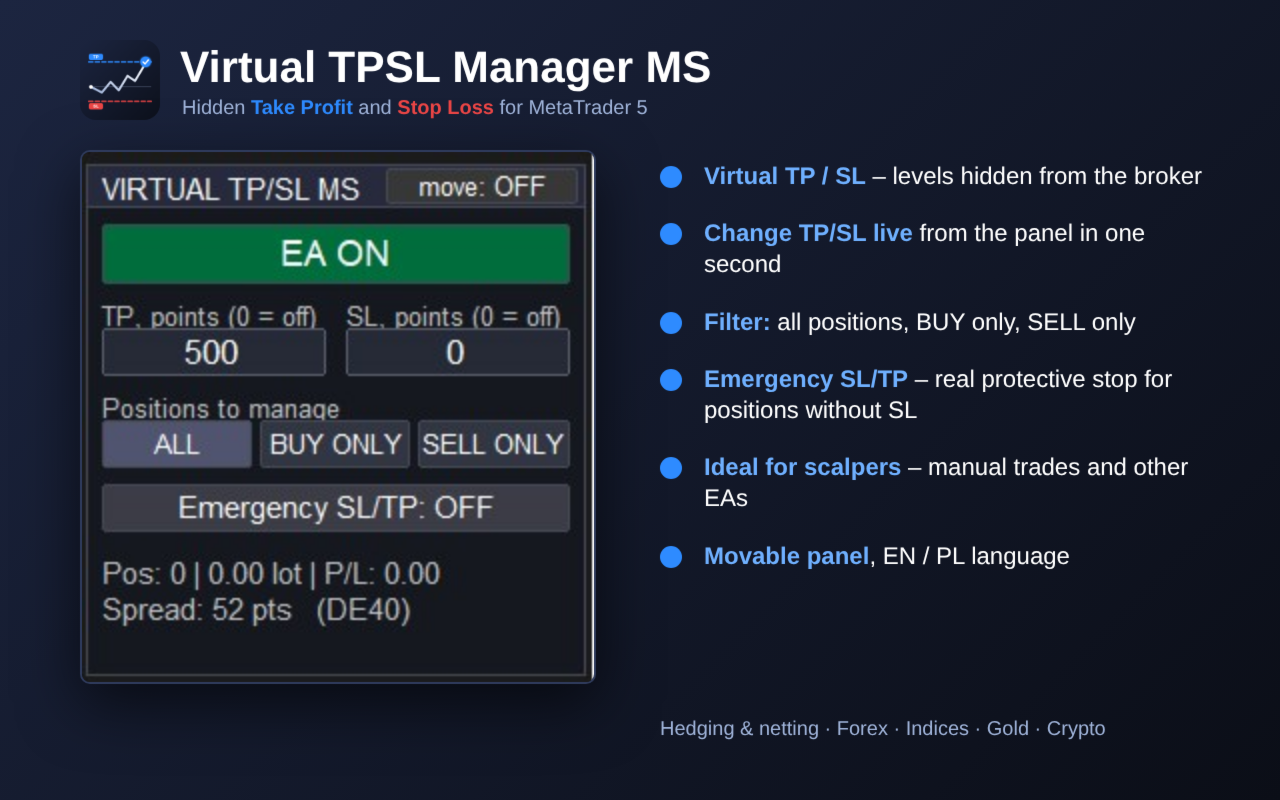
Virtual TPSL Manager MS – hidden Take Profit and Stop Loss with an on-chart panel
Virtual TPSL Manager MS manages your open positions with virtual (hidden) Take Profit and Stop Loss levels. The levels are never sent to the broker – the EA monitors the price and closes the position at market as soon as the level is reached. Works with manual trades and with positions opened by other Expert Advisors.
IDEAL FOR SCALPERS
- Hidden levels – your TP and SL are not stored on the broker's server, so nobody can see where your stops are.
- Change TP/SL in one second – type a new value on the panel, no need to modify every position separately.
- One setting for all positions – open several quick trades, the EA manages all of them with the same virtual TP/SL.
- No minimum stop distance – virtual levels can be set closer than the broker's stop level.
- Fast reaction – positions are checked on every tick and additionally every 0.5 s.
- Works perfectly with one-click trading: open the trade, the EA takes care of the exit.
Tip for scalpers: run the terminal on a VPS close to your broker's server for the fastest execution.
MAIN FEATURES
- Virtual TP and SL in points – hidden from the broker, set and changed live from the panel.
- Position filter: all positions, BUY only or SELL only (one click on the panel).
- Magic number filter and symbol filter (current chart symbol, a chosen symbol, or all symbols at once).
- Optional Emergency SL/TP – a real protective stop-loss is placed at the broker for positions that have no SL (protection if the terminal or connection goes down). Distances are randomized within your min/max range. An existing TP is never overwritten.
- Virtual TP/SL lines on the chart for every managed position.
- Live statistics: number of positions, total lots, floating P/L (blue = profit, red = loss), current spread.
- Warnings on the panel: wide spread vs. SL, Algo Trading disabled, failed close.
- Movable panel – switch "move: ON", drag the panel anywhere, switch it OFF to lock it.
- EA ON/OFF button – pauses management without closing anything.
- Panel state and settings are kept when you change the timeframe.
- Panel language: English / Polski.
- Works on hedging and netting accounts, with any symbol: Forex, indices, gold, crypto.
- Safe execution: close retries without freezing the terminal, configurable slippage, automatic filling mode, stop/freeze level checks.
HOW IT WORKS
- BUY positions are closed at Bid, SELL positions at Ask – the virtual level is measured exactly at the closing price.
- The virtual SL always works – a wide spread never blocks closing (you only get a warning).
- OFF pauses management: positions stay open and untouched.
INPUT PARAMETERS
- Language – panel language (EN/PL).
- OrderToClose – positions to manage at start (All / BUY only / SELL only).
- MagicToClose – magic number (-1 = all).
- SymbolToClose – "" = chart symbol, "*" = all symbols, or a symbol name.
- TakeProfitPoints / StopLossPoints – virtual TP/SL in points (0 = off).
- SlippagePoints – maximum slippage when closing.
- EmergencyLevelSet, EmergencySLMin/Max, EmergencyTPMin/Max – real protective SL/TP for positions without SL.
- ShowLines, LineTPColor, LineSLColor – virtual level lines on the chart.
- StartEAEnabled, RememberButtonState – start state and memory of panel settings.
- PanelX / PanelY – start position of the panel.
- PlaySoundOnClose, SoundFile – sound notification.
IMPORTANT
- Virtual levels work only while the terminal is running and connected. For 24/7 protection run the EA on a VPS and/or enable Emergency SL/TP.
- Values are in points (not pips). Example: on EURUSD with 5 digits, 100 points = 10 pips.
- One copy of the EA can manage positions on all symbols (SymbolToClose = "*").
- In the Strategy Tester the EA opens small test positions only to demonstrate how virtual TP/SL works. On a real or demo account it never opens trades – it only manages your positions.