IMD TP Manager

IMD TP SL Manager — 持仓篮子的止盈止损管理

聊天讨论团队的机器人:加入


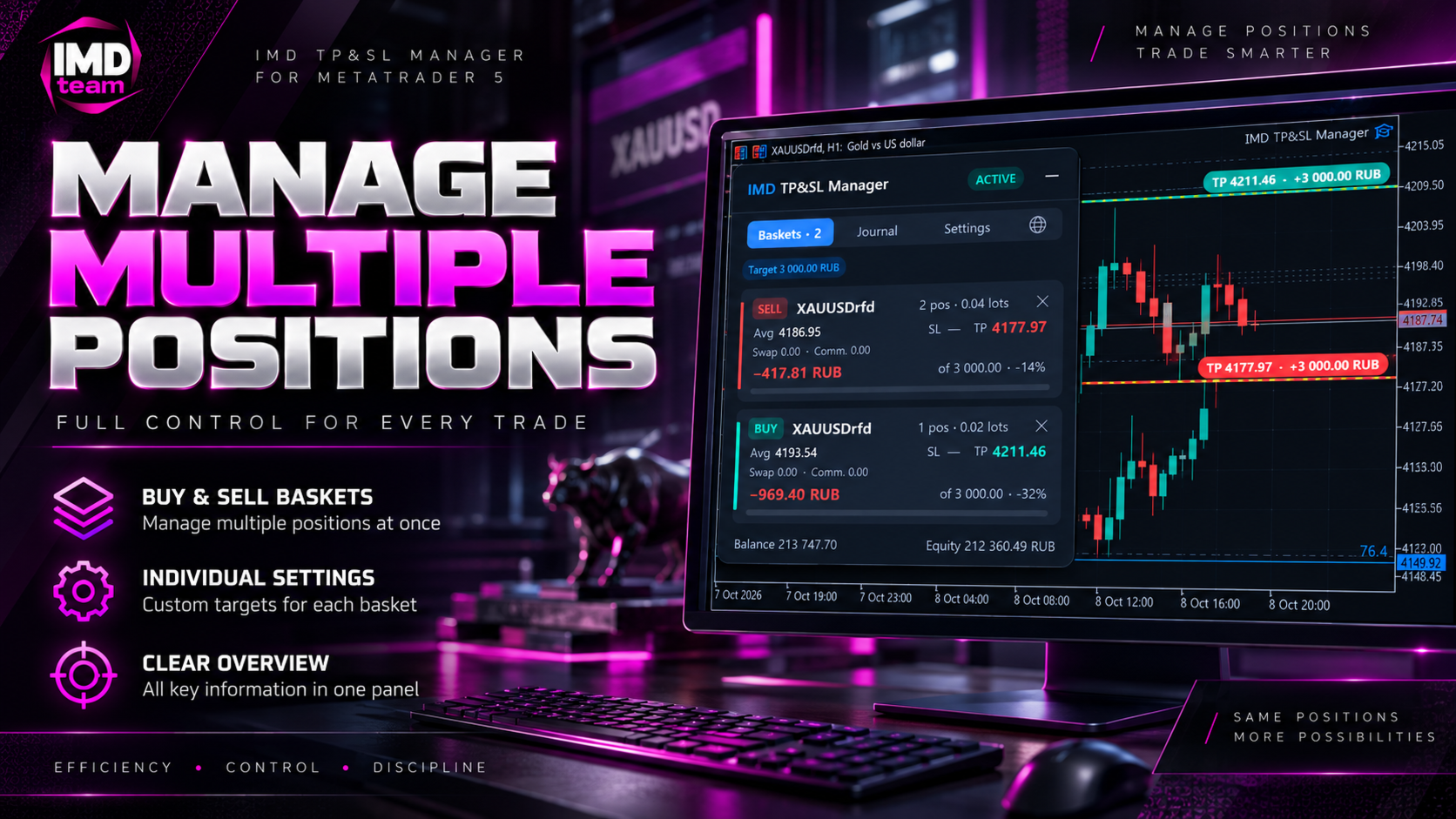
IMD TP SL Manager 是一款辅助型 EA,适合在同一品种上持有多笔仓位、并希望在达到预定收益时统一平仓的交易者。您可以按余额百分比或按账户货币金额设定目标。EA 会结合平均价格、库存费和佣金,为整组仓位计算统一的止盈价位,并持续保持更新。
本 EA 不开仓,也不做任何交易决策。它管理您手动开立或由其他 EA 开立的仓位。
解决的问题
持有多笔仓位时,统一止盈需要手动重新计算,而库存费和佣金又会逐渐改变整组仓位达到目标收益所需的价格。IMD TP SL Manager 会在每次变化后重新计算价位:新开仓位、库存费入账、部分平仓。止盈价位始终与您设定的金额相对应。
工作原理
仓位按品种和方向归入篮子。EA 为每个篮子计算:
按手数加权的平均开仓价;
累计库存费和已扣除的佣金;
预计的平仓佣金(根据成交历史自动计算,或按设定系数计算);
使篮子结果等于目标的价格。
对于交叉货币对,点值通过终端内置的盈亏计算进行修正,因此对点值随价格变化的品种也能得到正确的价位。
目标、止损与持仓管理
目标: 余额百分比或账户货币固定金额。百分比按篮子开立时的余额或您设定的金额计算,因此其他篮子平仓不会改变目标。
篮子止损: 以百分比或金额设定可承受的亏损,同样计入库存费和佣金。
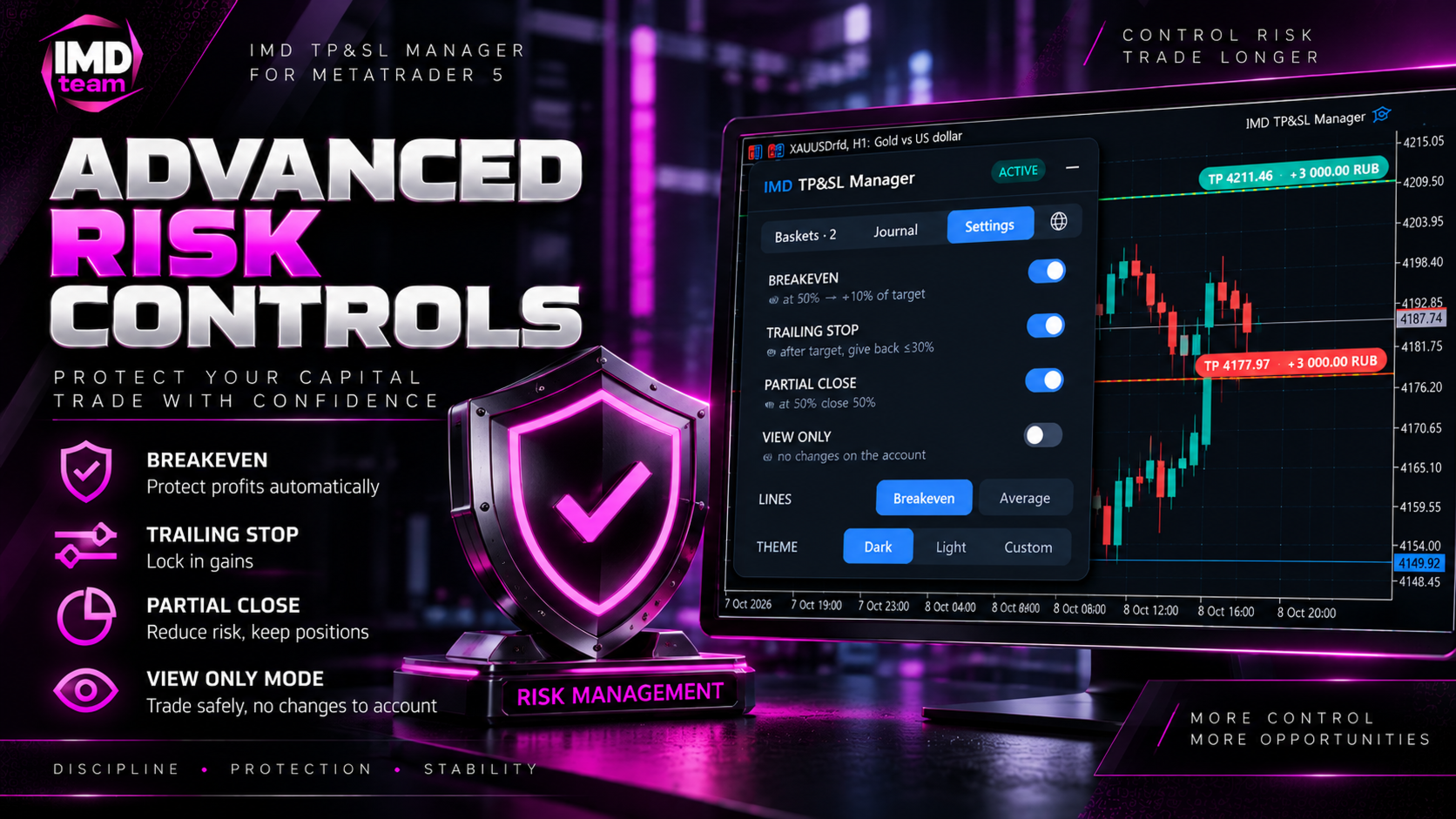
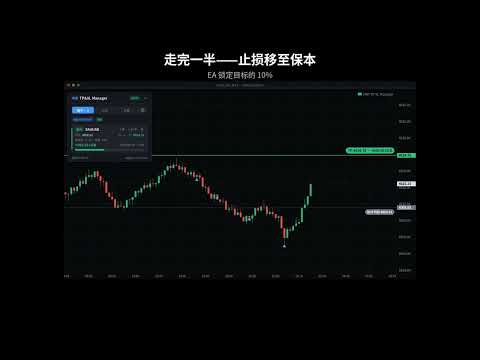
保本: 当篮子完成到目标路程的设定比例时,止损移至盈利区域。
利润追踪: 达到目标后不立即平仓,而是跟随利润增长,并限制可从峰值回吐的比例。
部分平仓: 在中间位置平掉设定比例的手数,剩余部分可移至保本。已实现部分计入篮子结果。
执行方式
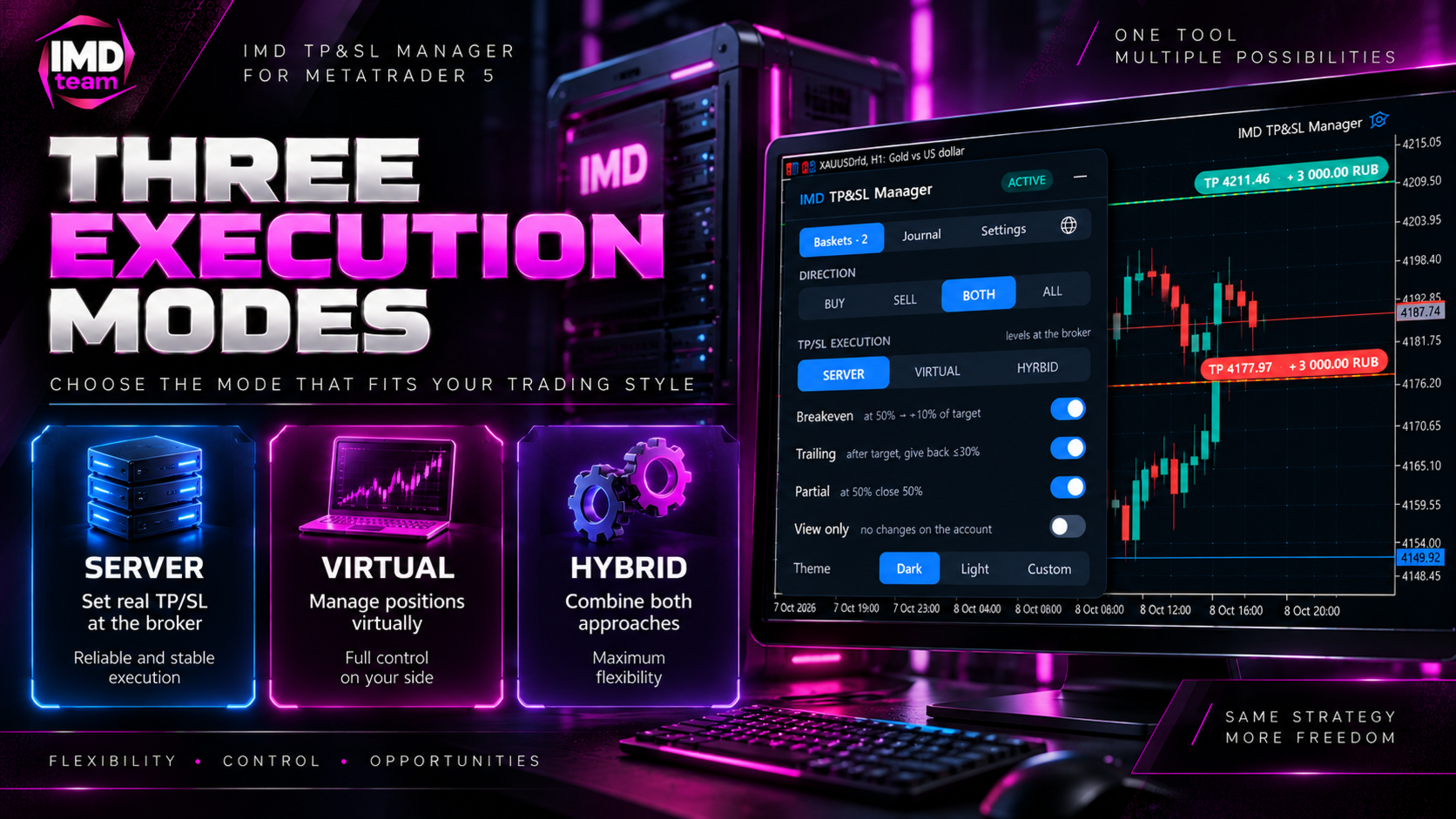
服务器价位: 止盈和止损挂在经纪商服务器上,即使终端关闭也会触发。
虚拟价位: 经纪商不可见,由 EA 执行平仓。
混合模式: 虚拟价位加上在设定距离处的服务器保护价位。
方向与筛选
仅买单或仅卖单。
买单和卖单分别管理:两个独立篮子,各有自己的价位和目标。
所有仓位合并:一个合并篮子,按总结果平仓。适用于锁仓和网格方法。在对冲账户上会先进行对冲平仓,以减少点差成本。
当前品种或账户中的所有品种。
所有仓位、仅手动仓位,或指定魔术号的仓位。
控制面板
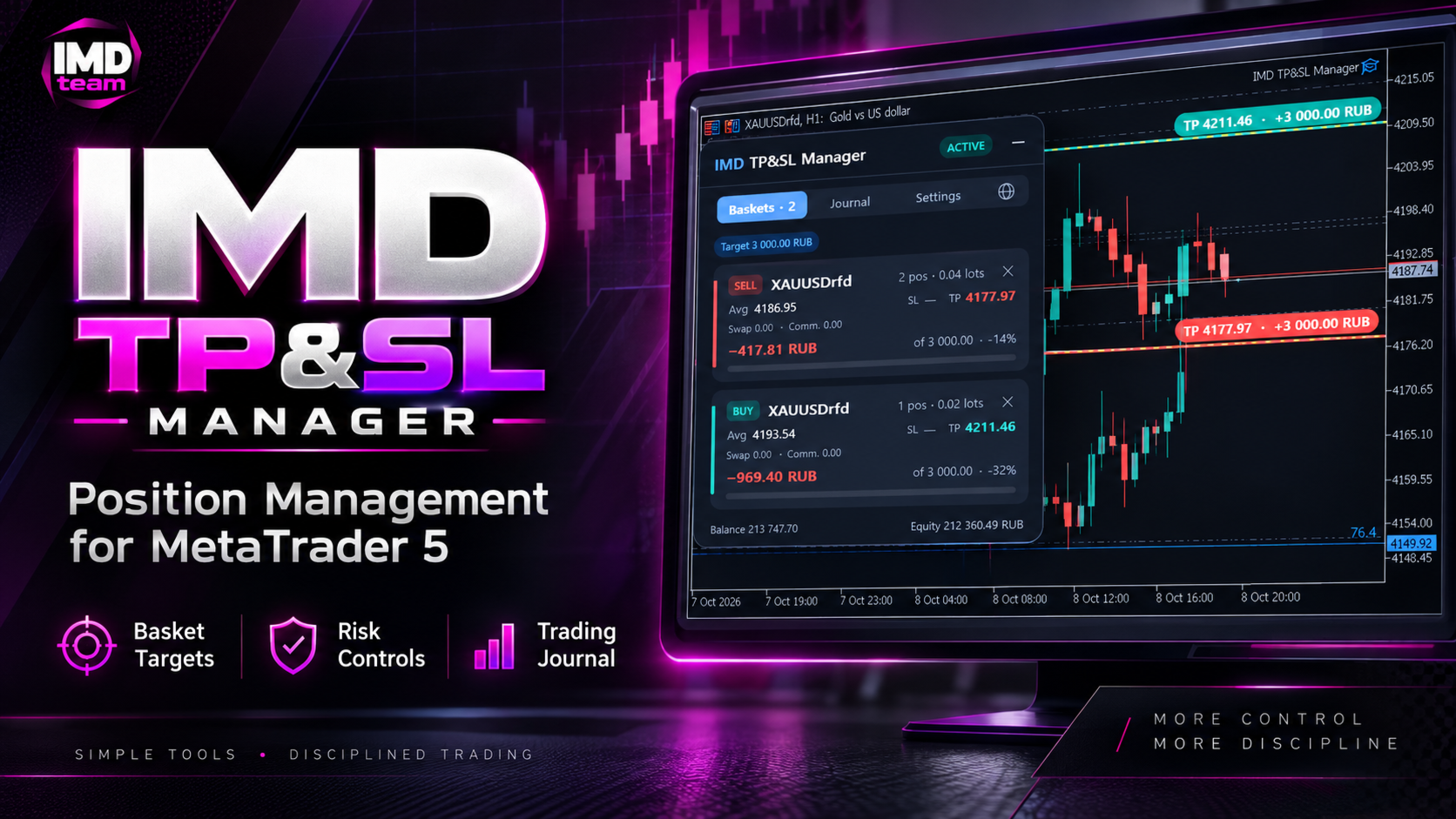
篮子: 卡片显示仓位数量和手数、平均价格、止损和止盈价位、库存费、佣金、当前结果以及达成目标的进度条。可经二次确认手动平掉篮子。
日志: 今天、本周、本月或全部期间已平仓篮子的统计——总结果、篮子数量、盈利比例、平均结果、平均持仓时间、平仓原因和最近记录。
设置: 主要参数可直接在面板上修改,无需重启 EA。
标题栏显示 EA 的当前运行状态;语言在单独的标签页中选择,配色主题在设置中选择。面板可用鼠标拖动,并可最小化为显示所有篮子总结果的紧凑条。面板上的设置会立即保存,在切换周期、重启终端或电脑意外关机后仍会保留。
图表操作
拖动线条: 目标线和止损线可用鼠标拖动。拖动时线条旁会显示当前价格对应的金额和余额百分比,松开后即生效。
附加线条: 平均价格以及包含库存费和佣金的保本价位,可分别开启。
三种配色主题: 深色、浅色和自定义。深色和浅色主题会同时改变图表颜色,自定义主题保持图表原样。移除 EA 后会恢复图表的原始颜色。
运行可靠性
交易可用性检查: 是否允许算法交易、品种是否处于交易时段、报价是否最新。休市时 EA 不发送请求,也不依据过时价格做出判断。
错误后暂停: 服务器返回错误后,以递增的间隔重试请求。
经纪商限制: 遵守最小价位距离和冻结水平。价位修改的最小步长以跳动点数和点差比例设定。
隔夜结算期间: 暂停修改价位。还可以在点差扩大时禁止按 EA 止损平仓。
每个品种只有一个管理实例: 若 EA 在多个图表上运行,仅由其中一个管理仓位,其余显示相应状态。
手动止损: 您手动设置的止损不会被删除。
仅显示模式: 只进行计算和显示线条,不对账户做任何更改。便于初次了解和检查设置。
日志与通知
每个已平仓的篮子都会记录到 MQL5文件夹中的 CSV 文件:根据成交历史得出的准确结果(含部分平仓、库存费和佣金)、平仓原因和持仓时间。该文件可在任何电子表格软件中打开。篮子平仓时,EA 会弹出终端提示;如已启用,还会向移动设备发送推送通知。
界面语言
English, Русский, 中文, Español, Deutsch, 日本語, Português, 한국어, Français, Italiano, Türkçe。语言可通过面板上的按钮切换,适用于面板、图表线条和通知。输入参数中的 Auto 选项使用终端语言。
快速开始
在终端中允许算法交易。
将 EA 加载到持有仓位的品种图表上。
开启“仅显示”模式,确认图表上的价位符合您的预期。
关闭“仅显示”模式,EA 即开始管理价位。
注意事项
EA 不会在真实账户或模拟账户上开仓。在策略测试器中,它会以最小手数开立演示仓位以展示管理功能,此功能可在输入参数中关闭。
虚拟价位、保本、利润追踪和部分平仓在终端运行时有效。如终端可能关闭,请使用服务器模式或混合模式。
支持对冲账户和净额账户。
本 EA 是持仓管理工具。交易结果取决于您的决策和市场状况,EA 不保证盈利。
推荐产品
This is a common, simple and easy to use but effective tool to manage trading risks for all traders. It also help trader places stop loss and take profit levels at the same time the order is filled. How to set the expert advisor's parameters to support your trading style? Lots size. Fixed lots size - For traders who prefered to trade with fixed lots size, they can input the lots size in 'User lots' menu in the expert advisor's properties. The input value should be from the 'Minimum Volume' to th
Professional risk management utility. Auto lot-size calculator + live risk panel. Works alongside any other EA — does not open trades independently. - **Auto lot size**: calculated from % risk per trade + SL distance in pips + balance - **Live dashboard**: Balance | Equity | Drawdown % | Suggested Lot | R:R ratio - **Daily drawdown alert**: notification when daily DD exceeds threshold - **Auto-close option**: closes all positions on daily DD breach (configurable) - Zero trade opening — purely a
Lot calculator tool MT5
Ernestas Kvedaras
3.67 (3)
More stable MetaTrader 4 version is available here:  Lot Calculator Tool . This tool helps you to automatically calculate and manage risk, conveniently place orders visually, schedule orders, trail stops, move them to break-even and more. Features Place market or pending orders using draggable lines Schedule orders Calculate and limit risk using various methods See current spread See time till next candle Set custom order comments Trail stops Move stops to break-even See order profit/loss in p
This tool will perform Trailing stop loss and Break even management for orders. Helps you limit or reduce the time spend watching orders on the screen, especially when you need to go to sleep. Just add this EA to 1 chart, you can manage all pairs. You can filter orders by comment, magic number, symbol and order ticket number. When Breakeven it can add shift/offset pips (to cover the commission...). You can try in strategy tester before purchase. The EA will add Buy and Sell alternately, so you
RRtoolBox
David Ruiz Moreno
RRtoolbox - Professional Tools: Risk:Reward Trading Tool (SL/TP Horizontals + Pending orders + Diagonals), Alerts set on trend lines (for alerts on diagonal levels), SelfManagement (BE, partials...), close/cancelling by time, Statistics, Info and trading on chart. One-Click Trading with Visual Risk:Reward Management RRtoolbox is a comprehensive trading panel that combines one-click order execution,  statistics and  powerful visual Risk:Reward tools, alerts set with trendlines, on chart butt
Golden Gestion TP SL No Limit MT5
Matthias Hubert Patrick Snidaro
Auto SL/TP Manager EA – Gestion Automatique Intelligente Auto SL/TP Manager EA est un Expert Advisor conçu pour automatiser la gestion des commandes avec une efficacité maximale et une grande discrétion. Il gère automatiquement : Le Stop Loss (SL) et le Take Profit (TP) Le Profit Lock (verrouillage progressif des bénéfices) Le Trailing Stop avec plusieurs méthodes avancées L' affichage masqué du SL et du TP pour plus de discrétion (non visible par le courtisan) C'est l'outil idéal pour les
Auto SL/TP Manager (自动止损止盈管理器) 永远不要让手动交易失去保护! 您是否曾经匆忙开仓而忘记设置止损 (Stop Loss) 或止盈 (Take Profit)?"Auto SL/TP Manager" 是您必不可少的安全网。 这款 EA (智能交易系统) 24/7 全天候监控您的账户,并自动将您预设的风险 (SL) 和利润 (TP) 水平应用于任何缺少这些设置的未平仓头寸。 对于 手动交易者 、 剥头皮交易者 ,或任何希望确保 每笔 交易都按照其策略受到保护的人来说,这是一个完美的工具——即使是从移动设备上开立的交易。 主要特点 完全自动化 :持续扫描并为没有止损/止盈的未平仓交易应用 SL/TP。 高度可配置 :轻松以点数 (Pips) 定义您的止损和止盈 (例如, 5.0 = 50 点)。 强大的过滤功能 :选择将其应用于 所有 交易品种、特定交易品种,或仅应用于当前图表的交易品种。 魔术数字 (Magic Number) 过滤 :隔离来自其他 EA 的交易,或仅专注于您的手动交易 (Magic Number = 0)。 “强制”模式 (可选) :即使 S
Not just a lot calculator – SizerX is a complete trade manager for MetaTrader 5: position sizing, break-even, partial close, 4 trailing stop types, pyramiding, prop firm protection and OCO orders, all from one clean panel on your chart. Fully testable in the Strategy Tester – the free demo includes every feature. Try before you buy. PLAN & SIZE • Risk as % of balance, % of equity or a fixed amount – SizerX calculates the exact lot, rounded to your broker's lot step. • Plan with lines on
LotPilot
Zhanbolat Umirbayev
LotPilot is a risk management and position size calculator designed for manual trading in MetaTrader 5. The utility helps traders calculate an appropriate lot size before entering a trade. Instead of calculating position size manually, the trader sets the required risk parameters and LotPilot performs the calculation. The main purpose of LotPilot is to make position sizing faster and help maintain consistent risk management from trade to trade. Main features Position size calculation based
Rulekeeper
Timurbek Yusupov
Rulekeeper is a professional risk-management utility for MetaTrader 5, built for prop-firm traders (FTMO, FundedNext, The5ers, Apex, Topstep and any ECN account). It removes the human factor: tilt, overtrading and accidental rule violations. WHAT IT DOES 1. Daily Loss Limit — measures the day result from the balance at the close of the PREVIOUS trading day (configurable: day-start balance / day-start equity). When the limit is hit it closes all positions, removes pending orders and locks trad
Recovery Assistant Pro for MT5 Manual Recovery Trading Assistant Recovery Assistant Pro is a Manual Trading Assistant EA for Recovery trade calculations and management. Helps calculate the appropriate Lot Size. Designed to calculate Recovery trade parameters based on floating loss and the selected Target USD. Simplifies Recovery calculations that would otherwise require manual calculation. The trading panel provides direct access to the main Recovery functions from the chart. Includes a Recov
WHAT IT DOES ICT-SMC Order Flow Risk & Order Management EA is a semi-automatic trade management panel for MetaTrader 5 that puts risk first. You decide how much money you are willing to risk per trade — the EA calculates the exact lot size from your stop-loss distance, places the order (market or pending), and then manages the position automatically: price-based or R-based partial closes, breakeven, R-based trailing stop, and an R-multiple take-profit. Built for ICT / SMC order-flow discretiona
Medoxray Trade Manager
Mohamed Hussein Abdallah Abdelsalam
Medoxray Trade Manager – Manual Trading Panel with Interactive Risk / Reward Tool for MT5 Product Overview Medoxray Trade Manager is a professional manual trading panel for MetaTrader 5, designed to make trade execution and position management faster, easier, and more organized. It combines one-click trading, interactive chart-based Risk / Reward management, pending order placement, advanced position management, and a live Profit & Loss dashboard in one convenient interface. This is a manual tra
Equity Master Stop v2 MT5
Frank William Jr Colbert
Trading tool combining a sophisticated equity stop-loss, dynamic take-profit management (Breakeven & Trailing), and symbol-group-based closing logic. It is a complete risk management and trade supervision tool. Features: All features of `Equity Master Stop v1` (floating profit/loss limits, exit protection, skip hours). Take-Profit Override: Can force a TP on any order to lock in a `MAX_FLOATING_PROFIT`. Step Breakeven: Locks in increasing amounts of profit as a trade moves favorably (e.g., aft
Nebula Trading Manager
Sina Mohammadamin Shahriari Moghadam
This expert advisor named   TradeManager   provides a manual trading management panel in MetaTrader 5 that allows precise control over open positions. It is designed for traders who want dynamic management of Stop Loss (SL), Take Profit (TP), Break Even (BE), and Partial Close functionality. Key Features: Dynamic Trade Management : Manually set or drag-and-drop SL, TP, and BE levels. Supports partial closing at different profit levels (1:1, 1:1.5, 1:2). Automated Drawing : Automatically draw
Pattern Recognition EA
Claudiu-georgian Zavera
Pattern Recognition EA - From Learn to Earn. The market repeats itself. This EA finds every past repeat of the current candle sequence - and lets history vote the direction. ONE SHAPE. EVERY REPEAT IN HISTORY VOTES. The last N candles on your signal timeframe form a shape. The EA scans the history you choose - a fixed number of bars or everything your broker provides - for the SAME shape, and checks what happened next, every single time. Only when enough repeats exist AND a clear majority of t
我们的   Basic Support and Resistance   指示器是提高技术分析所需的解决方案。该指标允许您在图表/ MT4版本 功能 斐波那契水平的集成: 可以选择显示斐波那契水平以及支持和阻力水平,我们的指标使您对市场行为和可能的逆转区域有更深入的了解。 性能优化: 只能在每个栏的打开时更新扩展线,我们的指标可确保最佳性能,而无需牺牲支持和阻力级别的准确性。 输入 主设置 Timeframe:   通过此输入,您可以选择在图表上显示较高时间范围的支撑线和阻力线。 Support/Resistance Strength [Number of Bars]:   使用此输入,您可以确定支撑和电阻的强度。数量越高,支持/阻力越强。 Price mode:  此参数允许您选择哪种价格将用于计算支持和电阻水平。它可以是收盘价,最高价格,最低价格等。取决于您的策略和偏好,您可以选择最适合您需求的价格。 显示设置 Display Fibonacci levels:   此参数确定是否将显示斐波那契水平以及图表上的支持和电阻级别。斐波那契水平是技术分析中使用的关键水平,并使用斐
Capital Guard – Position Size & Risk Manager An Amazing Software For Risk Calulcation & Trading Management! Created by a Trader with over 27 years of Trading experience with the tools and functions traders need. Not filled with features and functions you just do not need. For The Lowest Price Possible. And It will never go up. I am a trader not a marketer. Here to help you get better in what you already do! 1st Class Support. You are never left alone. I am almost always online and will r
Scalper Pivot
Yosi Malatta Madsu
Scalper Pivot detects respectable small reversal areas that can be used to mark repeatable opportunity windows. For M1 timeframe. Setup/inputs: First, set one pip on price, e.g. EURUSD to 0.0001, USDJPY to 0.01, or XAUUSD to 0.1. Or select AUTO for autodetect common symbols. Set minimum and maximum range on pips, if you want scalp between 10 to 20 pips then set it to 10 and 20 respectively. Set detection window to any candle count you want. Set it too low or too high would be less accurate.
ZF Equity Protector Premium v2.0 The Ultimate Daily Loss Breaker for Smart Traders & Prop Firm Hunters Have you ever blown a Prop Firm account just because of "one bad day"? Or has emotional revenge trading destroyed weeks of hard-earned profits in a matter of hours? Put an end to account destruction right now. ZF Equity Protector Premium v2.0 is an advanced automated safety system (EA) specifically engineered to be your capital's ultimate line of defense. This EA acts as a cold, calculated circ
Drawing Assistant Tool for MT5 This is an assistant tool that allows you to create drawing objects with a single click from an on-chart panel, using settings independent of the standard MT5 objects. Dual Presets: You can draw two distinct styles for each object type, labeled "1" and "2", simply by clicking the respective buttons. Three Styles Available: Since these presets function independently from the standard MT5 toolbar objects, you effectively have access to three different object styles (
General Description Auto SL/TP Manager is a professional utility for MetaTrader 5 designed to automate the management of Stop Loss and Take Profit levels on open positions. The levels are calculated based on monetary risk values defined by the user, rather than fixed pip distances. This tool helps maintain consistent risk discipline without manual intervention. Main Functionality The EA continuously monitors all open positions and automatically applies Stop Loss and Take Profit levels when they
ASTANA TRADE PRO — MetaTrader 5 专业交易管理面板 ASTANA TRADE PRO 是一款适用于 MetaTrader 5 的专业交易管理工具,专为手动交易者打造。它可以帮助交易者更快地执行交易、更方便地管理仓位,并通过一个高级交易面板更有纪律地控制风险。 本工具不会根据自动交易信号开仓,也不会替代交易策略。它的主要作用是帮助交易者更高效地管理已经计划好的交易:开仓、分阶段止盈、移动止损、使用保本、追踪止损、Recovery 计算器、加仓后的 Auto TP,以及重要 USD 新闻期间的交易保护。 主要功能 一键交易面板 ASTANA TRADE PRO 可以让交易者直接通过面板快速管理仓位: 开启 BUY 和 SELL 仓位; 关闭盈利仓位; 关闭亏损仓位; 关闭所有受管理的仓位; 将仓位移动到 Break Even; 只管理当前图表品种,或管理所有品种。 分阶段 TP Manager 内置 TP Manager 可以帮助交易者分阶段管理出场: TP1 — 关闭 60% 仓位,并将 SL 移动到 Break Even + 偏移点数; TP2 — 再关闭
EA Risk Manager is a professional risk‑management Expert Advisor designed to protect your trading account and enforce disciplined money management. The EA does not open trades by itself – it only monitors and manages all existing positions (manual and automated) on the account. It is especially useful for traders who want to: Hard‑limit daily / weekly / monthly losses and profits. Restrict lot size and the number of open trades. Trade a basket of G7‑related Forex pairs using one centralized
THREE LAYERS OF SMC MARKUP IN ONE TOOL Liquidity pools, order blocks and a volume profile — the Smart Money markup that traders usually assemble from three separate indicators. SMC Liquidity OB Profile draws all of it in one tool, with a single block of input parameters and one visual language. Why not just stack three free SMC overlays? Because three overlays means three settings lists, three visual styles and triple the load on your chart. Here everything is computed in a single lightweight
Support Resistance Inversion is based on supports and resistance to find the points in which the currency will probably go in a defined direction. Inputs: Alarm ON/OFF: turn on or off alarm on screen. The indicator draws an arrow pointing the direction to follow based on when the price cross or bounce on a support or a resistance. Support Resistance Inversion can help you to choose the moment to do your trades in a specific direction, strengthening your trading strategy.
MTM Pro Manual Trading Panel
Choawana Malaikitsanachalee
MTM Manual Trade Manager is a professional trading dashboard designed for manual traders who want better control over risk and trade management. This Expert Advisor does NOT open trades automatically. All trading decisions and order executions are fully controlled by the trader. Main Features: - Manual Buy and Sell execution from the dashboard - Visual Stop Loss and Take Profit using drag & drop lines - Fixed Lot and Risk Percentage position sizing - Automatic Break Even management - Multiple
FREE
Risk Calculator Veqrix
Jose Luis Heredia Padilla
Risk Calculator Veqrix  Risk Calculator Veqrix is a risk calculation, visual trade planning, and manual order execution tool for MetaTrader 5. The EA automatically calculates the trade volume using the configured risk, entry price, and distance to the Stop Loss. It also displays the planned trade directly on the chart and distributes the total volume across up to three Take Profit targets. This tool does not generate trading signals . The user selects the direction, configures the levels, and
FREE
Lot Size Calculator Advanced – 附带回撤平衡功能的头寸大小计算工具 该手数计算器基于所选的风险百分比和止损距离。 它还有一个新功能, 即每笔交易可增加额外的风险金额, 这种方法通过将风险增加分摊到一段时间内, 而不是立即加倍, 从而平稳地管理回撤。 这使得风险控制更佳, 管理更安全。 它专为外汇、 贵金属、 指数、 大宗商品和加密货币交易而设计。 主要特点 根据账户余额和选择的风险百分比进行头寸大小计算 视觉化和可点击按钮:市价单和挂单模式 视觉化交易水平:图表上的入场、 止损和止盈线 视觉化风险回报比显示 根据止损距离自动调整手数 面板上显示视觉化的盈亏值 如何使用 将指标附着到图表上。 在输入设置中选择风险百分比。 选择市价或挂单模式。 调整入场、 止损和止盈线。 使用计算出的手数在交易平台下单。 参数 Risk %: 从 0. 1% 到账户余额的 100%。 Optional to choose aggressive calculation mode: (可选激进计算模式)true/false。  True 意为“使用”, False 意为“不使用”
Ultimate Pro Trading Panel — All-In-One Manual & Grid Trading Dashboard Pro Trading Panel   is an all-in-one on-chart control panel that gives discretionary and semi-automated traders a complete toolkit for entries, exits, risk management, and grid trading — without leaving the chart. Every function is visual, draggable, and updates in real time. If you want to test this utility feel free to download the basic preview version of this tool here:  https://www.mql5.com/en/market/product/181435 Who
该产品的买家也购买
Trade Assistant MT5
Evgeniy Kravchenko
4.43 (216)
它有助于计算每笔交易的风险,容易安装新的订单,具有部分关闭功能的订单管理, 7 种类型的追踪止损和其他有用的功能。   附加材料和说明 安装说明   -   应用程序说明 线条功能  - 在图表上显示开仓线、止损线、止盈线。 有了这个功能,就可以很容易地设置一个新的订单,并在开仓前看到它的附加特性。   风险管理  - 风险计算功能在考虑到设定的风险和止损单的大小的情况下,计算新订单的成交量。它允许你设置任何大小的止损,同时观察设定的风险。 批量计算按钮 - 启用 / 禁用风险计算。 在 " 风险 " 一栏中设置必要的风险值,从 0 到 100 的百分比或存款的货币。 在 " 设置 " 选项卡上选择风险计算的变量: $ 货币, % 余额, % 资产, % 自由保证金, % 自定义, %AB 前一天, %AB 前一周, %AB 前一个月。   R/TP 和 R/SL - 设置止盈和止损的关系。 这允许你设置相对于损失的利润大小。 例如, 1 : 1 - 这决定了 TP = SL 的大小。 2 : 1 - 这意味着 TP 是 SL 的两倍。 RR - 它禁用比率。   订单管理 该面板支
Farmed Hedge Yield Farming | All Markets (Manual - Hybrid - Semi/Automated EA) VERIFIED TRADING RESULTS - Farmed Hedge Yield Axi Copy:  https://www.mql5.com/en/signals/2356376 - Farmed Hedge Yield Exn Copy:   https://www.mql5.com/en/signals/2356404 - Farmed Hedge Yield V Copy:  https://www.mql5.com/en/signals/2357156 IMPORTANT NOTICE: FarmedHedge is a MANUAL-FOCUSED TRADING UTILITY ,not a fully automated EA. Results shown on this Signal include manual trades and overall strategic management.
TradePanel MT5
Alfiya Fazylova
4.89 (176)
交易面板是一款多功能交易助手。该应用包含超过50种手动交易功能,并允许您自动执行大多数交易任务。 应用程序说明 : https://www.mql5.com/zh/blogs/post/761102 用于模拟账户的应用程序试用版: https://www.mql5.com/zh/blogs/post/762579 如何安装应用程序: https://www.mql5.com/zh/blogs/post/762580 如何在可视化模式下测试应用程序: https://www.mql5.com/zh/blogs/post/770278 如何在VPS MetaTrader上安装应用程序: https://www.mql5.com/zh/blogs/post/770196 贸易. 只需单击一下即可执行交易操作: 打開掛單和頭寸,並自動計算風險。 一鍵打開多個訂單和頭寸。 打開訂單網格。 按組別關閉掛單和頭寸。 反轉頭寸方向(關閉買入>打開賣出,關閉賣出>打開買入)。 鎖定頭寸(通過開啟缺少的頭寸,使買入和賣出頭寸的數量相等)。 一鍵部分關閉所有頭寸。 將所有頭寸的止盈和止損設置在同一價格水平。
EA Overfitter
Stephen J Martret
5 (5)
回测看起来很漂亮。但它明天、下周、下个月还能继续赚钱吗? EA Overfitter 让您的 EA 在 100 段它从未见过的价格历史上重新运行。一个分数告诉您这个优势是否真实。 回测告诉您的,是 EA 在某一段价格历史上的表现——那段恰好发生过的历史。您无法从中判断,这个结果有多少来自策略本身,又有多少只是那一条特定路径带来的。 EA Overfitter 回答的正是这个问题。它构建最多 100 段您的 EA 从未交易过的合成价格历史,让策略在全部这些历史上重新运行,并展示它所产生的完整结果区间。您得到的不再是一条幸运或不幸路径上的单个数字,而是一幅真实的图景:策略在陌生数据上多久能赚钱、典型结果是什么样(而不是最好的那一次),以及您的回测离它有多远。 这些世界是由您自己的近期历史重建而成,因此这不是预测——任何从历史数据出发的检验都不可能是预测。它告诉您的是:这个优势是否依赖于价格的某一种特定排列,以及回测数字距离典型结果有多远。在投入资金之前,这才是值得回答的问题。 三个步骤 1. 构建。在图表上选择时间区间和世界数量,然后按 Build。EA Overfitter 会
AI Agent Supervisor is NOT an Expert Advisor. AI Agent Supervisor   is a   multi-agent AI risk & portfolio supervisor   that watches every EA on your account and intervenes in real time.  WANT AN AI PORTFOLIO MANAGER WATCHING YOUR FLEET 24/7?   Run your fleet on the same brokers I do:   IC MARKETS , IC TRADING   .  Unlike the centralized stock market, Forex has no single, unified price feed.  Every broker sources liquidity from different providers, creating unique data streams. The Supervisor r
================================================================================ POC BREAKOUT - V20.72. Full Professional Grade Toolkit ================================================================================ POC Breakout is a full MetaTrader 5 trading dashboard for discretionary traders who want breakout signals, Point of Control (POC) context, volume profiles, order flow, market structure, news, alerts, and advanced trade planning in one professional workspace. Attached directly to you
News Trade EA MT5
Konstantin Kulikov
4.55 (11)
在此向大家介绍一款我本人使用多年的机器人。该产品支持半自动和全自动交易模式。 >>> Chat <<< 本程序包含基于经济日历新闻的灵活交易设置功能。不支持策略测试器检验。仅可进行实际操作。 下載最新的設定檔: https://www.mql5.com/en/blogs/post/747929 訊號監控: https://www.mql5.com/en/signals/author/test-standart 请参考博客中各类参数说明自行实现个性化设置   : https://www.mql5.com/en/blogs/post/748545   。 主要默认设置说明 单一图表英镑/GBP(英镑美元/GBPUSD、欧元英镑/EURGBP、英镑日元/GBPJPY、英镑加拿大元/GBPCAD、英镑澳大利亚元/GBPAUD、英镑瑞士法郎/GBPCHF)货币对操作。英镑/GBP是波动性最大的货币,能够为用户顺利完成交易提供更多机会。 Use_Symbols_from_Line = true; Symbols_Line = GBPUSD, EURGBP, GBPJPY, GBPCAD, GB
Power Candles Strategy Scanner:自我优化的多品种交易设置扫描器 一个风吹草动就提醒的扫描器,只会让您学会忽略它。一根K线收盘时行情一热闹,提醒接连不断,您真正要做的那个交易设置就被淹没在噪音里。 Power Candles Strategy Scanner 在您 Market Watch 中的每个品种上运行自我优化的 Power Candles 引擎,只针对通过您自己筛选条件的内容发出提醒:最后一根已收盘K线的强度、交易设置的盈亏比、实时点差,以及您交易的资产类别。一旦某个品种进入您的列表,扫描器就会通知您。被您筛掉的一切保持安静,同一根K线收盘的所有命中合并成一条消息送达。 购买前先看看面板和每一个筛选条件。 截图、完整功能导览以及与 Power Candles 的配合流程: stein.investments/products/power-candles-scanner 本工具属于 Stein Investments 生态系统:18 款以上工具,外加 Max,您的一对一 AI 交易导师。  全天候在线,深入了解每一个指标,在您需要把事情想清楚的那一刻
下一次更新 — 版本 2.52 即将推出![全新功能] 准备迎接 4 项重大新功能,全面提升您的市场分析能力与交易流程! 我们将通过 4 项全新功能,进一步提升市场分析水平,满足您的交易需求。现为您介绍: 1. TRADE OVERVIEW DASHBOARD 2. CONFLUENCE AT ZONE 3. STRONG & WEAK HIGH/LOW 4. OTE 1. TRADE OVERVIEW DASHBOARD 一个帮助您更轻松地了解整体市场状况的仪表盘,为您的交易决策提供参考指引,帮助您系统地分析市场并规划交易,所有信息尽在一个屏幕中。 多时间周期市场概览(Multi-Timeframe Market Overview) 更清晰地了解市场方向与价格结构 快速查看市场状况 为系统化市场分析和入场规划提供指引。 2. CONFLUENCE AT ZONE 当价格进入关键区域时……您将了解有多少项支持因素相互吻合。 关键区域是交易决策至关重要的地方。但仅仅是价格进入某个区域还不够。此功能可帮助您在入场交易前,识别相互吻合的因素,包括信号及其他相关因素,从而进行更全面的分析,并
REVDEN AI Desk:依托 REVDEN 的市场背景,在与您自己的 AI 的一场对话中运作您的交易 设想一下,在一场对话中运作您的全部交易。 REVDEN AI Desk 将这一切带入 MetaTrader 5:您询问自己的 AI 如何解读市场,它依据 REVDEN 对您所交易品种的完整背景信息作答,包括这些品种的状态、风险画像和即将到来的数据发布。它的提案附带入场、止损、目标和风险,您批准合适的那些。您的规则也以同样的方式修改:写下需要改变的内容,您的 AI 就会为您起草新的规则手册,采用与否由您决定。围绕这场对话,整个市场呈现在同一个屏幕上。 查看交易台和设置指南。 每个界面、每项设置,以及与您自己的 AI 共同迈出的第一步: stein.investments/products/revden-ai-desk 与您的 AI 进行一场对话,用一个屏幕纵览市场,两者共享同一个数据基础。  用您自己的话: 就在图表旁边,询问市场、某个品种或某项提案。  依托 REVDEN 的背景信息: 您的 AI 读取您所选每个品种的状态、风险画像、即将到来的数据发布,以及您的持仓和您的规则手
Zentriq Trade Manager
Mark Frederick Siebert
Experience trading without friction. Zentriq Trade Manager is a modern, high-performance trade management utility engineered with a high-DPI canvas interface, anticipatory workflow design, and an integrated Macroeconomic News Filter. Designed for discretionary traders, scalpers, and prop firm traders who demand speed, precision, zero-clutter ergonomics, and automated news event protection. User Manual Get the most out of Zentriq Trade Manager with the complete user manual: Complete User Manual:
Unlimited Trade Copier Pro MT5 is a tool to copy trade remotely to multiple MT4, MT5 and cTrader accounts at different computers/locations over internet. This is an ideal solution for you if you are a signal provider and want to copy your trades to other receivers globally on your own rules. One provider can copy trades to multiple receivers and one receiver can get trade from multiple providers as well. The provider can even set the subscription expiry for each receiver, so that receiver will n
GRat Crypto
Ivan Titov
4.5 (2)
Trade on crypto exchanges in MT5 with no limits! GRat_Crypto is a tool for manual and automated trading , including ANY available EA, ANY  cryptocurrency  on most popular crypto exchanges in the familiar MT5 environment 24/7. Features 1. ALL instruments of the 9 most popular crypto exchanges are available: Binance, BingX, Bybit, Coinbase, CoinEx, Kraken,   KuCoin, MEXC and OKX . 2. The ability to place ANY type of order available in MT5, both market and pending, to modify orders and positions,
RETAILBERG FOOTPRINT CHART PRO — Order-Flow Workspace for MetaTrader 5 Version 7.00  |  Professional System  |  31 tools  |  One chart A full 150-page illustrated User Manual is included. Please read the full manual to understand this feature packed footprint chart elements and ui. https://www.mql5.com/en/blogs/post/777982 DEMO / STRATEGY TESTER — PLEASE READ FIRST
Trade Indicator Assistant   is a powerful MT5 utility designed to turn indicators into automated trading systems. Its main feature is the ability to automatically detect an indicator’s   BUY and SELL signal buffers , without requiring you to know the buffer numbers, search through indicator settings, or modify the indicator source code. Bonus Indicator:   After purchasing Trade Indicator Assistant, contact me to receive   Trade Signal Pro   completely free as a bonus indicator. [Download Demo V
Strategy Builder offers an incredible amount of functionality. It combines a trade panel with configurable automation (covert indicators into an EA), real-time statistics (profit & draw down) plus automatic optimization of SL, TP/exit, trading hours, indicator inputs. Multiple indicators can be combined into an single alert/trade signal and can include custom indicators, even if just have ex4 file or purchased from Market. The system is easily configured via a CONFIG button and associated pop-u
Bots Builder Pro MT5
Andrey Barinov
4.17 (6)
This is exactly what the name says. Visual strategy builder . One of a kind. Turn your trading strategies and ideas into Expert Advisors without writing single line of code. Generate mql source code files with a few clicks and get your fully functional Expert Advisors, which are ready for live execution, strategy tester and cloud optimization. There are very few options for those who have no programming skills and can not create their trading solutions in the MQL language. Now, with Bots Builde
发现信号很好,但提供商的信号太小?您需要更大的持仓量,但终端设置太差?信号手数管理器将通过所需交易量的重复订单来增加提供商的头寸交易量。 只需设置手数大小和用于复制订单的信号名称即可。 Signal Lot Manager 是一个批量乘数实用程序,用于在您的终端上复制订单。来源可以选择任何顾问、手动交易、单独的交易信号。它具有广泛的功能、简单的设置以及高速度和可靠性。 Signal Lot Manager 安装和输入指南 如果您想获取有关 EA 的通知,请将我们的 URL 添加到 MT4/MT5 终端(参见屏幕截图)。 MT4版本     https://www.mql5.com/en/market/product/34864 MT5版本     https://www.mql5.com/en/market/product/41610 一般输入: 信号标题:信号的名称(您可以从信号顺序注释中复制它)。 最大限度。滑点:开仓交易可接受的最大滑点。因此,如果当前价格超过最高价格。与信号订单的入场价格相比的滑点距离,交易不会被复制。这对于防止复制交易出现不必要的滑点非常有用,特别是在高波动
Gamma Edge Pro MT5 — GexBot Classic API Integration Gamma Edge Pro brings institutional-grade Gamma Exposure (GEX) data directly onto your MetaTrader 5 chart — the same data used by professional options traders to anticipate price magnets, hedging flows, and dealer positioning. Powered by the GexBot Classic API, this indicator automatically maps options market data from US-listed instruments onto any MT5 CFD instrument — Forex pairs, Gold, indices, and more — with intelligent price conversion bu
The Patch
Mian Rameez Ali
The Patch It never opens a trade. It walks behind the ones that did. Every open position, every pending order — checked twice a second for the one thing that's easy to forget: a stop, a target. Found bare, it doesn't ask. It writes the missing number in, measured in points from wherever the position began, and moves on to the next. No strategy, no opinion on direction. Just the quiet assumption that nothing should ever sit on the market unprotected — not because someone decided it shouldn't,
Elliott Wave Helper
Siarhei Vashchylka
4.93 (14)
Elliott Wave Helper is a panel for constructing wave analysis. Manual (Be sure to read before purchasing) | Version for MT4 Advantages 1. Constructing wave analysis and wave structure in a few clicks 2. Availability of all wave analysis patterns, including triangles and combinations 3. All nine wave display styles, including a special circle font 4. Change colors and display styles of wave groups directly from the chart 5. Binding all elements to a set timeframe or timeframes 6. A template syste
Auto DCA EA
Truong Giang Hoang
5 (1)
All new interface and function Add telegram notify (you have to get Telegram bot API and chat ID). With this ea, you can earn 10-40% even more profit/month! 1. This EA is used to automatically take profit or DCA your orders on MT5 according to the parameters you set. You can enter first order on your phone or MT5 terminal on your computer and it automatically take profit or DCA your orders. 2. Enter buy/sell limit-stop price * Buy limit price/ Sell limit price/ Buy stop price/ Sell stop price:
YuClusters
Yury Kulikov
4.93 (43)
Attention: You can view the program operation in the free version  YuClusters DEMO .  YuClusters is a professional market analysis system. The trader has unique opportunities to analyze the flow of orders, trade volumes, price movements using various charts, profiles, indicators, and graphical objects. YuClusters operates on data based on Time&Sales or ticks information, depending on what is available in the quotes of a financial instrument. YuClusters allows you to build graphs by combining da
MT5 Trading Deck
Manuel Michiels
5 (2)
One button. One trade. MT5 Trading Deck is a hotkey trading panel for MetaTrader 5 that turns the platform into a keyboard-driven execution cockpit. Stop loss, take profit and lot size are pre-calculated for every key; the moment you press, a market order is live on the broker. A complete technical user manual is attached in the product Comments section. It documents every input parameter, the full hotkey map, the recommended Stream Deck XL layout, and the advanced workflows for Pre-Limit orders
Floor Watch
Syed Tauqeer Hussain Shah
Floor Watch One number, watched every thirty seconds: how far equity has fallen since the day began — or since its highest point, if it's told to trail the peak instead of the open. Cross the line and it doesn't argue. Every open position closes, every pending order vanishes, and anything that slips through afterward gets shut the moment it appears. Not asked. Removed. The floor holds until the clock turns 5 AM Pakistan time — then, and only then, does the day start over. One rule. No except
FUTURES ORDERFLOW FOOTPRINT CHART Professional OrderFlow EA for MetaTrader 5 Version 1.01| Professional tool for real traders | Institutional-Grade Visualization STRATEGY TESTER USERS - PLEASE SELECT EVERY REAL TICK WHEN TESTING AND YOU HAVE DOWNLOADED HISTORICAL DATA. IF YOU SEE A WAITING SCREEN AND IT IS NOT DOWNLOADING, IT MEANS YOU HAVE LOW HISTORICAL DATA. TRY 1 MIN AND 5 MIN FIRST ON 1 DAY DATA. ONE DAY DATA SHOULD BE THE NEWEST AND MOST CURRENT DATE. PLEASE WAIT UNTIL THE MARKET HAS ROL
The product will copy all  Discord  signal   to MT5   ( which you are member  ) , also it can work as remote copier.  Easy to set up. Work with almost signal formats, support to translate other language to English Work with multi channel, multi MT5. Work with Image signal. Copy order instant, auto detect symbol. Work as remote copier: with signal have ticket number, it will copy exactly via ticket number. How to setup and guide: Let read all details about setup and download Discord To MetaTrader
EasyInsight AIO MT5
Alain Verleyen
4.92 (12)
EASY Insight AIO – 全能智能交易一站式解决方案 概述 想象一下,您可以在几秒钟内扫描整个市场——外汇、黄金、加密货币、指数,甚至股票——无需手动筛选图表、繁琐安装或配置指标。 EASY Insight AIO 是您专为 AI 交易打造的即装即用数据导出工具。它将整个市场快照一次性输出为简洁的 CSV 文件,直接支持 ChatGPT、Claude、Gemini、Perplexity 等各类 AI 平台的即时分析。 无需窗口切换,无需图表叠加,也没有任何杂乱。只需纯净、结构化的数据自动导出,让您专注于基于数据的高效决策,无需再盯盘耗时。 为什么选择 EASY Insight AIO? 真正的一体化 • 无需设置,无需安装指标,无图表叠加。只需安装、运行并导出——就是这么简单。 多资产全覆盖 • 扫描分析外汇、金属、加密货币、指数、股票——您的券商所能提供的一切市场。 AI 专属数据导出 • 高度结构化、针对 AI 优化的 CSV 文件,直接适配主流智能工具和平台。 完整导出内容: • 三个可选周期的货币强度分析 • 净多头头寸变化体现市场情绪 • 成交量变化、
一次购买,即可免费获得我所有 MT4 和 MT5 指标,包括现有产品及未来发布的产品。 购买后请联系我,了解领取方式。 计划每售出 10 份后提价 50$,最高至 999$。 实际价格以结算时的 Market 标价为准。 保留您信赖的指标,让相关操作自动完成。 您的信号。您的规则。您的交易执行。 您已有信赖的 MT5 指标,却仍需盯盘、等待信号、计算手数、下单并手动管理每个持仓? Stratiora Signal Engine MT5 将这些环节连接起来。它可将兼容的买入和卖出缓冲区信号转化为完整的自动化流程:入场、交易量计算、止损、止盈、过滤、持仓管理及账户保护。 更换指标或交易思路时,无需每次另行定制 EA。您可以使用同一个灵活的执行引擎,自行决定每个信号的交易方式。 您的信号。您的规则。您的交易执行。 为什么开发 Stratiora 许多交易者已有熟悉且信赖的指标,但仍需手动盯盘、等待信号、计算手数、下单和管理持仓。 Stratiora 的目的就是连接这些步骤。 指标仍负责生成交易信号,Stratiora 负责按您的规则执行和管理。您决定何时读取信号、如何计算交易量、设置哪些保
Ultimate Extractor
Clifton Creath
5 (7)
Ultimate Extractor - Professional Trading Analytics for MT5 *****this is the local HTML version of Ultimate Extractor. !!!!!it is not compatible with Cloud!!!! For the online version please reach out to me directly****** Ultimate EA manager also now available when you use cloud pro and above for free!! Ultimate Extractor transforms your MetaTrader 5 trading history into actionable insights with comprehensive analytics, interactive charts, and real-time performance tracking. What It Does Automa
作者的更多信息
IMD Gold EA
Aleksei Chedaev
IMD Gold EA – 自适应交易EA,不使用网格交易或马丁格尔策略,每笔交易均设置止损。 聊天讨论团队的机器人: 加入 实时机器人信号: 打开 IMD GOLD EA:黄金(XAUUSD)智能交易系统 产品简介。 IMD GOLD EA 基于关键支撑位和阻力位交易黄金。入场决策由六个相互独立的算法并行给出,实现策略分散:某一种方法表现不佳时,不会影响其余方法。 工作原理 六个入场模块在重要价格位附近寻找交易机会,并行运行。 统一的风险模型:仓位大小根据账户资金的百分比和到止损位的距离计算。 止损和止盈设置在经纪商一侧,而不仅仅存在于终端中。 多层过滤器让 EA 避开不适合交易的环境:点差过大、时段不利、保证金不足。 对所有持仓的总风险设有上限,并保留一部分可用保证金。 五种交易模式。 在面板上一键切换模式,无需重启终端。切换分两步:点击,然后确认。 模式 单笔风险 组合风险上限 自营公司 0.25% 0.75% 保守 0.5% 1.5% 稳健 1% 3% 激进 2% 6% 加速 3% 9% 所有模式使用同一套入场逻辑,区别仅在于风险、组合上限、保证金储备,以及对较晚信号的过滤
IMD Fibo MT5
Aleksei Chedaev
5 (1)
IMDFIbo 是一款适用于 MetaTrader 5 终端的指标,可根据历史数据自动构建斐波那契水平线网格。该工具旨在在价格图表上可视化潜在的支撑和阻力区域。 工作原理 该指标分析指定时期内的历史价格最高点和最低点,并据此构建斐波那契水平线。该工具的特点在于网格的递归构建:每个水平线之间的区间可以按照相同的原则进一步细分为更小的水平线。 构建分三个阶段进行: 第一阶   — 根据整个指定时期内的历史最高点到历史最低点计算的水平线。 第二阶   — 在当前价格所在的第一阶区间内构建的水平线。 第三阶   — 在包含当前价格的第二阶区间内构建的水平线。 这种方法允许在当前交易品种所在的价格图表区域细化价格水平。 指标设置 该指标具有以下参数组: 面板设计。   允许设置图表上控制面板的宽度和高度。 常规设置。 用于计算第一阶水平的历史起始日期。 用于计算第二阶和第三阶水平的价格类型:Bid、Ask 或两者之间的平均值。 完整网格模式 — 启用后,指标将在所有区间内构建第二阶和第三阶水平,而不仅仅是在当前价格所在的区间。 完整网格更新间隔(以毫秒为单位)。 斐波那契水平。   用逗号分隔
FREE
该指标会实时扫描您的交易账户,分析已持仓单,并可选择是否计算挂单,然后通过数学方式计算出两个关键价格。 保本线(BE) 在该价格平仓后,您的总利润将正好为零。指标会计入手续费和库存费,避免您因为忽略交易成本而意外亏损平仓。 目标线(Target/TP) 价格需要达到该水平后,您才能获得指定金额的利润,例如正好 100 美元,或者获得账户余额的指定百分比,例如余额增长 2%。 两种计算模式,适合不同策略 您可以在设置中选择指标如何处理您的交易。 独立模式 非常适合对冲账户。指标会分别计算多单和空单。图表上会分别显示多单的保本线和目标线,以及空单的保本线和目标线。如果您双向交易或使用锁仓,非常适合该模式。 合并模式 非常适合净额结算账户以及锁仓交易。指标会将所有多单和空单合并计算,得出整体净头寸,并为该交易品种上的所有持仓显示一条统一的保本线和一条统一的目标线。 主要优势与功能 灵活的目标设置 您可以将目标利润设置为账户货币金额,例如 50 美元,也可以设置为当前余额的百分比,例如 1.5%。当余额变化时,指标会自动重新计算目标线。 精确计算 可选择是否计入库存费和手续费,使
FREE
IMD Fibo
Aleksei Chedaev
5 (5)
IMDFIbo 是一款适用于 MetaTrader 4 终端的指标,可根据历史数据自动构建斐波那契水平线网格。该工具旨在在价格图表上可视化潜在的支撑和阻力区域。 工作原理 该指标分析指定时期内的历史价格最高点和最低点,并据此构建斐波那契水平线。该工具的特点在于网格的递归构建:每个水平线之间的区间可以按照相同的原则进一步细分为更小的水平线。 构建分三个阶段进行: 第一阶 — 根据整个指定时期内的历史最高点到历史最低点计算的水平线。 第二阶 — 在当前价格所在的第一阶区间内构建的水平线。 第三阶 — 在包含当前价格的第二阶区间内构建的水平线。 这种方法允许在当前交易品种所在的价格图表区域细化价格水平。 指标设置 该指标具有以下参数组: 面板设计。 允许设置图表上控制面板的宽度和高度。 常规设置。 用于计算第一阶水平的历史起始日期。 用于计算第二阶和第三阶水平的价格类型:Bid、Ask 或两者之间的平均值。 完整网格模式 — 启用后,指标将在所有区间内构建第二阶和第三阶水平,而不仅仅是在当前价格所在的区间。 完整网格更新间隔(以毫秒为单位)。 斐波那契水平。 用逗号分隔的水平值字符串。默认
FREE
IMD Trade Line
Aleksei Chedaev
5 (1)
该指标会实时扫描您的交易账户,分析已持仓单,并可选择是否计算挂单,然后通过数学方式计算出两个关键价格。 保本线(BE) 在该价格平仓后,您的总利润将正好为零。指标会计入手续费和库存费,避免您因为忽略交易成本而意外亏损平仓。 目标线(Target/TP) 价格需要达到该水平后,您才能获得指定金额的利润,例如正好 100 美元,或者获得账户余额的指定百分比,例如余额增长 2%。 两种计算模式,适合不同策略 您可以在设置中选择指标如何处理您的交易。 独立模式 非常适合对冲账户。指标会分别计算多单和空单。图表上会分别显示多单的保本线和目标线,以及空单的保本线和目标线。如果您双向交易或使用锁仓,非常适合该模式。 合并模式 非常适合净额结算账户以及锁仓交易。指标会将所有多单和空单合并计算,得出整体净头寸,并为该交易品种上的所有持仓显示一条统一的保本线和一条统一的目标线。 主要优势与功能 灵活的目标设置 您可以将目标利润设置为账户货币金额,例如 50 美元,也可以设置为当前余额的百分比,例如 1.5%。当余额变化时,指标会自动重新计算目标线。 精确计算 可选择是否计入库存费和手续费,使
FREE
IMD Fibo EA
Aleksei Chedaev
IMD Fibo EA IMD Fibo EA 是一款适用于 MetaTrader 5 的交易辅助工具,用于寻找交易区域、分析市场方向,并基于分层 Fibonacci 结构生成清晰的交易计划。 该工具集成了: 多品种市场扫描器; 基于 EMA、MACD 和 ADX 的市场方向分析; 三级分层 Fibonacci 结构; Entry、Stop Loss 和 Take Profit 计算; 用于手动设置限价挂单的交易面板; 用于评估当前设置的虚拟统计功能。 IMD Fibo EA 并不是全自动交易机器人。 该工具不会在没有用户确认的情况下自动开仓。它负责分析市场并生成交易计划,而是否下单始终由交易者决定。 工具用途 IMD Fibo EA 适合需要以下功能的交易者: 快速扫描多个交易品种; 通过技术过滤器判断市场方向; 使用 Fibonacci 水平理解市场结构; 获得结构化交易计划; 通过内置面板手动设置限价挂单。 该工具适用于有纪律的手动交易:市场分析过程自动化,但最终交易决定由用户控制。 IMD Fibo EA 的工作方式 该工具分析选定的交易品种,并建立三级 Fibonacci
FREE
IMD TP SL Manager — 持仓篮子的止盈止损管理 聊天讨论团队的机器人: 加入 IMD TP SL Manager 是一款辅助型 EA,适合在同一品种上持有多笔仓位、并希望在达到预定收益时统一平仓的交易者。您可以按余额百分比或按账户货币金额设定目标。EA 会结合平均价格、库存费和佣金,为整组仓位计算统一的止盈价位,并持续保持更新。 本 EA 不开仓,也不做任何交易决策。它管理您手动开立或由其他 EA 开立的仓位。 解决的问题 持有多笔仓位时,统一止盈需要手动重新计算,而库存费和佣金又会逐渐改变整组仓位达到目标收益所需的价格。IMD TP SL Manager 会在每次变化后重新计算价位:新开仓位、库存费入账、部分平仓。止盈价位始终与您设定的金额相对应。 工作原理 仓位按品种和方向归入篮子。EA 为每个篮子计算: 按手数加权的平均开仓价; 累计库存费和已扣除的佣金; 预计的平仓佣金(根据成交历史自动计算,或按设定系数计算); 使篮子结果等于目标的价格。 对于交叉货币对,点值通过终端内置的盈亏计算进行修正,因此对点值随价格变化的品种也能得到正确的价位。 目标、止损与持仓
IMD Triangles MT4
Aleksei Chedaev
IMD Triangles — 基于趋势线的三角形与通道扫描器 聊天讨论团队的机器人: 加入 IMD Triangles 是一款指标,它在品种列表中寻找由趋势线构成的三角形和水平通道,并计算突破用的 Buy Stop 和 Sell Stop 价位。 该指标不开仓,也不做交易决策。它显示形态和价位,是否挂单由交易者自己决定。 如何寻找形态 上方线经过K线的最高价,下方线经过最低价。只有当之后的K线没有穿越该线时,才算一次触碰;最近已收盘的K线(默认3根)不作为触碰点。因此形态不会随每根新K线重画。 满足以下条件时显示三角形: • 形态的第一个底边足够高; • 两条线最近都被触碰过; • 两条线在设定的交易日数内相交:默认为今天、明天或后天。 只有当两条线几乎水平且平行时才显示通道。倾斜的通道没有两线的交点,因此不使用。 入场价位 Buy Stop 和 Sell Stop 设置在最近一根已收盘K线处、线外设定距离(默认50点)的位置,按设定步长取整,止盈为固定距离。 如果上方线向上倾斜,在顶点之前它都位于三角形内部,因此 Buy Stop 价位从顶点(两线相交处)计算
IMD Triangles
Aleksei Chedaev
IMD Triangles — 基于趋势线的三角形与通道扫描器 聊天讨论团队的机器人: 加入 IMD Triangles 是一款指标,它在品种列表中寻找由趋势线构成的三角形和水平通道,并计算突破用的 Buy Stop 和 Sell Stop 价位。 该指标不开仓,也不做交易决策。它显示形态和价位,是否挂单由交易者自己决定。 如何寻找形态 上方线经过K线的最高价,下方线经过最低价。只有当之后的K线没有穿越该线时,才算一次触碰;最近已收盘的K线(默认3根)不作为触碰点。因此形态不会随每根新K线重画。 满足以下条件时显示三角形: • 形态的第一个底边足够高; • 两条线最近都被触碰过; • 两条线在设定的交易日数内相交:默认为今天、明天或后天。 只有当两条线几乎水平且平行时才显示通道。倾斜的通道没有两线的交点,因此不使用。 入场价位 Buy Stop 和 Sell Stop 设置在最近一根已收盘K线处、线外设定距离(默认50点)的位置,按设定步长取整,止盈为固定距离。 如果上方线向上倾斜,在顶点之前它都位于三角形内部,因此 Buy Stop 价位从顶点(两线相交处)计算
筛选:
RosendorfWV
54
RosendorfWV 2026.10.22 07:35 

用户没有留下任何评级信息

Aleksei Chedaev
1192
来自开发人员的回复 Aleksei Chedaev 2026.10.23 07:45
Рады, что утилита оказалась для Вас полезной, успешной торговли!
回复评论