MT4 History Sync

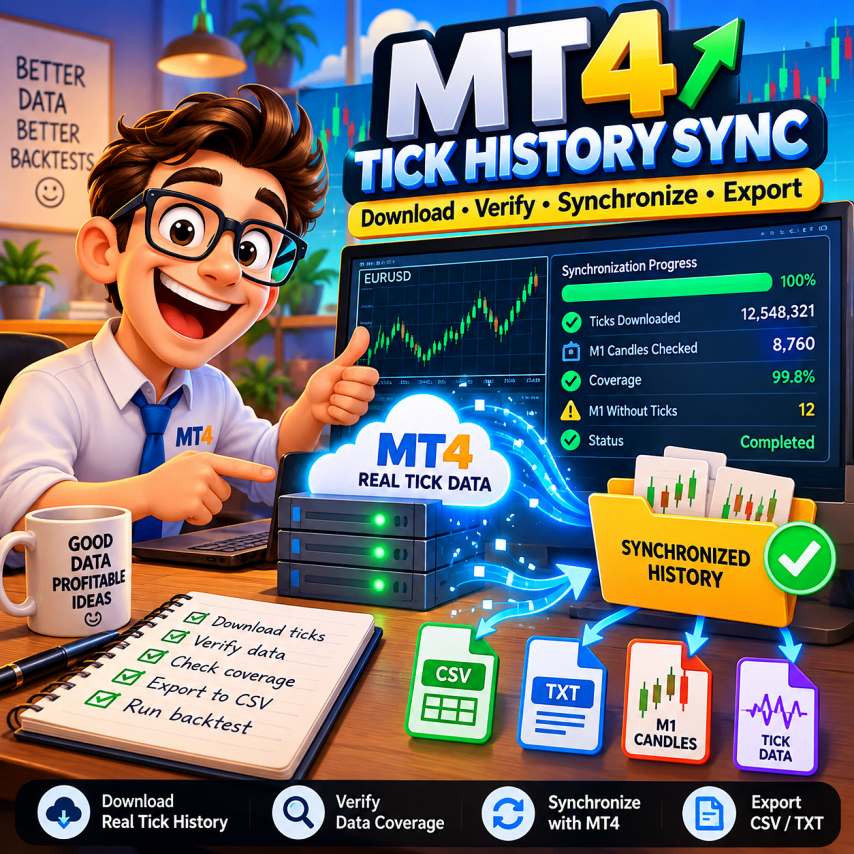
MT4 Tick History Sync – Real Tick Downloader, History Verification & Data Export

Download. Synchronize. Verify. Export. Make Every Backtest Count.

Are you confident that your MetaTrader 4 backtests are using complete real tick history?

Missing historical ticks can compromise the reliability of your backtesting results, especially when testing scalping strategies, high-frequency trading systems, and Expert Advisors that depend on precise price movements.

MT4 Tick History Sync by Zistilo is a professional MetaTrader 4 utility designed to download historical tick data, synchronize it with your terminal, verify tick availability against M1 candles, and export historical market data for further analysis.

Instead of blindly trusting your historical data, know exactly what is available, what is missing, and where potential gaps exist.

Key Features

1. Real Tick History Download & Synchronization

  • Download historical real tick data directly from your broker's available MT4 history.

  • Process large historical periods automatically, day by day.

  • Select any supported trading symbol and custom date range.

  • Synchronize downloaded ticks with the MetaTrader 4 terminal cache.

  • Automatically retry unsuccessful or incomplete data requests.

  • Verify download consistency through repeated tick-count checks.

2. Intelligent Tick History Verification

Not all historical price data is equally complete.

MT4 Tick History Sync compares real tick availability against historical M1 candles to identify potential weaknesses in your backtesting data.

  • Check whether every available M1 candle contains real ticks.

  • Detect M1 candles without corresponding real tick data.

  • Identify days with missing or incomplete tick history.

  • Distinguish normal market closures from unavailable historical data.

  • Highlight errors and days that cannot be fully verified.

  • Generate a clear coverage assessment for your selected period.

3. Professional Live Dashboard

Monitor the entire synchronization process directly on your MT4 chart.

The interactive visual dashboard displays:

  • Synchronization progress and current processing status.

  • Total historical ticks and M1 candles.

  • Historical coverage information.

  • M1 candles without real tick data.

  • Daily verification results.

  • Download and export statistics.

  • Final verification status.

No more guessing whether your historical data is ready for testing.

4. Flexible Historical Data Export

Go beyond MetaTrader 4 and use your market data in external research environments.

Export:

  • Real tick history.

  • M1 OHLC candle history.

  • Both datasets together.

Available formats:

  • CSV — ideal for Python, Excel, data science, and custom analysis.

  • TXT — tab-separated historical data.

Flexible file organization:

  • One file for the entire selected period.

  • Separate monthly files.

  • Separate daily files.

Choose between terminal-specific and shared MT4 file storage.

5. Detailed Verification Reports

Generate structured reports that make historical data auditing simple.

  • Daily synchronization and verification results.

  • Number of ticks downloaded per day.

  • M1 candle counts.

  • Number of M1 candles without real ticks.

  • Download attempts and error information.

  • Overall synchronization summary.

Useful for documenting data quality before running important strategy tests.

6. Designed for Serious Backtesting & Quantitative Research

Particularly valuable for:

  • Expert Advisor developers.

  • Gold (XAUUSD) scalping strategy developers.

  • Algorithmic trading researchers.

  • Quantitative analysts.

  • Python-based trading model development.

  • Historical market data analysis.

  • MT4 Strategy Tester users.

Why Choose MT4 Tick History Sync?

Because historical data quality matters.

A profitable backtest means very little if the underlying historical data is incomplete or unreliable.

MT4 Tick History Sync helps you discover missing tick coverage before investing hours in strategy optimization.

With automated synchronization, transparent verification, detailed reporting, and flexible exporting, it provides a practical foundation for more informed backtesting and trading research.

Simple Workflow

  1. Attach the script to any MT4 chart.

  2. Select your symbol and historical date range.

  3. Configure verification and optional export settings.

  4. Run the script and monitor the live dashboard.

  5. Review the final coverage results and generated reports.

No trading operations. No automatic orders. No changes to your trading strategy.

This utility focuses entirely on historical market data management.

Important Information

Historical tick availability depends on your broker and its available data.

The utility cannot create missing real ticks or guarantee that broker history is complete. It identifies missing coverage so you can evaluate the suitability of your data.

A successful verification confirms tick availability for the checked M1 candles; it does not independently certify the accuracy of every individual tick.

Take Control of Your Historical Data

Better data visibility. Better backtesting decisions. More confident strategy research.

Stop assuming your tick history is complete. Start verifying it.

MT4 Tick History Sync – Developed by Zistilo

Version 1.10 | MetaTrader 4 | Historical Data Utility


推荐产品
MQL5 博客: https://www.mql5.com/en/blogs/post/770814 MT4 版本: https://www.mql5.com/en/market/product/107986 上涨基线上涨 (RBR)、下跌基线上涨 (DBR)、下跌基线下跌 (DBD)、上涨基线下跌 (RBD)、公允价值缺口 (FVG) / 不平衡、隐藏基线 隆重推出“供需助手”(EA) 智能交易系统——助您精准自信地驾驭瞬息万变的金融市场。这款尖端智能交易系统经过精心设计,旨在为交易者提供实时供需动态洞察,助力其做出明智决策,并最大限度地发挥交易潜力。 主要功能: 自动区域识别:该智能交易系统采用先进的算法,自动检测并绘制价格图表上的关键供需区域。这些区域包括#rallybaserally、#rallybasedrop、#dropbaserally 和 #dropbasedrop,为交易者提供重要的参考点,帮助他们了解市场情绪和潜在的价格反转。 风险回报比计算:通过利用已识别的供需区域,该智能交易系统能够动态计算每个交易机会的风险回报比。这一关键指标使交易者能够评估交易
FREE
Please note: This demo will work only on EURUSD live chart. It will not run in the strategy tester. ChartTrader is a professional trading tool that every trader needs in their toolbox. It has been developed to work with the MetaTrader 4 platform. ChartTrader offers a number of options to make placing orders in the Forex market quick and easy. The GUI sits on the chart window, so there is no need to navigate to separate windows when placing orders. The program allows you to set pending and insta
FREE
Strategy creation : Create lines of stop loss, entry and take profit. Live parameters such as lot size, gap in pip from SL to TP, Risk/Reward ratio are update whenever lines of SL and Entry move.   This function allows traders to clarify their strategy before making any orders.   Risk management  - The risk calculation function calculates the volume for a new order taking into account the set risk and the distance from the Stoptloss to Entry Line.     In addition, maximum risk (%), RR value are
FREE
Real-time spread tracking and monitoring software Displays spread values in form of histograms on current timeframe of chart Convenient for analyzing spread changes, as well as for comparing trading conditions of different brokers By placing on desired chart, the spread changes at different trading times are displayed Additionally Fully customizable Works on any instrument Works with any broker
FREE
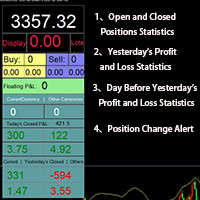
智能交易监控助手  —— 实时持仓统计、盈亏追踪与警报系统   实时监控 :自动统计持仓、平仓数据,清晰展示昨日/前日盈亏,告别手动计算!   智能警报 (仅付费版):持仓变动即时推送+声音提醒,不错过任何交易机会!   简洁直观 :一键加载,图表直接显示关键数据,提升决策效率。   兼容性强 :MT4/MT5双平台支持,适配任何交易策略。 免费版 vs. 付费版(订阅制) 功能 免费版 付费版(订阅) 持仓/平仓统计 ️ ️ +   历史数据导出 昨日/前日盈亏 ️ ️ +   多账户汇总 基础弹窗提醒 ️ 声音+推送警报 ️(支持自定义音效) 持仓异动即时通知 ️(如大额浮亏/盈利) 专属客服支持 ️(优先响应) 跟单和EA多品种交易高效统计和分析 “还在手动计算盈亏?90%的交易延迟来自反应滞后!【Smart Trade Monitor】自动监控持仓变动,付费版声音警报让您5秒内抓住机会,避免错过最佳平仓点!” 统计显示,使用警报功能的用户平均减少 23% 的非必要亏损。订阅付费版=每年节省 XX小
FREE
Market Profile 3
Hussien Abdeltwab Hussien Ryad
3 (2)
Market Profile 3 MetaTrader 4 indicator  — is a classic Market Profile implementation that can show the price density over time, outlining the most important price levels, value area, and control value of a given trading session. This indicator can be attached to timeframes between M1 and D1 and will show the Market Profile for daily, weekly, monthly, or even intraday sessions. Lower timeframes offer higher precision. Higher timeframes are recommended for better visibility. It is also possible t
FREE
Constructor
Aleksey Semenov
Constructor is a convenient tool for creating, (building strategies) testing and applying trading strategies and ideas, as well as testing and using separate indicators and their groups. Constructor includes opening, closing, deal tracking, averaging and recovery modules, as well as various trading options with and without averaging and martingale. You are able to connect up to 10 different external indicators. Find the detailed instructions in the attached pdf file. Trading settings averaging
FREE
After purchasing the Tpx Dash Supply Demand indicator, you must download this indicator which will link and feed market data to the Tpx Dash Supply Demand indicator and will provide all Supply Demand price signals, ATR Stop, VAH and VAL, trend values ​​with the ADX, and POC prices and locations in the market. Just download it and Dash will locate the indicator to retrieve the information!
FREE
Session High Low
Jerome Asiusin
This indicator help to mark the high and low of the session Asian,London,Newyork , with custom hour setting This indicator is set to count from minute candle so it will move with the current market and stop at the designated hour and create a accurate line for the day. below is the customization that you can adjust : Input Descriptions EnableAsian Enables or disables the display of Asian session high and low levels. EnableLondon Enables or disables the display of London session high and
FREE
The Saz_Timer indicator belongs to the Saz_Forex suite of professional indicators designed by Traders, for Traders. This indicator will show minutes and seconds of real time on the chart window. The indicator uses the OnTimer() event so it can update even while no ticks received on the chart. The text is shown toward the bottom right of the chart, encircled red in the screenshot. Inputs: Text Colour, allows selection of the colour for the text.
FREE
This panel is a part of the SupDem-Pro trading system and is used to search for the best opportunities for any available instruments. Which can be selected manually in the Market Watch (open it with CTRL + M). Using this trading panel in combination with ShvedSupDem-Pro_Zone allows to analyze multiple currency pairs with a single click. The panel allows to load any instruments from the Market Watch, from 6 major currency pairs up to all instruments (480). The indicator parameters Button Width -
FREE
Zig Zag 123
Stephen Reynolds
Zig Zag 123 tells us when a reversal or continuation is more likely by looking at the shift in supply and demand. When this happens a signature pattern appears known as 123 (also known ABC) will often break out in direction of higher low or lower high. Stop loss and take profit levels have been added. There is a panel that shows the overall performance of your trades for if you was to use these stop loss and take profit levels.  We get alerted if a pattern 123 appears and also if the price re
FREE
Automated Timeframe cycling with Symbols centered.  Force every timeframe onto one clock window, so the story you see on Daily is the same story you are slicing on H4, H1, and M1.  Traders usually flip timeframes and lose the span. A Daily chart shows a few weeks, then M15 shows a few hours, and the eye treats them as different markets. This indicator locks the window to N bars of the highest enabled timeframe — default 10 Daily — and maps every lower timeframe to that same stretch. You stay ins
FREE
FX Gambit
Boyan Atanassov
Zenner Trading Presents FX Gambit Streaming Live on YouTube:  https://youtu.be/rD9bCSxypio FX Gambit is an Adaptive, Market Neutral, Dual MT4 based Parallel Launch Automated Trading System, designed to respond to all directional combinations and permutations of the market, and still produce a Net Positive Outcome. There are 2 instances of MT4 with 2 charts in each. The LONG LEG of the HEDGE is in the left chart and the SHORT LEG on the right. The two MT4 instances exchange current market BID
FREE
AM Trade Manager
Ehab Basheer Abdulsalam Yahia
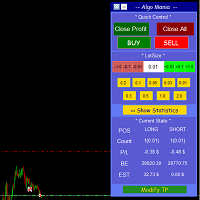
This is a trade manager specially for traders using martingale strategy and multiple trades at the same chart. features: - easy and fast to set the lot size with mouse clicks. - Close all trades and close profit trades with a single click. - Show details on the running symbol: - number of trades (long - short) and total lots of each direction. - total profit/loss on this symbol separately and  for both directions. - Break even point for both long and short. - Estimated profit if all the trades
FREE
Forex Market Profile and Vwap
Lorentzos Roussos
4.86 (7)
外汇市场概况(简称FMP) 这不是什么: FMP 不是经典的字母编码 TPO 显示,不显示整体图表数据配置文件计算,并且不将图表分段并计算它们。 它能做什么 : 最重要的是,FMP 指示器将处理位于用户定义频谱左边缘和用户定义频谱右边缘之间的数据。 用户只需用鼠标拉动指示器的每一端即可定义频谱。 当指标右边缘被拉到实时柱并进一步(到未来)时,指标被认为是“实时的”(它会更新新柱) 该指标将一个“锚点”对象放在它所附加的图表上,然后将该锚点与硬盘驱动器上的文件相关联。 这允许您在图表上运行一个持续的 FMP,您的设置在重新启动时持续存在,直到图表 - 或指标 - 关闭。 FMP 指标可以在一个图表上运行多个自身实例,并且您可以命名它们。(名称在指标数据中显示为半透明,以便您能够区分它们) 指标的数据窗口被快速切换控件包围,当它们的状态发生变化时,这些控件会更新该图表的指标设置的“内存”。 左手柄、右手柄和数据窗口的显示可以自定义。您可以从 13 种不同的样式组合中进行选择,或者选择每个部分的单独样式(从 13 种中选择)。 您可以选择显示与光谱左侧对齐、在中间对称居中、与光谱右侧
FREE
UT Bot MTF MT4
Evgenii Sutulov
5 (1)
一条不肯回吐一个点的移动止损,以及它翻转的那根确切K线。UT Bot MTF 在您的图表上画出 ATR 止损,标出每一次 BUY 和 SELL 翻转,还做了几乎没有哪个版本会做的事:告诉您过滤器丢掉了多少个信号、是哪个过滤器丢掉的,并在当前K线上的箭头仍可能消失时用颜色提醒您。免费,没有试用期,没有锁住的功能。 引擎刻意做得简单。止损按选定的 ATR 倍数跟随价格,只朝行情方向收紧,从不后退。当价格收盘穿过它时,止损翻到另一侧,指标标出一个 BUY 或一个 SELL。可以选择让整套计算改用平均K线(Heikin Ashi)的收盘价,而不是真实收盘价,这样翻转会更少,也会更晚。 本产品围绕这台引擎补上的,正是决定它能否真正用起来的部分:三个彼此独立的过滤器、每个过滤器丢掉了什么的诚实交代,以及一块从不把当前K线上的信号说成已经定了的面板。 三个过滤器 每个过滤器出厂都是关闭的。每一个都是关于市场的一条独立假设,都可以单独打开。趋势过滤器只保留与更高周期上某条移动平均线方向一致的信号,周期、参数和均线算法都由您选。比过滤器自身数据更早的信号不作判定,原样放行,面板会告诉您这样的信号有多少个
FREE
Colored Candle Time
Saeed Hatam Mahmoudi
Candle Time (MT4) The Candle Time indicator shows the remaining time for the current candle on the active chart timeframe. It adapts automatically to the chart period and updates on every tick. This is a charting utility; it does not provide trading signals and does not guarantee any profit. Main functions Display the time remaining for the current candle on any timeframe (M1 to MN). Color-coded state: green when price is above the open (up), gray when unchanged, and red when below the open (do
FREE
The indicator analyzes the change in the minimum and maximum prices of the previous bars fixing the entrance of the big players. If the change (delta) increases, a signal is displayed on the graph in the form of an arrow. At the same time, virtual trade on history is carried out. In the free version, virtual trade is performed without refills in case of a repeat of the signal. The results of virtual trading in the form of losses / losses, profitability, drawdown and transaction lines are display
FREE
Night Scalper EA Lite
Robots4Forex Ltd
2.25 (4)
The Night Scalper EA Lite is a fully automated Expert Advisor that trades at night and relies on price reversion. The EA trades using market orders and has the option to use time averaging to improve performance. This EA works best on EURUSD using the M5 timeframe, but will also work on AUDUSD, GBPUSD, NZDUSD, USDCAD, USDCHF and likely many more. A VPS is advisable when trading this system and a low spread and commission based broker is best. Check the comments for back test results and optimiz
FREE
VWAP 带告诉您价格在哪里。Algorex VWAP Odds 告诉您这在过去意味着什么。 对于当前K线,指标读取三项信息:纽约时间的时刻、与时段 VWAP 的距离(以 sigma 计)以及新鲜度,即价格上次触及 VWAP 以来的分钟数。针对这一具体情形,面板显示: 2 小时内回到 VWAP 的概率(%) 时段结束前回到 VWAP 的概率(%) 平均回归时间 Heat:价格通常先继续远离多少(平均值和 80 % 水平) 概率阶梯:在价格到达之前,每条带上标出的 2 小时概率 内置统计 指标内含 2015 至 2026 年纳斯达克 100、标普 500 和黄金的 5 分钟数据统计表,并能识别常见的 CFD 品种名称。此外,它还会从所在图表中学习并将两者融合。在任何其他品种上,它只从图表学习,并标出数据不足。 它不是什么 它是背景工具,不是信号。用这些概率判断 VWAP 是否是现实的目标、预计会有多大的反向波动,以及当天是否表现为趋势日。 设置 内置统计(Auto、纳斯达克 100、标普 500、黄金、仅图表)、内置统计的权重、状态阈值、概率阶梯、VWAP 和三条带、状态变化时提醒
FREE
This MQL4 code is a custom indicator that draws multiple colored rectangles on a chart, spaced apart by a defined pip distance, and projected into the future. Here's a brief breakdown: Purpose: Draws several horizontal rectangles (zones) starting from a specified price. Rectangles are spaced apart vertically by a pip distance. Colors alternate between FirstColor and SecondColor . Rectangles can be drawn behind candles and optionally filled. Each rectangle extends into the future for a specified
FREE
本程序是为交易者和投资者设计的简单图表播放器,旨在帮助您回放历史市场数据,从而更好地理解市场的动态和价格走势。   使用本播放器,您可以逐根推进K线,按顺序确认市场走势,   并可以分析特定交易策略在不同市场情况下的表现。   通过反复观察关键价格点和趋势变化,   您能够有效地提升交易决策的准确性和操作信心。   播放过程中可以暂停,   并在需要时继续播放。   【功能特点】   从过去向未来方向自动播放   以固定间隔逐根K线推进   支持播放中的暂停   【播放规格】   播放方向:过去 → 未来   播放速度:固定   移动K线数量:1根固定   播放暂停 / 继续   使用END结束播放   【操作方法】   Pause / Restart:暂停或继续播放   END:结束播放并停止程序 版本比较   下表显示了本产品(Player版)与高端型号(Full Version)之间的功能差异。虽然用户界面(控制面板)的布局完全相同,但可用的模式和设置范围有所不同。 功能项目 Player版 (本产品) Full Version (完整版) 用户界面 完全相同 (通用
FREE
期权市场实时伽马敞口(GEX)水平显示在SP500图表上。每30分钟更新。 Full description: GammaOrderBook Free — 一体化EA,直接在图表上下载并显示伽马敞口(GEX)数据。无需单独指标。 图表显示内容 • GEX Bars — 看涨和看跌伽马水平以水平条形显示,按ETF/Index来源分色 • Zero Gamma Line — 做市商对冲方向改变的关键水平 • Panorama V4 — 多时间框架伽马定位 • 支撑/阻力 — 基于期权未平仓合约的关键水平 • Bias Panel — BULL/BEAR/NEUTRAL信号、OI定位、成交量比率 • Distance Display — 实时显示与Zero Gamma的距离 支持品种 • ES / SP500 (US500) 数据更新 • 每30分钟 • 无需邮箱、许可证或订阅 — 挂载即可交易 设置 1. 将EA附加到SP500或US500图表 2. 在工具 > 选项 > EA交易中添加URL: https://gamma-auth.gammaorderbook.com
FREE
PZ Penta O MT4
PZ TRADING SLU
2.33 (3)
The Penta-O is a 6-point retracement harmonacci pattern which usually precedes big market movements. Penta-O patterns can expand and repaint quite a bit. To make things easier this indicator implements a twist: it waits for a donchian breakout in the right direction before signaling the trade. The end result is an otherwise repainting indicator with a very reliable trading signal. The donchian breakout period is entered as an input. [ Installation Guide | Update Guide | Troubleshooting | FAQ | A
FREE
AP VWAP Bands Pro (MT4) Volume-weighted average price with ±σ bands for clear intraday bias, mean-reversion zones, and dynamic support/resistance. Works on crypto (incl. BTC), FX, indices, and metals. Uses tick-volume when real volume isn’t available. What it shows VWAP line (volume-weighted mean price). Two envelopes around VWAP (default ±1σ and ±2σ) to highlight balance vs. extension. Reset modes: Day, Week, or Anchor Time (HH:MM) to start VWAP where you need it (e.g., exchange open). Why
FREE
BoxInside MT4
Evgeny Shevtsov
4.86 (7)
This indicator calculates the volume profile and places labels that correspond to the VAH, VAL and POC levels, for each candle individually. Indicator operation features The indicator works on the timeframes from M5 to MN, but it uses the history data of smaller periods: M1 - for periods from M5 to H1, M5 - for the H4 period, M30 - for the D1 period, H4 - for the W1 period, D1 - for the MN period. The color and location of the VAL, VAH and POC labels on the current candle are considered to be c
FREE
SX Supply Demand Zones accurately identifies and draws high-probability Supply and Demand zones using a sophisticated algorithm. Unlike traditional indicators that clutter your chart, this indicator is designed with a focus on performance and a clean user experience. New Unique Feature: Interactive Legend System What truly sets this indicator apart from everything else is the Interactive Control Legend. You have a professional dashboard directly on your chart that allows you to: Show/Hide: Ins
FREE
By applying this expert onto any char window, you are able to force download the historical data upon all time-frame (PERIOD_M1, PERIOD_M5, PERIOD_M15, PERIOD_M30, PERIOD_H1, PERIOD_H4, PERIOD_D1, PERIOD_W1, PERIOD_MN1) of 28 major pairs. The 28 major pairs are the combination of the 8 major currencies. 8 major currencies "USD", "EUR", "GBP", "JPY", "AUD", "NZD", "CAD", "CHF" 28 pairs "AUDCAD","AUDCHF","AUDJPY","AUDNZD","AUDUSD","CADCHF","CADJPY" "CHFJPY","EURAUD","EURCAD","EURCHF","EURGBP","E
FREE
ProfileVolumesMarket
Sergey Zhukov
5 (3)
The ProfileVolumesMarket indicator calculates tick volume on each price level in a selected range. Volume is vital when determining strength and therefore significance of price levels. The calculation range is set by a trader by means of moving two vertical lines. Thus the indicator allows to track important levels on different steps of a symbol price formation. A histogram of volume profile can be displayed on the chart (or removed from the chart) if you press "ON" ("OFF") button. When you chan
该产品的买家也购买
欢迎来到 Trade Manager EA——这是一个终极风险管理工具,旨在使交易变得更直观、精准和高效。它不仅仅是一个下单工具,而是一个用于无缝交易计划、仓位管理和风险控制的全面解决方案。不论您是新手交易员、资深交易员,还是需要快速执行的剥头皮交易员,Trade Manager EA 都可以满足您的需求,适用于外汇、指数、大宗商品、加密货币等各种市场。 借助 Trade Manager EA,复杂的计算已成过去。只需分析市场,在图表上用水平线标记入场、止损和止盈,设置您的风险水平,Trade Manager 就会立即计算出理想的头寸规模,并实时显示以点、账户货币计价的止损和止盈。每笔交易都得以轻松管理。 主要功能: 头寸规模计算器 :根据定义的风险瞬间确定交易规模。 简单的交易计划 :在图表上用可拖动的水平线直接计划交易,设置入场、止损和止盈。 实时显示 SL 和 TP :以账户货币、点或分显示止损和止盈,便于分析。 高级保护工具 盈亏平衡选项 : 基本盈亏平衡 :当您的交易达到设定水平时自动保护利润。 多级盈亏平衡 :设置多达 4 个级别以逐步保护利润。 尾随止损选项 : 基本尾随
Exp COPYLOT CLIENT for MT4
Vladislav Andruschenko
4.69 (65)
MetaTrader 4 专业交易复制器 快速、专业、可靠的 MetaTrader 4 交易复制器。 COPYLOT 可在 MetaTrader 4 与 MetaTrader 5 终端之间复制外汇交易,并为不同账户类型和交易场景提供灵活的同步方案。 COPYLOT MT4 版本支持: MetaTrader 4 → MetaTrader 4 MetaTrader 5 Hedge → MetaTrader 4 MetaTrader 5 Netting → MetaTrader 4   MT5 版本 完整说明 + DEMO + PDF 如何购买 如何安装 如何获取日志文件 如何测试与优化 Expforex 的全部产品 您也可以使用 MetaTrader 5 版本,在 MetaTrader 5 → MetaTrader 5 和 MetaTrader 4 → MetaTrader 5 之间进行复制: COPYLOT CLIENT for MT5 COPYLOT 是一款专业级交易复制器,可稳定运行于 2、3 甚至 10 个终端之间。 支持从模拟账户和投资者密码账户进行复制 可同时运行在多个终端上
Local Trade Copier EA MT4
Juvenille Emperor Limited
4.96 (111)
Local Trade Copier EA MT4 是一款快速、灵活的交易复制工具,用于在同一台 Windows 电脑或 Windows VPS 上的多个 MetaTrader 4 账户之间复制和管理交易。 它将本地交易同步与 Receiver 端的手数管理、风险管理、交易过滤、品种映射、交易管理和账户保护功能结合在一起。 只需约 1 分钟 即可完成 Transmitter 和 Receiver 终端的设置,并可在同一经纪商或不同经纪商的账户之间复制手动交易或 EA 交易。在合适的条件下,本地 MetaTrader 终端之间的交易信息可以在 0.5 秒以内 完成同步。实际交易执行速度取决于经纪商延迟、网络状况、电脑/VPS 性能以及终端负载。 购买前先试用免费演示版 您可以在 MT4 模拟账户上测试 功能完整的 Local Trade Copier EA MT4 免费演示版 ,每次可使用 4 小时 : 下载 Local Trade Copier EA MT4 免费演示版 将下载的文件放入: MT4 → 文件 → 打开数据文件夹 → MQL4 → Experts 然后重新启动 MT
Trade Assistant MT4
Evgeniy Kravchenko
4.43 (197)
它有助于计算每笔交易的风险,容易安装新的订单,具有部分关闭功能的订单管理, 7 种类型的追踪止损和其他有用的功能。 附加材料和说明 安装说明 - 应用程序说明   线条功能  - 在图表上显示开仓线、止损线、止盈线。 有了这个功能,就可以很容易地设置一个新的订单,并在开仓前看到它的附加特性。   风险管理  - 风险计算功能在考虑到设定的风险和止损单的大小的情况下,计算新订单的成交量。它允许你设置任何大小的止损,同时观察设定的风险。 批量计算按钮 - 启用 / 禁用风险计算。 在 " 风险 " 一栏中设置必要的风险值,从 0 到 100 的百分比或存款的货币。 在 " 设置 " 选项卡上选择风险计算的变量: $ 货币, % 余额, % 资产, % 自由保证金, % 自定义, %AB 前一天, %AB 前一周, %AB 前一个月。   R/TP 和 R/SL - 设置止盈和止损的关系。 这允许你设置相对于损失的利润大小。 例如, 1 : 1 - 这决定了 TP = SL 的大小。 2 : 1 - 这意味着 TP 是 SL 的两倍。 RR - 它禁用比率。   订单管理 该面板支持市场
Trade Dashboard MT4
Fatemeh Ameri
4.96 (55)
疲于复杂的订单下达和手动计算?Trade Dashboard 是您的解决方案。凭借其用户友好的界面,订单下达变得轻而易举,只需点击一下,您就可以开设交易、设置止损和止盈水平、管理交易手数,并计算风险回报比,让您只需专注于您的策略。告别手动计算,使用 Trade Dashboard 简化您的交易体验。 立即下载演示版本 。 您可以在这里找到仪表盘功能和特性的详细信息 。 加入 Telegram 频道 。 购买后请给我发消息以获取支持。如果您需要添加更多功能,可以在产品的评论区留下您的想法,我愿意听取任何建议,希望您能在使用我的产品时获得最佳体验 。 这是 MT5 版本。 风险管理:使用 Trade Dashboard,可以将您的风险设置为账户余额或权益的百分比,或将风险设置为总金额。在图表上直观地定义您的止损,让工具准确计算每个货币对的适当手数。该工具还可以根据您期望的风险回报比自动设置止盈水平。它甚至可以在手数计算中涵盖佣金和点差费用。此外,您的止损和止盈可以转变为虚拟水平,隐藏于经纪商。通过 Trade Dashboard 的高级风险管理功能,掌控风险,保护您的资本。 交易线
Ultimate No Nonsense FX Backtester - You can Run Forward Test Simulation with this tool! Do Not Download the Demo Here, Please Read Below! Step by Step Manual Guide PDF for this backtester PDF List of Commands(Shortcuts) for this backtester Ultimate NNFX Backtester is a powerful utility tool that significantly reduces the length of backtesting process for NNFX followers.  As well as for Forex traders that operates their entries and exits at the close of a candle and manage the risk using ATR.
The product will copy all telegram signal to MT4   ( which you are member  ) , also it can work as remote copier.  Easy to set up, copy order instant, can work with almost signal formats, image signal, s upport to translate other language to English Work with all type of channel or group, even channel have "Restrict Saving Content", work with  multi channel, multi MT5 Work as remote copier: with signal have ticket number, it will copy exactly via ticket number. Support to backtest signal. How to
Simple button panel of trade on your chart with OneClick VZ . This trade panel will make it easier for you. Equipped with several functions that make it very easy for you. You can try Trial Version OneClick V1 in here . This version includes: Open Order Buy Open Order Sell Open Pending Order [Buy Limit - Buy Stop - Sell Limit-Sell Stop] Close ALL orders Close Order Buy Close Order Sell Delete Pending Order [Buy Limit - Buy Stop - Sell Limit-Sell Stop] Order Management: Stop Loss Take Profit Tra
Trade Indicator Assistant is a powerful MT4 utility designed to turn indicators into automated trading systems. Its main feature is the ability to automatically detect an indicator’s   BUY and SELL signal buffers , without requiring you to know the buffer numbers, search through indicator settings, or modify the indicator source code. Bonus Indicator: After purchasing Trade Indicator Assistant, contact me to receive Trade Signal Pro completely free as a bonus indicator. [Download Demo Version]


Practice Simulator 是一款集回测、交易练习和实盘交易于一体的全功能交易模拟器。无论是需要练习的初学者,还是进行交易数据分析的经验丰富的交易者,都可以使用本工具。 您可以将其用于外汇交易、市场分析和交易策略优化。即使在市场休市或节假日期间,也可以随时进行模拟交易。简洁而功能丰富的界面提供风险管理和交易辅助功能。 详细信息请参阅 安装与用户指南 。 主要功能 模拟交易 – 随时进行交易,即使在市场休市或节假日期间也可以使用。支持多个图表同步和MTF。 回测 – 使用历史数据测试交易策略,并重现过去的交易。 实盘交易 – 使用相同的界面顺畅地过渡到实盘交易。 易用的界面 – 一键下单、拖放设置TP/SL以及批量平仓。 订单信息提示 – 将鼠标悬停在买入/卖出按钮、挂单按钮或TP/SL线上,即可在执行订单前查看手数、盈亏平衡点、TP、SL、RR等订单信息。 高级风险管理 – 自动计算手数、Dynamic TP/SL以及用于风险控制的移动止损。 Strategic Close – 自动执行平仓、移动止损和部分平仓。 Restart/TimeLoop – 从保存的节点继续,并重现
News Filter EA: Advanced Algo Trading Assistant News Filter EA is an advanced algo trading assistant designed to enhance your trading experience. By using the   News Filter EA , you can integrate a Forex economic news filter into your existing expert advisor, even if you do not have access to its source code. In addition to the news filter, you can also specify   trading days   and   hours   for your expert. The News Filter EA also includes   risk management   and   equity protection   features
Equity Protect Pro:全方位账户保护专家,让您的交易更安心 如果您正在寻找账户保护、净值保护、投资组合保护、多策略保护、利润保护、利润收割、交易安全、风控程序、自动风控、自动清仓、条件清仓、定时清仓、动态清仓、跟踪止损、一键关闭、一键清仓、一键还原等功能,Equity Protect Pro 就是您要找的程序。 它配置简单,当到达预设条件时,可关闭所有图表,同时支持关闭信号订阅(这意味着所有交易程序也将停止运行)。此时,将不再有新订单产生,最后再关闭所有订单,有效防止意外损失,让您在交易过程中高枕无忧。 Equity Protect Pro (Technical Manual) Equity Protect Pro Demo Version for yo u to test   Equity Protect Pro MT4 Demo.ex4        Equity Protect Pro MT5 Demo.ex5 Equity Protect Pro 拥有 14 个核心功能,它们都是独立运行的。您可以根据您的交易策略,选择合适的功能组合使用。这些功能默认为关闭状态


Trailing Stop and Breakeven Manager - Trail Architect MT4 Auto Trailing Stop and Breakeven Manager for MT4. Protect profit with automatic break even, then trail your stop loss using Classic, Step, ATR or Candle trailing - all from one professional panel. Every trader knows the pain: a winning trade turns into a loss because the stop loss was never moved. Watching the chart all day just to move your stop to break even and trail the stop loss by hand is exhausting - and one missed move can wipe o
TradePanel MT4
Alfiya Fazylova
4.84 (95)
交易面板是一款多功能交易助手。该应用包含超过50种手动交易功能,并允许您自动执行大多数交易任务。 应用程序说明 : https://www.mql5.com/zh/blogs/post/761102 用于模拟账户的应用程序试用版: https://www.mql5.com/zh/blogs/post/762579 如何安装应用程序: https://www.mql5.com/zh/blogs/post/762580 如何在可视化模式下测试应用程序: https://www.mql5.com/zh/blogs/post/770278 如何在VPS MetaTrader上安装应用程序: https://www.mql5.com/zh/blogs/post/770196 贸易. 只需单击一下即可执行交易操作: 打開掛單和頭寸,並自動計算風險。 一鍵打開多個訂單和頭寸。 打開訂單網格。 按組別關閉掛單和頭寸。 反轉頭寸方向(關閉買入>打開賣出,關閉賣出>打開買入)。 鎖定頭寸(通過開啟缺少的頭寸,使買入和賣出頭寸的數量相等)。 一鍵部分關閉所有頭寸。 將所有頭寸的止盈和止損設置在同一價格水平。
Grid Manual MT4
Alfiya Fazylova
4.71 (17)
Grid Manual是一个交易面板,用于处理订单网格。 该实用程序是通用的,具有灵活的设置和直观的界面。 它不仅可以在亏损方向上设置订单网格,还可以在盈利方向上设置订单网格。 交易者不需要创建和维护订单网格,实用程序会这样做。 打开一个订单就足够了,Grid manual会自动为它创建一个订单网格,并伴随它直到非常关闭。 完整说明和演示版 此處 。 该实用程序的主要特性和功能: 伴隨以任何方式打開的訂單,包括從移動終端打開的訂單。 適用於兩種類型的網格:“限制”和“停止”。 使用兩種方法計算網格間距:固定和動態(基於 ATR 指標)。 允許您更改未結訂單網格的設置。 顯示圖表上每個網格的盈虧平衡水平。 顯示每個網格的利潤率。 允許您一鍵關閉網格中的盈利訂單。 讓您一鍵關閉每個訂單網格。 允許您對訂單網格應用追踪止損功能。 允許您在訂單網格上應用將訂單網格的止損轉移到盈虧平衡水平的功能。 相對於訂單網格的盈虧平衡水平自動重新排列止盈(僅在限價網格模式下,距離取決於所選的計算類型:“保守”或“激進”)。 最多可管理 20 個訂單網格,每個網格最多可包含 100 個訂單。
DoIt Trade Manager - Risk Panel and EA Position Manager for MT4 Finding an entry is only half the job. Many execution mistakes happen in position sizing, partial exits, breakeven, trailing and account protection. DoIt Trade Manager puts the complete workflow on the chart. Plan the risk before entry, execute the order and apply consistent management rules to your manual trades and selected positions opened by other EAs. Full setup guide + how the free version works and where PRO starts :  https:/
Black Week: 购买价 69.99 USD。优惠将于 11 月 27 日(星期五)结束。 Telegram to MT4 Multi-Channel Copier   可将您 Telegram 和 Discord 频道中的交易信号自动复制到 MetaTrader 4。无需机器人、无需浏览器扩展、无需手动复制。信号一到 Telegram 或 Discord,EA 几秒内就在您的终端开仓。 在复制某个频道之前,内置回测器还能告诉您该频道在您的账户上会有怎样的表现。 产品包含两个组件:一个监听您 Telegram 频道的 Windows 应用程序,以及在 MT4 终端执行信号的本 EA。同时提供 MT5 版本   点此 . 购买前先试用:   应用程序可免费下载。连接您自己的频道,查看每条信号的读取结果。Backtest 选项卡和实际交易需要已购买或已租用的 EA。本页面的免费演示版只能在策略测试器中运行,而策略测试器无法读取 Telegram 和 Discord。 设置指南与应用下载:   https://www.mql5.com/zh/blogs/post/779480 了解如何
AZ Trade Recovery Assistant MT4   combines manual trading flexibility with intelligent automated management.This advanced on-chart panel isn’t just for trade execution — it’s a complete trade management assistant. You can open or close positions instantly, adjust lot size, manage trailing stops, and modify Take Profit or Stop Loss — all directly from the panel. It’s built for traders who want full control of their trades with smart automation running in the background. What truly makes this assi
CloseIfProfitorLoss with Trailing
Vladislav Andruschenko
4.88 (32)
Close If Profit or Loss with Trailing for MetaTrader 4 — 按总盈利或总亏损自动平仓 这是一款适用于 MetaTrader 4 的实用型交易管理工具。当总盈利或总亏损达到您设置的水平时,EA 可以自动关闭选定的持仓。 Expert Advisor 会监控当前交易,计算浮动盈亏,并可使用利润跟踪功能,帮助交易者比手动操作更快地管理风险和锁定结果。 MetaTrader 4 仍然被大量手动交易者、剥头皮交易者、网格交易者和 EA 用户使用。但 MT4 本身没有一个方便的内置工具,可以按一组订单的总结果来自动平仓。这个工具正是为了解决这个问题。 Close If Profit or Loss with Trailing 可用于手动交易,也可以与其他 Expert Advisors、网格系统、加仓策略、恢复策略和多品种交易一起使用。您设置规则,EA 负责监控结果,并在条件达到时执行平仓。 MT5 版本 | 完整说明 + DEMO + PDF | 如何购买 | 如何安装 | 如何获取日志文件 | Expforex 的所有产品 为什么 MT4
需要支持?如何设置?有问题?请用您的语言在这里提问,快速回复: https://www.mql5.com/en/market/product/139089/comments 试用版下载 Copy Cat More (跟单猫) MT4 交易跟单器 (Trade Copier) 不仅仅是一个简单的本地交易跟单器;它是一套 完整的风险管理与执行框架 (risk management and execution framework), 专为当今的交易挑战而设计。从自营公司 (prop firm) 挑战到个人投资组合管理,它凭借 稳健的执行、资金保护、灵活的配置和先进的交易处理的结合,适应各种情况。 该跟单器同时支持   主控端 (Master,发送方) 与 受控端 (Slave,接收方)   两种模式,可实时同步市价单与挂单、交易修改、部分平仓以及对锁平仓 (Close By) 操作。它兼容模拟与真实账户、交易或投资者登录,并通过持久化交易记忆 (Persistent Trade Memory) 系统确保恢复——即使 EA、终端或 VPS 重启也不例外。可借助唯一 ID 同时管理多个主控
Trade copier MT4
Alfiya Fazylova
4.62 (37)
Trade Copier 是一种专业实用程序,旨在复制和同步交易账户之间的交易。 复制发生从供应商的帐户/终端到收件人的帐户/终端,安装在同一台计算机或 vps 上。 在购买之前,您可以在演示帐户上测试演示版本。 演示 这里 。 完整说明 这里 。 主要功能和优点: 支持复制MT4>MT4、MT4>MT5、MT5>MT4,包括МТ5 netting账户。 供应商和收件人模式在同一产品中实现。 简单直观的界面,允许您直接从图表中实时控制复制。 连接中断或终端重新启动时不会丢失设置和位置。 允许您选择要复制的符号,也可以替换接收者的符号,例如 EURUSD> USDJPY。 允许为每个符号设置个性化的复制设置。 支持回拷贝。 能够仅复制某些订单。 允许您设置开仓交易价格的最大差异和最大时间延迟。 正确复制部分订单关闭的执行。 计算复制手数的几种方法。 同步止盈和止损。有几种方法可以计算它们的位置。 支持通过执行在“Market account”上工作,其中 SL / TP 仅在开仓后设置。 如何使用简单的设置复制交易 将供应商终端和接收终端安装在同一台计算机或 VPS 上。 在供应商终端上
RS Trade Copier - 超快 本地跟单系统,配备 真正的 图形界面。别再手动输入账号了。告别200多个晦涩的参数设置。 一款可靠且灵活的工具,用于在 MT4 和 MT5 多个终端之间复制交易操作。适合专业交易员、信号服务商以及个人投资者使用。能够以高精度和低延迟将一个或多个信号源(Provider)的 交易操作同步 到一个或多个接收端(Client)。支持简单自动配置和高级手动设置。不会干扰手动或其他 EA 开的订单。完全 在 MT4 本地运行 ,无需第三方服务器。 RS Trade Copier 与其他解决方案的对比 RS Trade Copier 其他解决方案 设置 可视化分步向导。 设置大约需要 1 分钟。 200 多个晦涩的输入参数。 设置大约需要 20 分钟。 速度 异步交易操作。* 批量平仓 50 个头寸仅需 ~1 秒。 缓慢的顺序执行。 批量平仓 50 个头寸需要约 25 秒。 界面 真正的图形界面,支持 11 种语言的工具提示。 无需手册即可上手。 EA 属性中“输入参数”选项卡下的长长参数列表。 需要阅读所有文档。 批量操作 完全支持。 接收端上的批量平仓
Telegram to MT4 Coppy
Sergey Batudayev
4.09 (11)
Telegram 到 MT4: 终极信号复制解决方案 使用 Telegram 转 MT4 简化您的交易流程,这款先进的实用程序旨在将交易信号直接从 Telegram 频道和聊天复制到您的 MetaTrader 4 平台,无需 DLL 文件。这款强大的解决方案确保信号执行的无缝衔接,拥有无与伦比的精度和丰富的自定义选项,从而节省您的时间并提高您的效率。 [ Instructions and DEMO ] 主要特点 直接 Telegram API 集成 通过电话号码和安全码进行身份验证。 使用用户友好的 EXE 桥轻松获取和管理聊天 ID。 添加、删除和刷新多个频道/聊天以同时复制信号。 使用高级过滤器进行信号解析 跳过包含自定义例外词(例如“报告”、“摘要”)的不需要的信号。 支持灵活的 SL 和 TP 格式:价格、点数或点数。 当信号指定点而不是价格时自动计算入场点。 订单定制和灵活性 使用多种模式定制订单规模:固定手数、动态手数(% 风险)或特定符号手数。 使用信号数据或自定义参数调整 SL/TP。 配置滑点、挂单到期和重试设置以实现完美执行。 综合符号管理 排除特定符号或匹配自定义
Trading History MT4
Siarhei Vashchylka
5 (9)
Trading History - A program for trading and money management on the history of quotes in stratagy tester. It can work with pending and immediate orders, and is equipped with trailing stop, breakeven and take profit functions. Very good for training and testing different strategies. Manual (Be sure to read before purchasing) Advantages 1. Allows you to test any trading strategy in the shortest possible time 2. An excellent simulator for trading training. You can gain months of trading experience
Exit Manager
Victor Christiaanse
5 (2)
Close every trade at the right moment, automatically. Most traders spend their energy on the entry and then close too early, too late, or on a feeling. Exit Manager takes the exit off your hands. Open a trade the way you always do, by hand or with any Expert Advisor, and Exit Manager watches it and closes it, fully or partly, when the indicator signal you chose appears. You can see it working on the chart. A clean panel on your chart shows, for every open trade, which rule will close it next, ho
Forex Sentiment Trader PRO EA
Salvador Martinez Ramos
5 (2)
I have created this  MT4 Tool EA to test if it is more profitable to trade in favor of the mass sentiment of traders or it is better to go against it. Remember to authorize Myfxbook url in WebRequest options in MT4 .  Features: Market Sentiment update every 30 minutes SL TP BreakEven Trail SL Daily Target Profit Max Daily DrawDown (Useful for prop firm) Max Spread Filter Time Filter Custom Trade Comments Protection in case a pair is not read correctly from the web (Prevents improper closing or o
来自CBOE期权数据的实时伽马敞口(GEX)水平。ES、NQ、RTY、黄金。每2分钟更新。 Full description: GammaOrderBook — 一体化EA,实时下载并显示GEX数据。无需单独指标。 图表显示内容 • GEX Bars — 看涨/看跌伽马水平以水平条形显示,按ETF/Index来源分色 • Zero Gamma Line — 做市商对冲方向改变的关键水平 • Panorama V4 — 多时间框架伽马定位 • 支撑/阻力 — 基于期权未平仓合约的关键水平 • Bias Panel — BULL/BEAR/NEUTRAL信号、OI定位 • Distance Display — 实时显示与Zero Gamma的距离 • 公告系统 — 重要更新直接显示在图表上 支持品种 • ES / SP500 • NQ / Nasdaq • RTY / Russell • GC / 黄金 数据更新 • 每2分钟(实时) • 支持多图表同时运行 • 无需邮箱、许可证或订阅 — 一次性购买 设置 1. 将EA附加到任何支持的图表 2. 在工具 > 选项 >
Drawdown Minimizer for MetaTrader 4 - your EAs pay in, old losers get paid off. This utility runs next to your other Expert Advisors and never opens a trade. It keeps a savings book of the net realized profit of your whole account and uses it to close the oldest losing positions of the EAs you choose - slice by slice, oldest first. WHY IT EXISTS Made by traders, for traders. One of our grid EAs got stuck in drawdown for months. The old positions did not come back, and they paid swap every single
Trade Autopilot 管理您在电脑或手机上手动开立的交易。没有止损时它会添加止损,将其移至保本,平掉部分仓位,并对剩余仓位进行追踪止损。一切都以 R(您的初始风险)和 ATR 来衡量,因此同一设置适用于黄金、指数和外汇。 首发价(至 12 月 15 日):30 USD,比常规价 60 USD 优惠 50%。 何时入场由您决定。之后由 Trade Autopilot 负责管理这笔交易。它不开立交易,也不提供信号。将它加载到一个图表上,即可管理账户中所有交易品种的交易。 每笔交易的四个步骤 Stop loss (止损):如果您开立的交易没有止损,它会在距入场价 2 ATR 处设置止损。这个距离即为 1R。 Breakeven (保本):达到 +1R 时,止损移至入场价加上点差和一个小余量。 Partial (部分平仓):达到 +1.5R 时,平掉 50% 的仓位并锁定利润。 Trailing (追踪):部分平仓后,止损以 1.5 ATR 的距离跟随价格,并且只朝对您有利的方向移动。 以上是 Balanced 风格的数值。如果您设置了止盈,它永远不会被改动。 只需一项设置:管理风格
ATTENTION: The Indicator cannot be backtested, as it is generated exclusively from live intraday calculations based on options flow. GEX Level Converter – Gamma Exposure Mapping for CFD Charts NASDAQ-100 edition — for US100 · NDX · NAS100 · USTECH and every Nasdaq-100 CFD equivalent Instantly see professional options-market levels directly on your MetaTrader Nasdaq-100 CFD chart. The GEX Level Converter translates the daily Gamma Exposure (GEX) zones of the NDX options market into precise pri
作者的更多信息
Zistilo EA X01
Hussein Adnan Kadhim
Zistilo EA X01   is an automated MetaTrader 5 trading system designed primarily for Gold (XAUUSD) . The EA combines a proprietary multi-timeframe Zistilo signal engine with automated BUY/SELL execution, individual and basket-based trade management, weighted fair-price calculations, session controls, economic news protection, floating-loss protection, and daily profit management. The system analyzes market direction and signal strength across several configurable timeframes and manages every trad
Auto TP SL EA
Hussein Adnan Kadhim
Auto TP SL – Smart Trade Manager for MetaTrader 5 Protect Your Trades. Automate Your Exits. Take Full Control. Managing multiple trading positions manually can be stressful, time-consuming, and prone to costly mistakes. Auto TP SL by Zistilo is a powerful and easy-to-use trade management Expert Advisor for MetaTrader 5, designed to automatically manage Take Profit, Stop Loss, Trailing Stop, individual profit targets, and total basket profit or loss. Whether you trade Forex, Gold, Indices, or oth
FREE
All Pivot Points Scanner
Hussein Adnan Kadhim
Support & Resistance Screener – FREE Indicator for MetaTrader Get multiple professional trading tools combined into one powerful all-in-one indicator — completely FREE! Instead of using several indicators separately, this screener helps you analyze market structure, identify important support and resistance zones, monitor pullbacks, and receive alerts directly from one dashboard. Included Tools Market Structure Screener Bullish Pullback Zones Bearish Pullback Zones Daily Pivot Poin
FREE
Trading Session Map
Hussein Adnan Kadhim
Indicator Description: Market Session Overlay The Market Session Overlay indicator for MT5 visually highlights the key global trading sessions — Asian, European, and American — directly on your chart. It allows traders to clearly identify the time ranges of each session and their respective highs, lows, and opening levels, improving session-based analysis and strategy execution. Features: Draws colored rectangles for each session (Asian, European, American) on the chart. Configurable se
FREE
Export Pairs name
Hussein Adnan Kadhim
MT5 Tick History Sync – Real Tick Downloader, History Verification & Data Export Download. Synchronize. Verify. Export. Make Every Backtest Count. Are you confident that your MetaTrader 5 backtests are using complete real tick history? Missing historical ticks can compromise the reliability of your backtesting results, especially when testing scalping strategies, high-frequency trading systems, and Expert Advisors that depend on precise price movements. MT5 Tick History Sync by Zistilo is a prof
FREE
automatically sets a pre set take profit and stop loss on all orders that lack the selected stop(orders without sl/tp or both). This enables quicker opening of orders especially if you use a common take profit, stop loss or both for all orders of a current pair. You only need to open orders without having to calculate your stops and no matter how many orders you have opened the EA will set stops for you as long as you have attached the EA on the currency pairs chart. For pending orders the EA
Tool sends trades when open and close with chart to telegram channel.  Tool can send multiple charts and magic numbers and pairs from a single chart. Send information of all type of orders: Opened (including Pending Orders), closed tiggered, and modified orders. Telegram Setup instruction Open your Telegram APP and search for "BotFather". Type  /start  and click/type  /newbot  to create a new bot. Give your bot a nickname and username (e.g., nickname: Bestnavisignal and username: Bestnavisignal
Close MyOrders
Hussein Adnan Kadhim
PipFiniteTrend Manager MT4 Smart Trade Management — Your Rules, Your Control! Take control of your trades with one powerful automated trade management Expert Advisor for MetaTrader 4! PipFiniteTrend Manager MT4 is designed to help Forex, Gold, and other market traders automate position management, control exits, secure profits when predefined conditions are met, and reduce the time spent monitoring open trades. Whether you trade manually, use trading signals, or run other Expert Advisors, thi
Tool sends trades when open and close with chart to telegram channel.  Tool can send multiple charts and magic numbers and pairs from a single chart. Send information of all type of orders: Opened (including Pending Orders), closed tiggered, and modified orders. Telegram Setup instruction Open your Telegram APP and search for "BotFather". Type  /start  and click/type  /newbot  to create a new bot. Give your bot a nickname and username (e.g., nickname: Bestnavisignal and username: Bestnavisignal
Evening Scalper Pro is the state-of-the-art mean-reversion trading system that operates during all trading session. It's very different from most other scalping systems, since it uses a unique trading logic on cross pairs that have a strong mean-reverting tendency with high profit targets. EA not enters the market with market orders, it does not open trades. In terms of a trade duration, it's classical scalping: in and out of the trade within a few hours at the most. The EA uses a number of adv
Alebrahimi EA
Hussein Adnan Kadhim
感谢您对“ Alebrahimi EA ”的关注。 我从 2015 年开始交易。我通常在每日和每周的基础上进行反转模式交易。我通常不会在交易中使用“止损”或“获利”,但当我最初的交易原因发生变化时,我确实会止损。有些交易会持有很长时间,比如几周,甚至几个月。别担心,它是我交易系统的一部分。 我不使用鞅或网格或任何危险的系统,但有时我会使用平均技术,这就是为什么有时我会在同一方向进行多次入场。 我使用 EA(机器人),这是 100% 自动交易。请记住,每天都不会盈利。要获得正确的结果,请复制我的交易至少 30 天。 最低存款:1000 美元 杠杆:500:1 利润目标:每月平均利润目标为 10% +/- 回撤:平均回撤为 10% 至 20% 请从以下经纪人创建一个帐户,以便在复制时获得良好的效果。 股票 - 零 Roboforex - 专业账户 注意: 只投资那些你准备损失的资金。订阅您承担所有风险的信号并不能保证未来的结果。 这是一个无隔夜利息账户,该账户不收取隔夜利息。 如果您无法承受回撤压力,那么此信号不适合您。 我们 EA 的实时结果 https://www.
Evening Scalper Pro is the state-of-the-art mean-reversion trading system that operates during all trading session. It's very different from most other scalping systems, since it uses a unique trading logic on cross pairs that have a strong mean-reverting tendency with high profit targets. EA not enters the market with market orders, it does not open trades. In terms of a trade duration, it's classical scalping: in and out of the trade within a few hours at the most. The EA uses a number of adv
Pivot Points for MT5
Hussein Adnan Kadhim
無論新手還是專家,我們的頂級多時間跨度 Turn Prof 將升級您的交換,並通過專家使用的幫助和阻礙級別為您帶來非凡的交換驚人的敞開大門。 轉折交易是一種在關鍵水平上進出市場的直接而引人注目的技術,並且已經被專家使用了很長時間,並且在所有圖像中都被淘汰了:外匯、加密貨幣、股票、指數等。 Turn Prof 將溢價水平傳遞給市場可能會做出反應的經紀人,這正是交易商進入或離開市場並避免巨大的止損不幸和回撤所需要的。 包括豐富的、獨特的計算來確定,並且所有的整體都顯示了來自不同時間段的每張圖像的大量數據級別。 一切都以一種獨特、乾淨且易於使用的組織形式展示,並附帶終端、電子郵件和手機警告。此外,一切都是可調整的……食譜、表演、注意事項等等。 來吧,您可能正在交換風格,您可以利用 Turn Prof 為您識別這些關鍵級別 沒有其他指針能像 Turn Prof 那樣做,所以請繼續閱讀並準備今天更改您的交換... 超值交易:獲得獨特的專家顧問,讓您在預設水平進行交易並獲得最佳表現 單擊此處實時信號 - 所有對 查看智能交易系統的表現 專家不開啟新交易。相反,它處理的是逆轉趨勢
TradeMetrics Pro
Hussein Adnan Kadhim
The TradeMetrics Pro indicator enhances trade analysis and performance evaluation by presenting trade history and metrics directly on the chart. It accomplishes this through three key features: Summary Trade Panel: The Summary Trade Panel provides a concise overview of open and closed trades. It organizes trade summaries by symbol, lots traded, pips gained or lost, profit, and advanced statistics. This panel enables quick assessment and comparison of trade performance across different symbols.
Zistilo AI Gold
Hussein Adnan Kadhim
Zistilo AI Gold Zistilo AI Gold is a professional multi-engine signal indicator for MetaTrader 5, developed mainly for Gold / XAUUSD traders who want structured, score-based market analysis instead of relying on a single technical condition. The indicator combines trend direction, momentum strength, execution confirmation, market structure, and swing-location filtering inside one unified analytical engine. Rather than producing signals from one indicator alone, Zistilo AI Gold evaluates multipl
筛选:
无评论
回复评论