Fvg mtf dragan
- 指标
- 版本: 1.0
- 激活: 5

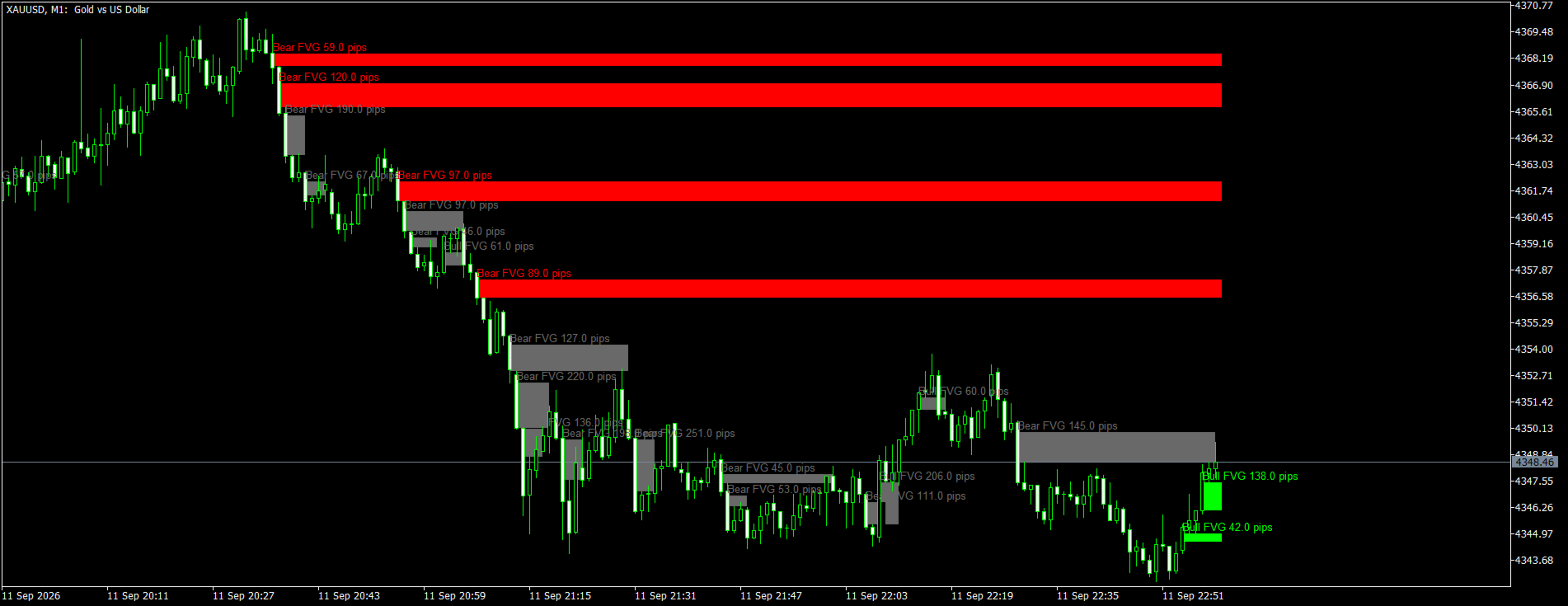
**FVG MTF Dragan** finds Fair Value Gaps (price imbalances) on the timeframe of your choice and draws them as boxes on the chart you trade from — for example the H1 gaps on an M5 chart. Every box has a size filter, a selectable mitigation rule, labels, alerts and hidden buffers, so the indicator works both as a discretionary tool and as a signal source for your own Expert Advisor.
**What is a Fair Value Gap**
A Fair Value Gap is a three-candle pattern in which the middle candle moves so fast that the first and the third candle do not overlap. In a bullish gap the low of the third candle stays above the high of the first candle; in a bearish gap the high of the third candle stays below the low of the first candle. The empty space between them is the gap — an area price often returns to before the move continues. The indicator confirms a gap only when the third candle closes, so the boxes never repaint.
**Key features**
- Multi-timeframe: detect gaps on any timeframe equal to or higher than the chart (M1 … MN1) and see them on your working chart.
- Size filter: minimum gap size in points, or as a fraction of ATR so the same setting works on forex, metals, indices and crypto.
- Mitigation rule of your choice: touch (any trade inside the gap), 50 % (price reaches the middle of the gap), full fill (price reaches the far edge) or close beyond (a candle closes beyond the far edge).
- Boxes extend live until the gap is mitigated, or for a fixed number of candles; mitigated boxes are grayed out or deleted.
- Optional skipping of new gaps that overlap an active gap of the same type — keeps the chart clean in fast markets.
- Labels with the gap type and size in pips.
- Alerts on every new confirmed gap and, optionally, on mitigation: pop-up, push notification and e-mail. Alerts are sent only for events after the indicator was attached, never for the history.
- Hidden buffers for Expert Advisors: the nearest active bullish and bearish gap (top and bottom), a signal on the bar where a gap was confirmed and the number of active gaps.
- Light on resources: the history is scanned once, afterwards only newly closed candles are processed. The scan depth and the number of boxes kept on the chart are adjustable.
- Works on any symbol and any chart timeframe.
**How it can be used**
- Continuation entries: after a bullish gap, wait for price to come back into the gap and look for longs; after a bearish gap, look for shorts on the return into the gap.
- Entry levels: the near edge, the middle (50 %) or the far edge of the gap, with the stop loss beyond the far edge.
- Higher-timeframe context: run an H1 or H4 copy as the zone map and trade the reactions on M5 or M15.
- Filter for other systems: take signals of another strategy only when they line up with an unmitigated gap in the same direction.
**Inputs**
Detection
- Gap timeframe — PERIOD_CURRENT uses the chart timeframe; a lower timeframe than the chart is replaced by the chart timeframe.
- History to scan — candles of the gap timeframe, default 2000.
- Minimum gap size filter — points or ATR fraction (default ATR).
- Minimum gap size in points (points mode) — default 50.
- Minimum gap size as a fraction of ATR (ATR mode) — default 0.25.
- ATR period for the size filter — default 14.
- Skip a new gap that overlaps an active gap of the same type — default on.
Mitigation
- Mitigation rule — touch / 50 % / full fill / close beyond (default touch).
- Extend the box until the gap is mitigated — default on; otherwise a fixed extension in candles (default 20).
- Delete the box once mitigated — default off (the box is grayed out).
- Maximum boxes kept on the chart — default 50; mitigated boxes are removed first.
Style
- Bullish, bearish and mitigated colors, box fill, border style and width, labels on/off, label font size, object name prefix (change it to run several copies).
Alerts
- Alert on a new confirmed gap (default on), alert on mitigation (default off), pop-up, push notification, e-mail.
**Buffers (for Expert Advisor developers)**
- 0 — nearest active bullish gap: top
- 1 — nearest active bullish gap: bottom
- 2 — nearest active bearish gap: top
- 3 — nearest active bearish gap: bottom
- 4 — signal on the bar where a gap was confirmed: +1 bullish, -1 bearish, 0 none
- 5 — number of active gaps
Buffers 0–3 and 5 hold the current state on the last bar; empty value = no active gap of that type. Buffer 4 is written on the chart bar that closed the third candle of the pattern, also through the history, so it can be used in the Strategy Tester.
Example — reading the indicator from an EA (H1 gaps, default settings):
```
int handle = iCustom(_Symbol, _Period, "Market\\FVG MTF Dragan MT5", PERIOD_H1);
double sig[], top[], bottom[];
if(CopyBuffer(handle, 4, 1, 1, sig) == 1 && sig[0] > 0)
{
// a bullish H1 gap has just been confirmed
}
if(CopyBuffer(handle, 0, 0, 1, top) == 1 && CopyBuffer(handle, 1, 0, 1, bottom) == 1 && top[0] != EMPTY_VALUE)
{
// top[0] .. bottom[0] is the nearest active bullish gap
}
```
**Notes**
- The gaps are calculated from the candles of the selected timeframe, so the boxes on a lower chart are exactly the gaps you would see on the higher-timeframe chart itself.
- Push notifications require the MetaQuotes ID of your mobile terminal in the terminal settings; e-mail alerts require the mail settings of the terminal.
- The indicator does not open trades and does not use any DLL or external files.