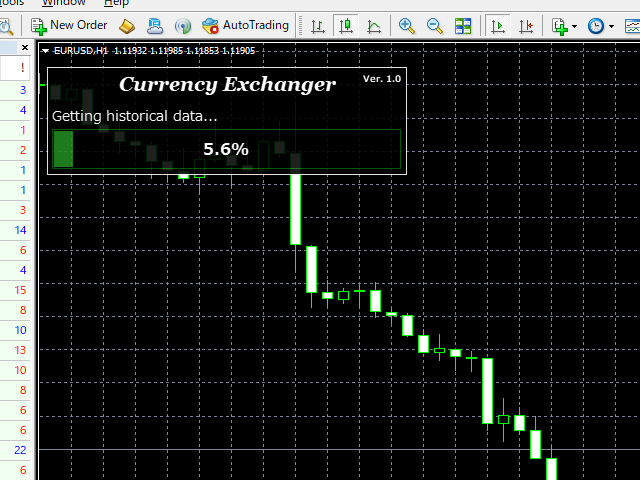
Currency Exchanger MT4

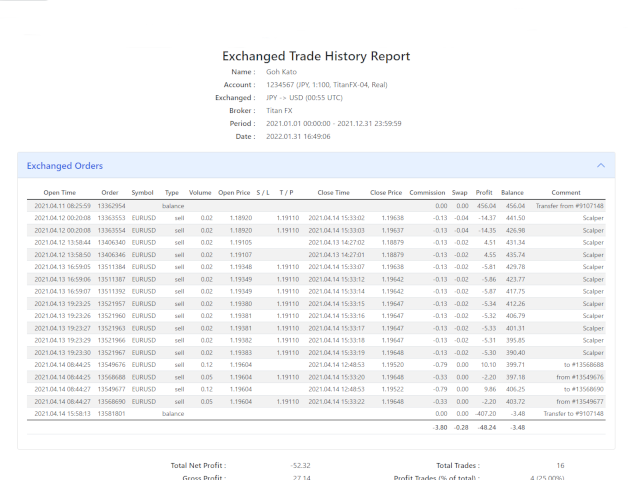
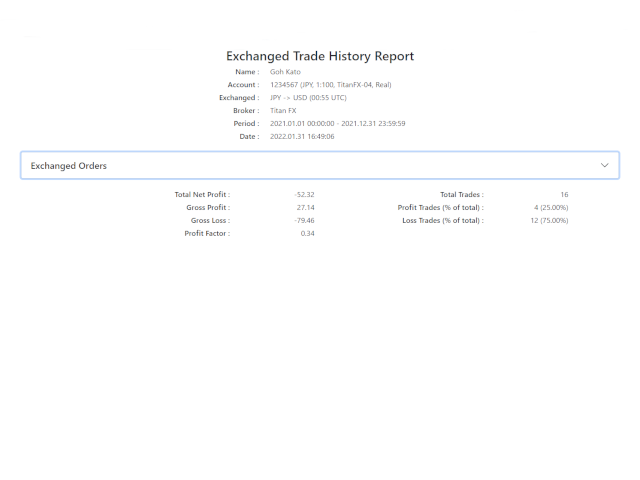
This is a multi-currency converter script that can convert the currency of the account history to another currency and output it. Since it supports multiple currencies, it is possible to exchange USD, EUR mutual conversion, JPY, GBP, AUD, or other minor currencies. Currency Exchanger can be converted to other currencies immediately by executing it once, so anyone can easily exchange currency.

Let Currency Exchanger do the tedious work!

  • The exchange result from the account history can be output as a report in html or csv format.
  • Exchange rates are obtained from MetaTrader historical data or the web.
  • The period for outputting reports and the timing of exchange can be set in detail.
  • Report output items can be changed.
  • Normal report output without currency exchange is also possible.
  • The languages ​​of the report are English and Japanese.
  • Click here for the MT5 product version : Currency Exchanger MT5

Input item description

General

  • Currency of after exchange : Specify with 3 digits. If you set the account currency, the report will be output without currency exchange.
  • Currency separator character : The default is space.
  • Report language : English or Japanese can be specified.
  • Report format : html or csv can be specified.
  • Source of exchange rate : MetaTrader or Web (2 types) can be specified.
  • Automatic download of historical data : Set to “true” to automatically download historical data. This option is available when the data source is MetaTrader. However, depending on the broker, downloading may not always be possible.

Period(Report output period setting, specified by server time)

  • From year (0 for current year) : If it is 0, it is from the beginning of the history.
  • From month (0 for default [Jan]) : If it is 0, it will start in January.
  • From day (0 for default [1st day]) : If it is 0, it starts from 1 day.
  • From time (empty for default [0:0]) : If it is Empty, it is from 0:0:0.
  • To year (0 for current year) : If it is 0, it is up to the end of the history.
  • To month (0 for default [Dec]) : If it is 0, it will be until December.
  • To day (0 for default [last day]) : If it is 0, it is until the last day of the month.
  • To time (empty for default [23:59]) : If it is Empty, it is until 23:59:59.

Time(Valid only when 'Source of exchange rate' is set to MetaTrader)

  • Exchange time ([-]h:m UTC, empty for exit time) : Set in UTC (can be negative). If empty, the deal time.
  • Broker DST type : Set according to the broker.
  • Broker time offset [hours] (winter) : Set the winter time offset. Set according to the broker.
  • Apply DST to exchange time : This item is effective when you want to exchange money at the same time at DST throughout the year.

Show(Report show item settings)

  • Show / hide report items.

About the exchange rate acquisition source

There are three types of exchange rate acquisition sources. In the case of MetaTrader, if you have historical data, you can currency exchange most accurately. There are plenty of time settings, so you can handle various cases. Currency exchange uses the currency pair of the broker, so if you have a currency pair, you can exchange it. On the other hand, please note that it cannot be used if there is no history data. (Please note that we cannot answer how to obtain historical data.)

To use retrieval from the web, you need to set the URL in MetaTrader. Check 'Allow WebRequest for listed URL' in 'Tools -> Options -> Expert Advisors tab' and set the following URLs in the input field. There is a slight time lag before the exchange rate for the day is released on both websites, so please wait for the release before exchanging money.

About the report save location

The save location of the report is as follows. To display MetaTrader Data Folder, specify 'File-> Open Data Folder' in MetaTrader. You cannot change the file name when saving.

  • (MetaTrader Data Folder)\MQL4\Files\

Please be sure to display the entire history of MT4 account history at the time of execution. You will not be able to view your balance accurately.

Please note that we do not take any responsibility caused by the use of this tool (Currency Exchanger).

Also, in all matters, the reports produced by this tool should be used as reference materials only.
Önerilen ürünler
Automated Timeframe cycling with Symbols centered.  Force every timeframe onto one clock window, so the story you see on Daily is the same story you are slicing on H4, H1, and M1.  Traders usually flip timeframes and lose the span. A Daily chart shows a few weeks, then M15 shows a few hours, and the eye treats them as different markets. TASSERACT locks the window to N bars of the highest enabled timeframe — default 10 Daily — and maps every lower timeframe to that same stretch. You stay inside o
FREE
The trading advisor trades with money management elements, both using the martingale system and using the anti-martingale system, at the user's choice. You can choose the type of money management system in external variables. (Usage options with money management according to Martin or AntiMartin) Opens starting positions on the RSI indicator, after exiting the position on the take profit, increases the lot by the AntiMartin coefficient, again we enter the market on the RSI indicator. With Marti
Nash Equilibrium
Tomasz Adrian Bialous
I am pleased to present to you a powerful EA, and everything about this EA is HUGE: profit, drawdown, number of orders, deposit. EA trade all 28 symbols x 5 timeframes (M15,M30,H1,H4,D1), individual timeframes and currencies (not symbols) can be disabled. Simple calculation: 28*5 = 140 signals to trade, and * 2 directions(buy/sell) = 280. If you are interested, read on. 1. How it was created: EA was created when, after writing EA for manual basket trading, I was looking for an idea to automate i
DoIt EA Monitor - Multi EA Performance Dashboard for MT5 Your account can be profitable while one EA quietly drags down the portfolio. MetaTrader history shows the combined result, but it does not clearly show which strategy deserves more capital and which one needs attention. DoIt EA Monitor runs on one chart and separates live and historical performance by magic number, EA and symbol. It is completely read-only. It never opens, closes or modifies a trade. KNOW WHICH EA IS EARNING ITS PLACE Aut
FREE
Bravo Runner
Gabriel Beaird
Cryptocurrency -  XRPUSD/BTCUSD Candle Time -  5m for best results Leverage -  1:5 This strategy uses RSI, CCI and a few other indicators when they meet certain levels. *BACKTESTING MATCHES LIVE DEMO* DATE: 2018 - OCT 2019   CURRENCY: XRPUSD   CANDLE TIME:  5M Bars in test 137239 Ticks modelled 5913780 Modelling quality 90.00%                                                                            Mismatched charts errors 0 Initial deposit 3000.00 Spread 85 Total net profit 1362781.92 Gross
The Arrow Scalper
Fawwaz Abdulmantaser Salim Albaker
1 (2)
Dear Friend..  I share with you this simple Expert Adviser .. it is full automatic  this Expert Adviser following the trend of the pair you install on or any stocks or indices , it is works like that: - when the trend on H4 chart show a start of up trend the expert will wait till the 15M & 1H charts show an up trend the EA will open a buy order directly , and do the same for down trend and open a sell order the buy or sell  order lot size and take profit and stop loss will measured manually  by
FREE
Multi Strategy Dashboard EA
Kevin Beltran Keena
5 (4)
Multi instrument and multi time frame EA, with the best indicators.  The MSD EA can be used for automated and manual trading. Click on the '?' button on the dashboard to obtain information about the various elements of the MSD EA. Uses ATR Take Profits, ATR Stop Losses and ATR Trailing Stops. Comes with an FX Currency Strength meter and a Market Sessions indicator. Has the option to place Trade Lines (Buy, Sell, Close, Alarm). When the price reaches the trendline, the EA will perform the approp
Lycan MT4
Leo Carlo Bermudez
Lycan MT4 is an automated Scalping system optimized for  XAUUSD (GOLD)  on the MetaTrader platform. The EA does not use grid or martingale recovery methods. It applies volatility-based stop loss protection and rule-based filters (spread, news, and session) to select scalp trade opportunities using confirmed breakout strength, rather than relying on high-frequency or recovery-based entries. Core Principle: No Grid, No Martingale, Dual Scalp Strategy System Lycan does not add to losing positions
FREE
[ MT5 Version ]  Single-platform versions: [ Telegram ]  [ Discord ] Publish your trades to   Telegram AND Discord simultaneously   — up to   6 channels   from one chart, each with its own audience tier, filters and delay.   The complete distribution toolkit for signal sellers. ONE EA, YOUR WHOLE AUDIENCE   6 CHANNELS AT ONCE   — 3 Telegram chats + 3 Discord webhooks ️   TIERS THAT SELL   — VIP channels get signals instantly, free channels get them delayed (you choose: 60 s
Market Monitor
Rodrigo Rethka Goncalves
Market Monitor – Smart Asset Performance Dashboard for MT4 Turn your MetaTrader 4 into a professional trading intelligence center! Market Monitor is a powerful monitoring tool that displays, in real time, the most relevant performance metrics of each symbol being traded — helping you make faster, smarter, and more strategic decisions. What Does This Indicator Do? Market Monitor scans all open and historical orders, consolidates the data by symbol, and displays everything in visual pa
Overview This Expert Advisor (EA) is designed to identify and trade specific candlestick patterns based on user-defined settings. It uses multiple technical indicators to confirm trends, volume, and trade opportunities. The EA includes features such as customizable trading hours, stop loss, take profit, trailing stops, and lot sizing. This EA is a tool intended to assist traders in testing and developing their own strategies. It is not a standalone trading strategy. Designed with user-defined f
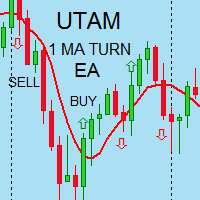
I speak in Hungarian. Magyarul beszélek benne. (Első felvétel. https://youtu.be/MapbQrJ0uPU Első felvétel. https://youtu.be/i2id5O1KPrI Második felvétel. https://youtu.be/Zp2i7QN-IMc Első felvétel. https://youtu.be/h7UbTWiM-Lw Második felvétel. https://youtu.be/y54q4Rasf2A Harmadik felvétel. https://youtu.be/13zYjsoe6ZQ Negyedik felvétel. https://youtu.be/NGiB1AnxxfU ) Nice Day Signalos! Positive building Muving Average Turn. Positive construction for Moving Average Round. If the Muving Average 
EA Follower Version any Follow Copy Account  (Acc. Number)  need a open MT Terminal, download multiple times Step1:   Open Master MT5 Terminal    =  install master- Version   (on any Symbol just one Time) Step2:   Open Follower MT5 Terminal = install follower- Version  (on any Symbol just one Time) Step3:   all Trades from any Symbol or any Robot are copy now to follow- Terminal immediately for simple copy set on Chart and   Start   no optimization. This Robot is a Trade Copier for MT5 that auto
FREE
VTB High Watermark Drawdown Lock EA for MT4 Advanced Equity Protection & Drawdown Management System VTB High Watermark Drawdown Lock is a professional risk management Expert Advisor designed to protect trading accounts, funded accounts, and proprietary trading challenges from excessive drawdown. Unlike traditional drawdown protection systems that calculate risk from the initial account balance, this EA uses a dynamic High Watermark (HWM) model that continuously protects both your original capita
The EA uses scalping strategy at night, trading consists of three algorithms and each algorithm works in its own time interval. The EA uses many smart filters to adapt to almost any economic situation. Pending orders are used for the least slippage when trading scalping. The adviser is safe and does not require any settings from the user, just install it on the chart and you are ready. The EA sets a protective stop order, so the trader does not have to worry that the robot will allow significant
Canlı Sinyal https://www.mql5.com/en/users/sagen520/seller Dinamik Fiyatlandırma (Sınırlı Teklif) Başlangıç Fiyatı : 49$ Fiyat Artışı : Satılan her 10 kopyada +100$. Bir sonraki zamdan önce lisansınızı en düşük fiyattan güvence altına alın! 15 Yıllık Backtest (2010 - 2026) Karmaşık piyasa döngülerinde 15 yıl boyunca kanıtlanmış istikrar: In-Sample (2010–2020) : Temel strateji ve risk-getiri optimizasyonu. Out-of-Sample (2020–2026) : Yüksek volatiliteli piyasalarda doğrulanmış sermaye büyümesi.
Details of each condition Type 1. Set no use Hedging Martingale, to open the order by yourself only through the push button. TP and SL follow setting. Set Setting_Hedging =false;     Use_Signal =false;  Type 2. Semi Auto Recovery Zone You have to open the order by yourself only through the push button. If in the wrong direction and Set true on Hedging Martingale, EA will fix the order with the zone system by use Hedging Martingale Set Setting_Hedging =true;     Use_Signal =false;  Type 3. Use
Details of each condition Type 1. Set no use Hedging Martingale, to open the order by yourself only through the push button. TP and SL follow setting. Set Setting_Hedging =false; Set Setting_TrailingStop =false; if not use. Type 2. Semi Auto Recovery Zone You have to open the order by yourself only through the push button. If in the wrong direction and Set true on Hedging Martingale, EA will fix the order with the zone system by use Hedging Martingale Set Setting_Hedging =true; Set Setting_Tra
Sürüm MT4:   https://www.mql5.com/zh/market/product/109262 Sürüm MT5:   ;   https://www.mql5.com/zh/market/product/109258 Kullanılacak talimatlar:   https://www.mql5.com/zh/blogs/post/755183 EA Overview: Bu EA, transaksyonları hedgilemek için iki brokeri, A ve B kullanır. When the ASK of broker A is smaller than that of broker B, broker A buys while broker B sells, and then observes the profits and losses of both accounts. Toplam zarar hedefine ulaştığında, A ve B hesapları aynı zamanda pozisy
Smart Soldier
Maria Rosaria Stradiotti
SMART SOLDIER  is a multi-currency EA, works on 9 pairs ,It can work at any broker, with any spread. This EA has a weekly account growth of around 10% and it is a low-risk system because the bets are made only and exclusively after an accurate and studied trend research. Before opening any position, the expert checks that most of the timeframes indicate the same trend. If a trend change occurs, the expert will try to close the positions with the basket system, avoiding large drawdowns and ex
Grid Trading EA is a semi-automated one-click trading EA for both Normal Trading and Grid/Martingale Trading . Normal Trading Simply click Buy or Sell directly from the chart. The EA will automatically manage trades by: Setting Stop Loss and Take Profit Managing Trailing Stop Grid / Martingale Trading When Grid Trading mode is enabled, the EA will automatically open additional grid orders at specified distances while increasing the lot size based on your settings. Inputs & Settings Lots — Initia
Ortalama geri dönüş ticareti için profesyonel ve nicel bir yaklaşım uygulayan benzersiz gösterge. Fiyatın tahmin edilebilir ve ölçülebilir bir şekilde ortalamaya döndüğü ve yön değiştirdiği gerçeğinden yararlanır, bu da nicel olmayan ticaret stratejilerinden büyük ölçüde daha iyi performans gösteren net giriş ve çıkış kurallarına izin verir. [ Installation Guide | Update Guide | Troubleshooting | FAQ | All Products ] Ticaret sinyallerini temizle Ticaret yapmak inanılmaz derecede kolay Özelleşt
Email Drawdown Alert
Roman Starostin
5 (12)
Free informative Indicator-helper. It'll be usefull for traders who trade many symbols or using grid systems (Averaging or Martingale). Indicator counts drawdown as percent and currency separate. It has a number of settings: Count deposite drawdown according equity value and send e-mail or notifications to user if DD more than set; Sending e-mail when max open orders reached; Shows price and remaining pips amount before MarginCall on current chart and Account generally; Display summary trade lot
FREE
This EA has been designed to achieve stable trades regardless of market fluctuations. The optimal time frame for this EA is M5. It calculates the price changes in higher time frames, such as H1 and H4, and looks for entry points after a significant trend has occurred and the price starts to retrace. It is recommended to set wider take profit and stop loss levels. This setup works well for one trade per day. If a trade ends in a loss, the EA waits for an opportunity to re-enter with double the l
FREE
Gold Apex EA MT4
Ahmed Ismail Muhammad Ismail Al Talhat
Gold Apex EA Gold Apex EA , yalnızca MetaTrader 4 platformu için geliştirilmiş; 1 dakikalık (M1) zaman dilimini kullanarak Altın (XAUUSD) üzerinde yüksek frekanslı scalping ve momentum işlemleri gerçekleştirmek üzere özel olarak tasarlanmış gelişmiş bir otomatik Uzman Danışmandır (Expert Advisor). Sistem, sistematik kurallar ve sıkı risk kontrolleri aracılığıyla kıymetli maden ticaretinin doğasında bulunan hızlı fiyat hareketlerini ve likidite değişimlerini yönetmek için tasarlanmıştır. Temel
Der rebound EA handelt vollautomatisch  Du bekommst hier einen tollen EA mit extra Zubehör, Kostenlos ! Er verwendet keine gefährlichen Strategien wie Martingale oder Gritter usw. Bei diesem EA kannst du vieles nach deinen Wünschen, oder nach meinem Set einstellen. Zusätzlich hat er einen News Filter, er pausiert die trades während der eingestellten Zeit. Zusätzlich erhöht er auf Wunsch die lots Grösse automatisch. Der Backtest und die trades wurden mit Fusion Markets gemacht Hebel 1:500 Zer
FREE
T Rex
Evgeny Vlasov
2.5 (2)
Порядок работы Cоветник работает на любом таймфрейме на любых валютных парах. При работе советника анализируется несколько трендовых индикаторов и показатели объема торгов, при возникновении необходимых условий происходит открытие рыночного ордера. Советник не открывает следующий ордер, пока не закроется предыдущий. Советник имеет блок TrailingStop , позволяющий перемещать StopLoss за движением цены. Основным отличием этого блока от стандартного является его не линейность. В настройках вам
Trading Control Pad is a useful tool for all traders. To send BUY/SELL, pending order, modify and automatic setting SL and TP in one click by the current symbol. The Trading Control Pad can help you being comfortable and quickly trading.  Pad can help you automatic and manual partially close some lot at the target, breakeven and trailing stop. The Trading Control Pad features / Functionality Showing the currency pair, the total positions, the number of buy and sell orders. Standard tools for op
Psychology
Tais Miranda Hoffmann
4.6 (5)
The most different product of the site: This tool is an auxiliary tool aimed at managing your trades and psychological discussions. As you probably know, more than 70% of the reason for the success of big traders is psychological issues. Only 30% is related to your strategy. So it is better to strengthen this big part with a tool. With a free tool, I allow you to become a better trader   This tool consists of several rules. In version 1.0, we have 7 rules. In later versions, we will add more ru
FREE
Bu ürünün alıcıları ayrıca şunları da satın alıyor
Trade Manager EA’ye hoş geldiniz! Ticaretin daha sezgisel, hassas ve verimli hale gelmesi için tasarlanmış nihai risk yönetim aracı ile tanışın. Bu sadece bir emir verme aracı değil; ticaret planlaması, pozisyon yönetimi ve risk kontrolü için kapsamlı bir çözüm. İster yeni başlayan bir yatırımcı olun, ister deneyimli bir trader ya da hızlı emir gerektiren bir scalper, Trade Manager EA ihtiyaçlarınıza uyum sağlar ve forex, endeksler, emtialar ve kripto paralar dahil tüm piyasalarda esneklik sunar
Effortlessly calculate lot sizes and manage trades to save time and avoid costly errors The Trade Pad Pro EA is a tool for the Metatrader Platform that aims to help traders manage their trades more efficiently and effectively. It has a user-friendly visual interface that allows users to easily place and manage an unlimited number of trades, helping to avoid human errors and enhance their trading activity. [ Installation Guide | Update Guide | Troubleshooting | FAQ | All Products ] One of the k

Telegram to MT4 Multi-Channel Copier   , Telegram ve Discord kanallarınızdaki alım-satım sinyallerini doğrudan MetaTrader 4'e otomatik kopyalar. Bot yok, tarayıcı uzantısı yok, elle kopyalama yok. Sinyal Telegram'a veya Discord'a düşer ve EA birkaç saniye içinde terminalinizde işlemi açar. Ve bir kanalı kopyalamadan önce, yerleşik backtester o kanalın hesabınızda ne yapmış olacağını gösterir. Ürün iki bileşenden oluşur: Telegram kanallarınızı dinleyen bir Windows uygulaması ve sinyalleri MT4 ter

Trade Indicator Assistant is a powerful MT4 utility designed to turn indicators into automated trading systems. Its main feature is the ability to automatically detect an indicator’s   BUY and SELL signal buffers , without requiring you to know the buffer numbers, search through indicator settings, or modify the indicator source code. Bonus Indicator: After purchasing Trade Indicator Assistant, contact me to receive Trade Signal Pro completely free as a bonus indicator. [Download Demo Version]
The product will copy all telegram signal to MT4   ( which you are member  ) , also it can work as remote copier.  Easy to set up, copy order instant, can work with almost signal formats, image signal, s upport to translate other language to English Work with all type of channel or group, even channel have "Restrict Saving Content", work with  multi channel, multi MT5 Work as remote copier: with signal have ticket number, it will copy exactly via ticket number. Support to backtest signal. How to
Take a Break pauses your Expert Advisors when trading is a bad idea: before news, after a daily loss, outside your trading hours, or when a rule you wrote yourself says so. When the pause is over, your EAs simply continue. Account protection for all your EAs in one tool: news filter, drawdown and equity protection, time filter and custom rules. One EA on one chart protects the whole account, the free indicator gives every chart its own rules on top. Free demo | What is new in 26.09 | Support Ass
FCK CurrencyStrength Pro
Patel Hitendrakumar Mahendrabhai
Hi Friends, " FCK Currency Strength Pro " is a auto & semi auto trading expert with direction of pair. Buy-Sell separate or multi currency in one click. The strategy of  FCK Currency Strength Pro  is a combination of custom indicator, Trendlines, Support & Resistance levels ( Price Action ) and most important secretive trading algorithm mentioned above. Download News Ex4 and csv file You need the following SDSnews.ex4 in MQL4/Libraries and the daylightsavings.csv in MQL4/Files. Only 4 of 5 copi
Unlimited Trade Copier Pro is a tool to copy trade remotely to multiple MT4, MT5 and cTrader accounts at different computers/locations over internet. This is an ideal solution for you if you are a signal provider and want to copy your trades to other receivers globally on your own rules. One provider can copy trades to multiple receivers and one receiver can get trade from multiple providers as well. The provider can even set the subscription expiry for each receiver, so that receiver will not b
Strategy Builder offers an incredible amount of functionality. It combines a trade panel with configurable automation (covert indicators into an EA), real-time statistics (profit & draw down) plus automatic optimization of SL, TP/exit, trading hours, indicator inputs. Multiple indicators can be combined into an single alert/trade signal and can include custom indicators, even if just have ex4 file or purchased from Market. The system is easily configured via a CONFIG button and associated pop-up
Grid Manual MT4
Alfiya Fazylova
4.71 (17)
Grid Manual, sipariş ızgarasıyla çalışmak için kullanılan bir ticaret yardımcı programıdır. Yardımcı program evrenseldir, esnek ayarlara ve sezgisel bir arayüze sahiptir. Sadece kayıpların ortalaması yönünde değil, aynı zamanda kazanç artışı yönünde de bir emir ızgarası ile çalışır. Tüccarın bir emir ızgarası oluşturmasına ve eşlik etmesine gerek yoktur, bu yardımcı programı yapacaktır. Emri açmanız yeterlidir ve Grid manual otomatik olarak ona bir emir ızgarası oluşturacak ve kapanana kadar ona
Ticaret yapmak istediğiniz temel alanları belirledikten sonra otomatik olarak destek ve direnç veya arz ve talep bölgelerini değiştirin. Bu EA, tek bir tıklamayla alım ve satım bölgeleri çizmenize ve ardından bunları fiyatın dönmesini beklediğiniz yere tam olarak yerleştirmenize olanak tanır. EA daha sonra bu bölgeleri izler ve bölgeler için belirttiğiniz fiyat hareketine göre otomatik olarak işlemler gerçekleştirir. İlk işlem gerçekleştirildikten sonra EA, hedef bölge haline gelen yerleştirdiğ
Riskless Pyramid
Snapdragon Systems Ltd
5 (1)
Introduction This powerful MT4 trade mangement EA offers a way potentially to aggressively multiply trade profits in a riskfree manner. Once a trade has been entered with a defined stoploss and take profit target then the EA will add three pyramid add-on trades in order to increase the overall level of profit. The user sets the total combined profit target to be gained if everything works out. This can be specified either as a multiple of the original trade profit or as a total dollar amount. Fo
Prop Guardian Risk Manager MT4 – Drawdown, Risk & Hedge Protection for Prop Firm and Managed Accounts Prop Guardian Risk Manager is a professional risk-control utility for MetaTrader 4, designed for prop firm traders, money managers and anyone who wants strict account-level risk protection. It does not generate trading signals, strategy entries or trading decisions. Instead, it runs in the background, monitors your account risk and can automatically block new exposure, close managed trades or ac
DrawDown Limiter MT4
Haidar Lionel Haj Ali
5 (8)
DrawDown Limiter v5.0 — Advanced Account Protection Controller DrawDown Limiter v5.0 is a client-side account protection controller designed to supervise your trading account and automatically react when configured risk, profit, news, schedule, rollover, or position limits are reached. It can monitor manual trades, automated strategies, multiple Expert Advisors, pending orders and floating positions from one dedicated chart. It can protect the complete account or be configured to supervise a spe
Auto Trade Driver is an automatic powerful tool (run as Expert Advisor) that helps you to manage risk and control orders and maximize your profit in multi-protect/trailing-stop rules. This tool is very useful for both scalpers and trend followers. It not only calculates the trade risk exactly, but also protects and maximizes your profits in real-time. With this tool, the only thing you have to do is to enter trade by your own strategy, then it will auto-drive your position with exit strategy you
The FFx Hidden Manager panel will help you to manage easily your orders directly on the chart. Below all features described: TP, SL and TrailingStop are hidden Each order has its own lines on chart Drag & Drop any line to change the TP/SL as per your need Option to move automatically the SL line at breakeven when TP #1 is reached Option to choose the TP/SL type (by pips or price) Option to choose the TrailingStop type (by pips, MA, Fractals, PSAR or ATR) Define which order(s) you want to manage
FFx Risk Calculator panel will help you to calculate very easily your trades size, SL or the risk directly on the chart. All features are described below: Option to select which parameter to calculate: Risk, Stop Loss or Lot Size The panel will show if the lot size is allowed according to the current account free margin Button to maximize/minimize the panel Drag and Drop the panel anywhere on the chart How to use it? Select the parameter you want to be calculated. It will be based on the 2 other
Trade Copier Pro is a tool to copy trade remotely to MT4, MT5 and cTrader accounts at different computers/locations over internet. This is an ideal solution for you if you are a signal provider and want to copy your trades to other receivers globally on your own rules. One provider can copy trades to multiple receivers and one receiver can get trade from multiple providers as well. The provider can even set the subscription expiry for each receiver, so that receiver will not be able to receive t
News Trader Pro is a unique robot that allows you to trade the news by your predefined strategy. It loads every piece of news from several popular Forex websites. You can choose any news and preset the strategy to trade it, and then News Trader Pro will trade that news by selected strategy automatically when the news comes. News release gives opportunity to have pips since the price usually has big move at that time. Now, with this tool, trading news becomes easier, more flexible and more exciti
Bears CD HTB Global  (Bears Convergence/Divergence High Top Bottom Global) is an analytical bears convergence/divergence indicator (C, D or CD) between a financial instrument and 22 MT4 indicators working on all periods simultaneously. The indicator measures the power of CD for indicators and periods and is the second one out of the two possible versions (HBT and HTB). Features The analyzer is not a lagging one. It works by ticks and is able to show CD in the main window even in case the MT4 in
Bulls CD LBT Global  (Bulls Convergence/Divergence Low Bottom  Top   Global) is an analytical bulls convergence/divergence indicator (C, D or CD) between a financial instrument and 22 MT4 indicators working on all periods simultaneously. The indicator measures the power of CD for indicators and periods and is the first one out of the two possible versions (LBT and LTB). Features The analyzer is not a lagging one. It works by ticks and is able to show CD in the main window even in case the MT4 i
The FFx Watcher PRO is a dashboard displaying on a single chart the current direction of up to 15 standard indicators and up to 9 timeframes. It has 2 different modes: 1. Watcher mode: Multi Indicators User is able to select up to 15 indicators to be displayed User is able to select up to 9 timeframes to be displayed 2. Watcher mode: Multi Pairs User is able to select any number of pairs/symbols User is able to select up to 9 timeframes to be displayed This mode uses one of the standard indicat
THE [VIZUALIZER] is a MetaTrader (MT4) Script designed to visualize an account history. It will read the account statement and then will visualize the positions on chart in form of rectangles, showing the OpenTime, OpenPrice, CloseTime and ClosePrice. Generally, it has been developed to analyze the trading history, to observe how risky the particular positions were, allowing you to analyze the trading strategy from the account statement. It is working with standard MS Excel CSV files It is visua
This is a must have tool for a serious trader. It saves your precious time spent for opening/closing trades, creating pending trades and modifying your TP/SL in bulk according to either pips or price. If you need to quickly open several pending orders (Buy Stop, Sell Stop) at a certain distance from each other, this script will do all the routine for you! The first time you use this handy tool, you will realize it has already paid for itself. Instructions: Drag and drop this script onto a chart.
The product combines a manual trade panel with the ability to perform actions automatically in a highly configurable way. Actions include capturing indicator values and then based on those values raising alerts, open/close or partially close trades, scale-in, setting up pending orders, adjusting stop loss, take profit and more. On-chart controls can be configured, such as tick boxes and buttons, so can be fully interactive. The EA also handles money management, news events, hidden stop loss, tak
Binary Options Copier Remote is an EA that allows to copy binary options trades between MT4 accounts at different computers. This is an ideal solution for signal provider, who want to share his trade with the others globally on his own rules. Provider can give free bonus license to 10 receivers. That means those 10 receivers can copy from provider by using Binary Options Receiver Free (no cost). From 11th one, receiver have to buy Binary Options Receiver Pro (paid version) in order to copy from
This panel is very simple to use and it is a very ally to manage your positions and orders. Also you can modify your risk, writing in fields directly on Panel. One click on buttons and the operation on market is done! Operations possible: BUY/SELL Break Even Split (close 50% all orders) Close All positions Hedging (opens reverse positions to cover) Close only BUY positions Close only SELL positions Close All pending orders Reverse all positions Please watch the video to verify the very simple u
The Expert Advisor (EA) generates an advanced trading tool to place a pending or market order on any currency pair symbol , as selected from a drop-down menu in the panel. A market order is placed by clicking appropriate Sell or Buy button. On the other hand, a pending order is placed by selecting a pending order type and thereafter clicking Place button. Moreover, the panel provides various options to define exact parameters for every order before placing it. For instance, the triggering price
Slow Pips OCO Trade Panel is an advanced trading panel for placing pending orders. Traders can use this panel to place two pending orders at once. One pending order would be of buy entry type and the other one would be of sell entry type. Both orders will have Stop Loss and Take Profit parameters. Since two pending orders are placed at the same time, the pending order for which the price hits first gets converted into a market order and the other pending order gets deleted (one order cancels the
This indicator changes the timeframe and chart profile for multiple charts. If you dispatched many charts (10~20 or more) in single MetaTrader terminal, it is very boring and difficult work to manage the timeframe and chart profile individually. If the indicators you use in a chart are numerous and the setting values are different from the default one, you might give up adding all the indicators to all charts. The changing of timeframes on multiple charts has the same problem, too. Whenever you
Yazarın diğer ürünleri
This is a multi-currency converter script that can convert the currency of the account history to another currency and output it. Since it supports multiple currencies, it is possible to exchange USD, EUR mutual conversion, JPY, GBP, AUD, or other minor currencies. Currency Exchanger can be converted to other currencies immediately by executing it once, so anyone can easily exchange currency. Let Currency Exchanger do the tedious work! The exchange result from the account history can be output a
Mean reversion EA with AUD,CAD,NZD Trading Camp MT4 Trading Camp is an EA that focuses on three currencies (AUD, CAD, and NZD) with strong mean reversion tendencies and performs a contrarian strategy. Although a grid is used as the trading technique, it is designed with a security feature with straddling of the trade, making it difficult to get stopped out. Various filters are also available to carefully select entries (therefore, the entry frequency is not high). In addition, various input para
Mean reversion EA with AUD,CAD,NZD Trading Camp MT5 Trading Camp is an EA that focuses on three currencies (AUD, CAD, and NZD) with strong mean reversion tendencies and performs a contrarian strategy. Although a grid is used as the trading technique, it is designed with a security feature with straddling of the trade, making it difficult to get stopped out. Various filters are also available to carefully select entries (therefore, the entry frequency is not high). In addition, various input para
Filtrele:
Değerlendirme yok
Değerlendirmeye yanıt