Tax Buddy

5

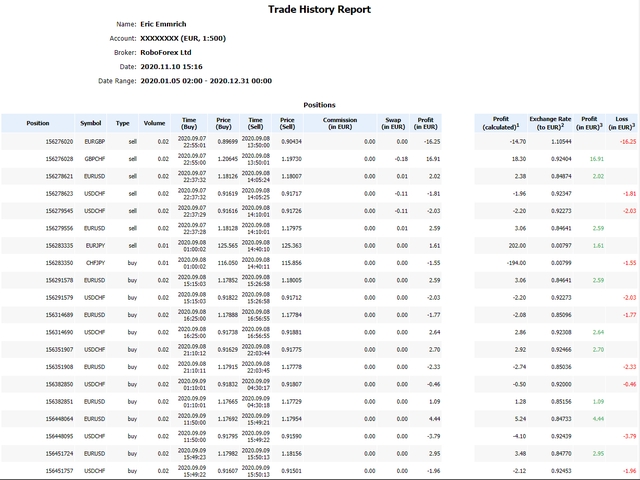
Tax Buddy creates a simple, sortable trading report which you can send to your local tax authorities alongside your annual declaration.

I've been using this kind of report for the German Finanzamt in order to declare my capital gains ("Kapitalerträge") in a readily comprehensible manner.

For testing purposes, the Demo version places random trades in the Strategy Tester on the symbol of your choice and creates a demo report for them.
Conveniently, all reports are stored in the common path for all terminals installed on a computer. So even if you're using both MT4 and MT5, you will find your tax reports in one single location.

Windows default location of the common files path for all terminals:

%APPDATA%\MetaQuotes\Terminal\Common\Files

Tax Buddy comes with multi-asset support for Forex, Indices, Commodities, Stocks and Cryptocurrencies. If you trade other assets and Tax Buddy does not perform proper calculations, please contact me and I'll be happy to add support for them as well.


Parameters

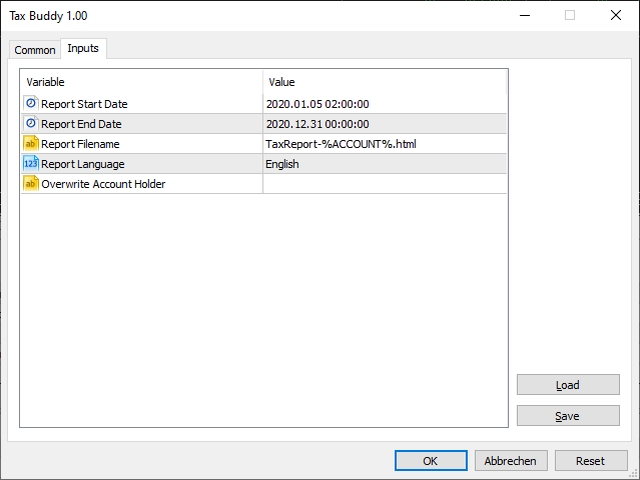
  • Report Start Date: defaults to 01.01. of the current tax year
  • Report End Date: defaults to 31.12. of the current tax year
  • Report Filename: Supports dynamic placeholders %ACCOUNT%, %START_DATE% and %END_DATE% which get replaced automatically on report generation.
  • Report Language: Currently supports "English" and "German". If you want to contribute with a translation, please contact me.
  • Balance Operations to include in P/L: Custom filter for tax-relevant balance operations like rebates, dividends and interests. Leave it empty to not include any of them.
  • Filter Magic Numbers: Custom filter for including only specific strategies/EAs in the report. By default, all trades are included. Supports multiple Magic Numbers separated by commas, e.g. 1,2,3.
  • Overwrite Account Holder: If you trade on an account that's not on your name, e.g. when using funding programs like FTMO or MFF, you can overwrite it here.
İncelemeler 3
Karsten Woelfel
653
Karsten Woelfel 2023.09.02 18:16 
 

Geniales Tool um dem deutschen Finanzbeamten im Rahmen der Einkommensteuererklärung alle notwendigen Details liefern zu können. Die generierte Übersicht stellt die Gewinne und die Verluste separat dar. Super finde ich die aufgeführten Kommentare zur Erläuterung von durchgeführten Berechnungen. Volle Transparenz. In den EInstellungen kann man zwischen Deutsch und Englisch wählen, wobei es sicher schön wäre, wenn bei Deutsch auch das Komma statt des Punktes verwendet wird. Zu Beginn erwartet man einen "Start"-Button o-ä., dabei erfolgt die Berechnung sofort, nachdem man den TaxBuddy in einen leeren Chart gezogen und das Setup mit OK bestätigt hat. Super simpel! Auch Zwischenergebnisse für das laufende Jahr lassen sich sofort mit den entsprechenden Datumseingaben erstellen. Schön wären eventuell noch frei wählbare Sortiermöglichkeiten, z.B. eine Sortierung nach dem Verkaufsdatum. Auch Zwischenergebnisse je Strategie würden sicher gut aussehen.

peterh217
299
peterh217 2022.03.16 09:18 
 

Sehr gute Übersicht für das Finanzamt und eigene Auswertung.

Wolfgang Rockert
2345
Wolfgang Rockert 2021.11.03 08:06 
 

Macht was es soll, gute Übersicht....

Önerilen ürünler
ATTENTION: the utility cannot work in the Strategy Tester, if you want to try the demo version for free for a week, or have any questions, write me an email! You can find my address on my user profile. TrendLine Auto Executor   is a software capable of identifying the trendlines you have drawn on the chart and opening orders as soon as they are touched or exceeded. The software allows you to manage two orders at a time for each chart by tracking two groups of trendlines, one for each order, and
The indicator detects and displays М. Gartley's Butterfly pattern. The pattern is plotted by the extreme values of the ZigZag indicator (included in the resources, no need to install). After detecting the pattern, the indicator notifies of that by the pop-up window, a mobile notification and an email. The pattern and wave parameters are displayed on the screenshots. The default parameters are used for demonstration purposes only in order to increase the amount of detected patterns. Parameters z
The indicator detects and displays Shark harmonic pattern (see the screenshot). The pattern is plotted by the extreme values of the ZigZag indicator (included in the resources, no need to install). After detecting the pattern, the indicator notifies of that by a pop-up window, a mobile notification and an email. The indicator highlights the process of the pattern formation and not just the complete pattern. In the former case, it is displayed in the contour triangles. After the pattern is comple
The Night Scalper EA Lite is a fully automated Expert Advisor that trades at night and relies on price reversion. The EA trades using market orders and has the option to use time averaging to improve performance. This EA works best on EURUSD using the M5 timeframe, but will also work on AUDUSD, GBPUSD, NZDUSD, USDCAD, USDCHF and likely many more. A VPS is advisable when trading this system and a low spread and commission based broker is best. Check the comments for back test results and optimiz
FREE
VANEXIO USES THE TREND WAVE INDICATOR AND IT CAN IDENTIFY THE BEGINNING AND THE END OF A NEW WAVE TREND MOVEMENT. AS AN OSCILLATOR, THE INDICATOR IDENTIFIES THE OVERBOUGHT AND OVERSOLD ZONES. IT WORKS GREAT TO CATCH THE SHORT TERM PRICE REVERSALS AND USES A MARTINGALE STRATEGY TO CLOSE ALL TRADES IN PROFIT. USE DEFAULT SETTINGS ON H1 OR HIGHER TIME FRAME ON ANY PAIR FOR MORE ACCURATE TRADES WHY THIS EA : Smart entries calculated by 5 great strategies The EA can be run on even a $20000 acco
FREE
Dear Friends, Practise master is a Utility program design to work in Live and  Strategy Tester. But Main purpose is to work in  Strategy Tester. With the help of this program you can take a good practise in strategy Tester.  Please rate this application for the better  Benefits. 1. Save lot of time when using this program in Live or  Strategy Tester. 2. Very useful to beginners. Demo account will not work in Sat & Sun Days(Market closed days). But for many users have office leave in Sat & Sun(h
FREE
By default Metatrader will show any newly created chart object on all timeframes. This handy utility will set the visibility of any new chart object drawn to be that of the current chart only.   e.g. If the chart timeframe is H4 then a new object will only be visible on the H4 timeframe.   Each object type can be included or excluded as required and, of course you can change the timeframes setting afterwards as this only operates at the point the chart object is created. Add to your chart and f
FREE
Tools designed for multi-currency trading. You can customize which currency you want to trade, analyze up to 10 currencies by yourself. Note: This is demo version that you can test for free (Maximum Lot Size = 0.01) Full version can be found here:  https://www.mql5.com/en/market/product/17793 Analysis method. (Refer to screenshot 1) Ultimate dashboard analyzes trend strength from six major time frames: M5, M15, M30, H1, H4, D1 Show the result in graphic format. You can identify which currencies
FREE
It's very easy, you only need to enter the amount of profit you want to get, then when your account has grown this EA will close the order, even though you are not monitoring the chart. Now you don't need to worry if the profit you have achieved turns into a loss because you don't use this EA, because this EA will help you whenever, wherever you are. Good luck trying it, hopefully you will become a very profitable trader
Make trades on symbols which are corelated not making any sense. So what if we can check, which of symbols are not corelated to each other and are oposit in current trend. For this simple and quick analyze you can use this utility. Simply run and see list of symbol pairs which are oposit to each other. Results of analyse will be printed in Strategies log. Duplicity A -> B == B -> A is not displayed.  You can specify   period   for which will be calculated trend (Daily,Hourly,Mothly), choice de
FREE
FFx Momentum
Eric Venturi-Bloxs
4 (1)
The purpose of this new version of the MT4 standard indicator provided in your platform is to display in a sub-window multiple timeframes of the same indicator. See the example shown in the picture below. But the display isn’t like a simple MTF indicator. This is the real display of the indicator on its timeframe. Here's the options available in the FFx indicator: Select the timeframes to be displayed (M1 to Monthly) Define the width (number of bars) for each timeframe box Alert pop up/sound/ema
FREE
This indicator will allow you to quickly go to the chart section that interests you, without unnecessary time costs. pt_shift - step of vertical scrolling; ButtonsHeight - button height; ButtonsWidth - button width; ButtonsColor - color of buttons; ButtonsBordersColor - button border color; Font - font; TextColor - button text color; TextSize - button text size; ButtonsBack - buttons in the background; ButtonsSelection - select buttons for movements; ButtonsHidden - hide buttons in
Free automatic Fibonacci is an indicator that automatically plots a Fibonacci retracement based on the number of bars you select on the BarsToScan setting in the indicator. The Fibonacci is automatically updated in real time as new highest and lowest values appears amongst the selected bars. You can select which level values to be displayed in the indicator settings. You can also select the color of the levels thus enabling the trader to be able to attach the indicator several times with differe
FREE
MerkaStudent is a basic version of an expert advisor that allows us to understand part of the behavior of a chart in historical time. It uses some basic parameters in trading, which allows us to understand mathematically how a chart moves and thus know what is our mathematical expectation in the historical period analyzed. Starting from a mathematical logic, we can create a strategy to evaluate its results.
FREE
Apex Drawdown
Carl Christian Nyberg
Uncomplicated straightforward indicator that shows the maximum account drawdown since the indicator was added to the chart. The indicator does not take transaction history into account since it is impossible to calculate drawdown from historical entries en closures of trades. The indicator will be free in this basic form. Eventually it will be developed but the focus is to keep it plain and simple.
FREE
Heartbeat Agent is a comprehensive monitoring system for MetaTrader 4 terminals, designed to detect critical issues before they impact your trading. Compatible with both Windows and Linux, it continuously monitors your terminal's health and alerts you immediately when problems arise. Key Features: Trading Permissions Monitoring: Detects when AutoTrading is disabled, preventing your Expert Advisors from executing trades. Alerts if your account is in Investor Mode (read-only) or if your broker has
FREE
Free Trading Keyboard
Yitzon Manuel Belandria Oropeza
Trading Keyboard Tool will enable you to: Easily OPEN/CLOSE/MODIFY orders with Keyboard and with Buttons on Screen. Modify Order parameters with shorcuts. Export different Prices into a file for analysing outside MT4. Save Chartscreen into an image. Show Fibonacci on screen with shorcut. You can export these Prices into files:   COHL : history of  Close,Open,High,Low in one file.   Close - history of  Close in one file.   Open - history of  Open in one file.   High - history of High in one file.
FREE
"SimSim Expert Assistant" утилита для сопровождению сделок трейдера в терминале МТ4. Утилита бесплатная, пользуйтесь. Кроме того, утилита открывает сделки по сигналам индикаторов SimSim Trading (через глобальные). Параметр индикатора "Signal shaping for SimSim Expert Assistan" указывает на это. Как работать с утилитой. Expert Assistant работает в терминале МТ4 и устанавливается в папку Expert, в утилите нет ни одного параметра при старте. Все параметры находятся в списке глобальных переменных
FREE
The Mode
Naim El Hajj
3.67 (3)
The M.O.D.E stands for " Multiple Oscillator Divergence Exit ". It is an indicator which signals a divergence between the price, and multiple oscillators. It is initially an exit indicator because it signals the weakening of a trend, but it could be used as an entry signal if used analytically Key Features: Check many divergences at once Non repainting Sends   Alerts and Push Notifications You could load the M.O.D.E onto a single chart, and be able to see the divergences happening on multiple os
FREE
VR İzleme listesi ve Bağlayıcı - terminal için tarama uygulaması MetaTrader'ı . En ilginç ve teknik finansal araçların bulunmasını kolaylaştırır. Bu tarayıcı, tüccarlar tarafından bybit, Moskova Borsası, Amerikan Borsası, döviz ve kripto para piyasası, metal piyasası gibi borsalarda işlem yapmak için kullanılır ve pervane şirketlerinde işlem yapmak için kullanılır. Finansal araçların seçimi manuel olarak gerçekleştirilir. Tarayıcı, açık grafikleri MetaTrader terminaline bağlar ve bir finansal en
FREE
Automatically closes orders when profit per lot or total profit reaches your specified level Per a lot : The amount of wins per lot in the selected symbol. Each orders is calculated as 1 lot. Example: If EURUSD total lot is 2.05 and earnings per lot is $ 100, then 100 * 2.05 = 205 $. Orders will be closed when EURUSD has a total profit of $ 205. When the total of all orders on the selected symbol reaches the specified amount, it closes all orders belonging to the symbol. For example: There are 3
Trendline Architect
Torsten Hempel
5 (4)
This indicator calculates and draws lines over the chart. There are two types of trends: Trend A: the line is drawn using local lows for uptrends and local highs for downtrends Trend B: the line is drawn using local highs for uptrends and local lows for downtrends There are a few conditions, which have to be fulfilled and can be changed by the parameters (see also picture 4): MinBarAge : the count of bars to the last base point of a line is called BarAge and has to be greater than the parameter
FREE
User Manual - TradePannelAdvanced v2.00 Table of Contents Introduction Installation and Setup Panel Description Customizable Inputs and Parameters Control Buttons and Functionality Order Management Trailing Stop and Break Even Functions SL/TP Visualization with Labels Profit Display Practical Examples FAQ Support Contacts 1. Introduction TradePannelAdvanced v2.00 is an Expert Advisor for MetaTrader 4 that offers an intuitive graphical panel for quick and easy management of trading orders, includ
You can check out comment #1 how does it work This is a very useful tool, enter the currency charts you need to open, use the symbol "/" to distinguish them, and select the periodicity /TF of the chart, press the button and they will open the charts for you in batches without you having to manually open them each! Because some EA use multiple currency pairs strategy, but do not support one chart to support all currency pairs, so I developed this tool, hope you like it, if you are satisfied with
FREE
Buffer Scanner is a Scripts to help you export only 2 buffers of your custom indicator data with history date time and open&close price in CSV file, The file name already has rename. More like for BinaryOptions indicators, analyzes, you can modify the input from script  parameters,especially~!No need to worry about the indicator sets bars limited, some of the indicators have parameters, but important thing is bars limited, remind you this script just only for "The indicator which has one paramet
FREE
FFx MACD
Eric Venturi-Bloxs
4.2 (5)
The purpose of this new version of the MT4 standard indicator provided in your platform is to display in a sub-window multiple timeframes of the same indicator. See the example shown in the picture below. But the display isn’t like a simple MTF indicator. This is the real display of the indicator on its timeframe. Here's the options available in the FFx indicator: Select the timeframes to be displayed (M1 to Monthly) Define the width (number of bars) for each timeframe box Alert pop up/sound/ema
FREE
The Analytical cover trend indicator is a revolutionary trend trading and filtering solution with all the important features of a trend tool built into one tool! The Analytical cover indicator is good for any trader, suitable for any trader for both forex and binary options. You don’t need to configure anything, everything is perfected by time and experience, it works great during a flat and in a trend. The Analytical cover trend indicator is a tool for technical analysis of financial markets
New version 8.00 is available. In this version, I tried to take into account the wishes of the user. Each of you can also take part in the improvement of this advisor. In the default settings, the adviser opens trades when the extremum point is broken       standard indicator       Zigzag. When the upper point of the zigzag extremum is broken, it opens a buy deal, and when the lower point of the zigzag extremum is broken, it opens a sell deal. In addition to the standard ZigZag indicator, which
FREE
Alert Relay Helper (EA) – MT5  & MT4 Encrypted bridge that forwards indicator alerts to external messengers *   in real-time. Plug-and-play   utility – simply attach it to   one   chart. Zero trading functions   – does   not   open, modify or close orders. End-to-end AES-256 encryption   – only custom indicators that support the same key can broadcast messages (e.g.  VWAP Ultimate Pro   v1.20+). Multi-platform   – MT5 build 4150+, MT4 build 1380+. Before you turn it on : Open Tools > Options >
FREE
This utility calculates and draws lines over the chart. There are two types of channels: Channel A: the mainline is drawn using local Lows for uptrends and local Highs for downtrends. Channel B: the mainline is drawn using local Highs for uptrends and local Lows for downtrends. The parallel line of both types is built, using the maximum fractal between the base points of the mainline. There are few conditions which have to be fulfilled and can be changed in the parameters (see also picture 4): T
Bu ürünün alıcıları ayrıca şunları da satın alıyor
Trade Assistant MT4
Evgeniy Kravchenko
4.42 (192)
It helps to calculate the risk per trade, the easy installation of a new order, order management with partial closing functions, trailing stop of 7 types and other useful functions. Additional materials and instructions Installation instructions   -   Application instructions   -   Trial version of the application for a demo account Line function -   shows on the chart the Opening line, Stop Loss, Take Profit. With this function it is easy to set a new order and see its additional characteris
Local Trade Copier EA MT4
Juvenille Emperor Limited
4.96 (104)
Local Trade Copier EA MT4 ile olağanüstü hızlı işlem kopyalama deneyimi yaşayın. Kolay 1 dakikalık kurulumuyla bu işlem kopyalayıcısı, aynı Windows bilgisayarda veya Windows VPS'te birden fazla MetaTrader terminali arasında işlemleri kopyalamanıza olanak tanır ve 0.5 saniyenin altındaki şimşek hızında kopyalama hızları sunar. Başlangıç seviyesinde veya profesyonel bir tüccar olsanız da, Local Trade Copier EA MT4 , spesifik ihtiyaçlarınıza göre özelleştirmek için geniş bir seçenek yelpazesi sunar
Trade Manager EA’ye hoş geldiniz! Ticaretin daha sezgisel, hassas ve verimli hale gelmesi için tasarlanmış nihai risk yönetim aracı ile tanışın. Bu sadece bir emir verme aracı değil; ticaret planlaması, pozisyon yönetimi ve risk kontrolü için kapsamlı bir çözüm. İster yeni başlayan bir yatırımcı olun, ister deneyimli bir trader ya da hızlı emir gerektiren bir scalper, Trade Manager EA ihtiyaçlarınıza uyum sağlar ve forex, endeksler, emtialar ve kripto paralar dahil tüm piyasalarda esneklik sunar
The product will copy all telegram signal to MT4   ( which you are member  ) , also it can work as remote copier.  Easy to set up, copy order instant, can work with almost signal formats, image signal, s upport to translate other language to English Work with all type of channel or group, even channel have "Restrict Saving Content", work with  multi channel, multi MT5 Work as remote copier: with signal have ticket number, it will copy exactly via ticket number. Support to backtest signal. How to
Exp COPYLOT CLIENT for MT4
Vladislav Andruschenko
4.69 (65)
MetaTrader 4 için ticaret fotokopisi.       Herhangi bir hesaptan forex işlemlerini, pozisyonlarını, emirlerini kopyalar. En iyi ticari fotokopi makinelerinden biridir.       MT4 - MT4, MT5 - MT4       için       KOPYLOT MT4       sürüm (veya       MT4 - MT5 MT5 - MT5       için       KOPYLOT MT5       sürüm). MT5 sürümü Tam tanım   +DEMO +PDF Nasıl alınır Nasıl kurulur     Günlük Dosyaları nasıl alınır?     Nasıl Test Edilir ve Optimize Edilir     Expforex'in tüm ürünleri için fotokopi   sür
Ultimate Extractor - Professional Trading Analytics for MT4 Ultimate Extractor transforms your MetaTrader 4 trading history into actionable insights with comprehensive analytics, interactive charts, and real-time performance tracking. Ability to combine multiple accounts and MT4 and MT5 into a single dashboard. What It Does Automatically analyzes your MT4 trading history across all Expert Advisors and generates detailed HTML reports with interactive visualizations. Tracks live performance metric
Trade copier MT4
Alfiya Fazylova
4.55 (31)
Trade Copier, ticaret hesapları arasındaki işlemleri kopyalamak ve senkronize etmek için tasarlanmış profesyonel bir yardımcı programdır. Kopyalama, tedarikçinin hesabından/terminalinden alıcının aynı bilgisayarda veya vps'de kurulu olan hesabına/terminaline gerçekleşir. Satın almadan önce demo sürümünü bir demo hesabında test edebilirsiniz. Demo versiyonu burada . Tüm talimatlar burada . Ana işlevler ve avantajlar: Emirlerin kopyalanmasını destekler: МТ4> МТ4, МТ4> МТ5, МТ5> МТ4. Emirlerin kopy
MT4 to Telegram Signal Provider , Telegram'a sinyal göndermeyi sağlayan ve hesabınızı bir sinyal sağlayıcısına dönüştüren kullanımı kolay ve tamamen özelleştirilebilir bir araçtır. Mesajların formatı tamamen özelleştirilebilir! Ancak basit kullanım için, önceden tanımlanmış bir şablonu seçebilir ve mesajın belirli kısımlarını etkinleştirebilir veya devre dışı bırakabilirsiniz. [ Demo ]  [ Kullanım Kılavuzu ] [ MT5 Sürümü ] [ Discord Sürümü ] [ Telegram Kanalı ]  New: [ Telegram To MT5 ] Kurulum
TradePanel MT4
Alfiya Fazylova
4.84 (89)
Ticaret Paneli çok işlevli bir ticaret asistanıdır. Uygulama, manuel ticaret için 50'den fazla ticaret işlevi içerir ve çoğu ticaret işlemini otomatikleştirmenize olanak tanır. Dikkat, uygulama strateji test cihazında çalışmıyor. Satın almadan önce demo sürümünü bir demo hesabında test edebilirsiniz. Demo sürümü burada . Talimatların tamamı buraya . Ticaret. Tek tıklamayla alım satım işlemlerini gerçekleştirmenizi sağlar: Otomatik risk hesaplaması ile bekleyen emir ve pozisyonları açın. Tek tıkl
Copy Cat More Trade Copier MT4 (Kopyacı MT4) sadece basit bir yerel trade kopyalayıcı değildir; günümüzün alım satım zorlukları için tasarlanmış eksiksiz bir risk yönetimi ve yürütme çerçevesidir. Prop firm sınavlarından kişisel hesap yönetimine kadar, güçlü yürütme, sermaye koruması, esnek yapılandırma ve gelişmiş işlem yönetimi ile her duruma uyum sağlar. Kopyalayıcı hem Master (gönderici) hem de Slave (alıcı) modlarında çalışır ve piyasa emirleri ile bekleyen emirlerin gerçek zamanlı senkroni
Effortlessly calculate lot sizes and manage trades to save time and avoid costly errors The Trade Pad Pro EA is a tool for the Metatrader Platform that aims to help traders manage their trades more efficiently and effectively. It has a user-friendly visual interface that allows users to easily place and manage an unlimited number of trades, helping to avoid human errors and enhance their trading activity. One of the key features of the Trade Pad Pro EA is its focus on risk and position manageme
Risk/Reward Tool, MetaTrader 4'te işlem planlama, görselleştirme ve gerçekleştirme şeklinizi devrim niteliğinde değiştirmek için tasarlanmış profesyonel düzeyde bir Uzman Danışmandır. İster hassas risk yönetimine değer veren isteğe bağlı bir trader olun, ister işlem kurulumlarını görsel olarak test etmesi gereken bir strateji geliştiricisi olun, bu araç zarif ve sezgisel bir arayüzde ihtiyacınız olan her şeyi sağlar. Temel pozisyon hesaplayıcılarından farklı olarak, Risk/Reward Tool görsel işlem
Fotokopi->Kullanışlı ve hızlı arayüz etkileşimi, kullanıcılar hemen kullanabilir       ->>>> Windows bilgisayarlarda veya VPS Windows'ta kullanılması önerilir Özellikler: Çeşitlendirilmiş ve kişiselleştirilmiş kopyalama ticareti ayarları: 1. Farklı sinyal kaynakları için farklı lot modları ayarlanabilir 2. İleri ve geri kopyalama ticareti için farklı sinyal kaynakları ayarlanabilir 3. Sinyaller yorumlarla ayarlanabilir 4. Lotun sözleşme lotuna göre kalibre edilip edilmeyeceği Çeşitlendirilmiş v
Bu ürün, haber saatlerinde tüm uzman danışmanları ve manüel grafikleri filtreler, böylece manüel ticaret kurulumlarınızı veya diğer uzman danışmanlar tarafından girilen işlemleri yok edebilecek ani fiyat dalgalanmaları konusunda endişelenmenize gerek kalmaz. Bu ürün, herhangi bir haber yayınlanmadan önce açık pozisyonlarınızı ve bekleyen emirlerinizi yönetebilen tam bir sipariş yönetim sistemi ile birlikte gelir. The News Filter'ı satın aldığınızda, gelecekteki uzman danışmanlar için yerleşik ha
Draw Agent, tüm grafik analizlerinizi, karalamalarınızı, notlarınızı ve daha fazlasını oluşturmanız ve yönetmeniz için güzel ve yenilikçi bir yol olarak tasarlanmıştır. Bu araç, grafik alanını bir kara tahta olarak ele almak ve elle çizmek için serbest çizim yöntemi sağlar. Bu Serbest Çizim aracı, tablodaki olayları işaretlemek veya vurgulamak için MT4/MT5 tablolarına çizim yapmanızı sağlar. Elliott dalgalarını elle çizmek, çizelgede çizgiler çizmek veya çizelgenizdeki fikirleri göstermek istiy
Belirli bir stop-loss seviyesine göre pozisyon büyüklüğünü veya riski anında hesaplayabilen bir araç, hem profesyonel hem de acemi yatırımcılar için kritik öneme sahiptir. TRADE PRO işlem aracı, hızlı ve doğru hesaplamalar sağlayarak, zamana duyarlı ve değişken piyasa koşullarında karar vermenize yardımcı olur. MT5 SÜRÜMÜ        /     Ek kurulum malzemeleri Başlıca işlevler: Orijinal. Sade. Etkili. Ana işlem panelini açmanın benzersiz ve kullanışlı bir yolu: Fare imlecinizi grafiğin sağ tarafı
This EA Utility allows you to manage (with advanced filtering) unlimited open orders (manual or EA) with 16 trailing stop methods: fixed, percent, ATR Exit, Chandelier Exit, Moving Average, Candle High Low Exit, Bollinger Bands, Parabolic, Envelope, Fractal, Ichimoku Kijun-Sen, Alligator, Exit After X Minutes or Bars, RSI and Stochastic. The trailing stop can be either real or virtual, and you can exit fully or with a partial close percent on touch or bar close.  Moreover, you can add (overrid
Tired of complex order placement and manual calculations? Trade Dashboard is your solution. With its user-friendly interface, placing orders becomes effortless, by a single click, you can open trades, set stop loss and take profit levels, manage trade lot size, and calculate risk to reward ratios, allowing you to only focus on your strategy. Say goodbye to manual calculations and streamline your trading experience with Trade Dashboard. Download  Demo Version  right now. You can find  Details of
Riskinizi otomatik olarak hesaplarken işlemlere hızlı bir şekilde girip çıkmanıza yardımcı olacak Ticaret Yöneticisi. Aşırı Ticaret, İntikam Ticareti ve Duygusal Ticaretten korunmanıza yardımcı olacak özellikler içerir. İşlemler otomatik olarak yönetilebilir ve hesap performans ölçümleri bir grafikte görselleştirilebilir. Bu özellikler, bu paneli tüm manuel yatırımcılar için ideal kılar ve MetaTrader 4 platformunun geliştirilmesine yardımcı olur. Çoklu Dil desteği. MT5 Sürümü  |  Kullanım Kılavu
DFGX Dashboard
Tsvetan Tsvetanov
5 (2)
Take your trading to the next level with DFGX - our second generation Dynamic Fibonacci Grid. This new, powerful and easy to use application is specially designed and optimized for contrarian intraday trading, scalping and news trading on the Forex market. This system is the ideal solution for active professional traders and scalpers who are looking for innovative ways to optimize their strategy. The system also provides excellent opportunity for new traders who want to learn to trade in a syste
Fotokopi->Kullanışlı ve hızlı arayüz etkileşimi, kullanıcılar hemen kullanabilir       ->>>> Windows bilgisayarlarda veya VPS Windows'ta kullanılması önerilir Temel işlevler: Kopyalama ticaretinin normal etkileşim hızı 0,5 saniyeden azdır Sinyal kaynaklarını otomatik olarak algıla ve sinyal kaynağı hesaplarının bir listesini görüntüle Sembolleri otomatik olarak eşleştirin, farklı platformlarda yaygın olarak kullanılan ticaret sembollerinin %95'i (farklı ekler gibi özel durumlar) otomatik olarak
Trading History - A program for trading and money management on the history of quotes in stratagy tester. It can work with pending and immediate orders, and is equipped with trailing stop, breakeven and take profit functions. Very good for training and testing different strategies. Manual (Be sure to read before purchasing) Advantages 1. Allows you to test any trading strategy in the shortest possible time 2. An excellent simulator for trading training. You can gain months of trading experience
Manuel işlemlerinizi geliştirin: Hızlı ve doğru otomatik risk yönetimi için Ticaret Yöneticisi Yardımcısı Ücretsiz demo sürümünü kullanarak Trade Manager Assistant'ın tüm kurulum talimatlarını edinin ve özelliklerini keşfedin. Daha fazla ayrıntı için   https://www.mql5.com/blogs/post/758625 adresine   bakın.       . Manuel işlem yapmak dikkatli analiz ve hızlı kararlar gerektirir, ancak işlem parametreleri üzerindeki uygulama hataları, tutarsızlıklar ve karışıklık riski karları azaltabilir ve g
What is it? Think about it, you can send all the orders/positions info to your telegram channel or group to create your community or VIP signals on telegram. Position info means this EA forward all of your new positions open details (Open price, Open time, Position Type, position Symbol and volume), positions changes ( SL or TP modifying or pending price changes) and position close (Close price, profit or loss, position duration time) and also EA Send NEWS alert (Economic calendar event) on you
News Filter EA: Advanced Algo Trading Assistant News Filter EA is an advanced algo trading assistant designed to enhance your trading experience. By using the   News Filter EA , you can integrate a Forex economic news filter into your existing expert advisor, even if you do not have access to its source code. In addition to the news filter, you can also specify   trading days   and   hours   for your expert. The News Filter EA also includes   risk management   and   equity protection   features
Ortalama Yardımcısı - Bu tür bir işlem yardımcı aracı, daha önce kârsız pozisyonlarınızın ortalamasını iki teknik kullanarak çıkarmanıza yardımcı olacaktır: standart ortalama trende göre pozisyonların açılmasıyla korunma Yardımcı program, hem alım hem de satım için aynı anda farklı yönlerde birden fazla açık pozisyonu sıralama yeteneğine sahiptir   . Örneğin, 1 pozisyonu bir satış için, ikincisini bir alım için açtınız ve ikisi de kârsız veya biri kârsız, diğeri kârlı ancak yeterli değil ve işle
With this Expert Advisor, you can seamlessly integrate various channel, arrow, and reversal indicators. It offers the flexibility to use all popular channel trading strategies, while also providing powerful tools to customize your trading conditions and risk management system.   The Expert Advisor opens orders when the price crosses the channel boundaries. Multiple crossing conditions are available for customization: Price touches boundary on re-entry into the channel Price touches boundary on
Basket EA MT4
Juvenille Emperor Limited
5 (5)
Basket EA MT4 , güçlü bir kâr alma aracı ve kapsamlı bir hesap koruma sistemini basit ve kullanımı kolay bir çözümde birleştirir. Ana amacı, tüm açık pozisyonları tek tek değil, bir sepet (basket) olarak yöneterek, hesabınızın toplam kâr ve zararını tamamen kontrol altında tutmaktır. EA; sepet düzeyinde take profit, stop loss, break even ve trailing stop gibi özellikler sunar. Bunlar, bakiye yüzdesi, sabit bir para birimi değeri ya da yönetilen işlemlerin ortalama pip hedefi olarak ayarlanabili
This trading panel has been developed for fast and comfortable operation of the financial markets. It is equipped with the necessary functions for manual and semi-automated trading. Due to the presence of the order trailing feature, trailing stop and automatic closure by equity, profit, time. You can use it to automate your trading system. All you have to do is open a position and set the parameters for maintenance, everything else will be handled by the EA. If you want to limit your losses, set
Kar takip fonksiyonu ile toplam kar/zarara ulaşıldığında MetaTrader 4'te pozisyonları kapatmak. Sanal durakları (Ayrı Sipariş) etkinleştirebilirsiniz, AL ve SATIŞ pozisyonlarının ayrı ayrı hesaplanması ve kapatılması (Ayrı AL SATIŞ), Tüm sembollerin veya sadece mevcut sembolün kapatılması ve hesaplanması (Tüm Semboller), Kâr için takip etmeyi etkinleştir ( Sondaki Kâr ) Mevduat para birimi, puan, bakiyenin yüzdesi üzerinden toplam kâr ve zararı kapatın. Uygulama, diğer herhangi bir EA ile birli
Yazarın diğer ürünleri
Tax Buddy creates a simple, sortable trading report which you can send to your local tax authorities alongside your annual declaration. I've been using this kind of report for the German Finanzamt in order to declare my capital gains ("Kapitalerträge") in a readily comprehensible manner. For testing purposes, the Demo version places random trades in the Strategy Tester on the symbol of your choice and creates a demo report for them. Conveniently, all reports are stored in the common path for al
The most advanced news filter on MQL market - free demo available Take a Break has transformed from a basic news filter into a comprehensive account protection solution. It seamlessly pauses any other Expert Advisors during news events or based on your custom filters, all while safeguarding your EA settings - restoring them automatically when trading resumes for complete peace of mind. Typical use cases: A single news filter for all your EAs. Stop trading during news/high volatility (+ close all
Please check the " What's new " tab regularly for a complete and up-to-date list of all improvements + parameters. FREE indicator for my trading utility Take a Break . This indicator allows you to manage multiple other EAs with just one Take a Break EA instance. Simply specify the corresponding Chart Group in the indicator(s) and Take a Break EA settings and you are good to go.  Setup examples (Indicator + EA) As a prerequisite, add the URL https://trading.custom-solutions.it to the list of al
FREE
This is the demo version of my Expert Advisor " Take a Break ". All EA operations are limited to 1 chart symbol only. The most advanced news filter on MQL market Take a Break has transformed from a basic news filter into a comprehensive account protection solution. It seamlessly pauses any other Expert Advisors during news events or based on your custom filters, all while safeguarding your EA settings - restoring them automatically when trading resumes for complete peace of mind. Typical use ca
FREE
Please check the " What's new " tab regularly for a complete and up-to-date list of all improvements + parameters. FREE indicator for my trading utility Take a Break . This indicator allows you to manage multiple other EAs with just one Take a Break EA instance. Simply specify the corresponding Chart Group in the indicator(s) and Take a Break EA settings and you are good to go.  Setup examples (Indicator + EA) As a prerequisite, add the URL https://trading.custom-solutions.it to the list of al
FREE
This is the demo version of my Expert Advisor " Take a Break ". All EA operations are limited to 1 chart symbol only. The most advanced news filter on MQL market Take a Break has transformed from a basic news filter into a comprehensive account protection solution. It seamlessly pauses any other Expert Advisors during news events or based on your custom filters, all while safeguarding your EA settings - restoring them automatically when trading resumes for complete peace of mind. Typical use ca
FREE
Never miss a trading opportunity again and stay up-to-date with latest market developments even while on the go - welcome to The Notifier . No need to watch your charts all day: receive real-time alerts from all your favorite indicators - by push notifications and on-screen alerts. This tool notifies you on every every new (indicator) high/low, or also regularly with just  a summary of the total highs/lows within the last X minutes. It also comes with its own built-in notifications that can be
Filtrele:
Karsten Woelfel
653
Karsten Woelfel 2023.09.02 18:16 
 

Geniales Tool um dem deutschen Finanzbeamten im Rahmen der Einkommensteuererklärung alle notwendigen Details liefern zu können. Die generierte Übersicht stellt die Gewinne und die Verluste separat dar. Super finde ich die aufgeführten Kommentare zur Erläuterung von durchgeführten Berechnungen. Volle Transparenz. In den EInstellungen kann man zwischen Deutsch und Englisch wählen, wobei es sicher schön wäre, wenn bei Deutsch auch das Komma statt des Punktes verwendet wird. Zu Beginn erwartet man einen "Start"-Button o-ä., dabei erfolgt die Berechnung sofort, nachdem man den TaxBuddy in einen leeren Chart gezogen und das Setup mit OK bestätigt hat. Super simpel! Auch Zwischenergebnisse für das laufende Jahr lassen sich sofort mit den entsprechenden Datumseingaben erstellen. Schön wären eventuell noch frei wählbare Sortiermöglichkeiten, z.B. eine Sortierung nach dem Verkaufsdatum. Auch Zwischenergebnisse je Strategie würden sicher gut aussehen.

Eric Emmrich
10079
Geliştiriciden yanıt Eric Emmrich 2023.09.04 02:22
Danke für die ausführliche Review und das Feedback! Ich habe soeben Version 1.30 veröffentlicht, die die frei wählbare Sortierung ermöglicht, sowie einen weiteren Filter hinzufügt, der alle Trades nach deren Magic Numbers filtert. Das sollte die Auswertung nach Strategie/EA vereinfachen. Lediglich das deutschen Zahlenformat mit Komma statt Punkt habe ich nicht umgesetzt, da das eine rein optische Änderung wäre, die dann aber beim Übernehmen der Daten - z.B. nach Excel - wiederum zu Problemen führt. Solltest du ansonsten noch Verbesserungsvorschläge haben, lass es mich gerne wissen.
peterh217
299
peterh217 2022.03.16 09:18 
 

Sehr gute Übersicht für das Finanzamt und eigene Auswertung.

Eric Emmrich
10079
Geliştiriciden yanıt Eric Emmrich 2022.03.17 17:21
Vielen Dank! Ich wollte Ihnen auch schon auf Ihre Nachricht antworten, kann das allerdings erst, nachdem Sie meine Anfrage angenommen haben. Lassen Sie mich einfach wissen, falls ich Ihnen noch irgendwie helfen kann :)
Wolfgang Rockert
2345
Wolfgang Rockert 2021.11.03 08:06 
 

Macht was es soll, gute Übersicht....

Eric Emmrich
10079
Geliştiriciden yanıt Eric Emmrich 2021.11.03 12:13
Danke, Wolfgang! Lass mich gerne wissen, wenn du Verbesserungsvorschläge hast.
İncelemeye yanıt