AlgoForge PropGuard
- Yardımcı programlar
-
Daniel Oladipupo Anjorin
 I develop custom MetaTrader 5 Expert Advisors, indicators, scripts and trading automation tools in MQL5, and I test them properly before you risk money.
DEVELOPMENT
• Custom MT5 Expert Advisors built from your rules
• Indicator-based and session/breakout systems - Sürüm: 1.4
- Etkinleştirmeler: 10
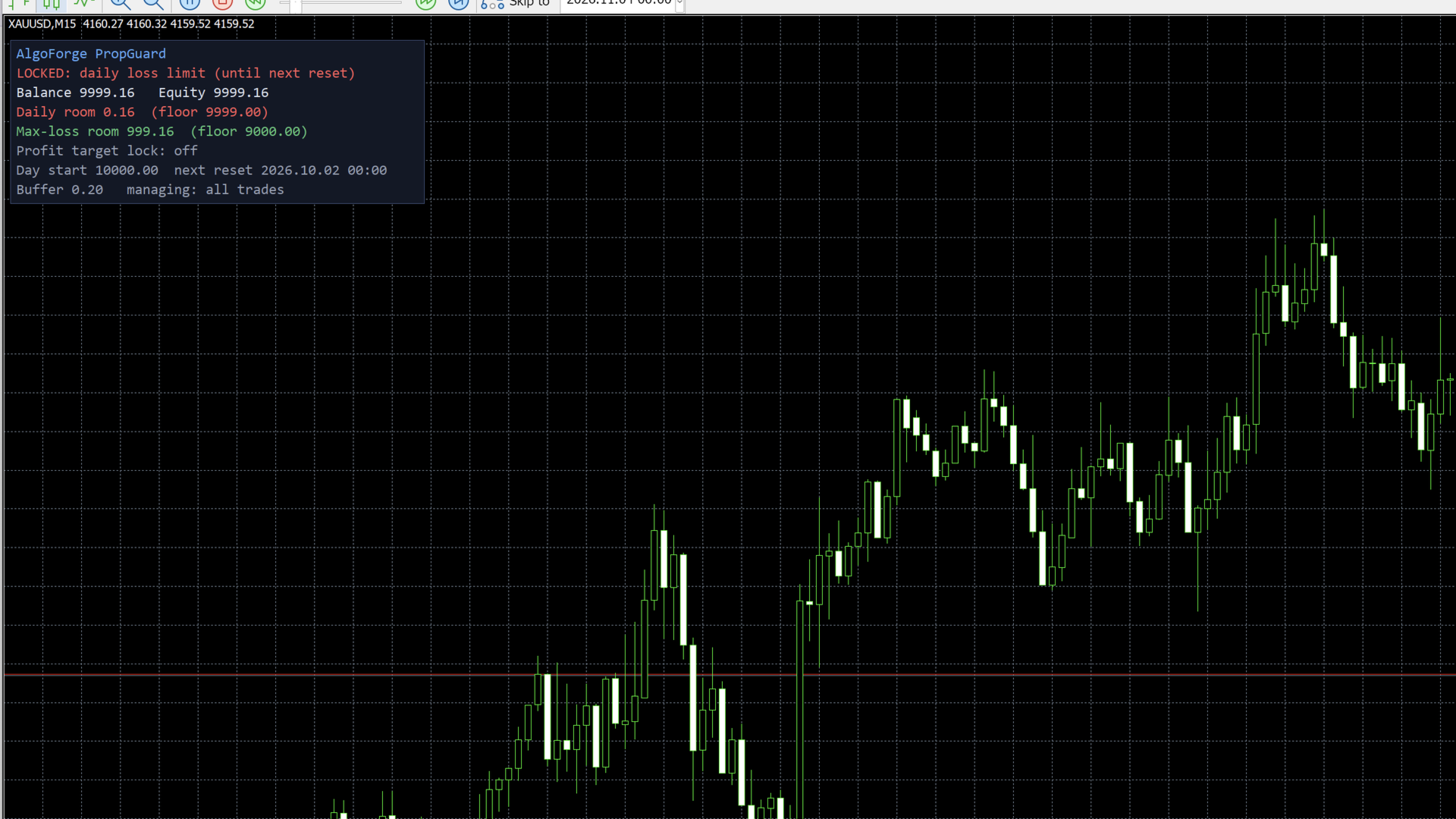
PropGuard watches your account every second and steps in before you break a daily loss or maximum loss rule. When a limit gets close, it closes the trades it manages, deletes their pending orders and blocks new trades until the next daily reset. A clear on-chart panel always shows how much room you have left.
It is a risk tool, not a trading strategy. It never opens trades on a live account.
WHO IT IS FOR
- Traders taking prop-firm challenges or trading funded accounts
- Anyone who wants a hard daily stop on a personal account
- EA users who want an independent safety layer on top of their robots
MAIN FEATURES
- Daily loss limit in % of the initial balance or in money, measured from the balance at the daily reset (or the higher of balance and equity)
- Daily reset time you set in server time
- Maximum loss limit: static, trailing on the highest balance, or trailing on the highest equity
- Safety buffer: acts this far before the limit, to allow for price movement while closing
- Profit target lock: optionally stops trading when a target is reached
- End-of-day and Friday close times
- Blocks new trades after a lock, including manual trades, until the next reset
- Choose what it manages: all trades on the account, only this symbol, or one magic number
- Rebuilds the day-start balance from history if you attach it mid-day
- Locks and the day-start balance survive terminal restarts
- Pop-up alert and push notification to your phone when a limit is hit
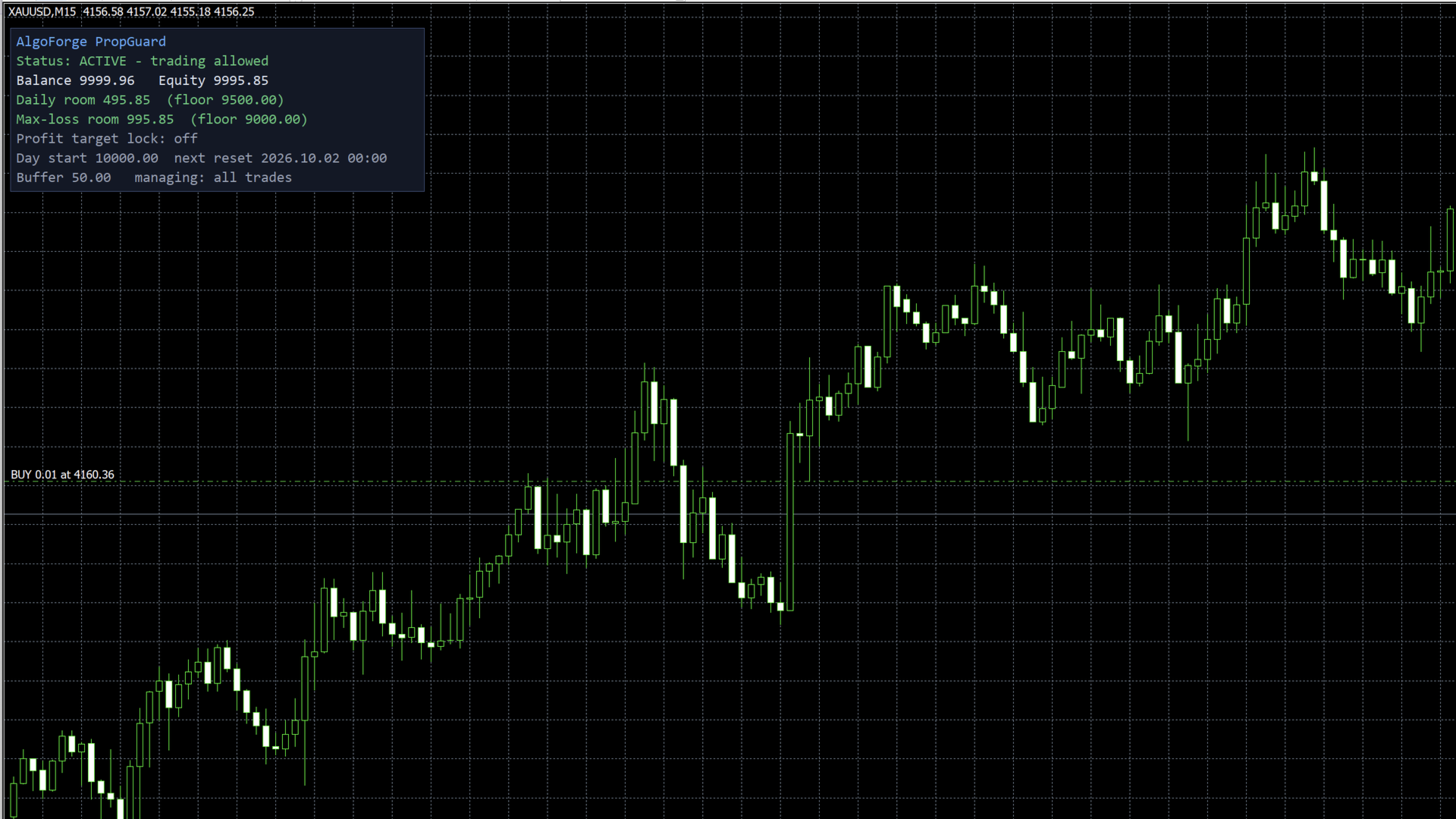
- On-chart panel: balance, equity, room before each limit and lock status
HOW TO USE
1. Attach PropGuard to any one chart of the account. One copy per account is enough.
2. Enter your account size and your limits as your firm defines them.
3. Set the daily reset time in your broker's server time.
4. Keep the terminal (or a VPS) running. PropGuard can only act while MetaTrader is running.
IMPORTANT
- Limits are checked on equity, including open trades.
- Price can move while trades are being closed. Use a buffer (default 0.5% of the account) so the guard acts before the real limit.
- Each firm has its own rules. Check yours and set the inputs to match.
- PropGuard reduces risk; it cannot guarantee that a limit is never exceeded (gaps, weekend opens, connection loss).
- If you change the settings, any existing lock is cleared and the limits are checked again at once.
STRATEGY TESTER
In the tester, PropGuard opens small demo trades so you can watch it manage them. This never happens on a live or demo account.
PARAMETERS
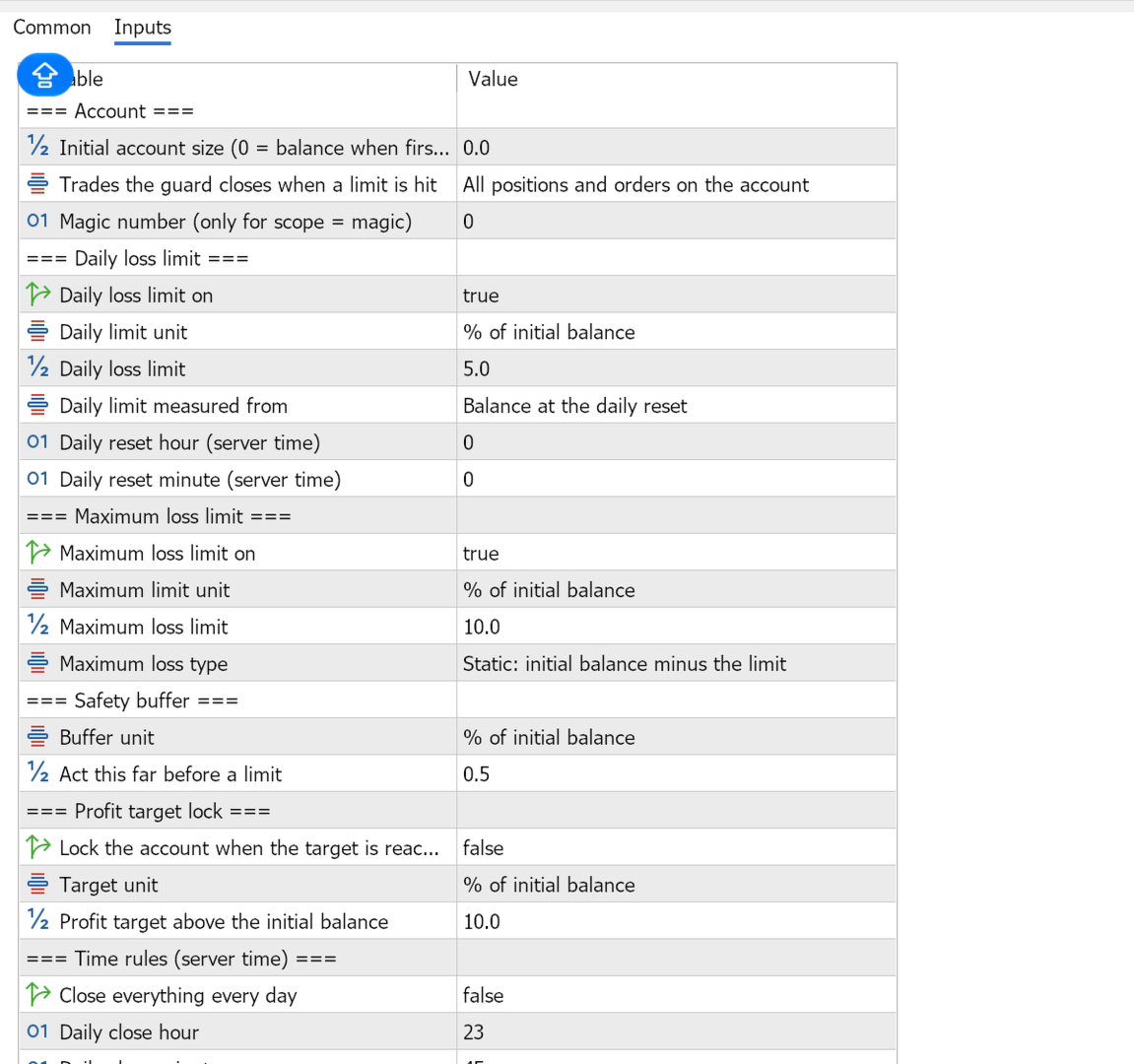
Account: initial account size (0 = balance when first attached), which trades to close (all / this symbol / one magic number), magic number
Daily loss limit: on/off, unit (% or money), value, measured from (balance at reset or higher of balance and equity), reset hour and minute (server time)
Maximum loss limit: on/off, unit, value, type (static / trailing balance / trailing equity)
Safety buffer: unit, value
Profit target lock: on/off, unit, value
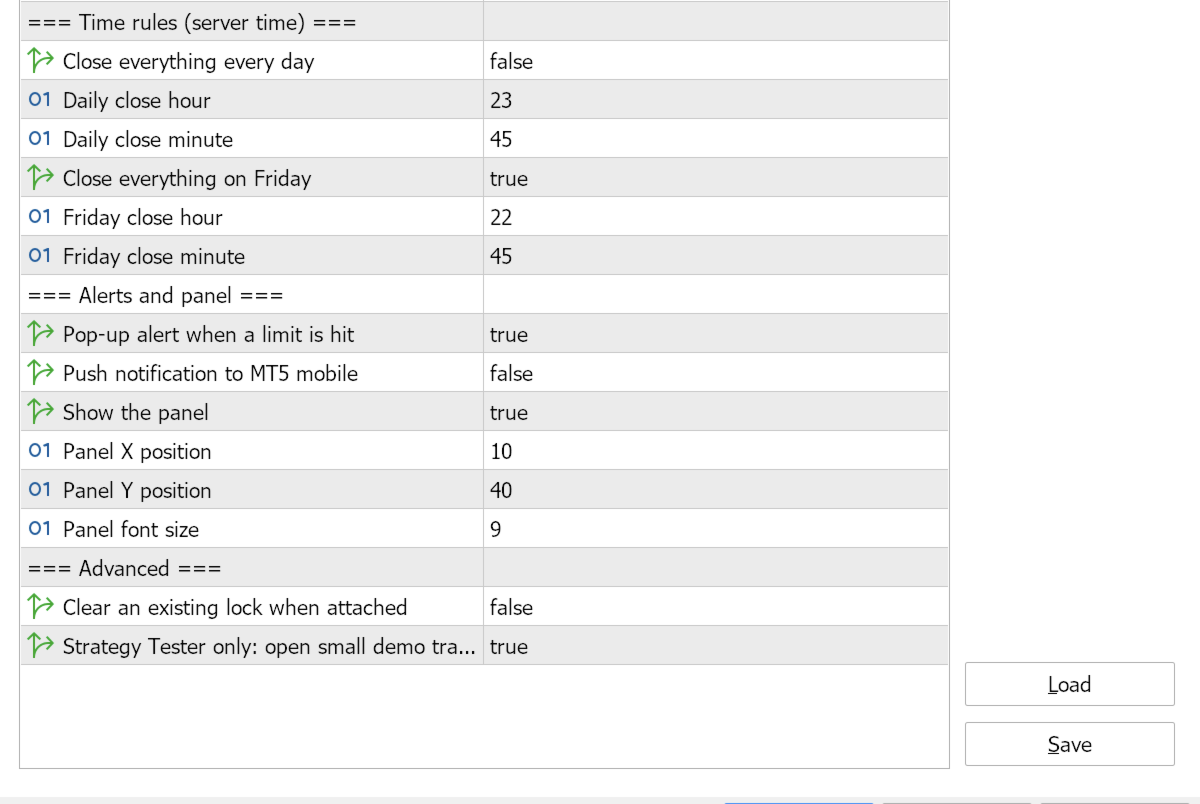
Time rules: daily close on/off and time, Friday close on/off and time (server time)
Alerts and panel: pop-up alert, push notification, show panel, panel position, font size
Advanced: clear an existing lock when attached, tester demo trades
It is a risk tool, not a trading strategy. It never opens trades on a live account.
WHO IT IS FOR
- Traders taking prop-firm challenges or trading funded accounts
- Anyone who wants a hard daily stop on a personal account
- EA users who want an independent safety layer on top of their robots
MAIN FEATURES
- Daily loss limit in % of the initial balance or in money, measured from the balance at the daily reset (or the higher of balance and equity)
- Daily reset time you set in server time
- Maximum loss limit: static, trailing on the highest balance, or trailing on the highest equity
- Safety buffer: acts this far before the limit, to allow for price movement while closing
- Profit target lock: optionally stops trading when a target is reached
- End-of-day and Friday close times
- Blocks new trades after a lock, including manual trades, until the next reset
- Choose what it manages: all trades on the account, only this symbol, or one magic number
- Rebuilds the day-start balance from history if you attach it mid-day
- Locks and the day-start balance survive terminal restarts
- Pop-up alert and push notification to your phone when a limit is hit
- On-chart panel: balance, equity, room before each limit and lock status
HOW TO USE
1. Attach PropGuard to any one chart of the account. One copy per account is enough.
2. Enter your account size and your limits as your firm defines them.
3. Set the daily reset time in your broker's server time.
4. Keep the terminal (or a VPS) running. PropGuard can only act while MetaTrader is running.
IMPORTANT
- Limits are checked on equity, including open trades.
- Price can move while trades are being closed. Use a buffer (default 0.5% of the account) so the guard acts before the real limit.
- Each firm has its own rules. Check yours and set the inputs to match.
- PropGuard reduces risk; it cannot guarantee that a limit is never exceeded (gaps, weekend opens, connection loss).
- If you change the settings, any existing lock is cleared and the limits are checked again at once.
STRATEGY TESTER
In the tester, PropGuard opens small demo trades so you can watch it manage them. This never happens on a live or demo account.
PARAMETERS
Account: initial account size (0 = balance when first attached), which trades to close (all / this symbol / one magic number), magic number
Daily loss limit: on/off, unit (% or money), value, measured from (balance at reset or higher of balance and equity), reset hour and minute (server time)
Maximum loss limit: on/off, unit, value, type (static / trailing balance / trailing equity)
Safety buffer: unit, value
Profit target lock: on/off, unit, value
Time rules: daily close on/off and time, Friday close on/off and time (server time)
Alerts and panel: pop-up alert, push notification, show panel, panel position, font size
Advanced: clear an existing lock when attached, tester demo trades