Prism Regime MT5
- Göstergeler
- Sürüm: 1.0
- Etkinleştirmeler: 5

Prism Regime MT5
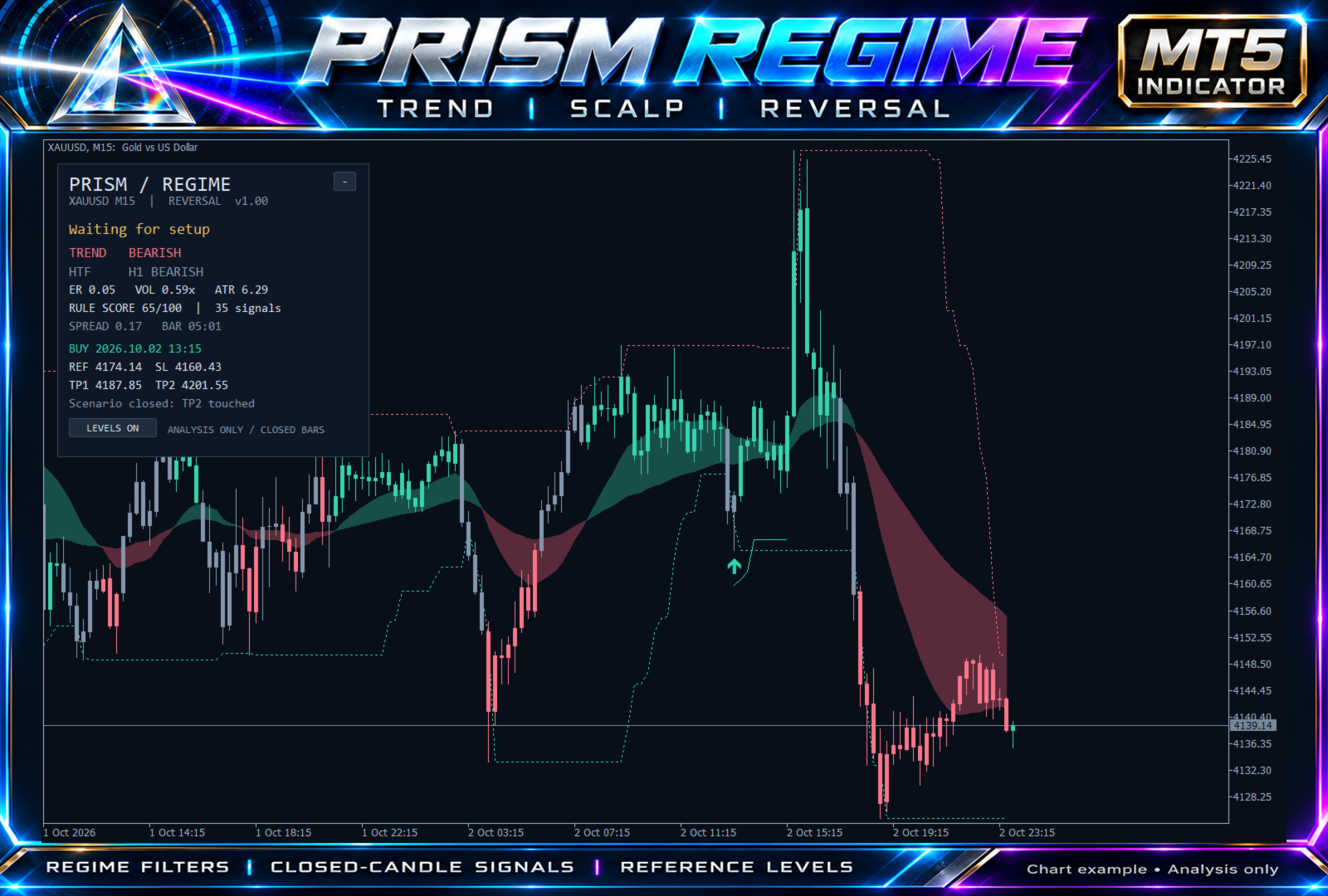
Prism Regime is a chart indicator for traders who want trend context, completed-candle signals and reference trade levels in one view. Choose Trend, Scalp or Reversal mode and see why the current market does or does not qualify for a setup.
Its distinguishing feature is an explicit regime gate: directional efficiency, relative volatility, historical spread and completed higher-timeframe direction filter the candidate signals. The dashboard names the condition currently blocking a setup.
Three analysis modes
- Trend: weighted moving-average direction with pullback continuation or prior-range breakout conditions.
- Scalp: faster weighted moving averages using the same closed-candle confirmation framework.
- Reversal: a sweep and reclaim of the previous range in a lower-efficiency environment. Higher-timeframe alignment remains optional.
On-chart tools
- Two-colour trend cloud and direction-coloured completed candles.
- Buy and sell arrows, previous support and resistance, and scenario exit markers.
- Reference entry, initial stop, two targets and an ATR-based scenario trail.
- A collapsible dashboard with trend, higher-timeframe bias, volatility, efficiency and gate status.
- Optional popup, push and email alerts; all are off by default.
- Data buffers for confirmed signals, levels, score and gate status.
Getting started
Attach the indicator to an XAUUSD M15 chart and begin with Trend mode and H1 confirmation. Load sufficient chart and higher-timeframe history. For Scalp mode, a minimum efficiency of 0.22 is a starting configuration; Trend defaults to 0.28. These are configuration examples, not optimized or guaranteed settings.
The default confirmation period is H1. If a selected confirmation period is below the chart period, the indicator automatically promotes it to an eligible H1, H4, D1, W1 or MN1 period; the dashboard shows the period actually used. For example, default confirmation on a D1 chart becomes W1. Select Current to use the chart period itself. Monthly bars use calendar-month boundaries. Broker symbols with suffixes work through the chart's current symbol. Instruments with missing historical spread data may not generate signals.
Input guide
- InpMode: Trend, Scalp or Reversal. InpUseHTF / InpHTF: enable direction confirmation and choose its period. InpCooldown: spacing filter in bars. InpHistoryBars: displayed calculation window, 200 to 20,000 bars.
- InpMinEfficiency: minimum directional efficiency for Trend/Scalp. InpMaxRangeEfficiency: maximum efficiency for Reversal. InpMinVolatility / InpMaxVolatility: allowed ATR-to-baseline range. InpMaxSpreadATR: largest historical spread as a fraction of ATR. InpMinScore: minimum rule-agreement score.
- InpStopATR / InpMaxStopATR: initial stop sizing and maximum accepted distance in ATR units. InpTP1R / InpTP2R: target distances in initial-risk multiples. InpTrailATR: scenario trailing distance. InpPlanMaxBars: scenario expiry in bars.
- InpShowCloud, InpColorCandles, InpShowStructure, InpShowPanel, InpShowLevels: display controls. InpPanelX / InpPanelY: dashboard position.
- InpPopupAlert, InpPushAlert, InpEmailAlert: optional closed-candle alerts. Push and email require the corresponding MT5 terminal settings.
Signal timing and interpretation
Confirmed signals use completed candles. The forming candle does not expose confirmed signals. Higher-timeframe confirmation uses completed higher-timeframe bars. Calculations use finite historical windows; changes to settings or broker history can change past results, and the displayed history window is limited.
The rule score measures agreement between configured conditions; it is not a probability of winning. Reference prices and scenario exits are analytical levels, not executed orders or verified fills. A stop touch takes precedence when a candle touches both a stop and a target. Signal counts are not a performance report.
This is an indicator and does not open, modify or close trades. It requires no DLLs or external service. Profitability has not been established; evaluate the settings on your own broker's demo data before using signals in a trading process.