Professional Volume Profile
- Göstergeler
- Sürüm: 1.0
- Etkinleştirmeler: 5

📊 Professional VolumeProfile
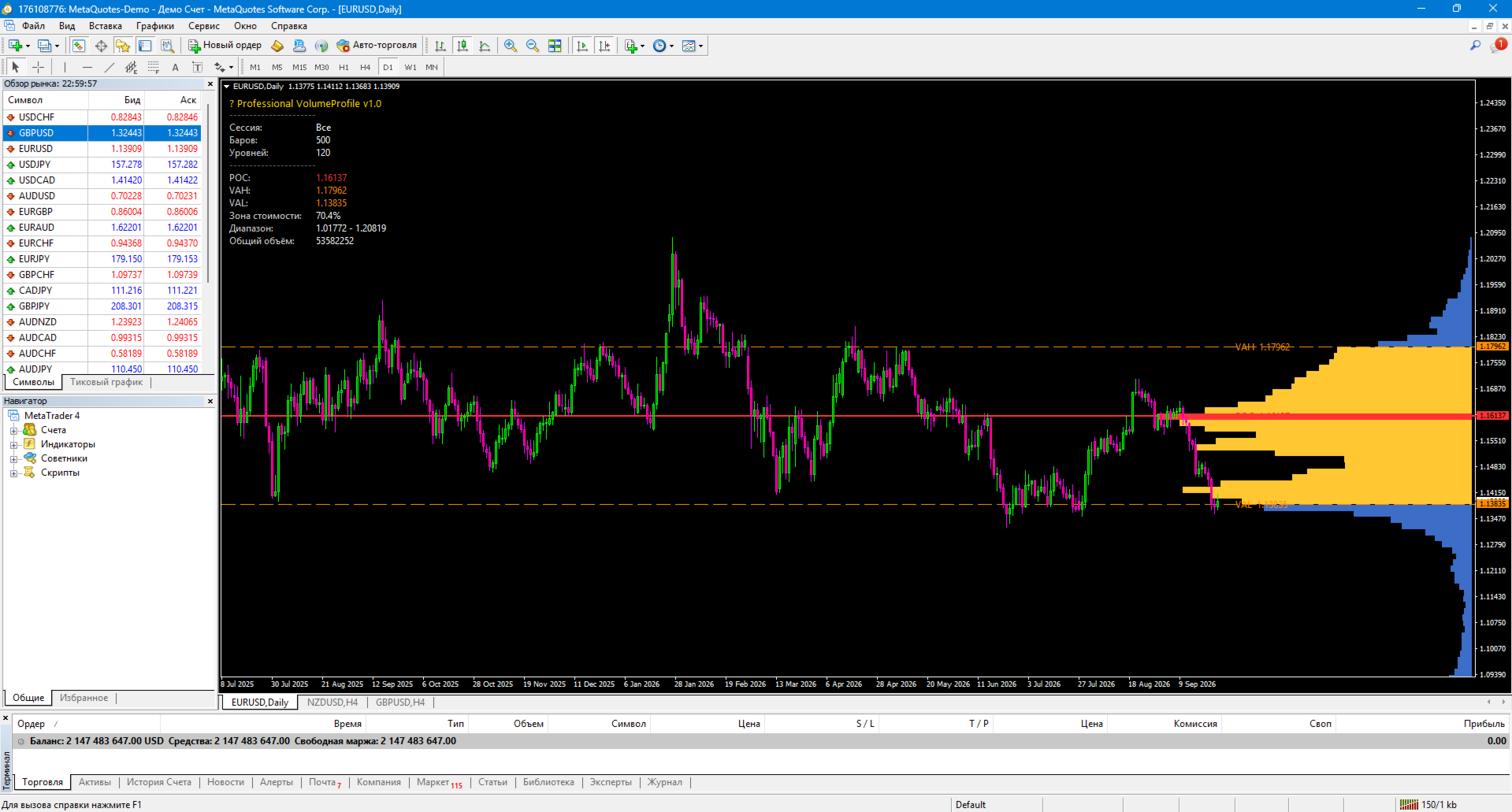
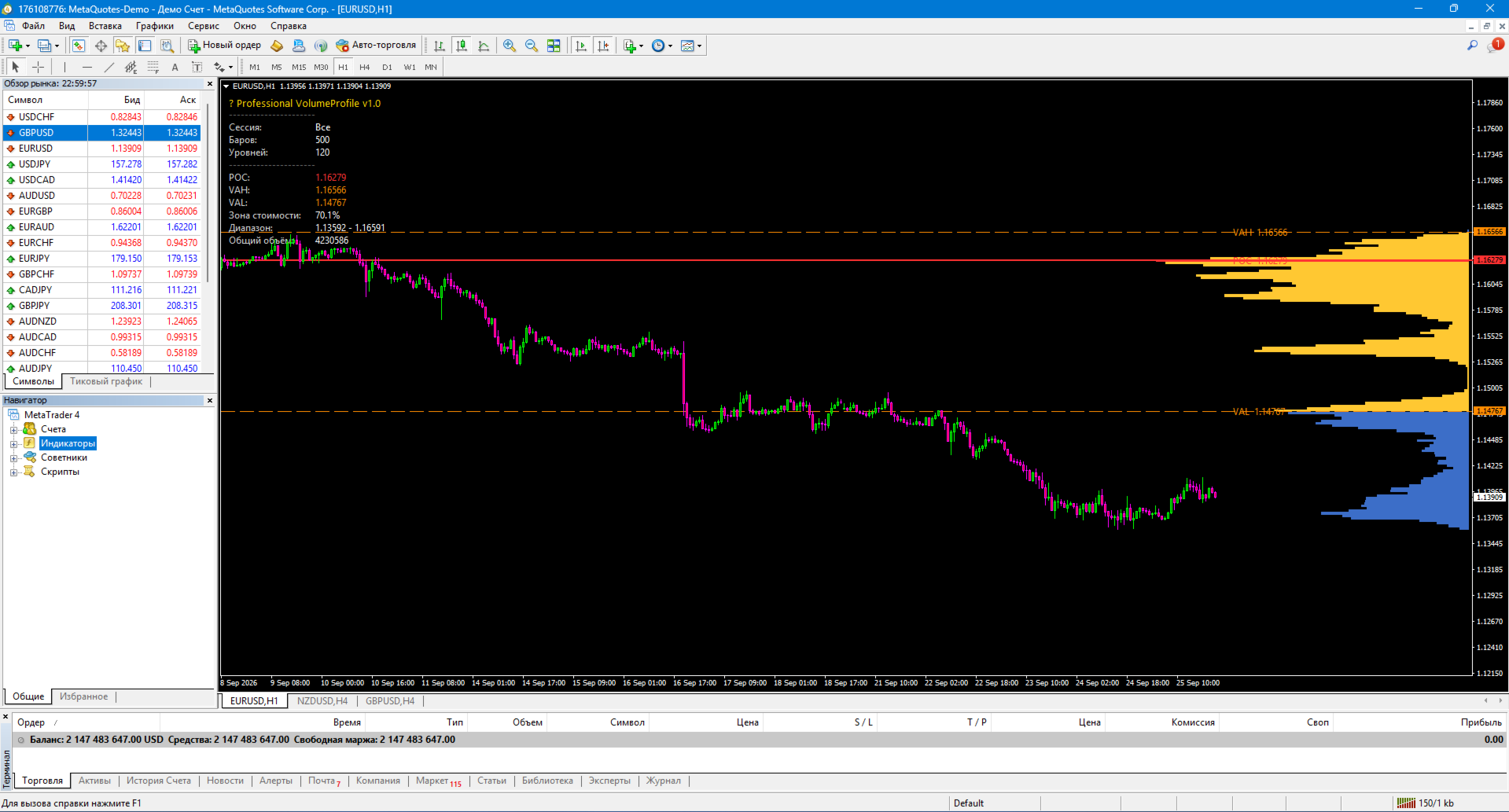
Professional VolumeProfile is a professional indicator for MetaTrader 4 that builds a volume profile by price directly on the chart: it shows POC (Point of Control), VAH/VAL (boundaries of the value zone), and a histogram of volume distribution across price levels.
The indicator was created by a practicing trader with 12 years of experience. It helps to see where the volume is actually concentrated, identify areas of interest for large capital, and determine the fair value of the instrument within the selected range.
🎯 What the indicator shows:
Volume distribution histogram:
🟦 Blue — regular price levels
🟨 Yellow — Value Area (value zone, 70% of the volume)
🟥 Red — POC (level with the maximum volume)
Key lines:
— POC — Point of Control, the price with the highest volume
— VAH — Value Area High, the upper boundary of the value zone
— VAL — Value Area Low, the lower boundary of the value zone
Statistics panel:
Current session and its parameters
Number of bars and price levels (bins)
POC, VAH, VAL values
Value Area coverage percentage
Price range and total volume
✨ Key features
🎨 Visualization in the style of professional terminals
The volume profile is built directly on top of the chart, on the right. The length of each bar is proportional to the volume accumulated at that price level. POC is highlighted in red, and the value zone is highlighted in yellow.
📊 Automatic calculation of the Value Area
The indicator automatically expands the Value Area from POC upward and downward until it reaches the specified percentage of the total volume (70% by default). This is the standard approach in the volume profile.
🕐 Session-based filters
You can only build a profile based on:
the entire history in the viewport;
Asian session;
London session;
The New York session;
the current day.
The session hours are adjusted to match the broker's server time.
Automatic language detection (11 languages)
The indicator automatically adjusts to the language of your terminal: Russian, English, Deutsch, Español, Français, Português, Italiano, Türkçe, 中文, 日本語, 한국어.
⚙️ Flexible settings
Number of bars for calculation (lookback)
Number of price levels (bins)
Value Area percentage
Volume type (tick)
Session filter
Histogram colors, POC, VAH, VAL
Profile width in % of graph
Displaying lines, labels, and statistics
, How to use
1. Installation
Copy Professional VolumeProfile.ex4 to the MQL4/Indicators folder/
Restart MT4
Drag the indicator onto the chart
2. Setting the parameters
InpLookbackBars — how many bars to analyze (default: 500)
InpPriceBins — how many price levels to split the range into (default: 120)
InpValueAreaPct — the percentage of volume for the Value Area (default: 70%)
InpSession — which session to use for building the profile
3. Trading applications
Identifying support/resistance zones — POC and Value Area boundaries often act as price magnets
Searching for areas of interest for large capital — high volume at a certain level = a major player.
Fair value assessment — if the price is above VAH, the market is overvalued; if it’s below VAL, it’s undervalued.
Entries on the return to POC — classic ICT/SMC logic: the price often returns to POC for retesting.
Session filter — comparing the Asian and London profiles shows where the market’s “center” is currently located.
Confirmation of breakouts — if the price breaks through VAH with volume, the breakout is stronger.
📋 Implementation features
Pure MQL4 — no DLLs or external dependencies
Recalculation on a new bar — does not load the terminal
Works on any instrument — forex, metals, indices, stocks, crypto
Supports all timeframes — from M1 to MN
Automatic detection of the terminal language
Customizable appearance — colors, font, profile width
⚠️ Important warning
Professional VolumeProfile is not a trading system. It is a volume analysis tool. The indicator does not provide buy or sell signals; it shows where the volume is concentrated and how the value is distributed.
Using the indicator does not guarantee profit. All trading decisions are made by the trader.
🏆 About the developer
The indicator was created by Musa Khunarikov, a practicing trader with 12 years of experience trading on real accounts (Forex, stocks, MOEX, metals). 51 certificates from the Finam Certification Center in trading, algorithmic trading, and MetaTrader 5.
Services: development of advisors, indicators, panels, audit of trading systems
📞 Support
30 days of free support after publication.
Bug fixes — within 48 hours.