AK Strategy Executer

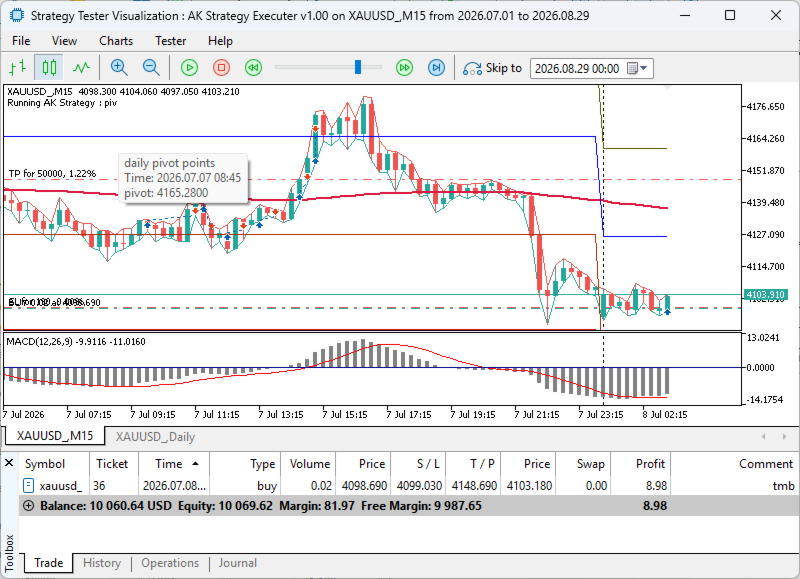
AK Strategy Executer (STE) is the EA that trades user-defined strategies created by the AK Strategy Creator (STC). It is also used to backtest strategies created by STC or STC Free Demo version.

It provides all standard EA functions including Lot Size, TP/SL, Trailing and Breakeven Stop, Trading hours ... etc.


STC/STE Solution bundle

Strategies created by STC can be back tested in MT5 Strategy Tester, forward tested on demo or executed on live accounts using AK Strategy Executer (STE).

Testing before buying

  • Since STC is a grpahical utility tool, the free demo version downloaded from MT5 Market will not correctly work in MQL5 Strategy Tester. For this I provided a full functional demo version that can be used live to create trading stragtegies.
  • Strategies created by the STC Demo version can only be used in MQL5 Strategy Tester using the same STE EA.


Strategy Template

  • Before attaching the STE EA to a live chart, make sure to load the strategy corresponding template that was used in creating the strategy via STC EA.
  • For backtesting, MQL Strategy tester automatically loads the "tester" strategy.
  • If the indicators on chart are not matching the indicators in the strategy to be traded, the EA will not trade it.

Important Inputs

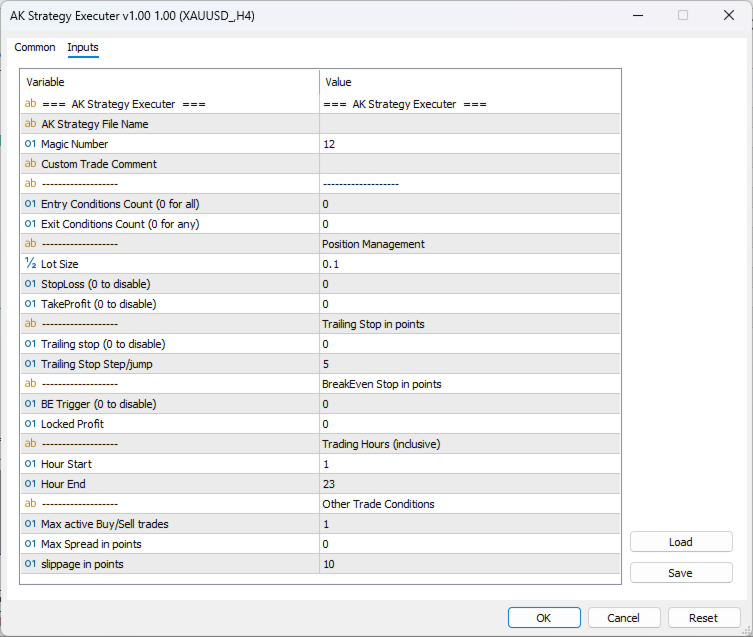
  • AK Strategy File Name : The name of the strategy to be traded.
    • Strategies created by STC are saved in Terminal COMMON folder, with ".bin" extension as they are binary files.
    • Enter the strategy name without the ".bin" extension.
  • Entry Conditions Count (0 for all): Conditions for Entery are "ANDed". 
    • If you set this input to 0 or to total count of conditions used, then all conditions must be true to trigger a trade.
    • If there are 6 entry conditions, and you set this input to 4, then a trade will be triggered if 4 or more conditions are true.
  • Exit Conditions Count (0 for any): Conditions for Exit are "ORed".
    • If you set this input to 0, then at least one condition must be true to trigger exit.
    • If there are 6 exit conditions, and you set this input to 4 then 4 conditions out of 6 must be true to trigger exit.
Yazarın diğer ürünleri
This Expert Advisor measures the broker execution time in milliseconds. Every 10 seconds (Refresh Seconds) , the EA opens a buy stop order far away from current price (1.5 x Ask), then modifies the (price, stop loss and take profit) of the created order by 5 pips then deletes it immediately. Inputs Refresh Seconds:   Number of seconds for each re-test, default 10 seconds. Display Last:   Last Execution time Min:   Fastest execution time Max:   Slowest Maximum execution time Avg:   Average exec
This is a DEMO version of the Smarter Trade Manager Smarter Trade Manager  is an advanced trade management tool that can monitor and manage your manual and EA trades according to the settings you choose. It works as an Expert Advisor (EA), it does not open any trades but it closes trades as per the auto closing settings or when manually pressing any of the close buttons. FEATURES: Three-dimensional  interactive  view of your trades Trade Summary, P/L, Alerts, Closure by  Currency Trade Summary,
FREE
Break-even Price indicator Shows Break even price tag for multiple positions on chart Multiple Levels for custom Profit/Loss Percentages of Balance, and Amounts in Deposit Currency Works for a specific Magic Number trades or all trades on chart Calculation includes Spread, Commissions and Swaps How to use The basic use of the indicator is to calculate the "break-even price level" for multiple mixed positions for the same symbol and show it on the chart. In addition to this, the indicator will s
Currency Dashboard Trader is a multi-currency trading system. It uses two sets of indicators across multiple time frames. Each set can be evaluated for trend following or reversal. The system calculates strength/weakness of currency pairs , and  generates a list of pairs eligible for trading. The system also incorporates a trade manager that supports currency basket management. Trading Modes: Manual Mode: Dashboard in manual mode is used as an indicator for trade signals. Clicking a pair from
Smarter Trade Manager  is an advanced trade management tool that can monitor and manage your manual and EA trades according to the settings you choose. It works as an Expert Advisor (EA), it does not open any trades but it closes trades as per the auto closing settings or when manually pressing any of the close buttons. FEATURES: Three-dimensional interactive  view of your trades Trade Summary, P/L, Alerts, Closure by Currency Trade Summary, P/L, Alerts, Closure by Magic Number Profit and Loss
High Probability Reversal Indicator The indicator looks for trend exhaustion areas, and plots Buy/Sell arrow after confirmation of trend   exhaustion. Signals can   also   be shown as popup alerts, or be sent as e-mail or mobile phone notification. Trades can be taken on breakout of the signal candle. Inputs Signal Type:   Aggressive/Normal History Bars : Can be set to 0 (zero) to show all historical signals, or can be set to a limited number of bars for faster execution. Show Alert   : True/Fal
High Probability Reversal Arrow Indicator The indicator looks for trend exhaustion areas, and plots Buy/Sell arrow after on confirmation of trend exhaustion. Signals can also   be shown as popup alerts, or be sent as e-mail or mobile phone notification. Trades can be taken on breakout of the signal candle. Inputs Signal Type: Aggressive/Normal History Bars : Can be set to 0 (zero) to show all historical signals, or can be set to a limited number of bars for faster execution. Show Alert : True/Fa
AK Strategy Creator  ( STC ) enables traders to create, edit and save their own strategies using MT5 standard and custom indicators. Attach your strategy's indicators or load your chart template. Add/Remove indicators and modify their settings as needed. Once you are satisfied the indicators, save as chart template. Give the template a specific name as it will be needed for demo/live trading. To backtest the strategy in Strategy Tester, save the template also under the name "tester". If it's alr
This is the demo version of  AK Strategy Creator  ( STC ) which enables traders to create, edit and save their own strategies using MT5 standard and custom indicators. Attach your strategy's indicators with your preferred settings, then attach STC EA, which will read the attached indicators so that you can use them in defining Buy and Sell Entry and Exit conditions. Two   default indicators   are always included in the indicator list to allow access to Candle (Bar) prices and indicator values:
FREE
Filtrele:
Değerlendirme yok
Değerlendirmeye yanıt