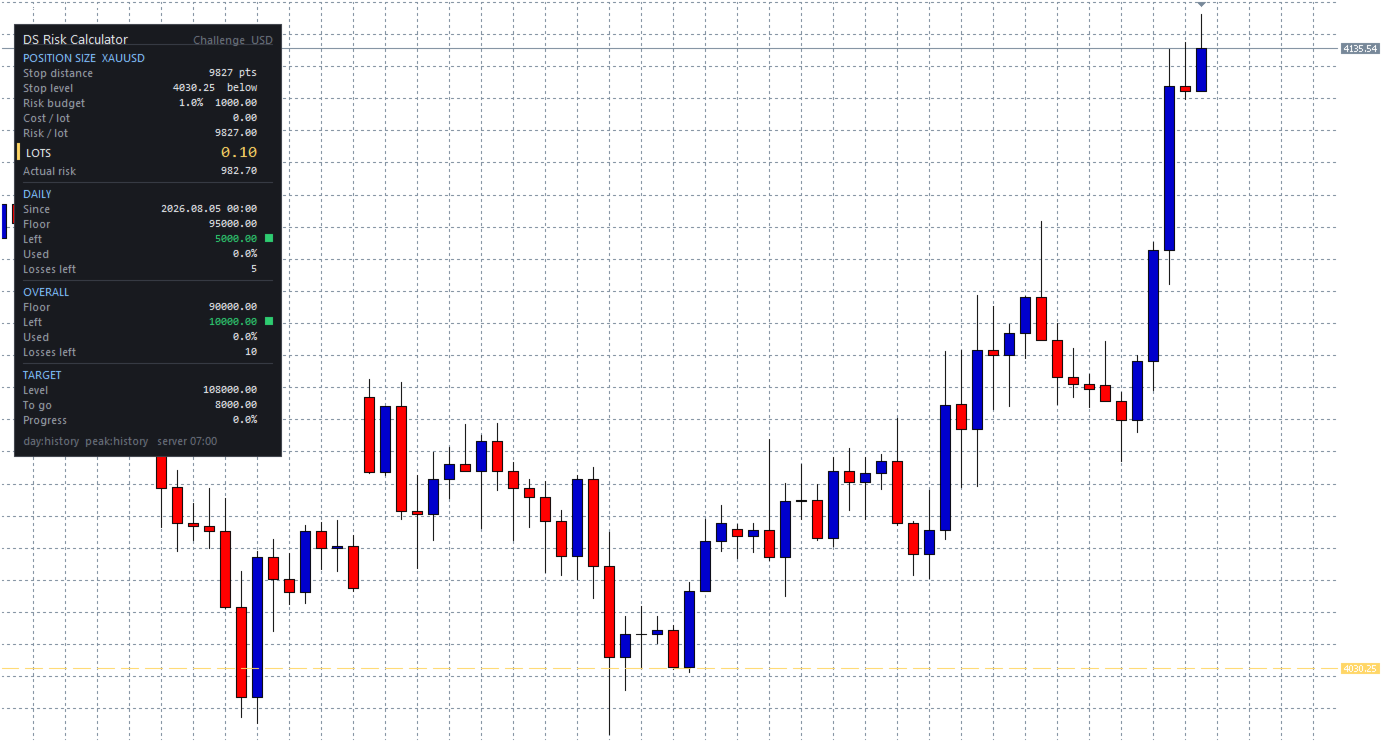
DS Risk Calculator
- Yardımcı programlar
- Sürüm: 1.0

DS Risk Calculator works out your lot size from the stop you actually intend to
use, and shows how much room is left before your daily loss limit, your overall
drawdown limit and your consistency rule are reached. It is built for funded
account rules, and it works just as well on an ordinary account with rules you
set yourself.
It does not place, modify or close orders. There are no trading functions in it.
It reads your account and shows you arithmetic.
WHAT IT SHOWS
- Lot size for the stop distance you set, normalised to the symbol's minimum,
maximum and step, and capped by your free margin.
- Distance to the daily limit, in money and as a percentage of the allowance.
- Distance to the overall limit, with a static, trailing, or trailing-then-locked
floor.
- How many consecutive losses at the current size fit into the room that is left.
- Progress towards a profit target.
- Consistency rule: what today's result may reach, and what total is needed for
the largest day already recorded to fall inside the share you set.
- A green / amber / red marker on each limit, with thresholds you choose.
DRAG THE STOP, READ THE SIZE
A dashed line on the chart marks your stop level. Drag it and the lot size
updates as you release it. The distance is measured from the price the trade
would fill at, so the spread is already accounted for and is not charged twice.
Prefer typing a number? Turn the line off and enter the distance in points.
EVERY RULE IS A SETTING
No firm's rules are written into this program, because firms change them.
You enter them once and save them as a preset:
- Daily limit as a percentage or a cash amount.
- Measured from the balance at the day start, the equity at the day start, the
higher of the two, or the highest equity reached during the day. All four are
in use somewhere; pick the one your rules describe.
- Open positions counted towards the daily loss, or not.
- Day reset at any hour and minute of the broker's server clock.
- Overall limit static, trailing the peak, or trailing until the floor reaches
your starting balance and then holding there.
- Consistency rule as a maximum share of total profit for a single day.
- Risk per trade as a percentage of the starting balance, the current balance or
the current equity.
Four presets are included as .set files, covering the combinations most often
seen, plus one for a personal account.
IT TELLS YOU WHAT IT DOES NOT KNOW
Install it halfway through and some figures are in the past. The day anchor and
the balance peak are rebuilt from your closed deals. The highest equity your
account ever touched cannot be rebuilt by anyone, because it depended on prices
that are no longer stored.
So every figure carries where it came from — measured live, rebuilt from history,
or entered by you — and it is shown on the panel. A tool that quietly guesses in
your favour is worse than no tool, because the guess always makes the room look
larger than it is.
At startup it also prints your rules translated into money: the exact floor
levels, the target level, the day anchor. Compare them with your own account
rules before relying on a single number on the panel.
ALERTS
A popup, and a push notification to the MetaTrader app on your phone, when a
limit moves from green to amber or from amber to red. Once per change of state,
not on a timer. The message states a figure about your account and nothing else.
WORKS EVERYWHERE
- Any account currency. Any symbol.
- Lot value taken from the broker's tick value, with a fallback derived from
contract size and the exchange rate for brokers that do not publish one.
- Netting and hedging accounts.
- No DLLs, no internet requests, no external files.
WHAT IT IS NOT
- It is not an automated trading system and contains no order functions.
- It gives no signals, forecasts, recommendations or advice of any kind.
- It is a calculator. What you do with the numbers is your decision.
Requires the MetaTrader 5 desktop terminal. Expert Advisors do not run on the
mobile apps or in the web terminal — a limitation of the platform, not of this
product. To keep tracking continuous while your computer is off, run it on a
virtual server.