PriceAlert
- Göstergeler
- Sürüm: 1.30

Here's how to use the BTC_PriceAlert.mq5 indicator in MetaTrader 5:
What it does
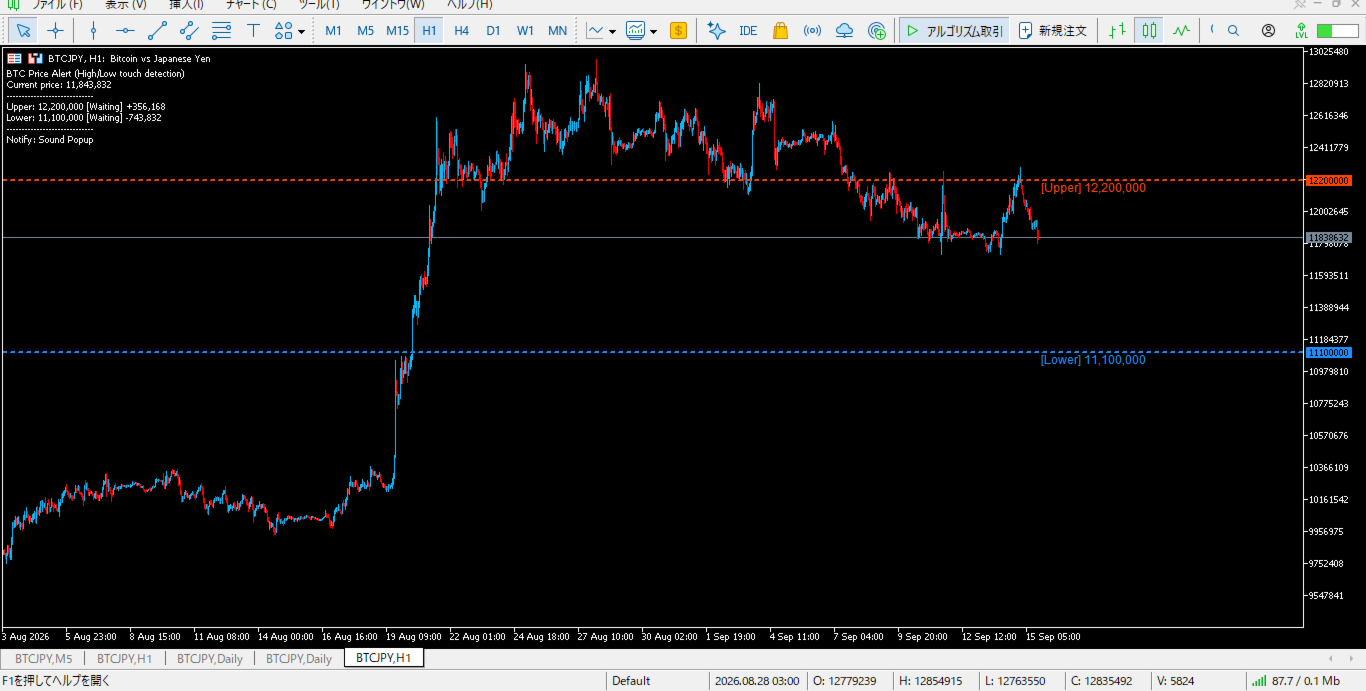
It's a custom indicator (not an EA) for BTCJPY that draws horizontal alert lines on your chart and fires a notification when price touches your specified upper or lower target. It checks the high/low of each bar (wick touches count, not just closes).
Install the indicatorCopy BTC_PriceAlert.mq5 into your MT5 data folder under MQL5/Indicators (File > Open Data Folder in MetaEditor or MT5). Compile it in MetaEditor (F7), or just restart MT5 so it appears in the Navigator under Indicators.
Attach it to a BTCJPY chartOpen a BTCJPY chart, find the indicator in the Navigator panel, and drag it onto the chart. It runs in the main chart window (not a subwindow), since it draws horizontal lines directly on price.
Set your alert pricesIn the input dialog, set Alert_Upper to the price you want to be alerted at on the way up, and/or Alert_Lower for the price on the way down. Leave a value at 0 to disable that alert entirely.
Choose notification methodsEnable any combination of: Use_Sound (plays a .wav file — customize the filename in Sound_File), Use_Popup (an on-screen Alert() popup), Use_Push (sends a push notification to the MT5 mobile app — requires MetaQuotes ID setup in MT5 options), and Use_Email (sends an email — requires SMTP settings configured in MT5 under Tools > Options > Email).
Watch the chartOnce running, the indicator draws dashed lines at your target prices and shows a live comment box in the top-left with the current price, distance to each target, and whether each alert has already fired. Each alert only fires once per chart session — reattaching the indicator or restarting MT5 resets the fired flags.
A couple of notes worth knowing:
- Push notifications need the MetaQuotes ID from your mobile MT5 app entered in Tools > Options > Notifications on the desktop terminal.
- Email needs SMTP server, login, and password set in Tools > Options > Email, plus "Allow WebRequest/Email" enabled.
- The alert only checks the most recently closed or forming bar's high/low, so it reacts on new ticks/bar updates — not a constant real-time tick-by-tick scan, though in practice it updates on every incoming tick since OnCalculate runs then too.