Aureon Confluence Enginee
- Göstergeler
- Sürüm: 1.0

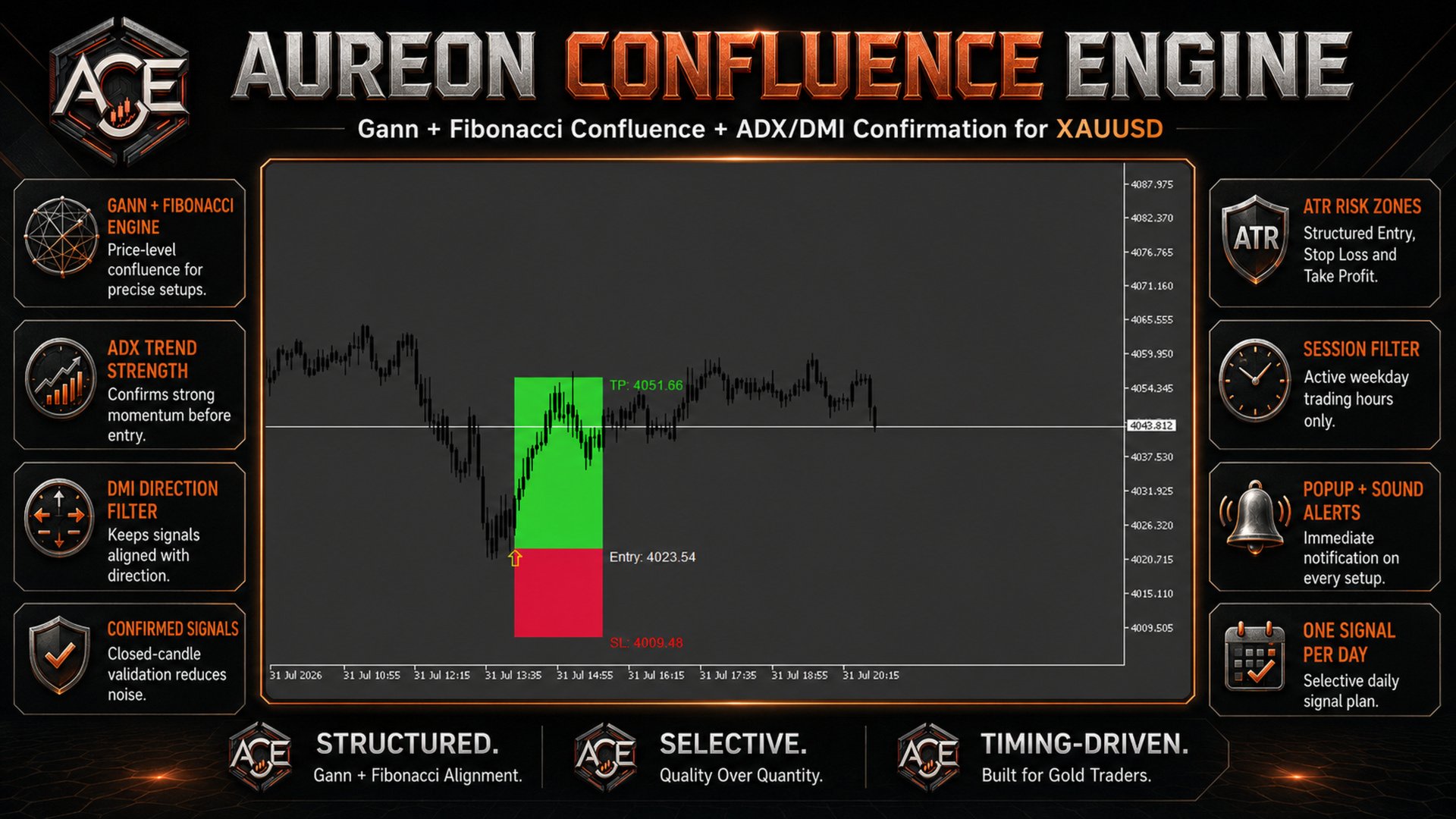
Aureon Confluence Engine is a trend-confirmation indicator for MetaTrader 5 that combines Gann price geometry, Fibonacci target alignment and ADX/DMI trend filtering in one structured signal system.
The indicator analyzes completed candles only. When all enabled conditions agree, it displays a BUY or SELL arrow together with clear Entry, Stop Loss and Take Profit zones directly on the chart.
By default, the indicator is configured to provide a maximum of one qualified signal per broker day, helping traders focus on selective setups instead of excessive signals.
HOW THE SYSTEM WORKS
-
The Gann-based engine determines the directional market bias.
-
The adaptive step system automatically adjusts its calculation according to the current chart timeframe.
-
ATR is used to calculate the Entry, Stop Loss and Take Profit levels.
-
The projected target is compared with the 1.272, 1.618 and 1.988 Fibonacci extension levels.
-
The ADX filter checks whether sufficient trend strength is present.
-
DMI confirms direction:
• BUY confirmation requires +DI to be above -DI.
• SELL confirmation requires -DI to be above +DI.
-
Optional candle-color and trading-session filters provide additional confirmation.
-
The daily signal plan and candle cooldown prevent repeated signals within a short period.
KEY FEATURES
• Gann and Fibonacci confluence engine
• Automatic timeframe-based Gann step selection
• Manual Gann step selection available
• ADX trend-strength confirmation
• DMI directional confirmation
• Signals calculated from completed candles
• Maximum one signal per broker day by default
• Configurable minimum distance between signals
• Optional candle-color confirmation
• Optional weekday trading-session filter
• Automatic ATR-based Entry, Stop Loss and Take Profit levels
• Clear visual Risk and Reward boxes
• BUY and SELL arrows displayed directly on the chart
• Popup and sound alerts for new signals
• Compatible with Gold, Forex, JPY pairs and Crypto when the appropriate divisor is selected
• Fully customizable colors and decimal precision
DEFAULT RISK STRUCTURE
The default configuration uses:
• Stop Loss: 2.0 ATR
• Take Profit: 4.0 ATR
This produces a default Risk-to-Reward structure of 1:2.
The multipliers remain fully adjustable from the indicator inputs.
RECOMMENDED INITIAL SETUP FOR GOLD
• Divisor: 1
• Gann Radar Step Mode: Automatic
• ATR Length: 14
• ATR Source: Live ATR
• Manual ATR Value: 0.5
• Confluence Threshold: 4.0
• ADX Period: 14
• Minimum ADX Strength: 20
• One Signal Per Broker Day: Enabled
INPUT PARAMETERS
CORE SETTINGS
• Gann Radar Step Mode — Selects automatic timeframe adaptation or a manual Gann step value.
• Divisor — Adjusts price scaling for different markets. Use 1 for Gold and Crypto, 100 for JPY pairs and 10000 for standard Forex pairs.
• ATR Length — Sets the period used for the ATR calculation.
• ATR Source — Selects Live ATR or the Manual ATR Value.
• Manual ATR Value — Defines the ATR value used when Manual ATR is selected.
• Confluence Threshold — Sets the maximum permitted distance between the ATR target and a Fibonacci extension level.
RISK MANAGEMENT
• Stop Loss ATR Multiplier — Controls the Stop Loss distance using ATR.
• Take Profit ATR Multiplier — Controls the Take Profit distance using ATR.
• Minimum Candles Between Arrows — Defines the minimum number of candles required between two signals.
DAILY SIGNAL PLAN
• Maximum One Signal Per Broker Day — Limits the indicator to one qualified signal during each broker calendar day.
CONFIRMATIONS
• Candle Color Confirmation — Requires a bullish candle for BUY signals and a bearish candle for SELL signals.
• Time Filter — Restricts signals to weekdays between 06:00 and 18:00 broker time.
ADX AND DMI FILTER
• Enable ADX/DMI Filter — Enables or disables trend-strength and directional confirmation.
• ADX/DMI Period — Sets the calculation period for ADX, +DI and -DI.
• Minimum ADX Strength — Defines the minimum ADX value required before a signal can be accepted.
VISUAL SETTINGS
• Label Decimal Places — Sets the number of decimal places displayed on Entry, Take Profit and Stop Loss labels. Use -1 for the chart’s automatic digits.
• Entry Label Color — Sets the Entry-price label color.
• Take Profit Label Color — Sets the Take Profit label color.
• Stop Loss Label Color — Sets the Stop Loss label color.
ALERTS
• Enable Alerts — Enables notifications when a new signal is confirmed.
• Play Sound — Plays the selected sound file when a signal appears.
• Sound File — Selects the alert sound stored in the MetaTrader 5 Sounds folder.
• Show Popup — Displays a MetaTrader 5 popup message for each new confirmed signal.
IMPORTANT
Aureon Confluence Engine is a technical-analysis indicator. It does not open, manage or close trades automatically.
Trading involves risk. Always test the indicator on a demo account and apply appropriate risk management before using it in live trading.