
LevelsHunter MT5
- Göstergeler
- Sürüm: 3.3
- Güncellendi: 13 Haziran 2026

LevelsHunter MT5 – Hacim Profili ve Ana Seviyeler Göstergesi
Amaç
Gösterge, belirtilen sayıda son barda tik hacminin fiyat seviyelerine göre dağılımını görüntüler. Araç, hacim birikim bölgelerini analiz etmek ve önemli destek ve direnç seviyelerini belirlemek için tasarlanmıştır.
Giriş noktalarını gösteren diğer göstergelerle birlikte özellikle etkilidir. POC, VAH ve VAL seviyeleri objektif bir filtre görevi görür: sinyal bir hacim birikim bölgesiyle çakışıyorsa onaylar veya bir sinyal "boş" bir alanda meydana geldiğinde işlem yapmaktan kaçınmanızı sağlar.
Kilit bir yetenek – zamanı geri sarabilir ve geçmişteki herhangi bir barda hangi POC, VAH ve VAL seviyelerinin geçerli olduğunu görebilirsiniz. Bu, göstergeyi tam teşekküllü bir işlem analizörüne dönüştürür.
Ana Unsurlar
-
POC (Kontrol Noktası) – analiz edilen dönemde en fazla işlem sayısının gerçekleştiği, en yüksek hacme sahip seviye.
-
VAH (Değer Bölgesi Yükseği) – toplam hacmin belirli bir yüzdesini içeren fiyat bölgesinin üst sınırı.
-
VAL (Değer Bölgesi Düşüğü) – toplam hacmin belirli bir yüzdesini içeren fiyat bölgesinin alt sınırı.
-
Önceki gün en yüksek ve en düşük – önceki işlem gününün seviyeleri.
Sinyal Yorumlama
-
POC seviyesini test etmek potansiyel bir dönüşe işaret edebilir.
-
Fiyatın VAH üzerinde veya VAL altında sabitlenmesi yeni bir hareketin başlangıcını sinyalleyebilir.
-
Önceki gün seviyelerinden sıçrama, trend takibi veya karşı trend stratejileri çerçevesinde kullanılır.
Geçmiş Analizi
Geçmişteki herhangi bir noktada hacim profilinin nasıl göründüğünü görebilirsiniz:
-
Manuel kaydırma – çubuk cinsinden bir kaydırma seçin, tüm POC, VAH, VAL çizgileri o çubuk için yeniden hesaplanacaktır.
-
Görsel işaretçi – grafikte "Analysis start" etiketli mavi kesikli dikey bir çizgi belirir ve seviyelerin hesaplandığı çubuğu işaretler.
-
Etkileşimli hareket – bu çizgiyi fare ile sola veya sağa sürükleyin, gösterge anında yeni çubuk için seviyeleri yeniden hesaplar. Ayarlara girmenize gerek yoktur.
Örnek:
M15 zaman diliminde 96 çubukluk bir kaydırma ayarlayın – gösterge tam olarak 24 saat önceki seviyeleri gösterecektir. İşaretçiyi kendi işlem giriş çubuğunuza taşıyın – ve giriş anında görülebilen hacimleri göreceksiniz.
Çizgi Çizim Mantığı
Çizgiler görsel karmaşa yaratmaz:
-
Her çizgi gerçekten ilgili olduğu yerde başlar ve yalnızca sağa (geleceğe doğru) uzanır.
-
POC, VAH ve VAL seviyeleri analiz döneminin ilk çubuğunda başlar ( Number of bars for analysis parametresi ile ayarlanır). Çubuk sayısını değiştirirseniz, çizgi başlangıçları buna göre kayar – net görsel geri bildirim sağlar.
-
Önceki gün seviyeleri – Prev High ve Prev Low çizgileri – tam olarak o günün 00:00'ında başlar.
Etiket Yönetimi
Show text labels at the right edge parametresi, metin etiketlerini (POC, VAH, VAL, Prev High, Prev Low) eğer engel oluyorlarsa grafiğin sağ kenarından tamamen kaldırmanıza olanak tanır.
Uygulama Özellikleri
-
Önceki gün seviyeleri (Yüksek/Düşük) yeniden boyanmaz – günde bir kez sabitlenirler.
-
POC, VAH ve VAL seviyeleri normal çalışma sırasında her yeni çubukta yeniden hesaplanır. Geçmiş analizi modunda, seçilen çubuk için sabitlenirler.
-
Gösterge herhangi bir zaman diliminde ve herhangi bir sembolde çalışır.
-
Harici DLL kitaplıkları kullanmaz.
-
Bilgi paneli her seviyenin kısa bir açıklamasını sağlar (devre dışı bırakılabilir).
Yapılandırma Parametreleri
| Parametre | Açıklama |
|---|---|
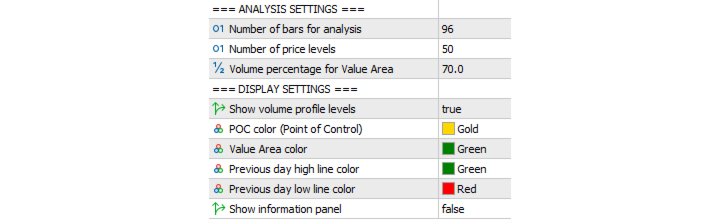
| Number of bars for analysis | Hacim profili hesaplaması için son çubuk sayısı (varsayılan: 96). M15'te ≈ bir gün. |
| Shift bars to past | Geçmişe kaydırma (çubuk cinsinden). 0 – şu an, 96 – 96 çubuk öncesinin seviyeleri. |
| Number of price levels | Fiyat seviyesi sayısı (varsayılan: 50). |
| Volume percentage for Value Area | VAH/VAL sınırları için toplam hacim yüzdesi (varsayılan: %70). |
| Show volume profile levels | POC, VAH, VAL çizgilerini etkinleştir/devre dışı bırak. |
| POC color | POC çizgisi rengi (varsayılan: altın). |
| Value Area color | VAH/VAL çizgileri rengi (varsayılan: yeşil). |
| Previous day high line color | Önceki gün yükseği çizgi rengi (varsayılan: yeşil). |
| Previous day low line color | Önceki gün düşüğü çizgi rengi (varsayılan: kırmızı). |
| Show information panel | Bilgi panelini göster/gizle. |
| Show text labels at the right edge | Sağ kenardaki metin etiketlerini göster/gizle. |
Ücretsiz Sürüm
Ücretsiz sürüm, hem profil hesaplaması hem de geçmişe kaydırma için en fazla 100 son çubuğu analiz etmenize olanak tanır.
M15 zaman diliminde bu yaklaşık 25 saattir (bir günden biraz fazla).
LevelsHunter Pro
Pro sürümü, geçmiş derinliği sınırlamasını kaldırır – geçmişteki herhangi bir sayıda çubuğu analiz edebilirsiniz.
Pro sürümünün ek özellikleri:
-
Bir çubuğa çift tıklama – seçilen çubuğun seviyelerine anında atlama
-
Değer Bölgesi dolgusu – VAH–POC ve POC–VAL bölgelerinin görsel olarak ayrılması
-
Geçmiş Modu düğmesi – tek tıklamayla geçmiş analizini etkinleştirin. Devre dışı bırakıldığında, gösterge mevcut durum moduna geri döner
Ticarette Uygulama
İşlem Girişi İçin
Bir pozisyon açmadan önce, analiz işaretçisini mevcut çubuğa taşıyın. Fiyatın önemli bir seviyeye (POC, VAH, VAL, Prev High/Low) yakın olup olmadığını değerlendirin. Ticaret sisteminizin sinyali bir hacim birikim seviyesiyle çakışıyorsa, başarılı bir işlem olasılığı artar. Sinyal "boş" bir fiyat aralığında meydana gelirse, bu ek doğrulama için bir nedendir.
Açık ve Kapatılmış İşlemleri İzleme ve Analiz Etme İçin
Açık bir pozisyon için – işaretçiyi giriş çubuğuna taşıyın ve o anın anahtar seviyelerini hatırlayın. Fiyatın şimdi onlarla nasıl etkileşime girdiğini izleyin: POC'yi test etme, VAH'ın üzerinde sabitlenme veya Prev Low'dan sıçrama.
Kapatılmış bir işlem için – giriş ve çıkış çubuklarına geri dönün. Hacim yapısının değişip değişmediğini karşılaştırın. Bu, işlemin hacim profili perspektifinden haklı olup olmadığını objektif olarak değerlendirmenize ve ticaret disiplininizi geliştirmenize olanak tanır.
Kimler İçin Uygundur
Scalper'lar – fiyatın zamanının çoğunu geçirdiği küçük zaman dilimlerinde en yüksek işlem yoğunluğuna sahip bölgeleri görürler.
Gün içi tüccarlar – gün içinde işlem bölgeleri oluşturmak için önceki günün seviyelerini ve Değer Bölgesini kullanırlar.
Swing tüccarlar – bir işlem gününden diğerine geçerken hacim profilindeki değişimi analiz ederler.
Algo tüccarlar ve strateji geliştiriciler – seviye değerlerini uzman danışmanlarda objektif giriş filtreleri olarak kullanabilirler.
Başlangıç seviyesindeki tüccarlar – grafikteki sadece güzel çizgileri değil, işlemlerin gerçekte nerede gerçekleştiğine dair net bir resim elde ederler.
İşlem günlüğü tutan herkes – herhangi bir işlemin anına geri dönme ve şimdi değil, o anda geçerli olan seviyeleri görme yeteneği.
Güncelleme 3.3
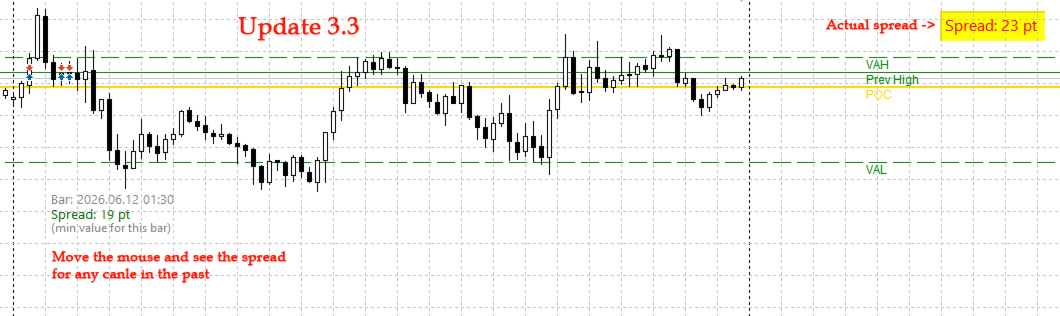
Ana işlevlere ek olarak, gösterge artık mevcut spread değerini puan cinsinden grafiğin sağ üst köşesinde kompakt bir panel olarak görüntüler. İmleci herhangi bir mumun üzerine getirdiğinizde, o çubuk için tarihsel spread'i gösterir.
Spread büyüklüğüne duyarlı stratejileri olan (scalping, haber ticareti, yüksek volatiliteye sahip enstrümanlarla çalışma) yatırımcılar için vazgeçilmezdir.
Güncel Spread
Sağ üst köşede sürekli olarak görüntülenir. Gerçek zamanlı olarak güncellenir (saniyede bir kez).
Tarihsel Spread
Fareyi herhangi bir mumun üzerine getirdiğinizde, aşağıdaki bilgileri içeren bir araç ipucu belirir:
-
Çubuk zamanı
-
Puan cinsinden spread değeri
-
Çubuk dönemi için minimum spread'in gösterildiğine dair not (brokerların tarihsel veri saklama özelliği)
Renk Göstergesi
-
Yeşil – spread normal aralıkta (≤ belirlenen eşik değeri)
-
Kırmızı – spread yüksek (> eşik değeri)
Eşik değeri kullanıcı tarafından yapılandırılabilir (varsayılan 20 puandır).
Yorumlama
-
Düşük spread (yeşil) – özellikle scalping ve gün içi ticaret için uygun giriş koşulları.
-
Yüksek spread (kırmızı) – işlem yapmaktan kaçınmak veya daha geniş zarar durdurma kullanmak için bir neden.
-
Tarihsel spread – geçmişte analiz ettiğiniz noktada rahat giriş koşullarının mevcut olup olmadığını değerlendirmenizi sağlar.
Uygulama Özellikleri
-
Herhangi bir zaman diliminde ve herhangi bir sembolde çalışır.
-
Güncel spread'i gerçek zamanlı olarak görüntüler.
-
Bir mum üzerine gelindiğinde tarihsel spread'i gösterir.
-
Daha iyi okunabilirlik için yapılandırılabilir bir arka plana sahiptir.
-
Harici DLL kitaplıkları kullanmaz.
-
Terminal performansı üzerinde minimum etki.
Yapılandırma Parametreleri
| Parametre | Açıklama |
|---|---|
| SpreadThreshold | Spread eşik değeri (varsayılan: 20). Spread ≤ eşik – yeşil renk, > eşik – kırmızı. |
| GoodSpreadColor | Normal spread rengi (varsayılan: parlak yeşil). |
| BadSpreadColor | Yüksek spread rengi (varsayılan: kırmızı). |
| BgColor | Panel arka plan rengi (varsayılan: siyah). |
| FontSize | Yazı tipi boyutu (varsayılan: 12). |
| XOffset | Panelin grafiğin sağ kenarından uzaklığı (varsayılan: 10). |
| YOffset | Panelin grafiğin üst kenarından uzaklığı (varsayılan: 10). |
Ticarette Uygulama
Scalping İçin
Yüksek spread (kırmızı) işlem yapmaktan kaçınmak için bir sinyaldir. Spread'in yeşil bölgeye düşmesini bekleyin.
Gün İçi Ticaret İçin
Bir pozisyona girerken spread'i izleyin. Spread rahat bir seviyeyi aşarsa – girişi erteleyin veya zarar durdurma seviyenizi ayarlayın.
Tarih Analizi İçin
Girişin yapıldığı mumun üzerine fareyi getirin. O andaki spread'in ne olduğunu öğrenin. Bu, işlemin kalitesini objektif olarak değerlendirmenize yardımcı olacaktır.
Enstrüman Seçimi İçin
Farklı sembollerin ortalama spread'ini karşılaştırın. Panel, mevcut grafiğin spread'ini gösterir; enstrümanlar arasında geçiş yapın – ve koşulların nerede daha iyi olduğunu göreceksiniz.
Kimler İçin Uygundur
-
Scalper'lar – spread, ultra kısa işlemler için kritik öneme sahiptir. Gösterge anında elverişsiz koşulları bildirir.
-
Gün içi yatırımcılar – giriş konforunu değerlendirir ve spread'e bağlı olarak pozisyon büyüklüğünü ayarlar.
-
Strateji geliştiriciler – manuel test ve optimizasyon sırasında görsel spread kontrolü.
-
Başlangıç seviyesindeki yatırımcılar – spread'in bir işlemi nasıl etkilediğini net bir şekilde görür ve daha iyi koşullara sahip anları seçmeyi öğrenir.
-
İşlem geçmişini analiz eden herkes – fareyle üzerine gelindiğinde görünen tarihsel spread, herhangi bir giriş anına geri dönmenize ve geçerliliğini değerlendirmenize olanak tanır.
Teknik Detaylar
Araç ipucu neden "min value for this bar" diyor?
CopySpread işlevini kullanarak tarihsel verileri kopyalarken, çoğu broker çubuk dönemi için ortalama veya son değeri değil, minimum spread değerini döndürür. Bu bir veri depolama özelliğidir. Gösterge, yatırımcının ne gördüğüne dair tam bir anlayışa sahip olması için bu konuda dürüstçe bilgi verir.
Güncel spread (köşe paneli) için gerçek zamanlı değer kullanılır.









































Kullanıcı değerlendirmeye herhangi bir yorum bırakmadı
I am glad that LevelsHunter helps you confirm entries around VAH, VAL, and POC levels. This is exactly the kind of practical feedback that motivates further development.
If you have any suggestions for future updates, feel free to share. Good luck with your trading!
Best regards