
LevelsHunter MT5
- Indicatori
- Versione: 3.3
- Aggiornato: 13 giugno 2026

LevelsHunter MT5 – Indicatore del Profilo di Volume e Livelli Chiave
Scopo
L'indicatore mostra la distribuzione del volume tick per livelli di prezzo su un numero specificato di barre recenti. Lo strumento è progettato per analizzare le zone di accumulazione del volume e identificare livelli significativi di supporto e resistenza.
Funziona particolarmente bene in combinazione con altri indicatori che mostrano i punti di ingresso. I livelli POC, VAH e VAL agiscono come un filtro oggettivo: confermano un segnale se coincide con una zona di accumulazione di volume, o consentono di astenersi da un'operazione quando un segnale si verifica in un'area "vuota".
Una capacità chiave – puoi "riavvolgere il tempo" e vedere quali livelli POC, VAH e VAL erano rilevanti su qualsiasi barra passata. Questo trasforma l'indicatore in un analizzatore di operazioni a tutti gli effetti.
Elementi Principali
-
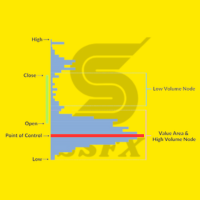
POC (Punto di Controllo) – il livello con il volume più alto, dove si è verificato il maggior numero di transazioni durante il periodo analizzato.
-
VAH (Massimo dell'Area di Valore) – il limite superiore della zona di prezzo che include una percentuale specificata del volume totale.
-
VAL (Minimo dell'Area di Valore) – il limite inferiore della zona di prezzo che include una percentuale specificata del volume totale.
-
Massimo e minimo del giorno precedente – livelli del giorno di trading precedente.
Interpretazione dei Segnali
-
Testare il livello POC può indicare un potenziale inversione.
-
Il fissaggio del prezzo sopra VAH o sotto VAL può segnalare l'inizio di un nuovo movimento.
-
Un rimbalzo dai livelli del giorno precedente viene utilizzato nell'ambito di strategie di follow del trend o contro-trend.
Analisi della Storia
Puoi vedere come appariva il profilo di volume in qualsiasi punto del passato:
-
Spostamento manuale – seleziona uno spostamento in barre, e tutte le linee POC, VAH, VAL verranno ricalcolate per quella barra.
-
Marcatore visivo – una linea verticale tratteggiata blu appare sul grafico con l'etichetta "Analysis start", che segna la barra per cui vengono calcolati i livelli.
-
Movimento interattivo – trascina questa linea a sinistra o a destra con il mouse e l'indicatore ricalcola istantaneamente i livelli per la nuova barra. Non è necessario entrare nelle impostazioni.
Esempio:
Imposta uno spostamento di 96 barre sul timeframe M15 – l'indicatore mostrerà i livelli di esattamente 24 ore fa. Sposta il marcatore sulla barra di ingresso della tua operazione – e vedrai i volumi che erano visibili al momento dell'ingresso.
Logica di Disegno delle Linee
Le linee non creano disordine visivo:
-
Ogni linea inizia dove è effettivamente rilevante e si estende solo verso destra (verso il futuro).
-
I livelli POC, VAH e VAL iniziano dalla prima barra del periodo di analisi (impostato dal parametro Number of bars for analysis ). Se modifichi il numero di barre, le origini delle linee si spostano di conseguenza – fornendo un feedback visivo chiaro.
-
I livelli del giorno precedente – linee Prev High e Prev Low – iniziano esattamente alle 00:00 di quel giorno.
Gestione delle Etichette
Il parametro Show text labels at the right edge ti consente di rimuovere completamente le etichette di testo (POC, VAH, VAL, Prev High, Prev Low) dal bordo destro del grafico se danno fastidio.
Caratteristiche di Implementazione
-
I livelli del giorno precedente (Alto/Basso) non si ridipingono – vengono fissati una volta al giorno.
-
I livelli POC, VAH e VAL vengono ricalcolati su ogni nuova barra durante il funzionamento normale. Nella modalità di analisi storica, vengono fissati per la barra selezionata.
-
L'indicatore funziona su qualsiasi timeframe e qualsiasi simbolo.
-
Non utilizza librerie DLL esterne.
-
Pannello informativo fornisce una breve descrizione di ciascun livello (può essere disabilitato).
Parametri di Configurazione
| Parametro | Descrizione |
|---|---|
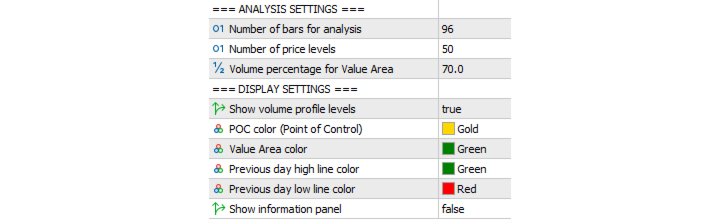
| Number of bars for analysis | Numero di barre recenti per il calcolo del profilo di volume (predefinito: 96). Su M15 ≈ un giorno. |
| Shift bars to past | Spostamento nel passato (in barre). 0 – momento attuale, 96 – livelli di 96 barre fa. |
| Number of price levels | Numero di livelli di prezzo (predefinito: 50). |
| Volume percentage for Value Area | Percentuale del volume totale per i limiti VAH/VAL (predefinito: 70%). |
| Show volume profile levels | Abilita/disabilita le linee POC, VAH, VAL. |
| POC color | Colore della linea POC (predefinito: oro). |
| Value Area color | Colore delle linee VAH/VAL (predefinito: verde). |
| Previous day high line color | Colore della linea del massimo del giorno precedente (predefinito: verde). |
| Previous day low line color | Colore della linea del minimo del giorno precedente (predefinito: rosso). |
| Show information panel | Mostra/nascondi il pannello informativo. |
| Show text labels at the right edge | Mostra/nascondi le etichette di testo sul bordo destro. |
Versione Gratuita
La versione gratuita ti consente di analizzare fino a 100 barre recenti sia per il calcolo del profilo che per lo spostamento nel passato.
Sul timeframe M15, ciò corrisponde a circa 25 ore (poco più di un giorno).
LevelsHunter Pro
La versione Pro rimuove la limitazione della profondità storica – puoi analizzare qualsiasi numero di barre nel passato.
Funzionalità aggiuntive della versione Pro:
-
Doppio clic su una barra – salta istantaneamente ai livelli della barra selezionata
-
Riempimento dell'Area di Valore – separazione visiva delle zone VAH–POC e POC–VAL
-
Pulsante Modalità Storica – attiva l'analisi del passato con un clic. Quando disattivato, l'indicatore torna alla modalità situazione attuale
Applicazione nel Trading
Per l'Ingresso in Operazione
Prima di aprire una posizione, sposta il marcatore di analisi sulla barra corrente. Valuta se il prezzo è vicino a un livello significativo (POC, VAH, VAL, Prev High/Low). Se il segnale del tuo sistema di trading coincide con un livello di accumulazione di volume, la probabilità di un'operazione di successo aumenta. Se il segnale si verifica in un intervallo di prezzo "vuoto", è un motivo per una verifica aggiuntiva.
Per il Monitoraggio e l'Analisi di Operazioni Aperte e Chiuse
Per una posizione aperta – sposta il marcatore sulla barra di ingresso e ricorda i livelli chiave di quel momento. Monitora come il prezzo interagisce con essi ora: testando il POC, fissandosi sopra VAH o rimbalzando da Prev Low.
Per un'operazione chiusa – torna alle barre di ingresso e uscita. Confronta se la struttura del volume è cambiata. Questo ti consente di valutare oggettivamente se l'operazione era giustificata dal punto di vista del profilo di volume e migliorare la tua disciplina di trading.
Per Chi è Adatto
Scalper – vedono le zone con la massima concentrazione di transazioni su piccoli timeframe dove il prezzo trascorre la maggior parte del tempo.
Day trader – utilizzano i livelli del giorno precedente e l'Area di Valore per costruire zone di trading all'interno della giornata.
Swing trader – analizzano lo spostamento del profilo di volume quando si passa da un giorno di trading all'altro.
Algotrader e sviluppatori di strategie – possono utilizzare i valori dei livelli negli expert advisor come filtri di ingresso oggettivi.
Trader principianti – ottengono un quadro chiaro di dove le transazioni sono realmente avvenute, non solo belle linee sul grafico.
Chiunque tenga un diario di trading – la capacità di tornare al momento di qualsiasi operazione e vedere i livelli che erano rilevanti in quel momento, non ora.
Aggiornamento 3.3
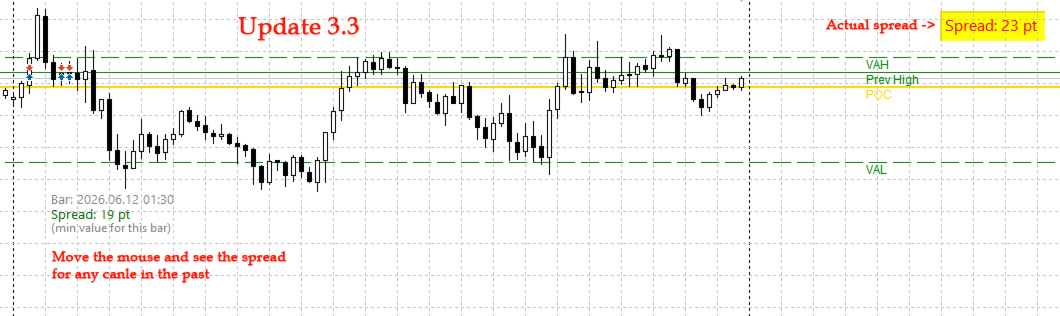
Oltre alle funzioni principali, l'indicatore ora mostra il valore corrente dello spread in punti come un pannello compatto nell'angolo in alto a destra del grafico. Passando il cursore su qualsiasi candela, mostra lo spread storico per quella barra.
Indispensabile per i trader le cui strategie sono sensibili all'entità dello spread: scalping, trading sulle notizie, lavoro con strumenti ad alta volatilità.
Spread Corrente
Visualizzato costantemente nell'angolo in alto a destra. Si aggiorna in tempo reale (una volta al secondo).
Spread Storico
Passando il mouse su qualsiasi candela, appare un tooltip con le seguenti informazioni:
-
Orario della barra
-
Valore dello spread in punti
-
Nota che viene mostrato lo spread minimo per il periodo della barra (caratteristica dell'archiviazione dei dati storici da parte dei broker)
Indicazione del Colore
-
Verde – spread entro l'intervallo normale (≤ soglia impostata)
-
Rosso – spread elevato (> soglia)
La soglia è configurabile dall'utente (il valore predefinito è 20 punti).
Interpretazione
-
Spread basso (verde) – condizioni favorevoli per l'ingresso, specialmente per scalping e trading intraday.
-
Spread alto (rosso) – un motivo per astenersi dall'operare o utilizzare stop-loss più ampi.
-
Spread storico – consente di valutare se in passato esistevano condizioni di ingresso confortevoli nel punto che si sta analizzando.
Caratteristiche di Implementazione
-
Funziona su qualsiasi timeframe e simbolo.
-
Mostra lo spread corrente in tempo reale.
-
Mostra lo spread storico al passaggio del mouse su una candela.
-
Ha uno sfondo configurabile per una migliore leggibilità.
-
Non utilizza librerie DLL esterne.
-
Impatto minimo sulle prestazioni del terminale.
Parametri di Configurazione
| Parametro | Descrizione |
|---|---|
| SpreadThreshold | Valore soglia dello spread (predefinito: 20). Spread ≤ soglia – colore verde, > soglia – rosso. |
| GoodSpreadColor | Colore per spread normale (predefinito: verde brillante). |
| BadSpreadColor | Colore per spread elevato (predefinito: rosso). |
| BgColor | Colore dello sfondo del pannello (predefinito: nero). |
| FontSize | Dimensione del carattere (predefinito: 12). |
| XOffset | Offset del pannello dal bordo destro del grafico (predefinito: 10). |
| YOffset | Offset del pannello dal bordo superiore del grafico (predefinito: 10). |
Applicazione nel Trading
Per lo Scalping
Spread alto (rosso) è un segnale per astenersi dall'operare. Attendere che lo spread scenda nella zona verde.
Per il Trading Intraday
Monitorare lo spread quando si entra in una posizione. Se lo spread supera un livello confortevole – posticipare l'ingresso o regolare il proprio stop-loss.
Per l'Analisi della Storia
Passare il cursore sulla candela in cui è stato effettuato l'ingresso. Scoprire qual era lo spread in quel momento. Questo aiuterà a valutare oggettivamente la qualità dell'operazione.
Per la Selezione degli Strumenti
Confrontare lo spread medio di diversi simboli. Il pannello mostra lo spread del grafico corrente; passare da uno strumento all'altro – e si vedrà dove le condizioni sono migliori.
Per Chi è Adatto
-
Scalper – lo spread è critico per le operazioni ultra-corte. L'indicatore segnala istantaneamente condizioni sfavorevoli.
-
Day trader – valutano il comfort dell'ingresso e regolano la dimensione della posizione in base allo spread.
-
Sviluppatori di strategie – controllo visivo dello spread durante test manuali e ottimizzazione.
-
Trader principianti – vedono chiaramente come lo spread influisca su un'operazione e imparano a scegliere momenti con condizioni migliori.
-
Chiunque analizzi la cronologia delle operazioni – lo spread storico al passaggio del mouse consente di tornare a qualsiasi momento di ingresso e valutarne la validità.
Dettagli Tecnici
Perché il tooltip dice "min value for this bar"?
Quando si copiano i dati storici utilizzando la funzione CopySpread , la maggior parte dei broker restituisce il valore minimo dello spread per il periodo della barra, non la media o l'ultimo valore. Questa è una caratteristica dell'archiviazione dei dati. L'indicatore informa onestamente di ciò in modo che il trader abbia una comprensione completa di ciò che sta vedendo.
Per lo spread corrente (pannello d'angolo), viene utilizzato il valore effettivo in tempo reale.











































L'utente non ha lasciato alcun commento sulla valutazione.
I am glad that LevelsHunter helps you confirm entries around VAH, VAL, and POC levels. This is exactly the kind of practical feedback that motivates further development.
If you have any suggestions for future updates, feel free to share. Good luck with your trading!
Best regards