FWS Pair Correlation Rolling Heatmap
- Göstergeler
-
Maya Roma Oberholzer
 A Senior Software Analyst Programmer with a strong software solutions architecture background and has 20+ years of experience in the IT Industry and technologies.
From 2003 to 2006 - contracting in the UK for four years to various well known corporate companies and the UK government. - Sürüm: 1.0
- Etkinleştirmeler: 5
🔗 FWS Pair Correlation - Rolling Heatmap & Duplicate-Risk Detector
Stop doubling up on correlated trades. See which pairs really move together.
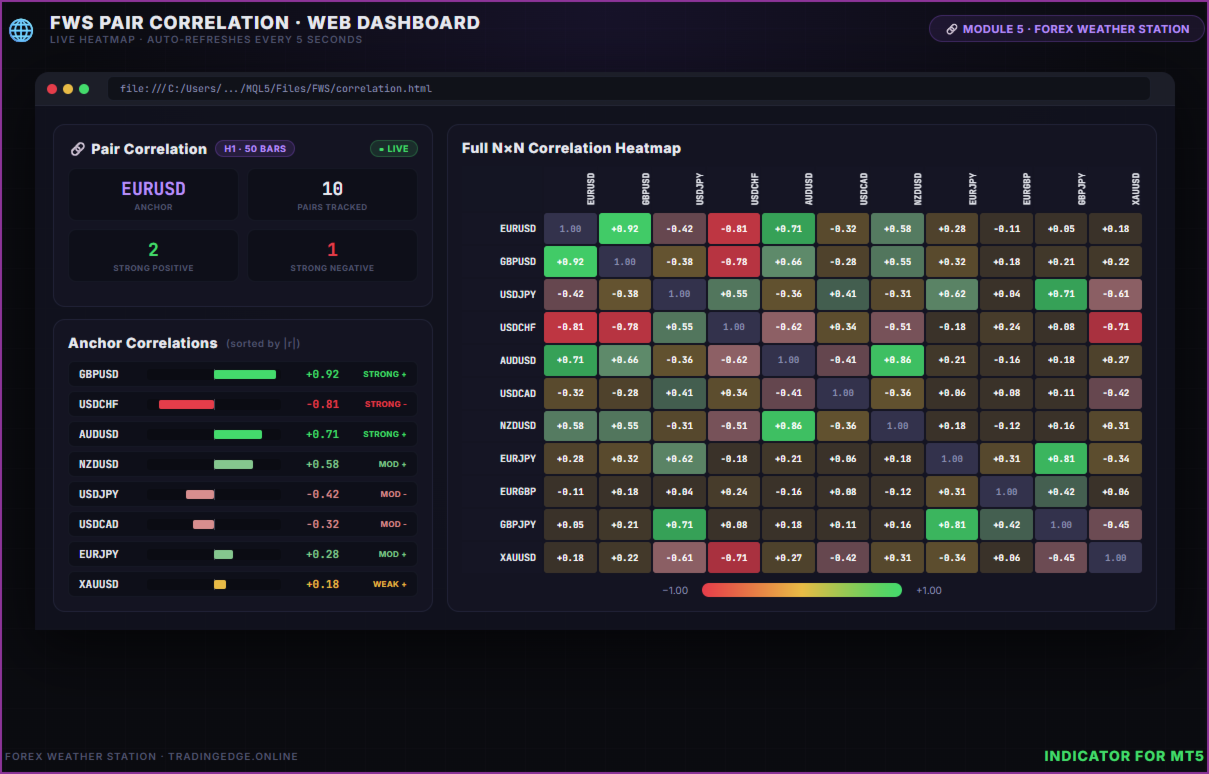
Pair Correlation computes a rolling Pearson correlation matrix across your watchlist of FX pairs, indices, gold, and crypto - so you can instantly spot pairs moving in lockstep (duplicate risk) and pairs that hedge each other (negative correlation). Compact on-chart panel anchored to your chart symbol, plus a stunning full N×N heatmap in the browser dashboard.
Part of the Forex Weather Station suite.
🧠 Why You Need This
Many traders unknowingly take the same bet twice. Long EURUSD + long GBPUSD isn't a diversified position - it's double exposure to USD weakness. When the correlation between two pairs spikes above +0.70, opening trades in the same direction just doubles your risk without doubling your edge. Pair Correlation flags those situations before you click Buy.
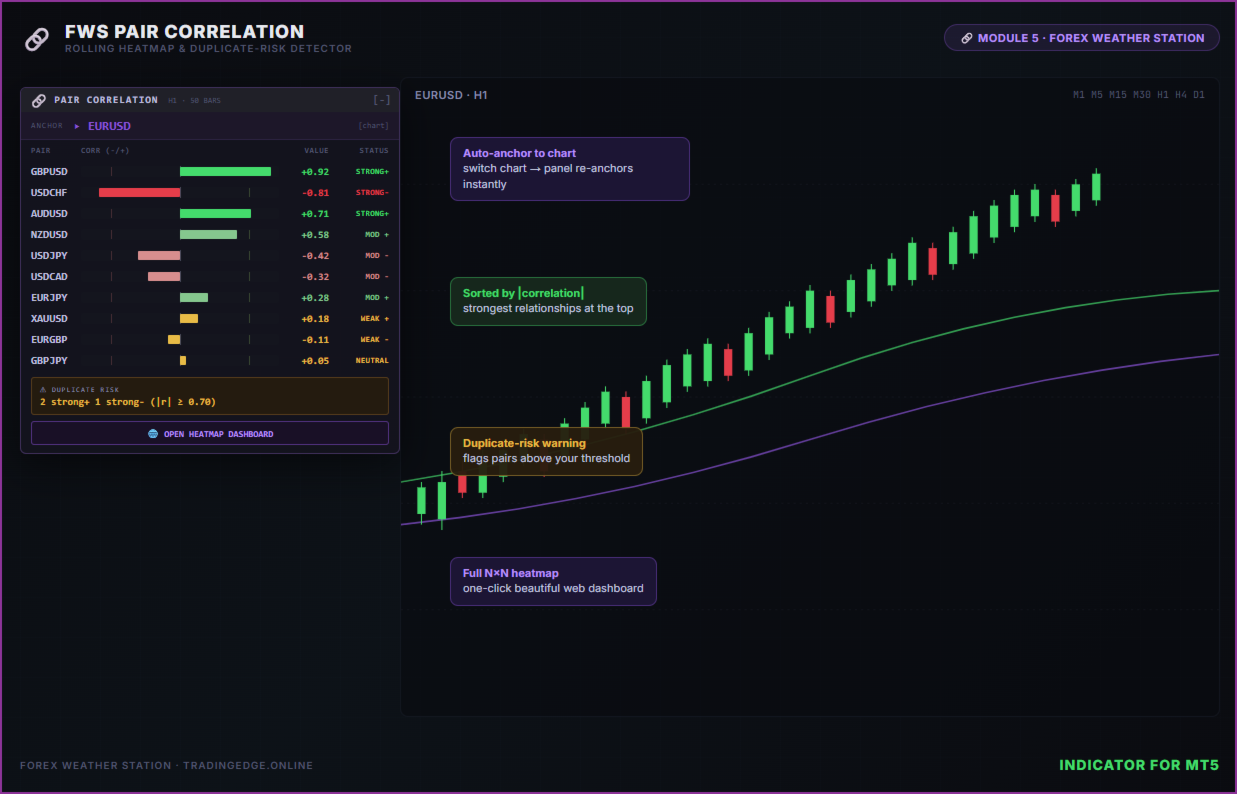
📊 What It Shows
- Anchor pair - Defaults to your current chart symbol; updates automatically when you switch charts
- Sorted correlation list - All pairs in your watchlist ranked by absolute correlation against the anchor
- Bidirectional bars - Centered on zero; positive correlation fills right, negative fills left
- Threshold ticks - Faint vertical marks at ±0.70 so you can see at a glance which pairs cross the danger line
- Status labels - STRONG+, MOD+, WEAK+, NEUTRAL, WEAK-, MOD-, STRONG-
- Duplicate-risk warning card - Counts strong-positive and strong-negative pairs vs the anchor
- Color-coded - Green strong positive, soft green moderate, amber neutral, soft red moderate, red strong negative
🌐 Stunning HTML Web Dashboard
Click "Open Heatmap Dashboard" for a full-screen browser dashboard featuring:
- Full N×N heatmap matrix - Every pair vs every other pair, opacity-graded by correlation strength
- Anchor correlation grid - Two-column sorted list with bidirectional bars
- Stats cards - Anchor symbol, pairs tracked, strong-positive count, strong-negative count
- Glassmorphism dark theme matching the Forex Weather Station design
- LIVE connection - updates every 5 seconds from MT5 data
- Bookmark the URL once, access with one click forever
🧮 The Math
Pair Correlation uses standard Pearson correlation on log returns:
r_i = ln(C_i / C_{i-1}) ρ(X,Y) = Σ((x - μx)(y - μy)) / sqrt(Σ(x - μx)² · Σ(y - μy)²)
Log returns are the right choice for correlated price series - they're stationary, scale- invariant, and produce comparable values whether you're correlating EURUSD against XAUUSD or USDJPY against BTCUSD. Sample window is configurable (default 50 bars).
⚙️ Fully Configurable Pair Universe
Unlike most correlation indicators, Pair Correlation lets you set your exact watchlist via a single comma-separated input:
InpPairList = "EURUSD,GBPUSD,USDJPY,USDCHF,AUDUSD,USDCAD,NZDUSD,
                EURJPY,GBPJPY,EURGBP,AUDJPY,EURAUD,XAUUSD,BTCUSD"
Drop in NAS100, US500, ETHUSD, EURUSDm, or any broker-specific symbol. Missing symbols are silently skipped - no errors, no nags. The default list covers 14 popular FX/cross/CFD symbols and works on virtually every broker out of the box.
✨ Key Features
- Up to 20 pairs - 14 default majors + crosses + gold + bitcoin (extendable to your liking)
- Pearson on log returns - Mathematically correct for price-series correlation
- 5 selectable timeframes - M5, M15, H1, H4, D1
- Configurable lookback - 20, 50, 100, 200 bars (or any value)
- Configurable strong/moderate thresholds - Default 0.70 / 0.40
- Auto-anchor mode - Anchor follows the chart symbol; switch charts and the panel re-anchors
- Custom anchor mode - Pin the anchor to a specific pair regardless of chart
- Symbol suffix support - Works on brokers using ".raw", "m", etc.
- Silent missing-symbol handling - Pairs not on your broker are quietly skipped (no log spam)
- Duplicate-risk warning - Instant visual flag when you have correlated positions
- Draggable panel - Click the border and drag anywhere on your chart
- Minimise button - Collapse to a compact title bar with [-]
- Fully customisable colours
- JSON data bridge - Full matrix exported every 5 seconds for integration
- No DLL required - Pure MQL5, marketplace-compliant
- No external API - All calculations from MT5 data
📋 Input Parameters
| Parameter | Description | Default |
|---|---|---|
| InpPanelX / Y | Panel position on chart (pixels) | 20, 50 |
| InpAnchorMode | Anchor follows chart symbol or fixed | Chart Symbol |
| InpAnchorOverride | Anchor pair (Custom mode only) | EURUSD |
| InpPairList | Comma-separated watchlist of pairs | 14 majors+crosses |
| InpSymbolSuffix | Broker suffix (e.g. ".raw", "m") | (blank) |
| InpCorrTF | Correlation timeframe | H1 |
| InpLookbackBars | Sample window in bars | 50 |
| InpStrongLevel | |r| threshold for STRONG label | 0.70 |
| InpModerateLevel | |r| threshold for MODERATE | 0.40 |
| InpFont / InpFontSize | Font name and size | Consolas / 9pt |
| InpColor* | All panel colours customisable | Dark theme |
| InpWriteJSON | Enable JSON/HTML data output | true |
| InpEnableWebBtn | Show "Open Web View" button | true |
📦 What's Included
- MQL5 Indicator - Compact 380px on-chart panel with sorted correlation list, threshold ticks, duplicate-risk warning
- HTML Web Dashboard - Auto-generated to MQL5/Files/FWS/correlation.html with full N×N heatmap
- JSON Data Bridge - Anchor row + full matrix written every 5 seconds for external integration
🔧 Quick Start
- Attach the indicator to any chart (any symbol, any timeframe)
- The panel anchors to your chart's symbol and ranks all watchlist pairs by correlation
- Click "Open Heatmap Dashboard" for the full N×N browser view
- Bookmark the URL for instant one-click access in the future
- Switch your chart to a different pair - the panel re-anchors automatically
- If your broker uses a suffix (e.g. EURUSD.raw), set InpSymbolSuffix
- Add or remove pairs by editing InpPairList (comma-separated, no spaces needed)
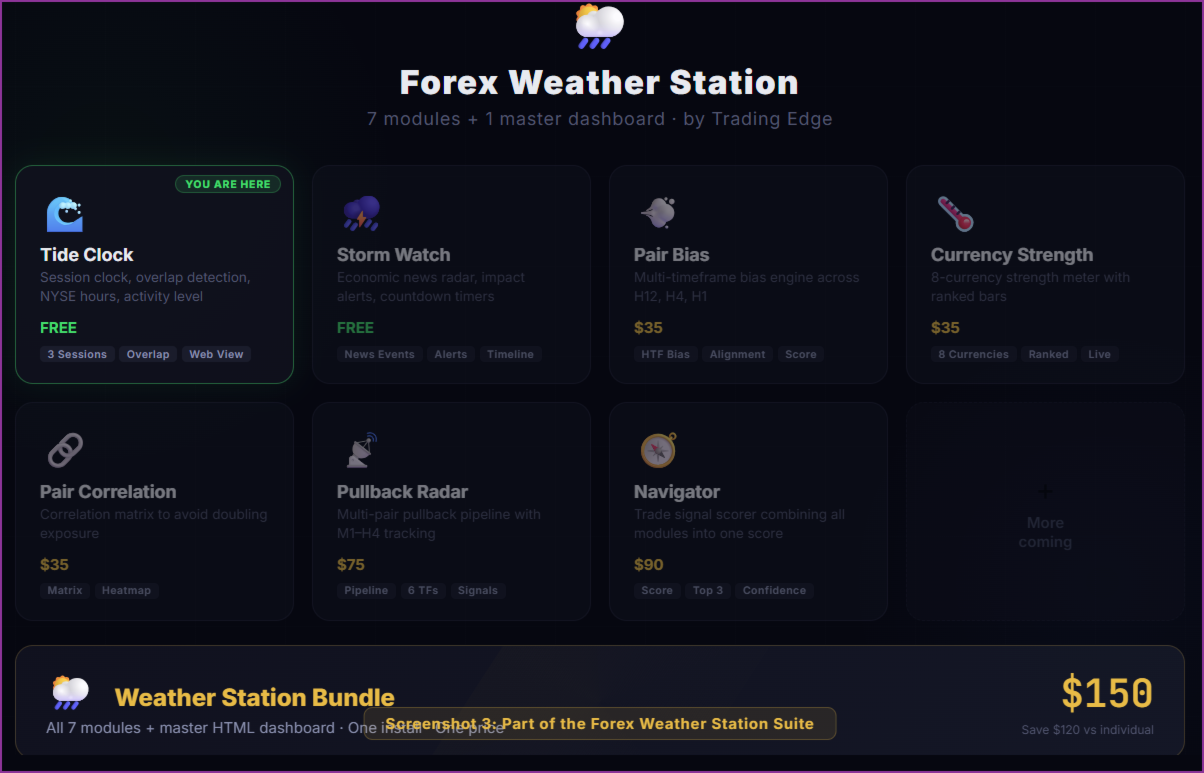
🔌 Part of the Forex Weather Station Suite
Module 5 of the Forex Weather Station - a suite of 7 specialised trading tools that each work standalone or combine into a unified premium dashboard:
| # | Module | What It Does | Price |
|---|---|---|---|
| 1 | 🌊 Tide Clock | Session clock & activity monitor | FREE |
| 2 | ⛈️ Storm Watch | Economic news radar & impact alerts | FREE |
| 3 | 💨 Pair Bias | Multi-timeframe directional bias | |
| 4 | 🌡️ Currency Strength | 8-currency strength meter | |
| 5 | 🔗 Pair Correlation (this) | Correlation matrix & duplicate-risk detector | |
| 6 | 📡 Pullback Radar | Multi-pair pullback pipeline scanner | |
| 7 | 🧭 Navigator | Trade signal scorer combining all modules | |
| ★ | 🌦️ Weather Station | All 7 modules + master HTML dashboard |
Each module writes data to a shared JSON bridge. The premium Weather Station bundle combines everything into one stunning real-time dashboard.
⚠️ Requirements
- MetaTrader 5 (build 3000+)
- FX pairs in your watchlist available on your broker (missing symbols are silently skipped)
- Web dashboard requires a modern browser (Chrome, Edge, Firefox)
- No DLL imports required
- No external API or API key required
💡 Tips
- Use H1 for day trading, H4/D1 for swing trading. Lower timeframes correlate noisier; higher timeframes reveal structural relationships.
- Anchor follows your chart - Just switch to USDCHF and the panel instantly shows USDCHF's correlations. No re-attaching needed.
- Watch the threshold ticks - The faint vertical marks at ±0.70 help you spot pairs crossing the duplicate-risk line at a glance.
- Negative correlation = hedge - A pair with -0.85 correlation moves opposite to your anchor. Useful for hedging or pairs trading.
- Add CFDs to the watchlist - Drop NAS100, US500, US30, GER40, ETHUSD, etc. into InpPairList . Correlation works on any tradable symbol.
- 50-bar default is a sweet spot - long enough to be statistically meaningful, short enough to react to regime changes. Increase to 100/200 for more stable values.
- The JSON file at Files/FWS/correlation.json contains the full matrix - your EAs can read it to filter trade signals based on portfolio correlation.
By Trading Edge - tradingedge.online