Ninja Strike Pro
- Uzmanlar
-
Channaphat Yamuangmorn
 Hello! I am an experienced Algorithmic Trader and MQL5 Developer based in Thailand. I specialize in designing and developing robust Expert Advisors (EAs) and automated trading systems for MetaTrader 5.
 - Sürüm: 4.24
- Güncellendi: 19 Mayıs 2026
- Etkinleştirmeler: 5
How Ninja Strike Pro v4.21 Works: Core Mechanics & Logic
Ninja Strike Pro v4.21 is an advanced Hybrid Expert Advisor that utilizes momentum-based high-frequency entries combined with institutional-grade risk management. Here is a step-by-step breakdown of how the system operates:
1. Identifying the Entry (Fast Sniper & Trend Rider)
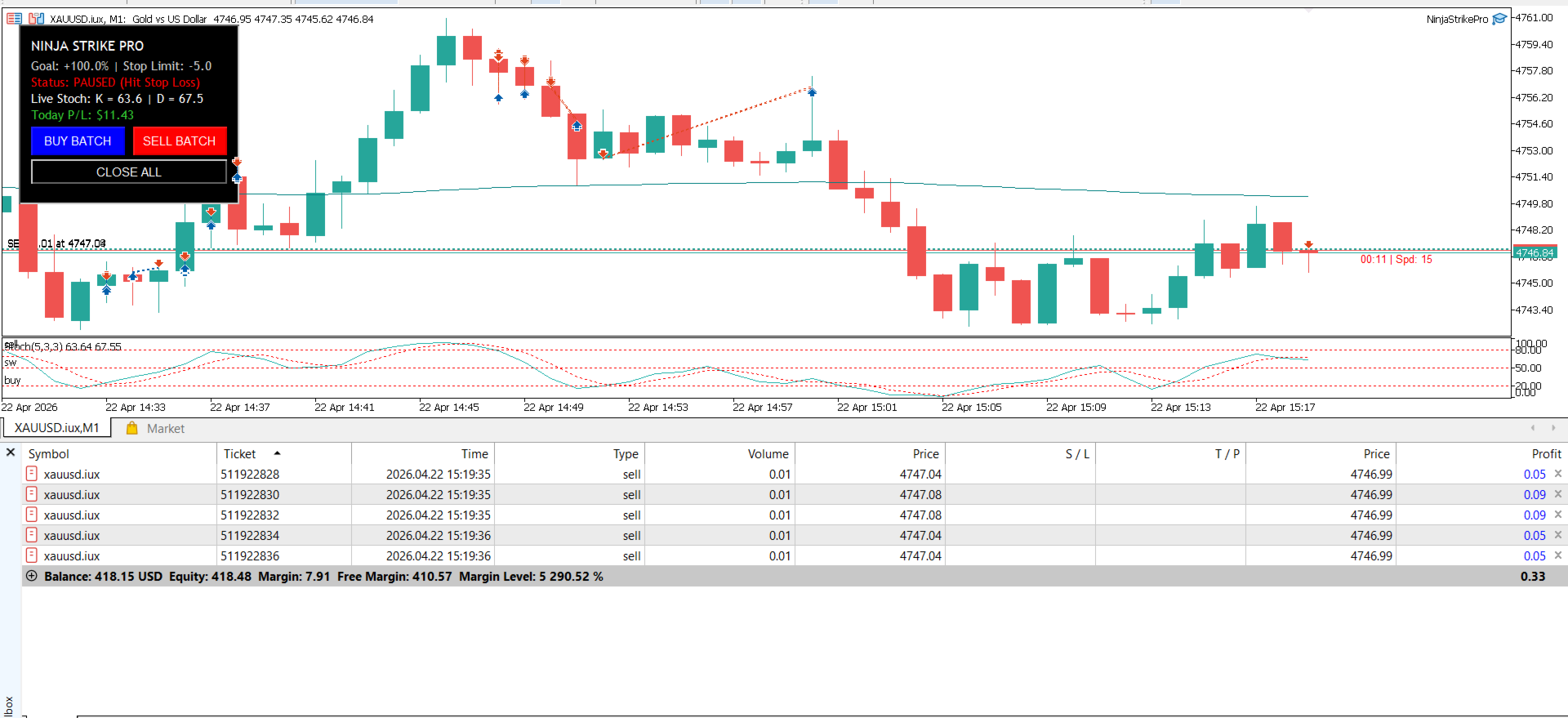
The EA monitors the market on the M1 timeframe using a highly sensitive "Fast Stochastic" algorithm.
-
Initial Sniper Entry: Instead of waiting for lagging signal lines to cross, the EA waits for the Stochastic 'K' line to enter an extreme zone (e.g., Oversold < 20). If the current M1 candle closes Green (bullish), the EA instantly fires a batch of BUY orders. If it enters Overbought (> 80) and closes Red, it fires SELL orders.
-
Trend Riding: Once a basket of trades hits Take Profit, the EA checks the momentum. If the next candle maintains the same color (e.g., still Green after a Buy TP), it immediately fires another batch of orders to "ride the trend" without waiting for the Stochastic to reset.
2. Smart Order Execution (v4.21 Advanced Features)
When an entry signal is triggered, the EA executes a "Batch" of trades (multiple orders fired at once) using a highly secure execution loop:
-
Dynamic Sizing: The EA automatically calculates the individual Lot Size and the total Batch Size (number of trades) based on your current Equity and risk settings.
-
Broker Limit Protection: Before firing each individual trade, the EA checks your broker's Maximum Volume Limit . If adding another trade would exceed the broker's limit, it stops firing immediately to keep your account safe.
-
Margin Check & Anti-Spam: It calculates the required Free Margin before every single ticket. If margin is insufficient, or if a trade request is rejected by the broker (Failed), the EA's Anti-Spam feature instantly breaks the execution loop. This prevents the EA from spamming errors to the broker server, ensuring it passes strict MQL5 Market Validation.
3. Managing the Basket (Take Profit & Trailing Stop)
Once the batch of trades is active in the market, the EA switches to Basket Management mode:
-
Total PnL Tracking: The EA groups all active trades (matching its Magic Number) into a "Basket" and monitors their combined floating Profit and Loss (PnL).
-
Target Reach: If the Basket's total PnL reaches your defined Target Profit or Target Loss (which can be set in fixed USD or as a % of your Equity), the EA instantly executes a "Close All" command.
-
Trailing Stop (Optional): If enabled, the EA will track the highest floating profit of the basket. If the profit pulls back by a specified distance, it locks in the profit and closes the basket, securing your gains before the market reverses.
4. Daily Goals & Prop Firm Protection
Designed with Prop Firm traders in mind, the EA acts as a disciplined risk manager:
-
At the start of each day, it records your starting Equity.
-
Daily Profit Hit: If your total daily profit reaches the Daily Profit Pct (e.g., +5%), the EA changes its status to "DONE" and stops trading for the rest of the day to protect your profits.
-
Cooldown Timer: If a Basket Stop Loss is hit, the EA enforces a strict "Cooldown" period (e.g., pausing for 60 minutes). This prevents emotional "revenge trading" during highly volatile market conditions.
5. True Hybrid Control
The EA doesn't just trade on its own; it empowers the user:
-
Mobile Trigger: If you are away from your PC and spot a good setup on your MT5 mobile app, you can manually open a single trade (0.01 lot). The EA on your VPS will detect it and instantly fire the remaining trades to complete the batch.
-
On-Chart Panel: You can use the physical buttons on the MT5 chart (BUY BATCH, SELL BATCH, CLOSE ALL) to manually command the EA's execution engine whenever you want
Custom EA & Indicator Development Do you have your own winning strategy? Let me automate it for you! I offer professional MQL5 programming services to turn your unique logic into a highly efficient Expert Advisor or custom Indicator. Send me a private message here on MQL5 to discuss your project!