Phantom Trail Pro

Standard trailing stops cost you money. They trail too tight and stop you out before the move is done.

You enter a clean trend. The trade is working, price is moving in your direction. You activate the trailing stop. And then — a normal pullback, one candle against the trend, and you're out. Price continues without you. You were right. The trailing stop was wrong.

This is not a trailing stop problem. It is a fixed-distance trailing stop problem.

Markets don't move in straight lines. They breathe. They pull back before continuing. A fixed pip trailing stop ignores volatility, ignores the candle structure, and treats a 50-pip EURUSD move the same as a 500-pip XAUUSD move. That's why it stops you out.

PHANTOM Trail Pro replaces standard trailing with stepped ATR-based trailing — a system that adapts to actual market volatility and gives your trades the room they need to run.

---

### What PHANTOM Trail Pro Does

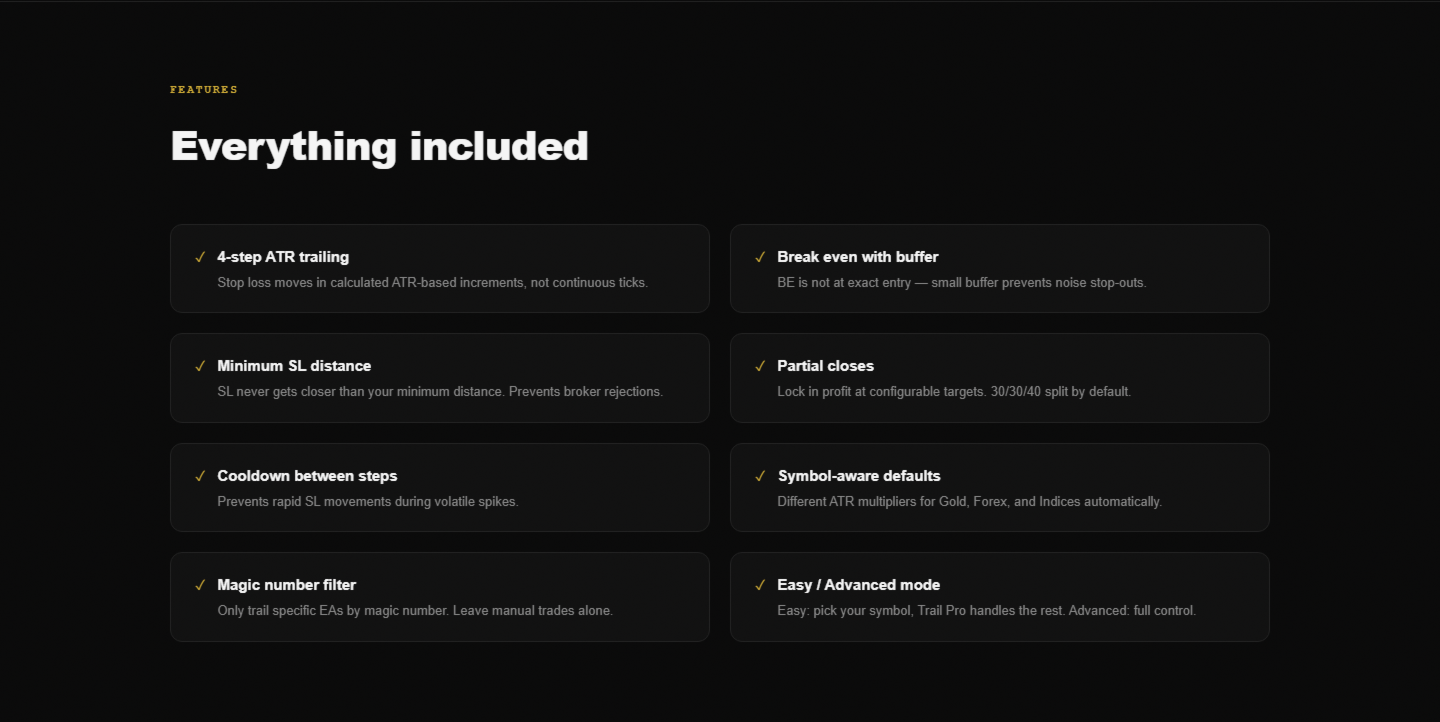
PHANTOM Trail Pro is a MetaTrader 5 trailing stop utility that attaches to your open positions and manages them through a 4-stage intelligent trailing process. It combines ATR-based stop distances, Break Even logic with a buffer zone, optional partial closes at profit targets, and a minimum SL distance to prevent premature stopouts.

It works on your trades whether you entered manually or via an EA. No signal generation — just pure mechanical trade management done right.

---

### Who This Is For

- Manual traders who want professional trailing stop management without coding it themselves
- EA users whose automated strategies have no trailing or use fixed-pip trailing
- Scalpers who need precise SL management on fast-moving instruments
- Swing traders who want to let winners run without manually monitoring every candle
- Prop firm traders who need to maximize winner size without exposing too much profit to reversal

---

### How It Works

Phase 1 — Minimum Profit Threshold
Trail Pro waits until the trade reaches a defined profit level before any trailing begins. No premature breakeven moves. The trade has room to establish direction.

Phase 2 — Break Even with Buffer
When profit threshold is hit, Trail Pro moves the SL to break even — but with a buffer. Not exact entry. A buffer below entry means price can pull back slightly without stopping you at zero. The buffer is fully configurable.

Phase 3 — Stepped ATR Trailing (4 Stages)
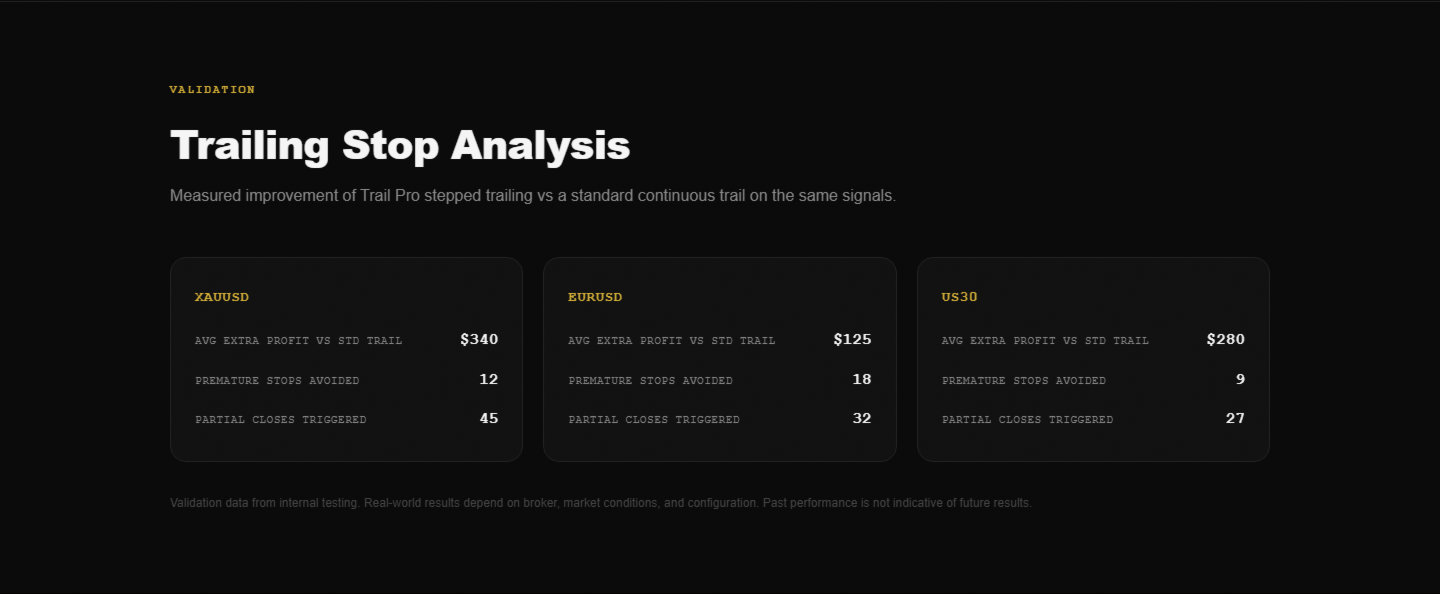
Once in profit beyond BE, Trail Pro begins stepped trailing. The trail moves in defined increments — not continuously. This is intentional. Continuous trailing follows every tick and gets stopped out on normal volatility. Stepped trailing only moves when the market earns it. Each step uses ATR as the distance multiplier, so the trail widens on volatile instruments and tightens on quiet ones.

All 4 steps are independently configurable: profit trigger, ATR multiplier, trail distance.

Phase 4 — Partial Closes
At defined profit targets (TP1, TP2), Trail Pro can close a percentage of the position. Bank profit, reduce exposure, let the runner continue with a tighter trail. All configurable per position type.

---

### Full Feature List

Trailing Engine
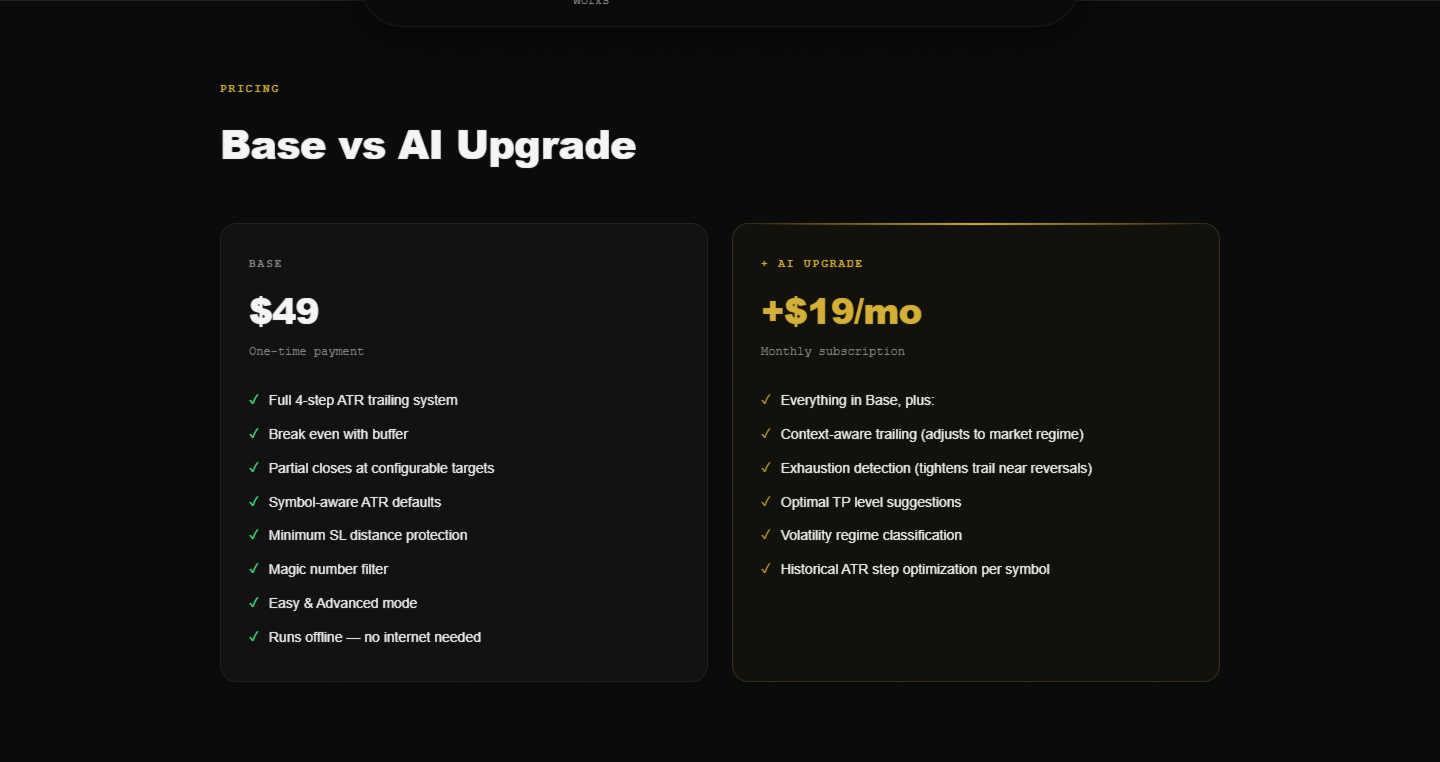
- 4-stage stepped ATR trailing (steps 1 through 4, each independently configurable)
- ATR period configurable (default 14, adjustable per symbol)
- Continuous trail mode available (off by default — stepped is recommended)
- Trail only activates after minimum profit threshold is reached

Break Even
- BE with configurable buffer (pips above entry, not at exact entry)
- BE trigger: configurable profit level before BE activates
- Prevents zero-loss stopouts on retracements

Partial Closes
- TP1 partial close: close X% at first profit target
- TP2 partial close: close Y% at second profit target
- Remaining runner continues with stepped trail
- Each close percentage configurable

Minimum SL Distance
- Prevents SL from being placed too close to current price
- Symbol-aware defaults (wider for XAUUSD, tighter for EURUSD)
- Protects against broker minimum stop requirements

Trade Filtering
- Magic number filter: apply Trail Pro to specific EAs or all trades
- Symbol filter: manage specific instruments only
- Direction filter: apply to long trades, short trades, or both

Cooldown
- Configurable cooldown period after each SL modification
- Prevents SL from updating too frequently on fast markets

Modes
- Easy Mode: select preset profile (Conservative / Balanced / Aggressive + symbol type), set BE buffer, go
- Advanced Mode: configure every parameter per step independently

Notifications
- Telegram alerts: BE move, step triggers, partial closes, final SL hit
- On-screen alerts in MT5
- MT5 push notifications

Compatibility
- Works with any Expert Advisor
- Works with manual trades
- No internet connection required
- No subscription, no API, no external server
- Any broker (hedging recommended for partial closes)

---

### What You Get

- Wider runners — stepped trailing gives trades room to develop fully
- Banked profits — partial closes lock in gains before the inevitable pullback
- Consistent execution — Trail Pro manages exits systematically, not emotionally
- Universal compatibility — works alongside any EA without modification
- Set and forget — drag it on, let it manage everything

---

### Good to Know

Stepped trailing is not continuous trailing. The SL moves in jumps, not tick by tick. This is a deliberate design choice — it reduces whipsaw stopouts significantly. If you expect continuous pixel-perfect trailing, this is not the right tool. If you want to stay in winning trades longer, it is.

Trail Pro works best in trending markets. In choppy, ranging conditions, ATR trailing distances widen and the tool becomes less precise. Consider combining with PHANTOM News Shield to avoid news-driven chop.

Partial close functionality requires a hedging account or a broker that supports partial position closure. Verify your broker supports this before enabling partial closes.

If a trade reverses sharply before reaching the profit threshold, Trail Pro does not interfere. Your original stop loss remains in place. Trail Pro only activates once the minimum profit threshold is reached.

---

### Setup in 3 Steps

1. Drag PHANTOM Trail Pro onto any chart (manages all open positions account-wide or per filter)
2. Choose mode: Easy (preset) or Advanced (manual config)
3. Done — Trail Pro monitors and manages all matching open trades from that moment forward

---

### System Requirements

- MetaTrader 5 (Build 4000+)
- Hedging account recommended (for partial closes)
- Any broker (ECN, STP, Market Maker all supported)
- No internet connection required
- Compatible with any Expert Advisor
- VPS optional but recommended for 24/7 operation

---

Part of the PHANTOM Trading Suite:
- Phantom News Shield — Automatic news protection
- Phantom Trail Pro — Smart trailing stop manager
- Phantom Guardian — Prop firm risk management
- Phantom Copier — Smart trade copier
- Phantom Airbag — AI trade filter for any EA
- Phantom Trader DSS — Autonomous AI trader

Try the full PHANTOM Suite free for 14 days at goldfoundry.de/sentinel
Önerilen ürünler
Gann Box MT5
Frederic Jacques Collomb
Gann Box göstergesi, trader'ların piyasanın kilit seviyelerini tanımlamalarına ve bunlardan yararlanmalarına yardımcı olmak için tasarlanmış güçlü ve çok yönlü bir araçtır. Bu gösterge, grafiğe bir dikdörtgen çizmeyi sağlar ve bu dikdörtgen otomatik olarak stratejik seviyeler olan 0, 0.25, 0.50, 0.75, 1 ile birkaç bölgeye ayrılır. Fiyat bu seviyelerden birine ulaştığında, alarmlar tetiklenir ve bu, ticaret kararları için değerli bir destek sağlar. Çizdiğiniz bölgeye göre piyasanın gelişimini an
Telegram to MT5 Pro — Advanced Telegram Signal Copier with Auto-Fix, Multi-TP, Risk Control and Full Trade Management Telegram to MT5 Pro — Profesyonel Telegram Sinyal Kopyalayıcı Telegram to MT5 Pro, Telegram’dan gelen sinyalleri MetaTrader 5 hesabına otomatik olarak doğrudan uygulayan yüksek performanslı bir trade kopyalayıcıdır ve risk, işlem yürütme ve trade yönetimi üzerinde tam kontrol sağlar. Sistem iki bileşenden oluşur: • MetaTrader 5 içinde çalışan Expert Advisor (EA) • Telegram’a bağ
MT5 Trade To Telegram MT5 Trade To Telegram is a professional trade signal bridge for MetaTrader 5. It monitors trades, positions, and pending orders placed on your MT5 account and sends clean, structured signal updates to your Telegram bot, group, channel, or private chat. It is designed for traders, signal providers, educators, account managers, and trading communities who need fast trade communication with flexible TP/SL handling, inverse signal mode, live target monitoring, and a modern on-
Devrim niteliğindeki İşlemler Zaman Yöneticisi ile işlem rutininizin kontrolünü zahmetsizce elinize alın. Bu güçlü araç, belirlenen zamanlarda emir gerçekleştirmeyi otomatikleştirerek alım satım yaklaşımınızı dönüştürür. Satın alma işleminden emir belirlemeye kadar çeşitli ticaret eylemleri için manuel müdahale olmadan kişiselleştirilmiş görev listeleri oluşturun. Trades Time Manager Kurulum ve Girdiler Kılavuzu EA hakkında bildirim almak istiyorsanız, URL'mizi MT4/MT5 terminaline ekleyin (ekran

Strategy Manager is a  Multi-Time-Frame & Multi-Currency  Dashboard for  Metatrader 4 and 5. Thanks to a free, external graphical user interface, build your own strategy by combining any indicators and loading them into the dashboard to see the result ! In addition, you can precisely  set-up your Auto-trading & Notifications and use indicators for Stop-Loss, partial profit or limit. Filter your automatic trading & notifications with forex calendar and more. Open and Manage your orders directly w
Overview In the fast-paced world of forex and financial markets, quick reactions and precise decision-making are crucial. However, the standard MetaTrader 5 terminal only supports a minimum of 1-minute charts, limiting traders' sensitivity to market fluctuations. To address this issue, we introduce the Second-Level Chart Candlestick Indicator , allowing you to effortlessly view and analyze market dynamics from 1 second to 30 seconds on a sub-chart. Key Features Support for Multiple Second-Level
The initial price is 92.25 USD, the future price is 250 USD Universal advisor with the use of economic and fundamental news " Smart News Trade ". Trading tactics are based on tracking the dynamics of the market and accelerating the price movement. Not guessing, not forecasting, only calculations with clear guidelines for the direction of positions. The work is carried out with pending orders, a stop loss is used to protect funds. A VPS server is required for smooth operation. Ease of use: Ther
MT5 to Telegram SignalFlow
Chukwuemeka Kingsley Anyanwu
5 (2)
THE BEST! yet easy-to-use MT5 to Telegram Trade Copier [MANUAL HERE] Overview: This powerful tool allows traders to send real-time trade notifications directly to their Telegram channels and group, ensuring they never miss an important market move.  TeleBot5 is an innovative MQL5 program designed to seamlessly bridge your MetaTrader 5 trading experience with Telegram.   **Key Features:** - **Real-Time Trade Alerts:** Instantly receive notifications for every trade executed on your MT5 accoun
Atlas Trade Desk MT5 Atlas Trade Desk MT5 is a visual trade panel, risk manager and lot calculator for manual MetaTrader 5 traders. Plan market and pending orders directly on the chart, calculate position size from your selected risk, adjust Entry, Stop Loss and Take Profit visually, and manage open positions from one clean dashboard. The tool is built for discretionary traders who want faster order preparation, clearer risk control and safer position management without switching between multipl
Aurum Lion Scalper
Hicham Mahmoud Almoustafa
Aurum Lion Scalper is a professional MT5 indicator designed for fast XAUUSD trading on the M5 timeframe . It automatically detects trading opportunities and displays clear Entry, Take Profit, and Stop Loss zones directly on the chart. Main Features Designed specifically for XAUUSD M5 Automatic Buy and Sell signal detection Clear Entry, TP and SL zones Built-in trend and market condition filters Optional strong Tick Volume confirmation before entry Optimized internal trading logic Strategy parame
Trade Dashboard simplifies how you open, manage, and control your trades, with built-in lot size calculation. It allows you to execute trades, manage risk, and control positions directly on the chart, with tools such as partial close, breakeven, and trailing stop. Designed to reduce manual work and help you stay focused on your trading decisions. A demo version is available for testing. Detailed explanations of features are provided within the MQL5 platform. Installation instructions are include
MATTRIX Position Monitor An 8x8 currency matrix dashboard that gives you a live overview of all  your open positions across the 28 Forex majors in one compact panel.  Designed for traders who manage multiple currency exposures and want  to see direction, hedging, profit, and risk at a glance. WHAT YOU SEE: The 8x8 matrix is organized by the Big8 currency hierarchy: EUR, GBP, AUD, NZD, USD, CAD, CHF, JPY. - Lower triangle (28 cells): one cell per Forex major pair   Cell color = direction:    
Manuel işlemlerinizi geliştirin: Hızlı ve doğru otomatik risk yönetimi için Ticaret Yöneticisi Yardımcısı Ücretsiz demo sürümünü kullanarak Trade Manager Assistant'ın tüm kurulum talimatlarını edinin ve özelliklerini keşfedin. Daha fazla ayrıntı için   https://www.mql5.com/blogs/post/758625 adresine   bakın.       . Manuel işlem yapmak dikkatli analiz ve hızlı kararlar gerektirir, ancak işlem parametreleri üzerindeki uygulama hataları, tutarsızlıklar ve karışıklık riski karları azaltabilir ve g
This program is a GUI for issuing orders that can be done more quickly. Faster TP SL setting This program is not an automated trading platform. Trading is risky, please manage your risk. We do not accept any responsibility. It should be tried with Demo before using it with Real. Normally, the setting sets the risk to 1:1 to shift manually or to enter the risk to x:1, where x can be entered and everything can move freely. Thank you to all customers who have purchased our products. We would like t
E2C Lines
Eduardo Cristian De Carvalho
Descubra o poder do nosso indicador de alta precisão, projetado para identificar as regiões de alvo e exaustão de qualquer ativo. Testado e validado por mais de 3 anos nos mercados de mini dólar e mini índice, ele oferece confiabilidade e eficácia incomparáveis. Transforme sua estratégia de trading e alcance novos patamares de sucesso com nossa ferramenta inovadora.
AutoLot Trade Panel, daha hızlı emir yürütme, otomatik lot hesaplama, canlı risk gösterimi, görsel SL/TP planlama ve pozisyon yönetimini doğrudan grafik üzerinde isteyen manuel traderlar için tasarlanmış grafik tabanlı bir MT5 trading panelidir. Hızlı başlangıç rehberi: https://www.mql5.com/en/blogs/post/769949 ! Ücretsiz demo mevcut ! Tam sürümü satın almadan önce panel iş akışını, AutoLot hesaplamasını ve Visual Tool’u test edebilmeniz için ücretsiz bir demo sürümü mevcuttur. Demo sürümü: ht
ATTENTION: The Indicator cannot be backtested, as it is generated exclusively from live intraday calculations based on options flow. GEX Level Converter – Gamma Exposure Mapping for CFD Charts NASDAQ-100 edition — for US100 · NDX · NAS100 · USTECH and every Nasdaq-100 CFD equivalent Instantly see professional options-market levels directly on your MetaTrader Nasdaq-100 CFD chart. The GEX Level Converter translates the daily Gamma Exposure (GEX) zones of the NDX options market into precise pri
# Telegram Signal Forwarder EA for MetaTrader 5 ## Overview This Expert Advisor automatically forwards all trading activity to a Telegram channel or group. It tracks **positions AND pending orders** in real-time and sends formatted signals. **Key Feature:** All follow-up messages (close, partial close, modify, delete) are sent as **replies to the original signal** in Telegram, creating a clean threaded conversation for each trade. ## Signal Types ### For Positions (Market Orders) - **OPEN
DeepTrade SessionIntel
Yasir Mohammed Sachit Sachit
Most session tools try to cover everything. DeepTrade Session Intel does the opposite — it focuses on what actually moves the market: the London and New York sessions, tuned for Gold (XAUUSD) and US30. It maps the liquidity and the real activity window so you trade when the market is alive, not when it's dead.   WHAT IT SHOWS - London and New York session boxes drawn at their real server hours - Session HIGH and LOW lines — the liquidity that price hunts - Pre-session breakout range — the conso
Ritz Prime TradeCopier Pro – Institutional Cross-Broker Sync Engine Say goodbye to lagging copy trades, mismatched broker symbols, and missed Stop Losses.   Ritz Prime TradeCopier Pro  is an ultra-fast, high-frequency copy trading engine designed for professional portfolio managers and retail traders. Powered by a custom Bit-Banger JSON architecture and an advanced Global Variable (GV) mapping system, it seamlessly bridges multiple MetaTrader terminals on a single VPS/SERVER with true zero-lag p
Smart Risk Manager – Master Your Trades with Precision and Confidence Take complete control of your manual trading with Smart Risk Manager , a professional all-in-one trade and risk management Expert Advisor for MetaTrader 5 . Designed for traders who value speed, precision, and capital protection, it simplifies every step of trade execution while ensuring your risk remains under control. Whether you trade Forex, Gold, Indices, or Cryptocurrencies , Smart Risk Manager helps you execute trades w
Jabidabi Session Indicator The Market Session Indicator is a powerful tool used by traders to identify and track different trading sessions within the forex and stock markets. It visually highlights key trading periods, such as the Asian, European, and North American sessions, directly on the trading chart. This indicator is especially useful for traders who follow ICT (Inner Circle Trader) strategies, which emphasize the significance of various market sessions for optimal trading opportunities.
Quantum Trade Panel – The Ultimate Smart Assistant for Flawless Execution & Risk Management Tired of slow executions and calculating lot sizes manually while the market moves? Quantum Trade Panel is the ultimate, feature-rich Trading Assistant Expert Advisor (EA) for MT5 . It is specifically engineered to empower day traders and scalpers to manage, calculate, and execute trades in milliseconds with pinpoint accuracy. Combining a stunning, futuristic Cyber/Neon user interface with powerful und
Aurum Quant Engine Pro
Javed Ali Khan Patan
Aurum Quant Engine Pro A disciplined execution model designed for decision clarity, trend alignment, and precise signal filtration. Trades are triggered only when price structure, directional context, and pattern strength align cohesively. Aurum Quant Engine Pro is the enhanced Version 2 of the original release Aurum Quant Engine now equipped with advanced filtering layers for improved trade quality, precision entries, and stronger overall performance. Support & Feedback If you have any qu
BossFXTradePanelEA (MT5)  [First 10 copies sold at 50 USD price will increase to 99USD] BossFXTradePanelEA is a fully interactive trade management panel designed for MetaTrader 5, providing traders with an easy-to-use, one-click interface to execute and manage trades. This EA simplifies trade execution , risk management, and position control by combining market orders, stop loss, take profit, trailing stops, and breakeven functionalities into a single, intuitive panel.  Key features include: On
Trade Panel HotKey – MT5 Scalping Utility Fast Trade Panel HotKey is a lightweight MT5 trading utility designed for traders who need to open, manage, and close positions as quickly as possible . The main purpose of this tool is to reduce the time between a trading decision and execution. Instead of moving the mouse, opening order windows, or manually modifying multiple positions, most important actions can be performed instantly through customizable keyboard hotkeys or directly from the compact
PRODUCT NAME NINJA Market Radar MT5 LANGUAGE Turkish (tr) SHORT DESCRIPTION Market Watch'ta görünen sembolleri şeffaf 0-100 Market Context Score ile sıralayan salt okunur MT5 yardımcı programı. FULL DESCRIPTION ÖNEMLİ: ANALİZ YARDIMCI PROGRAMIDIR, ALIM VEYA SATIM SİNYALİ DEĞİLDİR NINJA Market Radar MT5, salt okunur ve çok sembollü bir yardımcı programdır. Kullanıcının kendi grafik incelemesi için bir izleme listesi oluşturmasına yardımcı olmak amacıyla güncel piyasa bağlamını sıralar. BULLI
Size Calculator allow you to calculate the size you need for your position giving two parametres: the number of pips risked and the money risked, for example if you want to risk 20 USD on 200 pips, then you will need to input 200 in the case reserved for pips and 20 in the case reserved for risk, the size will appear in left top carner of the chart in your metatrader 4 platform,    Size Calculator  support the following symbols : EURUSD GBPUSD AUDUSD NZDUSD  GOLD WTI  EURJPY GBPJPY USDJPY AUDJP
Account Profit & Loss Killer Full Account-Level Intelligent Risk Management EA (MT5) ⸻ Product Introduction Account Profit & Loss Killer is a true "overall account control and risk management tool". It does not participate in any trading strategy; it focuses on only one thing: When the total floating profit or total floating loss of all positions in the account reaches your set amount, it immediately and within milliseconds forcibly closes all orders in the account. This is a true "
FREE
THIS RISK MANAGER WILL HELP YOU IN YOUR DAILLY TRADING, BY CALCULATING THE RISK AND THE LOTS, AND SET STOPLOSS, AND TAKE PROFIT, AND CAN CLOSE TRADES FOR YOU. RISK PERCENTAGE CASHRISK LOTS STOPLOSS TAKE PROFIT SELL AND BUY BUTTONS LOSE IN PROFIT BUTTON WICH WILL CLOSE ALL TRADES IN PROFIT SET BY THE USER CLOSE ON PROFIT BUTTON WICH WILL CLOSE ALL TRADES WHEN THE EQUALITY IS IN PROFIT SET BY THE USER AS WELL CLOSE TRADES BUTTON
Bu ürünün alıcıları ayrıca şunları da satın alıyor
Trade Assistant MT5
Evgeniy Kravchenko
4.41 (215)
It helps to calculate the risk per trade, the easy installation of a new order, order management with partial closing functions, trailing stop of 7 types and other useful functions. Additional materials and instructions Installation instructions - Application instructions - Trial version of the application for a demo account Line function -   shows on the chart the Opening line, Stop Loss, Take Profit. With this function it is easy to set a new order and see its additional characteristics bef
Trade Manager EA’ye hoş geldiniz! Ticaretin daha sezgisel, hassas ve verimli hale gelmesi için tasarlanmış nihai risk yönetim aracı ile tanışın. Bu sadece bir emir verme aracı değil; ticaret planlaması, pozisyon yönetimi ve risk kontrolü için kapsamlı bir çözüm. İster yeni başlayan bir yatırımcı olun, ister deneyimli bir trader ya da hızlı emir gerektiren bir scalper, Trade Manager EA ihtiyaçlarınıza uyum sağlar ve forex, endeksler, emtialar ve kripto paralar dahil tüm piyasalarda esneklik sunar
Local Trade Copier EA MT5
Juvenille Emperor Limited
4.97 (146)
Local Trade Copier EA MT5   ile olağanüstü hızlı işlem kopyalama deneyimi yaşayın. Kolay 1 dakikalık kurulumuyla bu işlem kopyalayıcısı, aynı Windows bilgisayarda veya Windows VPS'te birden fazla MetaTrader terminali arasında işlemleri kopyalamanıza olanak tanır ve 0.5 saniyenin altındaki şimşek hızında kopyalama hızları sunar. Başlangıç seviyesinde veya profesyonel bir tüccar olsanız da,   Local Trade Copier EA MT5 , spesifik ihtiyaçlarınıza göre özelleştirmek için geniş bir seçenek yelpazesi s
TradePanel MT5
Alfiya Fazylova
4.88 (166)
Trade Panel, çok işlevli bir ticaret asistanıdır. Uygulama, manuel ticaret için 50'den fazla ticaret fonksiyonu içerir ve çoğu ticaret görevini otomatikleştirmeyi mümkün kılar. Satın almadan önce demo hesapta demo sürümü test edebilirsiniz. Demo hesap için uygulamanın deneme sürümünü indirin: https://www.mql5.com/en/blogs/post/750865 . Talimatların tamamı buraya . Ticaret. Tek tıklamayla ticaret işlemleri yapmayı sağlar: Risk otomatik hesaplaması ile bekleyen emirleri ve pozisyonları açmak. Bird
================================================================================ POC BREAKOUT - V20.72. Full Professional Grade Toolkit ================================================================================ POC Breakout is a full MetaTrader 5 trading dashboard for discretionary traders who want breakout signals, Point of Control (POC) context, volume profiles, order flow, market structure, news, alerts, and advanced trade planning in one professional workspace. Attached directly to you
Beta Sürümü Telegram to MT5 Signal Trader resmi alfa sürümüne neredeyse hazır. Bazı özellikler hâlâ geliştirilmekte olup küçük hatalarla karşılaşabilirsiniz. Sorun yaşarsanız lütfen bildirin, geri bildiriminiz yazılımın herkes için gelişmesine yardımcı olur. Telegram to MT5 Signal Trader , Telegram kanallarından veya gruplarından gelen işlem sinyallerini otomatik olarak MetaTrader 5 hesabınıza kopyalayan güçlü bir araçtır. Herkese açık ve özel kanalları destekler ve birden fazla sinyal sağlayıc
AstroTrade Trading Assistant AstroTrade is a comprehensive multi-functional trading utility developed for the MetaTrader 5 platform. It integrates essential tools for trade execution, risk management, and technical monitoring into a single unified interface. The application is designed to assist traders in managing their daily operations through a visual and structured environment. Visual Trade Execution and Risk Management The application includes a specialized trading panel that assists in c
Exp COPYLOT CLIENT for MT5
Vladislav Andruschenko
3.97 (35)
MetaTrader 5 için profesyonel işlem kopyalayıcı MetaTrader için hızlı, profesyonel ve güvenilir bir işlem kopyalayıcı . COPYLOT , MT4 ve MT5 terminalleri arasında Forex işlemlerini kopyalamanıza olanak tanır ve Hedge ile Netting hesaplarını destekler. COPYLOT MT5 sürümü şunları destekler: - MT5 Hedge → MT5 Hedge - MT5 Hedge → MT5 Netting - MT5 Netting → MT5 Hedge - MT5 Netting → MT5 Netting - MT4 → MT5 Hedge - MT4 → MT5 Netting MT4 sürümü Tam açıklama + DEMO + PDF Nasıl satın alınır Nasıl kurul
Power Candles Strateji Tarayıcısı - Kendi Kendini Optimize Eden Çoklu Sembol Kurulum Bulucu Power Candles Strateji Tarayıcısı , Power Candles göstergesini çalıştıran aynı kendinden optimize edici motoru, Piyasa İzleyicinizdeki her sembol üzerinde yan yana çalıştırır. Tek bir panel, şu anda istatistiksel olarak hangi sembollerin işlem yapılabilir olduğunu, her birinde hangi stratejinin kazandığını, en uygun Stop Loss / Take Profit çiftini gösterir ve yeni bir sinyal geldiği anda size bildirim gön
Telegram to MT5 Multi-Channel Copier , Telegram kanallarınızdaki trading sinyallerini otomatik olarak doğrudan MetaTrader 5'e kopyalar. Bot yok, tarayıcı uzantısı yok, manuel kopyalama yok. Telegram'da bir sinyal alırsınız ve EA birkaç saniye içinde terminalinizde işlem açar. Ürün iki bileşen içerir: Telegram kanallarınızı dinleyen bir Windows uygulaması ve sinyalleri MT5 terminalinizde yürüten bu Expert Advisor. Bir MT4 sürümü de mevcuttur. Kurulum kılavuzu ve uygulama indirme: https://www.mql5
Farmed Hedge Yield Farming | All Markets (Manual - Hybrid - Semi/Automated EA) MULTI-ASSET SUPPORT Trade any asset available on your broker - Forex: Major, Minor, Exotic pairs - Crypto: BTC, ETH, XRP, SOL, BNB - Stocks: Apple, Tesla, Amazon, Google, etc. - Commodities: Gold, Silver, Oil, Gas - Indices: US30, NAS100, SPX500, DAX40 - Any CFD your broker offers VERIFIED TRADING RESULTS - Farmed Hedge Yield Axi Copy:  https://www.mql5.com/en/signals/2356376 - Farmed Hedge Yield Exn Copy:   https:/
Premium Trade Manager - İçine Koç Yerleştirilmiş İşlem Paneli Premium Trade Manager , grafiğinizin içine bir trading koçu yerleştirir; altında tam bir yürütme motoru çalışır. İşlemi her zamanki gibi kurun, ardından yapay zeka trading koçunuz Max, o kurulumu tam olarak okusun ve canlı hesabınıza göre taahhüt etmeden önce size net bir değerlendirme sunsun: stop disiplinli bir yaklaşıma uyuyor mu, risk büyüklüğü makul mü, yüksek etkili bir haber dakikalar sonra mı geliyor, prop firm limitinize yakl
VirtualTradePad PRO SE MT5 — MetaTrader 5 için profesyonel işlem kontrol merkezi VirtualTradePad PRO SE , MetaTrader 5 için grafik tabanlı premium bir işlem paneli ve trade yönetim çalışma alanıdır. Daha hızlı emir yürütme, daha net pozisyon kontrolü, yapılandırılmış trade yönetimi, görsel seviye planlama ve doğrudan grafik üzerinden profesyonel bir çalışma akışı isteyen traderlar için tasarlanmıştır. Bu yalnızca basit bir BUY / SELL paneli değildir. PRO SE; manuel işlem, bekleyen emirler, pozis
Riskinizi otomatik olarak hesaplarken işlemlere hızlı bir şekilde girip çıkmanıza yardımcı olacak Ticaret Yöneticisi. Aşırı Ticaret, İntikam Ticareti ve Duygusal Ticaretten korunmanıza yardımcı olacak özellikler içerir. İşlemler otomatik olarak yönetilebilir ve hesap performans ölçümleri bir grafikte görselleştirilebilir. Bu özellikler, bu paneli tüm manuel yatırımcılar için ideal kılar ve MetaTrader 5 platformunun geliştirilmesine yardımcı olur. Çoklu Dil desteği. MT4 Sürümü  |  Kullanım Kılavu
Anchor: The EA Manager Your EAs manage their own trades. Anchor manages the account around them. Anchor gives you one place to control your EAs, manage risk and decide when trading is allowed. Any EA, any vendor, any broker or symbol. No source-code changes required. The Problem Most EAs only know what they are doing. They cannot see when another EA is already trading, when several EAs open and are stacking risk or when the account has reached your loss limit. Even using just one EA, it may not
Custom Alerts AIO: Tüm Piyasaları Takip Et — Hiçbir Kurulum Gerekmez Genel Bakış Custom Alerts AIO , hiçbir ek yapılandırma gerektirmeyen, kullanıma hazır bir piyasa izleme çözümüdür. Gerekli tüm göstergeler — FX Power, FX Volume, FX Dynamic, FX Levels, IX Power — iç yapısına gömülüdür. Grafik görüntülemesi olmadan çalışır, bu da onu sessiz ve verimli bir şekilde gerçek zamanlı alarm üretimi için mükemmel hale getirir. Brokerınızın sunduğu tüm varlık sınıflarını destekler: Forex, Metaller, End
Footprint Chart Pro — Professional OrderFlow EA for MetaTrader 5 Version 6.34 | Professional tool for real traders | Institutional-Grade Visualization DEMO USERS - PLEASE SELECT EVERY TICK / REAL TICK WHEN TESTING AND YOU HAVE DOWNLOADED HISTORICAL DATA. IF YOU SEE A WAITING SCREEN AND IT IS NOT DOWNLOADING, IT MEANS YOU HAVE LOW HISTORICAL DATA. TRY 1 MIN AND 5 MIN FIRST ON 1 DAY DATA. ONE DAY DATA SHOULD BE THE NEWEST AND MOST CURRENT DATE. PLEASE WAIT UNTIL THE MARKET HAS ROLLED OVER PERIOD.
Timeless Charts
Samuel Manoel De Souza
5 (7)
Timeless Charts, profesyonel yatırımcılar için hepsi bir arada bir trading aracıdır. Saniye Grafikleri ve Renko gibi özel grafik türlerini, Footprints , Clusters , Hacim Profilleri , VWAP çalışmaları ve gelişmiş piyasa analizi sağlayan sabitlenmiş analiz araçlarıyla gelişmiş emir akışı analiziyle birleştirir. İşlem ve pozisyon yönetimi, entegre işlem yönetim paneli aracılığıyla doğrudan grafik üzerinden gerçekleştirilirken, Market Replay ve Sanal Hesaplar trading becerileri ve stratejileri üzeri
YuClusters
Yury Kulikov
4.93 (43)
Attention: You can view the program operation in the free version  YuClusters DEMO .  YuClusters is a professional market analysis system. The trader has unique opportunities to analyze the flow of orders, trade volumes, price movements using various charts, profiles, indicators, and graphical objects. YuClusters operates on data based on Time&Sales or ticks information, depending on what is available in the quotes of a financial instrument. YuClusters allows you to build graphs by combining da
Seconds Chart - MetaTrader 5 için saniye bazlı grafikler oluşturmanıza olanak sağlayan eşsiz bir araçtır. Seconds Chart sayesinde saniye cinsinden zaman dilimleriyle grafik oluşturabilir, standart dakika veya saatlik grafiklerde mümkün olmayan esneklik ve analiz hassasiyetine ulaşabilirsiniz. Örneğin, S15 zaman dilimi 15 saniyelik mum çubuklarını ifade eder. Desteklenen özel sembollerle herhangi bir gösterge ve danışman kullanabilirsiniz. Onlarla çalışmak, standart grafiklerde işlem yapmak kadar
Quant AI Agents are independent trading Expert Advisors. Instead of trading using a fixed strategy like other conventional EAs, Quant AI Agents   is a   multi-agent AI trading framework   that turns natural-language strategy prompts into live.  WANT THE SAME RESULTS AS MY LIVE SIGNAL?   Use the exact same brokers I do:   IC MARKETS , IC TRADING   .  Unlike the centralized stock market, Forex has no single, unified price feed.  Every broker sources liquidity from different providers, creating un
The product will copy all telegram signal to MT5 ( which you are member) , also it can work as remote copier.  Easy to set up, copy order instant, can work with almost signal formats, image signal,  s upport to translate other language to English Work with all type of channel or group, even channel have "Restrict Saving Content", work with  multi channel, multi MT5 Work as remote copier: with signal have ticket number, it will copy exactly via ticket number. Support to backtest signal. How to s
Features   With MT5 to Interactive Brokers(IB) Trader, you can: 1. Load chart data from IB to MT5, and Analyze with all standard or customer Indicators. 2. Place Orders to IB Account Directly in MT5. 3. Make your Own EAs upon IB Securities by only making minus changes of the trading function. Usage 1) Installation Copy the "Mt5ToIBTraderEn.ex4" and sample files to [MT5 Data Folder]->MQL5->Experts.  2)  MT5 Settings Add the IP Address to the MT5 Allowed URLs in 'Tools->Options->Expert Adviso
Welcome to ENTRY IN THE ZONE WITH SMC MULTI TIMEFRAME Entry In The Zone and SMC Multi Timeframe is a real-time market analysis tool based on Smart Money Concepts (SMC), designed to analyze market structure, price direction, and key trading zones. It supports both Single-Timeframe Analysis and Multi-Timeframe Analysis, providing a clearer view of the overall market structure across multiple timeframes, with real-time BUY / SELL signals that do not repaint. It is designed to help filter trading op
MT5 to Telegram Signal Provider , hesabınızı bir sinyal sağlayıcı haline getirerek belirtilen sinyalleri Telegram'ın sohbetine, kanalına veya grubuna göndermeyi sağlayan kullanımı kolay, tamamen özelleştirilebilir bir araçtır. Rakip ürünlerin çoğunun aksine, DLL içe aktarması yapmaz. [ Demo ] [ Kılavuz ] [ MT4 Versiyonu ] [ Discord Versiyonu ] [ Telegram Kanalı ]  New: [ Telegram To MT5 ] Kurulum Adım adım bir kullanıcı kılavuzu mevcuttur. Telegram API'si hakkında bilgi gerekmemektedir; ihtiyac
MetaTrader 5 için Trading Panel — grafik ve klavyeden profesyonel tek tıkla işlem kontrolü Aktif traderlar için geliştirilmiş güçlü bir Trading Panel; işlemleri standart MetaTrader arayüzüne göre çok daha hızlı açmanıza, yönetmenize ve kapatmanıza yardımcı olur. Bu çözüm; pozisyonları, bekleyen emirleri, toplam kârı ve işlem yürütmesini tek bir profesyonel çalışma alanında kontrol etmek isteyen kullanıcılar için tasarlanmıştır. Bu sadece sıradan bir yardımcı araç değildir. MetaTrader 5 için ger
EA Auditor
Stephen J Martret
5 (4)
EA Auditor is an independent analysis tool for traders evaluating Expert Advisors and trading signals on MetaTrader 5. It audits backtest reports, reviews posted developer signals, and cross-verifies the two against each other to help traders assess strategies before committing capital. The MQL5 market offers a wide range of Expert Advisors from many developers, with varying approaches, quality, and transparency. EA Auditor provides a consistent, data-driven framework for reviewing them, answer
News filter, equity guard & session control for all your EAs — one tool, full protection — Free Demo | Latest Updates v26 (August 2026) is the biggest update ever: the EA now protects your entire account — every chart, no helper needed — and the indicator gives any chart its own protection rules (news, loss limits, trading times and more). Existing setups keep working unchanged until you switch; the legacy Chart-Group mode is removed with v27. Versions are now year.month (26.08 = August 2026). U
The Expert Advisor will help you forward all alert from  MetaTrader 5 to Telegram channel/ group.  All alert must save to folder <Data folder>MQL5\Files\Alerts\ , text file with format *.txt and screenshot with format *.gif or *.png. Parameters: - Telegram Bot Token: - create bot on Telegram and get token. - Telegram Chat ID:  - input your Telegram user ID,  group / channel ID - Forward Alert: - default true, to forward alert. - Send message as caption of Screenshot: - default false, set true t
Fotokopi->Kullanışlı ve hızlı arayüz etkileşimi, kullanıcılar hemen kullanabilir       ->>>> Windows bilgisayarlarda veya VPS Windows'ta kullanılması önerilir Özellikler: Çeşitlendirilmiş ve kişiselleştirilmiş kopyalama ticareti ayarları: 1. Farklı sinyal kaynakları için farklı lot modları ayarlanabilir 2. İleri ve geri kopyalama ticareti için farklı sinyal kaynakları ayarlanabilir 3. Sinyaller yorumlarla ayarlanabilir 4. Lotun sözleşme lotuna göre kalibre edilip edilmeyeceği Çeşitlendirilmiş v
Filtrele:
Değerlendirme yok
Değerlendirmeye yanıt