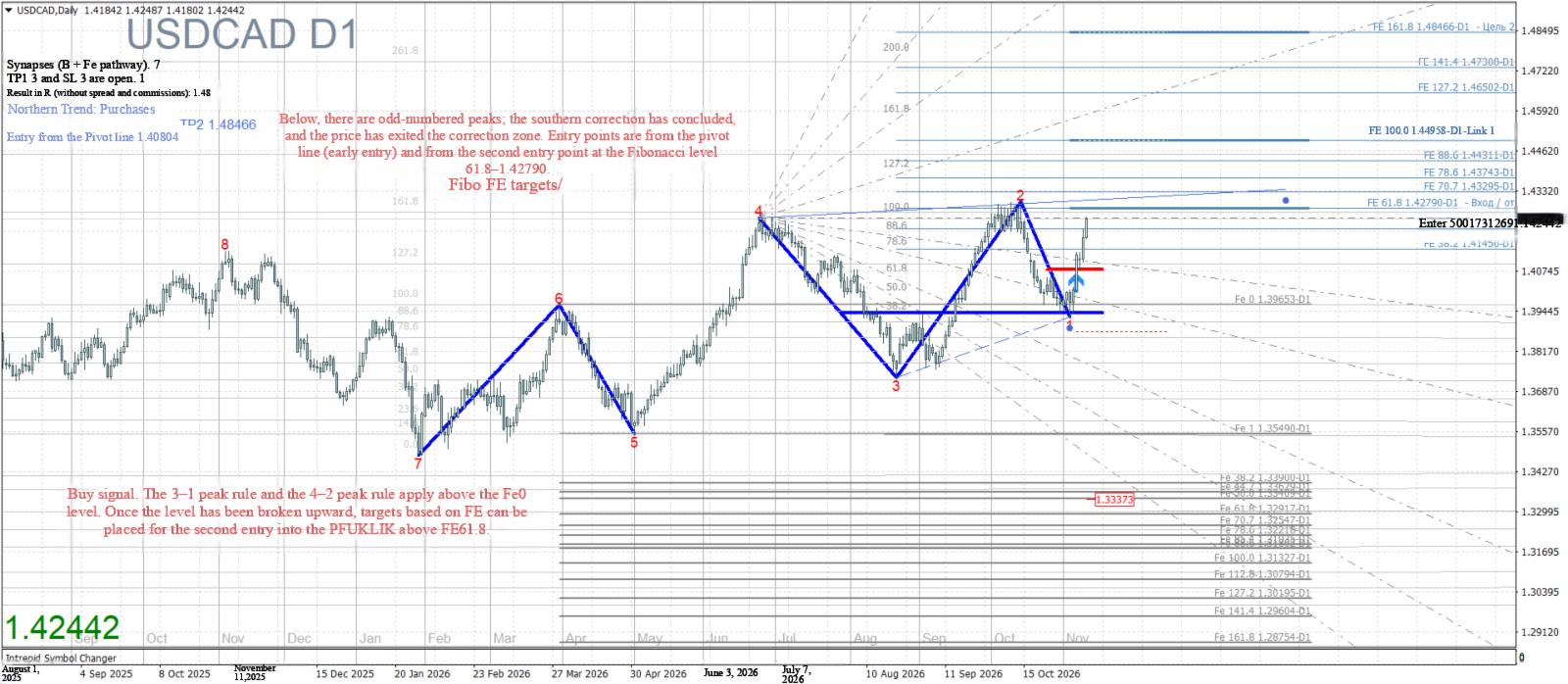
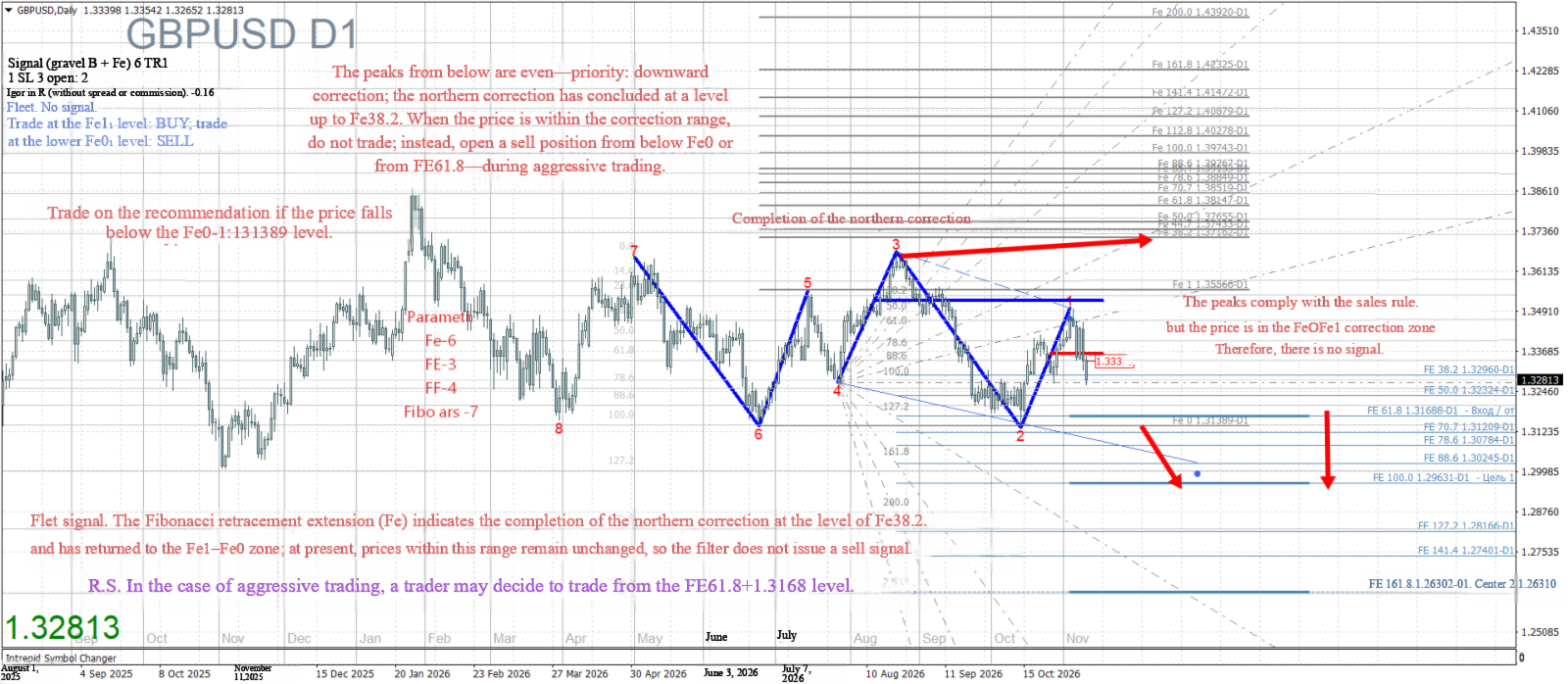
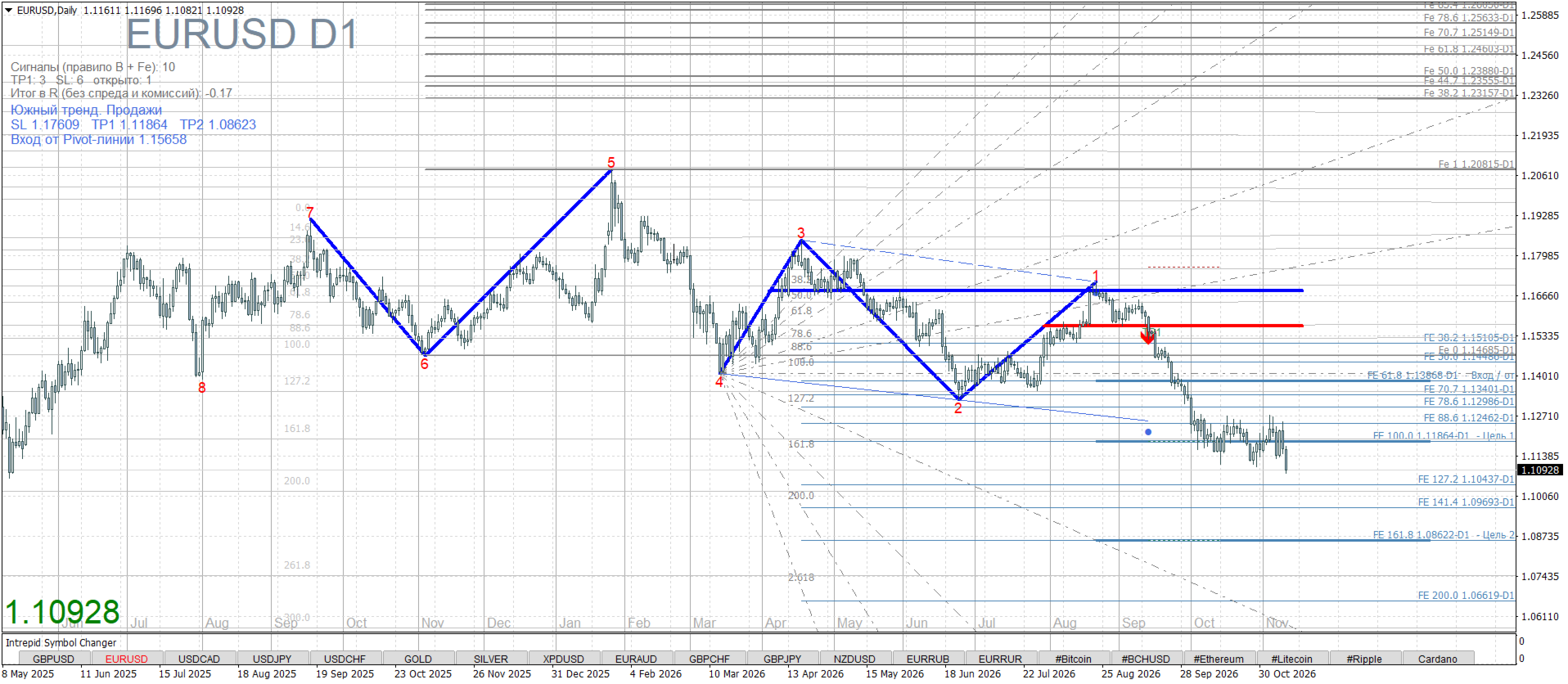
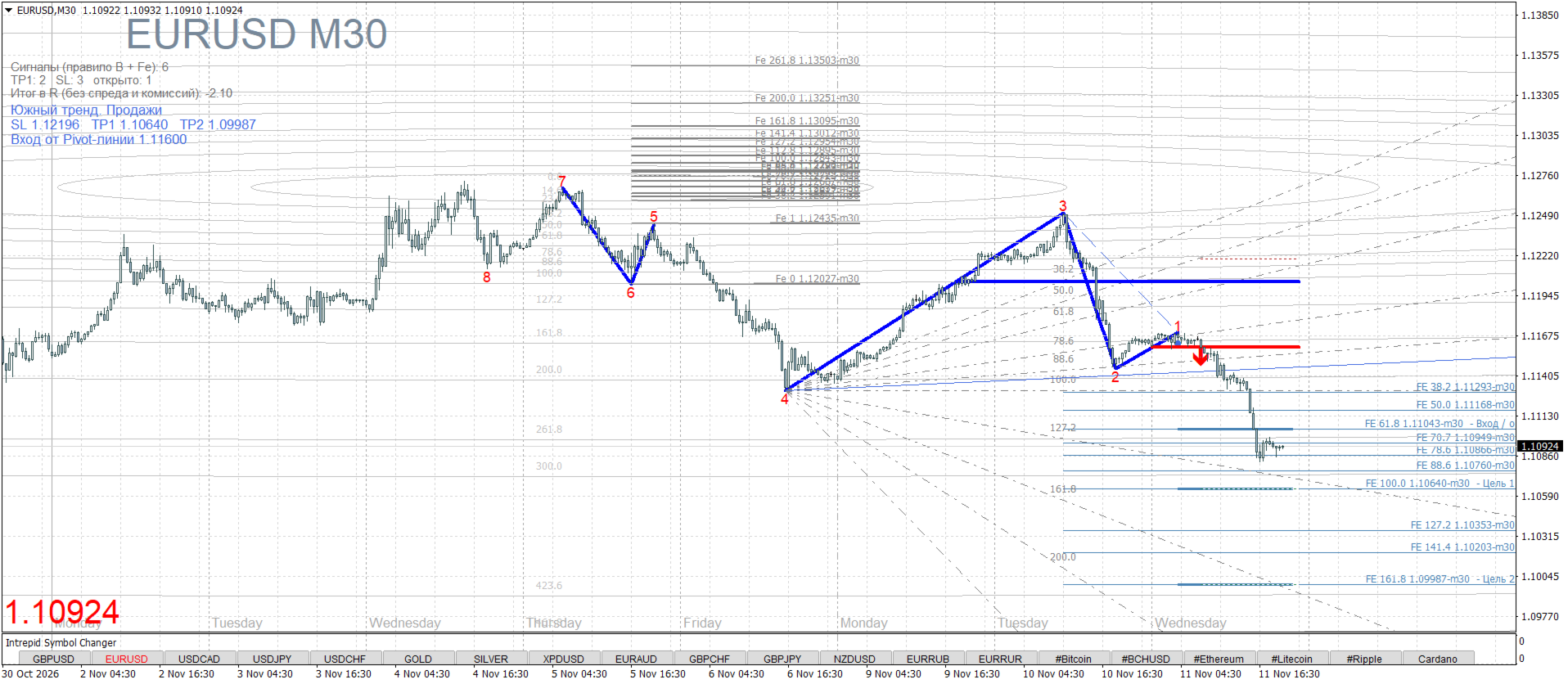
Fibo CorrectionExpansion
- Göstergeler
- Sürüm: 1.0
- Etkinleştirmeler: 5

Fibo(Fe)_CorrectionExpansion – An indicator for structural analysis and precise targets.
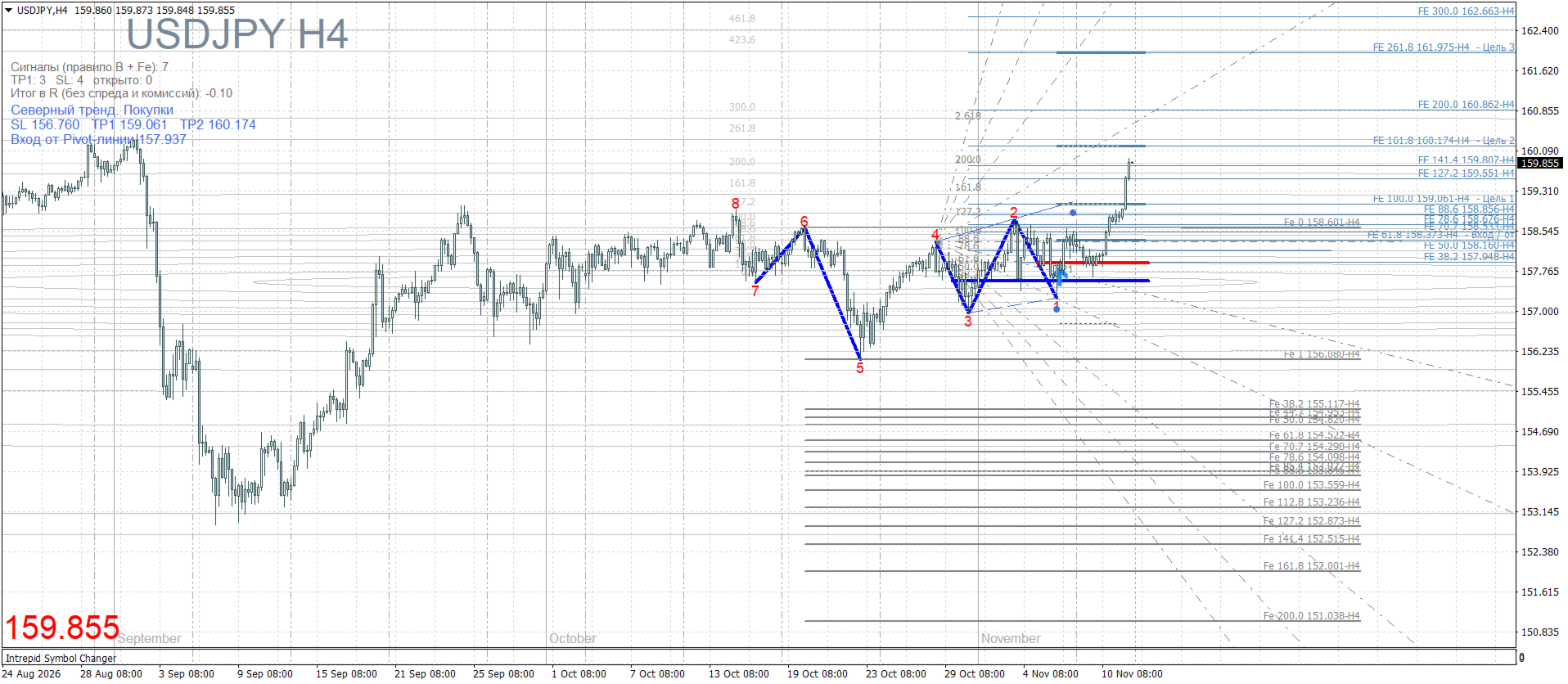
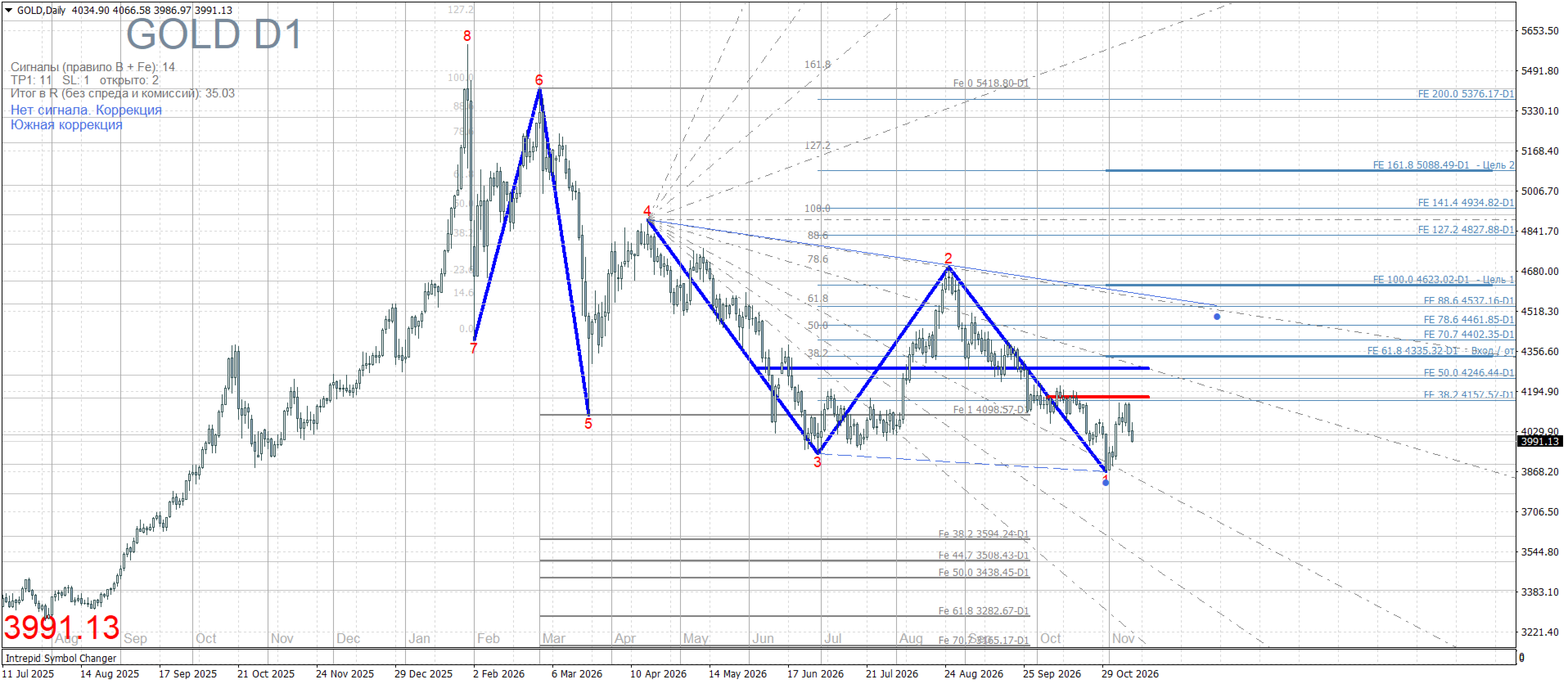
This is a professional tool for the MT4 terminal that automatically marks market structure, identifies corrections (Fe0–Fe1), and builds precise targets using Fibonacci expansion (FE). The ZigZag algorithm (with adjustable Depth–Deviation–Backstep parameters) is the main feature of this indicator; it has continuous vertex numbering. The Fibo system of this indicator is built specifically on vertex numbering.
The numbering of ZigZag peaks (vertices) is a very important element – these are “anchors”; without them it is impossible to build correct Fibonacci levels. They are also important for understanding the direction of the trend/correction (buy/sell) and for setting the ZIGZAG wave in the parameters, from which all Fibo levels will be built.
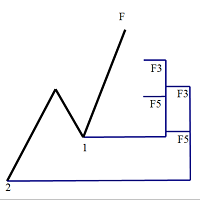
How it works: The indicator finds all significant extremes (High/Low) and assigns them sequential numbers (1,2,3,4,5,6,7,8...). Counting starts from the present: the newest (current) vertex always has number 1. The previous one is number 2, and so on deeper into history. For trading, we are always interested in vertex 1 – the new one.
Construction principle: ZigZag and vertex numbering.
Unlike standard indicators, here each Fibonacci line is tied to a specific numbered ZigZag vertex. You no longer guess where to place the stop and profit – the system does it for you, cutting out market noise. This completely eliminates chaotic marking and allows trading strictly according to the algorithm “TREND–CORRECTION–ENTRY–TARGET.” Thanks to this trading system, which marks the chart on a “vertex-to-vertex” basis, we can catch this trading algorithm on the chart, and for this we need 7 vertices.
IMPORTANT:
Even numbers – always sells; depending on the trend, this is a southern correction or southern trend. The market is dominated by “bears.” Fibo corrections and expansions with numbers (2,4,6,8) – SELL.
Odd numbers – always buys; depending on the trend, this is a northern correction or northern trend. The market is dominated by “bulls.” Fibo corrections and expansions with numbers (3,5,7) – BUY.
Fibo corrections and expansions (Fe) 6,7.
Parameter FiboCorrectionExpansion (Fe) – Levels Fe0–Fe1. These are correction levels; they show at what level the price may roll back after the initial movement. For example, if the price moves up, Fe0–Fe1 levels may indicate possible levels where the price may correct downward.
This is a trend filter and a generator of trading targets, protection against false breakouts. The classic 1-2-3 (3-2-1) pattern without this filtering will “beep” at every step, so signals are tied specifically to the correction-expansion levels (Fe); a signal appears when the trend has finished correction, exited the Fe1–Fe0 zone, and is ready to continue moving with the trend.
- Targets: Fibo Expansion (FE)3 (Take Profit):
- Targets are built using FE (Fibo Expansion) expansion from vertices 3-2-1 (this is setting 3); they are tied to the Fe1–Fe0 filter and show Entry and Targets.
- TP1: 100% of the impulse amplitude (Fe level 100.0).
- TP2: 161.8% of the amplitude (Fe level 161.8).
- Stop Loss (SL): Automatically placed behind vertex 1 with a protective buffer.
Performance panel: In the upper left corner, the indicator tests itself on history and shows statistics (number of signals, TP/SL hits, and final result in R).
Signal logic (Rule B + Fe filter)
The indicator does not draw arrows for no reason. It looks for the “Rule B” pattern – the classic trend continuation figure, the classic 1-2-3 pattern, which within the indicator is read as 3-2-1.
Signal filter: To filter out false entries, the indicator uses the Fe zone:
- For Buy: Odd vertices (1, 3, 5, 7) form an ascending structure (Higher Lows). Vertex 1 must be above vertex 3. Vertices 4 and 2 must break through the Fe0–Fe1 zone, i.e., be above the Fe0 level; thus the correction and sideways zone is over, and a long-term trend lies ahead.
- For Sell: Even vertices (2, 4, 6, 8) form a descending structure (Lower Highs). Vertex 1 must be below vertex 3.
- Entry trigger: A signal appears only when the price breaks the ZigZag Pivot line (red line on the chart). This confirms that the correction is complete and the impulse has begun.
- Flat (correction within correction): built-in protection. The main reason for deposit losses is trading in a range. The indicator solves this problem: if the market is in a range, the system displays “Flat. No signal” or “Correction. No signal” and indicates the boundaries (Fe0 and Fe1).
Fibo Fan and Fibo Arcs
For maximum accuracy, the indicator builds dynamic tools:
- Fibo Fan (Fibo Fan): Slanted support/resistance lines. An ideal coincidence of the Pivot entry point with a fan line gives double confirmation.
- Fibo Arcs (Fibo Arc): Show time and price. They act as magnets, hinting when exactly the correction time expires and the market is ready for an impulse. At the start of a strong trend, the arcs narrow at the vertex.
Targets: Fibo Expansion (FE)3 (Take Profit):
Targets are built using FE (Fibo Expansion) expansion from vertices 3-2-1 (this is setting 3).
- TP1: 100% of the impulse amplitude (Fe level 100.0).
- TP2: 161.8% of the amplitude (Fe level 161.8).
- Stop Loss (SL): Automatically placed behind vertex 1 with a protective buffer.
Performance panel: In the upper left corner, the indicator tests itself on history and shows statistics (number of signals, TP/SL hits, and final result in R).
Key advantages
- Full automation of marking: You do not need to manually search for vertices and draw Fibonacci lines. The indicator does it for you.
- Strict logic (no fluff): Each line is tied to a specific ZigZag vertex. Each signal is filtered by the correction zone.
- Ready-made targets and stops: The indicator immediately shows where to place SL and TP, which is ideal for scalping and intraday trading.
- Multi-timeframe: Works on any timeframe (from M15 to D1) and any instruments (forex, metals, crypto).
- Flexible settings: You can adjust ZigZag parameters, Fibonacci levels, entry rules, and display styles to suit your trading style.
Recommendations:
- Timeframe: from M15 to D1
- Trading instrument: Currencies, Metals, Cryptocurrencies
- Settings: Fibo CorrectionExpansion (6) + Fibo Expansion (3) + FiboFan (4) + FiboArc (7) – main default setting.
- Template: white.
Fibo settings for trading to choose for sets:
Fibo correction (Fe) has an odd number (7); along the trend it shows expansion of targets, then the fibo expansion parameter FE(6) – set an even number; in this case fibo FE will show the level at which the correction was completed, or the rollback zone. (fig.)
- Fibo Corrections-Expansion (Fe) – 7
- Parameters for fibo Fan (FF) – 4
- FanParameters for fibo Expansion (FE) – 6
- Parameters for fibo Arc – 4
Fibo correction (Fe) has an even number (6), shows correction levels, then the fibo expansion parameter FE(5) – set an odd number; in this case fibo FE will show the targets of zigzag 5-4-3, + the signal informer will show targets 3-2-1. (fig.). With this option, you can trade correction within correction, and then entry and targets are based on fibo FE.
- Fibo Corrections-Expansion (Fe) – 6
- Parameters for fibo Fan (FF) – 4
- FanParameters for fibo Expansion (FE) – 5
- Parameters for fibo Arc – 7
In addition to the above settings, you can enable the fibo parameter “Parameters for fibo Levels,” and here FiboDinamic – always moves with the price; the number does not affect it. FiboStatic – set “true” and set the desired vertex number.