Magic Alert

Missing entry opportunities,profitable exits or the chance to make profitable set ups on the chart can be very frustrating for a trader.This tool will help you by giving you alerts if your criteria or conditions have been fully met.It will send you alerts based on conditions you have set and send them through email and mql5 notifications (laptop and mobile devices).

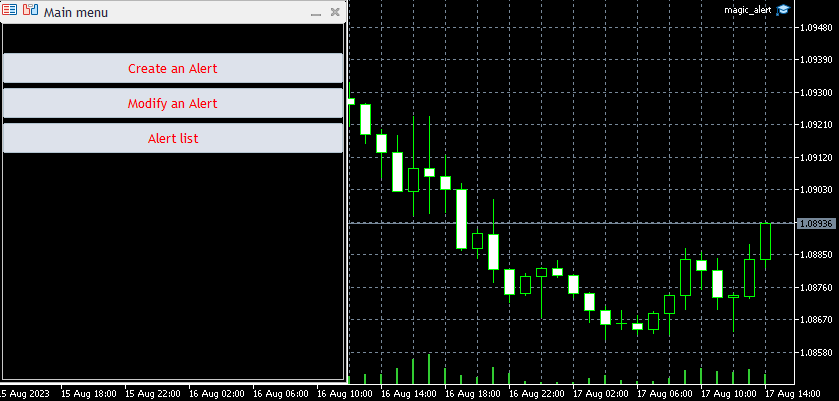
1.Creating Alerts

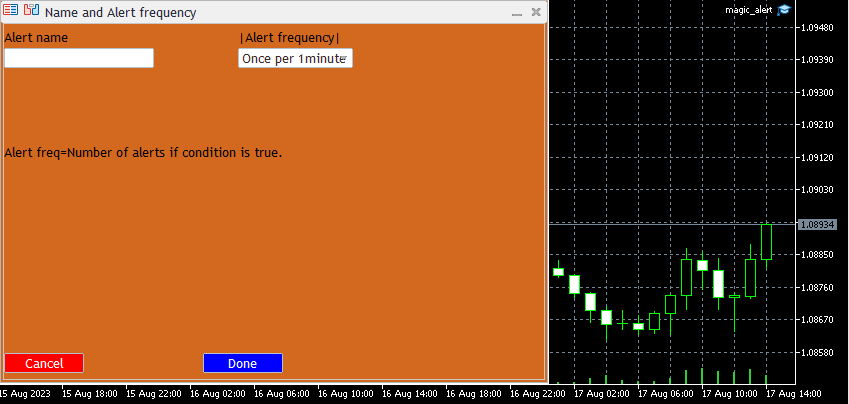
  • In order to create an alert you must first give the alert its name and how frequent it send you those alerts if conditions are fully met.The second step is to give the alert condition lists,which are a list of conditions that each must be fully met(all conditions must be true) in order for the alert message for that particular list to be sent to you.
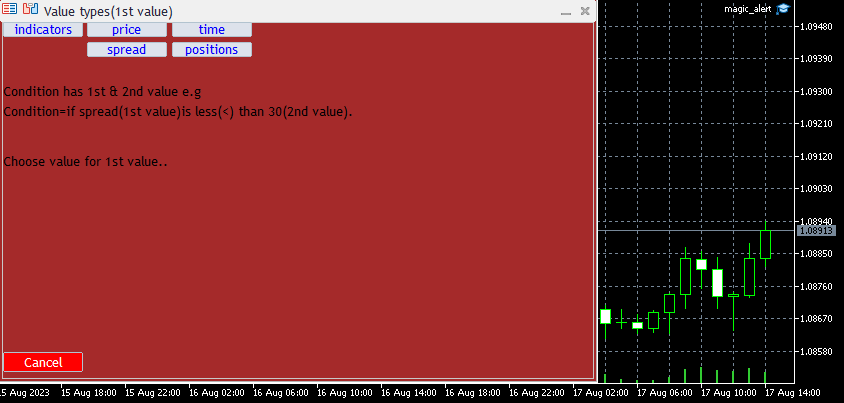
  • A condition has two values(1st and 2nd value) and each value can be any value chosen by you from value types e.g 1st value can be a Moving average and 2nd value can be force index and condition can be if Moving average is less than(<) force index.The second value can be a constant value like "1.233 or 1.555"  and condition is therefore Moving average is less than(<) "1.233".
  • After creating condition lists you will be done and then you choose if you want to activate your alert and make it start working.

2.Modifying an alert

  • If you want to to change your alert at anytime you can do so by Modifying alert name and/or alert frequency ,Adding a condition ,Modifying a condition or Deleting a condition.


3.Alert list

  • If you want to view your saved alerts at anytime you can do it and activate ,deactivate ,delete or view its details.


4.Tips and devices

  • If you close the tool entirely the alert will not work ,rather minimize the window if you are not using it any longer.
  • In order to receive notifications you must go to Tools -> options and in the notifications tab you must enable push notification and notifications from local terminal. You must also enter your MetaQuotes ID which you can get in your Messages tab in your mobile device labeled "MQID". Also make sure your MT5 app has permission for notifications in your mobile device.
  • In order to receive email notifications you must go to Tools -> options and in the email tab you must enter the details.
  • Fully maximize your chart window to view all controls on the panels.

Sub-value types

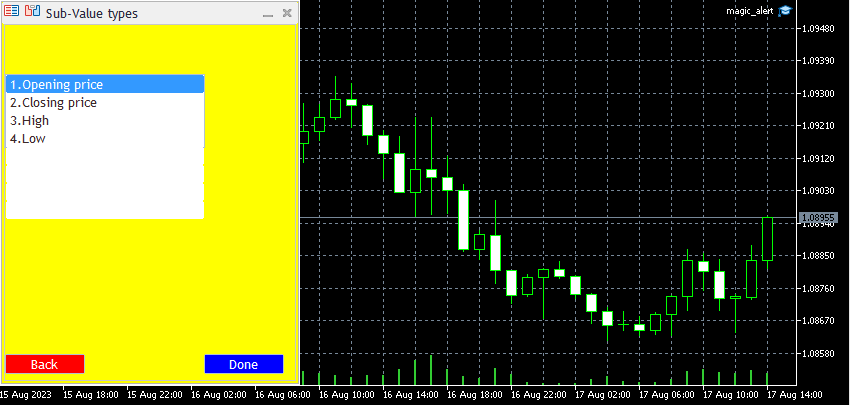
  • Some value types have sub-values to choose from e.g Price(value type) has opening price ,closing price ,high and low sub-values and the 1st or 2nd value of the condition will use that sub-value when condition is being compared(see image 4).

Symbol and timeframe

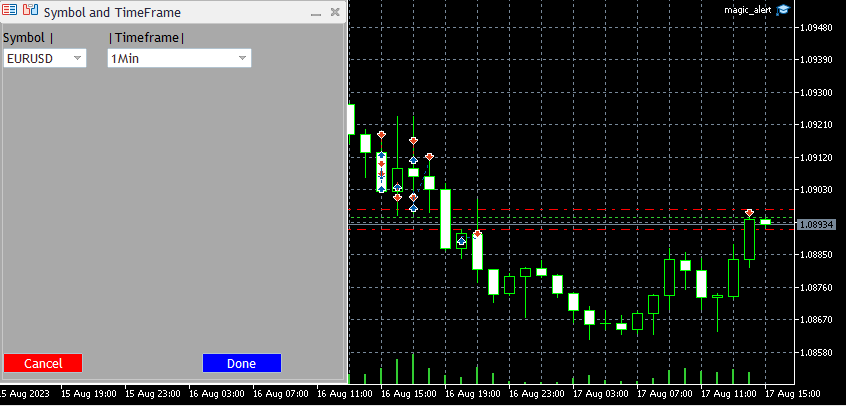
  • Some value types will require you to choose their Symbol and Timeframe e.g if you choose  Moving average as your value type in a condition ,it will need a symbol (EURUSD,GBPUSD) and timeframe (1hour,2hour).(see image 5)

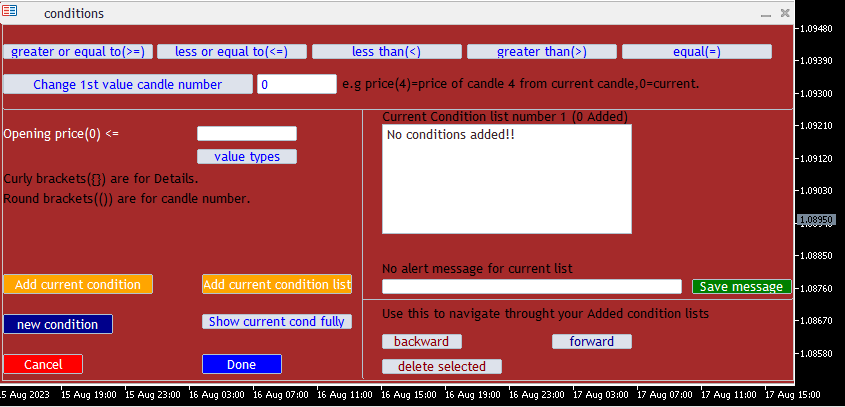
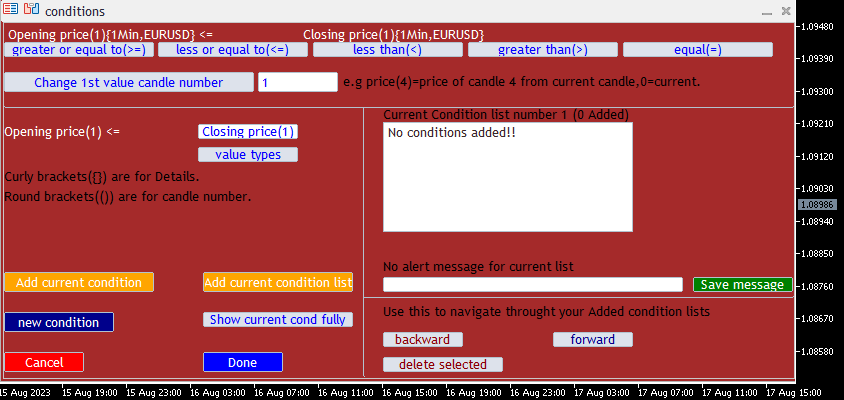
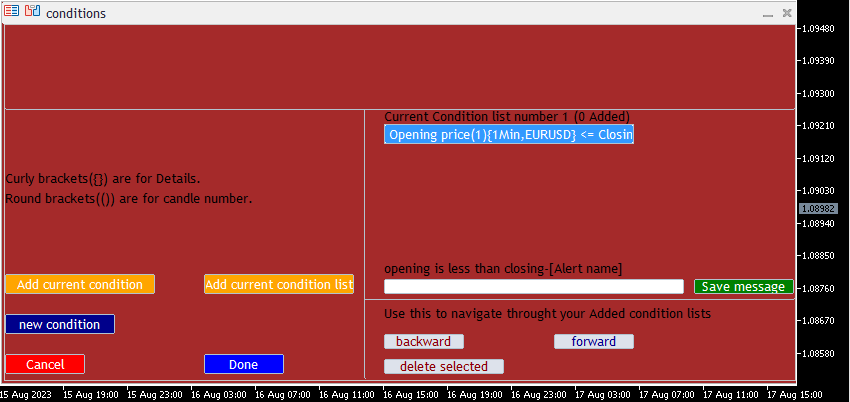
Adding condition to list(see image 6,7 and 8)

  • After creating a condition you must add that condition under the current condition list.
  • To fully view the condition before adding it you must press show current cond fully button.

Adding condition list(see image 6,7 and 8)

  • After adding all conditions and saving the alert message you must add that list and you can start a new one.
  • After you are done with with all lists press Done and you will be taken to a list of Alerts where you must activate the alert so it can start working.

Time value type

  • This value type has the current hour ,current minute ,current day of the week ,current day of the month ,current month and current year as it's sub-value types.
  • Current Hour-(from 0 to 23).
  • Current Minute-(from 1 to 60).
  • Current day of the week-(from 1 to 5).
  • Current day of the month-(from 1 to end of the month).
  • Current month-(from 1 to 12).
  • Current year-(full year e.g 2023).

Value candle number

  • Some value types require candle number e.g if your chosen value type is Moving average in a condition you must choose a candle. If the candle number is 0 it will use the current Moving average value from the current active candle every time a condition is checked ,if it is 1 it will use the first candle after (previously closed).
Önerilen ürünler
Bu yardımcı program, mum manuel olarak yerleştirilen trend çizgisine dokunduğunda, sanki daha belirgin bir bekleyen emirmiş gibi emirleri açar.  Herhangi bir varlık üzerinde kullanılabilir, emri açtığında dokunduğu çizgiyi ortadan kaldırır ve Arrow'u oluşturur. Bu durumda, fiyat tersine çevirme işlemleri için kullanılır; yükseliş mumu alt çizgiye dokunduğunda bir satış emri açar ve düşüş mumu yukarıdan aşağıya çizgiye dokunduğunda bir satın alma emri açar.  Zararı durdurma ve kar almayı ayarla
FREE
Smart Sync SL/TP Panel: The Ultimate Trade Management Dashboard For high-frequency manual traders and systematic grid operators, managing risk across multiple positions on a single asset can be a logistical nightmare. The Smart Sync SL/TP Panel is an advanced MQL5 utility engineered to eliminate the friction of mass order modification, giving you total control over your risk parameters in a fraction of a second. If you execute entries like a machine gun, this tool helps you place precise and uni
SMT Trade Planner, MetaTrader grafigi uzerinde profesyonel bir risk hesaplayici ve islem yurutme panelidir. Risk ayarlariniza gore lot buyuklugunu hesaplar, grafikte suruklenebilir Giris, Stop Loss ve Take Profit cizgileri gosterir, yapilandiriabilir risk kurallarina gore islemi dogrular ve tek tikla islem yurutmenizi saglar.   Nasil calisir Trade Planner'i herhangi bir grafige ekleyin. Panel hesap bilgilerini ve hizli risk secim dugmelerini gosterir. Grafikte uc yatay cizgi belirir: Giris (mavi
This program is a GUI for issuing orders that can be done more quickly. Faster TP SL setting This program is not an automated trading platform. Trading is risky, please manage your risk. We do not accept any responsibility. It should be tried with Demo before using it with Real. Normally, the setting sets the risk to 1:1 to shift manually or to enter the risk to x:1, where x can be entered and everything can move freely. Thank you to all customers who have purchased our products. We would like t
Ticks Charting
Mativenga Geoffrey Mativenga
Tick Copier EA — Description & Usage Guide Instead of seeing the market like everybody else using time based charts, instead view the market using ticks like an x-ray. This Expert Advisor (EA) for MetaTrader 5 copies live ticks from the chart it is attached to and sends them to a custom symbol you already created (for example EURUSD TICKS ). Each time a new market tick arrives:  EA reads the current tick data from the source symbol. It copies the tick values: time bid price ask price last price
Aegis XAU Extreme Edition Overview Aegis XAU Extreme Edition is a trend-following Expert Advisor designed exclusively for XAUUSD M1 . Rather than trading throughout the entire day, it focuses only on carefully selected trading sessions identified through extensive historical testing. By avoiding statistically unfavorable hours, the EA aims to improve overall trading efficiency while maintaining consistent long-term performance. The strategy combines: EMA Trend Filter EMA Pullback Entry ADX Tr
Guardian Account Protector — the seatbelt for your trading account Your robots have no brakes. Guardian is the brakes. Guardian does not open trades. It has no grid, no martingale, and no entry logic of any kind. It does one job with complete discipline: it watches your ENTIRE account and enforces the risk limits you set, so that no robot, no strategy, and no bad day can destroy your balance. Think of it like a seatbelt for the driver. A seatbelt does not steer the car and does not make the d
Algo Trading Indicaor MT5 The ATC ALGO indicator has been developed to work on the MetaTrader 5 platform. It has the same specifications and zones as the MetaTrader 4 version. There may be slight lag, which we believe is due to differences in MetaTrader 5 programming. We will work on improving it, God willing. MT5 Version                    https://www.mql5.com/en/market/product/170028 MT4 Version                    https://www.mql5.com/en/market/product/88034 With this indicator , you’ll have
One Click Breakeven Function: For multiple orders of the same currency but different order types (sell or buy), under the condition that the overall position is profitable, set the same stop-loss level or take-profit level. For example: there are currently 10 EURUSD orders, including 7 sell orders and 3 buy orders. When the overall position is profitable, if the overall take-profit for sell orders is set to 50 points: (1) When the total profit of the 7 sell orders is greater than the total loss
Aizen Trade Manager Pro
Japhet Eisenhdorf Pascua Jabulin
Aizen Trade Manager Pro Professional Trade Management for Traders Running Multiple Positions Opening a trade is the easy part. Managing it correctly—especially when you have several positions open at the same time—is where consistency is won or lost. Aizen Trade Manager Pro is a professional button-driven trade management panel that runs directly on your MetaTrader 5 chart. It does not generate signals, predict market direction, or execute trading strategies. Instead, it simplifies every repetit
Devrim niteliğindeki İşlemler Zaman Yöneticisi ile işlem rutininizin kontrolünü zahmetsizce elinize alın. Bu güçlü araç, belirlenen zamanlarda emir gerçekleştirmeyi otomatikleştirerek alım satım yaklaşımınızı dönüştürür. Satın alma işleminden emir belirlemeye kadar çeşitli ticaret eylemleri için manuel müdahale olmadan kişiselleştirilmiş görev listeleri oluşturun. Trades Time Manager Kurulum ve Girdiler Kılavuzu EA hakkında bildirim almak istiyorsanız, URL'mizi MT4/MT5 terminaline ekleyin (ekran
Trade Control Panel Function Normal One Click Function Close All Close All Profit Close All Loss Close All Pending Order Close All Sell Close All Buy Advance One Click Function 1.  Close Partial Lot Sell by Percent It will help you partial close for all open position by desire percent you wanted. No longer partial close one by one for every open position Manual input for desire percent 2. Close Partial Lot Buy by Percent It will help you partial close for all open position by desire percent
Smart Risk Manager – Master Your Trades with Precision and Confidence Take complete control of your manual trading with Smart Risk Manager , a professional all-in-one trade and risk management Expert Advisor for MetaTrader 5 . Designed for traders who value speed, precision, and capital protection, it simplifies every step of trade execution while ensuring your risk remains under control. Whether you trade Forex, Gold, Indices, or Cryptocurrencies , Smart Risk Manager helps you execute trades w
MT5 Trade To Telegram MT5 Trade To Telegram is a professional trade signal bridge for MetaTrader 5. It monitors trades, positions, and pending orders placed on your MT5 account and sends clean, structured signal updates to your Telegram bot, group, channel, or private chat. It is designed for traders, signal providers, educators, account managers, and trading communities who need fast trade communication with flexible TP/SL handling, inverse signal mode, live target monitoring, and a modern on-
Jabidabi Session Indicator The Market Session Indicator is a powerful tool used by traders to identify and track different trading sessions within the forex and stock markets. It visually highlights key trading periods, such as the Asian, European, and North American sessions, directly on the trading chart. This indicator is especially useful for traders who follow ICT (Inner Circle Trader) strategies, which emphasize the significance of various market sessions for optimal trading opportunities.
Quantum Trade Panel – The Ultimate Smart Assistant for Flawless Execution & Risk Management Tired of slow executions and calculating lot sizes manually while the market moves? Quantum Trade Panel is the ultimate, feature-rich Trading Assistant Expert Advisor (EA) for MT5 . It is specifically engineered to empower day traders and scalpers to manage, calculate, and execute trades in milliseconds with pinpoint accuracy. Combining a stunning, futuristic Cyber/Neon user interface with powerful und
Account Profit & Loss Killer Full Account-Level Intelligent Risk Management EA (MT5) ⸻ Product Introduction Account Profit & Loss Killer is a true "overall account control and risk management tool". It does not participate in any trading strategy; it focuses on only one thing: When the total floating profit or total floating loss of all positions in the account reaches your set amount, it immediately and within milliseconds forcibly closes all orders in the account. This is a true "
FREE
BossFXTradePanelEA (MT5)  [First 10 copies sold at 50 USD price will increase to 99USD] BossFXTradePanelEA is a fully interactive trade management panel designed for MetaTrader 5, providing traders with an easy-to-use, one-click interface to execute and manage trades. This EA simplifies trade execution , risk management, and position control by combining market orders, stop loss, take profit, trailing stops, and breakeven functionalities into a single, intuitive panel.  Key features include: On
Trade Utility Pro is a bot utility designed to help you manage trades more easily, quickly, and accurately. This utility features a control panel interface and supports MetaTrader 5 exclusively. This utility does not link to any account information or external sources, ensuring safety. Main Features: Open Trade Support: Lot size calculation Fixed Lot: Custom input lot required Money Risk Lot: Automatically calculated based on stop loss and money risk Account % Risk Lot: Automatically calculated
FREE
Hybrid Assisted Trading Engine Manual Trading. Machine Discipline. The Hybrid Assisted Trading Engine is an institutional-grade manual trade management system designed to protect traders from emotional mistakes — without taking control away from them. You decide when to enter . The engine decides how the trade is managed . What It Does This system continuously monitors your manual trades and enforces professional-level trade management rules in real time: Smart Breakeven logic R-based trai
Telegram to MT5 Pro — Advanced Telegram Signal Copier with Auto-Fix, Multi-TP, Risk Control and Full Trade Management Telegram to MT5 Pro — Profesyonel Telegram Sinyal Kopyalayıcı Telegram to MT5 Pro, Telegram’dan gelen sinyalleri MetaTrader 5 hesabına otomatik olarak doğrudan uygulayan yüksek performanslı bir trade kopyalayıcıdır ve risk, işlem yürütme ve trade yönetimi üzerinde tam kontrol sağlar. Sistem iki bileşenden oluşur: • MetaTrader 5 içinde çalışan Expert Advisor (EA) • Telegram’a bağ
# Higher-Lower Pending Bot - Advanced Multi-Pending Orders System ## Revolutionize Your Trading with Smart Pending Order Automation Welcome to the **Higher-Lower Pending Bot** - the most sophisticated pending order management system available on MQL5. Designed for traders who want to maximize opportunities while minimizing manual effort, this EA combines intelligent order placement with comprehensive profit tracking in one powerful package. ## What Makes Our Bot Unique? ### Smart D
Prop-Firm Guardian. Gerçek zamanlı drawdown koruması ️ Hesabınızı kurallar bozulmadan önce durdurur Prop-Firm Guardian , her tikte özsermayenizi izleyen ve günlük veya toplam drawdown limiti aşıldığı anda tüm pozisyonları zorla kapatan savunma amaçlı bir Expert Advisor 'dır. Yeni işlemler ardından bir sonraki broker gece yarısına kadar otomatik olarak bloklanır, böylece FTMO, MyForexFunds, FundedNext, The5ers veya başka herhangi bir prop firma challenge'ınız, ana stratejiniz kötü davransa bi
This Expert Advisor monitors all open positions across all symbols in MetaTrader 5. Whenever a Stop Loss (SL) or Take Profit (TP) is manually set or adjusted on any position, the EA automatically applies that value to all other open positions , regardless of symbol or order type (Buy/Sell). This ensures consistent and synchronized SL and TP levels across your account. Perfect for mobile trading via tablet or smartphone!
It is a utility that posts customized messages on Telegram based on account trading activity. Once the utility is on the chart, with each new position opened from the same chart symbol the utility is added, a customized message will be sent to the Telegram group defined in the input parameters. The utility will post to the Telegram group if a new position is opened and if it is the same symbol as the chart the utility is running on. If you are using an Expert Advisor for Buy and Sell and want to
DoIt EA Monitor - Multi EA Performance Dashboard for MT5 Your account can be profitable while one EA quietly drags down the portfolio. MetaTrader history shows the combined result, but it does not clearly show which strategy deserves more capital and which one needs attention. DoIt EA Monitor runs on one chart and separates live and historical performance by magic number, EA and symbol. It is completely read-only. It never opens, closes or modifies a trade. KNOW WHICH EA IS EARNING ITS PLACE Aut
FREE
Hello, I would like to give an example of this EA. From the picture you can see that the EA can spin around 3,500 lots, when taking into account the rebate, you will get about 35,000$ and a little bit of profit during execution. The EA has actually been run as shown in the picture. **You can optimize to get the best value before actually running it.  Thankyou   Excuseme .I'm sorry that I'm not good at English. Therefore, communication may be somewhat wrong. Facebook page :  facebook.com/ Gold
Trade Manager Panel ## Short description  Manage your manual trades with one click: automatic break-even, trailing stop, two-level partial close and risk-based lot sizing — all from a single on-chart panel. --- ## Full description Trade Manager Panel is an on-chart utility that takes care of your open trades so you can focus on the market instead of the order ticket. Drop it on any chart and it manages every position on that symbol automatically, while an interactive panel lets you size new
Hidden Gap by MMD MT5
Mariusz Maciej Drozdowski
Hidden Gap by MMD Hidden Gap by MMD is a unique indicator that detects hidden gaps between three consecutive candles. This observation isn't my own, but in the MMD methodology, it has its application alongside other original indicators. You can apply this indicator to the chart multiple times and set the interval from which you want to see the hidden gaps. You can show or hide these gaps as needed. For example, you can view the chart at an M5 interval and see hidden gaps from an M15 chart, etc.
Quant Lattice
Dilwyn Tng
5 (1)
1 Fiyata 3 Strateji Canlı Sinyal:   QL Drive   |   QL Steady          Ayar Dosyaları Quant Lattice (Kuantum Kafes) Nedir Quant Lattice (Kuantum Kafes) tek bir döviz çiftinde işlem yapan tam otomatik bir Expert Advisor'dır: AUDCAD. Steady (Dengeli) ve Drive (Atılım) olmak üzere 2 farklı stratejiyle gelir.  Bir kez kurarsınız, bir strateji seçersiniz, para yönetimini ayarlarsınız ve siz hiç dokunmadan işlem yapar. Neden AUDCAD?  Hem Avustralya doları hem de Kanada doları emtia bağlantılı para b
Bu ürünün alıcıları ayrıca şunları da satın alıyor
Trade Assistant MT5
Evgeniy Kravchenko
4.41 (215)
It helps to calculate the risk per trade, the easy installation of a new order, order management with partial closing functions, trailing stop of 7 types and other useful functions. Additional materials and instructions Installation instructions - Application instructions - Trial version of the application for a demo account Line function -   shows on the chart the Opening line, Stop Loss, Take Profit. With this function it is easy to set a new order and see its additional characteristics bef
Trade Manager EA’ye hoş geldiniz! Ticaretin daha sezgisel, hassas ve verimli hale gelmesi için tasarlanmış nihai risk yönetim aracı ile tanışın. Bu sadece bir emir verme aracı değil; ticaret planlaması, pozisyon yönetimi ve risk kontrolü için kapsamlı bir çözüm. İster yeni başlayan bir yatırımcı olun, ister deneyimli bir trader ya da hızlı emir gerektiren bir scalper, Trade Manager EA ihtiyaçlarınıza uyum sağlar ve forex, endeksler, emtialar ve kripto paralar dahil tüm piyasalarda esneklik sunar
TradePanel MT5
Alfiya Fazylova
4.88 (166)
Trade Panel, çok işlevli bir ticaret asistanıdır. Uygulama, manuel ticaret için 50'den fazla ticaret fonksiyonu içerir ve çoğu ticaret görevini otomatikleştirmeyi mümkün kılar. Satın almadan önce demo hesapta demo sürümü test edebilirsiniz. Demo hesap için uygulamanın deneme sürümünü indirin: https://www.mql5.com/en/blogs/post/750865 . Talimatların tamamı buraya . Ticaret. Tek tıklamayla ticaret işlemleri yapmayı sağlar: Risk otomatik hesaplaması ile bekleyen emirleri ve pozisyonları açmak. Bird
================================================================================ POC BREAKOUT - V20.72. Full Professional Grade Toolkit ================================================================================ POC Breakout is a full MetaTrader 5 trading dashboard for discretionary traders who want breakout signals, Point of Control (POC) context, volume profiles, order flow, market structure, news, alerts, and advanced trade planning in one professional workspace. Attached directly to you
Beta Sürümü Telegram to MT5 Signal Trader resmi alfa sürümüne neredeyse hazır. Bazı özellikler hâlâ geliştirilmekte olup küçük hatalarla karşılaşabilirsiniz. Sorun yaşarsanız lütfen bildirin, geri bildiriminiz yazılımın herkes için gelişmesine yardımcı olur. Telegram to MT5 Signal Trader , Telegram kanallarından veya gruplarından gelen işlem sinyallerini otomatik olarak MetaTrader 5 hesabınıza kopyalayan güçlü bir araçtır. Herkese açık ve özel kanalları destekler ve birden fazla sinyal sağlayıc
Farmed Hedge Yield Farming | All Markets (Manual - Hybrid - Semi/Automated EA) MULTI-ASSET SUPPORT Trade any asset available on your broker - Forex: Major, Minor, Exotic pairs - Crypto: BTC, ETH, XRP, SOL, BNB - Stocks: Apple, Tesla, Amazon, Google, etc. - Commodities: Gold, Silver, Oil, Gas - Indices: US30, NAS100, SPX500, DAX40 - Any CFD your broker offers VERIFIED TRADING RESULTS - Farmed Hedge Yield Axi Copy:  https://www.mql5.com/en/signals/2356376 - Farmed Hedge Yield Exn Copy:   https:/
AstroTrade Trading Assistant AstroTrade is a comprehensive multi-functional trading utility developed for the MetaTrader 5 platform. It integrates essential tools for trade execution, risk management, and technical monitoring into a single unified interface. The application is designed to assist traders in managing their daily operations through a visual and structured environment. Visual Trade Execution and Risk Management The application includes a specialized trading panel that assists in c
Power Candles Strateji Tarayıcısı - Kendi Kendini Optimize Eden Çoklu Sembol Kurulum Bulucu Power Candles Strateji Tarayıcısı , Power Candles göstergesini çalıştıran aynı kendinden optimize edici motoru, Piyasa İzleyicinizdeki her sembol üzerinde yan yana çalıştırır. Tek bir panel, şu anda istatistiksel olarak hangi sembollerin işlem yapılabilir olduğunu, her birinde hangi stratejinin kazandığını, en uygun Stop Loss / Take Profit çiftini gösterir ve yeni bir sinyal geldiği anda size bildirim gön
Footprint Chart Pro — Professional OrderFlow EA for MetaTrader 5 Version 6.34 | Professional tool for real traders | Institutional-Grade Visualization DEMO USERS - PLEASE SELECT EVERY TICK / REAL TICK WHEN TESTING AND YOU HAVE DOWNLOADED HISTORICAL DATA. IF YOU SEE A WAITING SCREEN AND IT IS NOT DOWNLOADING, IT MEANS YOU HAVE LOW HISTORICAL DATA. TRY 1 MIN AND 5 MIN FIRST ON 1 DAY DATA. ONE DAY DATA SHOULD BE THE NEWEST AND MOST CURRENT DATE. PLEASE WAIT UNTIL THE MARKET HAS ROLLED OVER PERIOD.
VirtualTradePad PRO SE MT5 — MetaTrader 5 için profesyonel işlem kontrol merkezi VirtualTradePad PRO SE , MetaTrader 5 için grafik tabanlı premium bir işlem paneli ve trade yönetim çalışma alanıdır. Daha hızlı emir yürütme, daha net pozisyon kontrolü, yapılandırılmış trade yönetimi, görsel seviye planlama ve doğrudan grafik üzerinden profesyonel bir çalışma akışı isteyen traderlar için tasarlanmıştır. Bu yalnızca basit bir BUY / SELL paneli değildir. PRO SE; manuel işlem, bekleyen emirler, pozis
Premium Trade Manager - İçine Koç Yerleştirilmiş İşlem Paneli Premium Trade Manager , grafiğinizin içine bir trading koçu yerleştirir; altında tam bir yürütme motoru çalışır. İşlemi her zamanki gibi kurun, ardından yapay zeka trading koçunuz Max, o kurulumu tam olarak okusun ve canlı hesabınıza göre taahhüt etmeden önce size net bir değerlendirme sunsun: stop disiplinli bir yaklaşıma uyuyor mu, risk büyüklüğü makul mü, yüksek etkili bir haber dakikalar sonra mı geliyor, prop firm limitinize yakl
YuClusters
Yury Kulikov
4.93 (43)
Attention: You can view the program operation in the free version  YuClusters DEMO .  YuClusters is a professional market analysis system. The trader has unique opportunities to analyze the flow of orders, trade volumes, price movements using various charts, profiles, indicators, and graphical objects. YuClusters operates on data based on Time&Sales or ticks information, depending on what is available in the quotes of a financial instrument. YuClusters allows you to build graphs by combining da
Welcome to ENTRY IN THE ZONE WITH SMC MULTI TIMEFRAME Entry In The Zone and SMC Multi Timeframe is a real-time market analysis tool based on Smart Money Concepts (SMC), designed to analyze market structure, price direction, and key trading zones. It supports both Single-Timeframe Analysis and Multi-Timeframe Analysis, providing a clearer view of the overall market structure across multiple timeframes, with real-time BUY / SELL signals that do not repaint. It is designed to help filter trading op
EA Auditor
Stephen J Martret
5 (4)
EA Auditor is an independent analysis tool for traders evaluating Expert Advisors and trading signals on MetaTrader 5. It audits backtest reports, reviews posted developer signals, and cross-verifies the two against each other to help traders assess strategies before committing capital. The MQL5 market offers a wide range of Expert Advisors from many developers, with varying approaches, quality, and transparency. EA Auditor provides a consistent, data-driven framework for reviewing them, answer
Quant AI Agents are independent trading Expert Advisors. Instead of trading using a fixed strategy like other conventional EAs, Quant AI Agents   is a   multi-agent AI trading framework   that turns natural-language strategy prompts into live.  WANT THE SAME RESULTS AS MY LIVE SIGNAL?   Use the exact same brokers I do:   IC MARKETS , IC TRADING   .  Unlike the centralized stock market, Forex has no single, unified price feed.  Every broker sources liquidity from different providers, creating un
The product will copy all telegram signal to MT5 ( which you are member) , also it can work as remote copier.  Easy to set up, copy order instant, can work with almost signal formats, image signal,  s upport to translate other language to English Work with all type of channel or group, even channel have "Restrict Saving Content", work with  multi channel, multi MT5 Work as remote copier: with signal have ticket number, it will copy exactly via ticket number. Support to backtest signal. How to s
Features   With MT5 to Interactive Brokers(IB) Trader, you can: 1. Load chart data from IB to MT5, and Analyze with all standard or customer Indicators. 2. Place Orders to IB Account Directly in MT5. 3. Make your Own EAs upon IB Securities by only making minus changes of the trading function. Usage 1) Installation Copy the "Mt5ToIBTraderEn.ex4" and sample files to [MT5 Data Folder]->MQL5->Experts.  2)  MT5 Settings Add the IP Address to the MT5 Allowed URLs in 'Tools->Options->Expert Adviso
The Expert Advisor will help you forward all alert from  MetaTrader 5 to Telegram channel/ group.  All alert must save to folder <Data folder>MQL5\Files\Alerts\ , text file with format *.txt and screenshot with format *.gif or *.png. Parameters: - Telegram Bot Token: - create bot on Telegram and get token. - Telegram Chat ID:  - input your Telegram user ID,  group / channel ID - Forward Alert: - default true, to forward alert. - Send message as caption of Screenshot: - default false, set true t
FUTURES ORDERFLOW FOOTPRINT CHART Professional OrderFlow EA for MetaTrader 5 Version 1.01| Professional tool for real traders | Institutional-Grade Visualization STRATEGY TESTER USERS - PLEASE SELECT EVERY REAL TICK WHEN TESTING AND YOU HAVE DOWNLOADED HISTORICAL DATA. IF YOU SEE A WAITING SCREEN AND IT IS NOT DOWNLOADING, IT MEANS YOU HAVE LOW HISTORICAL DATA. TRY 1 MIN AND 5 MIN FIRST ON 1 DAY DATA. ONE DAY DATA SHOULD BE THE NEWEST AND MOST CURRENT DATE. PLEASE WAIT UNTIL THE MARKET HAS ROL
BNEU PROP FIRM PASS SYSTEM v2.32 PRODUCT OVERVIEW Bneu Prop Firm Pass System is a professional risk management and account protection utility for MetaTrader 5. Attach to any chart and configure your account rules. The system monitors daily loss, maximum drawdown, profit target, trading days, open risk, margin usage, news events, pending orders, weekend restrictions, and rollover restrictions from one dashboard. It includes a 5-tab premium dashboard, prop firm presets, custom rules, Risk Senti
Official BlueDigitsFx Ecosystem Access Get infrastructure updates, workflow resources, product releases, and ecosystem access through the official BlueDigitsFx ecosystem. Telegram Ecosystem Website MT4 Version BlueDigitsFx Command Center — MT5 Trading Dashboard for Execution, Risk Management & Market Analysis BlueDigitsFx Command Center is a professional MT5 execution and workflow dashboard designed to help traders manage entries, risk, market direction, momentum, and session awareness from
Grid Manual MT5
Alfiya Fazylova
4.73 (22)
Grid Manual, sipariş ızgarasıyla çalışmak için kullanılan bir ticaret yardımcı programıdır. Yardımcı program evrenseldir, esnek ayarlara ve sezgisel bir arayüze sahiptir. Sadece kayıpların ortalaması yönünde değil, aynı zamanda kazanç artışı yönünde de bir emir ızgarası ile çalışır. Tüccarın bir emir ızgarası oluşturmasına ve eşlik etmesine gerek yoktur, bu yardımcı programı yapacaktır. Emri açmanız yeterlidir ve Grid manual otomatik olarak ona bir emir ızgarası oluşturacak ve kapanana kadar ona
AI Agent Supervisor is NOT an Expert Advisor. AI Agent Supervisor   is a   multi-agent AI risk & portfolio supervisor   that watches every EA on your account and intervenes in real time.  WANT AN AI PORTFOLIO MANAGER WATCHING YOUR FLEET 24/7?   Run your fleet on the same brokers I do:   IC MARKETS , IC TRADING   .  Unlike the centralized stock market, Forex has no single, unified price feed.  Every broker sources liquidity from different providers, creating unique data streams. The Supervisor r
Unlimited Trade Copier Pro MT5 is a tool to copy trade remotely to multiple MT4, MT5 and cTrader accounts at different computers/locations over internet. This is an ideal solution for you if you are a signal provider and want to copy your trades to other receivers globally on your own rules. One provider can copy trades to multiple receivers and one receiver can get trade from multiple providers as well. The provider can even set the subscription expiry for each receiver, so that receiver will n
Adam FTMO MT5
Vyacheslav Izvarin
5 (2)
ADAM EA Special Version for FTMO Please use ShowInfo= false for backtesting ! Our 1st EA created using ChatGPT technology Trade only GOOD and checked PROP FIRMS  Default parameters for Challenge $100,000 Tested on EURUSD and GBPUSD only  Use 15MIN Time Frame Close all deals and Auto-trading  before Weekend at 12:00 GMT+3  Friday For Prop Firms MUST use special Protector  https://www.mql5.com/en/market/product/94362 --------------------------------------------------------------------------------
ManHedger MT5
Peter Mueller
4.83 (6)
THIS EA IS A SEMI-AUTO EA, IT NEEDS USER INPUT. Manual & Test Version Please TEST this product before BUYING  and watch my video about it. The price of the ManHedger will increase to 250$ after 20 copies sold. Contact me for user support or bug reports or if you want the MT4 version! MT4 Version  I do not guarantee any profits or financial success using this EA. With this Expert Advisor, you can: Implement your own Zone Recovery strategy to capitalize on trending markets. Create Grid trading s
EASY Insight AIO – Akıllı ve zahmetsiz yatırım için hepsi bir arada çözüm Genel Bakış Tüm piyasayı — Forex, Altın, Kripto, Endeksler ve hatta Hisseler — saniyeler içinde, manuel grafik incelemesi, gösterge kurulumu ya da karmaşık ayarlar olmadan analiz edebildiğinizi hayal edin. EASY Insight AIO , yapay zekâ destekli yatırım için nihai, kullanıma hazır dışa aktarma aracınızdır. Tüm piyasanın kapsamlı bir anlık görüntüsünü tek bir temiz CSV dosyasında sunar; bu dosya ChatGPT, Claude, Gemini, Pe
Latency Arbitrage – Ultra Fast Execution & Price Inefficiency Capture Latency Arbitrage  utility tool is designed to exploit short-term price inefficiencies between fast and slow price feeds. Instead of predicting market direction, the EA focuses on execution speed and price deviation opportunities, allowing traders to capture micro-movements before the market fully adjusts. With built-in risk controls and smart filtering, it ensures precise and disciplined trading performance. Price increases b
Mt5 To InterativeBrokers Copier allows you to copy deals from MT5 account to Interactive Brokers. With this, you can run your EA strategy on a MT5 Demo/Real Account, then copy all the deals to Interactive Brokers account real time. Features: 1. Copy or Invert-Copy deals Realtime from MT5 to IB Account. 2. Synchronizing positions of both accounts periodicaly, in case any missing copying. 3. You can choose only Buy position or Sell position. Symbols Setup: General Format:  {MT Symbol} -> {IB S
TradeMirror, MT4/MT5 platformları için geliştirilmiş, gerçek zamanlı işlem senkronizasyonu destekleyen yerel bir emir kopyalama aracıdır. Eğitim Daha fazla eğitim görmek için lütfen Trademirror Eğitimi bağlantısına tıklayın. Ürün Avantajları Finansal yazılımlar için güvenlik, istikrar ve gizlilik standartlarına uygun olarak üç temel alanda iyileştirme yapılmıştır: Kullanıcı dostu arayüz ile kolay kullanım Finansal senaryolarda hassas veri izolasyonu için gelişmiş gizlilik koruması Milisanlık emi
Yazarın diğer ürünleri
Indicator details The Moving Average Retracement Boundaries(M.A.R.B) shows the average retracement level above or below the given moving average.It shows the first upper boundary (which is the average retracement above the moving average ),the second upper boundary (which is double the first upper boundary),the first lower boundary (which is the average retracement below the moving average) and the second lower boundary (which is double the first lower boundary). How to use it 1.It can be used
FREE
MARB Trader
Siyabonga Sandile Khanyile
This tool allows you to catch possible entries from the M.A.R.B indicator by entering the trades at a click of a button(use link for details on M.A.R.B * https://www.mql5.com/en/market/product/96635 *).M.A.R.B Trader shows a maximum of 4 different possible trades all with different Take profits and different Risk to Reward ratios and you can choose from one by clicking a button.M.A.R.B Trader also allows you to enter Buy stop,Sell stop and Market trades using buttons.
Filtrele:
Değerlendirme yok
Değerlendirmeye yanıt